Tipard Blu-ray Player: Play Blu-ray Discs, DVDs and 4K/8K Files on a Windows PC
Tipard Blu-ray Player is a Windows 7-11 media player that plays commercial Blu-ray discs, Blu-ray folders and ISO files, DVDs and everyday video and audio files, with disc menus and chapters. It costs $45 once for a lifetime licence on one PC at checkout (Tipard also sells a $30-a-month plan on its own store), and you can try it free first.
Windows has never shipped with a Blu-ray player, and the free players most people reach for stumble on encrypted discs and menus. If you have a Blu-ray drive in (or plugged into) your PC and a shelf of discs, this is the gap Tipard's player is built to fill.
Quick facts
- Developer: Tipard Studio
- Version: 6.3.60 (Windows)
- Platforms: Windows 11, 10, 8 and 7. A separate Mac edition is sold on its own licence.
- Plays: Blu-ray discs, BDMV folders and Blu-ray ISO files, DVD discs, VIDEO_TS folders and DVD ISO files, plus MP4, MKV, AVI, MOV, WMV, TS/M2TS, WebM, FLAC, MP3, AAC and more
- Price: $45 for a lifetime licence on 1 PC (our Buy Now button); Tipard's store also has a $30 monthly plan (auto-renews) and an $87.50 lifetime licence for 3 PCs
- Free version: yes; on Blu-ray it plays with a Tipard watermark until you register
- Refund: 30-day money-back guarantee on lifetime licences, 7 days on the monthly plan
- What we checked: the installer from Tipard's download server reports file version 6.3.60 (2.2 MB) on November 3, 2026, and the order page showed $45.00 (down from $56.25) for the 1-PC lifetime licence on November 4, 2026. We didn't play a commercial Blu-ray disc with it.
Before you buy
- You still need a Blu-ray drive. The software reads the disc; it can't make a DVD-only drive read Blu-ray.
- Skip the monthly plan on Tipard's store. It renews every month at $30; the $45 lifetime licence behind our Buy Now button costs less than two months of it and never renews.
- Tipard's own buy page ticks a Screen Capture trial for you. That box adds a 7-day trial of Tipard Screen Capture that then renews at $30 a month. Untick it if you only want the player. The order page behind the Buy Now button on this page holds only the Blu-ray Player lifetime licence.
- Licences are platform-specific. A Windows licence won't activate the Mac version, and a single licence covers one computer.
Overview
Tipard Blu-ray Player opens to two big buttons: Open File for anything on your drives and Open Disc for a Blu-ray or DVD in the drive. Load a disc and you get its own menu, then a sidebar tree of titles and chapters you can jump between. Under the hood it decodes with your graphics card (NVIDIA, AMD or Intel), so a high-bitrate 4K or 8K file plays without pinning the CPU.
It's a player, nothing more: it doesn't rip, convert or copy discs. Tipard sells those as separate programs.
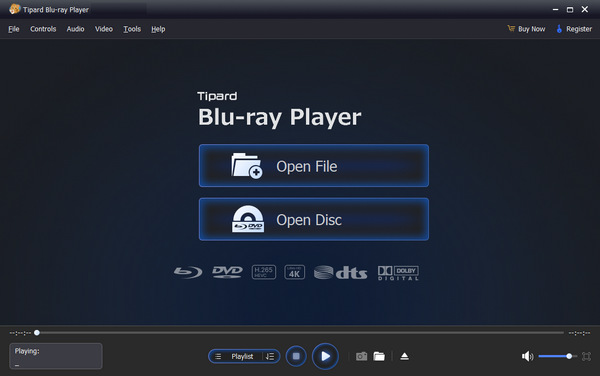
The start screen: Open File for video and audio files, Open Disc for a Blu-ray or DVD, with the Blu-ray, DVD, H.265, 4K, DTS and Dolby logos underneath.
Features
Plays commercial Blu-ray discs, folders and ISO files
Tipard Blu-ray Player handles the AACS and BD+ copy protection on retail Blu-ray discs and their region codes, so a newly bought movie plays like an old one. It also opens a BDMV folder or a Blu-ray ISO image you've already backed up to disk, which is handy on a laptop with no optical drive at all.

An ISO image playing, with the elapsed and total time (1:49:44) on the seek bar and the playlist, snapshot and folder buttons below.
Disc menus, titles and chapters
Tipard Blu-ray Player keeps the disc's own main menu, and its Menu and Playlist buttons open a side panel listing every title and chapter. You can skip straight to a scene or a bonus feature rather than sitting through trailers. DVDs get the same treatment, with upscaling to sharpen standard-definition discs on a large monitor.

A disc's own menu on the left and the Disc Play tree of menu entries, titles and chapters on the right, with the Menu and Playlist buttons highlighted.
4K and 8K files with GPU decoding
Tipard Blu-ray Player plays H.264, H.265, AV1, VP9, ProRes and H.266 video up to 8K and, by Tipard's figures, bitrates up to 200 Mbps with 10-bit HDR, without you installing codec packs. Hardware-accelerated decoding is set to Automatic, and you can pick a specific graphics card in Preferences if a laptop defaults to its weaker integrated chip.

Preferences: snapshot folder and format, hardware-accelerated decoding (Automatic), HDMI/SPDIF audio passthrough, file caching and auto-play when a disc is inserted.
Dolby and DTS sound passed through to your receiver
Tipard Blu-ray Player can send Dolby Atmos, Dolby TrueHD, DTS-HD Master Audio and DTS:X untouched over HDMI or S/PDIF, so an AV receiver decodes the full surround track (up to 7.1). The Audio menu switches between a disc's audio tracks, sets the stereo mode and picks the output device. It also works as a plain music player for FLAC, APE, WAV, MP3 and AAC files.

The Audio menu open over an MKV file: Audio Track, Stereo Mode and Audio Device.
Picture controls, snapshots and playlists
Tipard Blu-ray Player has sliders for hue, brightness, contrast, saturation and gamma (useful on a disc mastered too dark), aspect-ratio and window-size presets (16:9, 4:3, fit to screen), several deinterlacing methods for old interlaced video, and a snapshot button that saves the current frame as JPEG, PNG or BMP. You can also build and reorder a playlist of files.

The Effects window with sliders for hue, brightness, contrast, saturation and gamma, and a Reset button.
Benefits
- One player for everything on the shelf and the drive. Discs, disc images and downloaded files open in the same window, so you don't juggle a Blu-ray program and a separate file player.
- The disc experience stays intact. Menus, chapters, extras, alternate audio and subtitles work the way they do on a living-room player.
- Light on older PCs. Pushing decoding to the graphics card is what keeps 4K playback smooth on a modest CPU.
- Pay once. The $45 lifetime licence includes lifetime updates, so new disc protections are covered without a subscription.
Real-World Uses
- Movie night on a home-theatre PC. A PC under the TV with an internal Blu-ray drive, HDMI passthrough to the receiver and the disc's DTS-HD track decoded by the amplifier.
- Watching a disc collection on a laptop. Plug in a USB Blu-ray drive, or play ISO copies of your discs from an external drive when you're travelling.
- Checking a disc you've authored. Load your own Blu-ray or DVD folder and click through its menus and chapters before you burn it.
- Grabbing a still. Pause on a frame and save a snapshot for a review, a presentation or a wallpaper.
Who It's For, and Who Should Skip It
Good fit: Windows users who own Blu-ray discs and a Blu-ray drive, people with a home-theatre PC and an AV receiver, and anyone who keeps ISO copies of their discs and wants menus and chapters when they play them.
Skip it if: you only play downloaded MP4 and MKV files. Free players like VLC already handle those, so there's nothing here worth paying for. Skip it too if you want to rip or copy your discs (that's a ripper, not a player), or if you're on a Mac, where you need Tipard's separate Mac edition and licence.
Usage Guide
- Install. Download the free installer, run it and launch Tipard Blu-ray Player.
- Insert the disc. Put the Blu-ray or DVD in the drive. With the default setting, the player starts it automatically.
- Or open it yourself. Click Open Disc and pick the drive. For a BDMV or VIDEO_TS folder, an ISO image or a video file, use Open File instead, or drag the file onto the window.
- Play the movie. Choose Play Movie for the main feature, or use the Menu and Playlist buttons to pick a title or chapter.
- Set the sound and picture. Use the Audio menu for the track and output device, the Video menu for subtitles and screen size, and Tools > Effects for colour.
- Check hardware decoding. If 4K stutters, open Tools > Preferences and choose your dedicated NVIDIA or AMD card under Hardware-accelerated decoding.
- Register. After buying, enter the registration code from your purchase email in the app to remove the trial limits.
Where it falls short
- Brand-new discs can need an update. Studios change their protection, and one of Tipard's own featured reviewers is "hoping for even faster updates for the newest releases". Keep automatic update checks on.
- Reinstalling unregisters it. Tipard warns that uninstalling and reinstalling makes the software unregistered again, so keep your code. Trustpilot reviewers mention having to ask support to reactivate after a drive swap or a change to Tipard's registration process (support did sort it out).
- Little independent testing. Most reviews of this player are short user comments; we found no recent hands-on lab test from a major tech site.
- Playback only. No ripping, no conversion, no streaming to a TV.
What Users Say
On Tipard's site
Tipard shows a 4.9 rating from 1,946 reviews on the product page and 1,772 user comments on its review page. These are collected by the vendor, so read them as the happy side of the picture:
- "I can finally watch all my rented Blu-rays without fuss! Tipard Blu-ray Player saved my movie night! Super easy to use, even for someone who isn't very techy." (Jason, Movie Lover)
- "I watched a bunch of classics last night and the quality was stunning. Tipard Blu-ray Player makes me feel like I'm in a cinema at home. Hoping for even faster updates for the newest releases!" (Daniel, IT Geek)
- "Be able to pause, switch subtitles, and adjust audio freely." (Mark, January 2026)
- "I used this Blu-ray player for an old movie night at homeThe sound felt natural and the video stayed clear, even in full screen." (Sarah, September 2025)
- "This feature makes me surprised a lot! Some Blu-ray movies are so dark I can adjust video effects, including brightness, contrast, hue, etc., with this brilliant tool." (Julia, August 2022)
FileHorse
FileHorse's editor lists these pros: "Wide format support for media playback", "User-friendly interface suitable for all levels of expertise", "Multi-region DVD support" and "Affordable pricing". The cons: "Limited video recording capabilities" and "Some advanced features may be missing compared to premium media players." It also notes the demo "Plays Blu-ray with a watermark". The page shows an 8.4 user rating from only 5 votes.
Trustpilot (Tipard as a company)
Tipard scores 4.5 out of 5 from 91 reviews on Trustpilot, with 82% five-star and 10% one-star. None of the visible reviews is about the Blu-ray Player itself; they cover Tipard's other programs and its support. The text below came to us through a page summarizer.
- "My problem with reactivating the license due to an SSD replacement was resolved promptly and worked without any issues." (Kurt, 5 stars, February 2026)
- "Had issues with with the new registration process. Irene was able to correct the issue." (Darryl C, 5 stars, April 2026)
- "Such a complicated and incomprehensible activation, where you have the fields NAME, CODE and the SEND button." (Pablo, 2 stars, July 2026, about Tipard Screen Capture)
The pattern: people like that discs just play, with menus, subtitles and good sound, and that it's simple to use. The complaints are about activation and registration rather than playback, and about waiting for updates for the newest discs. Independent, detailed reviews are scarce.
Editions and Pricing
| Licence | Price at checkout | Computers | Updates | Refund window |
|---|
| 1 Month | $30.00, renews monthly (Tipard's store) | 1 PC | While subscribed | 7 days |
| Lifetime (our Buy Now button) | $45.00 once (list $56.25) | 1 PC | Lifetime | 30 days |
| Lifetime, multi-PC | $87.50 once | 3 PCs | Lifetime | 30 days |
Prices are in US dollars as shown on the order page and Tipard's store on November 3-4, 2026.
FAQs
Is Tipard Blu-ray Player free?
Tipard Blu-ray Player has a free download that plays video and audio files and discs, but on Blu-ray it shows a Tipard watermark until you register. Buying a licence and entering the code removes it.
Does Tipard Blu-ray Player play 4K Ultra HD Blu-ray discs?
Tipard Blu-ray Player plays 4K and 8K video files, but Tipard doesn't say it plays 4K UHD Blu-ray discs, which use a stricter protection than regular Blu-ray. Don't buy it for UHD discs without testing one in the free version first.
Can I cancel the monthly plan?
The lifetime licence behind our Buy Now button has no renewal, so there is nothing to cancel. If you buy the 1-month plan on Tipard's store instead, it renews automatically at $30 and can be cancelled at any time.
Can I use one licence on my desktop and my laptop?
No. A Tipard Blu-ray Player 1-month or 1-PC lifetime licence works on one computer. For two or three PCs, buy the 3-PC lifetime licence.
Does the Windows licence work on a Mac?
No. Tipard Blu-ray Player licences are platform-specific: the Windows licence registers only the Windows version, and the Mac edition is sold separately.
Will I lose my licence if I reinstall Windows?
Tipard Blu-ray Player becomes unregistered when it's uninstalled and reinstalled, so you'll need to enter your registration code again. Keep the purchase email; if the code is refused after a hardware change, Tipard support can reset it.
Can Tipard Blu-ray Player play discs from other regions?
Yes. Tipard Blu-ray Player handles Blu-ray region codes, so an imported disc plays without changing your drive's region setting.
System Requirements
- Operating system: Windows 11, 10, 8 or 7
- Processor: 1.2 GHz Intel or AMD CPU or faster
- Memory: 1 GB RAM or more
- Drive: an internal or USB Blu-ray drive for Blu-ray discs (a DVD drive is enough for DVDs)
- Graphics: an NVIDIA, AMD or Intel GPU for hardware-accelerated 4K/8K playback
Conclusion
If you own Blu-ray discs and want to watch them on a Windows PC with their menus, chapters and full surround sound, Tipard Blu-ray Player is worth it, and the $45 lifetime licence is the one to buy; it's what our Buy Now button sells. Tipard's $30 monthly plan only makes sense if you need it for a few weeks. The one reason to buy it is that retail discs simply play. The main reason not to is if your library is all downloaded files, where a free player does the same job. Try the free version with one of your own discs first.
Download Free TrialBuy Now