Tipard 4K Video Converter for Mac: Shrink 4K Footage or Scale Clips Up to 4K
Tipard 4K Video Converter for Mac is a $50 one-time Mac app that converts video between 4K UHD and smaller resolutions: it turns 4K camera and download files into 1080p, 720p or phone-sized copies, scales lower-resolution clips up to 4K, and writes 4K HEVC, H.264, WebM and MKV. It's for Mac owners whose 4K files won't play, won't fit, or won't upload where they need them to.
You shot a trip in 4K, and now the files are too big for your MacBook's drive, your older TV stutters on them, and the family iPad refuses half of them. This is the kind of small, single-job tool that fixes that in a batch.
Quick facts
- Developer: Tipard Studio
- Version: 9.1.50 (build 165794)
- Platform: macOS only, Mac OS X 10.7 or later; an Intel build that runs on Apple silicon Macs through Rosetta 2
- 4K output: H.265/HEVC MP4, H.264 MP4, WebM VP8 and VP9, MKV, TS, AVI, XviD, FLV, YouTube 4K MP4
- Price: $50 for a lifetime license on one Mac
- Trial: free download; files longer than 5 minutes are converted only for their first 5 minutes
- Guarantee: 30 days, but only for the cases in Tipard's refund policy (no "change of mind" refunds)
- What we checked: the 4k-video-converter-for-mac.dmg installer (50.3 MB, dated August 13, 2026), whose app reports version 9.1.50.165794, needs Mac OS X 10.7 and contains only Intel (x86_64) code, the trial's 5-minute limit in the app's own registration text, and the $50.00 lifetime price on the order page, all on November 4, 2026. We didn't convert our own 4K footage.
Before you buy
- It's an Intel app. On an M-series Mac it runs through Apple's Rosetta 2 translator, which macOS installs on first launch. Apple has said full Rosetta support ends after macOS 27, so this matters if you plan to keep the app for years.
- Try it on your own files first. Tipard doesn't refund a purchase because the program didn't meet your needs or you changed your mind, and it never converts copy-protected iTunes purchases.
- Upscaling adds pixels, not detail. A 720p phone clip scaled to 4K plays at 3840x2160 on a 4K TV, but it won't look like real 4K footage.
Download Free TrialBuy Now
Overview
Tipard 4K Video Converter for Mac is a classic one-window converter: you drop files into a list, pick an output profile at the bottom, and press Convert. What sets it apart from Tipard's other Mac converters is its 4K Video profile category, which holds ready-made 4K presets in modern codecs, and a resolution setting that goes both ways, from 3840x2160 down to 240p or from SD up to 4K.
Around that sits a simple editor (trim, merge, crop, rotate, watermark, brightness and contrast), a 2D-to-3D converter, audio extraction and device profiles. It converts your own files only: there's no DVD ripping, screen recording or video download in this app.

The main window: a 2560x1440 MP4 set to come out as 4096x2160 4K AVI, with the Profile list, Settings, destination folder, "Merge into one file" and the Convert button at the bottom and a preview player on the right.
Features
Downscale 4K to 1080p, 720p or smaller
Tipard 4K Video Converter for Mac resizes 4K video to 1080p or 720p for an HD monitor or TV, or further to 480p, 360p or 240p for a phone with little free space. It reads 4K in MP4, MOV, MKV, AVI, WebM, TS, MTS, M2TS and MXF, among others, including HEVC and AVCHD camera files from Sony, Canon and Panasonic.
Upscale SD and HD clips to 4K
Tipard 4K Video Converter for Mac can also go the other way, writing an older 720p or 1080p video as a 4K file so a 4K TV or a 4K editing timeline accepts it without rescaling.
Ready-made 4K and device profiles
Tipard 4K Video Converter for Mac lists 4K presets for H.265/HEVC MP4, H.264 MP4, WebM VP8 and VP9, TS, AVI, XviD, FLV, MKV and YouTube 4K MP4, next to standard and HD formats and profiles for iPhone, iPad, Android phones, Apple TV, PS3/PS4 and Xbox. Settings lets you change the encoder, resolution, frame rate and bitrate and save the result as your own profile.
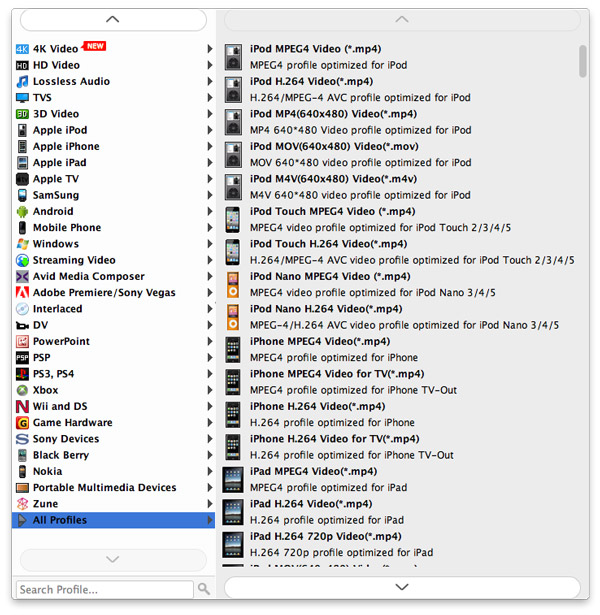
The profile menu, from an earlier version: 4K Video at the top, then HD Video, Lossless Audio, 3D Video, Apple and Android devices, game consoles, editing formats for Avid and Adobe Premiere, and a search box.
2D-to-3D conversion
Tipard 4K Video Converter for Mac turns a normal video into side-by-side, top-and-bottom or red/cyan anaglyph 3D in MP4, MKV, TS, AVI or FLV, with a depth slider and a left/right swap, for 3D TVs and VR viewers.
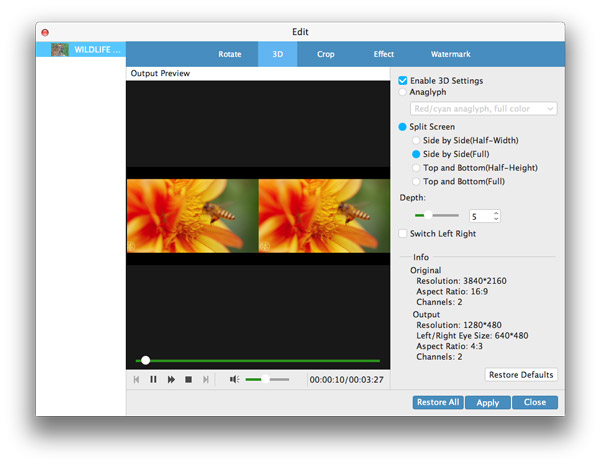
The Edit window's 3D tab: anaglyph or split-screen modes, a depth setting, and an info panel showing a 3840x2160 original and its output size.
Trim, merge and touch up before converting
Tipard 4K Video Converter for Mac cuts a clip into segments, joins several files into one, crops letterbox bars, rotates and flips sideways phone video, adds a text or image watermark and adjusts brightness, contrast, saturation and volume, with a live preview.
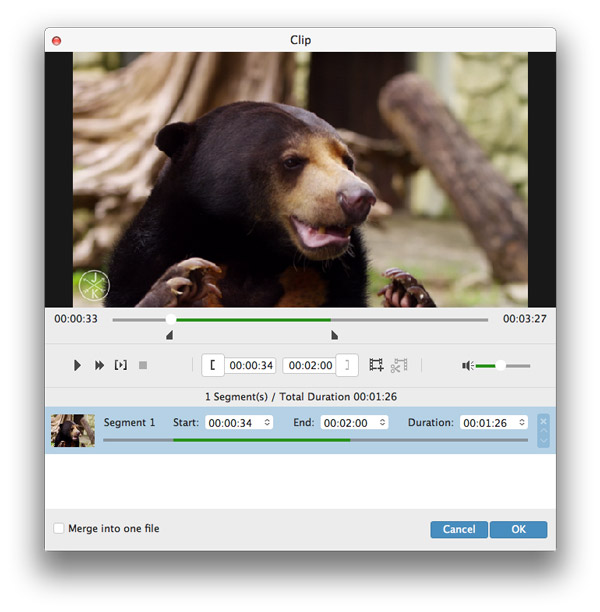
The Clip window: start and end markers on the timeline, one 1:26 segment listed below, and a "Merge into one file" box.
Audio extraction and batch conversion
Tipard 4K Video Converter for Mac saves a video's soundtrack as MP3, AAC, ALAC, FLAC, WAV, WMA, OGG and more, and converts a whole list of files in one run, each with its own profile if you like.
Benefits
- Disk space back. A 4K clip downscaled to 1080p HEVC takes a fraction of the space, which matters on a 256 GB MacBook.
- Files that play. Older TVs, consoles and tablets that choke on 4K or HEVC get a version in a format they know.
- One purchase. The $50 license is lifetime, with no subscription to remember.
Real-World Uses
- Travel footage. Batch-convert a folder of 4K GoPro or iPhone clips to 1080p MP4 so they fit on your laptop and play on the hotel TV from a USB stick.
- A 4K edit with old clips. Scale 1080p archive footage to 4K before dropping it into a 4K project, so every clip on the timeline matches.
- A 3D TV or VR headset. Make a side-by-side 3D copy of a family video to watch on a 3D-capable screen.
- A concert recording. Pull the audio from a 4K video into FLAC or MP3 for your music library.
Who It's For, and Who Should Skip It
It's a good fit for Mac users with a pile of 4K files who want a plain, offline converter with 4K presets and a one-time price.
- Skip it if you need to rip DVDs, record your screen or download video. Tipard's larger Mac Video Converter Ultimate rips DVDs, and Tipard sells a separate Screen Capture for Mac.
- Skip it if you want real detail added when upscaling. This app resizes. AI enhancers that rebuild detail are a different, pricier kind of tool.
- Skip it if you only convert now and then. HandBrake is free for Mac and handles HEVC and 4K, though with fewer presets for old devices and no 3D or watermark tools.
- Skip it if you're on Windows. This license is for macOS only and Tipard doesn't transfer licenses between platforms.
Usage Guide
- Install and launch. Open the DMG, drag the app to Applications and start it. On an Apple silicon Mac, accept the prompt to install Rosetta if it appears.
- Add files. Click Add File or drag videos into the list.
- Pick a profile. Open Profile, choose 4K Video (or HD Video for a downscale) and the format, then Settings to set the exact resolution, bitrate and frame rate.
- Edit if needed. Use Trim, 3D or Edit at the top for cuts, 3D, cropping, effects and watermarks.
- Convert. Pick a destination folder and click Convert. Tick "Merge into one file" to join the list into one video.
Where it falls short
- Dated interface. The window and the editor look much as they did several macOS versions ago, and the help pages still show older screens.
- No native Apple silicon code. Every binary in the installer is Intel-only, so on an M-series Mac the app runs translated rather than at native speed.
- Old device lists. Many profiles target devices like the PSP, Zune and Windows Phone 7, while the 4K presets are the part most buyers will use.
- Activation trouble. One recent Trustpilot reviewer lost a recording when Tipard's Screen Capture showed as unregistered after activation. That was another Tipard app, but it uses the same kind of registration code.
What Users Say
On Tipard's product page (4.9 from 259 ratings, selected by Tipard)
Arlene, a vlogger: "I often record travel videos with my camera in 4K, but they take up too much space. This 4K Video Converter for Mac helps me compress them to 1080p without losing quality. Now I can store all my travel memories on my MacBook easily."
Jay, a video editor: "Very helpful! I downloaded a 4K video in MP4, but it does not work on my new PS4. This 4K UHD Video Converter helps me to convert MP4 to AVI quickly."
Salva: "I use this converter to extract background music from my favorite videos and save them as MP3. It's super easy to use, and the sound quality is excellent."
Tipard as a company on Trustpilot (4.5 from 91 reviews)
Most Trustpilot reviews of Tipard don't name the product, and many are about support. John Ainley (UK): "Very prompt and professional dealing with my query. Thank you to the Tipard team." Kurt (Switzerland) had a license reactivated quickly after replacing his SSD, once he found the reply had landed in his spam folder.
The critical side: Pablo (Czech Republic) gave 2 stars, calling it "Such a complicated and incomprehensible activation" after a recording was lost when the program showed as unregistered. Several other reviewers also mention needing support to finish registration.
The pattern: buyers like that it's simple and does one job, and Tipard's support gets steady praise. The complaints are about registration and activation, not conversion quality. Independent reviews of this specific Mac app are scarce; MacUpdate lists it with no user reviews yet.
Comparisons
Tipard 4K Video Converter for Mac vs Tipard Mac Video Converter Ultimate
Mac Video Converter Ultimate is Tipard's all-in-one Mac suite: on top of conversion it rips DVDs and upscales video to 5K and 8K. If all you do is convert and resize your own files, the 4K converter covers it for a lower one-time price; if you also have discs to rip, the suite is the better buy.
Tipard 4K Video Converter for Mac vs HandBrake
HandBrake is free, open source and native on Apple silicon, and it encodes HEVC and 4K well. Tipard is easier for beginners, with device presets, a visual trim and merge, watermarks and 3D output that HandBrake doesn't have.
Editions and Pricing
| License | Price | Term | Macs |
|---|
| Lifetime (the Buy Now button on this page) | $50 | One-time, lifetime updates | 1 |
| 1 Month (Tipard's store) | $30 list | Renews monthly | 1 |
| Lifetime, 3 Macs (Tipard's store) | $87.50 list | One-time | 3 |
Tipard's own store often shows coupon prices below these list prices. The lifetime license is the better value: two months of the monthly plan cost more.
FAQs
Does Tipard 4K Video Converter for Mac run on M1, M2, M3 or M4 Macs?
Yes. Tipard 4K Video Converter for Mac is an Intel app that runs on Apple silicon through Rosetta 2, which macOS offers to install the first time you open it. It isn't a native Apple silicon build.
What does the free trial of Tipard 4K Video Converter for Mac limit?
The Tipard 4K Video Converter for Mac trial converts only the first 5 minutes of any file longer than 5 minutes. Shorter files convert in full, so test with a short clip and a long one.
Can I use my Tipard 4K Video Converter for Mac license on a Windows PC?
No. Tipard licenses are platform-specific, so the Mac license only registers the Mac app. The Windows version, Tipard 4K UHD Converter, is sold separately.
Can I move the license to a new Mac?
A lifetime license of Tipard 4K Video Converter for Mac is for one computer at a time. Tipard's support moves it when you replace your Mac or drive; reviewers describe getting this done quickly by email.
Can Tipard 4K Video Converter for Mac convert movies bought on iTunes?
No. Tipard 4K Video Converter for Mac doesn't convert copy-protected purchases from iTunes or other stores, and Tipard won't refund a license bought for that.
Will Tipard refund the license if I'm not happy?
Only in specific cases within 30 days, such as a technical problem support can't fix, a duplicate purchase or a registration code that never arrived. Tipard doesn't refund for a change of mind or because the program didn't do what you assumed, which is why the trial is worth running first.
System Requirements
- Mac OS X 10.7 or later, including current macOS
- Intel processor, or Apple silicon with Rosetta 2
- 512 MB RAM, 800x600 display, 16-bit graphics or better
- About 50 MB for the installer
Conclusion
Tipard 4K Video Converter for Mac is worth $50 if you regularly need to shrink 4K footage, feed old devices or bring older clips up to 4K, and you'd rather click a preset than learn HandBrake's settings. The one reason to buy it is that clear set of 4K presets with simple editing and a one-time price. The main reason not to is that it's an aging Intel-only app on Apple silicon Macs, so if you want a tool for the long run, or you only convert occasionally, a free native converter is the safer pick. Run the trial on a short file first.
Download Free TrialBuy Now