Tipard DVD Cloner for Mac: Back Up DVDs on a Mac with One External Drive
Tipard DVD Cloner for Mac copies DVDs on a Mac, to a blank DVD, an ISO image or a DVD folder, using a single external DVD drive if that's all you have. It costs $45 for a lifetime license on one Mac through our Buy Now button, a one-time payment.
Macs dropped their DVD drives more than a decade ago, and macOS no longer gives you an easy way to duplicate a video DVD. Disk Utility can still image a disc in principle, but it won't pick out the main movie, drop the menus or fit a dual-layer film onto a cheaper blank. This app does those things in one window, with an Apple USB SuperDrive or any USB DVD writer.
Quick facts
- Version: 6.2.56 (disk image dated August 13, 2026)
- Developer: Tipard Studio
- Runs on: macOS 10.12 Sierra or later. A separate Windows edition exists.
- Disc types: DVD-ROM, DVD±R, DVD±RW, DVD-RAM and MiniDVD, single- and dual-layer
- Output: a blank DVD, an ISO image or a DVD folder
- Price: $45 one-time on the order page (lifetime license for 1 Mac; $56.25 list with a 20% discount)
- Download: a 20.9 MB disk image containing the full app
- What we checked: the disk image from Tipard's download server and the app inside it (version 6.2.56, Intel-only code), and the order page, which charged $45.00 for the lifetime 1-Mac license with no renewal, both on November 4, 2026. We didn't copy a disc with it.
Before you buy
Make sure your drive can write DVDs if you want disc copies; some cheap USB drives only read. To copy a dual-layer movie at full quality you also need DVD+R DL blanks, which cost more than single-layer ones.
Run the free download on a disc you own before paying. Tipard's 30-day guarantee only covers technical problems it can't solve, and a Mac user who bought the Windows version by mistake isn't refunded. Tipard's own page asks you not to use it on discs that aren't yours, and copying copy-protected DVDs is restricted by law in some countries.
Download Free TrialBuy Now
Overview
On a Mac, DVD Cloner looks like a classic Aqua-era utility: a title list with chapters and running times, the disc's audio tracks and subtitles beside it, and a preview pane with a snapshot camera. The three copy-mode buttons sit in the middle, and the Source, Target, Volume, Writing Speed, Copies and Target Size controls fill the bottom, above a colored bar comparing the disc's size with the blank's.
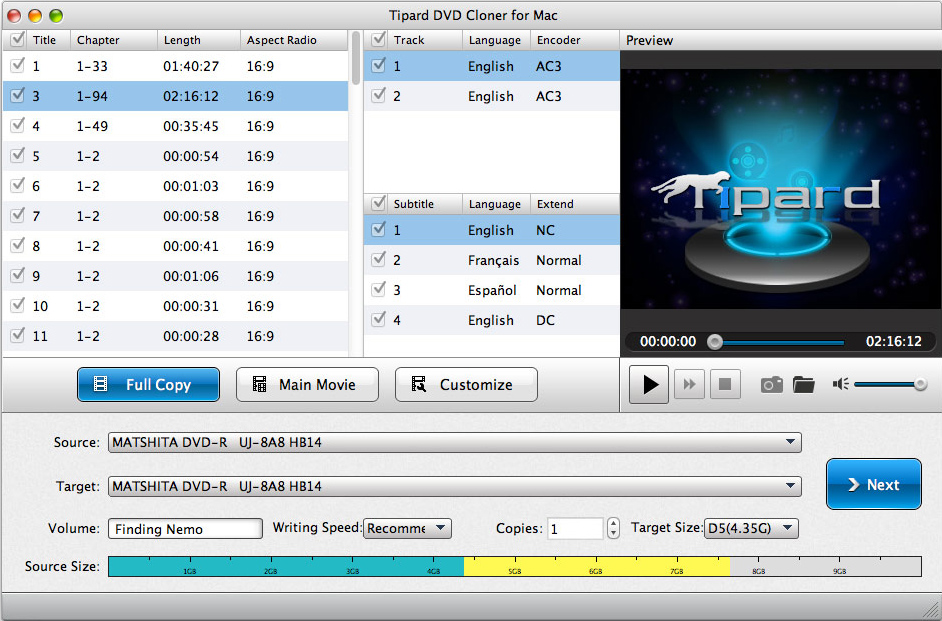
A movie disc loaded: the 2 h 16 min main title selected, two English AC3 tracks, four subtitles, and the same MATSHITA DVD drive as both source and target. The Source Size bar runs into the yellow, past the 4.35 GB of a D5 blank.
Features
One drive is enough
Tipard DVD Cloner for Mac can use the same drive as source and target, which is what most Mac owners have. It reads the disc to your Mac first, then asks for a blank and writes the copy, and it can keep that DVD folder on your Mac so you can burn further copies later without inserting the original again.
Three modes, with one Mac-specific catch
Tipard DVD Cloner for Mac offers Full Copy (everything, 1:1), Main Movie (the feature film picked automatically) and Customize (titles, chapters, audio and subtitles you choose). On the Mac, Tipard notes that Full Copy and Main Movie don't let you choose audio tracks or subtitles; if you want only the English track, for example, use Customize instead.
Menu, angle and region options
Tipard DVD Cloner for Mac's second screen can remove the menu or skip it so the movie starts at once, keep only one angle on a multi-angle disc, and remove the region code. It shows the compression ratio, and after burning it can delete the temp folder and quit the app.
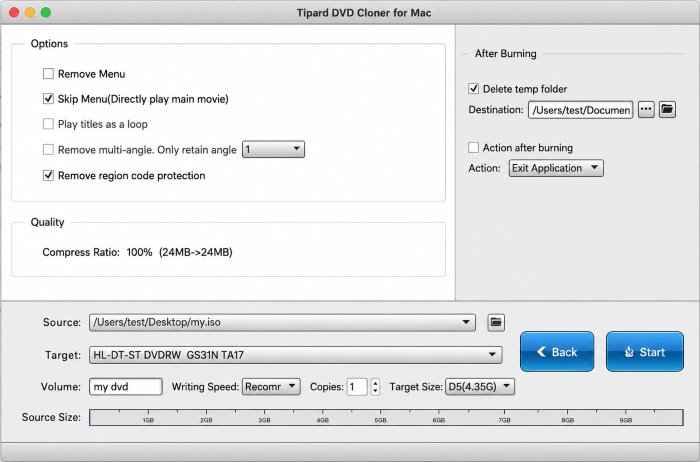
Burning an ISO from the Desktop to a DVD writer: Skip Menu and Remove region code protection are ticked, with Exit Application set as the action after burning.
ISO and folder backups, both ways
Tipard DVD Cloner for Mac saves a disc as an ISO image or DVD folder on your Mac or an external drive, and burns either back to a blank disc later. An ISO on the Mac also plays in VLC or IINA with no disc at all, which suits a MacBook on a plane.
Previews and snapshots
Tipard DVD Cloner for Mac previews any title before you copy it, which helps when a disc has several long titles and you're not sure which is the real movie. The camera button saves a still frame as JPG, PNG or BMP.
Benefits
- A DVD tool that still fits a modern Mac. It works with the USB drive you probably already own.
- Your library, disc-free. ISO copies on an external SSD replace a box of discs.
- Copies for other people. Family videos on DVD can be duplicated for relatives, several at a time.
- No subscription. The license on our order page is a one-time purchase.
Real-World Uses
- Before selling a DVD player: turn the discs you're keeping into ISO files on a NAS that the Mac and TV box can read.
- A wedding DVD from the videographer copied for both sets of parents with one SuperDrive and two blanks.
- A foreign-region disc copied with Remove region code ticked so it plays in a local player.
- A children's DVD copied with Skip Menu so it starts playing without a remote.
Who It's For, and Who Should Skip It
It's for Mac owners with a DVD writer who want straightforward copies of their own DVDs, as discs or ISO files, without Terminal commands or Windows.
Skip it if:
- You want videos for the Apple TV app, iPhone or iPad. You need a ripper that makes MP4 files (Tipard DVD Ripper for Mac, or the free HandBrake), not a copier.
- You don't have a DVD burner. Without one you can only make ISO and folder backups.
- Your Blu-rays need copying. This handles DVDs only, and Tipard's Blu-ray Copy is Windows-only.
- You mostly shrink dual-layer movies. A test of the Windows edition found heavy quality loss when compressing DVD-9 to DVD-5.
Usage Guide
- Install. Open the downloaded disk image, drag the app to Applications and launch it. Plug in your USB DVD drive and insert the disc.
- Choose the source. Select the drive, an ISO or a DVD folder in the Source box.
- Choose the target. Pick the same drive for a disc copy, or an ISO or folder location on your Mac.
- Pick the mode and size. Full Copy, Main Movie or Customize; set the volume name, writing speed, copies and D5 or D9. Click Next.
- Start. Tick Skip Menu or Remove region code protection if needed and click Start. When the disc has been read, swap in a blank if you're using one drive.
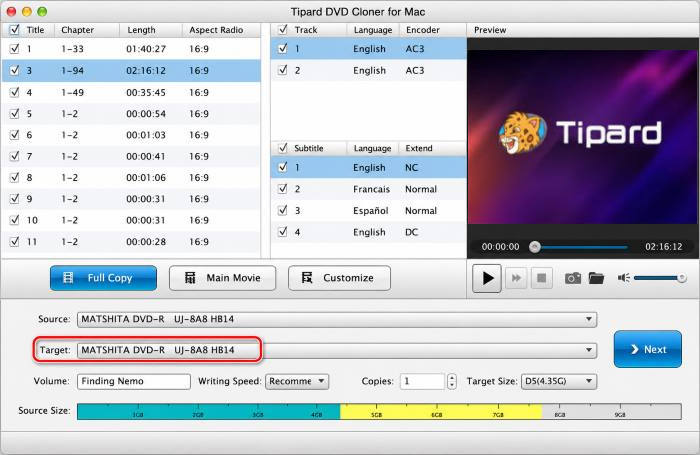
Choosing the target: here the copy goes back to the same MATSHITA DVD drive. An ISO file or a DVD folder can be chosen in the same box.
Where it falls short
- An older-looking, older-built app. The window design dates from the Mac OS X era, and the app is built on an old version of the Qt toolkit as Intel-only code, so on an Apple silicon Mac it runs through Apple's Rosetta 2 translation. Check it on your Mac with the free download before buying.
- Fewer track choices in two modes. Only Customize lets you choose audio and subtitle tracks on the Mac.
- Compression quality. The independent test we found (of the Windows edition) judged its DVD-9 to DVD-5 output unwatchable.
- Trial limits aren't published, and the license is tied to one Mac; you unbind it in your Tipard account to move it.
What Users Say
We found no independent review of the Mac edition itself, so here's what Mac buyers say on Tipard's site, what Tipard customers say on Trustpilot, and the one outside test of the same program on Windows.
Testimonials on Tipard's Mac page (4.9 from 406 reviews)
The Mac product page shows 4.9 from 406 reviews. They're hosted by the vendor, so treat them as testimonials.
Bernie: "The feature that I like most is the copy mode of Customize, and I feel comfortable being the active part."
Aaron: "I have used it to copy one DVD-9 movie to DVD-5, and I like the compression ratio keys this copy software offers when compressing. Moreover, I can select to skip the menu or not."
Abbott: "Surprisingly, this Main Movie part can automatically help you select the main movie without picking from countless titles."
Trustpilot: Tipard Studio (4.5 from 91 reviews)
Tipard as a company scores 4.5 out of 5 from 91 Trustpilot reviews. Andrzej Zet (June 2025, 5 stars) reviewed Tipard's DVD Ripper for Mac: "The software is incredibly user-friendly" and "their support team responded promptly and effectively". Several reviewers credit support with resetting licenses after a new computer or drive.
On the negative side, 10% of reviews are one-star, mostly about refunds and subscriptions, such as Maarten Laurent's "Just wanted the one month try-out, got an subscription instead." Trustpilot blocks direct downloads, so these quotes were read through a summarizing tool and are excerpts.
The Windows edition under test
Best Review Guide's review of Tipard DVD Cloner for Windows (updated September 2021) praised it as "exceptionally easy to use" but found that a compressed DVD-9 to DVD-5 copy showed "near-constant distortion, pixelation and compression artifact." The Mac edition shares the same three modes and compression feature, so the same caution applies.
The recurring themes
Buyers like the automatic Main Movie pick, Customize and the skip-menu option. The doubts are about compression quality and, for the company overall, refunds. Good support for license moves comes up again and again.
Comparisons
Tipard DVD Cloner for Mac vs Disk Utility and Finder
macOS can create a disk image of a plain, unprotected data disc and burn an image back, but it has no Main Movie or Customize modes, no menu or region options, and no DVD-9 to DVD-5 compression. Tipard's app adds exactly those.
Tipard DVD Cloner for Mac vs the Windows edition
Same price ($45 lifetime), same three modes and options. The Mac edition doesn't let you pick audio or subtitles in Full Copy and Main Movie, and licenses can't be moved between the two platforms, so buy the one for the computer you'll use.
Editions and Pricing
| License | Price | Term | Macs | Where |
|---|
| Lifetime License | $45.00 | One-time payment | 1 | Our Buy Now button and Tipard's store |
| 1 Month License | $15.00 a month | Renews monthly until cancelled | 1 | Tipard's store |
| Lifetime License, 3 Macs | $70.00 | One-time payment | 3 | Tipard's store |
US dollar prices from November 4, 2026, before sales tax or VAT. Tipard's store also sells a $69.74 Mac bundle with its Blu-ray converter and player.
FAQs
Does Tipard DVD Cloner for Mac work with the Apple USB SuperDrive?
Tipard DVD Cloner for Mac works with the Mac's connected DVD drive, and Tipard's own screenshots show a single MATSHITA (Panasonic) DVD drive as both source and target. Any USB DVD writer that macOS recognizes should work the same way.
Does it run on Apple silicon Macs?
Yes, through Rosetta 2. Tipard DVD Cloner for Mac version 6.2.56 contains only Intel (x86_64) code, so an M-series Mac translates it with Apple's Rosetta 2, which macOS offers to install the first time you open the app. Tipard lists M-series Macs as supported; test the free download on your Mac before you pay.
How do I register Tipard DVD Cloner for Mac after buying?
Choose Help > Register in Tipard DVD Cloner for Mac, enter the email you bought it with, and type the verification code Tipard emails you. You can also sign in with a Tipard password or Google account.
Can I play the ISO files it makes without burning them?
Yes. ISO images and DVD folders from Tipard DVD Cloner for Mac open in Mac players that support DVD structures, such as VLC, so you can watch a backup with no disc in the drive.
Can I move the license to a new Mac?
Yes. Tipard DVD Cloner for Mac's license covers one Mac at a time; the Change Device button in Tipard's Account Center releases it from the old one, or support can reset it.
Does it copy Blu-ray discs?
No. Tipard DVD Cloner for Mac handles DVDs only. Tipard's Blu-ray copier is a Windows program.
System Requirements
- macOS: 10.12 Sierra or later
- Mac: Intel, or Apple silicon via Rosetta 2; 512 MB RAM or more
- Drive: internal or USB DVD drive; a DVD writer to make disc copies
- Disk space: room for a full disc while copying (up to about 8.5 GB for a dual-layer DVD)
- Download: 20.9 MB disk image
Conclusion
Tipard DVD Cloner for Mac is one of the few simple, still-updated DVD copiers for macOS, and its one-drive workflow suits the way Macs are set up today. The one reason to buy it is easy 1:1 copies and ISO backups of your own DVDs with a single USB drive, for $45 once. The main reason not to is its compression: if you plan to squeeze dual-layer movies onto single-layer blanks, the quality may disappoint. Our verdict: a sensible buy for Mac owners archiving or duplicating home and purchased DVDs, provided the free download runs well on your macOS version first.
Download Free TrialBuy Now