AutoDWG DWG to PDF Converter Pro: Batch PDFs from AutoCAD Drawings, with Your Own Watermark
AutoDWG DWG to PDF Converter Pro is a $129 Windows program that batch-converts DWG, DXF and DWF drawings to PDF without AutoCAD, and stamps every page with a custom watermark: your logo, "PRELIMINARY", "NOT FOR CONSTRUCTION" or any text you design. It's a one-time purchase.
Quick facts
- Developer: AutoDWG
- Version: DWG to PDF Converter 2026 (installer version 6.88)
- Platform: Windows 11, 10, 8, 7, Vista and XP, 32-bit or 64-bit
- Input: DWG, DXF and DWF from R14 to AutoCAD 2027
- Adds over Standard: custom text or image watermarks, saved as reusable watermark files
- Price: $129 one-time ($116 each for 2-10 users). Server edition: $990.
- Trial: free, doesn't expire, watermarks the PDFs it creates
- What we checked: the installer (DWG2PDF2026.msi, 33.7 MB, product version 6.88, dated October 28, 2025) downloaded from AutoDWG, the $129.00 USD Pro price and $990.00 USD Server price on the order page, all on November 3, 2026. We didn't convert our own drawings.
Before you buy
- The only difference from the $99 Standard edition is the custom watermark. If you don't need one, buy Standard.
- Automating conversions from scripts or another program needs the Server edition, which adds a command line and server installation.
- Test with your own drawings first. AutoDWG only refunds within 15 days for a technical fault its support can't fix.
Download Free TrialBuy Now
Overview
AutoDWG DWG to PDF Converter Pro is the same five-step batch converter as the Standard edition, with the watermark options switched on. Add files or a folder, set page size and resolution, set pen widths or load a CTB file, choose the output and watermark, and convert. The watermark you set is applied to the PDFs the batch creates.
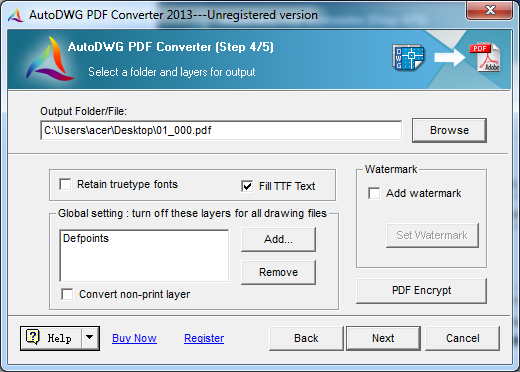
Step 4 of the converter (an older version of the interface): the output file, TrueType options, layers to turn off for all drawings, the Watermark box with Set Watermark, and PDF Encrypt.
Features
Custom watermarks
AutoDWG DWG to PDF Converter Pro adds a watermark of your own design to every PDF: text with the font, size and rotation you choose, an image such as a company logo, and even a hyperlink. Watermarks can be saved and reopened, so the same "DRAFT" or logo stamp is reused on every project.
Everything in the Standard converter
AutoDWG DWG to PDF Converter Pro also batch-converts files or folders, picks layouts and layers, writes one PDF per drawing or layout or a merged set, applies CTB pen widths, keeps TrueType text searchable, and encrypts PDFs with print, copy and edit permissions.
Who It's For, and Who Should Skip It
It's a good fit for firms that issue drawing sets to clients and contractors and need every sheet marked with a status stamp or their brand, without AutoCAD.
- Skip it if plain PDFs are enough. The Standard edition is $30 cheaper and otherwise the same.
- Skip it if you need unattended conversion on a server. That's the Server edition.
Usage Guide: adding a watermark
- Add your drawings in step 1 and set the options in steps 2 and 3.
- In step 4, tick Add watermark and click Set Watermark.
- Design the watermark (text or image, font, size, rotation), or open one you saved earlier.
- Click Next and Convert Now.
Where it falls short
- Font substitutions. Custom SHX fonts need their folders added in the options, or text can change.
- A dated wizard interface.
Editions and Pricing
| Edition | Price | Custom watermark | Command line and server install |
|---|
| Standard | $99 | No | No |
| Pro | $129 | Yes | No |
| Server | $990 | Yes | Yes |
The Server edition is the same converter licensed to run on a server for multiple users, with a command line for automation.
Buy Pro ($129)Buy Server ($990)
FAQs
What does AutoDWG DWG to PDF Converter Pro add over Standard?
AutoDWG DWG to PDF Converter Pro adds custom watermarks. Batch conversion, layouts, CTB files, searchable text and PDF permissions are in both editions.
Can AutoDWG DWG to PDF Converter Pro put a logo on every PDF?
Yes. AutoDWG DWG to PDF Converter Pro's watermark can be an image, such as your company logo, placed and rotated as you like on every page of the batch.
Does the Pro edition have a command line?
No. Command-line operation is only in the $990 Server edition, intended for automated or multi-user conversion on a server.
Is AutoDWG DWG to PDF Converter Pro a one-time purchase?
Yes. It costs $129 once with a year of updates, and you can keep using your version after that.
System Requirements
- Windows 11, 10, 8, 7, Vista or XP, 32-bit or 64-bit
- 1 GB of RAM or more
- 40 MB of free disk space
Conclusion
AutoDWG DWG to PDF Converter Pro is worth the extra $30 over Standard only if your PDFs need a stamp or logo; then it saves adding watermarks by hand to every sheet. Everything else is the same capable batch converter. If you need automation on a server, the Server edition is the one to buy.
Download Free TrialBuy Now