WinX DVD Copy Pro: 1:1 DVD Backups to Disc, ISO or Folder on Windows
WinX DVD Copy Pro is a $42.95 Windows DVD copier from Digiarty that clones a DVD to a blank disc, an ISO image or a VIDEO_TS folder at 1:1 quality, with nine copy modes in all. It's for people who still own a shelf of DVDs and want a safe copy before the discs scratch, crack or stop loading.
A DVD is surprisingly fragile. One deep scratch, a kid's fingerprint or years in a hot car, and the movie freezes halfway through. WinX DVD Copy Pro reads the disc once, skips over bad sectors when it has to, and gives you a copy you can keep on a hard drive, a NAS or a fresh blank disc.
Quick facts
- Developer: Digiarty Software, Inc. (WinXDVD), in business since 2006
- Version: 3.9.8, released August 10, 2023
- Platform: Windows 11, 10, 8.1, 8, 7 and Vista (32 and 64 bit), plus XP, 2003 and 2000. No Mac version
- Copies to: blank DVD-/+R, DVD-/+RW, dual-layer discs and DVD-RAM, ISO image, VIDEO_TS folder, MPEG-2 file
- Price: $42.95 for the lifetime license (1 PC) on the order page
- Free trial: copies DVDs to an ISO image only
- Languages: English, German, Japanese, Chinese
What we checked: the installer from Digiarty's download link, file version 3.9.8 (13.6 MB), digitally signed by Digiarty Software, Inc., and the lifetime license (1 PC) at $42.95 on Digiarty's buy page on November 3, 2026. We didn't copy a disc with it.
Before you buy
- No new version since August 2023. Version 3.9.8 is still the current release. Digiarty still sells and supports it, but its newer work goes into WinX DVD Ripper Platinum and Winxvideo AI.
- The money-back guarantee has conditions. Digiarty's refund policy covers a product that doesn't work because of an error or bug that support can't fix in a reasonable time. Changing your mind isn't covered, so test your own discs with the trial first.
- It copies, it doesn't convert. The output stays in DVD formats (disc, ISO, VIDEO_TS, MPEG-2). For MP4 files for a phone or TV, you need a DVD ripper instead.
- Check your local law. The program removes CSS, region codes and other DVD protection. Making a personal backup of a disc you own is treated differently from country to country.
Download Free TrialBuy Now
Overview
WinX DVD Copy Pro is a single window with the copy modes listed down the left side in three groups: Full DVD Disc Backup, DVD Title Backup and Tools. You pick a mode, choose the source DVD and the target (a burner, an ISO file or a folder), and press the big Run button. The bottom of the window shows the disc's details looked up online, such as the title, studio, director and release date, which helps when you're working through a large collection.
It's an older-style program, and it looks it. The upside is that there's very little to learn: most copies take three clicks.

Clone DVD to DVD: source disc, target burner, the protection options, the sector read and jump settings, and a temp folder that needs 9 GB free.
Features
Three ways to make a full 1:1 copy
WinX DVD Copy Pro makes a complete copy of a DVD, menus, audio tracks and subtitles included, in three forms: DVD to DVD (a blank disc), DVD to ISO (one image file) and DVD to VIDEO_TS folder (the disc's VOB files in a folder). The copy is 1:1, so a dual-layer DVD-9 goes to a dual-layer blank and a DVD-5 to a single-layer one. Digiarty quotes 12 to 17 minutes for a 1:1 copy.
Copy protection and region codes handled
WinX DVD Copy Pro reads homemade and commercial discs with CSS encryption, region codes 1 to 6 (including RCE), user operation prohibitions (UOPs), Sony ARccOS, Disney's X-project protection and APS. Each protection has its own tick box in the copy window, and Digiarty's guide says to leave them all on for commercial discs.

Clone DVD to ISO: the same options as a disc copy, with a target ISO file instead of a burner.
Rescue for scratched and damaged discs
WinX DVD Copy Pro copies sector by sector and lets you set how many sectors it reads at a time and how many it jumps when it hits a bad one (32 by default). A larger jump gets past badly damaged areas but loses more of the video there, so it's a trade-off you control. The same approach handles discs made with deliberate ARccOS bad sectors.
Copy just the movie, a chapter, or one track
WinX DVD Copy Pro's title modes copy part of a disc. Copy to Single MPEG2 File saves the main title as one .mpg file with the audio and subtitle tracks you tick, keeping 5.1 AC3 or DTS sound. Copy DVD Chapter saves the chapters you choose, which suits TV-series and music DVDs. Extract Video Only and Extract Audio Only pull out a single track, for example a concert's soundtrack.

Copy to Single MPEG2 File: the title list with the main title selected, and the audio and subtitle tracks to keep.
A built-in DVD burner and ISO mounter
WinX DVD Copy Pro includes two tools that save you installing others. The DVD Burner writes an ISO image or a VIDEO_TS folder to a blank disc and shows the drive's write speed and the disc's free space first. The ISO Mounter turns an ISO into a virtual drive, so you can play a backed-up movie as if the disc were in the tray.
Benefits
- Your originals can stay in the case. Play the ISO or the copied disc and keep the bought one safe.
- Nothing is lost in the copy. Because it doesn't re-encode, the picture, menus, extras and surround sound are exactly what was on the disc.
- One-drive PCs work too. With a single DVD writer, it copies to the temp folder first and then asks you to swap in a blank disc.
- Light on the PC. A 13.6 MB installer and a straight copy, with no heavy video encoding.
Real-World Uses
- A shelf of family DVDs. Clone each disc to ISO, store the images on a NAS, and mount one when you want to watch it.
- A favourite disc that's starting to skip. Copy it to a fresh blank while it still reads, raising the jump value if it stalls on a bad patch.
- A TV box set. Use Copy DVD Chapter to save just the episodes you want from each disc.
- A concert DVD. Extract Audio Only keeps the soundtrack, in the original 5.1 if you want it.
- Old ISO files from years ago. Burn them back to disc with the built-in DVD Burner for a player in another room.
Who It's For, and Who Should Skip It
WinX DVD Copy Pro suits Windows users who want exact copies of their DVDs, on disc or as ISO images, and don't want to learn a complicated tool.
Skip it if you:
- Want MP4 files for a phone, tablet, Plex or a TV's USB port. A DVD ripper, such as Digiarty's own WinX DVD Ripper Platinum, converts and compresses; this program doesn't.
- Need to fit a dual-layer DVD on a single-layer blank. It keeps a 1:1 copy and doesn't compress DVD-9 to DVD-5.
- Use a Mac. It's Windows only.
- Copy Blu-rays. It's DVD only.
Usage Guide
- Install and launch. Download the installer, run it, allow the UAC prompt, pick a language and finish the setup wizard. The trial starts straight away. To register it, click the key-shaped Register button and paste the license code from your order email, with no spaces.
- Insert the DVD. The program usually detects it and fills in the disc details. With several drives, use Browse to choose the right one.
- Pick a mode on the left: Clone DVD to DVD, Clone DVD to ISO, Copy DVD to VIDEO_TS Folder, or one of the title modes.
- Set the target. Choose the burner, the ISO file name or the output folder. For a disc copy, point the temp folder at a drive with more than 9 GB free.
- Check the protection boxes (region code, CSS, UOPs, Disney's fake) for a commercial disc, and leave the sector values at 32 unless the disc is damaged.
- Click Run. With one drive, insert a blank DVD when asked and press Burn to finish.
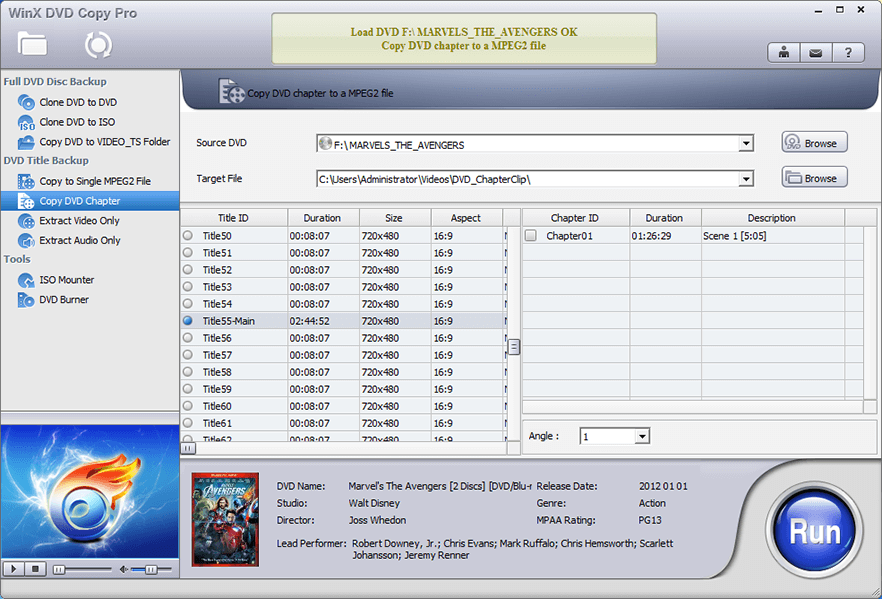
Copy DVD Chapter: pick the title on the left and tick the chapters to save on the right.
Where it falls short
- Dated interface. Digiarty's own screenshots still show a 2012 movie in a plain, older-style window. It works, but it doesn't look like a current app.
- No editing or compression. FileHorse lists the lack of trimming, subtitle editing and Blu-ray support as its main cons.
- Badly damaged discs still lose data. Jumping bad sectors gets the copy finished, but the skipped parts are gone.
- Refund complaints. Several Trustpilot reviewers of Digiarty say refunds were refused or only partly paid, which matches the conditional refund policy.
- One license, one PC. Moving to a new computer means uninstalling it from the old one first.
What Users Say
WinX DVD Copy Pro is an old, niche product, so there are fewer reviews of it than of Digiarty's DVD ripper. Here's what we could find, positive and negative.
Tech press (as quoted by Digiarty)
Digiarty's product and order pages quote several reviewers. These are the parts the vendor chose to show:
- Rick Broida: "Like other Digiarty products I've used (most notably the company's WinX DVD Ripper Platinum), WinX DVD Copy Pro works quickly and efficiently. It's a nice tool to have in your arsenal--assuming you're even using physical media any more."
- CNET: "The program has a simple, straightforward interface, and in my experience it works as advertised."
- TechRadar: "WinX DVD Copy Pro is perfect for backing up your discs, even if they've accumulated scratches that might make it impossible to use them in a regular DVD player."
- Richard Darell: "WinX DVD Copy Pro is a Windows software with a backpack full of useful features that will help you keep your DVD collection in good shape."
FileHorse
FileHorse lists version 3.9.8 with a user rating of 7.8 out of 10 from 11 votes. Its review lists these pros:
- "High-Quality Copies: Creates lossless DVD backups with a 1:1 ratio."
- "Supports Damaged Discs: Can recover data from slightly damaged or scratched DVDs."
- "User-Friendly Interface: Simple and intuitive user interface."
And these cons:
- "Limited Format Support: Focused mainly on DVD copying, lacks support for Blu-ray and other formats."
- "No DVD Editing: Does not offer editing options, such as trimming or adding subtitles."
Trustpilot (Digiarty as a company)
WinXDVD has a TrustScore of 3.8 out of 5 from 420 reviews. They cover all Digiarty products, not this one in particular, and the main split is over support and refunds:
- Russell Tasker, 5 stars, "Great service. Quick and helpful.": "The last one had a licence problem. I contacted the service. They took care of it immediately."
- Randy Nash, 5 stars, "Great customer support": "The follow through on the part of support. And the actual quality of the product"
- Dr. Carol Clark, 1 star, "Terrible product and support is…": "they were never able to correct the problem and refused to give me a refund."
- Roman Herasimenko, 1 star, "Review of WinXDVD": "The advertised 30-day full refund guarantee is misleading — only partial refunds are offered."
- Kruzey Kymbo, 1 star, "What a waste of time": "Now I am demanding my money back as part of the 30 day money back guarantee and they refuse to acknowledge this!!!"
The common thread: people who use WinX DVD Copy Pro describe it as simple and quick, and nobody complains about the copies themselves. The complaints are about the company: refunds that are hard to get and a product that no longer gets regular updates. Use the trial on your own discs before you pay.
Comparisons
WinX DVD Copy Pro vs WinX DVD Ripper Platinum
Both are Digiarty products, and they do different jobs. WinX DVD Copy Pro keeps the DVD as a DVD: a disc, ISO or VIDEO_TS copy with the menus intact. WinX DVD Ripper Platinum converts the movie into MP4, HEVC or other video files for phones, TVs and media servers, with GPU acceleration. If you want a backup that behaves exactly like the original, choose Copy Pro. If you want to watch your movies without a disc player, choose the ripper. Digiarty sells the two together as a lifetime bundle.
WinX DVD Copy Pro vs free tools
Free programs can burn an ISO to disc, and Windows mounts ISO files on its own. What WinX DVD Copy Pro adds is reading protected commercial discs, the bad-sector handling for scratched discs, and the title and chapter copy modes, all in one window.
Editions and Pricing
| License |
Price |
Term |
PCs |
| Standard one-year license (Digiarty's store) |
$59.95; $34.95 with Digiarty's holiday coupon |
1 year |
3 |
| Premium lifetime license (our Buy Now button) |
$42.95 |
Lifetime |
1 |
| DVD Ripper Platinum + DVD Copy Pro bundle |
$79.95 |
Lifetime |
1 |
The store prices are Digiarty's own buy page during its holiday sale on November 3, 2026, and they change with each promotion. Every license includes a full version with the trial limit removed, email support and free updates for its term; with the lifetime license that is for life, with no renewal.
FAQs
Does WinX DVD Copy Pro work on Windows 11?
Yes. WinX DVD Copy Pro lists Windows 11 and 10, 32 and 64 bit, as supported, and it also still runs on Windows 7, Vista and XP. You need a DVD drive, and a DVD writer for disc-to-disc copies.
What can I do with the free trial of WinX DVD Copy Pro?
The WinX DVD Copy Pro trial copies DVDs to an ISO image only. That's enough to check that it reads your discs, but disc-to-disc copies and the other modes need a license code.
Can I install WinX DVD Copy Pro on more than one PC?
A single WinX DVD Copy Pro license works on one PC. Digiarty sells a personal license for up to 3 PCs, and companies can ask its sales team for multi-PC licenses.
How do I move WinX DVD Copy Pro to a new computer?
Uninstall WinX DVD Copy Pro from the old computer, download the installer again from Digiarty's site, and register it with the same license code. If you've lost the code, Digiarty's sales team can resend it if you give the order number and email address.
Can WinX DVD Copy Pro shrink a dual-layer DVD onto a single-layer disc?
No. WinX DVD Copy Pro makes 1:1 copies, DVD-9 to DVD-9 and DVD-5 to DVD-5. For a DVD-9 movie, buy dual-layer blanks, or copy only the main title to an MPEG-2 file.
Can WinX DVD Copy Pro copy Blu-ray discs?
No. WinX DVD Copy Pro handles DVDs only: commercial and homemade discs, DVD folders and ISO images.
Do I get updates after I buy WinX DVD Copy Pro?
Yes. Paying WinX DVD Copy Pro users get every update, major or minor, for free during the license term (for life with a lifetime license). The Update button in the program checks for a new version. Trial and giveaway copies don't get updates.
System Requirements
- Windows: 11, 10, 8.1, 8, 7 or Vista (32 or 64 bit), XP, 2003 or 2000
- Drive: a DVD drive; a DVD writer for DVD-to-DVD copies and burning
- Blank discs: DVD-R, DVD+R, DVD-RW, DVD+RW (single or dual layer) or DVD-RAM
- Disk space: more than 9 GB free for the temp folder when copying disc to disc
- Input: DVD discs, DVD folders and ISO images
Conclusion
WinX DVD Copy Pro is worth it if you want exact DVD backups on Windows, protected and scratched discs included, without learning a complicated tool. The one reason to buy it is the 1:1 copy: menus, extras and surround sound kept, on a new disc or as an ISO you can mount any time. The main reason not to is that it hasn't been updated since August 2023 and its refund policy only covers faults, so try the free ISO copy on your own discs first. If what you really want is MP4 files for a phone or TV, buy a DVD ripper instead.
Download Free TrialBuy Now