DWGSee DWG Viewer: Open, Measure and Print AutoCAD Drawings Without AutoCAD
DWGSee DWG Viewer is a $69 Windows program from AutoDWG for opening, measuring, marking up and printing DWG, DXF and DWF drawings, from AutoCAD R14 files up to AutoCAD 2027, without AutoCAD. It's a one-time purchase, built for people who need to read drawings rather than draw them.
If you're a contractor, estimator, facilities manager or client who receives CAD files, you don't need a full CAD program to look at them. You need something that opens the file fast, lets you check a dimension, and prints the sheet. That's DWGSee's job.
Quick facts
- Developer: AutoDWG
- Version: DWGSee 2027 (installer version 6.645)
- Platform: Windows (the user guide lists XP through Windows 10). AutoDWG also has an Android app and a free Mac viewer.
- Opens: DWG, DXF and DWF from R14 to AutoCAD 2027, plus BMP, JPG, PNG, GIF and TIF images
- Price: $69 one-time for one user. Pro ($98) adds PDF and image export and editing.
- Download: 39 MB
- Trial: free, with a limit on how many drawings you can save
- What we checked: the DWGSee installer (DWGSeePro2027.msi, 41 MB, product version 6.645, dated October 15, 2026) downloaded from AutoDWG and the $69.00 USD one-time price on the order page, both on November 3, 2026. We didn't test it on our own drawings.
Before you buy
- The $69 edition doesn't export or edit. Saving a drawing as PDF or JPG, copying it into Word, and drawing or changing objects are DWGSee Pro features. If you'll send PDFs to people, buy Pro.
- No change-of-mind refunds. AutoDWG only refunds within 15 days for a technical fault support can't fix, so open your own files in the trial first.
- Updates run for one year. The program keeps working after that. A new major version costs extra.
Download Free TrialBuy Now
Overview
DWGSee looks and behaves like a classic CAD window: menus across the top, a toolbar of zoom, pan, measure and markup tools, and the drawing on a black background with Model and layout tabs at the bottom. A Browser mode shows a folder of drawings as thumbnails, like a photo viewer, so you can flip through a project's files before opening one.
Its selling point is weight. The installer is about 39 MB, compared with the 1.46 GB package AutoDWG quotes for Autodesk's free DWG TrueView, and drawings open and zoom quickly even on modest laptops.
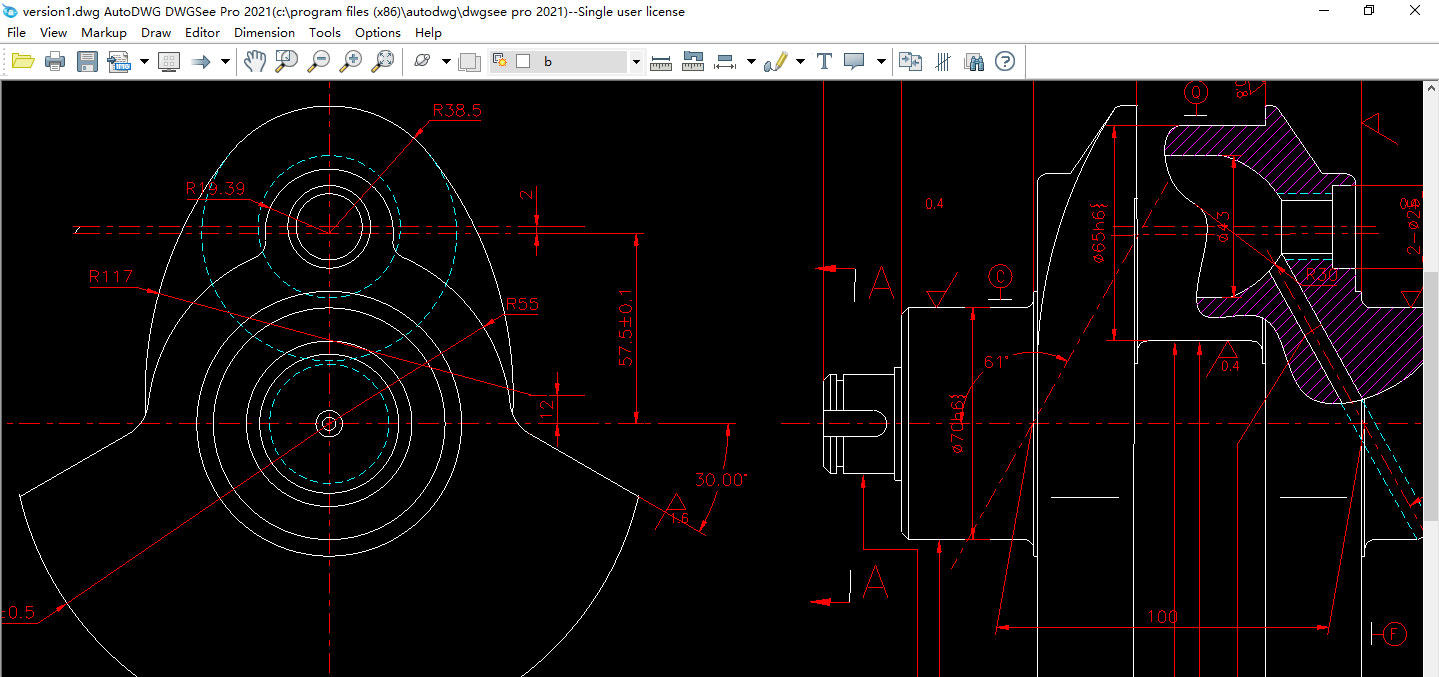
A mechanical part drawing open in DWGSee (the 2026 Pro window, which shares its interface with the DWG Viewer edition): File, View, Markup and Tools menus, zoom and measure tools, and Model and layout tabs.
Features
Opens current and old AutoCAD files
DWGSee DWG Viewer opens DWG, DXF and DWF files from AutoCAD R14 through AutoCAD 2027, and loads external references (Xrefs) so a drawing appears complete. An Xref manager lets you add search paths when referenced files live in another folder.
Measure with snaps
DWGSee DWG Viewer measures length, angle, radius and area by clicking, and snaps to endpoints, centers and intersections so the numbers are exact. Extra tools add up the lengths of lines on a layer, sum several areas, and count matching blocks and symbols, which is handy for quick take-offs.
Markups that don't touch the original
DWGSee DWG Viewer can save your comments, clouds and notes in a separate markup file next to the drawing, so the DWG itself stays exactly as the designer sent it. You can also add your notes as new layers in the DWG if you prefer.
Compare two revisions
DWGSee DWG Viewer shows two versions of a drawing side by side with synchronized zoom and pan, and lists and highlights what changed, so you don't have to hunt for a moved wall by eye.
Search, print and batch print
DWGSee DWG Viewer searches for text inside every drawing in a folder and its subfolders, then opens the matches. Batch Print sends a whole list of drawings, with the layouts you choose, to the printer without opening them one by one.
Who It's For, and Who Should Skip It
It's a good fit for anyone who receives AutoCAD drawings but doesn't create them: site managers, estimators, fabricators, building owners, and office staff who print plan sets. The one-time $69 price and the small, fast install are the point.
- Skip it if you need to send PDFs or edit. Buy DWGSee Pro ($98) instead.
- Skip it if you draft for a living. DWGSee CAD ($198) or a full CAD program is what you want.
- Skip it if viewing is rare and free is enough. Autodesk's DWG TrueView is free, just a far bigger, slower install.
- Skip it if you work in 3D. DWGSee is built for 2D drawings.
Usage Guide
- Download and install the 39 MB trial. The same installer serves the Viewer and Pro editions.
- Open a DWG, DXF or DWF file, or press Ctrl+B for Browser mode to see a folder as thumbnails.
- Zoom and pan with the mouse wheel and hand tool, and switch between Model and layout tabs at the bottom.
- Use the measure tools on the toolbar, with object snaps, to read lengths, angles and areas.
- For several sheets, use File > Batch Print, add the drawings, pick the layouts, and print.
- After buying, register the installed trial with your license code. No reinstall is needed.
Where it falls short
- Weak 3D. A user who otherwise rates it highly calls its "3D support is basically useless".
- Dated looks. The same user says the "UI looks like it's from 2010".
- Desktop only. There's no cloud sharing or team collaboration. Markups travel as files.
- Exports cost extra. The Standard edition can't save to PDF or images.
What Users Say
DWGSee has few public reviews. The most detailed is on Trustpilot, where dwgsee.com has a single, unprompted review.
Trustpilot: Heideman Tony, freelance MEP draftsman (5 stars, June 18, 2026)
"I'm a freelance MEP draftsman, mostly working with HVAC layouts in DWG format."
"I tried a bunch of viewers before landing on DWGSee: AutoCAD (too expensive just for viewing), DWG TrueView (slow, clunky), LibreCAD (good but DWG support is hit or miss), and IrfanView with plugins (hacky)."
"Opens DWG files fast — way faster than TrueView. Measurement and markup tools are accurate."
"3D support is basically useless. No LISP. UI looks like it's from 2010. Desktop only — no cloud, no collaboration."
"It's not AutoCAD. It doesn't try to be. But for 90% of what I need — open, view, markup, convert DWG — it does the job at 10% of the price."
Editions and Pricing
| Edition | Price | What you can do |
|---|
| DWGSee DWG Viewer | $69 | View, measure, mark up, compare and print. No editing. |
| DWGSee Pro | $98 | Adds PDF (with layers) and image export, copy to Word, drawing and editing |
| DWGSee CAD | $198 | Adds a classic CAD interface with command line and full 2D drafting |
| Floating licenses | From $560 (Viewer) | Shared licenses on a network or terminal server |
All are perpetual licenses with a year of updates. Optional yearly maintenance is sold separately.
FAQs
Can DWGSee DWG Viewer open AutoCAD 2027 drawings?
Yes. DWGSee DWG Viewer 2027 opens DWG, DXF and DWF files from AutoCAD R14 up to AutoCAD 2027.
Can DWGSee DWG Viewer convert DWG to PDF?
Not the $69 Viewer edition. Exporting to PDF and to JPG, PNG and other images is a DWGSee Pro feature. Viewer can print, including to a PDF printer if you have one installed.
How is DWGSee different from Autodesk DWG TrueView?
DWGSee costs $69 while TrueView is free, but DWGSee's download is about 39 MB against roughly 1.46 GB for TrueView (AutoDWG's figures), and installs in seconds.
Can I install DWGSee on two computers?
AutoDWG's single-user license lets you install DWGSee on one computer plus a second one you own, such as an office PC and a laptop, as long as only one copy is in use at a time.
Is DWGSee DWG Viewer a subscription?
No. DWGSee DWG Viewer is a one-time $69 purchase that includes a year of updates. You keep using your version after that.
System Requirements
- Windows (the user guide lists XP, Vista, 7, 8 and 10)
- 1 GB of RAM or more, more for large drawings
- 40 MB of free disk space
Conclusion
DWGSee DWG Viewer is worth $69 if you open AutoCAD drawings every week but never draw them: it's small, quick, measures accurately and batch-prints, and you pay once. The catch is that it can't save PDFs or edit, so most people who share drawings should spend the extra $29 on DWGSee Pro. If you only open a DWG once in a while, the free DWG TrueView will do.
Download Free TrialBuy Now