Excel Add-in for Zoho Desk: Edit Help Desk Records and Agent Settings From an Excel Sheet
Excel Add-in for Zoho Desk is Devart's $179.95 add-in that connects Excel for Windows to a Zoho Desk organization, so support managers and help desk admins can load Zoho Desk tables into a worksheet, analyze or correct them with normal Excel tools, and commit the changes back to Zoho Desk. It's a perpetual license with a year of updates, and it suits people who run Zoho Desk day to day and think in spreadsheets.
Zoho Desk is good at handling tickets one at a time. It's less handy when you need to compare seven agent profiles column by column, or fix the same detail across many records at once. Pulling the data into a sheet that can write back is the shortcut.
Quick facts
- Version: 3.1.70, September 7, 2026 (Zoho Desk support first released February 27, 2024)
- Developer: Devart
- Works in: Excel 2007 to 2024, Windows only
- Sign-in: Web Login to Zoho (OAuth), with Data Center and Organization Id
- Data centers: US, Europe, China, India, Australia, Japan, UK, Canada
- Installer: 76.60 MB, shared by all Devart Excel add-ins; download needs a free Devart account
- Price: $179.95 with a year of support and upgrades
- Trial: 30 days
- Refunds: "a 30-day money back guarantee" for anyone "not satisfied" on the order page, but the ordering FAQ only refunds, within 30 days, technical problems Devart's support can't resolve
- What we checked: Devart's Zoho Desk connection documentation and how-to guide, every Zoho Desk entry in the add-ins' revision history, version 3.1.70 at 76.60 MB on the download page, and the order page, which asked $179.95 for one license with one year of support and upgrades on November 16, 2026. We didn't connect it to a Zoho Desk portal.
Download Free TrialBuy Now
Overview
After installing, Excel gets a Devart ribbon tab. Get Data starts the Import Data Wizard, where you pick Zoho Desk, choose the data center that matches the address you use online, and click Web Login. Zoho's sign-in page opens and lists what the add-in asks permission for, and once you click Accept the refresh token is filled into the connection for you.
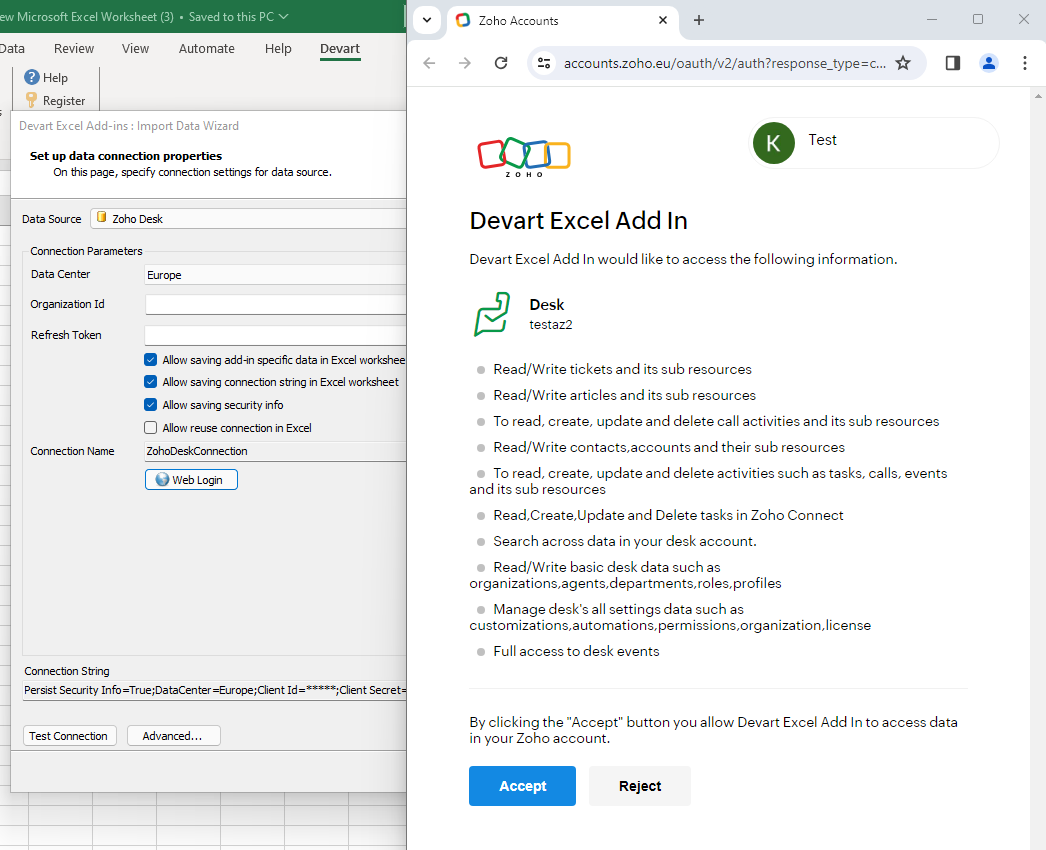
The Import Data Wizard with Zoho Desk selected and the Europe data center, next to Zoho's consent page: read/write tickets, articles, contacts and accounts, activities, basic desk data such as organizations, agents, departments, roles and profiles, settings data and desk events.
That consent list is the best map of what the add-in reaches: tickets and their sub-resources, knowledge base articles, contacts and accounts, call and task activities, and the organization's agents, departments, roles and profiles. From there you pick a table in the Visual Query Builder or type a SELECT on the SQL Query tab, preview the rows, and load them into a new or existing worksheet.
Features
Agent profiles and permissions as columns
Excel Add-in for Zoho Desk flattens complex settings into plain columns. Devart's own example loads the Profiles table, where each profile (Support Administrator, Light Agent, Newbie Agent, Help Center, Agent, Supervisor, Support Manager) gets one row and every permission, such as Permissions_Contacts_Create or Permissions_Reports_View, gets its own True/False column. Reviewing who may delete contacts or export data becomes a filter in Excel instead of clicking through each profile's settings page.
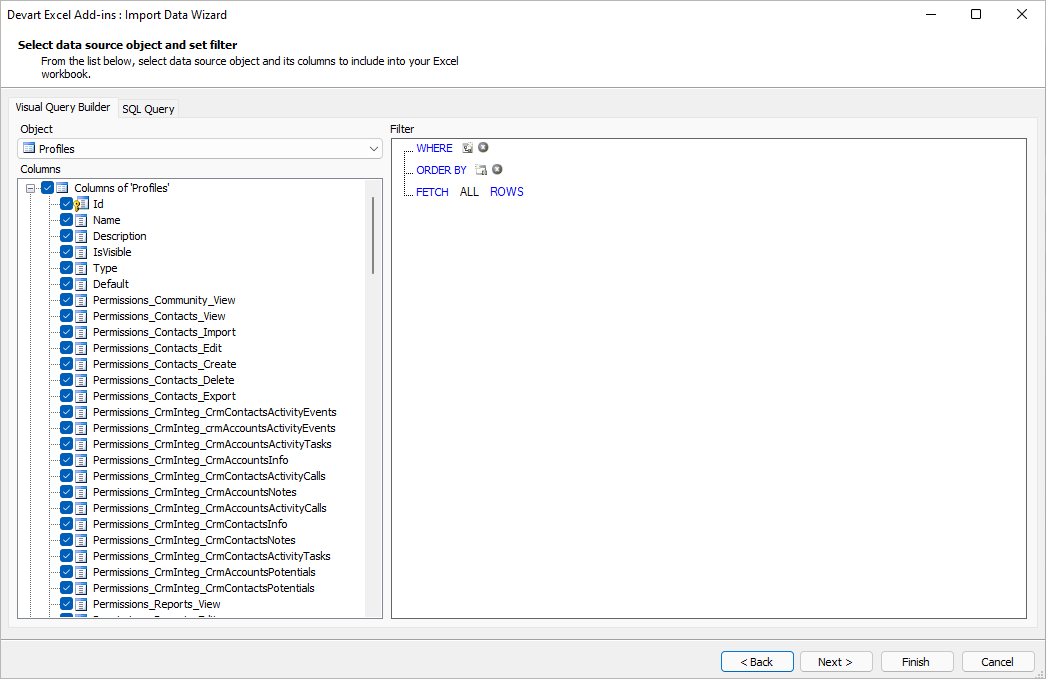
The Visual Query Builder with the Zoho Desk Profiles object: Id, Name, Description, IsVisible, Type and Default, followed by permission columns for contacts, CRM integration and reports.
Edits that are staged, highlighted and committed together
Excel Add-in for Zoho Desk keeps changes local until you're ready. In Edit Mode every changed cell, added row and deleted row is marked; Commit sends the batch to Zoho Desk and Rollback discards it. Data is validated as you type, so a bad value is caught in the sheet. Version 2.10.1514 (January 2025) fixed a "Returning operation is not supported" error on UPDATE operations against Zoho Desk objects, so stay on a current build if you edit.
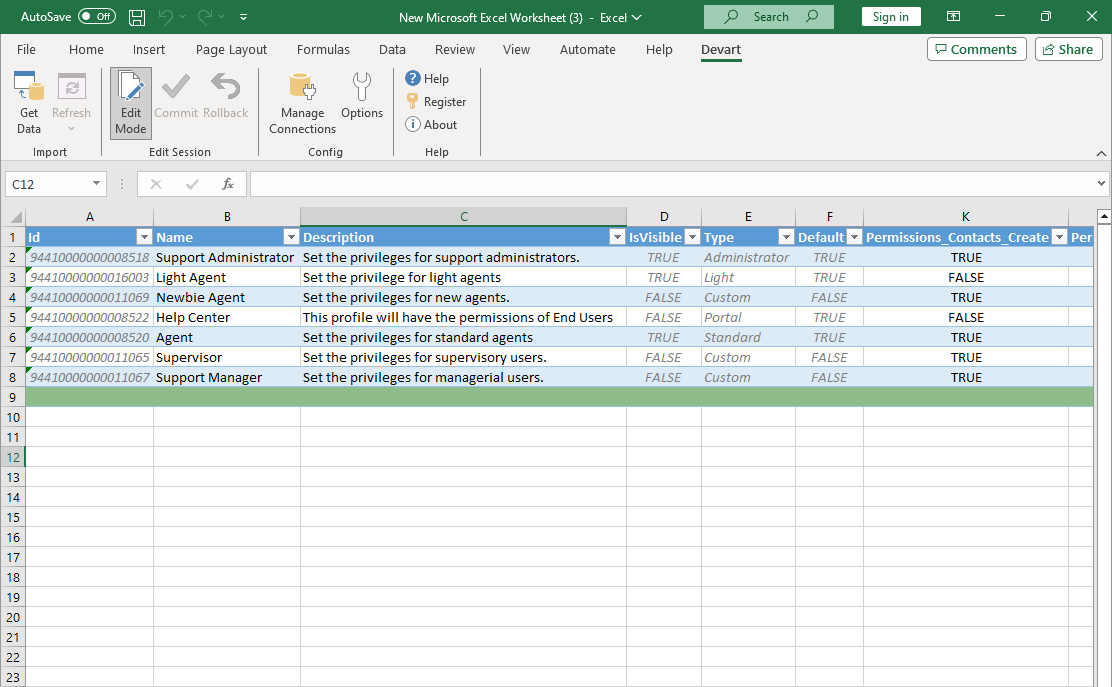
Seven Zoho Desk profiles in an Excel table with Edit Mode on: read-only columns (Id, IsVisible, Type, Default) are greyed, while Name, Description and the Permissions_Contacts_Create column stay editable.
Saved connections you can reuse
Excel Add-in for Zoho Desk can save the query and connection in the workbook so Refresh reloads current data, and with "Allow reuse connection in Excel" a named connection (ZohoDeskConnection by default) appears under Manage Connections for other workbooks. Each of these is a checkbox, so you decide whether a shared file carries any credentials at all.
Read-only and network options
Excel Add-in for Zoho Desk's Advanced settings include Readonly (SELECT only), proxy host, port and credentials for corporate networks, UTC date conversion, failover retries, timeouts, and a local SQL engine switch for queries too complex for the Zoho Desk API to answer directly.
Benefits
- Permission audits in minutes. Every profile's rights side by side, filterable and printable.
- Bulk fixes without CSV mapping. Change many records in the sheet and commit once.
- Your own reports. Formulas and charts on support data refresh with one click.
Real-World Uses
- Quarterly access review: a help desk admin exports Profiles, flags every profile that can delete or export contacts, and sends the sheet to security.
- Onboarding a new team: a manager reviews departments and agents in one workbook before a reorganization.
- Customer record clean-up: support ops load contacts and accounts, standardize company names with formulas, and commit.
- Knowledge base inventory: a content lead lists articles in a sheet to plan which ones to update.
Who It's For, and Who Should Skip It
It's for Zoho Desk administrators, support team leads and support operations analysts on Windows who manage settings or records in bulk and report in Excel.
Skip it if you're on a Mac or Excel for the web. If you need scheduled dashboards in Power BI or Tableau, Devart's ODBC Driver for Zoho Desk suits that better. A small help desk whose needs are met by Zoho Desk's built-in reports and import tools doesn't need it either.
Usage Guide
- Install the add-ins (76.60 MB) with an administrator account, after signing in to Devart to download.
- Open Excel, go to the Devart tab and click Get Data; choose Zoho Desk.
- Pick your data center, click Web Login, accept Zoho's permission page, and click Test Connection.
- Choose a table and columns, add filters, preview, and click Finish.
- For changes, turn on Edit Mode, edit, then Commit (or Rollback).
Before you buy
- The Zoho consent page asks for broad rights, including managing desk settings and full access to desk events. Sign in with an account whose Zoho Desk role matches what the workbook should be able to change, and use Readonly for report-only files.
- Buy Now orders one license with a year of support and upgrades at $179.95. Using Zoho CRM or Zoho Books too? The Excel Add-in Cloud Pack ($499.95) covers all three.
Where it falls short
- Windows Excel only, and it needs admin rights to install.
- No automation. There's no scheduled refresh or sync; someone has to click.
- API quotas. Each import and commit uses Zoho Desk API calls from your plan.
- Little Zoho Desk-specific development. Since launch, the revision history has one Zoho Desk entry (the UPDATE fix); the rest are general add-in changes.
- Documentation is generic. Devart's Zoho Desk help page lists connection options but no table reference, so check that the tables you need are there during the trial.
What Users Say
Excel Add-in for Zoho Desk has no rated reviews on the major software directories so far.
Devart's own case for it
Devart's guide puts the reason for the product plainly: "Zoho Desk's built-in tools for data handling may be insufficient for some scenarios," while many people prefer Excel "due to its powerful features like calculations, formulas, and pivot tables." That's a fair description of the gap it fills; whether it fills it for your portal is what the 30-day trial will tell you.
Comparisons
vs. Zoho Desk's built-in import, export and reports
Zoho's own tools are free and fine for one-off loads and standard dashboards. The add-in is for repeated two-way work: editing existing records and settings in bulk, and keeping an Excel report live.
vs. Devart's Excel Add-in for Zoho CRM
Same design and price, different Zoho app. Sales teams want the Zoho CRM add-in, support teams this one, and a business using both should look at the Cloud Pack.
Editions and Pricing
There's a single edition; on the order page you can add a second or third update year and priority support.
| Product | Price | Covers |
|---|
| Excel Add-in for Zoho Desk | $179.95 | Zoho Desk only; perpetual, one year of support and upgrades |
| Excel Add-in Cloud Pack | $499.95 | All of Devart's cloud-app add-ins, Zoho Desk, Zoho CRM and Zoho Books among them |
| Excel Add-in Universal Pack | $599.95 | Every Devart Excel add-in, cloud and database |
See our Universal Pack page for the full bundle. Multiple licenses get 5% off from 5, 10% from 10 and 15% from 20.
FAQs
Can Excel Add-in for Zoho Desk connect to a Zoho account hosted in Europe?
Yes. Excel Add-in for Zoho Desk lets you choose the US, Europe, China, India, Australia, Japan, UK or Canada data center; pick the one that matches the Zoho address you log in at.
Do I have to paste an API token into Excel Add-in for Zoho Desk?
No. Excel Add-in for Zoho Desk gets the refresh token through Web Login: you sign in on Zoho's page, click Accept, and the token is filled in automatically.
Can I stop Excel Add-in for Zoho Desk from changing anything?
Yes. Excel Add-in for Zoho Desk has a Readonly connection option that allows only SELECT statements, so a workbook built on it can't write to Zoho Desk.
Will Excel Add-in for Zoho Desk work in Excel for Mac or the web?
No. Excel Add-in for Zoho Desk runs only in Excel for Windows, versions 2007 to 2024.
Can I get my money back for Excel Add-in for Zoho Desk?
Possibly. The Excel Add-in for Zoho Desk order page advertises a 30-day money-back guarantee if you're not satisfied, but Devart's ordering FAQ only promises a full refund within 30 days when a technical problem stops the product working and support can't fix it. Use the 30-day trial first.
What if my trial or update year ends?
Excel Add-in for Zoho Desk keeps the connections you created: since January 2025, saved connections are no longer hidden or deleted when a trial or subscription ends. A purchased license is perpetual for your version.
System Requirements
- Excel 2007, 2010, 2013, 2016, 2019, 2021 or 2024, Windows version
- .NET Framework 4.0 or later with Visual Studio 2010 Tools for Office Runtime
- Administrator rights for installation
- A Zoho Desk account with API access
Conclusion
Excel Add-in for Zoho Desk is worth $179.95 for Zoho Desk admins and support leads on Windows who audit settings or fix records in bulk. The reason to buy is the two-way sheet: profiles, contacts and other Desk tables laid out in columns, edited with Excel's tools and committed in one batch. The reasons not to are the Windows-only requirement, no scheduled refresh, broad Zoho permissions to manage carefully, and a product Devart has changed little for Zoho Desk since 2024. If you run two or more Zoho apps, buy the Cloud Pack instead; otherwise, try it for 30 days on a read-only connection first.
Download Free TrialBuy Now