Excel Add-in Universal Pack: Every Devart Excel Add-in in One License
Excel Add-in Universal Pack is Devart's $599.95-a-year bundle of all 26 of its Excel Add-ins, for analysts, accountants and admins who want to pull data from databases and business apps into Microsoft Excel for Windows, edit it in the worksheet, and save the changes back. It covers six databases (SQL Server, Oracle, MySQL, PostgreSQL, SQLite, DB2) and twenty cloud apps, from Salesforce and Dynamics 365 to QuickBooks Online and Shopify.
Bought one by one, the same add-ins cost $179.95 each, or $4,678.70 for all of them. So the pack makes sense as soon as you need more than three sources, or when you don't yet know which systems next year's reports will need.
Quick facts
- Version: 3.1.70, released September 7, 2026
- Developer: Devart
- What's inside: all 26 Devart Excel Add-ins, 6 for databases and 20 for cloud applications (full list below)
- Excel versions: Excel 2007, 2010, 2013, 2016, 2019, 2021 and 2024, Windows only
- Download: one 76.60 MB installer for the whole pack
- Price: $599.95 for one user with one year of updates and support. Renews at $299.95 a year
- Trial: 30 days free, download needs a free Devart account
- Guarantee: 30-day money-back guarantee
- What we checked: the pack's contents, version 3.1.70 and the 76.60 MB download on Devart's pages, and the order page on November 13, 2026: Excel Add-in Universal Pack at $599.95 for one year of updates and support, with a $299.95 renewal. We didn't install the add-ins or connect them to a live data source.
Download Free TrialBuy Now
What the Pack Contains
Each add-in appears as a data source inside the same Devart tab on Excel's ribbon, so one installation gives you all of them with one set of buttons.
| Group | Add-ins included |
|---|
| Databases (6) | SQL Server (including Azure SQL), Oracle, MySQL (including MariaDB and Percona), PostgreSQL, SQLite, DB2 |
| CRM and marketing (8) | Salesforce, Salesforce Marketing Cloud, Dynamics 365, Dynamics CRM, HubSpot, Marketo, SugarCRM, Zoho CRM |
| Accounting and ERP (4) | QuickBooks Online, NetSuite, FreshBooks, Zoho Books |
| E-commerce (3) | Shopify, BigCommerce, Magento |
| Help desk, email and office (5) | Zendesk, Freshdesk, Zoho Desk, Mailchimp, Google Workspace |
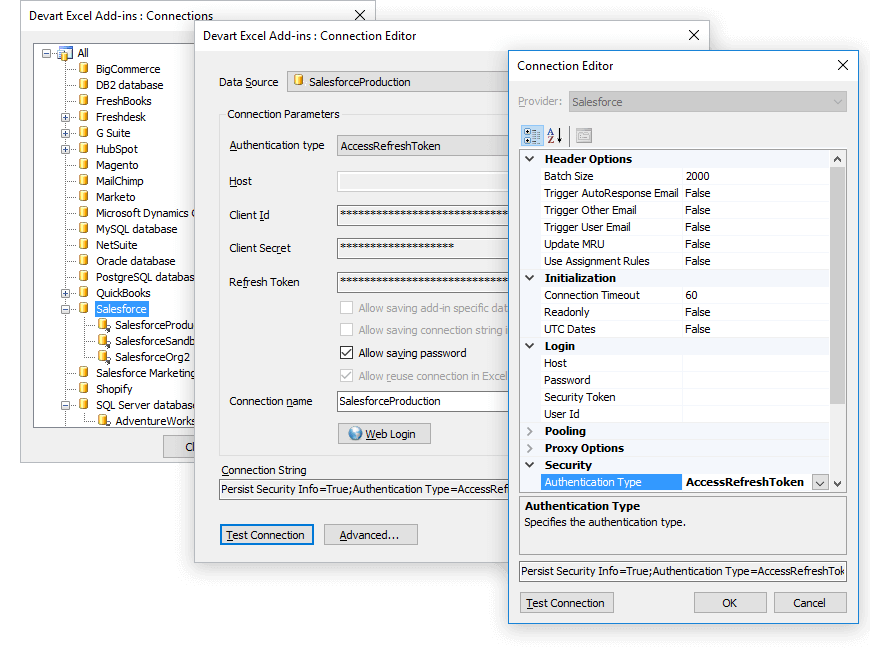
The Devart Excel Add-ins Connections window with saved connections grouped by source (BigCommerce, DB2, FreshBooks, HubSpot, Salesforce, SQL Server and more), and the Connection Editor for a Salesforce connection.
Overview
Devart's Excel Add-ins turn a worksheet into a front end for a database or a cloud app. You pick a source, choose tables or objects with a visual Query Builder or write SQL, and the data lands in an Excel table. From there you can refresh it with one click, switch to Edit Mode, change cells, add or delete rows, and send the changes back with Commit, or throw them away with Rollback. The add-ins check each edit against the source's rules as you type, so a bad date or an over-long string is flagged before it reaches the server.
Devart ships the add-ins on a common code base, and the revision history shows steady work across all of them. Version 3.0 (June 2026) added Excel 2024 support, NetSuite API v2, Oracle Database 26ai and MariaDB 12. Versions 3.1.49 and 3.1.70 (August and September 2026) brought HubSpot OAuth v3 endpoints, new FreshBooks objects, SCRAM-SHA-256-PLUS for PostgreSQL and a run of fixes for Dynamics 365 sign-in.

The Import Data Wizard's first page: Salesforce chosen as the data source, with host, user, password, security token and the options for saving the connection in the workbook.
Features
Live editing with Commit and Rollback
Excel Add-in Universal Pack lets you edit source data directly in the worksheet. Click Edit Mode, change values, insert or delete rows, and the changed cells are highlighted so you can review them. Commit writes everything back to the database or cloud app in one go, and Rollback cancels it.
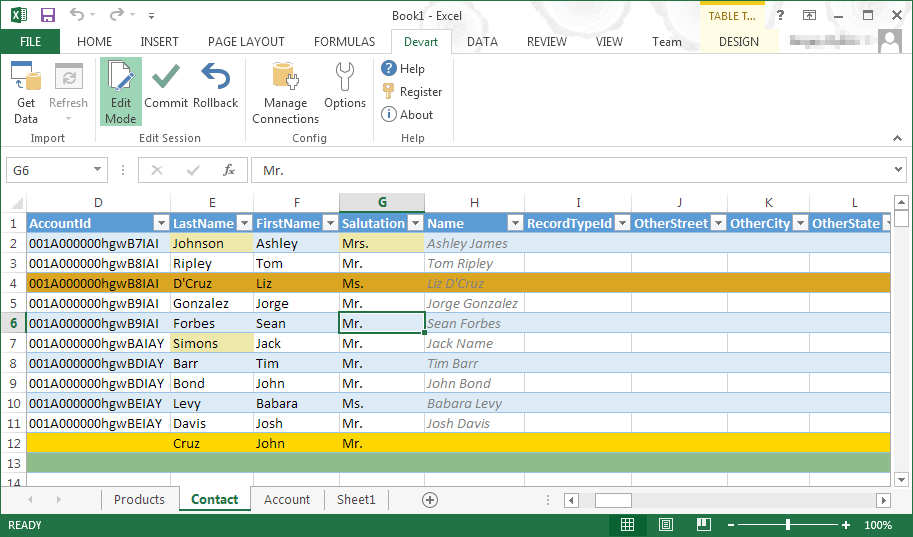
Salesforce Contact records in Edit Mode: edited cells, a deleted row and a new row are highlighted, with Commit and Rollback on the Devart ribbon tab (Excel 2013).
SQL or a visual Query Builder
Excel Add-in Universal Pack retrieves data with a SQL query, even from cloud apps that have no SQL of their own, or with the built-in Query Builder, where you tick tables and columns, set filter conditions and choose the sort order. Several queries from different sources can sit in one workbook on separate sheets.
Instant data validation
Excel Add-in Universal Pack checks edits against the source's data types and constraints the moment you type them: wrong dates, strings longer than the field allows and duplicate primary key values are marked in red with the reason, so you fix them before committing.
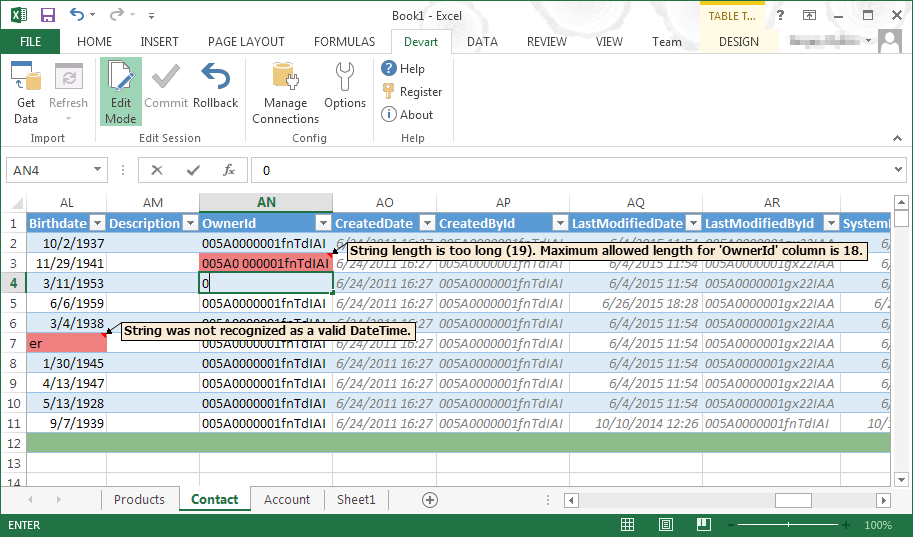
Validation in action: one cell flagged "String was not recognized as a valid DateTime" and another "String length is too long (19). Maximum allowed length for 'OwnerId' column is 18."
One-click refresh, online or offline
Excel Add-in Universal Pack keeps the query with the worksheet, so Refresh reloads the latest data without rebuilding anything. The data stays in the workbook when you're offline, and you can choose whether the connection string and password are saved in the file or entered each time.
Direct, secure connections
Excel Add-in Universal Pack connects straight to each source: databases over their native protocols (with SSH keys, including PuTTY PPK3, for MySQL, Oracle and PostgreSQL) and cloud apps through their APIs with OAuth where the service supports it. Your data goes from the source to your PC without passing through a Devart server.
Benefits
- One tool you already know. Sorting, formulas, pivot tables and charts all work on the imported data, with no new reporting tool to learn.
- Bulk edits without exports. Fixing 300 CRM records or product prices is a paste and a Commit, not an export, a re-import and a mapping screen.
- Room to grow. When the company adds HubSpot or moves to NetSuite, the add-in is already installed and licensed.
- Big saving against single add-ins. $599.95 against $4,678.70 for the 26 add-ins bought separately on Devart's pages.
Real-World Uses
- Month-end reporting. A finance analyst pulls invoices from QuickBooks Online and the order table from a SQL Server database into one workbook and refreshes both each month.
- CRM clean-up. A sales-ops admin imports Salesforce contacts, fixes salutations and owner IDs in bulk with Excel formulas, and commits the changes.
- Catalog price updates. An e-commerce manager loads Shopify or BigCommerce products, applies a price rise with a formula, and writes it back to the store.
- Support metrics. A team lead brings Zendesk or Freshdesk tickets into a pivot table to track response times by agent.
Who It's For, and Who Should Skip It
It's for Excel power users who work with several systems at once, consultants who connect to whatever their clients run, and teams that want one license instead of tracking a handful of separate add-ins.
Skip it if you use Excel on a Mac, on the web or on a tablet: the add-ins run in Excel for Windows only. If you only need databases, the Database Pack ($399.95) covers all six; if you only need cloud apps, the Cloud Pack ($499.95) covers all twenty; and for one or two sources a single add-in at $179.95 is cheaper. If all you want is read-only reports from one database, Excel's own Power Query may already do it at no cost.
Usage Guide
- Install. Sign in with a free Devart account on the download page, close Excel, and run the 76.60 MB installer as an administrator. It needs .NET Framework 4.0 or later and the Visual Studio 2010 Tools for Office Runtime.
- Open the Devart tab. Start Excel and find the Devart tab on the ribbon, with Get Data, Refresh, Edit Mode, Commit, Rollback and Manage Connections.
- Connect. Click Get Data, choose the data source (for example Salesforce or MySQL), enter the connection details or sign in with OAuth, and click Test Connection.
- Pick the data. Use the Query Builder to choose an object and columns and add filters, or switch to SQL. Check the rows in Data Preview, then import them to a sheet.
- Edit and save. Click Edit Mode, make your changes, fix anything validation flags, and click Commit.
- Refresh later. Open the workbook and click Refresh to reload current data.
- Register. After buying, enter your activation key with the Register button on the Devart tab.
Before you buy
The $599.95 price buys a license with one year of updates and support. Devart's pages describe the pack as a perpetual license: the version you have keeps working after the year, and renewing ($299.95 a year on the order page) gets you the updates that keep connectors working when cloud vendors change their APIs. Two- and three-year terms and premium support are options on the order page, and volume discounts start at five licenses.
Where it falls short
- Windows Excel only. There's no version for Excel on Mac, Excel on the web or Microsoft 365 mobile apps.
- Cloud connectors need updates. The revision history is full of fixes after cloud vendors changed their APIs (Dynamics 365 OAuth sign-in, HubSpot rate limits, QuickBooks Online errors). If you stop renewing, a connector can stop working when the service changes.
- Setup can take some API knowledge. Some cloud sources need a security token, client ID and secret, or an admin to approve the OAuth app before the first connection works.
- Some limits per source. SugarCRM must be version 7.0 or higher, and its Community edition isn't supported.
- Big imports are still Excel-sized. Excel's own row limit and memory apply, so very large tables need filters.
What Users Say
Reviews are spread across the individual add-ins rather than the pack, and there are few of them. Here is what TrustRadius, G2 and Software Advice list.
TrustRadius
"Devart Excel Add-ins" shows a score of about 9.3 out of 10 from 33 reviews and ratings. Treat it loosely: several reviews filed under the name describe Devart's dbForge database tools (data pump, schema and data comparison) rather than the Excel add-ins, so the score mixes products.
G2 and Software Advice
The Salesforce Excel Add-in by Devart shows 4.7 out of 5 from 3 reviews on G2. The complaints there are the cost, since there's no free version, and the first-time setup, which needs some configuration that users new to API connections can find hard. Software Advice lists Devart's Excel Add-ins at 4.5 out of 5 from 2 reviews, and one reviewer there wished the add-ins were sold as a full package rather than separately, which is exactly what this pack is.
The pattern is consistent: people who use the add-ins rate them well for getting live data into Excel and editing it there, and the criticism is about price and the initial connection setup, not about the editing itself. The sample sizes are small.
Comparisons
Universal Pack vs Database Pack vs Cloud Pack
The Universal Pack is the only one that covers both sides. The Database Pack has the six database add-ins for $399.95, and the Cloud Pack the twenty cloud add-ins for $499.95. If you need even one database and one cloud app, the Universal Pack at $599.95 costs only $200 more than the Database Pack, and less than buying the two smaller packs together.
Excel Add-in Universal Pack vs Power Query
Excel's built-in Power Query imports from many databases and some online services for free, and it's the better choice for read-only reports and data shaping. What it can't do is write changes back: the Devart add-ins add Edit Mode, Commit and Rollback with validation, plus connectors for apps such as Zoho Desk, Freshdesk, Marketo or SugarCRM.
Editions and Pricing
The pack is one product with one Buy Now button; the term and support level are chosen on the order page. Prices on November 13, 2026, one user, one year of updates:
| Product | Add-ins | Price | Bought separately |
|---|
| Excel Add-in Universal Pack | All 26 | $599.95 (renews at $299.95) | $4,678.70 |
| Excel Add-in Cloud Pack | 20 cloud apps | $499.95 | $3,599 |
| Excel Add-in Database Pack | 6 databases | $399.95 | $1,079.70 |
| Single Excel Add-in | 1 | $179.95 | - |
The Buy Now buttons on this page order the Universal Pack. Volume discounts of 5%, 10% and 15% apply from 5, 10 and 20 licenses.
FAQs
Does Excel Add-in Universal Pack work on a Mac or in Excel Online?
No. Excel Add-in Universal Pack runs only in Microsoft Excel for Windows, versions 2007 to 2024 (including the desktop Excel that comes with Microsoft 365 on Windows).
Is Excel Add-in Universal Pack one installer or 26?
Excel Add-in Universal Pack is one 76.60 MB installer. All the add-ins appear as data sources on the same Devart ribbon tab, and one activation key covers them.
Will new Devart Excel Add-ins be added to the Universal Pack?
Excel Add-in Universal Pack is described by Devart as all of its Excel Add-ins in one package, and the source list has grown over the years (SingleStore support arrived through the MySQL add-in in version 3.0). New connectors come with updates, so they need an active update subscription.
What happens when the Excel Add-in Universal Pack year of updates ends?
Excel Add-in Universal Pack keeps working at the version you have, but you stop getting new versions and support. Renewal was $299.95 a year on November 13, 2026. Because cloud APIs change, renewing matters more for the cloud add-ins than for the database ones.
Can Excel Add-in Universal Pack connect to Azure SQL or Amazon RDS?
Yes. Excel Add-in Universal Pack's SQL Server add-in supports Azure SQL, and its MySQL add-in supports Amazon RDS for MySQL and MariaDB, Amazon Aurora, Azure Database for MySQL and Google Cloud SQL for MySQL.
Is my data sent through Devart's servers?
No. Excel Add-in Universal Pack connects your copy of Excel directly to the database or the cloud service's API. You decide whether connection details and passwords are stored in the workbook.
Can I get a refund for Excel Add-in Universal Pack?
Yes. Devart gives a 30-day money-back guarantee on its purchases. Since the 30-day trial includes every add-in, test the sources you need first.
System Requirements
- Windows with Microsoft Excel 2007, 2010, 2013, 2016, 2019, 2021 or 2024
- .NET Framework 4.0 or later
- Visual Studio 2010 Tools for Office Runtime
- Administrator rights to install
- Databases: SQL Server 2000 to 2025 and Azure SQL, Oracle 8.0 to 26ai, MySQL 3.23 to 9.x and MariaDB 5 to 12, PostgreSQL 8 to 18, SQLite 3, DB2 8.0 and later
- Cloud apps: an account with API access for each service you connect
Conclusion
Excel Add-in Universal Pack is worth $599.95 if you work in Excel for Windows and need two-way access to more than three of its 26 sources, or to both a database and a cloud app: at that point it's cheaper than the single add-ins or the two smaller packs. The best reason to buy it is editing live CRM, accounting or store data in a worksheet and committing it back, with validation catching mistakes first. The main reason not to is that it's Windows-only and needs a yearly renewal to keep cloud connectors current; if you only read one or two sources, a single add-in or Power Query is enough. Try it free for 30 days on the sources you actually use.
Download Free TrialBuy Now