Short answer
Buy Excel Add-in Universal Pack ($599.95 at checkout) if you need Excel to reach both a database and a cloud app, or four or more sources of any kind: it holds all 26 Devart Excel Add-ins and costs $299.95 less than the other two packs together. Buy Excel Add-in Cloud Pack ($499.95) if all your data lives in SaaS apps such as Salesforce, HubSpot, QuickBooks Online or Shopify, and Excel Add-in Database Pack ($399.95) if it all sits in SQL Server, Oracle, MySQL, PostgreSQL, SQLite or DB2.
If you need only one or two sources, skip the packs: a single Devart Excel Add-in costs $179.95, so two cost $359.90. All three packs run only in Excel for Windows.
At a glance
| Universal Pack | Cloud Pack | Database Pack |
|---|
| Price at checkout (1 user, 1 year of updates) | $599.95 | $499.95 | $399.95 |
| Yearly renewal | $299.95 | $249.95 | $199.95 |
| Add-ins included | 26 (all) | 20 cloud apps | 6 databases |
| Same add-ins bought singly | $4,678.70 | $3,599.00 | $1,079.70 |
| SQL Server, Oracle, MySQL, PostgreSQL, SQLite, DB2 | ✓ | ✗ | ✓ |
| Salesforce, HubSpot, Dynamics 365, QuickBooks Online, Shopify and 15 more | ✓ | ✓ | ✗ |
| Edit data and commit it back | ✓ | ✓ | ✓ |
| Version | 3.2.145 (November 18, 2026) | 3.2.145 | 3.2.145 |
| Excel | 2007 to 2024, Windows only | 2007 to 2024, Windows only | 2007 to 2024, Windows only |
| Trial | 30 days, free Devart account to download | 30 days | 30 days |
| License | Perpetual, per user | Perpetual, per user | Perpetual, per user |
How we compared them
- We put each pack, and two single add-ins (Salesforce and SQL Server), in the cart and read the price, the license term and the renewal price.
- We checked which add-ins each pack contains on Devart’s pack pages and its ordering data, and worked out where the packs beat single add-ins.
- We read the version, download size and release notes on the download and revision history pages, and the system requirements, refund terms and renewal rules.
- We gathered user ratings from TrustRadius, G2 and Software Advice and looked at Devart’s screenshots of each workflow.
- What we checked: on November 24, 2026 the order page charged $599.95 for Excel Add-in Universal Pack (renewing at $299.95), $499.95 for Excel Add-in Cloud Pack ($249.95) and $399.95 for Excel Add-in Database Pack ($199.95), with no Black Friday discount, and $179.95 each for the Salesforce and SQL Server add-ins. All three packs were at version 3.2.145 (November 18, 2026) with the same 81.18 MB installer.
We compared contents, prices and terms. We didn’t install the add-ins or connect them to a live database or cloud account.
What each pack costs against its add-ins bought singly (USD)
Universal Pack (26 add-ins)$599.95
Universal Pack add-ins bought singly$4,678.70
Cloud Pack add-ins bought singly$3,599.00
Database Pack add-ins bought singly$1,079.70
Order-page prices, 1 user, 1 year of updates, November 24, 2026. Single add-ins $179.95 each.
The three packs are the same software
Devart’s Excel Add-in packs differ only in which data sources they include. All three install from the same 81.18 MB setup, add the same Devart tab to Excel’s ribbon (Get Data, Refresh, Edit Mode, Commit, Rollback, Manage Connections) and share the same version, 3.2.145. Each add-in imports a table or a SQL query into an Excel table through a visual Query Builder or your own SQL, refreshes it with one click, and lets you edit cells, add and delete rows and commit the changes back, with type and length checks as you type.
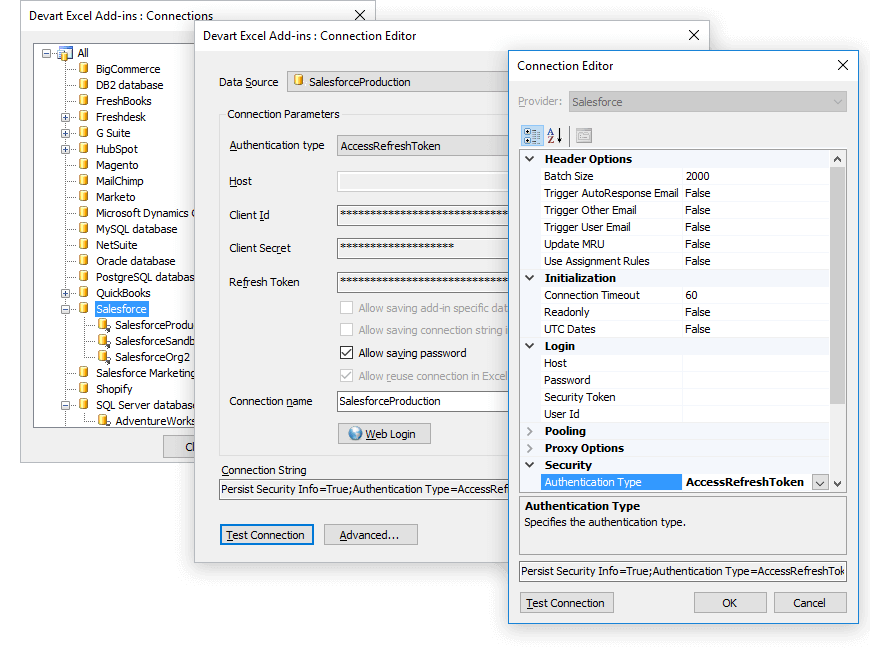
The Devart Excel Add-ins Connections window lists saved connections by source (BigCommerce, DB2, FreshBooks, HubSpot, MySQL, NetSuite, Salesforce, SQL Server and more), with the Connection Editor open for a Salesforce connection.
So the buying decision is simple arithmetic about sources. The Database Pack covers six: SQL Server (including Azure SQL), Oracle, MySQL (with MariaDB and Percona), PostgreSQL, SQLite and DB2. The Cloud Pack covers twenty: Salesforce, Salesforce Marketing Cloud, Dynamics 365, Dynamics CRM, HubSpot, Marketo, SugarCRM, Zoho CRM, QuickBooks Online, NetSuite, FreshBooks, Zoho Books, Shopify, BigCommerce, Magento, Zendesk, Freshdesk, Zoho Desk, Mailchimp and Google Workspace. The Universal Pack is both lists.
- Price: $599.95 for one user with one year of updates and support; renews at $299.95 a year
- Contains: all 26 add-ins, 6 databases and 20 cloud apps
- Best for: analysts, finance and operations staff who combine a company database with CRM, accounting or shop data, and consultants who connect to whatever their clients run
Excel Add-in Universal Pack is the only pack that lets one workbook hold, say, a SQL Server orders table next to QuickBooks Online invoices, each on its own sheet and refreshed together. It costs $100 more than the Cloud Pack and $200 more than the Database Pack, and $299.95 less than buying those two. If there’s any chance next year’s reports will need a source from the other side, this is the cheaper way to be ready.
What we like
- Every Devart Excel Add-in under one license key and one installer
- $599.95 against $4,678.70 for the 26 add-ins bought singly
- Cheaper than Cloud Pack plus Database Pack ($899.90)
- New connectors arrive with updates while your renewal is current
Watch out for
- The highest renewal of the three ($299.95 a year)
- Overkill if all your data is on one side
- Three mixed sources still cost less as single add-ins ($539.85)
Download Universal Pack TrialBuy Excel Add-in Universal Pack
- Price: $499.95; renews at $249.95 a year
- Contains: 20 cloud-app add-ins, no databases
- Best for: sales-ops, marketing and e-commerce staff who bulk-edit records in several SaaS tools
Excel Add-in Cloud Pack turns a worksheet into an editor for CRM, accounting, shop and help-desk records. It accepts SQL against apps that have none of their own and translates it into API calls, so you can filter Zendesk tickets or join Mailchimp data with a SELECT. The catch with cloud connectors is upkeep: the release notes are full of fixes that follow API changes on the vendors’ side (Dynamics 365 sign-in, HubSpot rate limits, QuickBooks Online errors), so the yearly renewal matters more here than for databases.

HubSpot contacts in Excel with Edit Mode on: changed cells, a new row and a row marked for deletion are highlighted, with Commit and Rollback on the Devart tab.
What we like
- Two-way editing for 20 SaaS apps from one ribbon
- SQL queries, including joins, against apps without SQL
- Pays for itself from the third app ($539.85 singly)
Watch out for
- No database connections; Universal adds all six for $100 more
- Connectors need the $249.95 renewal to keep up with API changes
- Some apps need an admin to approve OAuth access before the first connection
Download Cloud Pack TrialBuy Excel Add-in Cloud Pack
- Price: $399.95; renews at $199.95 a year
- Contains: SQL Server, Oracle, MySQL, PostgreSQL, SQLite and DB2 add-ins
- Best for: DBAs, developers and analysts who maintain reference data in two or more database engines
Excel Add-in Database Pack makes Excel a light front end for database tables: load a price list, apply a formula, check the tinted cells and commit, and the add-in turns your edits into INSERT, UPDATE and DELETE statements. It connects to Oracle without an Oracle Client and reaches servers behind a firewall through SSH tunnels. Version 3.2.145 added MySQL 9.7 support and SSL over an SSH tunnel for MySQL and PostgreSQL.

A Company table in Edit Mode: an edited name and email, a row marked for deletion and a new “Beta Company” row, waiting for Commit or Rollback.
What we like
- Cheapest pack, and cheaper than three single add-ins ($539.85)
- No Oracle Client needed; SSH tunnels for MySQL, Oracle and PostgreSQL
- Database connectors change less often, so a lapsed renewal hurts less
Watch out for
- No cloud apps
- Excel’s limit of about a million rows applies, so big tables need a filtered query
- DB2 for Linux, UNIX and Windows only, not z/OS or IBM i
Download Database Pack TrialBuy Excel Add-in Database Pack
Price: when a pack beats single add-ins
A Devart pack beats single add-ins from the third source on its side. One add-in is $179.95 and two are $359.90, cheaper than any pack. Three single add-ins ($539.85) cost more than the Database Pack or the Cloud Pack, but still $60.10 less than the Universal Pack, so three sources that mix databases and cloud apps are the one case where singles win. From four sources on ($719.80), the Universal Pack is the cheapest way to get them.
Yearly renewal for another year of updates (USD)
Renewal prices shown on the order page, November 24, 2026.
The licenses are perpetual, so the add-ins keep working when the update year ends; renewing buys new versions and support. Renew on time: Devart adds 20% to the renewal price once 3 months have passed after the update year ends, and 60% after 12 months. The order page also offers 2- and 3-year terms, and volume discounts of 5%, 10% and 15% from 5, 10 and 20 licenses.
What users say
Nobody reviews the packs themselves; ratings sit under the Devart Excel Add-ins line or the single add-ins, which are the same connectors. TrustRadius lists “Devart Excel Add-ins” at about 9.3 out of 10 from 33 reviews and ratings, though several reviews filed there describe Devart’s dbForge database tools, so the score mixes products. G2 shows the Salesforce Excel Add-in at 4.7 out of 5 from 3 reviews, and Software Advice lists the Excel Add-ins at 4.5 out of 5 from 2 reviews.
The praise is about getting live data into Excel and editing it there. The complaints are the cost of buying add-ins one by one (one Software Advice reviewer wished they were sold as a package, which is what these packs are) and a first connection that takes some API knowledge, such as security tokens, client IDs or admin consent. The samples are small, so the 30-day trial with your own accounts matters more than the stars.
Which should you choose?
| Your situation | Pick | Why |
|---|
| Company database plus a CRM, accounting or shop app | Excel Add-in Universal Pack | Only pack with both sides; $299.95 less than buying both smaller packs |
| Consultant connecting to whatever clients run | Excel Add-in Universal Pack | Every source on one license |
| Data only in Salesforce, HubSpot, Shopify, QuickBooks Online and similar | Excel Add-in Cloud Pack | $100 less than Universal |
| Data only in SQL Server, Oracle, MySQL, PostgreSQL, SQLite or DB2 | Excel Add-in Database Pack | Cheapest pack, beats three single add-ins |
| One or two sources | A single add-in | $179.95 each |
| Read-only reports from one database | Excel’s own Power Query | Free; the packs only pay off when you write data back |
Who should skip all three: anyone on Excel for Mac, Excel on the web or a tablet, since the add-ins run only in desktop Excel for Windows (2007 to 2024, including Microsoft 365’s desktop Excel). Skip them too if you only read data and never edit it.
What commonly goes wrong
- Buying the Database Pack, then needing one cloud app. Adding a single cloud add-in costs $179.95 on top of $399.95, which is $20 less than the Universal Pack but leaves the other 19 apps out.
- Letting the renewal lapse on cloud connectors. When a SaaS vendor changes its API, an old connector can stop working; late renewals cost 20% to 60% more.
- Expecting a refund for a change of mind. The order page promises a 30-day money-back guarantee, but Devart’s ordering FAQ limits refunds to technical problems its support can’t fix. Test in the trial first.
- Editing live tables with an admin login. Commit writes straight to production data; give business users accounts limited to the tables they should change.
- Saving passwords in shared workbooks. The connection dialog can store the password in the file, and it travels with every copy you email.
FAQs
What is the difference between Devart Excel Add-in Universal Pack and Cloud Pack?
Excel Add-in Universal Pack ($599.95) includes all 26 Devart Excel Add-ins, the 20 cloud-app add-ins plus the 6 database add-ins. Excel Add-in Cloud Pack ($499.95) has only the 20 cloud apps. The software and version are the same.
Is the Universal Pack cheaper than buying the Cloud Pack and Database Pack?
Yes. Excel Add-in Universal Pack costs $599.95, while Cloud Pack ($499.95) and Database Pack ($399.95) together cost $899.90, so the Universal Pack saves $299.95.
How many single add-ins make a Devart pack worth it?
Three. Three single add-ins cost $539.85, more than the Database Pack ($399.95) or Cloud Pack ($499.95). For three mixed sources, singles are $60.10 cheaper than the Universal Pack; from four sources, the Universal Pack is cheaper.
Do Devart Excel Add-ins work on a Mac or in Excel Online?
No. All three Devart Excel Add-in packs run only in Microsoft Excel for Windows, versions 2007 to 2024, including the desktop Excel that comes with Microsoft 365.
Should I start with the Database Pack and add cloud apps later?
If you think you’ll need cloud apps later, buying Excel Add-in Universal Pack from the start ($200 more than the Database Pack) avoids a second purchase; adding the Cloud Pack later would cost $499.95 more.
Do the add-ins stop working if I don’t renew?
No. Devart’s Excel Add-in packs are perpetual licenses; without renewal you keep the version you have but lose new versions and support. Renewal is $299.95, $249.95 or $199.95 a year depending on the pack.
Is one license per computer or per user?
Devart prices the Excel Add-in packs per user; the default order is one user, with volume discounts from 5 licenses.
Does my data go through Devart’s servers?
No. The Devart Excel Add-ins connect your copy of Excel directly to the database or to the cloud app’s API.
Conclusion
Excel Add-in Universal Pack is the one most buyers should get. At $599.95 it costs only $100 more than the Cloud Pack and $200 more than the Database Pack, holds every Devart Excel Add-in, and spares you a second purchase the day your reports need a source from the other side. Pick Excel Add-in Cloud Pack or Excel Add-in Database Pack only when you’re sure all your data stays on one side, and buy single add-ins if you need just one or two sources. Whichever you choose, run your own connections through the 30-day trial first.
Download Free TrialBuy Excel Add-in Universal Pack