Excel Add-in Database Pack: Edit SQL Server, Oracle, MySQL, PostgreSQL, SQLite and DB2 Tables in Excel
Excel Add-in Database Pack is a $399.95 Devart bundle of six Excel Add-ins that connect Microsoft Excel for Windows to SQL Server, Oracle, MySQL, PostgreSQL, SQLite and DB2. You load a table or a SQL query result into a worksheet, change it like any spreadsheet, and commit the inserts, updates and deletes back to the database.
It is meant for analysts and admins who keep being asked for "just a spreadsheet of the table" and then for the edits to go back in. Bought separately the six add-ins cost $1,079.70.
Quick facts
- Version: 3.1.70, released September 7, 2026
- Developer: Devart
- Databases: SQL Server and SQL Azure, Oracle, MySQL and MariaDB, PostgreSQL, SQLite, DB2 for LUW
- Excel: 2007 to 2024, Windows only
- Database client software: not needed for the direct connections
- Price: $399.95 per user, perpetual, including 12 months of updates and support; $199.95 a year to renew updates
- Trial: 30 days; download (76.60 MB) after a free Devart sign-in
- Refunds: within 30 days, and only when a technical fault Devart support can't solve stops the product working
- What we checked: the pack's database list, server versions and download size on Devart's pages, and the order page on November 14, 2026, which priced Excel Add-in Database Pack at $399.95 for one year of updates without priority support, with a $199.95 renewal. We didn't install it or connect it to a database.
Download Free TrialBuy Now
What's in the Database Pack
| Add-in |
Server versions Devart lists |
How it connects |
| SQL Server | SQL Server 2000 to 2019, Express editions, SQL Azure | Host plus Windows or SQL Server authentication, SSL encryption |
| Oracle | Oracle 8.0 to 21c, Personal and Express, Oracle Database Cloud; release notes add 23ai and 26ai | Direct (host, port, SID) with no Oracle Client, or a TNS alias through Oracle Client; SSH and SSL |
| MySQL | MySQL 3.23 to 8.0, MariaDB (12 in the latest notes), Percona, SingleStore | Host, port and login; SSL, SSH (PuTTY PPK3 keys too), authentication plugins |
| PostgreSQL | PostgreSQL 7.1 to 14, EnterpriseDB, Pervasive Postgres | Host, port and login; SSL, single sign-on, SCRAM-SHA-256-PLUS |
| SQLite | Databases created with SQLite 3 and later | Path to the database file |
| DB2 | DB2 for Linux, UNIX and Windows 9.x and later | Host, port and login; SSL, several DB2 authentication types |
Cloud apps such as Salesforce or QuickBooks Online are not part of this pack; Devart sells those add-ins in its Cloud Pack, and both groups together as the Universal Pack.
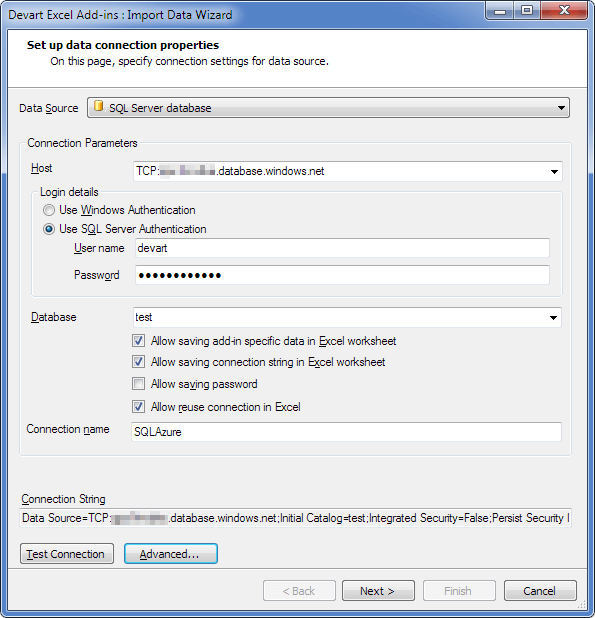
The Import Data Wizard's connection page for a SQL Server database on database.windows.net, with the choice of Windows or SQL Server authentication and options for saving the connection in the workbook.
Overview
Excel's own Get Data can already read a database. What the Database Pack adds is the way back. After an import, the sheet stays linked to its table: Edit Mode tracks your changes, and Commit turns them into INSERT, UPDATE and DELETE statements on the server. That makes Excel a quick front end for lookup tables, price lists, customer records or test data, without building a form or writing an import script.
The six add-ins come from the same code base as Devart's cloud add-ins and are updated with them. Recent database work in the release notes includes Oracle Database 26ai support with its JSON and BOOLEAN types, MariaDB 12 with INET6 and UUID columns, SingleStore support for MySQL users, modern SSH key exchange for MySQL and Oracle, and a fix for an Oracle memory leak on repeated connections in OCI mode.
Features
Two-way editing of database tables
Excel Add-in Database Pack writes worksheet edits back to the table. Changed cells are tinted, new rows and rows marked for deletion are coloured differently, and nothing reaches the server until you press Commit. Rollback discards the whole batch, which is a comfortable safety net when you are fixing hundreds of rows with a formula.

A Company table in Edit Mode: one changed name, an edited email, a row marked for deletion and a new "Beta Company" row, with Commit and Rollback on the Devart tab.
Query Builder that follows foreign keys
Excel Add-in Database Pack lists each table's columns and its relations in the Query Builder, so you can pull in a related table's columns through a foreign key without writing the join yourself. Conditions such as "is not null" or "= 'Legal'" and the sort order are set by clicking. If you know SQL, the SQL Query tab takes your own statement in the database's dialect.

The Visual Query Builder on a Company table: columns ticked, the Company_PrimaryContact relation expanded, and a WHERE filter with an ORDER BY.
Constraint checks while you type
Excel Add-in Database Pack knows each column's type, length and key, so it marks a text value in a numeric column, a string longer than a VARCHAR allows or a duplicate primary key as soon as you enter it. Triggers, check constraints and foreign keys on the server are still enforced at Commit, as with any client.
No client libraries to install
Excel Add-in Database Pack talks to each server directly. Oracle, which normally needs an Oracle Client on every PC, connects by host, port and SID instead (a TNS alias through an installed client still works). SSH tunnels for MySQL and Oracle mean you can reach a server that isn't open to the internet.
Benefits
- Business users can maintain reference data (prices, territories, product codes) without a custom admin screen.
- Fewer one-off scripts. A bulk correction becomes a formula, a fill-down and a Commit.
- One tool across mixed estates. A company with SQL Server for finance and PostgreSQL for the web shop uses the same ribbon for both.
- Cheap compared with the single add-ins as soon as you need three of the six.
Real-World Uses
- Price list updates: load a MySQL or MariaDB product table, apply a 5% increase with a formula, review the tinted cells, commit.
- Data migration checks: put the same table from an old SQL Server and a new PostgreSQL side by side and compare them with lookups.
- Oracle reporting without the client: a finance analyst reads Oracle tables on a laptop that has no Oracle software installed.
- Local app data: open an SQLite file used by a desktop or mobile app, clean it up in Excel and save it back.
- Test data: developers paste generated rows into a DB2 or SQL Server test table instead of writing INSERT scripts.
Who It's For, and Who Should Skip It
The Database Pack fits DBAs, developers and data-savvy analysts who move between two or more of these databases and want Excel as a light editing and reporting front end.
Skip it if everything you have is in one database: a single add-in costs $179.95, and two cost less than the pack. Skip it on a Mac or in Excel on the web, which the add-ins don't support. If you only read data and never write it back, Excel's built-in Get Data or Power Query may be enough. And for heavy schema work, a full database IDE suits you better than a spreadsheet.
Usage Guide
- Get the installer: sign in with a free Devart account on the Database Pack download page and save the 76.60 MB setup file.
- Install as an administrator with Excel closed. .NET Framework 4.0+ and the Visual Studio 2010 Tools for Office Runtime are required.
- Connect: on the Devart tab click Get Data, choose the database type, then enter the host and credentials (or the file path for SQLite). Use Advanced for SSL or SSH settings, and Test Connection.
- Choose the data with the Query Builder or a SQL statement, check Data Preview and import.
- Edit and commit: turn on Edit Mode, make the changes, fix anything shown in red, then Commit.
- Reuse: save the workbook; the Refresh button reloads the table next time.
Before you buy
- Edits write straight to live tables. Give business users an account with rights only on the tables they should change.
- Decide whether the workbook may store the connection string and password. The connection page has separate check boxes for each, and a saved password travels with the file.
- The default $399.95 order covers one user and one year of updates. The order page also offers 2- or 3-year terms and priority support.
- Devart only refunds when a technical problem can't be fixed by its support, so run your own databases through the 30-day trial before paying.
Where it falls short
- The published version lists lag behind. The compatibility page still stops at SQL Server 2019, PostgreSQL 14 and MySQL 8.0, while the release notes show newer Oracle and MariaDB support. Test newer servers in the trial.
- Excel's row limit applies. A worksheet holds about a million rows, so very large tables need a filtered query.
- DB2 is LUW only. Devart lists DB2 for Linux, UNIX and Windows 9.x and later, not DB2 for z/OS or IBM i.
- Late renewal costs more: 20% extra after a 3-month gap, 60% after 12 months.
What Users Say
TrustRadius, G2 and Capterra
Nobody reviews the Database Pack as such; reviews sit under "Devart Excel Add-ins" or the single add-ins. TrustRadius scores the Devart Excel Add-ins line about 9.3 out of 10 from 33 reviews and ratings, and several reviewers there describe using it with databases, citing time saved and simpler processes. G2's SQL Server add-in profile has a single five-star review, and Capterra's SQL Server add-in page is based on one review.
The pattern
Praise centres on broad database connectivity and editing data in a familiar tool. The criticism is about price when add-ins are bought one by one, security integration in a large financial firm, and the fact that Excel itself does nothing to stop a user typing a wrong but valid value. The sample is small, so the trial matters more than the stars.
Comparisons
Database Pack vs buying add-ins one at a time
Each database add-in is $179.95. Two cost $359.90, still $40 under the pack; three cost $539.85, already $140 more. All six would be $1,079.70 against $399.95.
Database Pack vs Universal Pack
For $200 more, the $599.95 Universal Pack adds the 20 cloud-app add-ins (Salesforce, HubSpot, QuickBooks Online, Shopify and others). If your reporting mixes a database with a SaaS system, that is the better deal; if it doesn't, the Database Pack is enough.
Database Pack vs Excel's Power Query
Power Query is free and reads all six databases, but it is a one-way import. The Database Pack's reason to exist is editing and committing back, with type checks on the way.
Editions and Pricing
There is one edition. The update term and priority support are picked on the order page after Buy Now.
| Order |
What you get |
Price |
| Excel Add-in Database Pack (default) | 6 database add-ins, perpetual license, 1 year of updates and support | $399.95 |
| Yearly renewal | Another year of updates and support | $199.95 |
| Order-page options | 2 or 3 years of updates, priority support | shown at checkout |
Volume discounts apply from 5 licenses (5%), 10 licenses (10%) and 20 licenses (15%).
FAQs
Does Excel Add-in Database Pack work with Azure SQL Database?
Excel Add-in Database Pack's SQL Server add-in connects to SQL Azure as well as on-premises SQL Server, using SQL Server authentication over an encrypted connection.
Can Excel Add-in Database Pack connect to MariaDB or Percona?
Excel Add-in Database Pack's MySQL add-in supports MariaDB and Percona by name, and any MySQL-compatible server reachable by host and port, with SSL or an SSH tunnel when the server isn't public.
Do I need Oracle Client to use the Oracle add-in?
No. Excel Add-in Database Pack connects to Oracle directly by host, port and service ID. Oracle Client is only needed if you want to connect through a TNS alias.
Can I write my own SQL in Excel Add-in Database Pack?
Excel Add-in Database Pack imports the results of a SELECT you write on the SQL Query tab, in the database's own dialect. Editing and Commit work on the table data loaded into the sheet.
Does the license keep working if I don't renew?
Yes. Excel Add-in Database Pack is sold with a perpetual license, so the version you have keeps running; renewing at $199.95 a year only buys new versions and support.
How many PCs does one license cover?
Excel Add-in Database Pack is priced per user; the default order is one user, and the order page lets you raise the quantity with volume discounts from five.
System Requirements
- Microsoft Excel 2007, 2010, 2013, 2016, 2019, 2021 or 2024 for Windows
- .NET Framework 4.0 or higher and Visual Studio 2010 Tools for Office Runtime
- Administrator rights for installation
- Network access to the database server, or a local path for SQLite files
Conclusion
Excel Add-in Database Pack is a sound buy at $399.95 if you work with three or more of SQL Server, Oracle, MySQL, PostgreSQL, SQLite and DB2 and need to change data, not just read it. Commit and Rollback from a worksheet, Oracle access without a client, and SSH tunnels make it practical for real admin chores. Pass on it if you live in a single database (buy that one add-in), only need read-only reports (Power Query is free), or work on a Mac.
Download Free TrialBuy Now