Excel Add-in for Zoho CRM: Edit Accounts, Contacts and Deals in Excel and Sync Them Back
Excel Add-in for Zoho CRM is a Devart add-in for Excel on Windows that signs in to Zoho CRM through OAuth, loads modules such as Accounts, Contacts, Leads and Deals into worksheets, and commits your edits back to Zoho CRM through its API v8. It costs $179.95 with a year of updates and suits sales operations staff and CRM admins who clean or update records in bulk.
Zoho CRM has its own import and mass-update tools, but mass update changes one field to one value, and imports need a mapped file. When every record needs a different correction, say, standardised company names or phone formats, an Excel table that writes back is simply faster.
Quick facts
- Version: 3.1.70 from September 7, 2026
- Developer: Devart
- Excel: 2007 through 2024 for Windows
- Sign-in: OAuth in a browser window (OAuthInteractive); no token to copy
- Zoho CRM API: v8 ("Preferred") or v2 ("Deprecated")
- Data centres: US, EU, India, Australia, China, Canada, Japan, Saudi Arabia, UK
- Modules: Accounts, Contacts, Leads, Deals, Calls, Tasks, Events, Cases, Products, Vendors, Price Books, Quotes, Sales Orders, Purchase Orders, Invoices, Campaigns and custom modules
- Price: $179.95, renewals $89.95 a year
- Trial: 30 days via a free Devart account
What we checked: the OAuth sign-in steps, API versions and options in Devart's Zoho CRM documentation, a decade of Zoho CRM entries in the revision history, version 3.1.70 at 76.60 MB on the download page, Devart's listing on the Zoho Marketplace, and the order page, which charged $179.95 for one license with a year of updates and $89.95 to renew on November 14, 2026. No Zoho CRM account was connected.
Before you buy
Choose API v8. Devart labels API v8 "Preferred" and v2 "Deprecated", and older workbooks may still point at v2. New connections should use v8; Devart's documentation no longer covers the old v1 authentication-token login.
Pick the right data centre. Zoho keeps accounts in separate regions. If your CRM opens at crm.zoho.eu or crm.zoho.in, select that domain before signing in, or the login will fail.
Download Free TrialBuy Now
Overview
Devart has supported Zoho CRM in its Excel add-ins since at least 2016, and the product has followed Zoho's API generations: v2 in 2018, v4 in 2023, and v8 in June 2026, when the connection editor was simplified to just "Preferred" and "Deprecated" API choices. Sign-in is now a browser login: you pick your domain, click Sign In, approve the permissions, and the add-in stores a refresh token for later sessions.
Once connected, every Zoho CRM module, including custom modules, appears as a table in the Import Data Wizard. Lookups such as Account Owner, Created By or Parent Account come through as columns, and the loaded sheet becomes editable with Edit Mode.
Features
Choose module columns and filters visually
Excel Add-in for Zoho CRM lists a module's fields in the Query Builder, so for Accounts you can tick name, phone, website, industry, employees, annual revenue and billing and shipping addresses, and keep only rows where, say, phone or fax is filled in. With the Query API option on, those filters run as Zoho COQL queries on the server, which Devart added to speed up queries on the core modules.
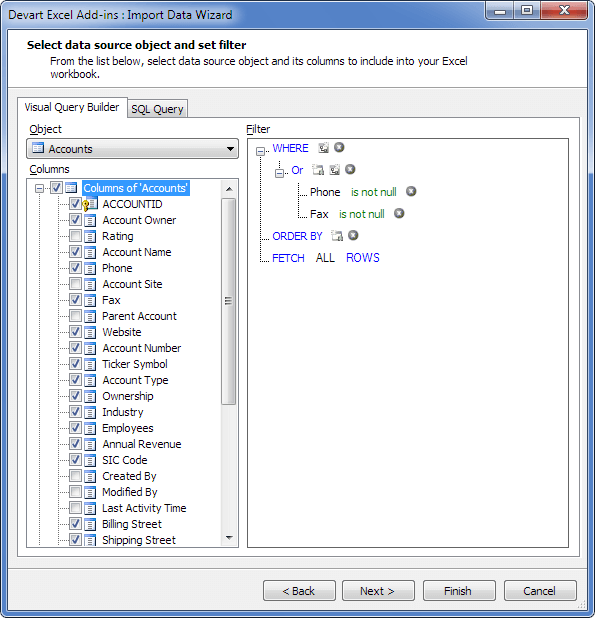
The Accounts module in the Query Builder, with most fields ticked and a filter keeping accounts that have a phone or fax number.
Correct account records row by row, commit once
Excel Add-in for Zoho CRM shows every pending change in colour: edited cells, changed records and new accounts at the bottom of the sheet. System columns such as the record ID and Account Owner are read-only. Commit pushes the batch to Zoho CRM; Rollback restores the loaded values.
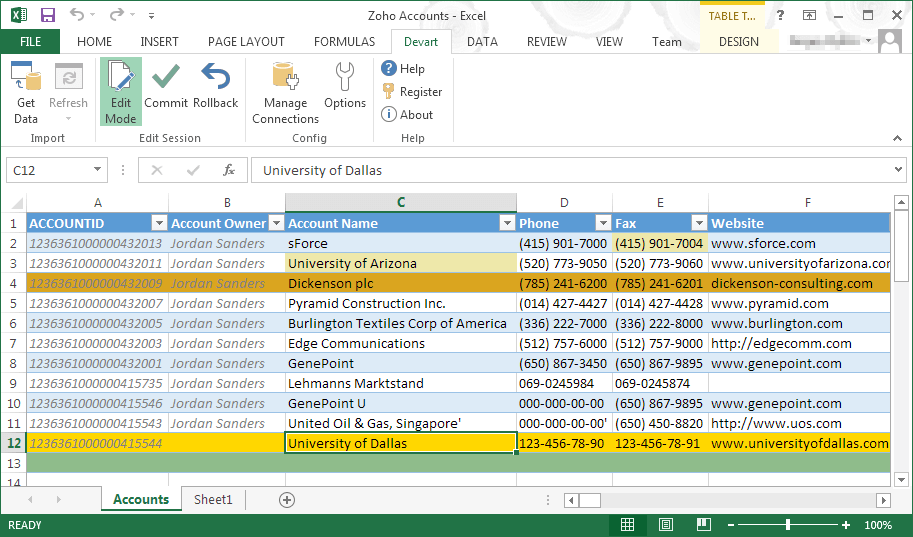
Zoho CRM Accounts in Edit Mode: a changed fax number and account name are shaded, one record is highlighted, and "University of Dallas" is being added as a new account.
Numbers and types checked before the API sees them
Excel Add-in for Zoho CRM validates entries against the module's field types. "39k" in an Employees field or text in Annual Revenue is marked red with the reason, so a batch commit isn't stopped by one bad cell. Zoho's newer field types (image upload, multi-user lookup, rollup summary, territories and others) were added to the add-in's type support in August 2026.
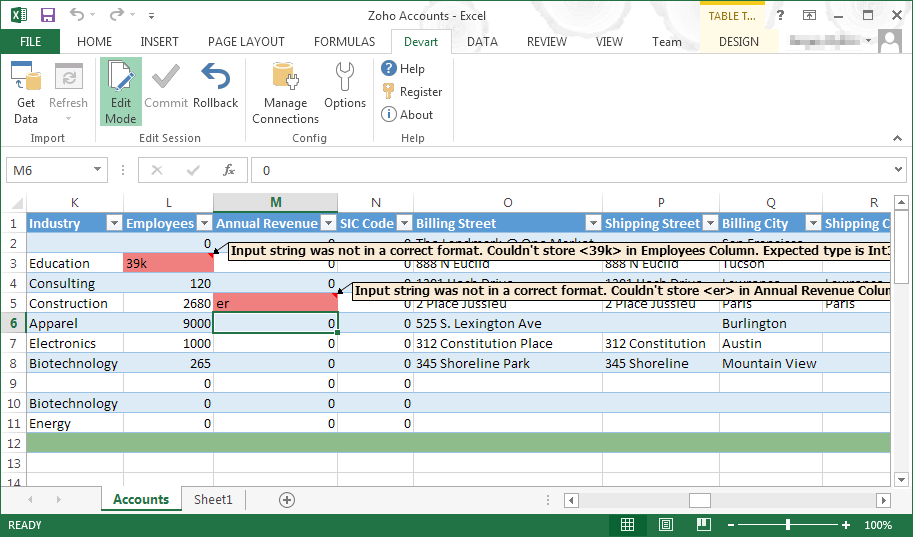
Validation on the Accounts sheet: "39k" in Employees and "er" in Annual Revenue are rejected because the columns expect numbers.
Bulk Read for big modules
Excel Add-in for Zoho CRM can switch to Zoho's Bulk Read API with the BulkRead option, added in June 2026 for querying large data volumes, such as a contacts module with hundreds of thousands of records. A SuppressExtendedRequests option skips the extra API calls some objects need for extended data, which saves time and API credits when you don't need those fields.
Deal history and approval-aware reads
Excel Add-in for Zoho CRM includes a read-only DealsStageHistory table, which records how each deal moved through the pipeline, so win-rate and stage-duration analysis can be done in Excel. An Enable Non Approved Records option decides whether records still waiting for approval are included, and display names can replace API module names for custom modules.
Benefits
- Different value per record. Unlike Zoho's mass update, each row can get its own correction.
- No token handling. The browser sign-in means nobody pastes API secrets into a spreadsheet.
- Works in every Zoho region, including China, Saudi Arabia and Japan since 2026.
Real-World Uses
- Account clean-up: load Accounts, fix inconsistent industry values and website formats with Excel formulas, and commit.
- Territory reassignment prep: pull Accounts and Contacts by region into one workbook to plan reassignment, then apply the changes.
- Pipeline analysis: join Deals with DealsStageHistory to see how long deals stay in each stage.
- Importing leads from an event list: paste new rows under the Leads table and commit them as new records, with validation catching malformed numbers or dates first.
Who It's For, and Who Should Skip It
Right for Zoho CRM administrators and sales operations analysts on Windows who regularly fix or enrich many records with different values, and anyone who reports on Zoho CRM data in Excel.
Wrong for users on Excel for Mac, teams who need a hands-off scheduled sync (Devart's add-ins have no automation), and anyone whose edits fit Zoho's built-in mass update or import tools, which cost nothing extra.
Usage Guide
- Install the add-in (76.60 MB, Devart sign-in needed) on Windows with administrator rights.
- Open the wizard: Devart tab, Get Data, data source Zoho CRM.
- Sign in: set Authentication Type to OAuthInteractive, API Version to Preferred, choose your Zoho domain, click Sign In, log in in the browser and grant access.
- Optional settings under Advanced: Query API for COQL, BulkRead for very large modules, Readonly for a reporting workbook.
- Load a module, switch on Edit Mode, make changes, clear any validation errors, and Commit.
Where it falls short
- API credits still apply. Every load, refresh and commit uses Zoho CRM API calls, which count against your edition's daily allowance.
- Stage history is read-only. DealsStageHistory can be analysed but not edited.
- Zoho's API changes ripple through. Past releases fixed errors after Zoho changes, such as an "invalid module name" error and failures reading Invoices, so stay on the current version.
- No automation. Refresh and Commit are buttons only.
What Users Say
Zoho Marketplace, Capterra and GetApp
Devart Excel Add-in for Zoho CRM has had a Zoho Marketplace listing since September 2017, and it showed no ratings or reviews on November 14, 2026. Capterra lists it as rated by 0 users, and GetApp's page has no reviews. Feedback on this add-in simply hasn't been published.
The wider Devart add-in line
Taken as a family, "Devart Excel Add-ins" scores roughly 9.3 out of 10 on TrustRadius across about 33 ratings, a pool that includes some of Devart's database tools. Software Advice shows 4.5 out of 5 from two reviews. The praise is for editing live data inside Excel; the complaints are cost per data source and the learning curve of the first connection.
Comparisons
Excel add-in vs Zoho CRM's import, export and mass update
Zoho's own tools are included in your subscription and are fine for loading a new list or setting one field on many records. The add-in is for the in-between job: many records, each needing its own fix, reviewed in Excel and written back without mapping a file.
Excel add-in vs Devart's ODBC driver for Zoho CRM
Devart's ODBC Driver for Zoho CRM serves BI and reporting tools such as Power BI or Tableau and scheduled jobs. Choose the Excel add-in when people edit CRM data by hand in Excel.
Editions and Pricing
Only one edition exists. Buy Now opens Devart's order page with one license and a year of updates selected; the page lets you add a second or third year of updates or priority support.
| Option | Price | Contents |
|---|
| Excel Add-in for Zoho CRM | $179.95 | Perpetual use; updates and support for the first year |
| Yearly update renewal | $89.95 | Late renewal costs 20% more after 3 months, 60% after a year |
| Cloud Pack | $499.95 | Zoho CRM, Zoho Books, Zoho Desk and 17 other cloud add-ins |
| Universal Pack | $599.95 | Every one of the 26 add-ins |
A company running Zoho CRM with Zoho Books and Zoho Desk would pay $539.85 for the three single add-ins, more than the $499.95 Cloud Pack. Volume discounts of 5%, 10% and 15% apply at 5, 10 and 20 licenses.
FAQs
Does Excel Add-in for Zoho CRM work with custom modules and custom fields?
Yes. Excel Add-in for Zoho CRM lists custom modules alongside the standard ones, and can show them by display name instead of their API name with the Use Display Name For Custom Tables option.
Is my Zoho password stored in the workbook?
No. Excel Add-in for Zoho CRM signs in through Zoho's own login page and keeps an OAuth refresh token, by default in a token file rather than in the workbook. You can still choose whether the connection itself is saved in the file.
Can Excel Add-in for Zoho CRM connect to a Zoho account in Europe or India?
Yes. Excel Add-in for Zoho CRM has a domain list covering crm.zoho.com, .eu, .in, .com.au and .com.cn, with Canada, Japan, Saudi Arabia and UK domains added in June 2026.
Is there a refund if it doesn't work with my CRM?
Devart refunds Excel Add-in for Zoho CRM within 30 days of purchase when a technical problem stops it working and Devart's support can't fix it. It isn't a change-of-mind refund, so use the 30-day trial first.
How many PCs does one license cover?
One license of Excel Add-in for Zoho CRM is for a single user on one computer, plus a second copy on that user's own laptop or home PC.
Can I use it in Excel for Mac?
No. Excel Add-in for Zoho CRM supports Excel 2007 to 2024 on Windows only.
System Requirements
- Excel 2007, 2010, 2013, 2016, 2019, 2021 or 2024, Windows version
- .NET Framework 4.0 or higher with the Visual Studio 2010 Tools for Office Runtime
- Administrator account to install
- A Zoho CRM account with API access
Conclusion
Excel Add-in for Zoho CRM is good value at $179.95 for admins who keep correcting Zoho CRM records one by one. Browser sign-in, API v8, Bulk Read and COQL make it current with Zoho's platform, and the validated edit-and-commit loop handles the record-by-record fixes Zoho's mass update can't.
If your changes are simple one-value updates or one-off imports, Zoho's free tools do the job, and Mac users can't run it. Otherwise, run the trial on your own modules and commit a small batch first.
Download Free TrialBuy Now