dotConnect for Zoho Books: Query and Update Zoho Books Accounting Data From .NET With SQL
dotConnect for Zoho Books is Devart's $339.95 ADO.NET data provider that lets .NET developers read and write a Zoho Books organization (contacts, sales orders, sales receipts, bills, credit notes, customer payments and bank transactions) with ordinary SQL or Entity Framework Core instead of Zoho's REST API. It runs on .NET 5 to 11 and .NET Framework 4.5 to 4.8 on Windows, Linux and macOS, and the price is a perpetual single-developer license with a year of updates.
The usual buyer is the developer whose company keeps its books in Zoho and who now has to push orders from a web shop into Zoho Books, pull receivables into a data warehouse, or show cash figures in an internal portal. Doing that by hand means OAuth flows, eight regional API hosts, paging and JSON models. This provider turns it into a connection string and SELECT ... FROM Contacts.
Quick facts
- Version: 2.3.248, released November 11, 2026 (first release May 29, 2024)
- Developer: Devart
- Data source: Zoho Books, in the US, Europe, China, India, Australia, Japan, UK or Canada data center
- Sign-in: OAuth 2.0, either interactive in the browser or with a stored refresh token plus Organization Id, Client ID and Client Secret
- .NET: .NET 5 to 11, .NET Core 2.0 to 3.1, .NET Standard 2.0/2.1, .NET Framework 4.5 to 4.8, including ASP.NET Core, Blazor and .NET MAUI
- ORMs: Entity Framework Core 1 to 11, Entity Framework 4 to 6, Dapper 1.x and 2.x, NHibernate 1.x to 5.x
- Packages: Devart.Data.ZohoBooks and Devart.Data.ZohoBooks.EFCore on NuGet, plus a 16.06 MB Windows installer for Visual Studio 2015 to 2026
- Price: $339.95 for one developer, Server $799.95, OEM for 10-100 devices $4,999.95, all perpetual with one year of updates
- Trial: 30 days, full product, no card, free Devart account needed to download
- Refunds: the order page promises a 30-day money-back guarantee "if the product does not meet your expectations", while Devart's ordering FAQ grants refunds within 30 days only for technical problems its support can't fix
- What we checked: version 2.3.248 and the 16.06 MB download on Devart's site, every entry in the revision history back to the first release, the connection and OAuth documentation, and the order page on November 16, 2026: $339.95 for a single license with one year of support and upgrades. We didn't connect it to a Zoho Books organization.
Download Free TrialBuy Now
Overview
Zoho Books is Zoho's online accounting app for small and mid-sized businesses: invoicing, bills, bank feeds, sales orders and tax. Everything in it is reachable only through Zoho's web API, and every customer's data lives in one of Zoho's regional data centers. dotConnect for Zoho Books hides both facts behind the standard ADO.NET classes (ZohoBooksConnection, ZohoBooksCommand, ZohoBooksDataReader, ZohoBooksDataAdapter), so your code talks to a Zoho Books organization the way it would talk to SQL Server.
How a query runs matters for performance. Simple statements are compiled straight into Zoho Books API calls and executed on Zoho's side. When a statement is too complex for the API (a join between contacts and sales orders, say, or a GROUP BY), the provider sends the parts Zoho can answer and finishes the rest in its own local SQL-92 engine before returning rows to your application.
The product is young but actively kept up. It first shipped in May 2024, gained .NET 10, Visual Studio 2026 and runtime interactive OAuth in version 2.0 (December 2025), new accounting objects in May 2026, and .NET 11 and EF Core 11 support on November 11, 2026.
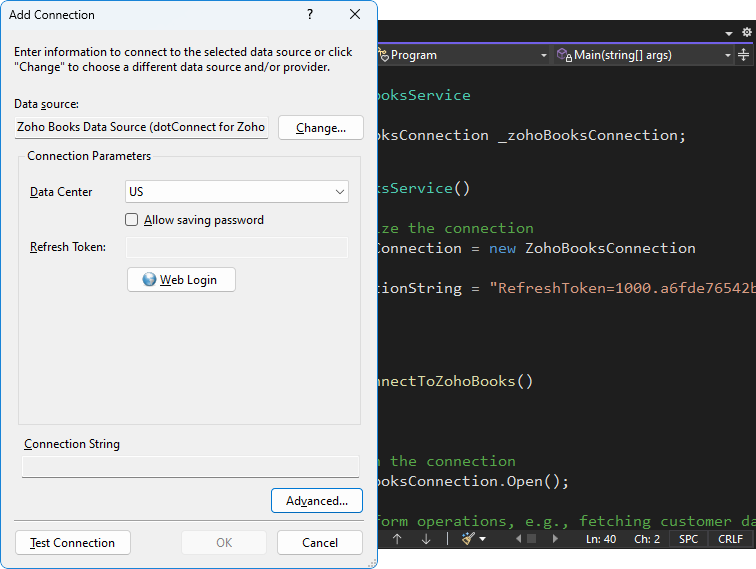
Visual Studio's Add Connection dialog with the Zoho Books data source: Data Center set to US, an empty Refresh Token filled in through the Web Login button, and C# code using ZohoBooksConnection behind it.
Features
Zoho Books records as SQL tables, with writes
dotConnect for Zoho Books exposes the organization's business records as tables you can SELECT from and, where Zoho allows it, INSERT into, UPDATE and DELETE. Devart's own samples insert a contact with INSERT INTO Contacts and change its website with an UPDATE. The May 2026 release added the SalesReceipts object, nested line items inside Bills, reading BankTransactions in every status, better filtering on Status fields, and fuller custom-field support in SalesOrders, Bills, CreditNotes and CustomerPayments. Fields Zoho treats as read-only, such as a contact's Phone in Devart's sample, stay read-only.
Custom fields come through as columns
dotConnect for Zoho Books reads the CustomFields and CustomFieldHash data Zoho attaches to sales orders, bills, credit notes and customer payments. If your accountants track a project code or cost center in a custom field on bills, that value is available to your WHERE clauses and reports rather than buried in a JSON blob.
Two ways to sign in, eight data centers
dotConnect for Zoho Books connects with Authentication Type OAuthInteractive, which opens Zoho's login page in a browser and fetches the token for you, or OAuth, where you supply the Organization Id, Refresh Token, Client ID and Client Secret yourself for unattended services. You can use Devart's built-in OAuth app or register your own in the Zoho Developer Console. The Data Center setting covers the US, Europe, China, India, Australia, Japan, UK and Canada, which is what decides whether a login from a European or Indian Zoho account works at all.
EF Core scaffolding and Entity Developer models
dotConnect for Zoho Books ships a separate Devart.Data.ZohoBooks.EFCore package, so you can scaffold a DbContext from your Zoho Books organization and write LINQ against it, on EF Core 1 to 11. Entity Framework 4 to 6, Dapper and NHibernate also work. Devart's visual ORM designer, Entity Developer, can build the model in a wizard, but it's a separate product with its own license.
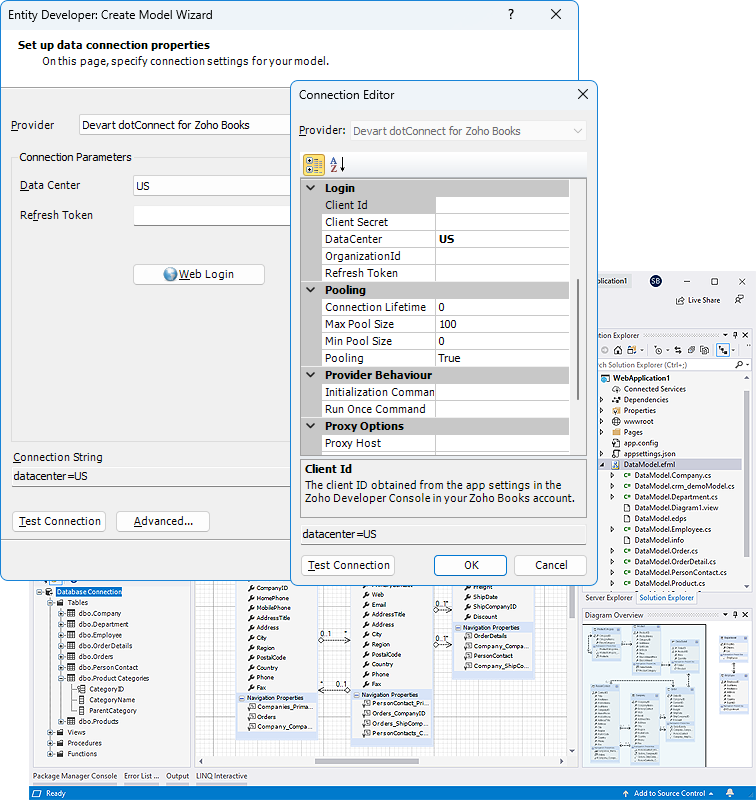
Entity Developer's Create Model Wizard with the Devart dotConnect for Zoho Books provider selected, and its Connection Editor listing the Client Id, Client Secret, DataCenter, OrganizationId and Refresh Token settings, plus pooling and proxy options.
Paging, bulk loading and request tracing
dotConnect for Zoho Books reads results page by page: a ZohoBooksDataReader requests the next page from Zoho only as you read, while ZohoBooksDataAdapter.Fill pulls everything at once. A ZohoBooksLoader component loads rows in bulk, and ZohoBooksMonitor together with Devart's dbMonitor tool shows the API requests each query produces, which is the quickest way to see why a report is slow or hitting Zoho's limits.
Benefits
- One code path for every region. Changing a customer from the US to the EU data center is a connection-string change, not new endpoint code.
- Joins Zoho's API can't do. The local engine lets you combine contacts, orders and payments in one statement.
- Familiar tooling. Server Explorer, LINQ, Dapper and DataTables work as they do with any database provider.
- Runs where your services run. The NuGet package works on Linux containers and macOS as well as Windows.
Real-World Uses
- Web-shop orders into the books: an ASP.NET Core service inserts sales receipts for paid online orders so the accountant never re-keys them.
- Payables dashboard: a Blazor page lists open Bills with their line items and custom cost-center field for department heads.
- Bank reconciliation helper: a nightly job reads BankTransactions in every status and flags uncategorized ones for review.
- Warehouse feed: a scheduled console app copies CustomerPayments and CreditNotes into SQL Server for Power BI.
Who It's For, and Who Should Skip It
It's for .NET developers at companies that run their accounting in Zoho Books, and for software vendors who want Zoho Books support inside their own .NET product (which needs the OEM license).
Skip it if nobody on your team writes .NET code. Analysts who want Zoho Books data in Excel, Power BI or Tableau are better served by Devart's ODBC Driver for Zoho Books, a cheaper driver any ODBC tool can use, or by Devart's Excel Add-in for Zoho Books. If your company's sales data lives in Zoho CRM rather than Books, the sibling dotConnect for Zoho CRM is the right provider. And for a single nightly call to one Zoho endpoint, plain HttpClient code costs nothing.
Usage Guide
- Download the trial with the button on this page (Devart asks you to sign in with a free account) and run the installer, or add
Devart.Data.ZohoBooks from NuGet to your project.
- Note your Zoho Books Organization Id and which data center your account uses.
- In Visual Studio's Server Explorer, choose Connect to Database, pick Zoho Books Data Source, set Authentication Type to OAuthInteractive and the Data Center, and click Sign In.
- For a server job, use Authentication Type OAuth with a refresh token, Organization Id, Client ID and Client Secret, so no browser is needed.
- Query with ZohoBooksCommand or scaffold an EF Core model. If you create connections in code rather than with the designer component, add your license key through the License Key connection parameter before deploying.
Before you buy
- Buy Now opens the order page with a single license and one year of support and upgrades at $339.95. Edition, license type (Single, Team, Site), a second or third year of updates and priority support are chosen on that same page, under the one product.
- The Developer license covers development and testing by one developer. Running your integration on a production server needs the Server edition ($799.95), and shipping it inside your product needs OEM.
- The license is perpetual: the version you bought keeps working after the update year ends.
- Interactive sign-in opens a local callback port (59996 by default) for Zoho's reply, so a locked-down firewall must allow it.
Where it falls short
- Generic documentation in places. Devart's product page promises "accounts, contacts, leads, and opportunities", CRM words that don't describe Zoho Books, and the Retrieving Data tutorial's sample still queries an "Accounts" table with an "Account Name" column. The getting-started samples on Contacts are the accurate ones. Browse the real object list in Server Explorer during the trial.
- Zoho's API is the speed limit. Every query becomes API calls against your Zoho plan's limits, and a DataAdapter.Fill on a large table reads every page. Filter early and watch the requests in dbMonitor.
- A short track record. The provider has been on sale since mid-2024, and the object coverage was still being widened in May 2026.
- Licensing chores. Since version 2.0 the .NET Framework assemblies use license keys too, and version 2.2.223 had to fix Visual Studio treating an expired perpetual license as invalid.
What Users Say
dotConnect for Zoho Books has no rated reviews on G2, Capterra or similar directories yet; it's a niche component that only appeared in 2024. The public record so far is Devart's own launch note, so judge it on the trial.
Devart's launch announcement
Devart introduced the Zoho Books and Zoho Desk providers together, writing that they "ensure easy data synchronization between Zoho Books or Zoho Desk and external databases." That is the honest scope of the product: a connector for moving and querying data, not a reporting tool of its own.
Comparisons
vs. calling the Zoho Books API yourself
Zoho's REST API is free and complete, but you write the OAuth refresh logic, choose the right regional host, page through results and map JSON to classes for every object. dotConnect for Zoho Books is worth $339.95 when you need several objects, joins or EF Core; for one endpoint the API alone is enough.
vs. Devart's other accounting providers
Devart sells the same provider design for other accounting systems at the same price and editions: dotConnect for QuickBooks Online and dotConnect for FreshBooks. Pick the one that matches the books your business keeps.
Editions and Pricing
All editions are one product on Devart's order page; the edition and update term are picked there.
| Edition | Price | Allowed use |
|---|
| Developer (Buy Now default price) | $339.95 | One developer, on any number of development workstations |
| Server | $799.95 | One server used by one organization, including web and application servers |
| OEM for 10-100 devices | $4,999.95 | Redistributing the provider inside your own application |
| Site, and OEM for 100+ devices | On the order page | Unlimited computers in one company, or larger redistribution |
Buying 5 to 9 licenses takes 5% off, 10 to 19 takes 10%, and 20 or more 15%.
FAQs
Does dotConnect for Zoho Books work with a Zoho account in Europe or India?
Yes. dotConnect for Zoho Books has a Data Center setting with US, Europe, China, India, Australia, Japan, UK and Canada. Choose the one your Zoho Books account is hosted in before signing in.
Can dotConnect for Zoho Books run in a background service without a browser login?
Yes. dotConnect for Zoho Books accepts Authentication Type OAuth with a refresh token, Organization Id, Client ID and Client Secret in the connection string. You get the refresh token once, interactively or with the provider's ApplyAsync helper, and store it for the service.
Can one app use dotConnect for Zoho Books with several Zoho Books organizations?
Yes, one connection per organization. dotConnect for Zoho Books picks the organization with the Organization Id connection parameter, so an app can open a connection for each company it manages.
Do I need the Server edition of dotConnect for Zoho Books for a web app?
Usually yes. The Developer license of dotConnect for Zoho Books covers development and testing by one developer; Devart's Server edition covers installation on a single server of one organization, including web and application servers.
Can I get a refund for dotConnect for Zoho Books?
Devart's order page for dotConnect for Zoho Books advertises a 30-day money-back guarantee if the product doesn't meet your expectations. Its ordering FAQ is stricter: a full refund within 30 days of purchase when a technical problem or bug stops the product working and support can't fix it. Use the 30-day trial on your own organization first.
Does dotConnect for Zoho Books work in Visual Studio Code or Rider?
Yes, through NuGet. dotConnect for Zoho Books works in any NuGet-compatible IDE such as VS Code or JetBrains Rider; the design-time tools (Server Explorer, designers) are Visual Studio only.
System Requirements
- .NET 5 to 11, .NET Core 2.0 to 3.1, .NET Standard 2.0/2.1, or .NET Framework 4.5 to 4.8; x64 and x86
- Windows, Linux or macOS through NuGet; the installer and Visual Studio 2015 to 2026 integration are Windows only
- A Zoho Books organization, and outbound HTTPS access to Zoho's servers
Conclusion
dotConnect for Zoho Books is a sound $339.95 buy for a .NET team that has to move data in and out of Zoho Books regularly. The reason to buy it is that it removes the plumbing (regional hosts, OAuth tokens, paging) and gives you SQL joins and EF Core over your accounting records, on Windows, Linux and macOS. The reasons to hold back are the extra $799.95 Server license most production integrations need, documentation that still borrows CRM examples, and a product only two years old. Try it for 30 days against your own organization, with the exact objects your integration needs.
Download Free TrialBuy Now