SSIS Data Flow Components for Oracle: Oracle Source, Destination and Lookup for SSIS, No Oracle Client Needed
SSIS Data Flow Components for Oracle is Devart's Oracle connector for SQL Server Integration Services: an Oracle Source, Oracle Destination, Oracle Lookup and an Oracle Connection Manager that can reach the database directly over TCP/IP without installing Oracle Client. It's for data engineers and DBAs who move data between Oracle and SQL Server or other systems in SSIS packages, runs on Windows, and costs $199.95 a year for one developer, or $399.95 for a perpetual license.
Getting SSIS to talk to Oracle usually starts with installing and configuring Oracle's client software on every machine that designs or runs packages, then matching 32-bit and 64-bit drivers. Devart's components skip that step with their Direct mode, and add a query editor, bulk loading and a caching lookup built for Oracle.
Quick facts
- Version: 5.1.49, released August 17, 2026
- Developer: Devart
- Components: Oracle Source, Oracle Destination, Oracle Lookup, Oracle Connection Manager
- Oracle versions: Oracle 8.0 to 26ai, including Express and Personal editions, Oracle Cloud Database as a Service, Oracle on Azure and Amazon RDS for Oracle
- SSIS versions: SQL Server Integration Services 2008, 2012, 2014, 2016, 2017, 2019, 2022 and 2025
- Platform: Windows Vista and later, 32-bit and 64-bit, with .NET Framework 4.5
- Price: $199.95 a year for one developer (subscription), $399.95 perpetual. Server and Site licenses available
- Trial: 30 days, fully functional; the 618.60 MB download needs a free Devart account
- Refunds: Devart's ordering FAQ allows a full refund within 30 days of purchase only when a technical problem or bug stops the product working and support can't fix it
- What we checked: the Oracle component dialogs, supported versions and the 5.1.49 release on Devart's pages, and the order page on November 16, 2026: SSIS Data Flow Components for Oracle at $199.95 for the default one-year Developer subscription (renewing yearly), $399.95 Developer perpetual, $499.95 and $999.95 for Server subscription and perpetual, and $999.95 for a perpetual Site license. We didn't install the components or run a package against an Oracle server.
Download Free TrialBuy Now
Overview
After installation, four Devart Oracle items appear in Visual Studio's SSIS Toolbox. You create a Devart Oracle Connection Manager, drop a Devart Oracle Source into a data flow, drag a table into its query box to generate a SELECT, and connect the output to any SSIS transformation or destination. Going the other way, the Oracle Destination bulk-loads rows into Oracle, and the Oracle Lookup matches incoming rows against Oracle tables. The packages run on your own SSIS server and connect straight to the database.
The Oracle connector gets regular attention in Devart's release notes. Version 3.0.630 (September 2024) added Oracle 23c and connections to servers with Security Banners in Direct mode; 3.2.1007 (December 2025) added long passwords in Oracle 23ai and fixed an OCI-mode memory leak and CLOB/NCLOB reading errors; 4.0.0 (January 2026) added Oracle Database 26ai; 5.0.0 (June 2026) added the JSON data type (21c, 23ai, 26ai) and BOOLEAN (23ai, 26ai); and 5.1.49 (August 2026) added PuTTY PPK3 keys for SSH tunnels.
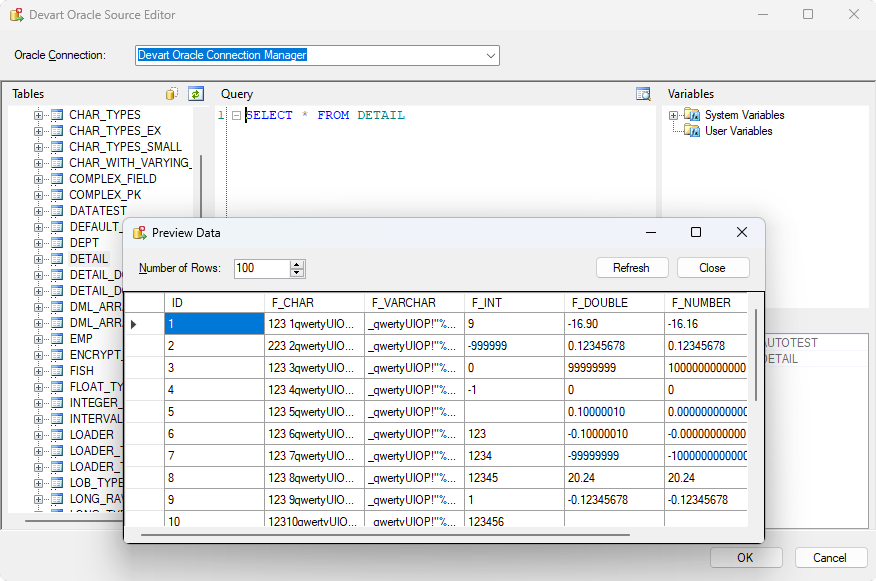
The Devart Oracle Source Editor: the schema's tables on the left, a SELECT * FROM DETAIL query, system and user variables on the right, and the Preview Data window showing the first rows.
Features
Connect without Oracle Client, or through it
SSIS Data Flow Components for Oracle connect in Direct mode over TCP/IP with just a server, port (1521 by default), SID, user and password, so no Oracle Client has to be installed on the design or server machine. Prefix the server with tcps:// for SSL or ssh:// for an SSH tunnel. Clear the Direct box and the components use an installed Oracle Client instead (OCI mode), with a TNS alias and the Oracle Home you pick. Leaving the user and password blank uses OS authentication, and Connect Mode opens SYSDBA or SYSOPER sessions.
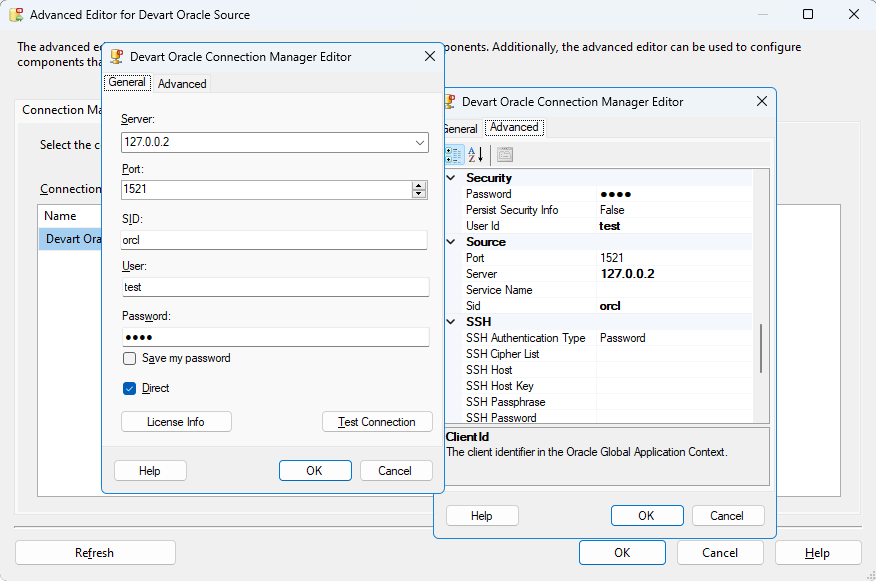
The Devart Oracle Connection Manager Editor: server, port 1521, SID and login on the General tab with Direct ticked, and the Advanced tab's Security, Source and SSH settings.
Fine-tuning for Oracle connections
SSIS Data Flow Components for Oracle expose Oracle-specific connection options in an advanced editor: Number Mappings to control how NUMBER, INTEGER and FLOAT columns map to .NET types, Default Fetch Size, connection and command timeouts, an Initialization Command run after connecting, connection pooling, OCI Session Pooling with proxy users, Database Resident Connection Pooling (DRCP, Oracle 11g and later), and Lob Block Size for very large CLOB values.
A source editor that previews the data
SSIS Data Flow Components for Oracle's Source Editor lists the database's tables and columns next to your SSIS variables. Drag a table into the query box to get a SELECT, then edit it to pick columns, join tables or filter with variables as parameters, and preview the returned rows before you run the package.
Bulk loading into Oracle
SSIS Data Flow Components for Oracle's Destination uses Oracle's Direct Path interface in OCI mode and array binding in Direct mode to insert rows in bulk. Its advanced properties include the operation (BulkInsert among them), buffer size, and a retry count and interval for transient errors.
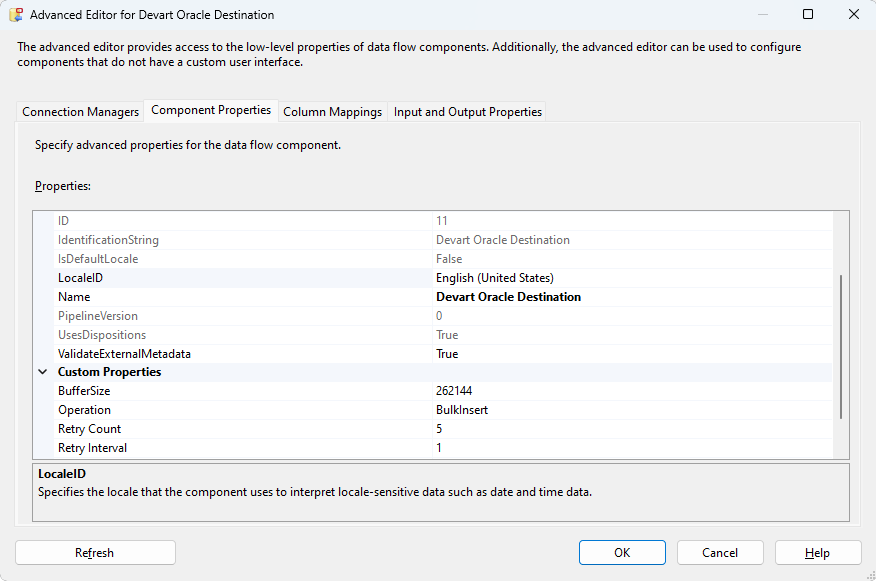
Advanced Editor for the Devart Oracle Destination: Operation set to BulkInsert, BufferSize 262144, Retry Count 5 and Retry Interval 1.
A lookup that batches and caches
SSIS Data Flow Components for Oracle's Lookup checks several incoming rows with one SELECT and caches what comes back, so a package matching thousands of rows doesn't send one query per row to the server. Batch size and cache size are set in the component's properties.
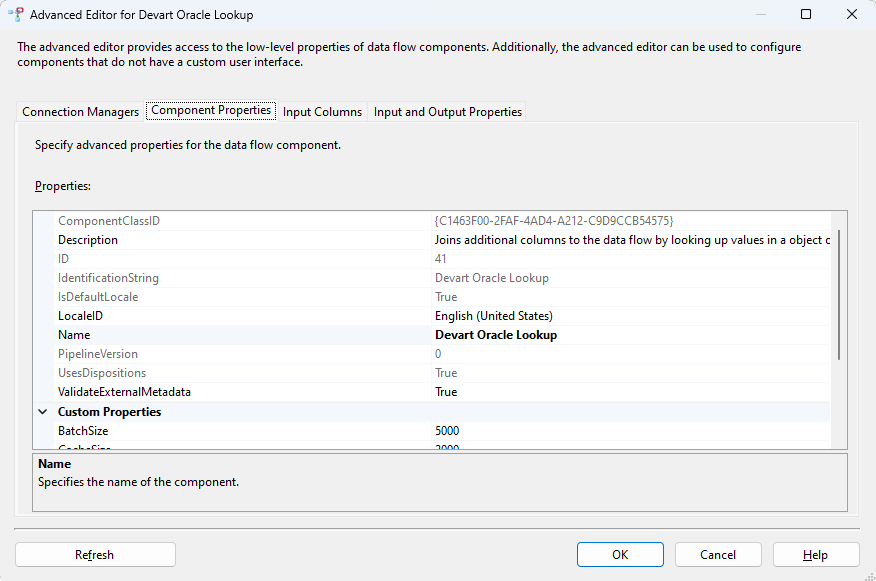
Advanced Editor for the Devart Oracle Lookup, with BatchSize 5000 under Custom Properties.
Benefits
- Fewer moving parts on servers. Direct mode means no Oracle Client installs, no TNS files to sync and no 32/64-bit client mismatch between Visual Studio and the SSIS runtime.
- Modern Oracle types handled. JSON and BOOLEAN columns from Oracle 23ai and 26ai come through, along with LOBs, XMLTYPE and TIMESTAMP WITH TIME ZONE.
- Faster loads. Bulk Direct Path and array binding beat row-by-row inserts for large tables.
- Data stays in-house. Packages run on your own servers, with SSL or SSH to the database when it sits on another network.
Real-World Uses
- Oracle to SQL Server migration. Copy an Oracle application's tables into SQL Server through ordinary SSIS data flows.
- Nightly reporting feeds. Extract changed rows from an Oracle ERP into a SQL Server warehouse for Power BI, filtering the SELECT with an SSIS date variable.
- Loading files into Oracle. Read CSV or XML files with SSIS's flat file sources and bulk-load them into Oracle staging tables with the Destination.
- Cloud Oracle access. Pull from Amazon RDS for Oracle or Oracle Cloud over SSL, or through an SSH jump host, without client software on the SSIS server.
Who It's For, and Who Should Skip It
It's for SQL Server shops that run SSIS and need Oracle as a source or target, especially where installing and maintaining Oracle Client on build and production servers is a hassle, and teams on SSIS 2008 that still need a supported Oracle connector.
Skip it if you don't use SSIS: it's a set of SSIS components, not a standalone ETL or migration tool. If Oracle is one of many systems you integrate, the SSIS Universal Bundle covers every Devart source for $499.95 a year. And if your team is moving off SSIS to a cloud ETL service, buying SSIS-only components points the wrong way.
Usage Guide
- Install. Sign in with a free Devart account on the download page, close Visual Studio, and run the installer on the development machine (it's the same 618.60 MB installer Devart uses for all its SSIS components). Install it on the SSIS server too.
- Open an Integration Services project in Visual Studio with SSDT/SSIS projects installed, and go to the Data Flow tab.
- Add the source. Drag Devart Oracle Source from the SSIS Toolbox into the data flow and double-click it.
- Create the connection. Choose to create a new connection manager, tick Direct, enter server, port, SID, user and password, and click Test Connection. Add
tcps:// or ssh:// to the server and fill in the Advanced tab for SSL or SSH.
- Write the query. Drag a table into the Query box, edit the SELECT, and click Preview to check the rows.
- Load or match. Connect the source to transformations and a destination, or use Devart Oracle Destination to load into Oracle and Devart Oracle Lookup to match rows. Then deploy and schedule the package like any other.
Before you buy
The default order is a one-year Developer subscription at $199.95, which renews yearly; the subscription license works only while it's active and needs an Internet connection to activate and check the license. The perpetual Developer license ($399.95) keeps working at your version and activates offline. A Developer license covers building and testing packages on one developer's workstations; deploying packages to a production server needs a Server license ($499.95 a year or $999.95 perpetual), which also covers one developer. A Site license covers unlimited computers in one company.
Where it falls short
- Some features depend on the mode. Direct Path loading and Lob Block Size are OCI-mode features, so the fastest load path still needs Oracle Client.
- Oracle edge cases keep turning up. Recent releases fixed an OCI-mode memory leak on repeated connections, an AccessViolationException reading CLOB/NCLOB, TIMESTAMP WITH TIME ZONE offset errors and XMLTYPE handling in Direct mode, so stay on current updates.
- Big download for one connector. The installer is 618.60 MB because it's the same package as the full bundle.
- Thin documentation in places. Reviewers of Devart's SSIS line say some parts of the components aren't fully documented.
What Users Say
Review sites rate Devart's SSIS components as one product line rather than the Oracle connector alone, and the review counts are small.
Capterra and SoftwareReview
SSIS Data Flow Components averages 4.6 out of 5 from 12 reviews on Capterra, with 4.3 for ease of use and 4.3 for customer service. SoftwareReview shows 4.7 out of 5 from 9 ratings. Reviewers call the components intuitive, and the main complaint is documentation that doesn't cover every part of the data flow components.
G2
On G2, Devart's Universal SSIS Components page has about 20 reviews averaging 4.5. Reviewers praise ease of use, handling of large data volumes and integration with SQL Server and Azure. The criticism is occasional crashes when opening packages and support replies that are slower than they'd like.
In short: good marks for ease of use and throughput, with complaints about documentation and occasional stability problems. With a few dozen ratings across all sites, run the trial against your own Oracle server before deciding.
Comparisons
SSIS Data Flow Components for Oracle vs SSIS Universal Bundle
Devart's SSIS Universal Bundle includes this Oracle connector plus Source, Destination and Lookup components for every other Devart source: SQL Server, MySQL, PostgreSQL, Snowflake, BigQuery, Salesforce, Dynamics 365, NetSuite and over 40 more. It costs $499.95 a year or $999.95 perpetual for one developer, against $199.95 and $399.95 for Oracle alone. If you'll need three or more Devart connectors, the bundle costs less than buying them separately.
SSIS Data Flow Components for Oracle vs SSIS's own OLE DB and ADO.NET components
SSIS's built-in OLE DB and ADO.NET sources and destinations reach Oracle through a provider you install and configure separately. Devart's components bring their own Oracle connectivity with no client in Direct mode, plus an Oracle-aware query editor with preview, bulk Direct Path and array-binding loads, a batching lookup with a cache, and SSH tunnelling built into the connection.
Editions and Pricing
The Buy Now button opens the order page with the Developer subscription selected; you choose the license type, subscription or perpetual, term and premium support there. Prices on November 16, 2026:
| License | Subscription (1 year) | Perpetual | What it covers |
|---|
| Developer | $199.95 | $399.95 | One developer's workstations, for development and testing |
| Server | $499.95 | $999.95 | One server running packages, plus one developer |
| Site for 10-100 Devices | On the order page | $999.95 | Unlimited computers in one company |
Two- and three-year terms and premium support are options on the order page.
FAQs
Do I need Oracle Client installed to use SSIS Data Flow Components for Oracle?
No. SSIS Data Flow Components for Oracle connect in Direct mode over TCP/IP, SSL or SSH with no Oracle Client. You only need Oracle Client if you want OCI mode, for example to use Direct Path loading or TNS aliases.
Does SSIS Data Flow Components for Oracle support Oracle 23ai and 26ai?
Yes. SSIS Data Flow Components for Oracle support Oracle 8.0 through 26ai. Version 4.0.0 added 26ai, and 5.0.0 added the JSON data type (21c and later) and BOOLEAN (23ai and 26ai).
Can SSIS Data Flow Components for Oracle connect to Amazon RDS or Oracle Cloud?
Yes. SSIS Data Flow Components for Oracle list Oracle Cloud Database as a Service, Oracle on Azure and Amazon RDS for Oracle among supported servers, and can tunnel through SSH when the database isn't directly reachable.
Does SSIS Data Flow Components for Oracle work with SSIS 2008?
Yes. SSIS Data Flow Components for Oracle support SQL Server Integration Services 2008 as well as 2012 through 2025. Devart's cloud-app components need SSIS 2012 or later, but the database ones, Oracle included, still cover 2008.
Do I need a separate license for the production SSIS server?
Yes. The Developer license of SSIS Data Flow Components for Oracle covers development and testing only. Deploying packages to a server needs a Server license ($499.95 a year or $999.95 perpetual) or a Site license.
What happens when the subscription ends?
The subscription license of SSIS Data Flow Components for Oracle only works for the term you paid for, so packages that use it need a renewal. A perpetual license keeps working at the version you have without a subscription.
Can I get a refund for SSIS Data Flow Components for Oracle?
Only for technical problems. Devart's ordering FAQ gives a full refund within 30 days of purchase when a bug or technical issue stops the product working and support can't fix it, so contact support first. Use the 30-day trial to test against your own Oracle server before buying.
System Requirements
- Microsoft SQL Server Integration Services 2008, 2012, 2014, 2016, 2017, 2019, 2022 or 2025
- Visual Studio with SQL Server Data Tools / Integration Services projects for designing packages
- Windows Vista or later, 32-bit or 64-bit, with .NET Framework 4.5
- Oracle 26ai, 23c, 21c, 19c, 18c, 12c, 11g, 10g, 9i, 8i or 8.0, including Personal and Express editions, Oracle Cloud, Oracle on Azure and Amazon RDS for Oracle
- Oracle Client only for OCI mode (Direct mode needs none)
Conclusion
SSIS Data Flow Components for Oracle is worth $199.95 a year (or $399.95 once) for an SSIS team that moves data in and out of Oracle and is tired of managing Oracle Client on every machine. The one reason to buy it is Direct mode: Oracle 8.0 to 26ai, on-premises or in the cloud, from SSIS with nothing else installed, plus bulk loading and a caching lookup. The main reason not to is the licensing: the production server needs its own, pricier license, and if Oracle is only one of several systems you connect, the $499.95 Universal Bundle is the better buy. Try the 30-day trial against your own database first.
Download Free TrialBuy Now