Devart ODBC Driver for Airtable: SQL Access to Your Airtable Bases from Windows Tools
Devart ODBC Driver for Airtable is a Windows ODBC driver, $109.95 a year, that connects Excel, Power BI, Tableau, Access, SQL Server and other ODBC tools to an Airtable base, so its tables can be queried with SQL and edited with INSERT, UPDATE and DELETE. You sign in with your Airtable account; there's no API key to copy.
Airtable is easy to fill and harder to report on once a base holds thousands of records across linked tables. This driver lets those tables flow into the reporting and database tools a company already has, instead of CSV exports.
Quick facts
- Version: 1.3.0, released October 16, 2026; first released April 10, 2024
- Developer: Devart
- System: Windows Vista or newer, 32-bit and 64-bit, Terminal Server too, .NET Framework 4.5 or later; no macOS or Linux edition
- Sign-in: "Sign in to Airtable" in the DSN dialog grants access to the bases you pick and fills in a refresh token, Base ID and Base Name
- Connection: HTTPS to Airtable, optionally through a proxy
- Price: $109.95 a year or $219.95 perpetual for one desktop user
- Trial: 30 days, evaluation only, with a free Devart account
- Refund: within 30 days of purchase, and only if a technical problem stops the driver working and Devart's support can't fix it
- What we checked: the order page charged $109.95 for Desktop for Windows with one year of updates on a yearly subscription, renewing yearly, and the download page listed version 1.3.0 with a 32.25 MB installer, on November 15, 2026. We didn't connect it to an Airtable base
Download Free Trial Buy Now
Overview
Each connection points at one Airtable base, identified by its Base ID, and the base's tables become SQL tables. Devart's example query on the product page joins a Users table to an Events table, filters on a Status field and sorts by last name: the sort of cross-table question that's awkward in Airtable's own views.
The connection setup is an Airtable consent screen rather than a token you paste. Airtable shows what the driver asks for and lets you choose which bases and workspaces it can reach:
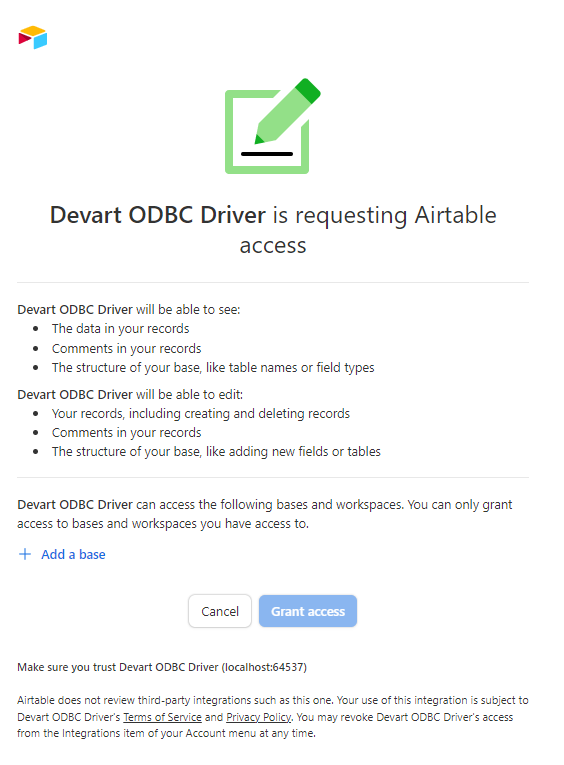
Airtable's "Devart ODBC Driver is requesting Airtable access" screen: it lists permission to see and edit records, comments and the base structure, and an "Add a base" link to choose which bases to grant.
Features
Airtable data in spreadsheets and BI tools
Devart ODBC Driver for Airtable plugs into Excel (Power Query, Microsoft Query, Power Pivot), Power BI, Tableau and QlikView as an ODBC source, so a dashboard refreshes from the base rather than from last week's CSV.
Writing records back to Airtable
Devart ODBC Driver for Airtable supports INSERT, UPDATE and DELETE, so a SQL Server job or a Python script can add or correct records in bulk, for example syncing new orders from a database into an Airtable base the operations team works in.
Friendlier column names for strict tools
Devart ODBC Driver for Airtable has a Normalize DB Names option that replaces dots in column names with underscores, for tools that choke on them. Airtable field names are free text, so this matters more here than with a database.
Works behind a corporate proxy
Devart ODBC Driver for Airtable can route its HTTPS traffic through a proxy server with a user name and password, and has adjustable connection (60 seconds by default) and query timeouts for slow networks.
Benefits
- Airtable stays the front end. Teams keep entering data in Airtable while analysts work in SQL and BI tools.
- Joins Airtable with company data. A SQL Server linked server puts a base next to ERP or CRM tables.
- No token handling. The OAuth sign-in avoids personal access tokens sitting in config files.
- Low price for a cloud driver. At $109.95 a year it's among Devart's cheaper ODBC drivers.
Real-World Uses
- Content calendar reporting. A marketing team plans in Airtable and a Power BI report counts published items per channel and month.
- Event registrations. An events team joins attendees to sessions in SQL to see room numbers per session.
- Inventory sync. A nightly SSIS package writes stock levels from the warehouse database into an Airtable base used by the sales team.
- Archive to a database. An admin copies an Airtable base into SQL Server before a project closes.
Who It's For, and Who Should Skip It
This driver fits Windows-based analysts, operations staff and developers whose teams keep working data in Airtable and who need it in Excel, Power BI, SQL Server or scripts, with the option to write changes back.
Skip it if Airtable's built-in interfaces, extensions and CSV export cover your reporting, if you're on a Mac or Linux, or if you're a developer happy to call Airtable's REST API directly from code, which costs nothing extra.
Usage Guide
- Download the Windows installer from Devart (free account needed) and install it.
- Activate with a license key, or start the 30-day trial.
- Open ODBC Data Sources (32-bit or 64-bit, matching your tool), click Add and choose Devart ODBC Driver for Airtable.
- Click Sign in to Airtable, log in, add the base or bases the driver may use and click Grant access; the refresh token and Base ID fill in.
- Test the connection, then choose the DSN in Excel, Power BI or your code. A connection string looks like
DRIVER={Devart ODBC Driver for Airtable};Refresh Token=...;Base ID=....
Before you buy
Airtable's consent screen shows that the driver asks to edit records, comments and even the base structure (adding fields or tables), not just to read. Grant it only the bases it needs, and for reporting give your BI tool read-only queries. You can revoke the access later from Integrations in your Airtable account menu.
Where it falls short
- Airtable's speed limit applies. Airtable's API allows 5 requests per second per base and makes clients wait 30 seconds after exceeding it, so large bases and frequent refreshes can be slow.
- One base per connection. Reporting across several bases needs several DSNs.
- Windows only. No macOS or Linux build.
- Thin documentation. Devart's docs don't describe how linked records, attachments or lookup fields appear in SQL, so check them in the trial.
What Users Say
The Airtable driver has no reviews of its own on the major review sites; Devart's ODBC drivers are rated there as one line.
How Devart's ODBC line rates
Capterra shows 4.7 out of 5 from 26 reviews for Devart ODBC Drivers and G2 4.6 out of 5 from 18. Reviewers, mostly using database and Salesforce drivers, single out simple installation and reliable connections; cost across several drivers and the need to know SQL are the common complaints.
Comparisons
ODBC driver vs. Airtable's own API and exports
Airtable's REST API and CSV export cost nothing, but the API needs code and the export is a one-off copy. Devart ODBC Driver for Airtable ($109.95 a year) gives live SQL access in tools that already speak ODBC, which is what non-developers and BI tools need.
Airtable driver vs. Devart's Smartsheet and Google Sheets drivers
Devart sells separate ODBC drivers for other spreadsheet-style cloud tools such as Smartsheet and Google Sheets. Each covers only its own service, so a team using several of them should price the ODBC Universal Bundle, which includes all 92 Devart ODBC drivers from $499.95 a year.
Editions and Pricing
| Edition (Windows) | 1-year subscription | Perpetual | Who can use it |
|---|
| Desktop | $109.95 | $219.95 | One user at a time on one computer |
| Server Standard | $799.95 | $1,599.95 | Many users on one server with up to 6 cores, one legal entity |
| Server Enterprise, Site, OEM | Quote | Quote | Unlimited cores, a whole company, or distribution inside your own app |
Buy Now opens an order for Desktop for Windows on a 1-year subscription. Server editions, the perpetual license, 2- and 3-year terms and priority support are chosen on the order page, and 5 or more copies get a volume discount of 5 to 15 percent.
FAQs
Do I need an Airtable API key or personal access token for the Devart driver?
No. Devart ODBC Driver for Airtable uses a "Sign in to Airtable" button that grants access through Airtable's own consent screen and stores a refresh token in the DSN.
Can the Airtable ODBC driver read several bases at once?
Not in one connection. Devart ODBC Driver for Airtable connects to one Base ID per DSN, so create a DSN for each base and combine them in your reporting tool or in SQL Server.
Why are large Airtable queries slow?
Airtable limits its API to 5 requests per second per base, and Devart ODBC Driver for Airtable works through that API. Filter and select only the fields you need, and schedule big refreshes outside working hours.
Can I stop the driver from changing my base?
Airtable's consent screen grants Devart ODBC Driver for Airtable both read and edit rights, so control writes on your side: use read-only queries in BI tools, limit who can use the DSN, and revoke the integration in Airtable when it's no longer needed.
Is there a money-back guarantee on the Airtable driver?
Only for technical failure. Devart refunds Devart ODBC Driver for Airtable in full within 30 days of purchase if a problem or bug that support can't fix stops it working; otherwise, decide during the 30-day trial.
System Requirements
- Windows Vista or newer, 32-bit or 64-bit, including Windows Server and Terminal Server
- .NET Framework 4.5 or later
- 32.25 MB installer; one driver version installed
- An Airtable account with access to the bases you report on
- HTTPS access to Airtable, directly or through a proxy
Conclusion
Devart ODBC Driver for Airtable is good value at $109.95 a year for Windows teams that keep operational data in Airtable but report in Excel, Power BI or SQL Server, and for anyone who wants to push records into Airtable from a database. Expect Airtable's API rate limit to set the pace on big bases, and note that the driver asks for full edit rights. Developers comfortable with Airtable's REST API, and Mac users, can pass. For everyone else, the trial on a real base is the quickest way to see whether linked records and lookups come through the way you need.
Download Free Trial Buy Now