dbForge AI Assistant: an SQL Chat That Knows Your Schema, Inside dbForge
dbForge AI Assistant is the AI chat built into Devart's dbForge database tools for SQL Server, MySQL, MariaDB, Oracle and PostgreSQL. It writes SQL from plain-language requests, explains and fixes queries, and suggests index changes, using your database's schema as context. There's a free Express plan with 200,000 tokens a month, and the Professional plan costs $99.95 a year (or $9.95 a month) for 20 million tokens a month.
It isn't a separate program. If you already use dbForge Studio, SQL Complete in SSMS, or one of the dbForge Compare or Documenter tools, the Assistant is a panel you switch on in that product. If you don't use dbForge, there's nothing here for you to run on its own.
Quick facts
- Version: 2026.2, released September 22, 2026 (document attachments, custom instructions, model choice and the free Express plan)
- Developer: Devart
- Works inside: dbForge Studio for SQL Server, MySQL, Oracle and PostgreSQL, dbForge Edge, SQL Complete and SQL Tools for SSMS and Visual Studio, and the dbForge Compare, Documenter, Data Generator, Query Builder and Transaction Log tools, version 2025.1 or later
- Operating systems: Windows 7 to 11 and Windows Server 2008 to 2025 with .NET Framework 4.7.2; macOS and Linux only through CrossOver
- AI models: Anthropic Claude Haiku 4.5, Sonnet 4.6 and Sonnet 5; OpenAI GPT-5.4 and GPT-5.6 Luna
- Price: Express free; Professional $99.95 a year or $9.95 a month, with 2- and 3-year terms and priority support offered on the order page
- Trial: a one-time 14-day trial, plus the permanent free Express plan
- Refunds: the order page promises a refund within 30 days on a yearly plan, or 7 days on a monthly plan, if you're not satisfied. Devart's ordering FAQ is narrower: a full refund within 30 days when a technical problem or bug that support can't fix stops the product working
- What we checked: the order page priced dbForge AI Assistant at $99.95 for the default Professional plan on a 1-year subscription renewing yearly without premium support, and Devart's release history listed version 2026.2 as the latest, both on November 15, 2026. We didn't run the Assistant against a database
Before you buy
Start on Express. It has the same features as Professional; what you pay for is tokens (200,000 a month free, 20 million paid) and three extra models (Claude Sonnet 4.6, Claude Sonnet 5 and GPT-5.4). Your prompts, attached documents and the schema metadata go to OpenAI or Anthropic, so check your company's policy on sending database structure to an outside AI service first. Your table data isn't sent.
Get Started FreeBuy Now
Overview
Devart added the AI Assistant to its dbForge line with the 2025.1 releases in June 2025 and has shipped a new version every few months since. The idea is simple: general chatbots don't know your tables, and copying a schema into a browser tab gets old fast. Inside dbForge, you click Attach Database, pick a connection, and the Assistant reads the structure (tables, columns, data types, relationships and, since 2026.1, clustered, nonclustered, composite and unique indexes). Every answer after that is written against your real object names.

The AI Assistant Chat panel docked in dbForge Studio, with the Attach Database list showing the connections from Database Explorer.
One database can be attached at a time. The Assistant reads metadata only; it doesn't read rows, change the schema, or add comments to objects. The chat remembers the 10 most recent messages, so long sessions lose their early context unless you repeat it.
Features
Plain-language requests become schema-aware SQL
dbForge AI Assistant turns a request such as "employees in the sales department whose last names start with A, B or C" into a query that uses your actual tables and joins. You can also ask about the schema itself (which tables hold a column, what relates to what), and refine the query with follow-up questions. Each code block has buttons to copy it, open it in a new SQL document, or insert it into the editor.
Explain, Optimize and Fix from the SQL Editor
dbForge AI Assistant adds commands to the SQL Editor's right-click menu: select a fragment and send it to a new chat to be explained clause by clause, optimized, or checked for problems, or paste it into a new chat as-is. When a query fails, it can explain the error message and propose a fix.
Index analysis that writes the script
dbForge AI Assistant reviews how a slow query uses existing indexes and flags missing, redundant or badly structured ones. In Devart's documented SQL Server walkthrough it recommends a composite index instead of another redundant one and generates a T-SQL script that drops the redundant indexes and creates the new one, which you then measure in dbForge's Query Profiler.
Documents and team rules as context
dbForge AI Assistant 2026.2 can attach any open text document (.sql, .xml, .md, .txt, up to 10 MB) and, by default, includes the active document automatically. A plain instruction file in %AppData%\Devart\dbForge\AI holds reusable rules, such as naming conventions or formatting, that apply to every request; the Assistant can suggest new rules but saves them only when you approve. You can share that file so a team gets consistent output.
Model choice and web search
dbForge AI Assistant lets you switch between Claude and GPT models mid-chat, keeping the conversation, and each answer shows which model wrote it. Web search is a per-request toggle: turn it on and the answer can draw on online documentation, including dbForge's own help, with a list of the sources used.
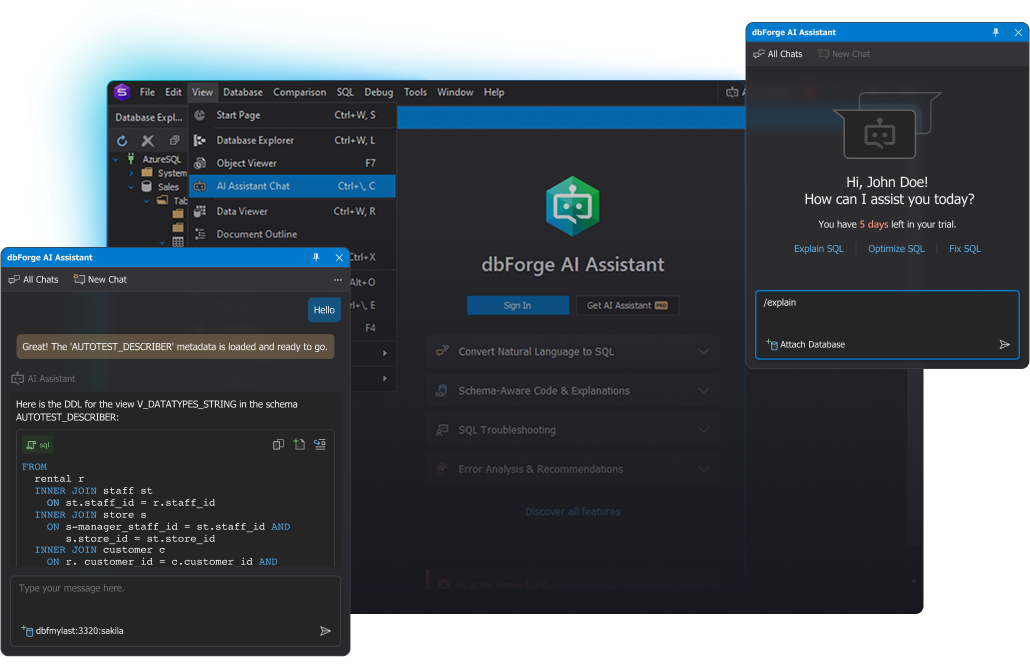
Devart's composite of the Assistant: a chat with a generated multi-table JOIN against an attached Sakila database, the View menu entry, and a trial panel with Explain SQL, Optimize SQL and Fix SQL shortcuts.
Benefits
- No context switching. The chat sits next to your SQL document and Database Explorer, so you don't paste schemas into a browser or retype generated code.
- Answers that match your names. Because the schema and indexes are attached, generated queries use real tables and keys instead of guessed ones.
- One license across tools. A single Professional license on your Devart account works in every compatible dbForge product you own; you don't buy one per tool.
- A real free tier. Express isn't a trial: it keeps working after the 14 days, with fewer tokens and two models.
Real-World Uses
- A data analyst attached to a reporting database asks for "monthly revenue by region for the last 12 months" and gets a grouped query to run and tweak.
- A DBA selects a slow stored-procedure query in dbForge Studio for SQL Server, chooses Optimize, and gets an index script to test in Query Profiler.
- A developer new to Oracle highlights an inherited PL/SQL block and asks for a clause-by-clause explanation.
- A team lead puts the house SQL style (aliases, casing, no SELECT *) in the shared instruction file so every developer's generated code follows it.
- Someone comparing two versions of a view in dbForge asks the Assistant to compare their DDL and explain what changed.
Who It's For, and Who Should Skip It
It's for people who already work in dbForge: SQL Server developers in dbForge Studio or SQL Complete inside SSMS, MySQL and MariaDB developers, Oracle and PostgreSQL users of the dbForge Studios, and analysts who know their data but not every join.
Skip it if you don't use a dbForge product; you can't buy or run it alone, and a general AI chat or your IDE's built-in assistant will do. Skip it too if your organization forbids sending schema metadata to OpenAI or Anthropic. And if you write a few queries a week, the free Express plan is probably all you'll ever need.
Usage Guide
- Install or update a dbForge product to version 2025.1 or later. Devart's getting-started page links the downloads; the dbForge product itself also needs a valid license or trial.
- Sign in to your Devart account in the product.
- Open the Assistant from the AI Assistant button at the top right, or View > AI Assistant Chat (Ctrl+\, C).
- Start the 14-day trial, activate Express, or enter a Professional license.
- Click Attach Database and choose a connection, the current connection, or an open SQL document's database.
- Type your request, or right-click selected code in the SQL Editor and pick Explain, Optimize or Fix.
- Review the answer, then copy, open or insert the code into the editor and run it yourself.

Opening the Assistant in dbForge Studio: View > AI Assistant Chat (Ctrl+\, C), or the AI Assistant tile on the Start Page.
Where it falls short
- Only one database can be attached per chat; for cross-database questions you switch and start a new chat.
- The chat keeps just the last 10 messages as context, and Express keeps chat history for 14 days.
- In SSMS and Visual Studio (through SQL Complete), only SQL documents can be attached.
- Web search has to be switched on again for every request.
- Devart itself says to review complex generated queries before running them; the Assistant doesn't execute anything for you, which is safer but means you still check its work.
- It isn't sold in some countries, including Russia.
What Users Say
Review sites
dbForge AI Assistant has its own listings on Capterra, GetApp and Software Advice, but no user reviews or star ratings there yet. Opinions of the wider dbForge line are plentiful (dbForge Studio and SQL Complete have long review histories), but they're about the IDEs and add-ins, not the AI chat, so we don't repeat them here. If you want a verdict before paying, the free Express plan is the honest test: it has every feature, just fewer tokens.
Comparisons
Express vs Professional
Both editions have the same features: query generation, natural language to SQL, optimization, explanations, troubleshooting, error analysis, AI chat with web search and integration with the dbForge tools. The difference is volume and models.
| Edition | Price | Tokens per month | Models |
|---|
| Express | Free | 200,000 | Claude Haiku 4.5, GPT-5.6 Luna |
| Professional | $99.95 a year or $9.95 a month | 20,000,000 | All five, adding Claude Sonnet 4.6, Claude Sonnet 5 and GPT-5.4 |
dbForge AI Assistant vs a general AI chat
A browser chatbot can write SQL too, but it only knows the schema you paste in and can't put the answer into your editor. dbForge AI Assistant reads the attached database's structure and indexes itself, works from SQL Editor's context menu, and follows your saved instruction file. The trade-off is that it only works inside dbForge.
Editions and Pricing
There's one paid edition, Professional, sold as a subscription. The Buy Now button opens the order page with the default 1-year term at $99.95; on that page you can switch to 1 month ($9.95), 2 years or 3 years, and add priority support. One license covers every compatible dbForge product on your Devart account, and it's separate from your dbForge product licenses. Devart quotes volume discounts for teams on request. When a paid subscription ends, you can fall back to the free Express plan.
FAQs
Is dbForge AI Assistant included in my dbForge Studio license?
No. dbForge AI Assistant needs its own license for the Professional plan; it isn't part of dbForge Studio, SQL Complete or other dbForge licenses. The free Express plan works in both paid and Express editions of dbForge products.
Does dbForge AI Assistant send my table data to OpenAI or Anthropic?
No. dbForge AI Assistant sends your prompts, any attached documents and the attached database's metadata (structure and indexes), not the rows. Devart says conversations aren't used to train models and that only the conversation is stored on its server. Until you enable the Assistant, nothing is sent.
Can I use dbForge AI Assistant with SSMS?
Yes, through dbForge SQL Complete or dbForge SQL Tools, which add it to SQL Server Management Studio and Visual Studio. There, only SQL documents can be attached to a chat.
Do I need a separate license for each dbForge product?
No. One dbForge AI Assistant license on your Devart account applies to all compatible dbForge products associated with that account.
What happens when my Professional subscription ends?
dbForge AI Assistant can be switched to the free Express license after a trial or subscription expires, so it keeps working with 200,000 tokens a month and the two Express models.
Can I turn dbForge AI Assistant off or uninstall it?
dbForge AI Assistant ships deactivated and stays off until you start a trial or activate a plan. It can't be uninstalled from dbForge products, but you can disable it at any time.
Does dbForge AI Assistant work on a Mac?
Only through CrossOver, the same way Devart supports its Windows-based dbForge tools on macOS and Linux. There's no native Mac version.
System Requirements
- A compatible dbForge product, updated to version 2025.1 or later (dbForge Studio for SQL Server from 2025.3.61)
- Windows 7, 8, 8.1, 10 or 11, or Windows Server 2008, 2012, 2016, 2019, 2022 or 2025
- .NET Framework 4.7.2 or later
- macOS or Linux through CrossOver
- An internet connection and a Devart account
Conclusion
If you live in dbForge, turn on the free Express plan today: the schema-aware query writing and the right-click Explain, Optimize and Fix commands cost nothing to try, and they beat pasting your schema into a browser. Pay the $99.95 a year only when you run out of tokens or want the stronger Claude Sonnet and GPT-5.4 models. The main reason not to buy: it's useless without a dbForge product, and it sends schema metadata to outside AI providers, which some companies won't allow.
Get Started FreeBuy Now