dotConnect for Zoho Desk: Your Help Desk Data in .NET Code, Through SQL and EF Core
dotConnect for Zoho Desk is a $339.95 ADO.NET data provider from Devart that gives .NET applications SQL access to Zoho Desk, Zoho's customer support platform, so you can read support records, add contacts or update them from C# or VB.NET without coding against the Zoho Desk REST API. It runs on .NET 5 to 11 and .NET Framework 4.5 to 4.8 on Windows, Linux and macOS, and the price is a perpetual one-developer license with a year of updates.
Think of the developer asked to sync customer records between an in-house system and the help desk, to feed ticket figures into a company portal, or to give an internal AI assistant read access to support data. All of those start with the same chores: OAuth, the right regional data center, paging. This provider packages those chores into a connection string.
Quick facts
- Version: 2.3.248, released November 11, 2026 (on sale since May 2024)
- Developer: Devart
- Data source: Zoho Desk in any of eight Zoho data centers (US, Europe, China, India, Australia, Japan, UK, Canada)
- Sign-in: OAuthInteractive (browser sign-in) or OAuth with Organization ID, Refresh Token, Client ID and Client Secret
- .NET: .NET 5 to 11, .NET Core 2.0 to 3.1, .NET Standard 2.0/2.1, .NET Framework 4.5 to 4.8
- ORMs: Entity Framework Core 1 to 11, Entity Framework 4 to 6, Dapper, NHibernate
- Delivery: Devart.Data.ZohoDesk on NuGet, or a 16.49 MB Windows installer with Visual Studio 2015 to 2026 integration
- Price: $339.95 Developer, $799.95 Server, $4,999.95 OEM for 10-100 devices, perpetual with a year of updates
- Trial: 30 days, no limits, no credit card
- Refunds: Devart's order page offers a 30-day money-back guarantee if the product doesn't meet your expectations; its ordering FAQ limits refunds to technical problems support can't fix, within 30 days of purchase
- What we checked: version 2.3.248 and the 16.49 MB installer listed on the download page, the full revision history since version 1.0.20, the OAuth, connection and deployment documentation, and the order page on November 16, 2026: $339.95 for a single license with one year of support and upgrades. We didn't connect it to a Zoho Desk portal.
Download Free TrialBuy Now
Overview
Zoho Desk keeps a company's support conversations, customer contacts and agent setup in the cloud, and the only programmatic way in is Zoho's API. dotConnect for Zoho Desk is an ADO.NET provider in the classic mould: ZohoDeskConnection, ZohoDeskCommand, ZohoDeskDataReader and ZohoDeskDataAdapter behave like their SQL Server counterparts, and Visual Studio's Server Explorer can browse the Zoho Desk objects like database tables.
Devart's getting-started samples show the style: open a connection with Authentication Type=OAuthInteractive;DataCenter=US, insert a contact with a parameterized ZohoDeskCommand, then run UPDATE Contacts SET Phone = ... WHERE FirstName = .... Simple statements turn into API calls on Zoho's side, and a built-in SQL-92 engine handles joins and grouping the API can't do.
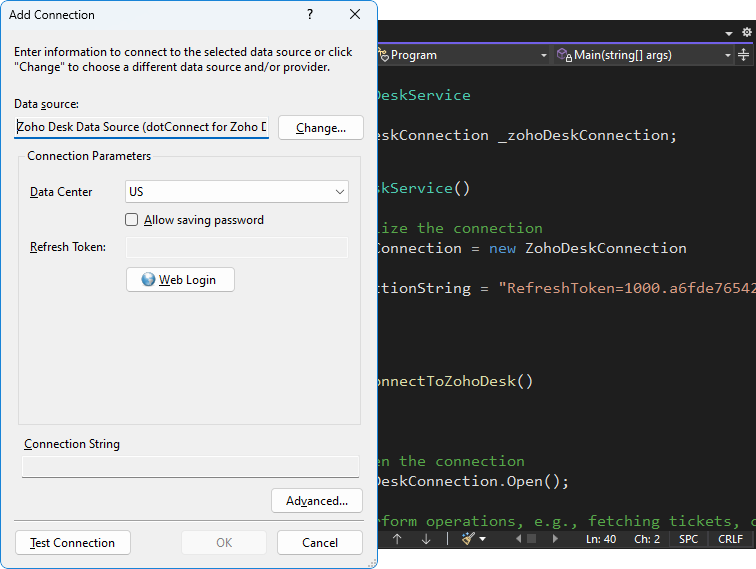
The Zoho Desk data source in Visual Studio's Add Connection dialog (Data Center US, Refresh Token obtained with Web Login), next to C# code that creates a ZohoDeskConnection and goes on to fetch tickets.
Features
Read and write support data with plain SQL
dotConnect for Zoho Desk supports SELECT, INSERT, UPDATE and DELETE against Zoho Desk objects, with WHERE conditions, JOINs and parameters. Results are paged: a ZohoDeskDataReader fetches the next page from Zoho as you read, so a loop over a large support history doesn't wait for everything up front. A ZohoDeskLoader component handles fast bulk loading, and the ZohoDeskMonitor component with Devart's dbMonitor tool shows the requests behind each statement.
OAuth with Devart's app or your own
dotConnect for Zoho Desk can sign in through Devart's default OAuth credentials, the quickest route, or through an app you register in the Zoho Developer Console with your own Client ID and Client Secret, which many companies' security teams prefer. The interactive flow listens on a local callback port (59996 by default). A ZohoDeskOAuthAuthenticationProvider can fetch a refresh token without opening a data connection, so a setup tool can collect the token once and hand it to a background service.
A demo MCP server for AI assistants
dotConnect for Zoho Desk has, since version 2.2.192 (September 2026), shipped a demo Model Context Protocol server among its installation samples. It shows how AI tools such as Claude, Cursor, Codex or Visual Studio Code can reach Zoho Desk data through the provider. It's sample code to build on, not a finished product, but for a team prototyping a support copilot it's a useful starting point that the Zoho Books sibling doesn't include.
Entity Framework Core models of your help desk
dotConnect for Zoho Desk supports EF Core 1 to 11 through the Devart.Data.ZohoDesk.EFCore package, plus Entity Framework 4 to 6, Dapper and NHibernate, so the help desk can sit in the same LINQ-based data layer as your other sources. Devart's Entity Developer can generate the model visually, sold separately.
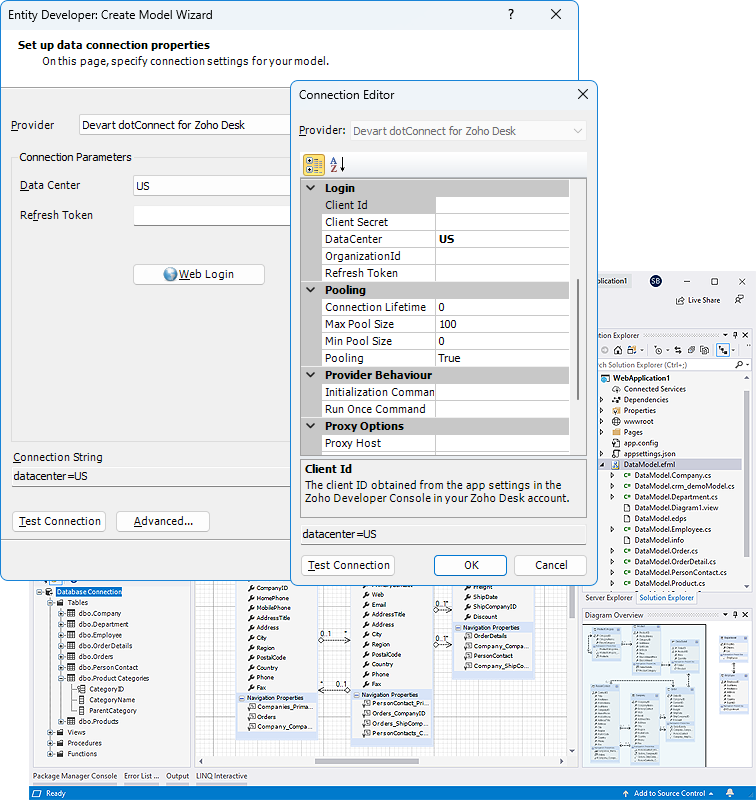
Entity Developer's Create Model Wizard using the Devart dotConnect for Zoho Desk provider, with the Connection Editor showing Client Id, Client Secret, DataCenter, OrganizationId and Refresh Token, and pooling and proxy settings.
Deployment that suits build servers
dotConnect for Zoho Desk deploys as three assemblies (Devart.Data.ZohoDesk.dll, Devart.Data.SqlShim.dll and Devart.Data.dll) copied next to your app or registered in the GAC, plus the sqlite3.dll library its local SQL engine uses, in the same bitness as your application. The installer has a silent command-line mode (/TYPE=FULL /VERYSILENT) that Devart documents for Azure DevOps pipelines, and a "Minimal installation" option for target machines.
Benefits
- Support data where your developers already work. No separate SDK, no hand-written JSON models.
- Regional accounts just work. One setting switches between Zoho's eight data centers.
- Controlled access. Registering your own OAuth app keeps the integration within your company's security rules.
- A head start on AI tooling. The bundled MCP sample saves the first days of a support-assistant prototype.
Real-World Uses
- Customer master sync: when a customer's phone or company changes in the ERP, a .NET service updates the matching Zoho Desk contact, so agents see current details.
- Support KPIs in an intranet: an ASP.NET Core page shows open support volume per department from a nightly copy in SQL Server.
- Support copilot prototype: a team extends the demo MCP server so an internal AI assistant can answer "what did this customer report last month?"
- Product feedback mining: a scheduled job exports support records into a warehouse where product managers group them by feature.
Who It's For, and Who Should Skip It
It's for .NET developers integrating Zoho Desk with in-house systems, and for ISVs adding Zoho Desk support to a .NET product (with the OEM license).
Skip it if you only want support figures in Power BI, Tableau or Excel: Devart's ODBC Driver for Zoho Desk plugs straight into those tools and costs less, and Devart's free MCP Server for Zoho Desk is built on that ODBC driver rather than on this provider. If your customer data lives in Zoho CRM, dotConnect for Zoho CRM is the matching provider. And Zoho's own reports and integrations may already cover a small help desk.
Usage Guide
- Get the trial through the Download button (a free Devart account is required) or run
Install-Package Devart.Data.ZohoDesk.
- In Server Explorer choose Connect to Database, then Zoho Desk Data Source and dotConnect for Zoho Desk.
- Pick OAuthInteractive, set your Data Center and click Sign In; or pick OAuth and enter Organization ID, Refresh Token, Client ID and Client Secret.
- Browse the objects, then query with ZohoDeskCommand or scaffold an EF Core model.
- Before shipping, add the license key (License Key parameter for .NET Framework assemblies since version 2.0) and copy the three Devart assemblies and sqlite3.dll with your app.
Before you buy
- Buy Now opens Devart's order page with one license and one year of support and upgrades for $339.95. The edition (Developer, Server, Site, OEM), extra update years and priority support are options on that page.
- A service running in production on your server needs the $799.95 Server edition, not just the Developer license.
- The license is perpetual; renewing only matters for new versions and support.
Where it falls short
- Thin Zoho Desk-specific documentation. Devart documents connecting and deployment well, but publishes no table-by-table reference of Zoho Desk objects; you find them in Server Explorer during the trial.
- Few Desk-specific changes so far. Since its 2024 launch the revision history is mostly .NET, Visual Studio and EF Core updates, plus the MCP sample. That shows upkeep, but not a long record with Zoho Desk itself.
- API limits still apply. Every query becomes Zoho Desk API calls counted against your Zoho plan.
- Extra files to deploy. Forgetting sqlite3.dll, or shipping the wrong bitness, breaks the local SQL engine.
What Users Say
dotConnect for Zoho Desk has no rated reviews on G2, Capterra or other directories, which is common for a specialist provider launched in 2024.
How Devart pitched it
Devart launched it alongside the Zoho Books provider, saying users could "easily retrieve and analyze financial records, customer service inquiries, and other important data." For Zoho Desk that means the customer service side: a data access layer, not a reporting product. The 30-day trial is the best way to judge it against your own portal.
Comparisons
vs. the Zoho Desk API directly
The REST API is free and documented. Coding it yourself means token refresh, regional hosts, paging and object models. dotConnect for Zoho Desk is worth it when you touch several object types or want EF Core and joins; a single webhook handler doesn't need it.
vs. Devart ODBC Driver for Zoho Desk
The ODBC driver serves end-user tools (Excel, Power BI, SSMS) and the free MCP server; dotConnect serves .NET code with ADO.NET classes, EF Core and Visual Studio design-time support. Developers want dotConnect, analysts want ODBC.
Editions and Pricing
Every edition is ordered under the same product; choose it on the order page.
| Edition | Price | Covers |
|---|
| Developer | $339.95 | One developer building and testing apps |
| Server | $799.95 | One server of one organization (web, application or batch server) |
| OEM for 10-100 devices | $4,999.95 | Shipping the provider in your own software |
| Site; OEM for 100+ devices | On the order page | Unlimited computers in a company, or wider redistribution |
Volume discounts: 5% for 5 to 9 licenses, 10% for 10 to 19, 15% for 20 or more.
FAQs
Can dotConnect for Zoho Desk use my company's own Zoho OAuth app?
Yes. dotConnect for Zoho Desk accepts your own Client ID and Client Secret, through the connection string builder or an OAuth provider options builder, instead of Devart's default credentials.
Does dotConnect for Zoho Desk run in Docker or on Linux?
Yes. dotConnect for Zoho Desk runs on Linux and macOS through its NuGet package on .NET 5 to 11 and .NET Core, and Devart fixed license-key loading on Red Hat-based distributions in version 2.1.33.
Which Zoho data centers does dotConnect for Zoho Desk support?
dotConnect for Zoho Desk supports the US, Europe, China, India, Australia, Japan, UK and Canada data centers, chosen with the Data Center connection setting.
Is the MCP server in dotConnect for Zoho Desk ready for production?
No, it's a demo. dotConnect for Zoho Desk includes it among the installation samples to show how MCP clients can reach Zoho Desk data; Devart's separately downloadable MCP Server for Zoho Desk is the ready-made option, and it works through the ODBC driver.
What's Devart's refund policy for dotConnect for Zoho Desk?
The dotConnect for Zoho Desk order page promises your money back within 30 days if it doesn't meet your expectations. Devart's ordering FAQ says a full refund within 30 days applies when a technical problem or bug stops the product working and support can't solve it. Test it in the 30-day trial first.
Can I install dotConnect for Zoho Desk on a build server?
Yes. dotConnect for Zoho Desk's installer runs silently with /TYPE=FULL /VERYSILENT, which Devart shows as an Azure Pipelines step, so a CI server can build projects that use the design-time features.
System Requirements
- .NET 5 to 11, .NET Core 2.0 to 3.1, .NET Standard 2.0/2.1, or .NET Framework 4.5 to 4.8
- Windows, Linux or macOS (x64 and x86) through NuGet; installer and Visual Studio 2015 to 2026 tools on Windows
- sqlite3.dll matching your app's bitness for the local SQL engine
- A Zoho Desk organization and outbound internet access
Conclusion
dotConnect for Zoho Desk earns its $339.95 for .NET teams that integrate Zoho Desk with other systems on a regular basis: it takes care of OAuth, regions and paging, adds SQL joins and EF Core, and its demo MCP server gives AI projects a head start. The main reason to think twice is how little Zoho Desk-specific depth Devart documents for a product launched in 2024, plus the $799.95 Server license most production services need. If you're an analyst rather than a developer, buy the ODBC driver instead. If you're a developer, run the 30-day trial against your own Zoho Desk portal before ordering.
Download Free TrialBuy Now