SSIS Data Flow Components for NetSuite: NetSuite Records in SSIS with SQL, Token-Based Auth and API v2
SSIS Data Flow Components for NetSuite is Devart's Oracle NetSuite connector for SQL Server Integration Services: a Source, Destination, Lookup and Connection Manager that query and update NetSuite contacts, customers, transactions, lists and custom records with SQL. It's for finance-systems and BI developers who move ERP data between NetSuite and SQL Server in SSIS packages, runs on Windows, and costs $199.95 a year for one developer, or $399.95 for a perpetual license.
Getting NetSuite data into a SQL Server warehouse usually means saved-search CSV exports or custom SuiteTalk code. With these components, an SSIS package reads NetSuite records directly with a SELECT, lands them next to the rest of your data, and can write changes back in the same job.
Quick facts
- Version: 5.1.49, released August 17, 2026
- Developer: Devart
- Components: NetSuite Source, Destination, Lookup and Connection Manager
- NetSuite API: API v1 (SuiteTalk, including the 2024.2 release) and API v2, added in version 5.0.0
- Sign-in: token-based authentication, OAuth 2.0 (added in 5.0.0), or basic account, user and password
- SSIS versions: SQL Server Integration Services 2012, 2014, 2016, 2017, 2019, 2022 and 2025
- Platform: Windows Vista and later, 32-bit and 64-bit, with .NET Framework 4.5
- Price: $199.95 a year for one developer (subscription), $399.95 perpetual. Server and Site licenses available
- Trial: 30 days, fully functional; the 618.60 MB download needs a free Devart account
- Refunds: Devart's ordering FAQ allows a full refund within 30 days of purchase only when a technical problem or bug stops the product working and support can't fix it
- What we checked: the NetSuite Source Editor, connection options and the 5.1.49 release on Devart's pages, and the order page on November 16, 2026: SSIS Data Flow Components for NetSuite at $199.95 for the default one-year Developer subscription (renewing yearly), $399.95 Developer perpetual, $499.95 and $999.95 for Server subscription and perpetual, and $999.95 for a perpetual Site license. We didn't install the components or connect them to a NetSuite account.
Download Free TrialBuy Now
Overview
After installation, Devart NetSuite Source, Destination and Lookup appear in Visual Studio's SSIS Toolbox. You add a Devart NetSuite Connection Manager with your account ID and credentials, drop the Source into a data flow, and write a SELECT against a record type such as Contact, Check or Classification. The Destination inserts, updates or deletes NetSuite records, and the Lookup matches incoming rows against NetSuite data.
NetSuite has had the most attention of these connectors lately. Version 3.0.630 (September 2024) supported the NetSuite 2023.2 release; 5.0.0 (June 2026) added NetSuite API v2, the 2024.2 release of API v1 and OAuth login in the connection manager; and 5.1.49 (August 2026) added the TransactionAccountingLines object in API v2, which holds the accounting lines of transactions.
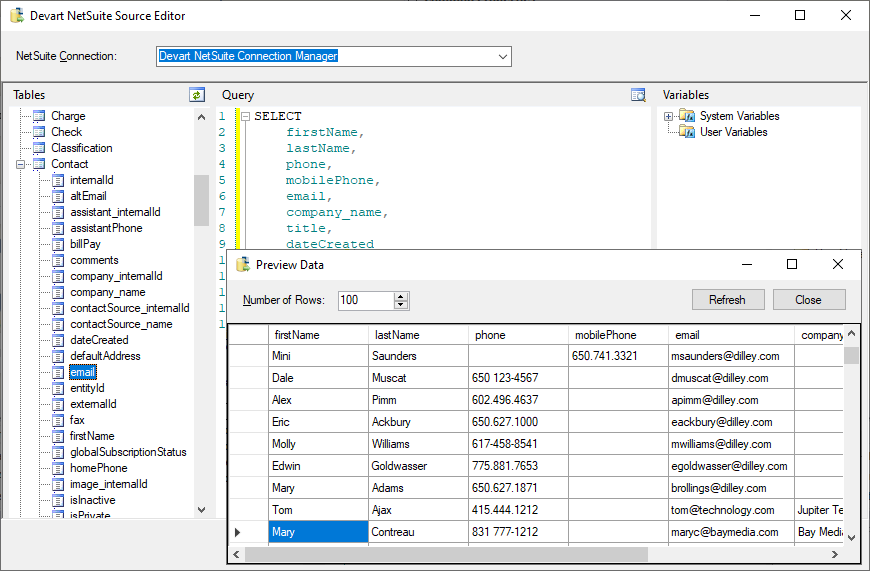
The Devart NetSuite Source Editor: Contact fields in the object tree, a SELECT of firstName, lastName, phone, mobilePhone, email, company_name, title and dateCreated, and the Preview Data window with the returned contacts.
Features
SQL queries against NetSuite records
SSIS Data Flow Components for NetSuite's Source takes a SQL SELECT for any NetSuite record type. Simple statements are translated into NetSuite API calls and run on NetSuite's side; more complex ones, with grouping, filtering and ordering, fetch the needed data and finish the query locally. The editor lists record types and fields next to your SSIS variables, builds queries by drag and drop, and previews the rows.
Token-based authentication and OAuth 2.0
SSIS Data Flow Components for NetSuite's connection manager signs in with token-based authentication (consumer key and secret from an integration record, plus a token ID and secret for a user role and the role's internal ID), with OAuth 2.0 using the integration record's client ID and secret, or with a basic account ID, user and password. You can pin the SuiteTalk API version and set your account's date format and time zone so dates are read and written correctly.
Custom fields, lists and records when you need them
SSIS Data Flow Components for NetSuite can include custom fields on standard records, custom lists and custom record types, each switched on separately in the connection options. They're off by default because reading them takes noticeably longer, so a package that only needs standard records stays fast.
Write back with INSERT, UPDATE and DELETE
SSIS Data Flow Components for NetSuite's Destination loads data into NetSuite with all three DML operations, so a package can create customers from a web shop database, update item or contact fields from another system, or delete obsolete records.
A lookup that batches and caches
SSIS Data Flow Components for NetSuite's Lookup checks several rows at once and caches the results, cutting round-trips to NetSuite's web services when a package matches thousands of rows against customers or items.
Benefits
- ERP data next to everything else. NetSuite transactions and customers land in SQL Server, where they join CRM, web and warehouse data.
- No saved-search exports to babysit. Scheduled SSIS packages replace manual CSV downloads and imports.
- Accounting-level detail. API v2's TransactionAccountingLines object gives finance teams the accounting lines of transactions.
- Credentials NetSuite admins accept. Token-based authentication and OAuth 2.0 tie access to an integration record and role instead of a shared password.
Real-World Uses
- Finance reporting. A nightly package copies transactions and their accounting lines into SQL Server for month-end and management reports.
- Customer master sync. New customers and contacts from a CRM or web store database are inserted into NetSuite, and changes flow back the other way.
- Migration into NetSuite. Records from a legacy accounting or ERP database are loaded into NetSuite through the Destination, with the Lookup matching existing customers first.
- Contact export. NetSuite contacts are pulled into SQL Server for a mailing tool or data quality checks.
Who It's For, and Who Should Skip It
It's for companies that run NetSuite as their ERP and SQL Server Integration Services for their data warehouse or integrations, and need the two connected on a schedule with credentials their NetSuite administrator will sign off on.
Skip it if you don't use SSIS: these are SSIS components, not a standalone sync tool. If you also need Salesforce, Dynamics 365, QuickBooks Online or other sources, the SSIS Universal Bundle covers them all for $499.95 a year. And if your NetSuite reporting needs are met by saved searches and SuiteAnalytics, you may not need an ETL connector at all.
Usage Guide
- Prepare NetSuite. Find your account ID under Setup > Integration > Web Services Preferences, and create an integration record (Setup > Integrations > Manage Integrations > New) for token-based or OAuth sign-in.
- Install. Sign in with a free Devart account on the download page, close Visual Studio, and run the installer (the same 618.60 MB package Devart uses for all its SSIS components) on the development machine and the SSIS server.
- Create the connection. In an Integration Services project, add a Devart NetSuite connection manager, enter the account ID and your credentials or tokens, turn on custom fields, lists or tables only if you need them, and test it.
- Query. Drop the Devart NetSuite Source into a data flow, pick a record type, write the SELECT and preview the rows.
- Load and match. Use the Destination with Insert, Update or Delete, or the Lookup to match existing records. Deploy and schedule the package like any other.
Before you buy
The default order is a one-year Developer subscription at $199.95, which renews yearly; the subscription license works only while it's active and needs an Internet connection to activate and check the license. The perpetual Developer license ($399.95) keeps working at your version and activates offline. A Developer license covers building and testing packages on one developer's workstations; deploying packages to a production server needs a Server license ($499.95 a year or $999.95 perpetual), which also covers one developer. A Site license covers unlimited computers in one company.
Where it falls short
- Custom data slows things down. Reading custom fields, lists and records takes considerably longer, which matters on accounts that rely on many customisations.
- Complex queries pull data locally. SELECTs the API can't run are processed after the data is fetched, which can be slow on large transaction tables.
- NetSuite releases need matching updates. Support for new NetSuite releases (2023.2, 2024.2) and API v2 arrived in component updates, so keep the subscription or update plan current.
- Big download for one connector. The installer is 618.60 MB because it's the same package as the full bundle.
What Users Say
Review sites rate Devart's SSIS components as one product line rather than the NetSuite connector alone, and the review counts are small.
Capterra and SoftwareReview
SSIS Data Flow Components averages 4.6 out of 5 from 12 reviews on Capterra, with 4.3 for ease of use and 4.3 for customer service. SoftwareReview shows 4.7 out of 5 from 9 ratings. Reviewers call the components intuitive, and the main complaint is documentation that doesn't cover every part of the data flow components.
G2
On G2, Devart's Universal SSIS Components page has about 20 reviews averaging 4.5. Reviewers praise ease of use, handling of large data volumes and integration with SQL Server and Azure. The criticism is occasional crashes when opening packages and support replies that are slower than they'd like.
In short: good marks for ease of use and throughput, with complaints about documentation and occasional stability problems. With a few dozen ratings across all sites, run the trial against your own NetSuite account before deciding.
Comparisons
SSIS Data Flow Components for NetSuite vs SSIS Universal Bundle
Devart's SSIS Universal Bundle includes this NetSuite connector plus components for QuickBooks Online, Salesforce, Dynamics 365, Shopify, Stripe, SQL Server, Snowflake and the rest of Devart's 50-plus sources. It costs $499.95 a year or $999.95 perpetual for one developer, against $199.95 and $399.95 for NetSuite alone. If you'll need three or more Devart connectors, the bundle costs less than buying them one by one.
SSIS Data Flow Components for NetSuite vs saved-search exports
A NetSuite saved search exported to CSV is free and fine for an occasional report, but someone has to run or schedule the export and load the file. The Devart components query NetSuite from the SSIS package itself, pick up changes on every run, and can write data back, which exports can't.
Editions and Pricing
The Buy Now button opens the order page with the Developer subscription selected; you choose the license type, subscription or perpetual, term and premium support there. Prices on November 16, 2026:
| License | Subscription (1 year) | Perpetual | What it covers |
|---|
| Developer | $199.95 | $399.95 | One developer's workstations, for development and testing |
| Server | $499.95 | $999.95 | One server running packages, plus one developer |
| Site for 10-100 Devices | On the order page | $999.95 | Unlimited computers in one company |
Two- and three-year terms and premium support are options on the order page.
FAQs
Does SSIS Data Flow Components for NetSuite support NetSuite token-based authentication?
Yes. SSIS Data Flow Components for NetSuite supports token-based authentication with a consumer key and secret, token ID and secret, and role ID, as well as OAuth 2.0 (since version 5.0.0) and basic sign-in.
Does SSIS Data Flow Components for NetSuite support NetSuite API v2?
Yes. SSIS Data Flow Components for NetSuite added NetSuite API v2 in version 5.0.0, and 5.1.49 added the TransactionAccountingLines object there. API v1 (SuiteTalk) is still supported, including the 2024.2 release.
Can SSIS Data Flow Components for NetSuite read custom records and fields?
Yes. SSIS Data Flow Components for NetSuite reads custom fields, custom lists and custom record types once you turn on the matching Use Custom Fields, Use Custom Lists and Use Custom Tables options.
Does SSIS Data Flow Components for NetSuite work with SSIS 2008?
No. SSIS Data Flow Components for NetSuite need SQL Server Integration Services 2012 or later, up to SSIS 2025; only Devart's database components still support SSIS 2008.
What happens when the subscription ends?
The subscription license of SSIS Data Flow Components for NetSuite only works for the term you paid for, so packages that use it need a renewal. A perpetual license keeps working at the version you have without a subscription.
Do I need a separate license for the production SSIS server?
Yes. The Developer license of SSIS Data Flow Components for NetSuite covers development and testing only. Deploying packages to a server needs a Server license ($499.95 a year or $999.95 perpetual) or a Site license.
Can I get a refund for SSIS Data Flow Components for NetSuite?
Only for technical problems. Devart's ordering FAQ gives a full refund within 30 days of purchase when a bug or technical issue stops the product working and support can't fix it, so contact support first. Use the 30-day trial to test with your own data before buying.
System Requirements
- Microsoft SQL Server Integration Services 2012, 2014, 2016, 2017, 2019, 2022 or 2025
- Visual Studio with SQL Server Data Tools / Integration Services projects for designing packages
- Windows Vista or later, 32-bit or 64-bit, with .NET Framework 4.5
- A NetSuite account with web services access and an integration record for token-based or OAuth sign-in
Conclusion
SSIS Data Flow Components for NetSuite is worth $199.95 a year (or $399.95 once) for a company that runs NetSuite and SSIS and wants its ERP data in SQL Server without manual exports. The one reason to buy it is current NetSuite support: API v2 with accounting lines, token-based and OAuth sign-in, and custom records, read and written from the SSIS packages you already schedule. The main reasons to hold back are the separate Server license for production and slower reads once custom fields are switched on; and if NetSuite is one of several systems you connect, the $499.95 Universal Bundle is the better buy. Test it against your own account in the 30-day trial.
Download Free TrialBuy Now