Excel Add-in for Zoho Books: Pull Your Zoho Books Ledger Into Excel, Fix It There, Commit It Back
Excel Add-in for Zoho Books is a $179.95 Devart add-in for Excel on Windows that connects a worksheet to your Zoho Books organization: you import bills, sales orders, credit notes, payments, bank transactions or currencies into a sheet, refresh them with one click, and write edits, new rows and deletions back to Zoho Books. It's built for bookkeepers, accountants and finance staff who already live in Excel, and the price buys a perpetual license with a year of updates.
Zoho Books can export to CSV and import from files, but that round trip is slow and easy to get wrong when you're correcting dozens of records with different values. Here the sheet is the connection: change a cell, see it highlighted, press Commit.
Quick facts
- Version: 3.1.70, released September 7, 2026 (the Zoho Books add-in first shipped February 27, 2024)
- Developer: Devart
- Excel: Microsoft 365 Excel and Excel 2013, 2016, 2019, 2021 and 2024, Windows only
- Connection: Data Center, Organization ID and a refresh token from the Web Login button
- Data centers: US, Europe, China, India, Australia, Japan, UK, Canada, plus Saudi Arabia since version 3.0.0
- Download: 76.60 MB installer (Devart's shared Excel Add-ins setup), free Devart account required
- Price: $179.95 with one year of support and upgrades; 2- and 3-year terms and priority support on the order page
- Trial: 30 days
- Refunds: the order page offers a 30-day money-back guarantee "if you are not satisfied with the product"; Devart's ordering FAQ narrows that to technical problems its support can't fix, within 30 days
- What we checked: the connection options in Devart's documentation, the Zoho Books entries in the add-ins' revision history, version 3.1.70 at 76.60 MB on the download page, the bundle prices, and the order page, which charged $179.95 for one license with a year of support and upgrades on November 16, 2026. We didn't connect it to a Zoho Books organization.
Download Free TrialBuy Now
Overview
The add-in puts a Devart tab on Excel's ribbon with Get Data, Refresh, Edit Mode, Commit and Rollback. Get Data opens an Import Data Wizard: choose Zoho Books as the data source, pick your data center, enter the Organization ID (one Zoho login can own several Books organizations, and this picks one), and click Web Login. Zoho's own consent page then asks you to let "Devart Excel Add In" read, create, update and delete your Zoho Books data. After that the add-in keeps a refresh token, so you don't sign in every time.
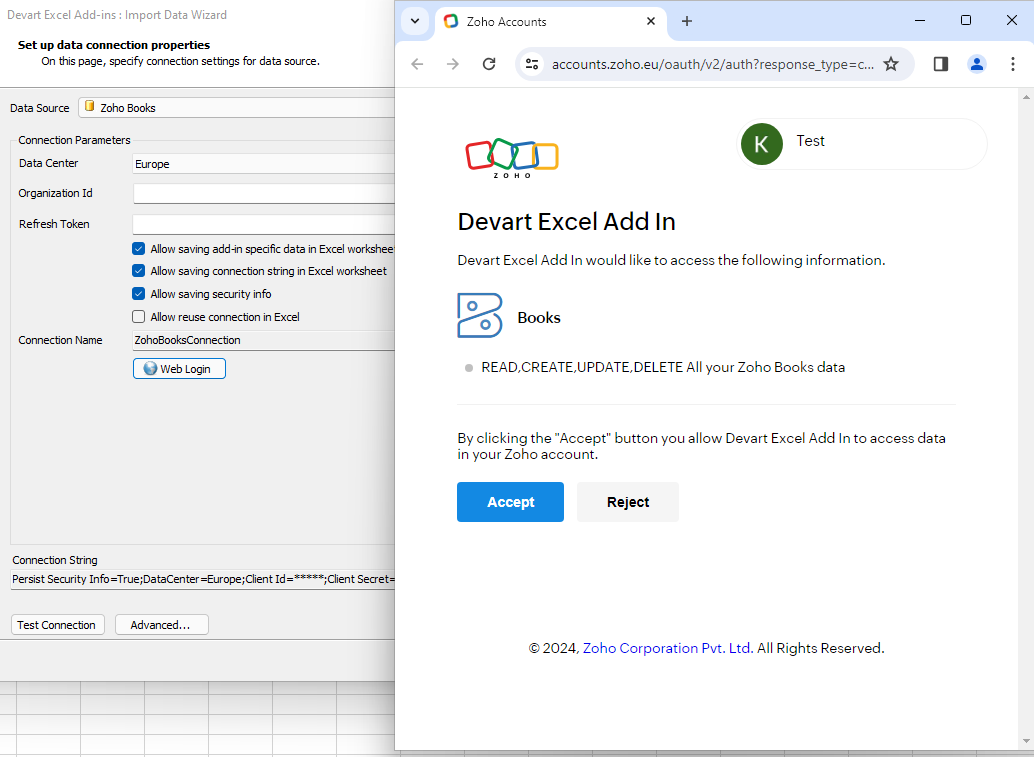
The Import Data Wizard set to Zoho Books and the Europe data center, with Zoho's consent page asking to allow Devart Excel Add In to READ, CREATE, UPDATE and DELETE all Zoho Books data.
Once connected, the wizard lists Zoho Books objects in a Visual Query Builder. You tick the columns you want, add WHERE and ORDER BY conditions, or switch to the SQL Query tab and type a SELECT yourself. A preview shows the first rows before anything lands in the workbook.
Features
Accounting objects, including bills with their lines
Excel Add-in for Zoho Books imports Zoho Books objects as tables. The June 2026 release (3.0.0) added a SalesReceipts object, nested line items inside Bills, reading BankTransactions in every status, better filtering by Status, and fuller custom-field support in SalesOrders, Bills, CreditNotes and CustomerPayments. Reference tables such as Currency come through too, with codes, symbols, formats and exchange rates.
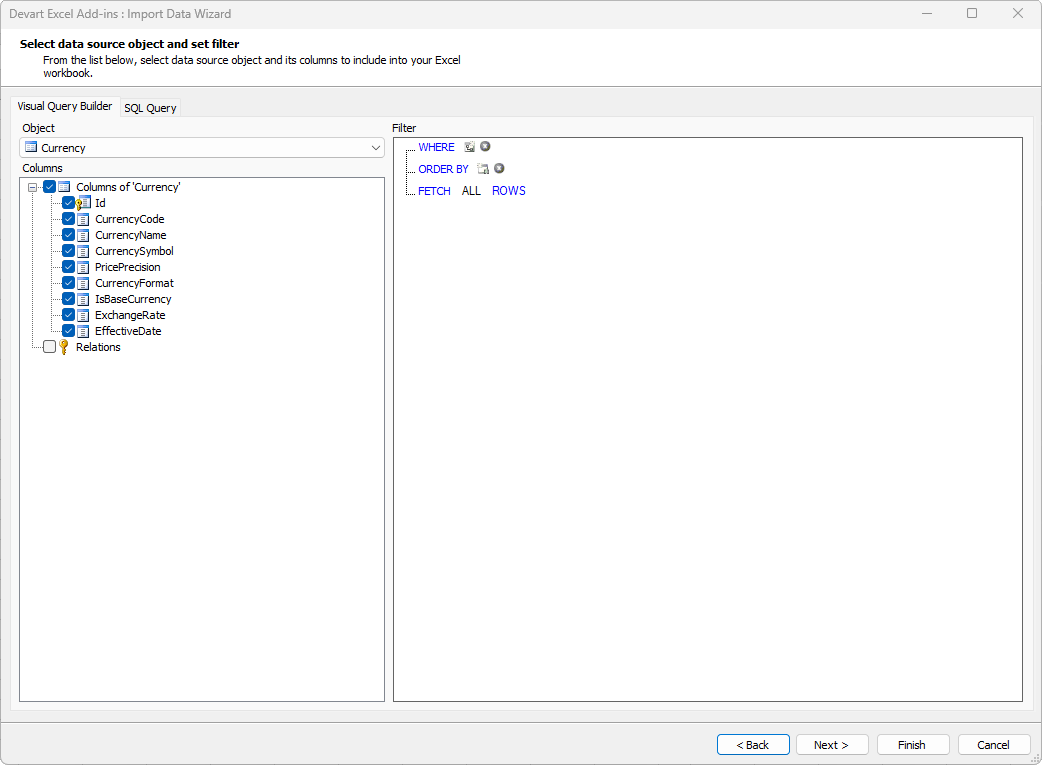
The Visual Query Builder with the Zoho Books Currency object selected: Id, CurrencyCode, CurrencyName, CurrencySymbol, PricePrecision, CurrencyFormat, IsBaseCurrency, ExchangeRate and EffectiveDate, with empty WHERE and ORDER BY filters.
Edit Mode with commit and rollback
Excel Add-in for Zoho Books turns an imported table into an edit session. Switch on Edit Mode and changed cells, inserted rows and deletions are highlighted; nothing reaches Zoho Books until you click Commit, and Rollback restores the loaded values. Entered values are checked against the column types first, so a typo in a number or date is flagged in the sheet rather than rejected by Zoho halfway through a batch.
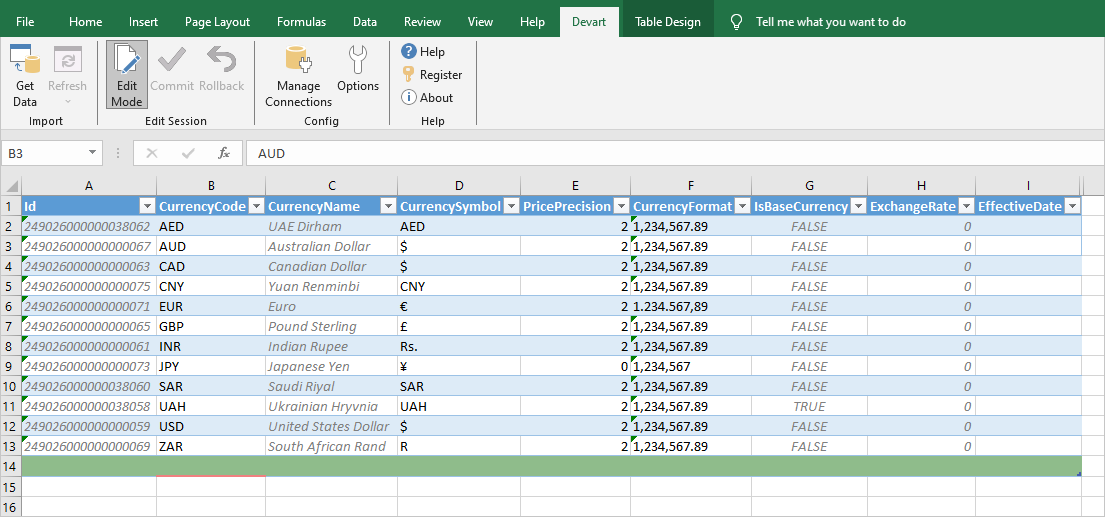
Zoho Books currencies (AED to ZAR) loaded into an Excel table with the Devart ribbon's Edit Mode switched on; read-only columns such as Id and CurrencyName are greyed, and a new empty row waits at the bottom.
One-click refresh for recurring reports
Excel Add-in for Zoho Books stores the query with the worksheet (if you allow it in the connection options), so next month's figures are a Refresh away. Your analysis and charts built on the imported table update along with it.
Connection options for the cautious
Excel Add-in for Zoho Books has a Readonly option that allows only SELECT statements, useful for a report workbook shared around the finance team. Checkboxes decide whether the connection string and security info are saved in the workbook at all. Advanced settings cover a proxy server, UTC date conversion, failover retries for temporary errors, command timeouts, and your own OAuth Client Id and Client Secret.
Benefits
- Corrections at spreadsheet speed. Fill-down, find-and-replace and formulas work on live Zoho Books records.
- No CSV round trips. Nothing to export, map and re-import.
- Reports that stay current. Refresh replaces last month's copy-and-paste.
- Safe by default. Edits are staged, validated and committed only when you say so.
Real-World Uses
- Exchange-rate upkeep: a multi-currency business pastes this month's rates into the Currency sheet and commits them.
- Bill coding clean-up: a bookkeeper loads bills with their line items and custom fields, fixes misallocated cost codes, and commits.
- Receivables review: finance pulls CustomerPayments and CreditNotes into a pivot table each Monday with one Refresh.
- Bank feed triage: an accountant lists BankTransactions in every status to find what still needs categorizing.
Who It's For, and Who Should Skip It
It's for Zoho Books users on Windows who do real work in Excel: bookkeepers fixing records in bulk, accountants with recurring workbooks, and controllers who want live figures in their models.
Skip it on a Mac, since only Excel for Windows is supported. If you want Zoho Books data in Power BI, Tableau or SQL Server rather than Excel, Devart's ODBC Driver for Zoho Books fits better. Developers building an integration should look at Devart's ADO.NET provider for Zoho Books instead. And if you only import a price list twice a year, Zoho Books' own CSV import is free.
Usage Guide
- Download and install the add-ins (76.60 MB) with an administrator account; you'll need a free Devart account for the download.
- In Excel, open the Devart tab and click Get Data, then choose Zoho Books.
- Pick the data center your Zoho account uses, enter your Organization ID, click Web Login and accept Zoho's consent page, then Test Connection.
- Pick an object, tick columns, add filters (or write a SELECT on the SQL Query tab), preview, and Finish.
- Turn on Edit Mode, make your changes, insert rows with Insert > 1 Row Above/Below, then Commit.
Before you buy
- The add-in writes straight to your books with the rights of the Zoho user who signed in. For a reporting workbook, tick Readonly or sign in as a user whose Zoho Books role is view-only.
- Buy Now orders one license with one year of support and upgrades for $179.95. If you also run Zoho CRM or Zoho Desk, price the Excel Add-in Cloud Pack first (below).
- The license is perpetual; the update year only affects new versions and support.
Where it falls short
- Windows Excel only. No Mac, web or mobile Excel.
- No scheduling. Refresh and Commit are buttons; for a nightly sync you need an ODBC or SSIS setup instead.
- Zoho Books API limits apply. Large imports and refreshes are made of API calls counted against your Zoho plan.
- Muddled help text. Devart's how-to page tells you to create a token in Zoho's API settings, while the add-in itself gets the token through Web Login. Follow the Web Login route.
- Zoho Books changes are infrequent. Since the 2024 launch, the only Zoho Books-specific release notes are in version 3.0.0; most updates are general add-in fixes.
What Users Say
Excel Add-in for Zoho Books has no rated reviews on Capterra, G2 or similar sites; it only launched in February 2024.
Devart's launch post
Devart introduced the Zoho Books and Zoho Desk add-ins together, promising that users can "import data into Excel, instantly refresh it, edit data in the spreadsheet, and save modifications directly back to Zoho applications." The screenshots above show exactly that workflow, so the claim is concrete; how well it copes with your own organization's volume is what the 30-day trial is for.
Comparisons
vs. Zoho Books' import and export
Zoho's built-in CSV tools cost nothing and are fine for a first data load. The add-in wins when you edit existing records repeatedly, each with a different value, or keep a workbook that must show current figures.
vs. Devart's other Zoho add-ins
The same add-in design covers Zoho CRM and Zoho Desk, at the same price each. A company that runs several Zoho apps should compare three separate add-ins with the Cloud Pack.
Editions and Pricing
There's one edition. Buy Now opens Devart's order page with one license and a year of support and upgrades; a second or third year and priority support are options there.
| Option | Price | What you get |
|---|
| Excel Add-in for Zoho Books | $179.95 | Perpetual license, one year of support and upgrades |
| Excel Add-in Cloud Pack | $499.95 | Every cloud-app add-in, Zoho Books, Zoho CRM and Zoho Desk included |
| Excel Add-in Universal Pack | $599.95 | All Devart Excel add-ins, cloud apps and databases |
Three Zoho add-ins bought singly cost $539.85, more than the Cloud Pack. Details are on our Cloud Pack and Universal Pack pages. Buying 5 or more licenses of one add-in takes 5% off, 10 or more 10%, and 20 or more 15%.
FAQs
Can Excel Add-in for Zoho Books work with more than one Zoho Books organization?
Yes. Excel Add-in for Zoho Books picks the organization with the Organization ID in each connection, so you can save one named connection per organization and use them side by side.
Does Excel Add-in for Zoho Books support Zoho's Saudi Arabia data center?
Yes. Excel Add-in for Zoho Books added the Saudi Arabia domain in version 3.0.0 (June 2026), alongside the US, Europe, China, India, Australia, Japan, UK and Canada.
Can colleagues open my workbook without signing in to Zoho Books?
They can see the data already in the sheet. To refresh or commit, Excel Add-in for Zoho Books needs the add-in installed and a connection; whether your connection string and credentials are stored in the workbook depends on the save options you tick when connecting.
Does Excel Add-in for Zoho Books run on Excel for Mac?
No. Excel Add-in for Zoho Books supports Microsoft 365 Excel and Excel 2013 to 2024 on Windows only.
What is the refund policy for Excel Add-in for Zoho Books?
Devart's order page for Excel Add-in for Zoho Books advertises a 30-day money-back guarantee if you're not satisfied. Its ordering FAQ says refunds within 30 days are given when a technical problem stops the product working and support can't fix it. Test with the 30-day trial before buying.
Does the add-in keep working after the first year?
Yes. Excel Add-in for Zoho Books is a perpetual license, so your version keeps working; renewing brings new versions and support, which matters when Zoho changes its API.
System Requirements
- Microsoft 365 Excel or Excel 2013, 2016, 2019, 2021 or 2024 for Windows
- .NET Framework 4.7 or higher and the Visual Studio 2010 Tools for Office Runtime
- An administrator account to install
- A Zoho Books organization and its Organization ID
Conclusion
Excel Add-in for Zoho Books is worth $179.95 to anyone who regularly corrects or reports on Zoho Books records in Excel on Windows. Its one big reason to buy is the edit-and-commit loop on live accounting data, with validation and rollback, which Zoho's CSV import can't match. The reasons not to are a Windows-only Excel requirement, no scheduling, and few Zoho Books-specific updates since launch; and if you use two or more Zoho apps, the $499.95 Cloud Pack is the better deal. Run the trial on a test edit first, then commit for real.
Download Free TrialBuy Now