dotConnect for Zoho CRM: Query Zoho CRM from .NET with Plain SQL, EF Core or Dapper
dotConnect for Zoho CRM is Devart's ADO.NET data provider that lets C#, VB.NET and F# applications read and write Zoho CRM leads, contacts, accounts and deals with ordinary SQL, Entity Framework Core, NHibernate or Dapper. It runs on .NET 5 to 10, .NET Core and .NET Framework 4.5 to 4.8 on Windows, Linux and macOS, and a single-developer license costs $339.95 with a year of updates.
Zoho's REST API does the job, but every report or sync turns into OAuth token handling, paging, JSON parsing and per-module endpoints. dotConnect for Zoho CRM hides all of that behind familiar ADO.NET classes such as ZohoConnection and ZohoCommand, so SELECT * FROM Contacts just works.
Quick facts
- Version: 3.2.223, released October 8, 2026
- Developer: Devart
- Platforms: .NET 5.0 to 10.0, .NET Core 2.0 to 3.1, .NET Standard 2.0 and 2.1, .NET Framework 4.5 to 4.8, ASP.NET Core, Blazor and .NET MAUI
- Operating systems: Windows, Linux and macOS, x64 and x86
- IDEs: Visual Studio 2015 to 2026, plus NuGet-compatible IDEs such as VS Code and JetBrains Rider (without design-time tools)
- Zoho CRM: API v8 (preferred) and v2 (deprecated), all Zoho data centers: crm.zoho.com, .eu, .in, .com.au and .com.cn
- Price: $339.95 for a single developer with one year of support and upgrades, $169.95 a year to renew
- Trial: fully functional for 30 days, no credit card required
- Guarantee: 30-day money-back
What we checked: version 3.2.223 (released October 8, 2026, 16.76 MB installer) on Devart's download page and the matching Devart.Data.Zoho 3.2.223 package on NuGet (6,516 downloads in total), and the single-developer license at $339.95 at checkout with a $169.95 renewal, plus the Server, Site and OEM prices on the same order page, all on October 28, 2026. We didn't install the trial (the download needs a Devart account) or connect it to a Zoho CRM account.
Before you buy
dotConnect for Zoho CRM is a developer component, not an app for CRM users. You use it inside your own .NET code. The Windows installer needs a free Devart account to download, and the trial has to be activated. On Linux and macOS you add the Devart.Data.Zoho NuGet package instead. If you only want Zoho CRM data in Excel or a reporting tool, Devart sells separate Excel Add-in and ODBC driver products for that, and you don't need this one.
Download Free TrialBuy Now
Overview
dotConnect for Zoho CRM connects to Zoho CRM directly, with no Zoho client libraries, and exposes every module as a table: Leads, Contacts, Accounts, Deals, Calls, Campaigns, Events, notes, attachments and the rest. Simple queries are compiled straight into Zoho API calls and run on Zoho's side. Complex ones are split up: part runs on Zoho CRM, and a local SQL-92 engine handles the joins and conditions the API can't do itself, then hands the result back to your application.
The product is actively maintained. Devart shipped seven releases of it in 2026, after adding .NET 10, Visual Studio 2026 and interactive OAuth in version 3.0.0 (December 2025). Version 3.2.100 (May 2026) moved it to Zoho CRM API v8 and added Bulk Read support for large data volumes.
Features
SQL against Zoho CRM modules
dotConnect for Zoho CRM runs standard SELECT, INSERT, UPDATE and DELETE statements against Zoho CRM modules, with JOINs, WHERE conditions and other SQL features, so you don't have to learn the Zoho API. You read data with ZohoCommand and ZohoDataReader, or fill a DataSet through ZohoDataAdapter and post the changes back. The ZohoLoader component loads data quickly, and query results can be fetched page by page.
Sign-in with interactive OAuth or a refresh token
dotConnect for Zoho CRM handles Zoho's OAuth for you. With Authentication Type=OAuthInteractive, the first Open() launches a browser window where you sign in to Zoho and grant access, and the provider then stores and refreshes the tokens itself. For unattended services you can pass a Client ID, Client Secret and refresh token instead. You pick the Zoho data center (US, EU, India, Australia or China) with the Domain parameter. Connections use SSL/TLS, can go through a proxy server, and can run in FIPS 140-2 mode on Windows.
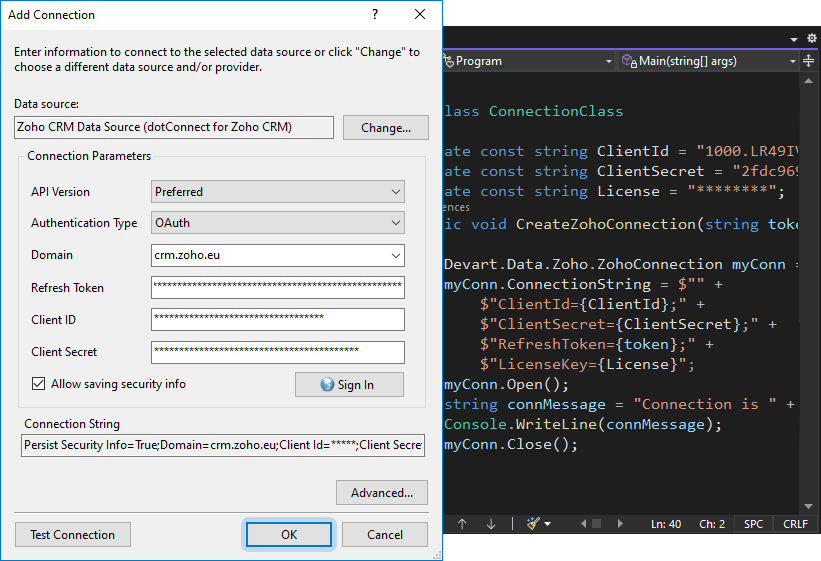
The Add Connection dialog for the Zoho CRM data source, set to the preferred API version, OAuth authentication and the crm.zoho.eu domain, with a Sign In button, next to C# code that builds the same connection string.
Entity Framework Core, NHibernate and Dapper
dotConnect for Zoho CRM works with Entity Framework Core 1 to 10, Entity Framework 4 to 6, NHibernate 1.x to 5.x and Dapper 1.x and 2.x. You can scaffold a DbContext and entity classes from your Zoho CRM account with Scaffold-DbContext and the Devart.Data.Zoho.EFCore package, then query and update records with LINQ. Devart's visual model designer, Entity Developer, can also build the model from a diagram, but it's licensed separately.
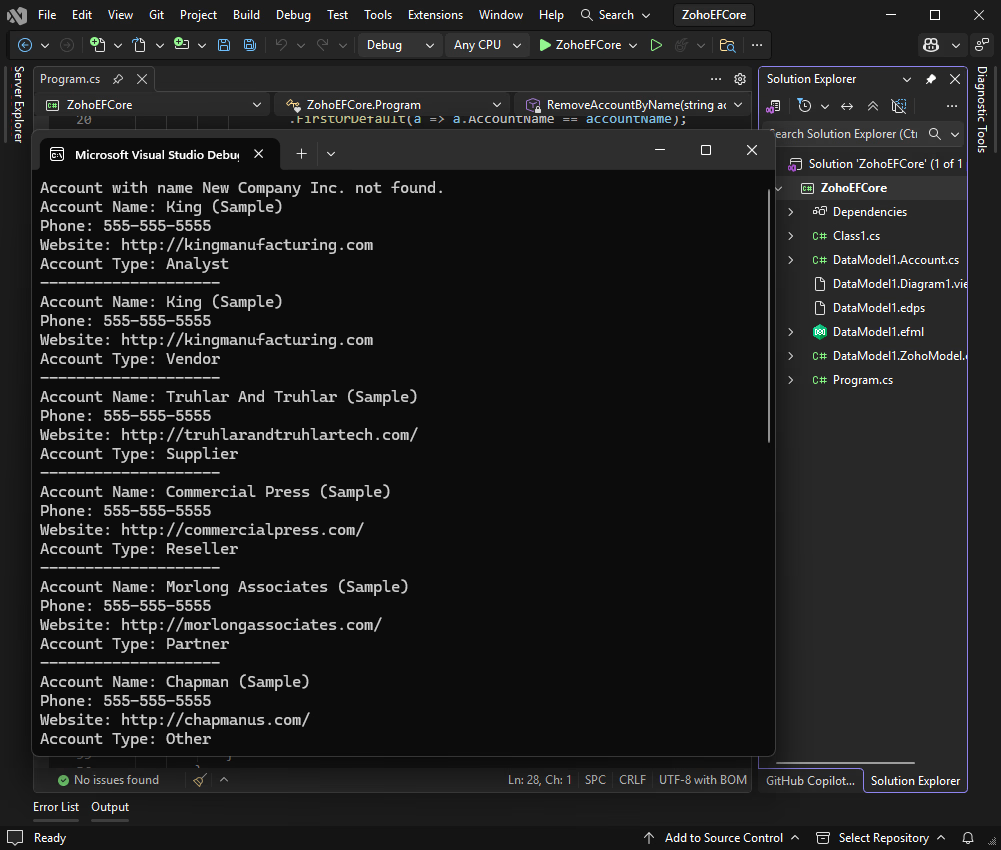
A Visual Studio EF Core console app that read Zoho CRM sample accounts through dotConnect and printed each account's name, phone, website and type, with the generated model files in Solution Explorer.
Browse Zoho CRM inside Visual Studio
dotConnect for Zoho CRM adds a Zoho CRM data source to Visual Studio's Server Explorer. You can expand a connection to see every module and its fields, and open a module's data in a query window with one right-click. Design-time editors, IntelliSense descriptions for its classes, and SQL syntax highlighting and completion come with it.
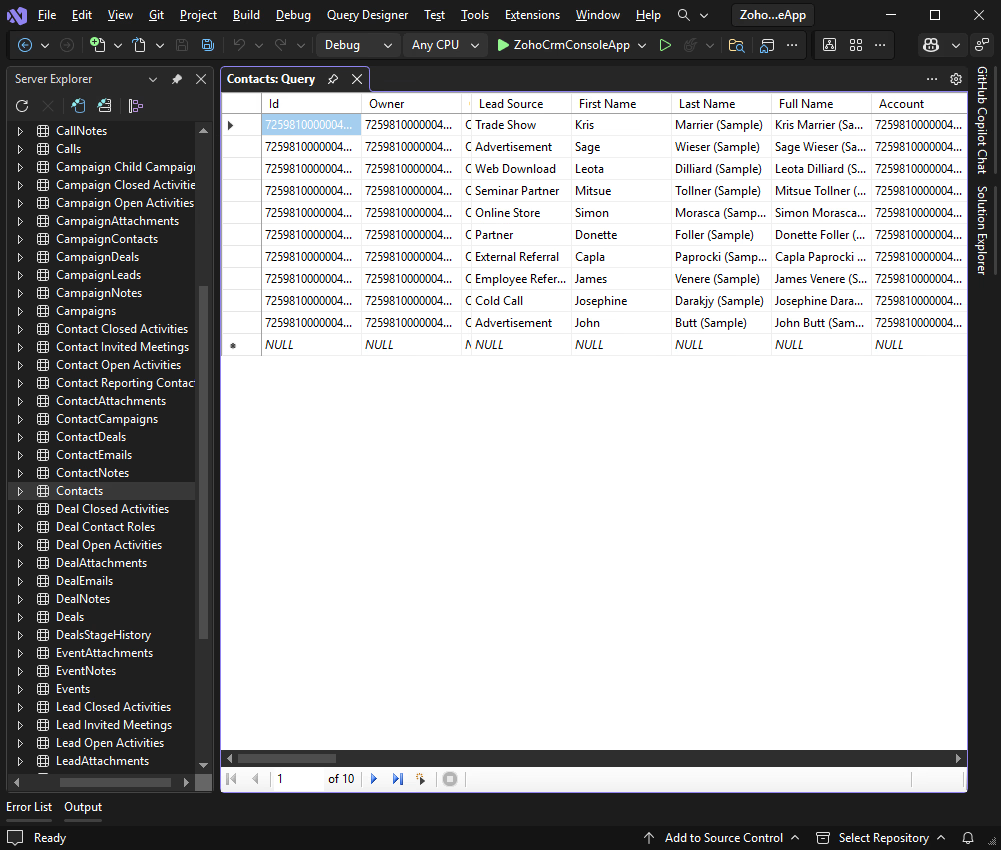
Server Explorer listing Zoho CRM modules (Calls, Campaigns, Contacts, Deals, Events and more) as tables, with the Contacts module's sample records open in a query grid.
Bulk Read, monitoring and tuning
dotConnect for Zoho CRM 3.2.100 added a BulkRead connection string option that switches large queries to Zoho's Bulk Read API. The ZohoMonitor component and Devart's dbMonitor tool trace every statement your application sends, and connection pooling, batch processing and automatic fetch block sizing are built in. Version 3.2.192 (September 2026) also added a demo MCP server to the samples, showing how AI assistants such as Claude, Cursor and Visual Studio Code can reach Zoho CRM data through the provider.
Benefits
Less plumbing code. Exports, reports and sync jobs become SQL and LINQ instead of hand-written REST calls, token refreshes and paging loops.
Skills your team already has. Anyone who knows ADO.NET or EF Core can work with Zoho CRM data on day one.
One code base across platforms. The same provider runs in a Windows service, an ASP.NET Core site on Linux or a .NET MAUI app.
No per-user fees for your customers. End users of an application you build with it don't need a license.
Real-World Uses
- A nightly job copies new Zoho CRM leads and deals into a SQL Server data warehouse with a few
SELECT statements and Bulk Read for the large modules.
- An ASP.NET Core or Blazor intranet page shows each sales rep's open deals and recent calls, with an EF Core model scaffolded from the Zoho CRM account.
- An order system written in C# creates or updates the matching Zoho CRM account and contact with an
INSERT or UPDATE when a customer signs up.
- A consultant cleans up duplicate contacts by joining Contacts and Accounts in SQL inside Visual Studio before writing any code.
Who It's For, and Who Should Skip It
dotConnect for Zoho CRM is for .NET developers who build or maintain applications that talk to Zoho CRM, especially teams that already use ADO.NET, EF Core or Dapper against SQL databases and want the same patterns for their CRM data.
Skip it if you don't write .NET code. Business users who just want Zoho CRM data in a spreadsheet or BI tool are better served by an ODBC driver or an Excel add-in, and no-code users by an integration service. Skip it too if you only need one or two simple API calls, since Zoho's own REST API and SDKs are free. And if your stack is Java, Python or Node.js, this provider won't help you.
Usage Guide
- Sign in to your Devart account, download the Windows installer from the download page and run it, or add the
Devart.Data.Zoho NuGet package to your project with dotnet add package Devart.Data.Zoho. On a machine without Visual Studio, choose the Minimal installation type.
- Activate the trial or your purchased license and copy the license key from the Devart Customer Portal.
- In Visual Studio, open Server Explorer, right-click Data Connections, choose Add Connection and select Zoho CRM Data Source with the dotConnect for Zoho CRM provider.
- Pick OAuth or OAuthInteractive, choose your Zoho domain, click Sign In to authorize access, then click Test Connection.
- In code, create a
ZohoConnection with a connection string such as Authentication Type=OAuthInteractive;License Key=..., call Open(), and run SQL through ZohoCommand.
- For EF Core, install
Devart.Data.Zoho.EFCore and Microsoft.EntityFrameworkCore.Tools, then run Scaffold-DbContext with your connection string and the Devart.Data.Zoho.Entity.EFCore provider.
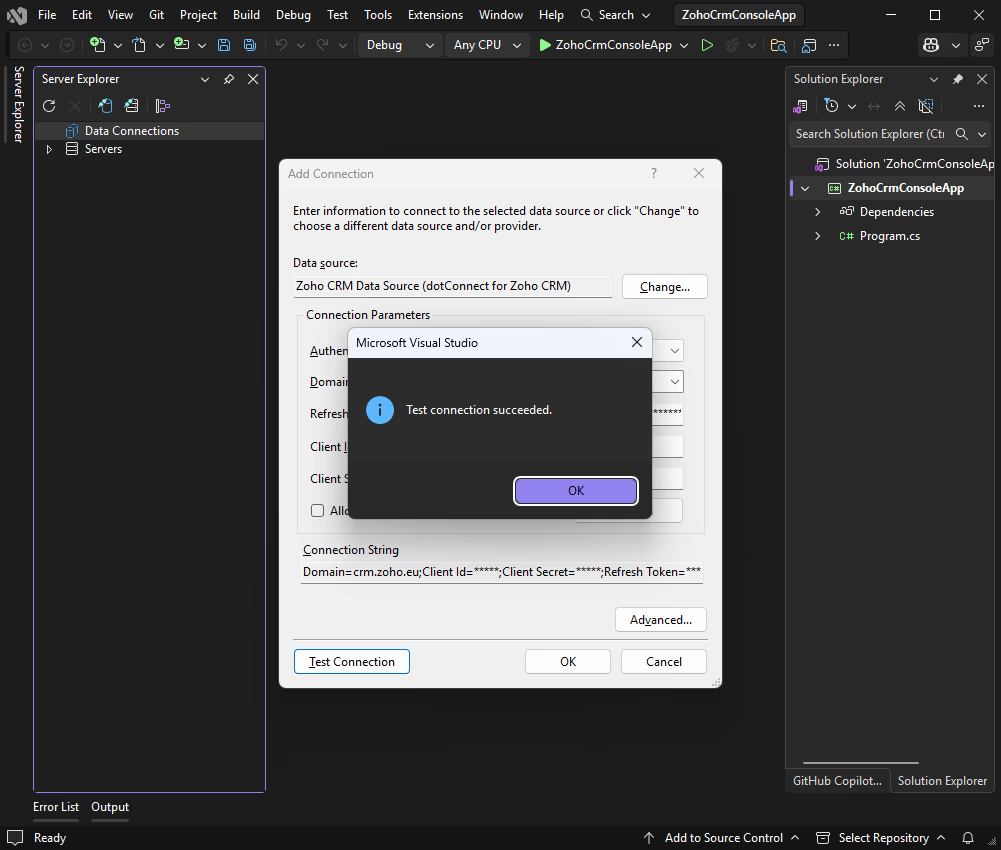
Visual Studio's Add Connection dialog for the Zoho CRM data source, showing the "Test connection succeeded." message and a connection string for the crm.zoho.eu domain.
Tips
- Build your release with the purchased version. An application compiled with the trial keeps the trial's time limit even when deployed with licensed assemblies, and starts reporting that the trial has expired.
- Uninstall the trial completely before installing the purchased version, and remove any leftover Devart.* assemblies from the Global Assembly Cache.
- Use the preferred API version (v8). Version 2 is marked deprecated, and Zoho's API v1 has already reached end of life.
- Install Devart data providers from releases of the same date. They share the
Devart.Data.dll assembly, and mixed versions conflict.
Where it falls short
- Licensing takes care. dotConnect for Zoho CRM uses .NET component licensing, and Devart's FAQ spends a long section on "License not found" and "License not valid" errors: a missing or non-embedded
licenses.licx, an outdated App_Licenses.dll in ASP.NET sites, or builds left over from the trial.
- It's still bound by the Zoho API. Complex JOINs are processed locally after the data is fetched, so a big join across large modules pulls a lot of records through the API. Bulk Read helps for large reads.
- Visual Studio Express is limited. The add-in menu, automatic toolbox registration and advanced design-time integration aren't available there.
- Entity Developer costs extra. The visual EF Core designer shown in Devart's guides is a separate product.
- Updates end with the subscription. The license is perpetual, but new versions, including fixes for Zoho API changes, need an active subscription at $169.95 a year.
What Users Say
dotConnect for Zoho CRM is a niche developer component, and it has no published user reviews yet. Capterra, Software Advice and GetApp list it without a rating, and we found no independent magazine reviews of it. The clearest signal of use is NuGet, where the Devart.Data.Zoho package had 6,516 downloads in total on October 28, 2026.
The fairest way to judge it is the free 30-day trial against your own Zoho CRM account: check that the modules and custom fields you need show up in Server Explorer, and time a typical query before you buy.
Comparisons
dotConnect for Zoho CRM vs the Zoho CRM REST API
Zoho's REST API and SDKs are free and cover every Zoho CRM feature, but you write the HTTP calls, token refresh, paging and JSON mapping yourself. dotConnect for Zoho CRM costs $339.95 and gives you SQL, ADO.NET classes and EF Core models on top of the same API. It pays for itself when you'd otherwise spend days on data-access code.
dotConnect for Zoho CRM vs Devart's ODBC Driver for Zoho CRM
Devart's ODBC driver connects Zoho CRM to any ODBC tool, such as Excel, Power BI or a reporting suite, and to code in many languages. dotConnect for Zoho CRM is .NET only, but it adds what ODBC can't: native ADO.NET classes, Entity Framework Core and Dapper support, and Visual Studio integration. Pick dotConnect for .NET development, and the ODBC driver for reporting tools and non-.NET code.
Editions and Pricing
Every license is perpetual and includes one year of updates and support. After that, you keep using the last version you received, or renew the subscription for new versions. Two years of updates cost $489.95 and three years $619.95 for a single developer, and Priority Support adds 20% ($409.95 for one developer). Buying 5, 10 or 20 copies at once gets a 5%, 10% or 15% volume discount. The single-developer license is called Developer on Devart's site and Professional on the order page, at the same $339.95.
| License |
Price (1 year of updates) |
What it covers |
| Developer, single |
$339.95 |
One developer, on one or more development workstations |
| Developer, team |
$849.95 |
A team of developers |
| Server |
$799.95 |
One server of one organization, including web, application and batch servers with many users |
| Site, 10-100 devices |
$3,999.95 |
Use across one company ($7,999.95 for 100+ devices) |
| OEM, 10-100 devices |
$4,999.95 |
Royalty-free redistribution inside your own application, with silent installation ($9,999.95 for 100+ devices) |
FAQs
Can I keep using dotConnect for Zoho CRM after the subscription ends?
Yes. dotConnect for Zoho CRM licenses are perpetual, so the version you have keeps working. The subscription only covers new versions, bug fixes and support, and it renews at $169.95 a year for a single developer.
Do my application's users need a dotConnect for Zoho CRM license?
No. End users of an application built with dotConnect for Zoho CRM don't need a license. You deploy the Devart runtime assemblies and the license resource with your application. Distributing it as part of a product you sell to other companies calls for the OEM license.
Does dotConnect for Zoho CRM work with Zoho CRM accounts in the EU or India?
Yes. dotConnect for Zoho CRM connects to Zoho's US, EU, India, Australia and China data centers. You set the matching domain (crm.zoho.com, crm.zoho.eu, crm.zoho.in, crm.zoho.com.au or crm.zoho.com.cn) in the connection string.
Can I use dotConnect for Zoho CRM on Linux or macOS?
Yes. dotConnect for Zoho CRM runs on Linux and macOS through the Devart.Data.Zoho NuGet package with .NET 5 to 10 or .NET Core. Version 3.1.33 fixed license key activation on Red Hat-based distributions such as RHEL, AlmaLinux and Rocky Linux 9 and 10. The Windows installer and Visual Studio tools are Windows only.
Does dotConnect for Zoho CRM need Zoho API credentials?
Not with interactive OAuth. dotConnect for Zoho CRM opens a browser window on the first connection, you sign in to Zoho and grant access, and the provider manages the tokens. For a service that runs without a user, you register a Zoho client and supply its Client ID, Client Secret and a refresh token.
Is a refund possible if dotConnect for Zoho CRM doesn't fit my project?
Yes. Devart covers dotConnect for Zoho CRM purchases with a 30-day money-back guarantee and refunds the payment in full if the product doesn't meet your expectations.
Does the dotConnect for Zoho CRM license include Entity Developer?
No. The dotConnect for Zoho CRM activation key activates every component in its bundle except Entity Developer, Devart's visual ORM designer, which needs its own license. You can still build EF Core models without it, with Scaffold-DbContext.
System Requirements
- .NET 5.0 to 10.0, .NET Core 2.0 to 3.1, .NET Standard 2.0 or 2.1, or .NET Framework 4.5 to 4.8
- Windows, Linux or macOS, x64 or x86
- Visual Studio 2015 to 2026 for design-time integration (optional)
- Languages: C#, VB.NET and F#
- A Zoho CRM account with API access
- 16.76 MB installer for Windows
Conclusion
dotConnect for Zoho CRM is worth $339.95 if you're a .NET developer who has to move data in and out of Zoho CRM regularly. The one reason to buy it is time: SQL, ADO.NET and EF Core on top of Zoho's API replace days of token, paging and JSON code, and Devart keeps it current with Zoho's API changes and new .NET versions. The main reason not to is that there's no independent user feedback yet and the licensing needs some care, so run the 30-day trial against your own Zoho CRM account first. If you don't write .NET code, or only need a couple of API calls, it's the wrong tool.
Download Free TrialBuy Now