Vovsoft Log Analyzer: Open and Search Log Files Too Big for a Text Editor
Log Analyzer is a $19 Windows program from Vovsoft that opens very large log and text files, including files over 1 GB and files another program is still writing, and finds every line that contains the value you search for. Version 3.0 also splits Apache access logs and Windows Event Log (.evtx) files into columns and counts the values in any column. The $19 is a one-time lifetime license, and there's a free trial.
It's for administrators, developers and support staff who keep hitting the same wall: Notepad freezes, the editor refuses the file, and all you want is the 2,000 lines that mention one IP address or one error code.
Quick facts
- Version: 3.0, released September 13, 2026
- Developer: Vovsoft
- Platform: Windows 11, 10, 8/8.1, 7 and Vista, 32-bit and 64-bit. No Mac or Linux version
- Capacity: displays up to 100,000,000 lines in a virtual list
- Encodings: No Encoding (Raw), ANSI, UTF-8 and Unicode
- Structured analysis: Apache access logs and Windows .evtx event logs
- Editions: installer (3.39 MB) and portable (2.03 MB), one license for both
- Price: $19, one-time payment, lifetime license with free updates
- Trial: the full search works, with a nag screen and for non-commercial use only
- What we checked: installer file version 3.0.0.0 (3,559,848 bytes) with a valid code signature, downloaded from the vendor on November 11, 2026, and $19.00 on the order page with no auto-renewal on November 11, 2026. We didn't load a multi-gigabyte file ourselves
Download Free TrialBuy Now
Overview
The window is deliberately plain: a Select Log File button, a search box with a Case-Sensitive option, the lines of the file below, and a status bar with the line count and how long the load or search took. Menus for File, Analyze and Encoding sit on top. You don't edit anything here. Log Analyzer is a reader and a filter, and that's why it can stay fast on files that make editors choke.
Under the hood it reads the file through a buffered stream with memory caching, straight from disk, instead of pulling the whole file into RAM. The list is virtual, so only the lines on screen are drawn.
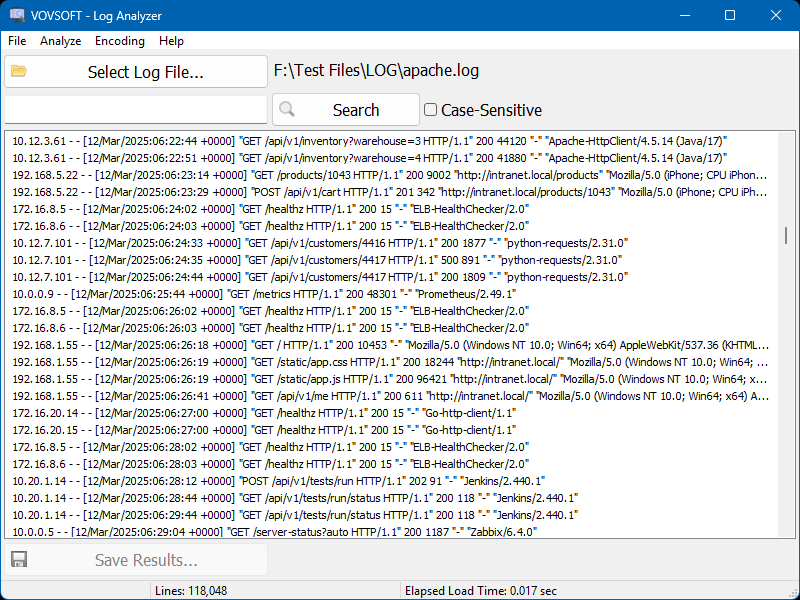
An Apache access log loaded: 118,048 lines, with an elapsed load time of 0.017 seconds in the status bar.
Features
Search a huge file and keep only the matching lines
Log Analyzer filters the file down to the lines that contain your search value, with an optional case-sensitive match, and shows how many were found. Save Results writes just those lines to a new file, which is often the whole point: a 2 GB log becomes a few hundred kilobytes you can attach to a ticket. A right-click Show Line command, added in version 2.5, takes you from a result back to its place in the file.
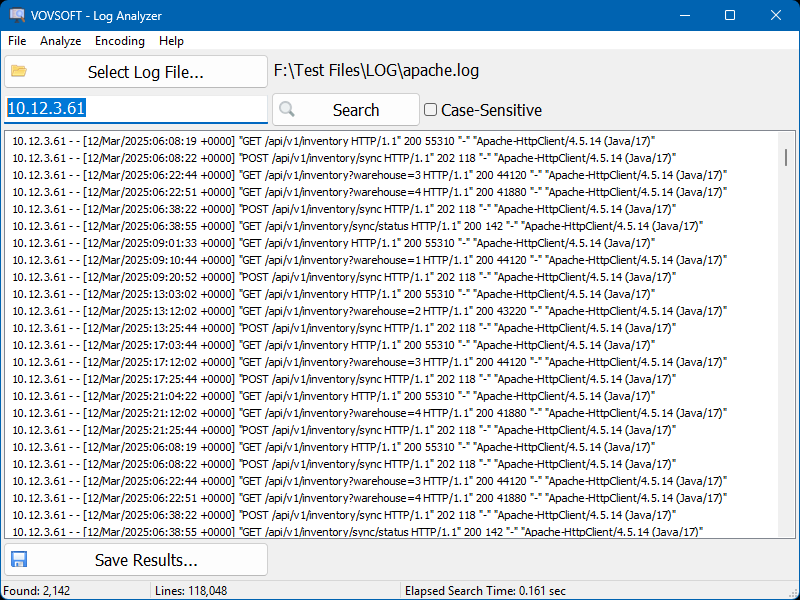
A search for the IP address 10.12.3.61: 2,142 matching lines out of 118,048, found in 0.161 seconds.
Open files that are still being written
Log Analyzer can load a file that's currently in use by another program, such as a server's active log, since version 2.4. Many editors refuse a locked file or ask you to copy it first. It also opens files passed on the command line (version 2.5) or dragged onto the window.
Apache log analysis: columns and counts
Log Analyzer 3.0 turns an Apache access log into a table with IP address, identity, user, date and time, request, status, size and referrer columns. Pick a column and click List, and it counts every distinct value: which IPs hit the server most, which URLs were requested most, how many 404s or 500s came back. That's the quick "who and what" summary you'd otherwise build with a script or a spreadsheet.
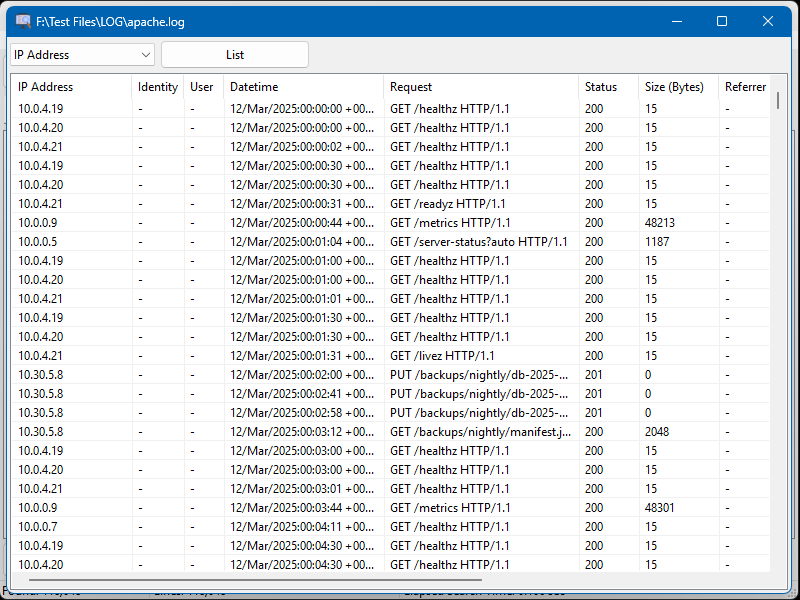
The Apache analysis view: each log line split into columns, with a column picker and a List button at the top.
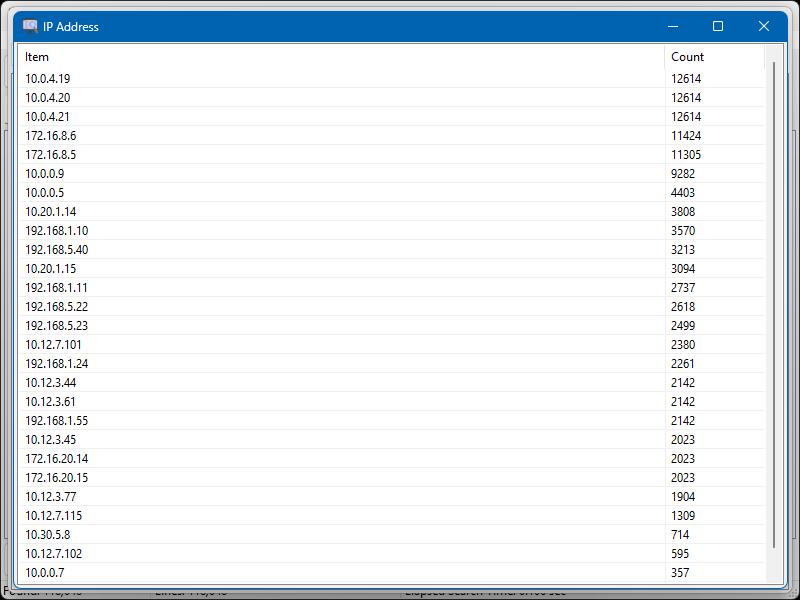
Counting the IP Address column: each address with its number of requests, highest first.
Windows Event Log (.evtx) files
Log Analyzer 3.0 also opens Windows Event Log files saved as .evtx, the format Event Viewer exports, so you can inspect system, security or application events from another PC and count the values in a field the same way as with Apache logs.
Encoding choices for odd files
Log Analyzer's Encoding menu reads a file as No Encoding (Raw), ANSI, UTF-8 or Unicode. Raw mode, added in version 2.4, helps with dumps and mixed files that would otherwise show as garbage or fail to load.
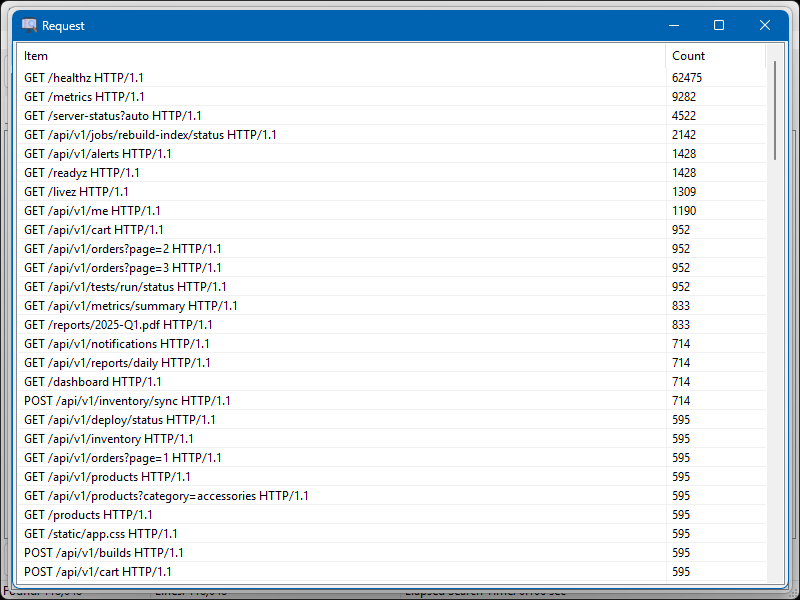
Counting the Request column: the most requested URLs, led by a health-check endpoint with 62,475 hits.
Benefits
The real gain is time. Instead of splitting a file, waiting for an editor to index it, or writing a one-off script, you open it, type a value and save what you need. For a web server, the counts answer the first questions of any incident in a minute: is one IP hammering the site, which page is throwing errors, what changed in traffic. And because it's a small download with a portable edition, you can carry it to a server or a client's PC on a USB stick.
Real-World Uses
- A web admin pulls every request from a suspicious IP out of a month of Apache logs and saves them as evidence.
- A developer opens a 3 GB application log that's still being written and searches for one transaction ID.
- Support staff count status codes in an access log to see whether a reported outage shows up as 500 errors.
- An IT technician loads an .evtx file exported from a user's PC and counts the event sources behind a crash.
- A database admin searches a huge SQL dump for one table name without loading it into an editor.
Who It's For, and Who Should Skip It
Log Analyzer suits Windows users who now and then need to look inside one very large log or text file, and small-site owners who want quick counts from their Apache logs without setting up a log platform.
Skip it if you need continuous log monitoring, alerts, dashboards or logs gathered from many servers: that's the job of a log management system, not a file viewer. Skip it too if your logs come from Nginx, IIS or another format and you want them split into columns: version 3.0's structured analysis covers Apache and .evtx only, while plain search works on any text file. Mac and Linux users need another tool.
Usage Guide
- Download the installer or the portable edition and start Log Analyzer.
- Click Select Log File and choose the file, or drag it onto the window.
- If the text looks wrong, pick another option in the Encoding menu.
- Type a value, tick Case-Sensitive if needed, and click Search.
- Click Save Results to write the matching lines to a new file.
- For an Apache or .evtx log, open the Analyze menu, choose a column and click List to count its values.
Before you buy
The trial does the full search, with a nag screen, and it's for personal use: using it at work needs the license. One license covers one person on any number of their own computers, or one shared workstation. Vovsoft's general policy is no refunds, since a free trial comes first (it may refund an accidental order at its discretion, and PayPro Global has the final say on its orders), so test the trial on one of your real files before buying.
Where it falls short
- Search is a plain text match with a case option. For pattern searches you'd need a regular-expression tool such as Vovsoft's own RegEx Extractor.
- Column analysis covers only Apache access logs and .evtx files.
- It's a one-file viewer: no merging of several logs, no charts, no alerts.
- The interface is English only.
- Between version 2.3 in June 2023 and version 2.4 in August 2026 there were no updates, though three releases followed in quick succession after that.
What Users Say
On Vovsoft's site
Log Analyzer's product page shows 4.3 out of 5 from 3 ratings, with one written comment, which is about buying rather than using it:
"Excellent overall. Ordering process was straightforward and license key received immediately after purchase. Good software at a very reasonable price." swirlingair
That's all the user feedback there is: Log Analyzer is a niche utility, and we found no independent hands-on reviews of version 3.0. The few ratings are positive, but they're too few to tell you much, so the trial is the better guide.
Comparisons
Log Analyzer vs Windows Event Viewer
Event Viewer is free and built into Windows, and it's still the right place to read the live logs of the PC you're on. Log Analyzer helps with .evtx files copied from other machines, plain-text search across them, and counting the values in a field, all in a lighter window.
Log Analyzer vs a text editor
An editor, including Vovsoft's own Text Edit Plus, lets you change text; Log Analyzer doesn't. In return it opens files far beyond what editors handle comfortably, including files that are locked by another program, and turns a search into a saved file of matching lines.
Editions and Pricing
| Option | Price | License | What you get |
|---|
| Trial | Free | Personal, non-commercial use | Full search, with a nag screen |
| Log Analyzer license | $19 one time | Lifetime, commercial use allowed | No nag screen, all future updates |
| Vovsoft Universal License | $99 one time | Lifetime | All 115+ Vovsoft programs |
The license key arrives by email right after payment. Prices include tax.
FAQs
Can Log Analyzer open a 10 GB log file?
Log Analyzer is built for files beyond 1 GB: it reads from disk with a buffered stream instead of loading everything into memory, and its list shows up to 100,000,000 lines. A file with more lines than that won't display in full, so very long logs may need splitting.
Does Log Analyzer support regular expressions?
Log Analyzer's search is a plain text match with a case-sensitive option. Vovsoft sells pattern extraction as a separate program, RegEx Extractor.
Can Log Analyzer read Nginx or IIS logs?
Log Analyzer opens and searches any text log, Nginx and IIS included. The column view and value counts in version 3.0 are only for Apache access logs and Windows .evtx files.
Does Log Analyzer change the log file?
No. Log Analyzer only reads the file. Saved results go to a new file you choose.
Is the $19 a subscription?
No. Log Analyzer's $19 is a one-time payment for a lifetime license, and future updates are included. Nothing renews.
Can I use Log Analyzer on a server without installing it?
Yes. Log Analyzer has a portable edition (2.03 MB) that runs without installation, and the same license key activates it. Offline activation is available for machines without internet access.
Can I use the trial at work?
No. Log Analyzer's trial is for non-commercial use, and commercial use needs the $19 license.
System Requirements
- Windows 11, 10, 8/8.1, 7 or Vista, 32-bit or 64-bit
- About 3.4 MB for the installer, or 2 MB for the portable edition
- English interface
Conclusion
Log Analyzer is worth $19 if you regularly need to search log files that your editor can't open, or want quick IP, URL and status counts from Apache logs without building anything. The reason to buy it is that it opens huge and in-use files instantly and saves only the lines you care about. The reason not to: it's a simple viewer, with plain-text search and structured analysis for just two log formats, so anyone who needs monitoring or regex should look at a bigger tool. Try it on your own largest log first.
Download Free TrialBuy Now