WooCommerce Simple Auctions: Turn a WooCommerce Store into an Auction Site
WooCommerce Simple Auctions is a $69-a-year WordPress plugin from WPGenie that adds normal, reverse, sealed and multi-item lot auctions to a WooCommerce store. It suits store owners and developers who already run WooCommerce and want bidding, reserve prices and winner payment inside the shop they have.
You have items whose value you can't price well, such as antiques, machinery or a one-off collectible, and a fixed price leaves money on the table. This plugin adds an Auction product type next to your ordinary products, and the winner pays through your normal WooCommerce checkout.
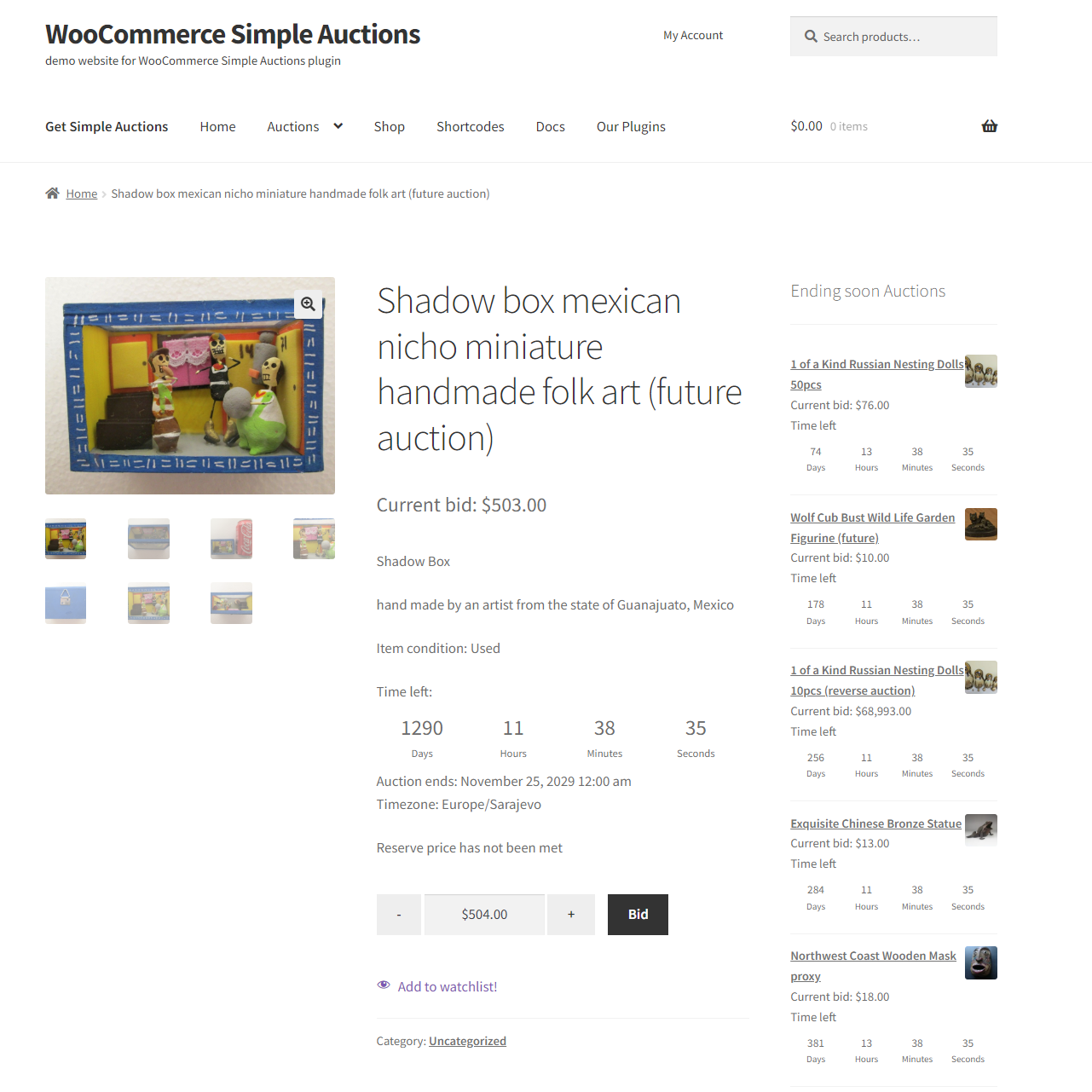
An auction page on the vendor's demo store: current bid, countdown, reserve status, Bid button and watchlist link, with an Ending soon list at the side.
Quick facts
- Version: 4.0.0, last updated November 2, 2026 (first released February 13, 2014)
- Developer: WPGenie
- Runs on: your WordPress site, not on a PC. WordPress 6.2+, PHP 7.4+, WooCommerce 5.0+
- Price: $69.00 a year on the order page, for one website
- Trial: none. There's a public demo store where you can see bidding work
- Refunds: none once the plugin has been downloaded
- What we checked: version 4.0.0 in the vendor's changelog and the requirements in its documentation, and the order page showing $69.00 a year with auto-renewal, all on November 9, 2026. We didn't buy the plugin or run it on a test store, so the screenshots here are the vendor's.
Before you buy
- The order page sets up auto-renewal. It says the $69 is charged each billing cycle until you cancel in your customer account, while the plugin's product page on wpgenie.org says "Renews manually". Go by the order page and cancel if you only want one year.
- There's no refund after download. WPGenie's policy gives a full refund only if the item hasn't been downloaded, so use the demo store and ask your presale questions first.
- Your host must run real cron jobs. The documentation asks for scheduled server tasks so that auctions close, emails go out and relisting happens on time.
- Bidders must have accounts. Customers have to log in to bid, so customer registration has to be switched on.
Buy Now
Overview
WPGenie has sold this plugin since 2014, mostly on CodeCanyon, where it has 8,269 sales. Version 4.0.0 is the largest change in that time. It moves the plugin beyond single auctions by adding lots, so one event can hold many items, along with buyer fees and a reporting screen.
The design stays close to WooCommerce. An auction is a product with its own type in the product editor. Payment, tax, shipping and order handling stay with WooCommerce and your existing gateways, which means there's little new to learn if you already run a store.
Features
Four ways for customers to bid
WooCommerce Simple Auctions runs normal auctions, where the highest bid wins, and reverse auctions, where the lowest bid wins. Either can use proxy bidding, in which a customer enters a maximum and the system bids up to it, or sealed bidding, in which nobody sees the other offers. Each auction takes a starting price, a bid increment, a reserve price, an optional Buy It Now price and opening and closing dates.
Lots that group many items into one sale
Simple Auctions 4.0 adds an Auction Lot product type. In parallel mode every item in the lot closes at the same time, and in sequential mode each one starts when the previous one ends. You can split a lot into scheduled sessions, publish viewing days for in-person inspection, and create one combined order for a buyer who wins several items.
Anti-sniping that gives bidders time to respond
Simple Auctions can extend an auction when a bid lands near its deadline. You set the final bidding window and how many seconds to add, per auction, so a last-second bid doesn't end the sale before others can answer it.
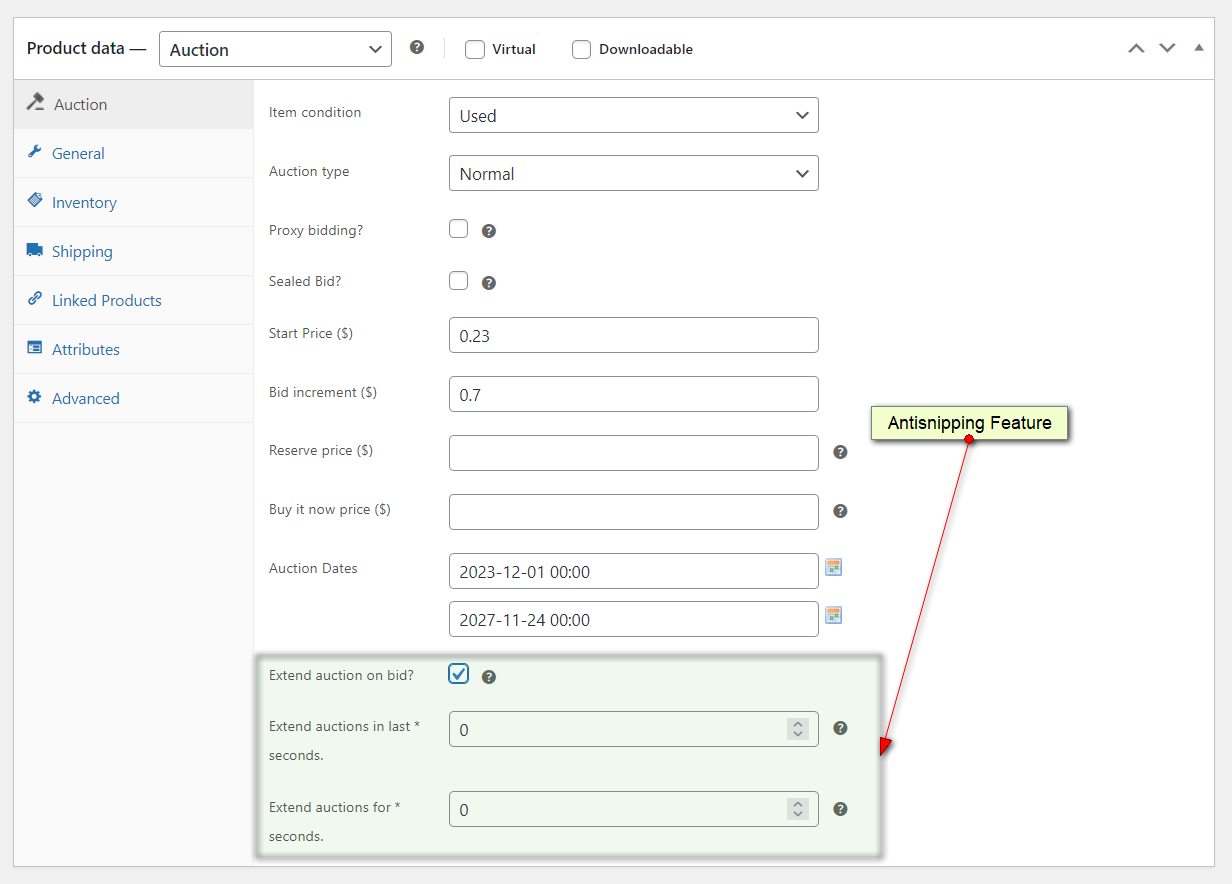
The Auction tab in the WooCommerce product editor, with the extend-on-bid fields marked by the vendor.
Buyer fees and paid entry
Simple Auctions 4.0 charges fixed or percentage buyer fees per auction or per order, with overrides for single auctions and lots, and they respect WooCommerce tax classes. Seated auctions make a customer buy a seat product before bidding, with an optional progress bar showing how many seats are filled.
An account page and emails for bidders
Simple Auctions gives customers a watchlist and a My Auctions page listing their active and won auctions. Outbid, winner, closing-soon and payment reminder emails use editable templates. Bids go through AJAX, including optional bid forms directly in shop grids.
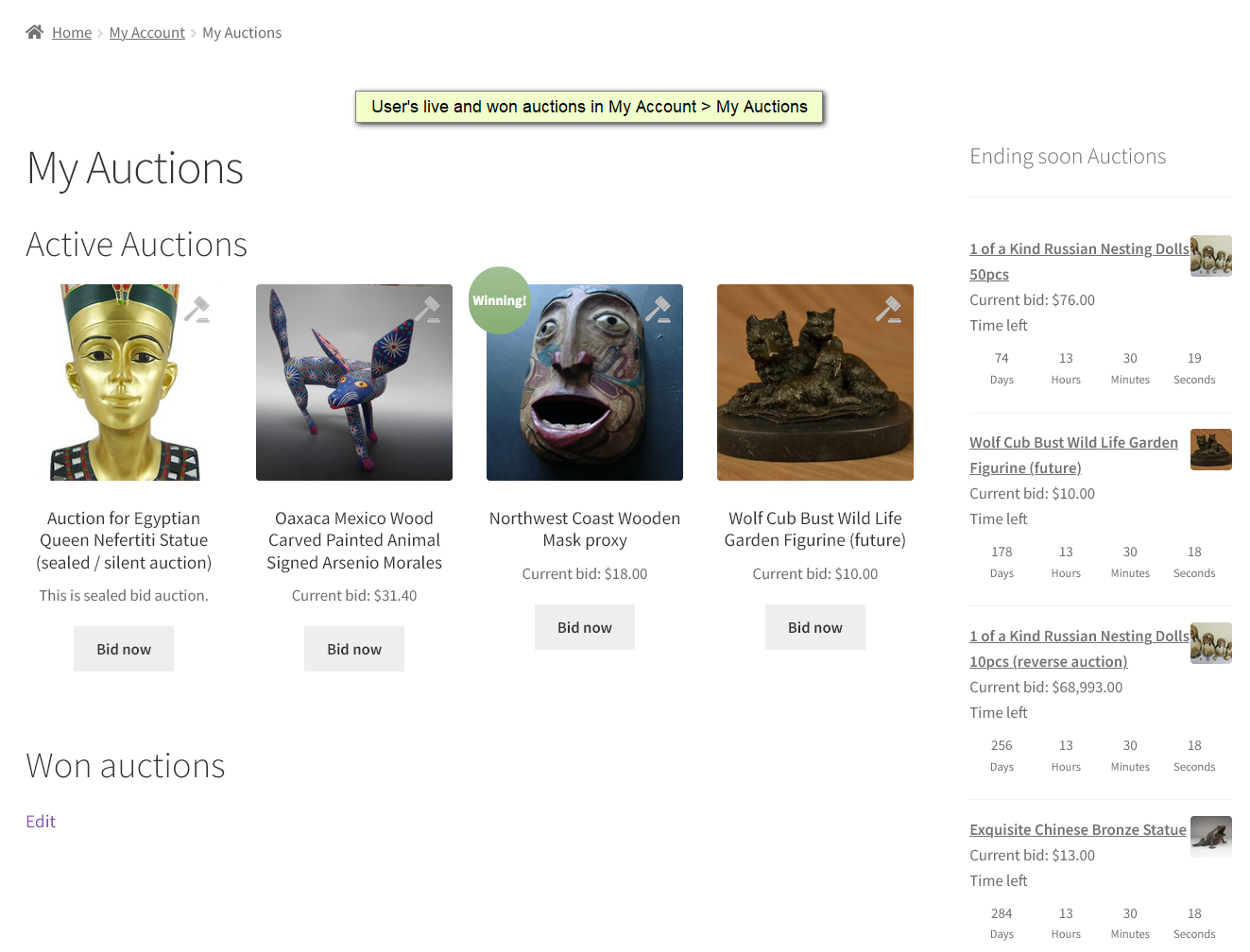
My Auctions on the demo store, with a Winning badge on the item the customer leads and a Won auctions section below.
Reports on what sold and what didn't
Simple Auctions 4.0 adds an Analytics screen with date, lot and session filters, bid charts, top bidders, paid revenue and unpaid wins. A separate Auction Winners report and each auction's history export to CSV, and you can remove a bid by hand or relist a failed auction.
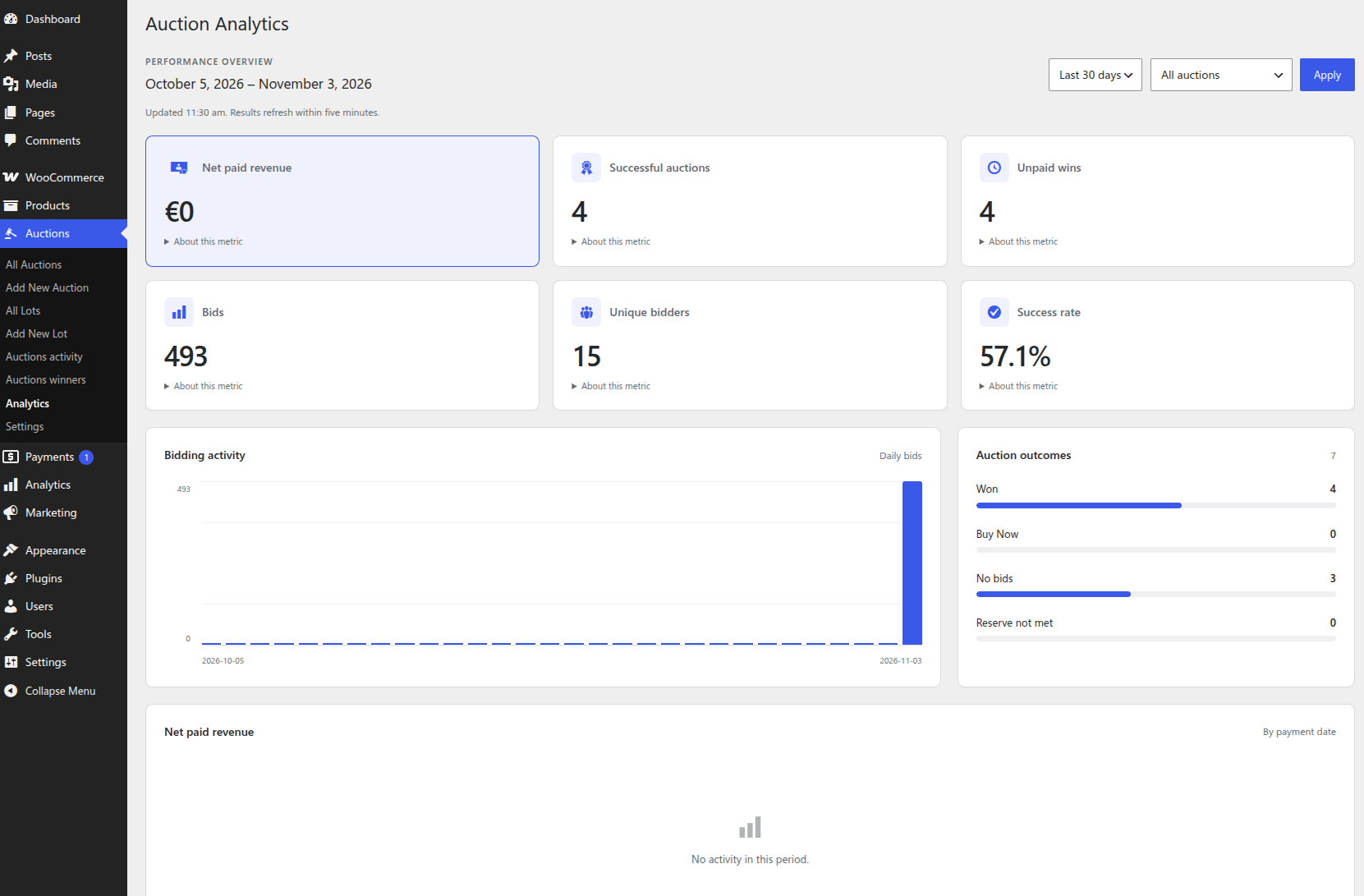
The Auction Analytics screen in WordPress: net paid revenue, successful auctions, unpaid wins, bids, bidders, success rate and auction outcomes.
Benefits
- Auctions and fixed-price items live side by side. You choose whether auctions mix into the shop or sit on their own page.
- No second system to run. Orders, tax and payouts stay in the WooCommerce you already know.
- Unpaid wins are visible. Winning and paying are separate steps, and the reports show which winners still owe you.
Real-World Uses
- An estate or antiques dealer runs a sequential lot of 40 items over a weekend, with a viewing day beforehand and one combined order for each buyer.
- A company buying services uses a reverse auction so suppliers bid the price down, and the lowest offer wins.
- A charity holds a sealed-bid sale of donated goods, so a donor's offer isn't visible to anyone else.
- A machinery reseller adds a percentage buyer fee and a reserve, and lists the rest of its stock at fixed prices in the same shop.
Who It's For, and Who Should Skip It
It's the right buy if you already run WooCommerce, or are willing to, and you or a developer can set up cron jobs. Agencies building an auction site for a client get a mature base that's meant to be extended.
Skip it if you don't want to look after a WordPress site. A hosted auction service or a marketplace listing will be far less work. It also isn't a good fit if you need to try the software on your own store before paying, because there's no trial and no refund after download. And if you want third parties to list items, as on eBay, you'll need a separate marketplace plugin and its integration as well.
Usage Guide
- Upload the plugin ZIP in WordPress and activate it, with WooCommerce already installed and activated.
- Open Auctions > Settings and choose the Auctions Base Page and whether auctions appear among your other products.
- Set up the cron endpoints on your hosting account.
- Check the auction emails under WooCommerce > Settings > Emails.
- Activate your license under Auctions > Settings > License so that updates and support work.
- Choose Add New Auction, enter the type, starting price, increment, reserve and dates, and publish.
- Exclude auction and checkout pages from full-page caching, then place a test bid while logged in as a customer.
Where it falls short
- Automatic winner charging is Stripe-only. Charging a winner's saved card, and requiring a stored card before bidding, need Stripe. With other gateways, winners pay through checkout themselves, and you chase the ones who don't.
- Some features cost extra. Penny-style bid credits and role-based bidding are separate $50 add-ons, SMS needs a third-party integration, and vendor selling needs a marketplace plugin and its integration.
- Caching can break live bidding. Personalized auction and checkout pages have to be left out of shared full-page caching.
- Theme templates need care on updates. WPGenie advises testing updates on a staging site first, particularly if your theme overrides auction templates.
What Users Say
Buyers on CodeCanyon and wpgenie.org: what they like
The plugin averages 4.66 out of 5 from 206 reviews on CodeCanyon, across 8,269 sales.
mawuartgallery, who built a custom reverse auction system on it: "What stands out the most is how flexible and reliable the plugin is. It integrates smoothly with WooCommerce and gives you a solid foundation to build more advanced auction logic if needed."
dragonartdesign27: "Firstly the plugin is awesome. Works great. But the big thing with this plugin is the support is superb. They reply very quickly and answer your question each time."
evag54: "Simply perfect auction plugin! I've tried many and this on is just the best"
uniqu3app: "Excellent plugin and very helpful support. Speaks the same code language"
Gustavo, November 3, 2026, on a client's site in use since 2021: "From the start, it was easy to install, configure, and use. While it initially had fewer features, they've improved it every year. Support has always provided answers and solutions. Sometimes they took longer than usual, and other times the response time was normal."
CodeCanyon buyers: what went wrong
canbeep hit a fatal error on installation and needed a fix within hours: "their response that they don't give refunds on issues they have not been given time to fix is a poor policy. People purchase plugins like this because they don't have the time or funds to build something from scratch."
josereneb: "Be advised the devloper does not offer refund under any circumtsance which I could not find stated anywhere."
nicolaspycik: "WP don't want to install it. It shows an error when trying to install the file that as been downloaded". The author's reply said this was probably the wrong file, and that the "ZIP with installable files" package is the one to use.
xpain: "I was really disappointed with this app. It was really slow and glitchy, and I found myself constantly having to close and reopen it just to get it to work properly." The author replied that the problem couldn't be reproduced and asked for a support ticket.
WPLift's hands-on review
WPLift tested the plugin in May 2019, on a much older version: "In playing around with it, I didn't hit any snags, and all the functionality worked as you'd expect it to. All in all, I was up and running with working auctions within just a few minutes of installing the plugin, which is tough to argue with."
Two themes run through these reviews. Buyers rate the support and the plugin's flexibility highly, and developers like building on it. The complaints are mostly about installation errors and the no-refund policy, so that risk is the one to weigh before you pay. The star ratings shown on wpgenie.org's own page aren't a useful guide, because even the complaints above appear there with five stars. Use the CodeCanyon average instead.
Editions and Pricing
| Product | Price | Term | What it adds |
|---|
| Simple Auctions | $69.00 | 1 year, 1 website | The plugin, updates and support |
| Buy Bid Credits add-on | $50.00 | One-time | Credits bought before bidding, for penny auctions |
| Role-Based Bidding add-on | $50.00 | One-time | Bidding limited by user role or a verification purchase |
WPGenie also still sells a $50 Seated Auctions add-on, although seated auctions are listed as a feature of version 4.0.0 itself, so ask WPGenie before paying for it. CodeCanyon sells the plugin separately for $99 as a Regular License, and its page showed a last update of October 15, 2026, before the 4.0.0 date on wpgenie.org.
FAQs
Can I use WooCommerce Simple Auctions on more than one website?
WooCommerce Simple Auctions is licensed for one website per purchase. WPGenie asks you to contact it about additional websites. Version 4.0 also supports registering a staging site through your WPGenie account.
What happens to WooCommerce Simple Auctions when the year ends?
The $69 covers one year of updates and support for WooCommerce Simple Auctions. The order page renews it automatically on cards and PayPal unless you cancel in your customer account.
Will WooCommerce Simple Auctions work with my theme and Elementor?
WooCommerce Simple Auctions supports shortcodes and Elementor, including an Auction Lots archive widget, and the vendor notes that appearance depends on your theme. Version 4.0 also includes fixes for block themes.
Does upgrading WooCommerce Simple Auctions to 4.0 keep my existing auctions?
WooCommerce Simple Auctions 4.0 is described as upgrade-safe: settings, bid records, order links, shortcodes and theme overrides are kept during the database upgrade. WPGenie still advises a backup and a test on staging first.
Can anonymous visitors bid with WooCommerce Simple Auctions?
WooCommerce Simple Auctions requires bidders to log in, so customer registration has to be enabled in your WooCommerce account settings.
Can WooCommerce Simple Auctions keep regular products on sale at the same time?
WooCommerce Simple Auctions lets you show auctions alongside ordinary products or give them a page of their own, so an existing shop can keep selling as it does now.
System Requirements
- WordPress 6.2 or later
- PHP 7.4 or later
- WooCommerce 5.0 or later (your WooCommerce release or other extensions may need newer versions)
- Server cron jobs and working email delivery
- Stripe integration only if you want stored-card bidding or automatic winner charging
Conclusion
WooCommerce Simple Auctions is worth $69 a year if you already run WooCommerce and want real auctions in that store. The reason to buy it is depth: 4.0.0 adds lots, buyer fees and analytics to a plugin with twelve years of use behind it and a 4.66 average from 206 CodeCanyon reviews. The reason to hesitate is that you can't try it on your own site and can't get your money back once you've downloaded it, so spend time on the demo store first, and have someone on hand who can set up cron.
Buy Now