GuidelyPro.AI: AI Guided-Selling Product Finder for Shopify and WooCommerce Stores
GuidelyPro.AI is a Swiss-hosted AI product finder that adds a guided shopping assistant to a Shopify or WooCommerce store: it asks shoppers a few questions, matches their answers to your catalog and explains why each product fits. Pricing has two parts: the Beginner plan is $99 a month plus 10% of the revenue GuidelyPro is credited with, and for the first 4 months there's no base fee until that revenue passes twice the plan fee.
It's built for stores where shoppers stall because they don't know which product to pick: the right jam for a cheese board, the right handlebars for freestyle riding. Instead of a wall of filters, the shopper answers three to five questions and gets a short, explained recommendation.
Quick facts
- Developer: GuidelyPro.AI, a brand of ad bonum Ltd., Zug, Switzerland
- Works with: Shopify (through its Shopify app, launched June 17, 2026) and WooCommerce; Wix, BigCommerce, Adobe Commerce, Squarespace and WordPress are listed as coming soon
- Platform: web dashboard; the shopper widget runs on your storefront
- Plans: Beginner $99/mo + 10%, Starter $299/mo + 7%, Scale $599/mo + 5% of attributed revenue; Enterprise custom
- Introductory offer: no base fee for the first 4 months until attributed revenue exceeds 2x the plan fee
- Hosting: Switzerland, on Flow Swiss AG's ISO/IEC 27001:2022-certified cloud
- What we checked: the plans, revenue shares and introductory offer on GuidelyPro's pricing page, its Shopify setup guide and dashboard screenshots, its legal imprint and its Shopify App Store listing and reviews, all on November 16, 2026. We didn't install it on a live store.
Before you buy
Two things matter more than the $99. First, the revenue share: GuidelyPro takes 10% (Beginner), 7% (Starter) or 5% (Scale) of every sale it's credited with, counted by session: a purchase made within the attribution window after a shopper used the assistant. On a store where most buyers would have bought anyway, that's a commission on sales you already had, so ask how long the attribution window is before you sign. Second, it's very new: the Shopify app launched in June 2026, and on November 16, 2026 it had one review.
Start FreeBuy Now
Overview
GuidelyPro.AI calls itself a "Product Match Engine". You connect your store, it imports your product catalog, and you build one or more experiences: a guided flow for a product range, with its own goal, recommendation rules, tone and look. On the storefront the experience opens as a panel with a greeting, a few answer buttons and a free-text box, then shows its top picks with a short "why it's a good fit" explanation and a link to each product.
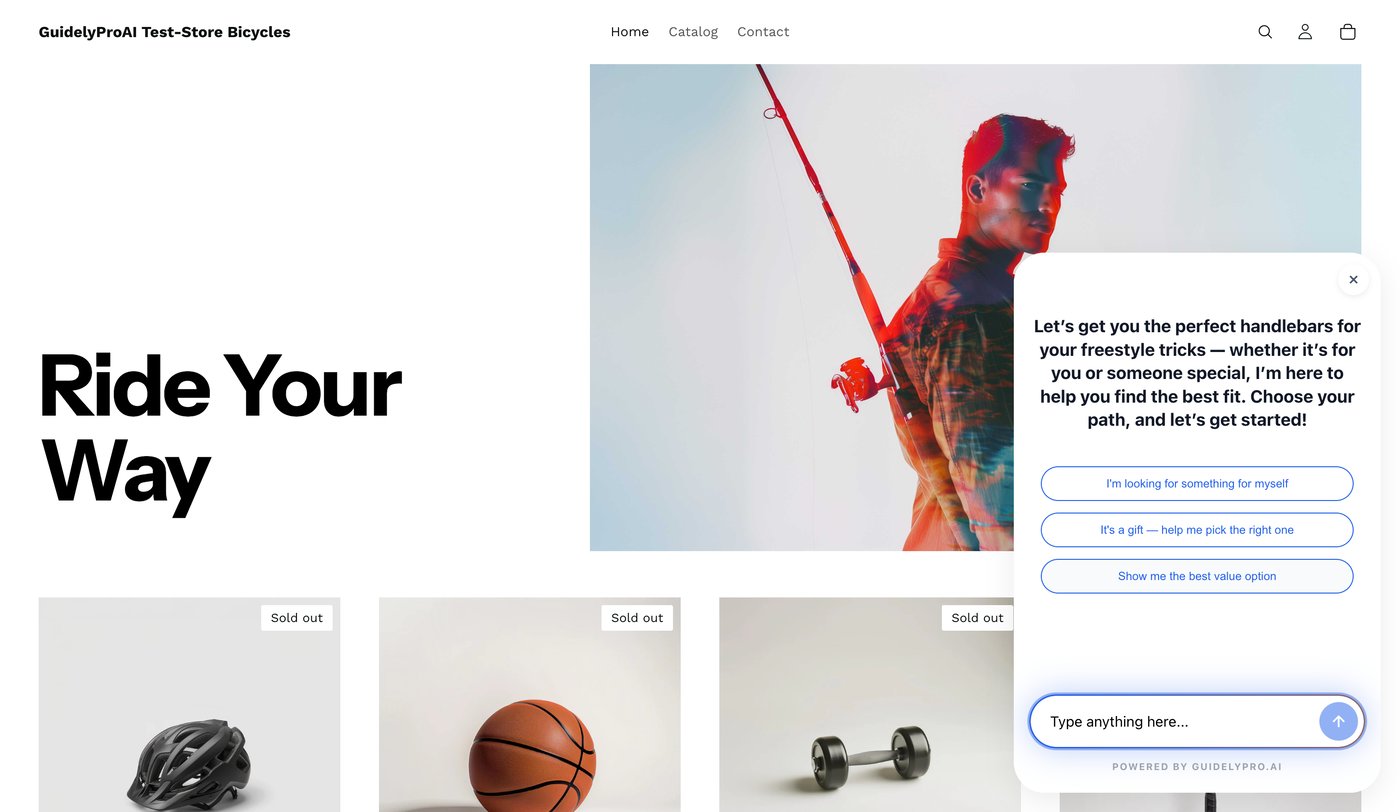
GuidelyPro.AI's assistant on its Shopify test store: a greeting about freestyle handlebars, three answer buttons and a "Type anything here" box, marked "Powered by GuidelyPro.AI".
Features
Guided questions with explained picks
GuidelyPro.AI asks a short sequence of questions, interprets the needs the shopper states, and recommends products from your catalog with a plain-language reason for each, in three to five steps. Shoppers can also type their own question, and the conversation reads like a chat rather than a quiz.
Experience builder with templates and guidelines
GuidelyPro.AI's dashboard starts each experience from a template (such as a Handlebar Selector), with a title and goal, then lets you set how many products to show, recommendation guidelines and other rules, the tone of voice, and the design, so the panel matches your store. A live preview updates as you write, and you publish with one button.
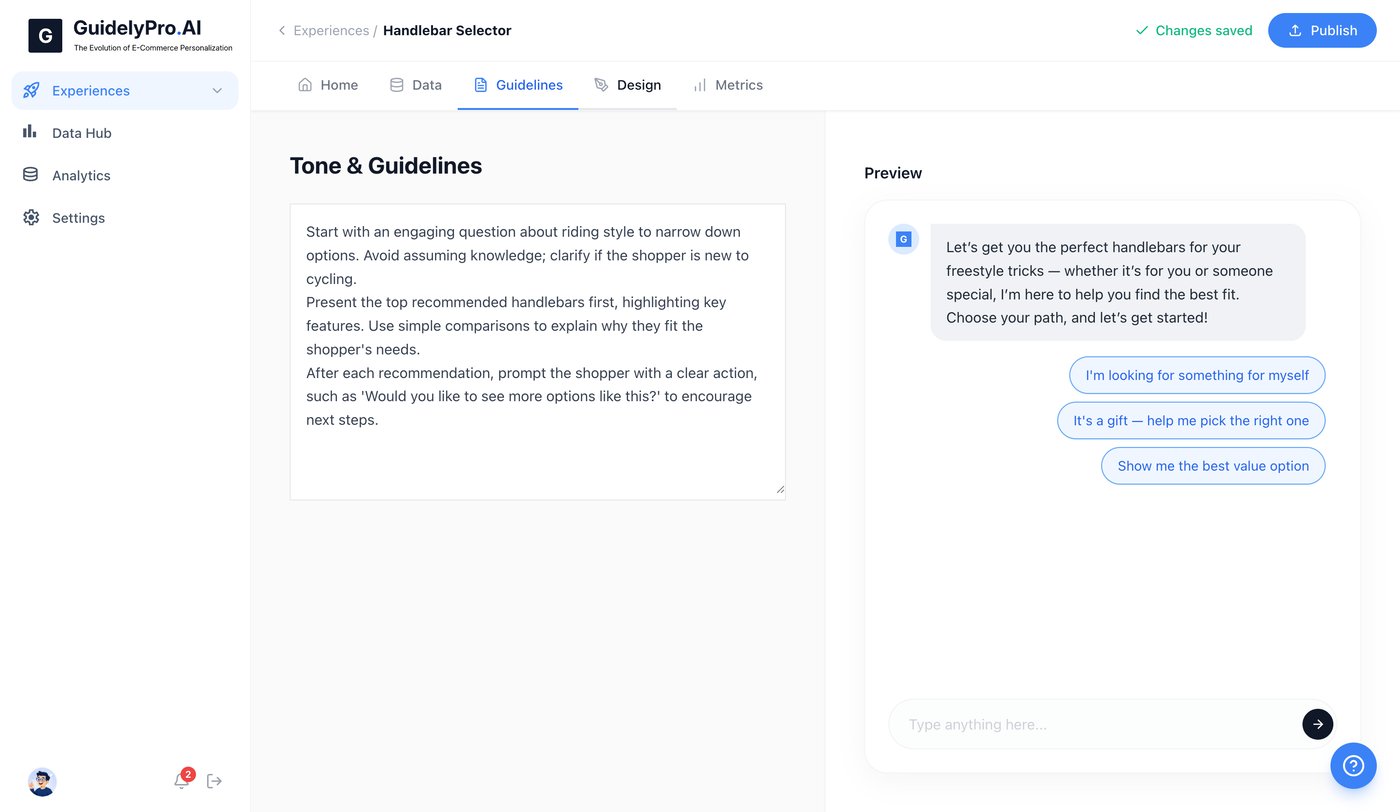
The experience editor: written tone and guidelines on the left, a live preview of the shopper conversation on the right, with Home, Data, Guidelines, Design and Metrics tabs and a Publish button.
No-code setup on Shopify and WooCommerce
On Shopify you install the GuidelyPro.AI app from the Shopify App Store, sign up, enter your store domain and pick a plan; GuidelyPro's guide puts the whole setup at about five minutes, with no theme edits. WooCommerce stores connect through the Data Hub in the dashboard.
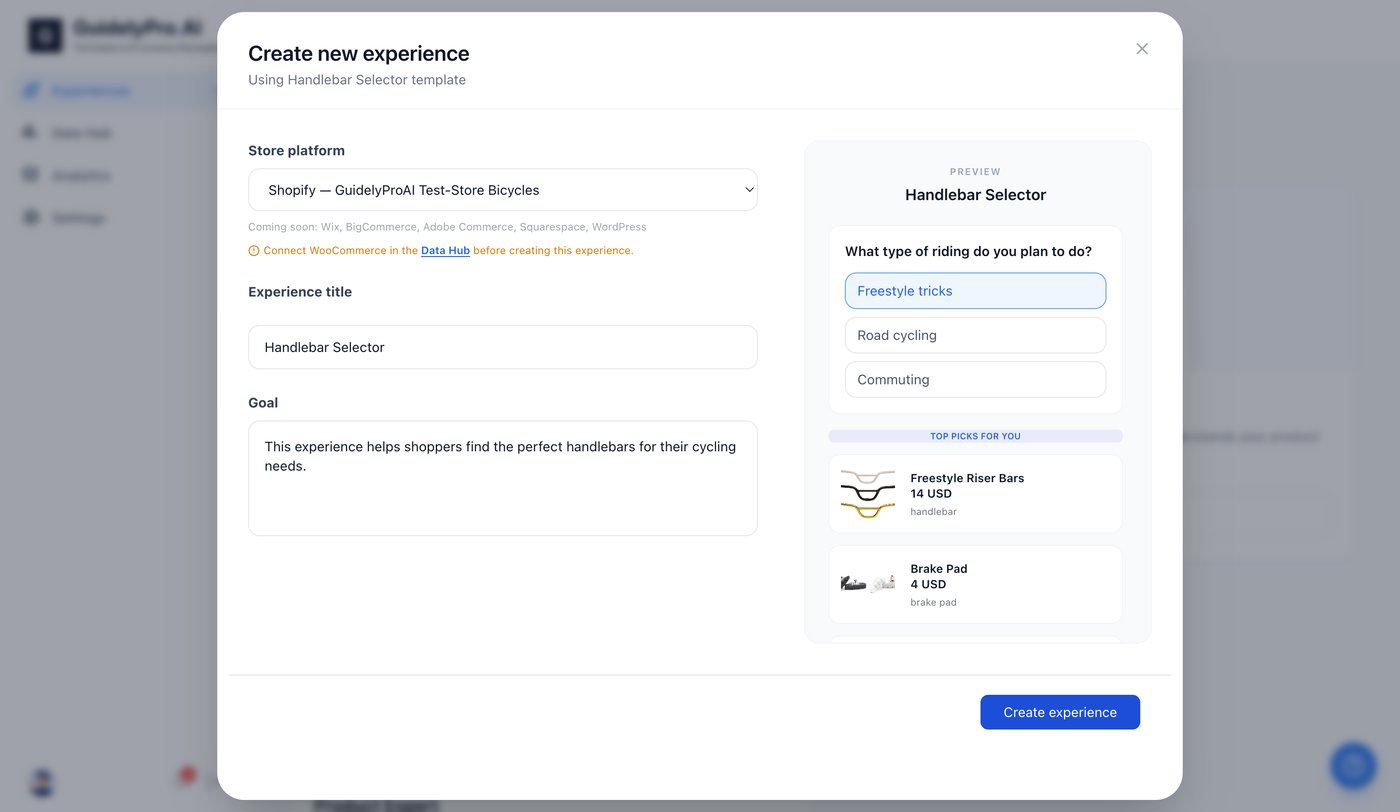
Creating an experience from the Handlebar Selector template: store platform, title and goal on the left, a preview with a riding-style question and top picks on the right.
Reports and higher-tier extras
Every GuidelyPro.AI plan includes performance reports. Starter adds the full AI engine and 30 days of data retention (Beginner keeps none); Scale adds AI optimization insights, advanced behavioral targeting, priority support and a year of retention; Enterprise adds custom AI model training, a private Slack channel and unlimited retention.
Who It's For, and Who Should Skip It
GuidelyPro.AI fits Shopify and WooCommerce stores with products that need explaining: many similar variants, gifts, technical parts, food or cosmetics where taste and skin type matter, and stores with high return rates from wrong picks.
Skip it if your store sells a handful of obvious products, if most of your sales come from returning customers who know what they want (you'd pay a revenue share on sales you'd make anyway), or if you're on Wix, BigCommerce or Squarespace, which aren't supported yet. Stores that want a proven tool with a long review history should look at established product-quiz apps in the Shopify App Store instead.
Usage Guide
- Install and sign up. On Shopify, add the GuidelyPro.AI app from the App Store and accept its permissions, then sign up; on WooCommerce, sign up with the Start Free button and connect the store in the Data Hub.
- Connect your store. Choose your platform and enter your store domain so the catalog is imported.
- Choose a plan. Pick Beginner, Starter or Scale; the 4-month introductory terms apply from activation.
- Create an experience. Start from a template, set the goal, the number of recommended products and your recommendation rules.
- Set tone and design. Write the guidelines for how the assistant should talk and adjust the design to match your store.
- Publish and test. Publish from the top-right button, open your store and walk through it as a shopper, then watch the Metrics tab.
Where it falls short
- Recommendations are only as good as your catalog. GuidelyPro says itself that quality depends on catalog data, configuration and testing; thin product descriptions mean thin matches.
- The revenue share grows with your sales. At $50,000 a month in attributed sales, Beginner's 10% is $5,000 on top of the $99, so check the numbers against Scale's lower rate.
- Beginner keeps no data. Data retention starts at 30 days on Starter, which limits what you can learn from the reports on the cheapest plan.
- Two platforms only. Shopify and WooCommerce are the only live integrations.
What Users Say
Shopify App Store (5.0 from 1 review)
"It's so cool! And my customers love it! The set up is so easy too and it adds so much value to our website. Sales have been up since we installed it. The conversations our customers have are like with a normal person. I highly recommend the feature!" (Les Collines, United States, 22 days using the app, September 8, 2026)
That's the only public review we found, and it isn't independent in the usual sense: Les Collines is also the customer story on GuidelyPro's own home page, where its owner, Gian Marco Heilmann, says setup took "about three minutes", and GuidelyPro's legal imprint names Stephan Heilmann as the company's responsible person. Until more stores review it, treat the introductory months as your own test.
Plans and Pricing
Every plan is a monthly fee plus a percentage of attributed revenue. Prices on GuidelyPro's pricing page on November 16, 2026:
| Plan |
Monthly fee |
Revenue share |
Data retention |
Adds |
| Beginner | $99 | 10% | None | Store integration, performance reports |
| Starter | $299 | 7% | 30 days | Full AI engine |
| Scale | $599 | 5% | 1 year | AI optimization insights, behavioral targeting, priority support |
| Enterprise | Custom | Custom | Unlimited | Custom model training, private Slack channel |
For the first 4 months from activation there's no base fee until attributed revenue exceeds twice your plan fee; standard pricing applies after that. The Shopify connector app itself is listed at $1 a month with a 30-day free trial. Subscriptions renew automatically until cancelled, and cancelling stops future renewals without refunding fees already charged.
FAQs
How does GuidelyPro.AI decide which sales count as attributed revenue?
GuidelyPro.AI uses session-based attribution: a purchase completed within the configured attribution window after a shopper interacted with the assistant counts, and your plan's percentage is applied to it.
Is GuidelyPro.AI really free for 4 months?
The monthly base fee is waived for the first 4 months unless attributed revenue exceeds twice your plan fee in that time. GuidelyPro describes it as only paying once the engine pays for itself; read the order terms for how the revenue share is handled during those months.
Does GuidelyPro.AI work with Wix or BigCommerce?
Not yet. GuidelyPro.AI's live integrations are Shopify and WooCommerce; its dashboard lists Wix, BigCommerce, Adobe Commerce, Squarespace and WordPress as coming soon.
Where is GuidelyPro.AI's data stored?
GuidelyPro.AI is hosted in Switzerland on Flow Swiss AG's cloud platform, which is certified to ISO/IEC 27001:2022. The company, ad bonum Ltd., is registered in the canton of Zug.
Do I need a developer to install GuidelyPro.AI?
No. GuidelyPro.AI's Shopify setup needs only admin access and your store domain, with no code or theme changes, and the experience is published from the dashboard.
System Requirements
- A Shopify store (admin access) or a WooCommerce store
- A modern web browser for the dashboard
Conclusion
GuidelyPro.AI is a promising, low-risk trial for Shopify and WooCommerce stores whose shoppers struggle to choose: setup is quick, the assistant explains its picks instead of just filtering, and the first 4 months carry no base fee unless it's already producing sales. The reason to try it is fewer abandoned visits and wrong-product returns. The reasons for caution are the revenue share, which can cost far more than the $99 fee once sales grow, and a track record of a few months with a single review. Try it on one product range, measure the lift against your normal conversion rate, and decide before standard pricing starts.
Start FreeBuy Now