ShipStation: Web-Based Shipping Software for Online Sellers, from One Package to 100,000 a Month
ShipStation is a web-based shipping and order-fulfillment platform that pulls your orders in from Shopify, Amazon, eBay, Etsy, Walmart, TikTok Shop and hundreds of other stores and marketplaces, compares discounted carrier rates, and prints the labels in batches. Plans start at $14.99 a month for 50 shipments ($143.90 a year billed annually), the popular Standard plan starts at $29.99, and every new account gets a 30-day free trial with no credit card.
If you're copying addresses from three seller dashboards into a carrier website every afternoon, ShipStation is the tool that replaces that routine. It's owned by Auctane and says it has served 1.3 million customers in 195 countries. It's powerful and widely used, but it also draws some of the loudest support complaints in its category, so read the "Where it falls short" box before you commit to a yearly plan.
Quick facts
- Developer: ShipStation, owned by Auctane Inc.
- Platforms: web app in any modern browser; ShipStation Mobile for iPhone and iPad (iOS 15 or later, version 2.18.0 released November 16, 2026)
- Plans: Starter from $14.99, Standard from $29.99, Premium from $349.99 a month at 50 shipments; prices rise with your monthly shipment tier; 20% off with annual billing
- Carriers and channels: 200+ parcel carriers and 50+ LTL freight carriers; 400+ stores, shopping carts and marketplaces
- Shipping from: the United States, Canada, Australia, New Zealand, the United Kingdom, France or Germany (the countries the sign-up form offers)
- Free trial: 30 days, no credit card required, cancel anytime
- Guarantee: the "ShipStation Promise", a full refund if you're not satisfied within 90 days
- Not included: postage and shipping insurance, which you pay for separately
- What we checked: every plan price at each shipment tier for monthly and annual billing, the features each plan lists, the trial and refund terms and the sign-up form on ShipStation's US site; the iOS app version, size and rating; and the ratings and recent reviews on the Shopify App Store, the Apple App Store and Trustpilot, all on November 17, 2026. We didn't ship live orders through an account for this page.
Before you buy
ShipStation's price depends on two things: the plan and how many shipments you send a month. Starter at 50 shipments is $14.99, but Starter at 1,000 shipments is $79.99, and Standard at 1,000 is $149.99. Pick the tier from your busiest month, not your average. The subscription never includes postage or insurance; extra users and the 3PL and dropship add-ons cost more. Accounts opened before July 8, 2025 are on older plans that may still pay fees to connect their own carrier accounts. Plan downgrades only take effect at the start of the next billing cycle.
Start Free TrialBuy Now
Overview
ShipStation sits between the places you sell and the carriers that deliver. You connect your stores once, and every new order lands in one Awaiting Shipment list, whatever channel it came from. From there you pick a carrier and service (or let a rule pick it), print labels and packing slips for a whole batch, and ShipStation sends the tracking number back to the store and an email to the customer.
Because it's software as a service, there's nothing to install for the main app: you log in at shipstation.com from any computer. You can use the discounted postage ShipStation buys from USPS, UPS, FedEx, DHL and others, connect your own negotiated carrier accounts, or both. Around that core, the higher plans add inventory tracking, warehouse picking, a branded returns portal, analytics and LTL freight booking.
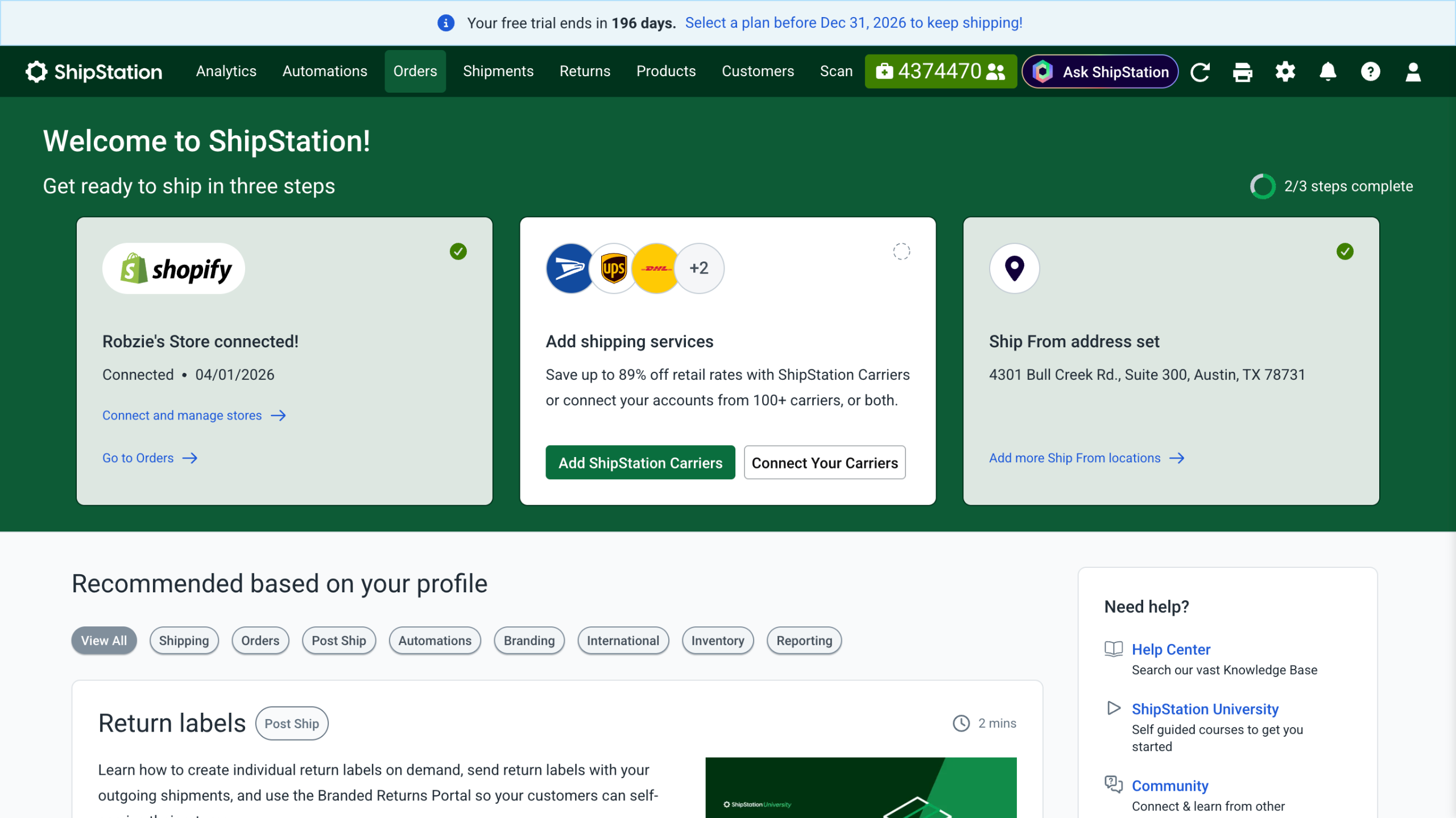
ShipStation's welcome screen: a Shopify store connected, a prompt to add ShipStation Carriers or connect your own carrier accounts, and the ship-from address set.
Features
One order list for every store and marketplace
ShipStation imports orders from Shopify, WooCommerce, BigCommerce, Squarespace, Wix, Big Cartel, Adobe Commerce, Amazon, eBay, Etsy, Walmart, TikTok Shop, Shein, Temu and more, and every plan includes unlimited store connections. Only a few "Premium Integrations" cost extra. You can also create orders by hand or import a CSV. Orders can be filtered by store, destination, tag or assignee, grouped into batches, and, on Standard and up, combined or split automatically.
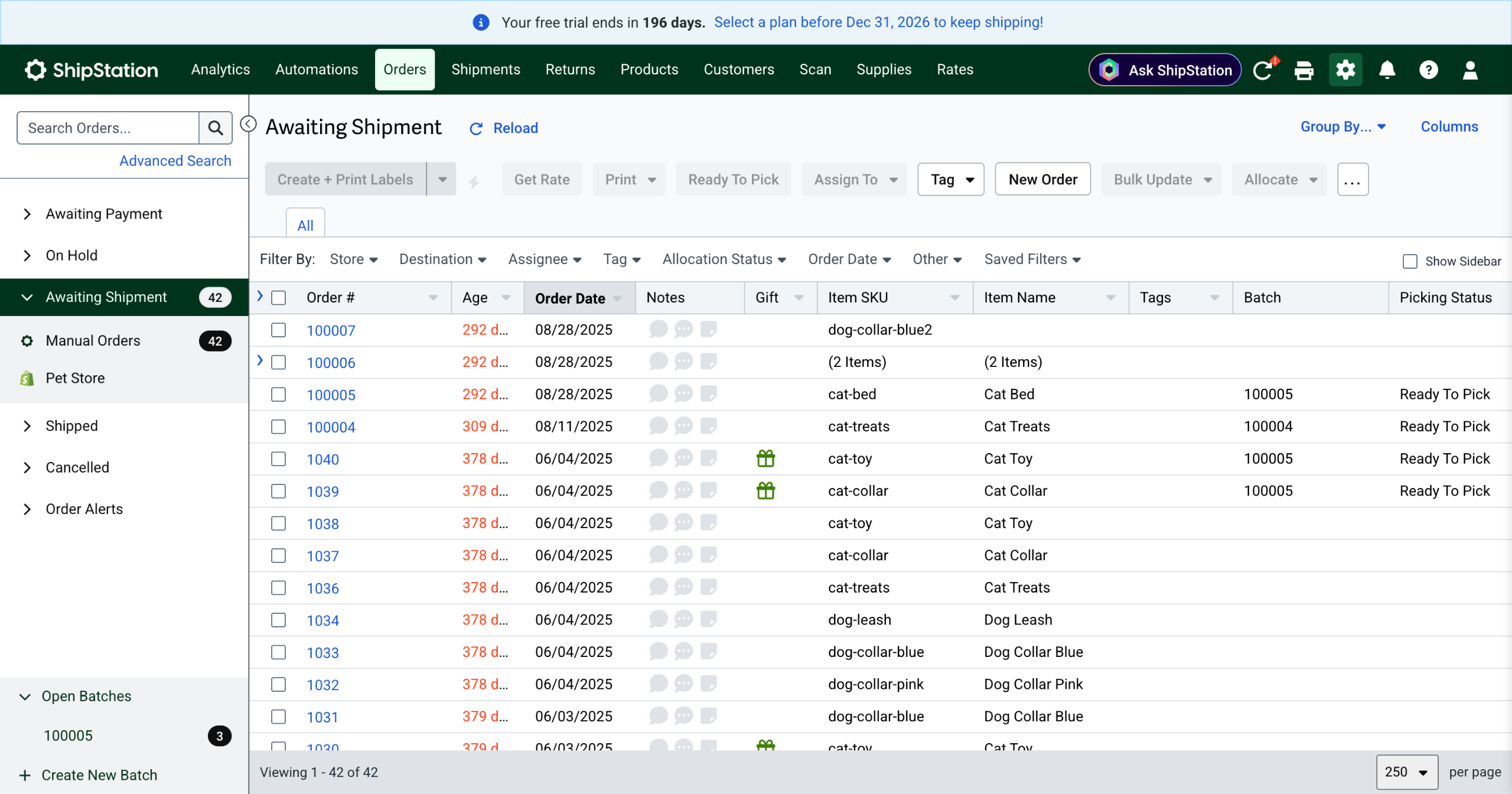
The Awaiting Shipment list: 42 orders from manual entry and a pet store, with order age, item SKU and name, batch number and picking status, and the Create + Print Labels button above.
Discounted labels and automatic rate shopping
ShipStation sells postage from its own carrier accounts at discounts it puts at 80% to 90% off retail ("up to 89%" in the app), and every plan includes automated rate shopping: you choose cheapest, fastest or best value and it picks the service for each order. A rate calculator at the top of the Automations page quotes a parcel from two ZIP codes and a weight. Standard and Premium also let you bring your own carrier accounts with your negotiated rates, at no connection fee on current plans.
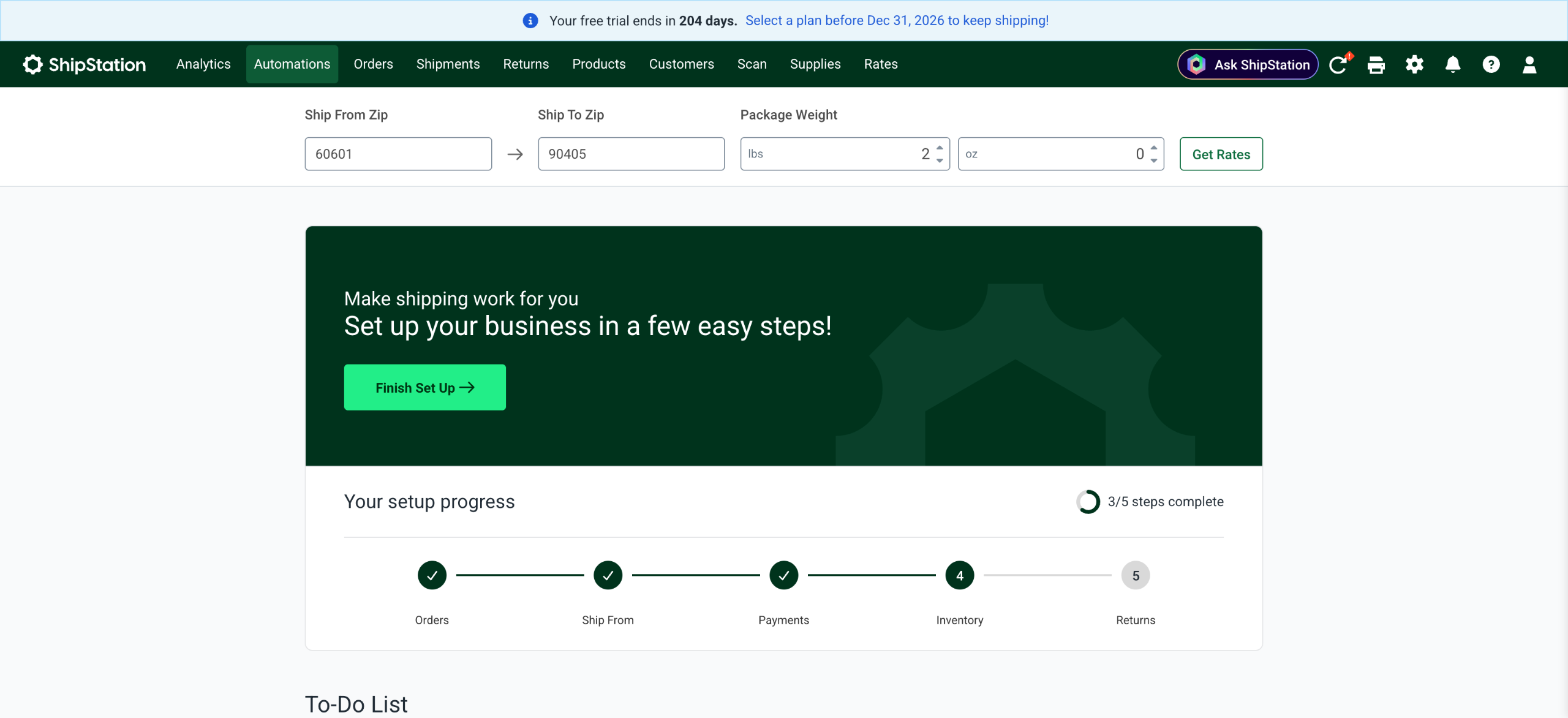
The Automations tab: a quick rate check (ship-from ZIP, ship-to ZIP, package weight) above the account setup steps for orders, ship-from, payments, inventory and returns.
Automation rules that set up each label for you
ShipStation's automation rules apply presets when orders arrive: package size and weight, carrier and service, insurance, tags, or which warehouse ships it. Starter gets basic automations; Standard and Premium get unlimited automation rules, auto-split, and on Premium, auto-routing by inventory availability and destination. Once the rules are right, most orders only need a click on Create + Print Labels.
Inventory and warehouse tools
ShipStation keeps a product catalog with SKUs, images, bundles and stock levels, and syncs inventory between channels to stop overselling. Pick lists, packing slips and barcode scan-to-verify cut packing mistakes. Standard adds basic warehouse management. Premium adds scan to receive, purchase orders, reorder forecasting, transfers between locations, mobile pick to tote, Cubiscan dimensioning and ODBC access to your data.
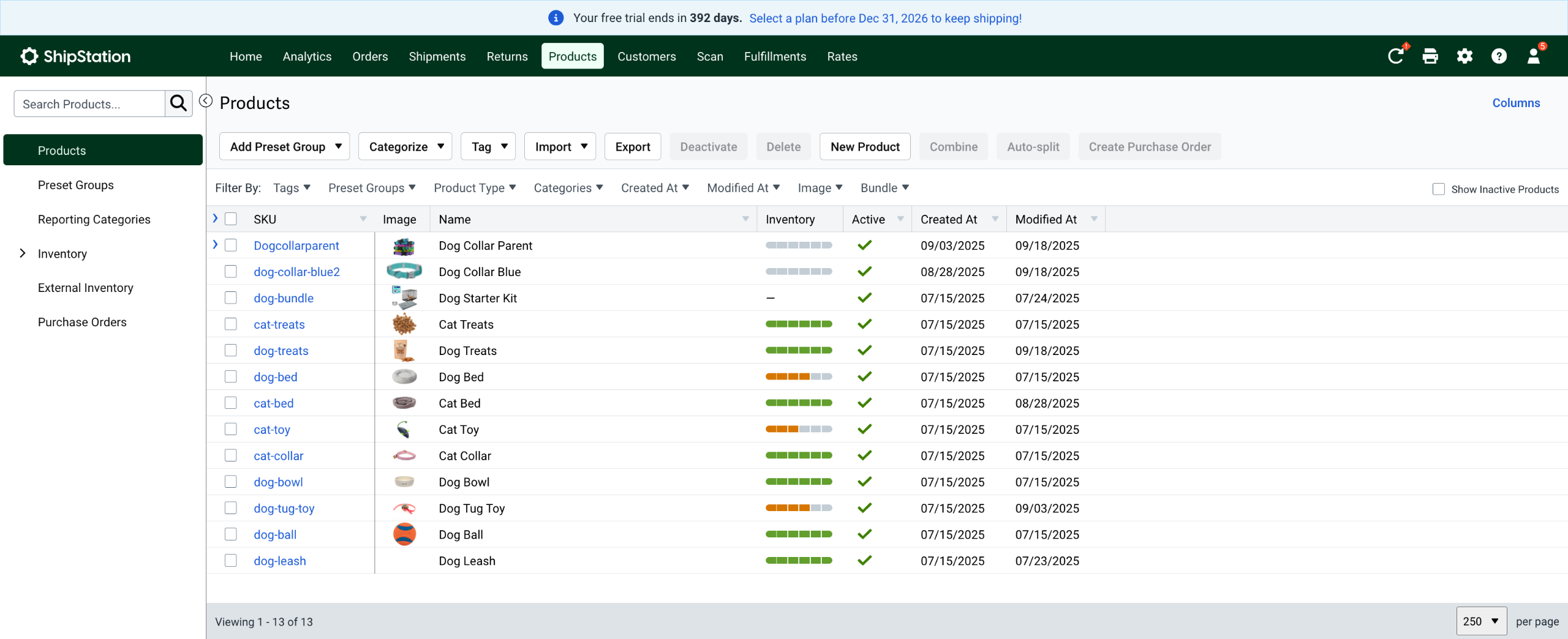
The Products page: 13 SKUs with thumbnails, inventory level bars, active status and dates, plus buttons to import, export, combine, auto-split and create a purchase order.
Returns, exchanges and branded tracking
Every ShipStation plan can create return labels. Standard adds the Returns and Exchanges tools: a portal where customers look up their order and start a return or exchange themselves, with your logo and background. ShipStation also sends shipment notification emails, and offers branded emails and a branded tracking page so customers check delivery on a page that looks like your store instead of the carrier's.
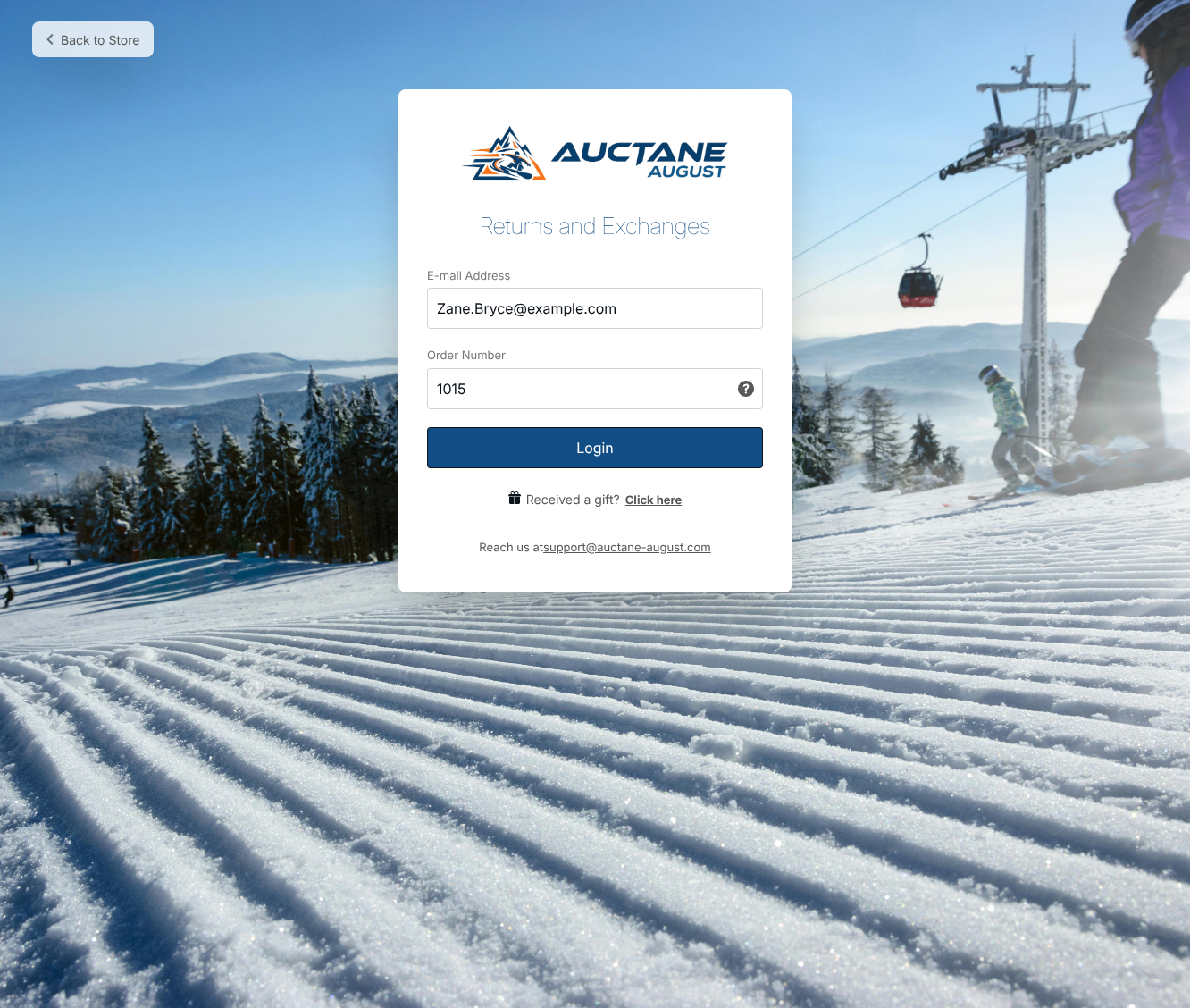
A branded Returns and Exchanges portal for a demo store: the shopper enters an email address and order number to start a return.
Analytics, LTL freight and an AI assistant
ShipStation's Analytics tab shows shipments, shipping revenue against shipping cost, average cost per label, carrier share and open order aging. Premium adds custom dashboards you can edit, schedule and alert on. Every plan can compare and book LTL freight next to parcel, generate bills of lading, and use an existing Worldwide Express or Unishippers account. An Ask ShipStation button opens the built-in AI assistant.
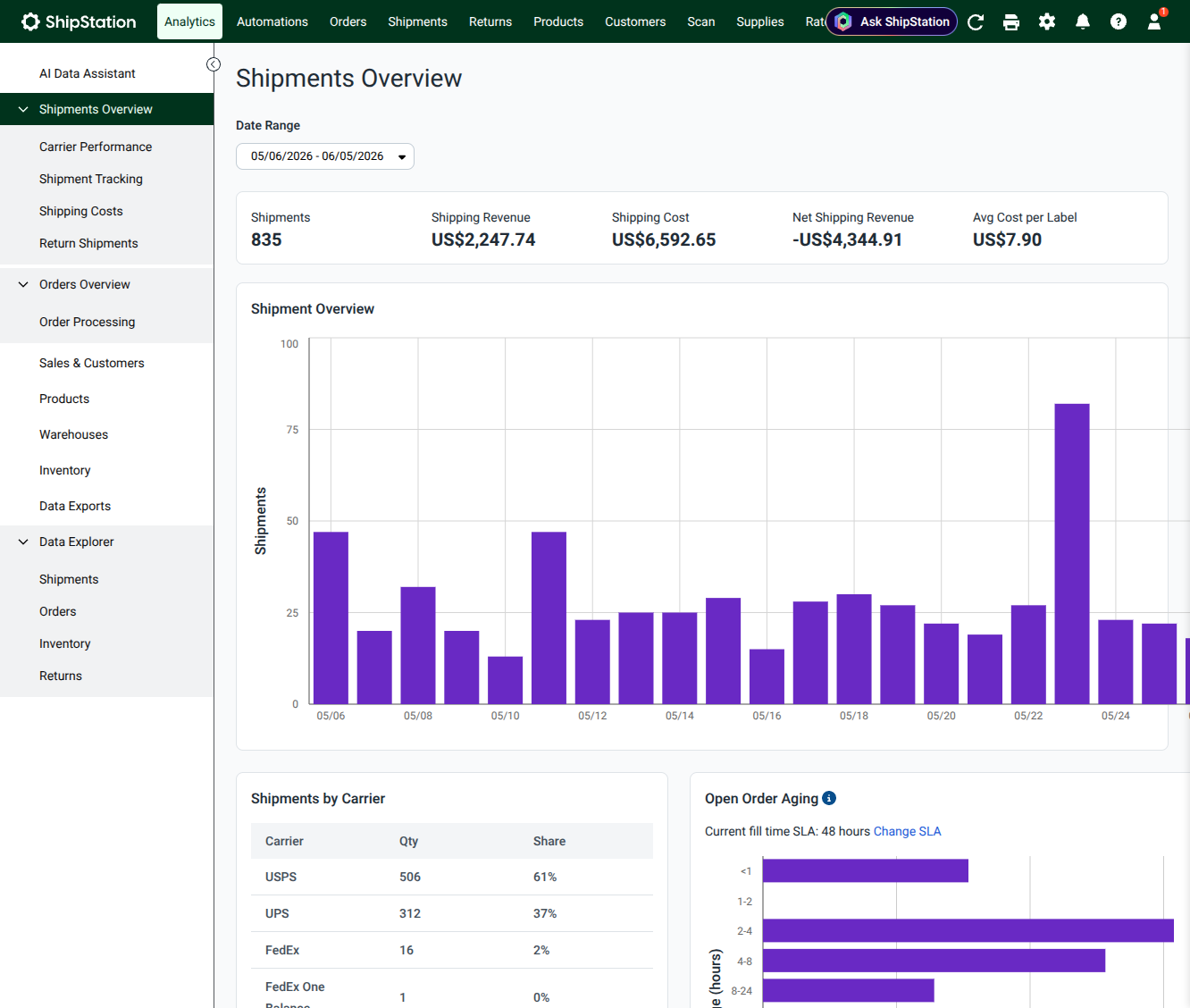
Analytics, Shipments Overview: 835 shipments in a month with shipping revenue, shipping cost and average cost per label, a daily shipments chart, shipments by carrier and open order aging.
ShipStation Mobile for iPhone and iPad
ShipStation Mobile lets you import and search orders (including by barcode scan), edit addresses, create and print labels, pick lists and packing slips, send return labels, generate SCAN forms for the end-of-day pickup, check stock and get alerts on an Apple Watch. It's a companion to the web app, not a replacement, and its recent reviews are much weaker than the platform's (see What Users Say).
Benefits
- Shipping time drops from hours to minutes. Merchants on the Shopify App Store describe it as turning hours of label work into a batch print, because rules fill in the package and service for each order.
- The postage discount can pay for the plan. Shopify merchants often say the discounted rates and rate shopping offset the subscription, since every label is cheaper than buying it at the carrier's retail price.
- Fewer wrong parcels. Barcode scan-to-verify and pick lists catch the wrong size or color before the box is sealed.
- Room to grow. The same account covers one store at 50 shipments or many warehouses at 100,000, plus freight, so you don't have to migrate as volume rises.
Real-World Uses
- A handmade seller on Etsy and Shopify pulls both shops into one list each morning, lets the rate shopper pick USPS Ground Advantage or Priority by weight, and prints 30 labels on a thermal printer in one go.
- A supplement brand on Amazon, Walmart and its own site syncs stock across all three so the last units aren't sold twice, and uses a branded tracking page to cut "where is my order?" emails.
- A growing apparel shop moves to Standard to connect its negotiated UPS account, hands out 10 user logins to packers, and offers self-serve exchanges for wrong sizes.
- A furniture or garden-bed maker quotes and books LTL freight for pallets in the same screen as its small-parcel orders, with the bill of lading generated automatically.
Who It's For, and Who Should Skip It
ShipStation is for online sellers shipping from about 50 to tens of thousands of parcels a month, especially across several stores or marketplaces, who want rate shopping and automation rather than one label at a time. It's also a common choice for brands that need freight and parcel in one place.
Skip it if you send a handful of packages a month: there's no free plan any more, and the label tools built into Shopify, eBay or Etsy, or a pay-per-label service, cost less. Skip it too if you sell only on one platform with simple needs, or if you rely on quick, personal phone support from day one: Starter has email and chat support only, and support is the top complaint in the reviews below. Multi-location Shopify merchants should test location changes and order splits during the trial, since that's where the most detailed complaints come from.
Usage Guide
- Start the trial. Click Start Free Trial, choose your shipping origin country, enter your name, email and a password, and pick your monthly shipment range. No card is needed for the 30 days.
- Connect your stores. Add each store or marketplace from the welcome screen; existing unshipped orders appear under Awaiting Shipment.
- Set up carriers and your ship-from address. Add ShipStation Carriers for the discounted rates, connect your own carrier accounts, or both. Add funds or set an auto-refill for prepaid USPS postage.
- Add products and package presets. Import your catalog or let it build from orders, then save package sizes and weights as presets.
- Create automation rules. Start with one or two (for example, "orders under 1 lb ship USPS Ground Advantage"), then turn on the rate shopper.
- Print a batch. Select orders, click Create + Print Labels, and print labels and packing slips together. Tracking numbers go back to each store automatically.
- Pick a plan before day 30. Choose the plan and shipment tier inside ShipStation; billing starts at the end of the trial.
Where it falls short
- Support is uneven. Reviews praise named onboarding specialists, but also describe weeks without an answer, scripted replies and AI chat agents that didn't solve the problem.
- Order sync isn't always live. Several Shopify merchants report orders that import once and don't pick up later changes (added items, location changes, order splits), and a connector that needs manual refreshing.
- Billing surprises. One-star reviews describe add-on charges they say they didn't choose, duties back-charged on international shipments, and charges continuing after cancellation. Check your plan and add-ons in the account settings, and keep the cancellation confirmation.
- The mobile app lags behind. Its recent App Store reviews are mostly about forced re-logins, browser verification and missing features.
- Prices climb with volume. A busy Standard account at 10,000 shipments a month is $449.99, and Premium starts at $349.99, so compare the tier you'll really need.
What Users Say
ShipStation's ratings depend heavily on where you look. Business software directories rate it highly (ShipStation's pricing page shows 4.6 from 897 reviews on Capterra and 4.3 from 531 on G2), the Shopify App Store gives the app 4.3 from 710 reviews, and the iPhone app has 4.6 from 6,212 ratings. On Trustpilot it scores 3.5 from 726 reviews, and the newest reviews on every site lean more negative than the averages.
Shopify App Store (4.3 from 710 reviews; 72% five-star, 18% one-star)
Biota Coffee (United States, over 4 years using the app), September 17, 2026: "I really appreciated getting to be connected with a live individual to walk through the setup. The software is pretty deep so it definitely sped up our setup time to work with someone who was familiar with it."
mysimpleus (United States), July 21, 2026: "Darren Dybala was our implementation Manager and did an incredible job helping us through everything. I was a little worried about only having 3 hours in total call time but we were able to knock it out in less than that ... were already saving $1000's in our first week."
Equetech (United Kingdom), September 2, 2026: "Great app, and the shipping prices are very competitive. Shame you can't show availability in the way of a percentage bar, in the awaiting shipment grid, so you didn't have to open each order, then it would be perfect!"
Mrs Edgar (Australia, 3 months using the app), August 11, 2026: "Coming from a much simpler fulfilment provider, initially the set up process was daunting but now being fully implemented, we are seeing the capabilities and how ShipStation will save us time and money."
NZ Tack Saddlery Co (New Zealand, two stars), edited September 15, 2026: "Two stars, and it's a shame, because the actual software itself is great but their Shopify sync is absolutely beyond terrible. ... The barcode verification for packing has pretty much eliminated our packing errors ... Onboarding was a nightmare, over a month of daily emails and it still was not right at the end."
Spycraft 101 (United States), September 18, 2026: "Every single day I have to manually refresh the ShipStation Connect app on my laptop after a few minutes of inactivity. ... The order page does not automatically update with new orders for approximately 4-6 hours typically, in my experience."
Chummy Tees (United States, almost 10 years using the app), April 21, 2026: "We were charged nearly 3x our usual plan's rate for "addons" that were deceptively hidden and/or that we did not actually select. They refused to refund us for these unused features when we got our bill." ShipStation replied that it had offered to correct the charge in the customer's ticket.
Trustpilot (3.5 from 726 reviews)
Terry Cady, "Support tech fixed our label printing snag" (5 stars, November 2026): "Rep stayed on a screen-share and walked through the whole account setup until labels started printing out properly."
David Usey, "Happy to have 'phone' support" (5 stars, November 2026): "Didn't have to wait very long. Support very friendly and all seemed eager to help."
Chris, "Shipstation Version 3 is Horrid" (1 star, October 2026): "They do not listen to long time users regarding necessary fixes to make it borderline usable."
Brian, "Package returned to sender for no reason" (1 star, October 2026): "I tried to reach out to customer support and their "AI agents" did nothing to help me."
Apple App Store, ShipStation Mobile (4.6 from 6,212 ratings)
The high average comes from years of ratings; the reviews written since mid-2025 are mostly about sign-in problems in the mobile app, not the web platform.
Spartangearshop (4 stars), March 10, 2026: "I've been using ship station for years. Great way to save on postage, track shipments and run sales."
Peffy03 (1 star), August 29, 2026: "I'm an online seller with a couple hundred transactions a year, so not huge, but also not small. ... The app does not allow you to add funds to your ShipStation account."
Qwerty.qwert (1 star), November 3, 2026: "It loses login constantly and have to manually enter passwords because the password fill doesn't show up."
The pattern: people who get through setup like the batch labels, rate shopping, barcode verification and automations, and many credit a named onboarding specialist. The complaints cluster around support response times, order sync with Shopify (especially multi-location stores), unexpected charges, and the mobile app's logins. The software itself is rarely the problem; the service around it is.
Comparisons
ShipStation vs Shopify's built-in shipping
Shopify's own shipping labels cost nothing extra and are fine for a single Shopify store. ShipStation earns its fee when you sell on several channels, want rules and rate shopping across many carriers, need inventory and warehouse tools, or ship freight. Within ShipStation, Standard (marked Most Popular) suits most growing stores, and Premium is for warehouses that need forecasting, purchase orders and pick to tote.
Plans and Pricing
You choose the plan and shipment tier inside ShipStation, during or after the trial. US prices at the 50-shipments-a-month tier on November 17, 2026:
| Plan | Billed monthly | Billed annually | Users | What it adds |
|---|
| Starter | $14.99/mo | $143.90/yr ($11.99/mo) | 3 | Unlimited stores, rate shopping, LTL quotes, return labels, basic automations, email and chat support |
| Standard (Most Popular) | $29.99/mo | $287.90/yr ($23.99/mo) | 10 | Unlimited automations, combine and split orders, your own carrier accounts, returns and exchanges, basic warehouse tools, Shipping API, phone support |
| Premium | $349.99/mo | $3,359.90/yr ($279.99/mo) | 15 | Advanced inventory and warehouse management, custom analytics, auto-routing, Cubiscan, ODBC |
Higher shipment tiers cost more. Monthly prices at a few tiers:
| Shipments a month | Starter | Standard | Premium |
|---|
| 100 | $29.99 | $59.99 | $399.99 |
| 500 | $39.99 | $89.99 | $449.99 |
| 1,000 | $79.99 | $149.99 | $599.99 |
| 5,000 | $174.99 (highest Starter tier) | $249.99 | $799.99 |
| 10,000 | not offered | $449.99 | $1,099.99 |
| 100,000 | not offered | $3,599.99 | $7,499.99 |
Extra users, the 3PL manager and the dropship manager are paid add-ons. Postage and insurance are billed separately: prepaid USPS postage comes from your ShipStation balance, and your own UPS or FedEx accounts bill you as usual.
FAQs
Does ShipStation have a free plan?
No. ShipStation's current price list has no free plan: Starter at $14.99 a month is the cheapest. The 30-day free trial, with no credit card, is the only free way to use it, and you aren't charged unless you choose a paid plan.
Can I get a refund on ShipStation?
Yes, within 90 days. Under the ShipStation Promise, if you're not satisfied for any reason within 90 days, you get a full refund of the subscription. Postage you've used is a separate matter with the carrier.
How do I cancel ShipStation?
ShipStation lets you cancel from the subscription plan page in the account settings, or by emailing its sales team. Given the reviews about charges after cancellation, save the confirmation and check your next statement.
Does ShipStation charge per label?
Current ShipStation plans show $0.000 per label, and connecting your own carrier accounts is free for accounts registered after July 8, 2025. Older plans may still pay carrier-connection fees, so long-time users should check their plan before upgrading or changing it.
What happens if I go over my shipment tier?
ShipStation lets you raise or lower the shipment tier within your plan at any time, and upgrade plans whenever you like. Downgrades take effect at the start of the next billing cycle, so a busy holiday month is better handled by raising the tier for that month.
Which countries can I ship from with ShipStation?
ShipStation's sign-up form offers the United States, Canada, Australia, New Zealand, the United Kingdom, France and Germany as shipping origins, and it ships to 195 countries with customs forms and prepaid duties and taxes. Regional sites list their own prices in local currency.
Is there a ShipStation app for Android?
ShipStation Mobile is listed on Apple's App Store for iPhone and iPad (iOS 15 or later). Reviews mention an Android version, but this page only checked the iOS app. On any device, the full web app runs in the browser.
Can developers use the ShipStation API?
Yes, on Standard and Premium. ShipStation's Shipping API is included from the Standard plan, and a separate product, ShipStation API, is priced on its own for developers building shipping into their own software.
System Requirements
- A current web browser (Chrome, Edge, Firefox or Safari) on Windows, macOS, Linux or ChromeOS, and an internet connection
- A printer for labels and packing slips; a barcode scanner and a shipping scale are optional
- ShipStation Mobile: iPhone or iPad with iOS 15.0 or later (135.5 MB)
Conclusion
ShipStation is worth paying for if you ship from more than one store or marketplace, or more than a few dozen parcels a month: the batch labels, rate shopping and rules save real time, and the postage discounts often offset the plan's cost. For most growing shops, Standard is the plan to pick, because it adds your own carrier accounts, unlimited rules and phone support. The main reason to hesitate is the service, not the software: support response, Shopify sync and billing complaints are frequent enough that you should use the full 30-day trial on your real orders, and keep the 90-day refund in mind before paying for a year.
Start Free TrialBuy Now