Quantum Competition for WooCommerce: Prize Draws, Instant Wins and Live Streams
Quantum Competition for WooCommerce is a $149-a-year WordPress plugin from WPGenie for running paid prize competitions in a WooCommerce store, with ticket selection, instant-win reveals and a live draw screen. It's aimed at competition sites and at owners of WPGenie's older WooCommerce Lottery plugin who want to move up.
A UK-style competition site lives or dies on two things: how much fun it is to enter, and whether people believe the draw is fair. Quantum works on both, with animated prize reveals on one side and published signatures for ticket and winner selection on the other.
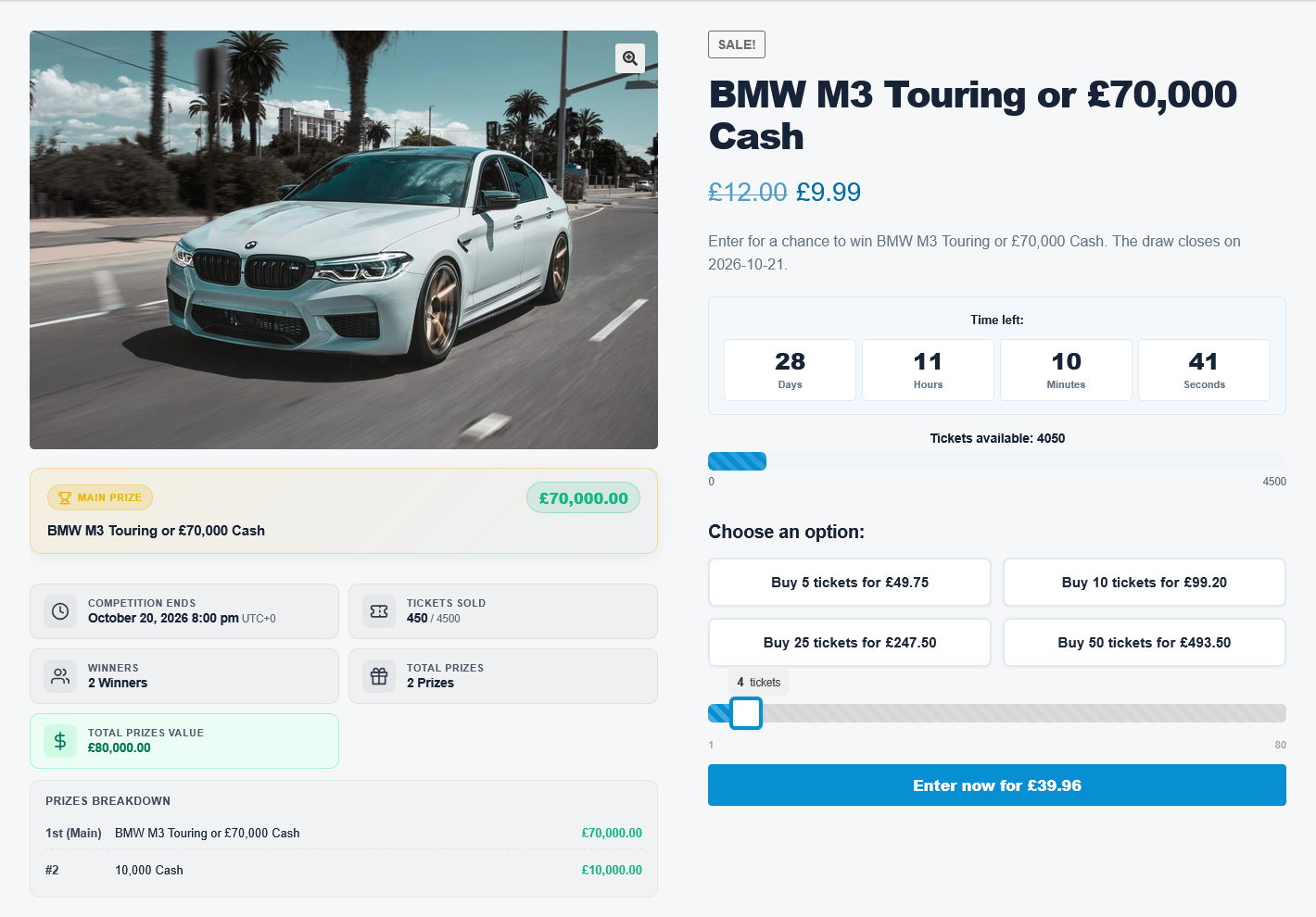
A competition page from the vendor: prize breakdown, countdown, tickets sold, ticket bundle buttons and a quantity slider.
Quick facts
- Version: 1.0.3, last updated November 6, 2026 (first released October 21, 2026)
- Developer: WPGenie
- Runs on: your WordPress site, not on a PC. WordPress 5.8+, PHP 7.4+, WooCommerce 6.0+
- Price: $149.00 a year on the order page, for one website
- Trial: none. There's a public demo site
- Refunds: none once the plugin has been downloaded
- What we checked: version 1.0.3 in the vendor's changelog and the requirements in its documentation, and the order page showing $149.00 a year with auto-renewal, all on November 9, 2026. We didn't buy the plugin or run a draw with it, so the screenshots here are the vendor's.
Before you buy
- The order page sets up auto-renewal. It says the $149 is charged each billing cycle until you cancel in your customer account, while WPGenie's product page says plans renew manually with no automatic payment. Go by the order page and cancel if you only want one year.
- There's no refund after download. A full refund is only available if the item hasn't been downloaded, so walk through the demo first.
- Prize draws are regulated. Rules on paid competitions differ by country. The plugin gives you tools such as skill questions and free postal entry, but making your competition legal is your job.
- It's a very young product. Version 1.0 arrived in October 2026, so expect fixes to keep coming, and test on a staging site.
Buy Now
Overview
Quantum replaces two older WPGenie products: WooCommerce Lottery, which sold more than 4,200 copies on CodeCanyon, and the $250 Pick Ticket Number add-on that many of its buyers needed. WPGenie says those two will still get security patches but no new features, and all new work goes into Quantum.
Competitions are WooCommerce products with their own admin area. Tickets go through the normal cart and checkout, and the plugin handles reservations, draws, prize records and the customer's ticket history.
Features
Ticket picking, Lucky Dip and bundles
Quantum Competition lets customers choose numbers on an interactive picker, take a Lucky Dip, or get tickets allocated automatically, and picked numbers are held with live cart reservations. You can set custom ticket ranges, prefixes and per-user entry limits, add skill questions, and offer bundle buttons with quantity-based prices.
Instant wins with animated reveals
Quantum Competition assigns prizes to ticket numbers and reveals the results on the order confirmation page, using a Flip Card, Scratch Card, Case Opening or Spin the Wheel for each competition. Colors, sounds and confetti can be changed, or you can use plain text. Winners get a notification and a prize history in My Account. Automatic wallet credit needs the separate TeraWallet plugin.
A live draw console and an OBS overlay
Quantum Competition can pick winners automatically, on demand, or through a full-screen Live Draw console made for broadcasts. A transparent overlay, added to OBS as a Browser Source, shows the ticket counter and instant-win alerts as they happen, without being refreshed.
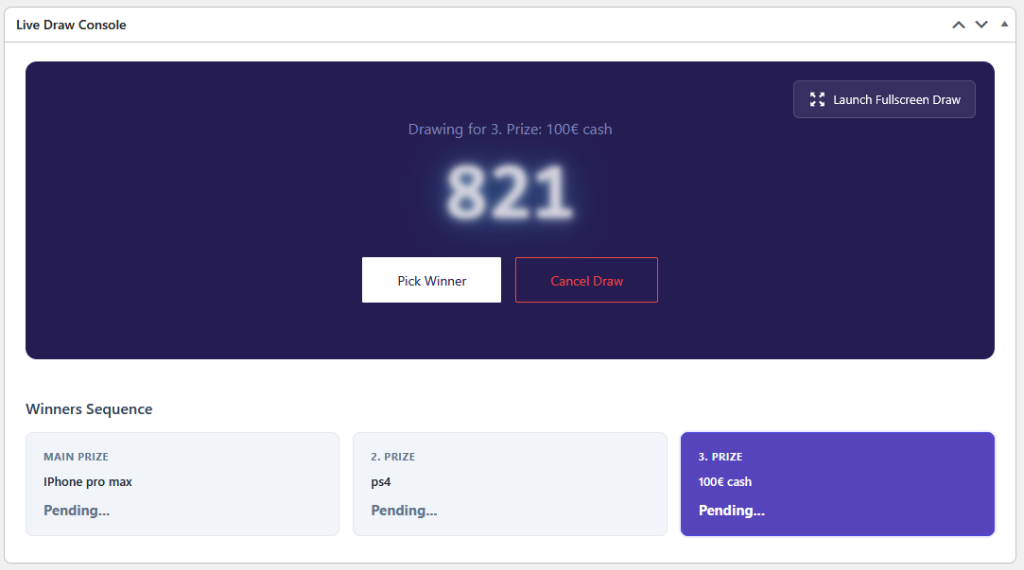
The Live Draw Console: the draw number, Pick Winner and Cancel Draw buttons, a full-screen launch button and the sequence of prizes.
Three random engines and public verification
Quantum Competition offers the wpgenie Quantum Randomizer, an ANU-powered service included for licensed users, a direct ANU connection with your own API key, or PHP's random_int() on your server. With the wpgenie service, optional public signatures and verification links let customers see how their numbers were assigned and how winners were chosen.
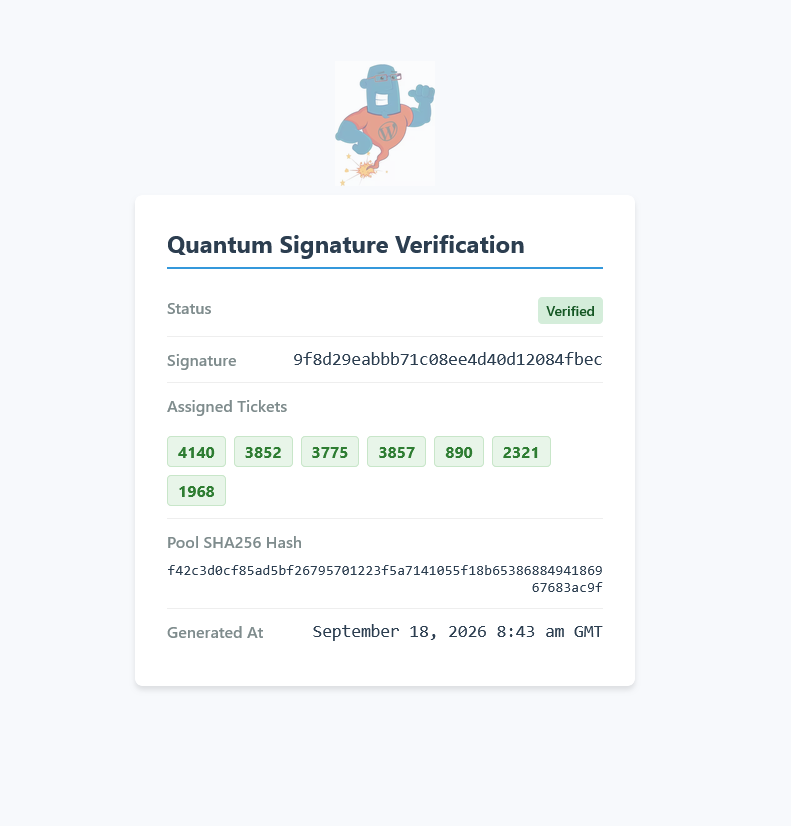
A public verification page showing the status, signature, assigned ticket numbers, pool hash and generation time.
Free postal entries and day-to-day management
Quantum Competition publishes your postal entry instructions in a product tab, and when an entry arrives you register it in the editor, which creates a zero-cost order and allocates the tickets. A dedicated Competitions area shows status, sales and winners, with import of instant prizes and export of winner lists.
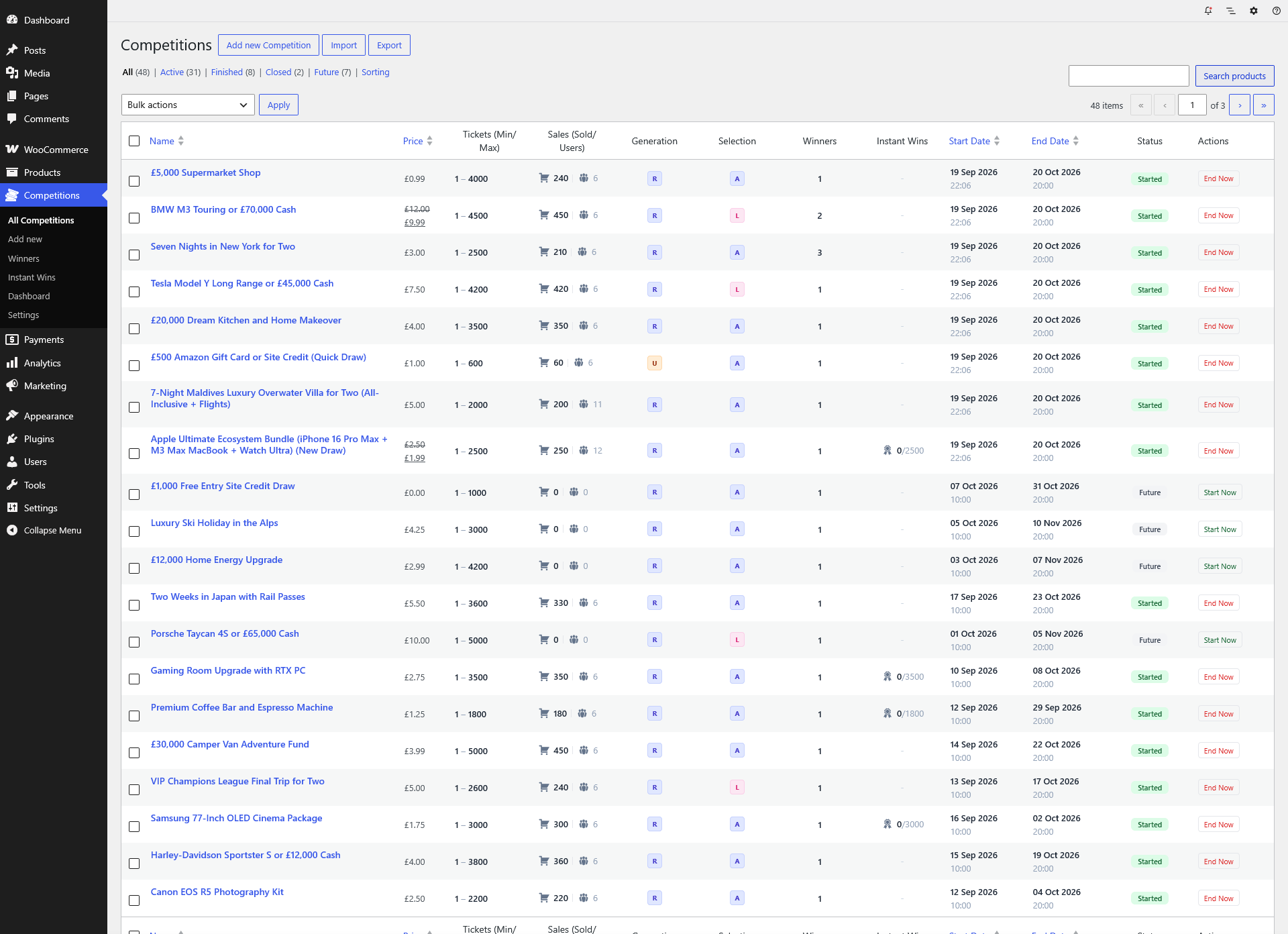
The Competitions list in WordPress, with prices, ticket limits, sales, winners, instant wins, dates and status for each competition.
Benefits
- One plugin instead of two. The ticket picker that used to be a $250 add-on is included.
- A visible answer to "is it rigged?" Published signatures give customers something to check.
- A built-in show. Reveals and live draws give people a reason to come back and watch.
Real-World Uses
- A prize competition site sells tickets for a car, adds instant-win cash prizes to the ticket pool, and streams the final draw through OBS.
- A WooCommerce Lottery store moves its existing products and ticket tables over and drops the separate picker add-on.
- A UK operator publishes a free postal route and registers the entries that arrive by mail against customer accounts.
Who It's For, and Who Should Skip It
Buy it if you run competitions as a business, or plan to, and can look after a WordPress site with a real cron job. It's also the natural step for an existing WooCommerce Lottery store that wants new features.
Skip it if you only want an occasional free giveaway, because $149 a year is a lot for that and simpler tools exist. Be cautious too if you need a product with a long track record, since Quantum is only weeks old, or if you can't get legal advice on running paid prize draws where you operate.
Usage Guide
- Check that your host meets the requirements below, then back up the site.
- Install and activate the plugin with WooCommerce already running, and activate your license.
- Set up a server cron job that runs every minute, so draws and ticket releases happen on time.
- Choose Add new Competition, then set the price, ticket range, dates and number of winners.
- Pick the allocation mode: manual picker, Lucky Dip or automatic.
- Add instant prizes and a reveal style if you want them, and choose a random engine.
- Run a full test on staging, including a paid order and a draw, before going live.
- Moving from WooCommerce Lottery? Back up, deactivate the old plugins, activate Quantum, then check your settings and competitions.
Where it falls short
- Letting the plan lapse has visible effects. Updates, support and the Quantum Randomizer stop, and public verification links show an inactive-domain notice instead of their details. Draws then fall back to the local random generator, without a new signature.
- Quantum allocation can slow checkout. WPGenie notes that assigning tickets from the quantum service at checkout depends on external API response times.
- High traffic needs serious hosting. The documentation recommends 512 MB or more of PHP memory for high-volume draws, plus Redis or Memcached.
- Early fixes show its age. The first three updates dealt with database table types, payment retries and ticket reservations, the sort of thing you want settled before a large draw.
What Users Say
Quantum was released in October 2026 and has no independent reviews yet. The comments below are about its predecessor, WooCommerce Lottery, so they tell you about the developer and the code it grew from, not about Quantum itself.
WooCommerce Lottery on CodeCanyon
The older plugin averages 4.18 out of 5 from 94 reviews, with 4,264 sales.
SDNETWORLD: "…support and the reactivity of the staff is prodigious."
neil74white: "…the extra customisation we have paid for is incredible…"
jackc87: "Brilliant customer service, quick replies…"
Most of the critical reviews share one complaint. Buyers including tjpconsulting, goldencomps and mimi530 said key features needed a costly add-on, and swiftyhosting reported that emails weren't sent. Quantum's inclusion of the ticket picker answers the first complaint directly, at a higher yearly price.
WPLift's hands-on review of WooCommerce Lottery
WPLift tested the older plugin in May 2019: "Overall, WooCommerce Lottery delivered on exactly what it promised. It made it super simple to add lottery functionality to WooCommerce, and all the features it advertised worked exactly as I'd expect in my testing."
Editions and Pricing
| Product | Price | Includes | Status |
|---|
| Quantum Competition | $149.00 a year, 1 website | Competition engine, ticket picker, updates, support | Current, new features |
| Pick Ticket Number Mod (with WooCommerce Lottery) | $250.00 | Older plugin and its picker | Security updates only |
Existing Pick Number customers can ask WPGenie for an 80% coupon on Quantum's first year.
FAQs
Can I move my WooCommerce Lottery site to Quantum Competition?
Quantum Competition has a migration path that reuses existing lottery products and ticket tables and converts supported legacy settings. Custom code and theme overrides should be tested on staging first.
Do I need my own ANU API key for Quantum Competition?
Quantum Competition only needs your own ANU key if you pick the direct ANU option. The wpgenie Quantum Randomizer comes with a license, and the PHP engine uses no external API.
Does Quantum Competition include a customer wallet?
Quantum Competition doesn't include a wallet. Automatic credit of instant prizes relies on the separate TeraWallet plugin, with crediting turned on for the relevant prize categories.
Does Quantum Competition work with Elementor and Gutenberg?
Quantum Competition's storefront displays can be customized with Elementor, Gutenberg and shortcodes, and the look of competition pages varies with your theme.
Is Quantum Competition compatible with WooCommerce order storage (HPOS)?
Quantum Competition's requirements page lists it as compatible with High-Performance Order Storage, with WooCommerce 8.0 or later recommended.
System Requirements
- WordPress 5.8 or later (6.4+ recommended)
- PHP 7.4 or later (8.1 or 8.2+ recommended) with curl, json, mbstring and openssl
- WooCommerce 6.0 or later (8.0+ recommended)
- MySQL 5.7 or MariaDB 10.3 or later
- 256 MB PHP memory (512 MB+ for high-volume draws)
- A real server cron job, running every minute
Conclusion
Quantum Competition for WooCommerce is worth $149 a year for a serious competition site, because it puts the ticket picker, instant wins, live draws and draw verification in one plugin from a developer with years in this niche. The reason to wait is its age: it's weeks old with no independent reviews, and there's no refund once you've downloaded it. Try the demo thoroughly and test on staging before you trust it with a real draw.
Buy Now