Vovsoft Keyboard Soundboard: Turn Your PC Keyboard into a Sound Pad
Keyboard Soundboard is a $19 Windows program from Vovsoft that plays a sound for each key you press, from its own built-in set or your own WAV, MP3, OGG, M4A and other audio files, even while you're in a game or another program. The $19 is a one-time lifetime license, and there's a free trial.
It's a toy and a tool at once: a sound-effects board for streams and calls, a simple instrument for kids, or a way to bring back typing clicks.
Quick facts
- Version: 2.1, released October 25, 2026
- Developer: Vovsoft
- Platform: Windows 11, 10, 8/8.1, 7 and Vista, 32-bit and 64-bit. No Mac version
- Sound files: WAV, MP3, MP2, MP1, AIFF, OGG and M4A, plus a built-in MP3 set
- Keys: letters, numbers, symbols, F1 to F12 and more, on any keyboard layout
- Editions: installer (5.05 MB) and portable (5.37 MB), one license for both
- Price: $19, one-time payment, lifetime license with free updates
- Trial: free to try, for personal, non-commercial use, with a nag screen
- What we checked: installer file version 2.1.0.0 (5,297,216 bytes) with a valid code signature, downloaded from the vendor on November 11, 2026, and $19.00 on the order page with no auto-renewal on November 11, 2026. We didn't test it inside a game
Download Free TrialBuy Now
Overview
The window shows an on-screen keyboard under a dot-matrix display that reads "Press any key". Every key you press plays its sound, and a slider above the keys sets the volume. The Redefine Keys list maps each key to a file, so you can swap the built-in sounds for your own clips.
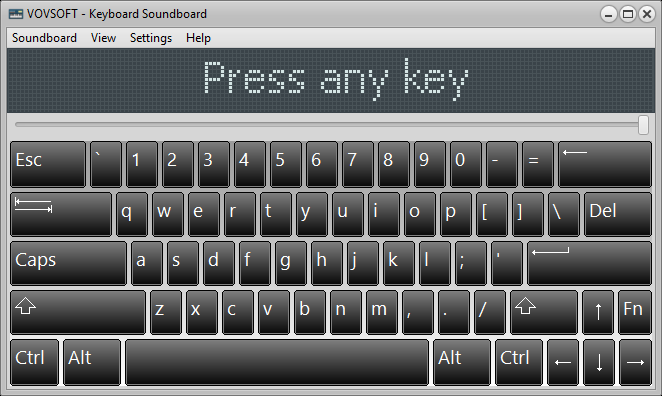
The main window: an on-screen keyboard, the dot-matrix display and the volume slider.
Features
Your own sounds on any key
Keyboard Soundboard's Redefine Keys window lists every key with its sound file, and Add, Edit and Delete buttons let you point a key at any WAV, MP3, MP2, MP1, AIFF, OGG or M4A clip on your PC.
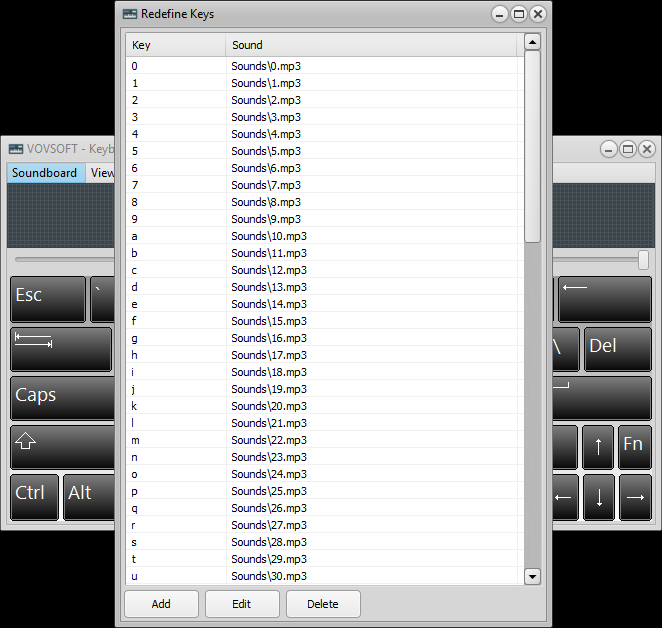
Redefine Keys: each key mapped to an MP3 in the Sounds folder, with Add, Edit and Delete buttons.
Hotkey Mode for games and other apps
Keyboard Soundboard's Hotkey Mode, on by default, keeps playing sounds when another program has the focus, so the keys still work while you're in a game, a call or a streaming app.
Overlapping sounds
Keyboard Soundboard's Allow Overlapping Sounds setting lets each key press play on its own, so several sounds can ring at once for chords or layered beats. Switch it off and a new key press cuts off the last sound.
Runs quietly in the tray
Keyboard Soundboard can start with Windows, minimize at startup and sit in the system tray, so a sound board is always one key away.
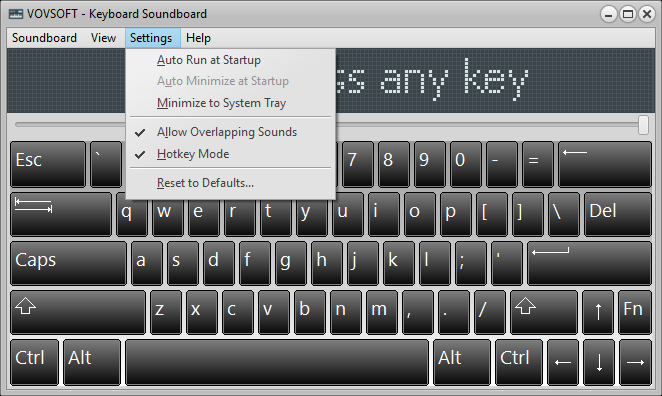
The Settings menu: Auto Run at Startup, Minimize to System Tray, Allow Overlapping Sounds, Hotkey Mode and Reset to Defaults.
Real-World Uses
- A streamer puts applause, a rimshot and an air horn on the number keys and fires them off mid-game.
- A teacher maps letters to animal sounds or spoken letters for a young child learning the keyboard.
- A hobby musician loads drum samples onto a row of keys and taps out a beat with overlapping sounds on.
- Someone who misses a clicky keyboard maps typing sounds to every key.
Who It's For, and Who Should Skip It
It suits casual streamers, families and tinkerers who want an easy keyboard sound board on Windows without buying extra hardware.
Skip it if you want teammates on Discord or in a game's voice chat to hear the sounds: there's no virtual microphone in its feature list, so that needs a separate virtual audio cable. Musicians who need MIDI or proper sampler features belong with a real DAW, and MIDI support is still only a feature request here.
Usage Guide
- Download the installer or the portable edition and start Keyboard Soundboard.
- Press keys to hear the built-in sounds, and set the volume with the slider.
- Open Redefine Keys to assign your own audio files to keys.
- In Settings, keep Hotkey Mode on to play sounds from other programs, and choose whether sounds may overlap.
- Turn on Auto Run at Startup and Minimize to System Tray if you want it always ready.
Before you buy
Try the free version with your own sound files and in the game or app you plan to use. Updating rewrites the key map file only after asking, since version 2.1. One license covers one person on any number of their own computers. Vovsoft's general policy is no refunds once the key is delivered, since a free trial comes first (accidental orders are generally refunded, at its discretion, and PayPro Global has the final say on its orders).
Where it falls short
- No virtual microphone output for voice chat.
- No looping a sound while a key is held, and no separate sounds for Shift plus a key. Both are open requests.
- No MIDI input.
- Its rating on Vovsoft's site is lower than most of the company's tools, at 3.9 out of 5.
What Users Say
On Vovsoft's site
Keyboard Soundboard's page shows 3.9 out of 5 from 16 ratings, with one written comment.
"Cool! I remember a very long time ago when they did away with the mechanical key clicks on the keyboards and the keys were silent. Everyone was installing software on their computer to add the key clicks back and played them through the speakers. I forgot all about that until I saw this program!" Dano
Vovsoft as a company has a TrustScore of about 4.6 out of 5 from 411 reviews on Trustpilot, read through a summarizer. We found no independent review of Keyboard Soundboard itself, so try it before you buy.
Comparisons
Keyboard Soundboard vs Discord-style soundboards
Soundboard apps built for voice chat send clips into your microphone so others hear them. Keyboard Soundboard plays on your own speakers and is built around the whole keyboard as a pad, which suits local fun, teaching and streaming setups that capture desktop audio.
Keyboard Soundboard vs a DAW or sampler
A DAW gives you MIDI, recording and effects for real music work. Keyboard Soundboard is instant: press a key, hear a sound, with nothing to set up.
Editions and Pricing
| Edition | Price | License | What you get |
|---|
| Trial | Free | Personal, non-commercial use | The full program, with a nag screen |
| Licensed | $19 one-time | Lifetime | Commercial use, no nag screen or ads, lifetime free updates |
The installer and portable editions use the same key, sent by email right after payment. Vovsoft's $99 Universal License covers all of its desktop programs.
FAQs
Does Keyboard Soundboard work while I'm playing a game?
Yes. Keyboard Soundboard's Hotkey Mode plays the sounds while another program, such as a game, has the focus.
Can my friends on Discord hear Keyboard Soundboard?
Not by itself. Keyboard Soundboard plays through your speakers or headphones, so voice chat needs a virtual audio cable that routes its output into your microphone.
Which audio formats can Keyboard Soundboard play?
Keyboard Soundboard plays WAV, MP3, MP2, MP1, AIFF, OGG and M4A files.
Does Keyboard Soundboard work with non-English keyboard layouts?
Yes. Vovsoft says it works with all keyboard layouts, and there's a Keyboard Layout setting.
Is the Keyboard Soundboard license a subscription?
No. The $19 license is a one-time payment that never expires and includes future updates.
System Requirements
- Windows 11, 10, 8/8.1, 7 or Vista, 32-bit or 64-bit
- About 6 MB of disk space, plus your sound files
- Speakers or headphones
Conclusion
Keyboard Soundboard is worth $19 if you want a simple, keyboard-wide sound board on Windows for streaming, teaching or fun, and you'll play the sounds on your own speakers. The reason to buy it is how quick it is to set up with your own clips. The reason not to: it doesn't feed voice chat on its own, and its user rating is modest, so make sure the free version does what you need first.
Download Free TrialBuy Now