UVI Sparkverb: A Fast, Light Algorithmic Reverb You Shape by Hand
Sparkverb is a $79 algorithmic reverb plugin from UVI for Windows and macOS (VST, VST3, AU, AAX and standalone). It covers everything from small rooms to frozen, endless tails, and you shape the decay by dragging directly on a frequency display instead of hunting through menus. There's a 3-day free trial.
Most reverbs make you choose between a quick preset that's almost right and a wall of parameters. Sparkverb's answer is two visual tools: a decay editor where low, mid and high decay times sit on one canvas, and a "Preset Voyager" map you can drag across to blend presets into new spaces.
Quick facts
- Developer: UVI (Paris, France)
- Version: 1.5
- Type: algorithmic reverb on UVI's parametric FDN (feedback delay network) engine
- Platforms: Windows 10 and 11 (64-bit), macOS 10.14 Mojave to macOS 27
- Formats: VST, VST3, AU, AAX and standalone
- Size: about 142 MB installer (Windows 64-bit), 200 MB on disk
- License: 3 activations on any mix of computers or iLok keys; a free iLok account is needed, a dongle isn't
- Price: $79
- Trial: 3 days, installed through UVI Portal with a free UVI account
- Also included in: UVI's SonicBundle and SonicPass
- What we checked: the $79 price (no discount running) and the 3-day trial terms on the product page, the controls and version 1.5 in the user manual, and the system requirements, on November 19, 2026. We didn't run the trial on a mix.
Download Free TrialBuy Now
The trial button opens the UVI Portal page: install Portal, sign in with a UVI account, and start the Sparkverb trial from there.
Overview
Sparkverb first came out in 2013 and has been updated since; version 1.5 is current. It's an algorithmic reverb rather than a convolution one, so it doesn't load impulse responses of real rooms or vintage units. Instead it generates the space from a set of continuous controls: room size in meters, pre-delay, a shape control that trades echo density against modal density, modulation depth and rate, and three modes (Lo-Fi, Dark and Bright) that change how the high end decays.
What sets it apart is the center display. In decay-editor view you drag the decay time and its low and high multipliers and crossovers on a spectrum graph, with a live analyzer behind them. Toggle it, and the same area becomes the Preset Voyager.
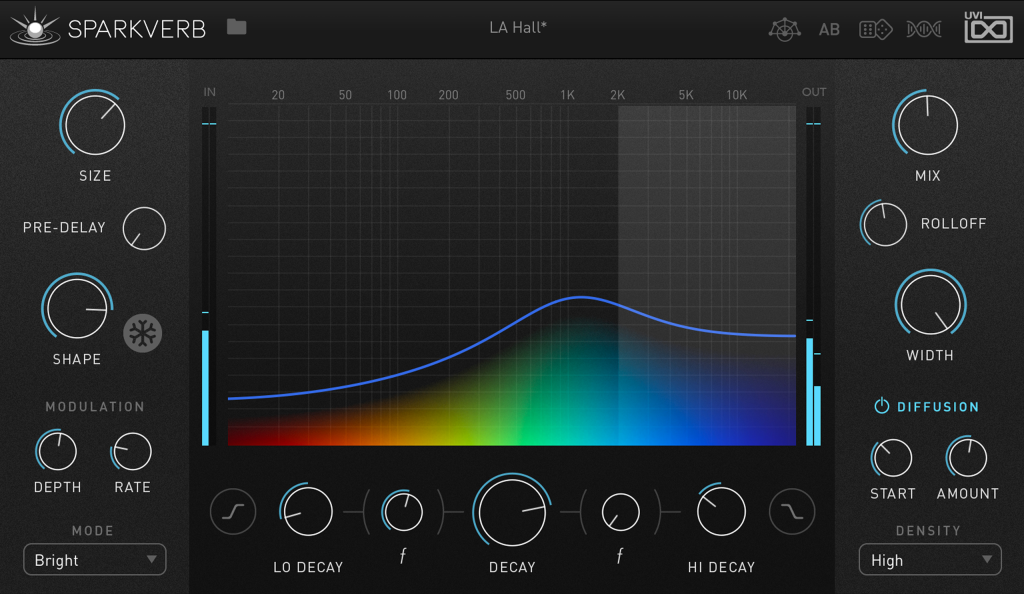
Sparkverb's main window on the "LA Hall" preset in Bright mode: size, pre-delay, shape and modulation on the left, the decay curve over a spectrum display in the center, and mix, rolloff, width and diffusion on the right.
Features
A decay editor you drag instead of dial
Sparkverb's decay editor puts the reverb's frequency behavior on one graph. Drag the center column up or down to change the main decay time (RT60), the left column for the low-frequency multiplier and crossover, and the right column for the highs. Hi and Lo Cut buttons switch each band to a shelf or a filter. It's a direct way to make a long vocal reverb that doesn't muddy the low end.
Preset Voyager: blend presets on a map
Sparkverb's Preset Voyager arranges every factory and user preset as a color-coded cloud, grouped by similarity. Click and drag between the dots and the plugin interpolates the settings of the nearest presets, so you can land somewhere between "Snare Plate" and "Music Hall". Double-click a dot to load that preset. New presets appear on the map after you reload the plugin.
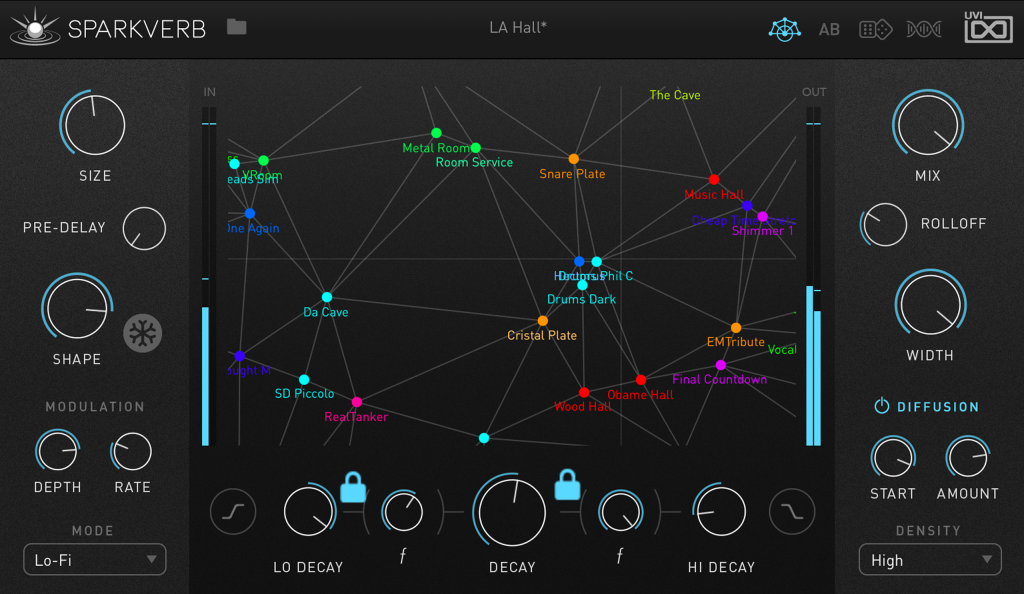
The Preset Voyager view: presets such as Metal Room, Snare Plate, Music Hall and Shimmer 1 as connected dots, with padlocks on two decay controls (parameter locks).
Randomize and mutate, with locks
Sparkverb can randomize all its parameters or "mutate" them (a smaller random change based on the current settings). Right-click any control to lock it first, so you can keep a fixed mix level or modulation amount while exploring everything else. A/B snapshots let you compare two versions as you go.
Freeze, modulation and diffusion for sound design
Sparkverb's Freeze button holds the tail indefinitely (it keeps the input low so energy doesn't build up), which makes instant pads from any sound. Modulation depth and rate give chorus-like, lush tails, the Lo-Fi mode adds grainy high-frequency diffusion, and separate diffusion start, amount and density controls tune how quickly the reverb thickens, from sparse echoes to dense reflections. Every control can be MIDI-learned.
Low CPU use
UVI built Sparkverb to be loaded on many tracks and buses at once, and reviewers agree it's light. That matters if you prefer a separate reverb per instrument over one shared send.
Benefits
- Faster results: the graph and the Voyager get you from "too boomy" to right in a few drags, without knowing what each diffusion parameter does.
- One reverb for mixing and effects: natural rooms for a mix and huge frozen spaces for sound design come from the same plugin.
- Affordable now: it launched at $199 and sells for $79, with a trial to check it in your own sessions first.
Real-World Uses
- Vocals: a long, bright plate-like tail with the low decay pulled down, so the vocal gets air without mud.
- Drums: a short, dense room on the snare with diffusion on, for percussive material that needs density quickly.
- Ambient and film work: freeze a chord into a pad, or push size and decay into "deep space" territory with modulation.
- Big sessions: a separate instance on each instrument or bus without worrying about CPU.
Who It's For, and Who Should Skip It
It's for producers and mixers who want one flexible, CPU-friendly algorithmic reverb that's quick to tune by ear, and sound designers who like experimenting with presets.
Skip it if you need the sound of a specific vintage plate or spring unit (a dedicated emulation or a convolution reverb does that better), or if you need surround and 3D placement for immersive mixing. If you already have a favorite algorithmic reverb you know well, Sparkverb's advantage is mostly workflow.
Usage Guide
- Create a free UVI account and a free iLok account (no dongle needed).
- Download and install UVI Portal for Windows or macOS, and sign in.
- Find Sparkverb in Portal and start the 3-day trial, or register your purchase; Portal installs the plugin and opens iLok License Manager to activate it.
- Rescan plugins in your DAW and insert Sparkverb on a send/return bus (Mix at 100%) or directly on a track (lower the Mix).
- Pick a preset from the menu, then shape the decay on the graph, or switch to the Preset Voyager and drag between presets.
- Use A/B to compare, lock the controls you like, and save the result as a user preset.
Before you buy
- The trial is short. Three days goes fast, so have a session ready before you start it.
- Installation goes through UVI Portal. There's no separate trial installer to download from the website.
- No refunds once registered. UVI's terms rule out a refund once a downloaded product is registered to your account, which is why the trial matters.
- Bought SonicBundle or SonicPass? Sparkverb is already included.
Where it falls short
- No vintage emulations. Sparkverb models spaces algorithmically, so it won't recreate a particular EMT plate or spring tank, as Sound On Sound's reviewer pointed out.
- The Voyager map isn't perfect. "Similar" presets aren't always neighbors on the map, and new presets only appear after a reload.
- Not for 3D placement. One KVR reviewer calls it better for sound design than for positioning sources in space.
- Installer and Portal issues. A few users report the UVI installer or Portal failing, or the plugin not showing up in their DAW.
What Users Say
Sound On Sound (Jon Burton, March 2014)
Sound On Sound reviewed Sparkverb shortly after launch, when it cost $199. The verdict: "Sparkverb's innovative interface makes it easy to choose and shape the right reverb for your song."
- Pros: "Fast and easy to use, with high–quality sounds."
- Cons: "Expensive compared with some reverbs." (It's since dropped to $79.)
- On its limits: "the only obvious exception being where I need to recreate the sound of a vintage device such as a plate or spring."
- On the Voyager: "sometimes I did question the alleged similarity between adjacent presets!"
KVR Audio users (4.69 out of 5 from 29 reviews)
Many of the recent KVR reviews came in April and May 2026, and several reviewers say they received the plugin free, so weigh them accordingly.
- Ave2 (v1.5, Windows): "Sparkverb is a surprisingly lightweight and super versatile algorithmic reverb."
- ruzz (Windows): "Pretty much perfect. Very easy to dial in a setup. Sparkverb is rapidly becoming my goto verb."
- harshsznn (v1.5.0, Mac): "FINALLY A DIFFERENT REVERB THAT DOESN'T SOUND METALLIC AND THIN."
- Dirk Diggler (v1.5.0, Windows): "the freeze function alone is a great feature to make it stand out."
- AquiMusicBoy (v1.5.0, Mac, mixed): "Not for 3d placement, more for sound design, sounds great."
- boomkitchen (Windows, negative): "The UVI installer won't run even after general troubleshooting."
Producers quoted by UVI
- Fab Dupont (mixing engineer and producer): "Between the Preset Voyager and the intuitive controls, Sparkverb is an amazing source of inspiration when looking for creative reverb sounds and special effects."
- Benjamin Rice (producer and mix engineer): "The Decay Editor in Sparkverb allows me to quickly and easily create a unique vibe for a vocal."
- Phil Greiss (producer): "Sparkverb is almost a 'cheating' tool in the way that it becomes 'too easy' and intuitive to go from the space you hear in your head, to the space you hear coming out of your speakers."
- Richard Devine (sound designer): "Sparkverb is gorgeous! Loving all the different flavors of reverb algorithms that are in there."
Trustpilot (UVI as a company)
UVI has only five Trustpilot reviews (2.6 out of 5), none about Sparkverb. The two recent ones are about installation: one buyer "spent a full hour trying to download the 'Tape Suite' plugin via the UVI Portal", another had a plugin that wouldn't show up in the DAW.
The pattern: reviewers praise the sound (smooth, not metallic), the low CPU use, Freeze and how fast the decay editor gets results. The criticisms are that it isn't a vintage plate or spring emulation, the Voyager's groupings can be odd, and installation through UVI's tools occasionally fails.
Comparisons
Sparkverb vs a convolution reverb
A convolution reverb plays back recordings (impulse responses) of real rooms and hardware, which is the way to get a specific church or a classic plate. Sparkverb generates its spaces, so every parameter stays continuously adjustable, it can freeze and modulate, and it's lighter on CPU. Many mixers keep one of each.
Sparkverb alone vs SonicBundle
Sparkverb on its own is $79. It's also one of the effects in SonicBundle, UVI's bundle of 116 products, which was $299 on sale on November 19, 2026. If you'd use UVI's instruments and other effects too, the bundle is the better buy; if you only want a reverb, buy Sparkverb.
Editions and Pricing
| Option | Price | License | Notes |
|---|
| Sparkverb | $79 | Permanent, 3 activations | One edition; 3-day trial first |
FAQs
Does Sparkverb need an iLok dongle?
No. Sparkverb uses iLok licensing, but a free iLok account is enough; activations can live on your computer. You get 3 activations, and an internet connection is needed to activate.
How does the Sparkverb trial work?
The Sparkverb trial lasts 3 days. You install UVI Portal, sign in with a UVI account, and start the trial there; there's no separate demo download.
Does Sparkverb work in FL Studio, Ableton Live and Logic Pro?
Yes. Sparkverb comes as VST, VST3, AU and AAX, and UVI lists it as tested in FL Studio, Ableton Live, Logic Pro, Pro Tools, Cubase, Studio One, Bitwig, Reaper, Reason and others. It also runs standalone.
Can Sparkverb do shimmer and infinite reverb?
Sparkverb's Freeze button holds the tail indefinitely, and its factory presets include shimmer-style sounds, though it has no dedicated pitch-shifted shimmer control. Modulation and very long decays cover most ambient uses.
Is Sparkverb included in UVI's bundles?
Yes. Sparkverb is part of SonicBundle (UVI's one-time bundle) and SonicPass (UVI's subscription), so don't buy it separately if you own either.
Can I resize Sparkverb's window?
Yes. Sparkverb's menu has a scaling option that enlarges the interface up to 200%, useful on high-resolution displays.
Can I get a refund on Sparkverb?
Usually not. UVI's terms say the right of withdrawal doesn't apply to downloadable products registered to your UVI account, so use the 3-day trial to decide.
System Requirements
- Windows 10 or 11 (64-bit), or macOS 10.14 Mojave to macOS 27
- 4 GB RAM, 200 MB of disk space
- VST, VST3, AU or AAX host, or standalone
- Free iLok account (no dongle required) and an internet connection for activation
- UVI account and UVI Portal for installation
Conclusion
Sparkverb is worth $79 for anyone who wants a smooth, CPU-light algorithmic reverb that's quick to shape by ear: the decay editor alone saves time on every vocal and drum bus, and Freeze plus the Preset Voyager make it a sound-design tool too. The main reason to pass is if you're after the character of a specific vintage plate or spring, which it doesn't emulate. Try it for three days first, since sales are final once registered, and if you're also eyeing UVI's instruments, look at SonicBundle, which includes it.
Download Free TrialBuy Now