Vovsoft Text to MP3 Converter: Turn Text, PDFs and Word Files into Spoken Audio
Text to MP3 Converter is a $19 Windows text-to-speech program from Vovsoft that reads typed text, TXT, PDF and Word files aloud and saves the speech as MP3 or WAV. It uses the free voices built into Windows, which work offline, and can also use OpenAI's natural-sounding voices or Replicate's voice cloning with your own API key. The $19 is a one-time lifetime license with free updates.
Listening to a long report on your commute, adding a voiceover to a YouTube video without recording yourself, or turning study notes into audio for revision: these are the jobs it was built for, with a text box, a few sliders and a Save button.
Quick facts
- Version: 4.7, released October 4, 2026
- Developer: Vovsoft, the one-person software company of Fatih Ramazan Çıkan in Turkey
- Platform: Windows 11, 10, 8/8.1 and 7, 32-bit and 64-bit. No Mac or Linux version
- Input: typed or pasted text, TXT, PDF, DOC and DOCX, up to 500,000 characters (about 8 hours of speech) at a time
- Output: MP3 or WAV, with batch conversion of several files
- Voices: Microsoft SAPI voices installed in Windows (free, offline); OpenAI and Replicate voices with your own paid API account
- Editions: installer (19.43 MB) and portable (23.44 MB), one license for both
- Price: $19, one-time payment, lifetime license with free updates
- Trial: free, but conversion isn't unlimited and there's a nag screen until you buy
- Refunds: no money-back guarantee; refunds are at the vendor's discretion, mainly for accidental orders
- What we checked: the installer we downloaded from vovsoft.com on November 8, 2026 is version 4.7.0.0, 19.43 MB, digitally signed by Fatih Ramazan Çıkan; the order page showed $19.00 with no auto-renewal on November 8, 2026. We didn't install the program or listen to its output.
Overview
Text to MP3 Converter opens on a tabbed text editor. Below the text are Spell and Emphasize boxes, sliders for voice pitch, volume and speech speed, a Speech Engine list with the voices installed on your PC, and an Audio Format list. Speak, Pause and Stop let you preview, and Save writes the MP3 or WAV file. The File menu has three kinds of new tab: Classic for the Windows voices, OpenAI and Replicate for the online engines.
It's actively developed: OpenAI voices arrived in 3.0 (November 2023), Replicate voices and voice cloning in 4.0 (January 2025), OpenAI's gpt-4o-mini-tts model in 4.5 (June 2026), PDFium as the default PDF engine in 4.6 (August 2026), and a fix to the animated mouth shapes in 4.7 (October 2026).
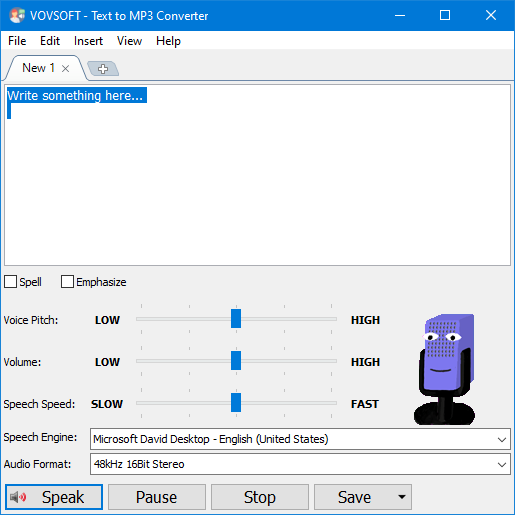
The Classic tab: the text box, Spell and Emphasize, pitch, volume and speed sliders, the Microsoft David voice and a 48 kHz 16-bit stereo output format.
Features
Free offline voices from Windows
Text to MP3 Converter uses the Microsoft SAPI voices that come with Windows, such as David and Zira for English and Hortense for French, at no extra cost and without an internet connection. You can add more languages (Windows offers voices for about 36, from Arabic to Vietnamese) through Windows' language settings, and the program picks them up after a restart. Vovsoft itself admits these voices can sound robotic next to AI voices.
Natural AI voices and voice cloning (your own API key)
Text to MP3 Converter's OpenAI tab sends your text to OpenAI and saves the result with one of its six voices (Alloy, Echo, Fable, Onyx, Nova, Shimmer), using the TTS, TTS-HD or gpt-4o-mini-tts models. The Replicate tab adds sample voices and voice cloning from an MP3 file's URL. Both need your own account and are paid separately: Vovsoft quotes OpenAI at $15 per million characters for TTS and $30 for TTS HD, with a $5 minimum credit.

The OpenAI tab: paste your API key, pick a voice (Fable) and model (TTS-1-HD), then Send and Save.
PDF and Word to MP3, in batches
Text to MP3 Converter loads PDF, DOC and DOCX files as well as plain text, so a Word report or a PDF chapter becomes an MP3 without copying and pasting. Batch Conversion turns several text files into audio files in one go, showing progress and remembering your input files and destination folder.
Control over how it speaks
Text to MP3 Converter sets speech speed from 10x slower to 10x faster, plus pitch and volume. Spell reads text letter by letter, Emphasize stresses words, and the Insert menu adds silences, which helps pace a voiceover. The output format list goes up to 48 kHz 16-bit stereo.
Read along with highlighting and tabs
While Text to MP3 Converter speaks, it highlights the current word and sentence, so you can follow along, which helps for language learning and proofreading by ear. Several documents can be open in tabs, and "Speak" is on the right-click menu for a selection.

Reading French with the Microsoft Hortense voice: the current sentence is bold and the current word highlighted, with six documents open in tabs.
Benefits
The main benefit is choice of cost. With the Windows voices it costs $19 once and never anything more, works offline and keeps your text on your PC; when a project needs a voice that sounds human, you switch tabs and pay OpenAI only for the characters you use, instead of a monthly subscription to an online TTS service. The 500,000-character limit per conversion is enough for a short book.
Real-World Uses
- Voiceovers for videos: narrate a YouTube tutorial or product video without recording yourself.
- Listening instead of reading: turn long PDFs, articles or Word reports into MP3s for the car or the gym.
- E-learning and presentations: produce consistent narration for slides and course modules.
- Studying: one buyer says it helps him study faster by listening to his notes.
- Language practice: hear text in another language with word-by-word highlighting.
Who It's For, and Who Should Skip It
A good fit if you want a simple desktop tool that turns text and documents into audio files, offline with Windows voices, with the option of AI voices when quality matters, and you prefer a one-time price.
Skip it if you need studio-quality AI voices but don't want to manage an API key and pay-as-you-go billing: an all-in-one online voice service is simpler. Mac users have no version. If you only want your PC to read text to you and don't need audio files, Windows' built-in Narrator or the read-aloud feature in Edge and Word may be enough.
Usage Guide
- Download the installer or the portable edition from vovsoft.com and run it.
- Type or paste text, or open a TXT, PDF, DOC or DOCX file.
- Pick a voice in Speech Engine, adjust pitch, volume and speed, and press Speak to preview.
- Choose the Audio Format and click Save to write an MP3 or WAV file.
- For AI voices, choose File, New (OpenAI) or New (Replicate), paste your API key, pick a voice and save.
- For several files, use Batch Conversion. After buying, enter your key using Vovsoft's "How to Activate using License Key" steps.
Before you buy
- The $19 doesn't include AI voices. OpenAI and Replicate are billed by those companies to your own account. Without them you get the Windows voices, which are clear but synthetic.
- Listen to your voices in the trial. Which voices you get depends on your Windows version and installed languages, so check them before paying.
- No refund if you change your mind. Vovsoft generally doesn't refund purchases, because the trial is there to evaluate the program; refunds are at its discretion, mostly for orders placed by accident.
Download Free TrialBuy Now
Where it falls short
- 500,000 characters per conversion. Longer books have to be split; merging the output automatically is an open user request.
- No progress bar when saving a long text to a file, the most-voted open request on Vovsoft's feature request page.
- Punctuation in some languages. Users report the Windows voices don't handle question and exclamation marks naturally in non-English languages such as Greek.
- No subtitle timing and no command line yet, also open requests; reading SRT files with exact timings isn't supported.
What Users Say
Text to MP3 Converter is rated 4.6 out of 5 from 11 votes on Vovsoft's product page, and its testimonials are among the most detailed for any Vovsoft tool.
Buyers on vovsoft.com
"I recently purchased Vovsoft Text to MP3 Converter, and I’m extremely happy with it! The software is lightweight, fast, and very easy to use — perfect for turning written content into high-quality audio. The voices sound natural, and the conversion process is smooth without any unnecessary complications. Customer support from Vovsoft is excellent too — they responded quickly and helped me activate the software right away." (D.MOHANTY)
"Just downloaded it and installed it to my Windows 11 laptop, then activated without any issue. Tried to paste a couple text messages in both English & Chinese to and the conversions seemed to be very smooth. Also, tried different voices (Male & Female), all sounded very naturally like real humans. Great utility and highly recommended." (John Liu)
"This software does what it says it can do. Been using it for several years wherein I purchased a lifetime license. A selection of different voices (male/female) is nice. Try it, you will like it." (Mardel)
"Good easy to use clear and nice interface help me in studying fast" (Anonymous User)
"For its light size, it does the job and stable.." (Peter)
"Very good software. Support is amazing." (Naeem Bhatti)
MajorGeeks (editor's description, version 4.5)
MajorGeeks summarizes it as a tool that "allows you to convert text to speech and save it in WAV or MP3 formats", notes that it "utilizes the Microsoft SAPI Text-to-Speech (TTS) engines for generating voice", and concludes it "will be a great choice if you need a straightforward tool for performing text-to-audio conversions."
Video walkthroughs
Online Computer Tips has two tutorials: one showing typed text and imported Word, PDF and text files converted to MP3 and WAV, and one covering voice, pitch and speed settings, batch conversion of text files and the OpenAI feature. Tiger Technology's short demo covers PDF and DOC to MP3 and inserted silences.
The company on Trustpilot
Vovsoft as a company has a TrustScore of 4.6 from 410 Trustpilot reviews, 78% of them 5-star and 6% 1-star. They cover all of Vovsoft's programs and its support, not this tool in particular.
The recurring themes: easy to use, light, stable, and quick support with activation. How "natural" the voices sound depends on which engine you use; buyers praising natural voices may be using OpenAI or newer Windows voices, while the classic SAPI voices are more mechanical, as Vovsoft itself says. We found no detailed negative reviews of this tool.
Comparisons
Text to MP3 Converter vs online AI voice services
Online text-to-speech services offer polished voices in a browser, usually on a monthly plan with character limits. Text to MP3 Converter costs $19 once, works offline with Windows voices, and reaches comparable AI voices through OpenAI's pay-per-use API, but you have to set up that account yourself.
Text to MP3 Converter vs Windows Narrator and Edge read aloud
Windows' built-in tools read text to you for free but don't save audio files. Text to MP3 Converter adds MP3 and WAV export, batch conversion of documents, speed and pitch control and silences for pacing.
Editions and Pricing
| Option | Price | License term | What you get |
|---|
| Free trial | $0 | No time limit | Text to speech with limited conversion and a nag screen |
| Text to MP3 Converter license | $19 | One-time payment, lifetime, free updates | Unlimited conversion, no nag screen or ads; installer and portable |
| OpenAI voices (optional) | $15-$30 per million characters | Pay as you go, billed by OpenAI | Six natural AI voices; needs your own API key |
Vovsoft also sells a $99 Universal License that covers all of its programs, including its Speech to Text Converter and Sound Recorder, which pays off if you want several of them.
FAQs
Does Text to MP3 Converter work offline?
Yes, with the Windows voices. Text to MP3 Converter's Classic mode uses Microsoft SAPI voices installed on your PC and needs no internet; only the OpenAI and Replicate modes send text online.
Can I use Text to MP3 Converter's audio in YouTube videos?
Text to MP3 Converter is marketed for YouTube voiceovers and video narration. For OpenAI or Replicate voices, also follow those services' own usage terms, and only clone a voice you have permission to use.
How do I get more voices in Text to MP3 Converter?
Text to MP3 Converter lists whatever speech voices Windows has. Add a language with speech support in Windows' Time & Language (Region & Language) settings, then restart the program to see the new voices.
Can Text to MP3 Converter read a whole e-book?
Up to a point. Text to MP3 Converter converts up to 500,000 characters at a time, roughly 8 hours of audio, so a long book needs splitting into parts. It opens PDF, DOC, DOCX and TXT, not EPUB.
Is Text to MP3 Converter a subscription?
No. Text to MP3 Converter costs $19 once. Vovsoft licenses never expire and include future updates, and the order page shows no auto-renewal. Only optional OpenAI or Replicate usage is billed separately by those companies.
Can I move my Text to MP3 Converter license to a new PC?
Yes. Vovsoft says you can activate the same key on your new computer without deactivating the old one. A lost key can be retrieved from Vovsoft's User Panel with your purchase email.
System Requirements
- Windows 11, 10, 8/8.1 or 7, 32-bit or 64-bit
- About 20 MB of disk space for the installer version, 24 MB for the portable edition
- At least one Windows speech voice (English voices come with Windows)
- Internet connection and your own API key only for OpenAI or Replicate voices
Conclusion
Text to MP3 Converter is worth $19 if you regularly turn text or documents into audio files: PDF and Word input, batch conversion, speed, pitch and silences, offline Windows voices, and an OpenAI or Replicate tab when you need a voice that sounds human, all on a lifetime license updated as recently as October 2026. The reason to hesitate is the voices themselves: the free Windows ones are synthetic, and the good ones cost extra and need an API account. Try the trial with the voices on your own PC before you buy.
Download Free TrialBuy Now