Leawo UHD Drive Tool for Mac: Make a USB Blu-ray Drive Read 4K UHD Discs on a Mac
Leawo UHD Drive Tool for Mac is a $99.95-a-year (or $109.95 lifetime) macOS utility that rolls the firmware of certain LG, ASUS, Buffalo and Archgon Blu-ray drives back to an older "UHD-friendly" version, so 4K ripping and copying software can read Ultra HD Blu-ray discs in them. It's for Mac users with an external drive from Leawo's list that won't load 4K discs, and it runs on macOS 10.10 through macOS 27, on Apple silicon through Rosetta.
On a Mac, every Blu-ray drive is an external one: a USB drive or an internal drive in a USB enclosure. That's exactly the setup this tool is built to flash, and also why the warning about not unplugging anything mid-flash matters more on a laptop desk than inside a PC tower.
Quick facts
- Developer: Leawo Software Co., Ltd.
- Mac installer: macuhddrivetool_setup.dmg, 90 MB, dated January 7, 2026. Leawo publishes no version number for the Mac build.
- Runs on: macOS 10.10 Yosemite to macOS 27, Intel Macs, and Apple M1/M2 Macs with Rosetta
- Works with: about two dozen drive models on Leawo's list, including USB drives such as the LG BP50NB40 and BP60NB10, ASUS BW-16D1H-U, Buffalo BRUHD-PU3-BK and Archgon MD-8107S-U3-UHD
- Price: $99.95 for 1 year (auto-renews, 5-day money-back guarantee) or $109.95 lifetime (14 days), one Mac
- Trial: detects your drive and its firmware, but can't start a downgrade until you buy and activate
- What we checked: the Mac installer on Leawo's download page (macuhddrivetool_setup.dmg, 90 MB, last modified January 7, 2026), Leawo's Mac requirements and supported drive list, and the order page, which charged $99.95 for one year of "Leawo UHD Drive Tool for Mac" on November 1, 2026. We didn't flash a drive.
Before you buy
- Only buy it if your drive is on the list and won't read 4K discs now. Leawo's FAQ says you don't need to flash a drive that already works with its products.
- Match the exact model and firmware. Some entries carry conditions, such as "BU13 not included" for the BU40N or "E115 not included" for the ASUS BW-16D1H-U.
- The trial won't flash. Leawo's registration guide says you "can't commence downgrading the firmware in the free trial version". It will show whether your drive is detected and which firmware it offers, which is worth checking before you pay.
- Keep the Mac awake and the cable still. Plug a MacBook into power, connect the drive directly rather than through a hub if you can, and don't let the Mac sleep while the firmware is being written.
- It isn't native on Apple silicon. Leawo lists "Apple M1/M2 chip (Rosetta required)", and Apple has said macOS 27 is the last version with full Rosetta support.
Download Free TrialBuy Now
Overview
Many Blu-ray drives can physically read 4K UHD discs, but newer firmware blocks third-party software from getting at them. Leawo calls those drives "unfriendly". UHD Drive Tool writes an older, compatible firmware to the drive, after which Leawo UHD Ripper, UHD Copy and Blu-ray Player can open your 4K discs. The point of using it on a Mac is simple: Mac 4K disc software only works through an external drive, and many of the USB drives sold today ship with the newer firmware.
The app is one window with an Optical Drive Information panel at the top and a running log underneath. Leawo publishes screenshots of the Windows build only; the layout is the same idea on a Mac.
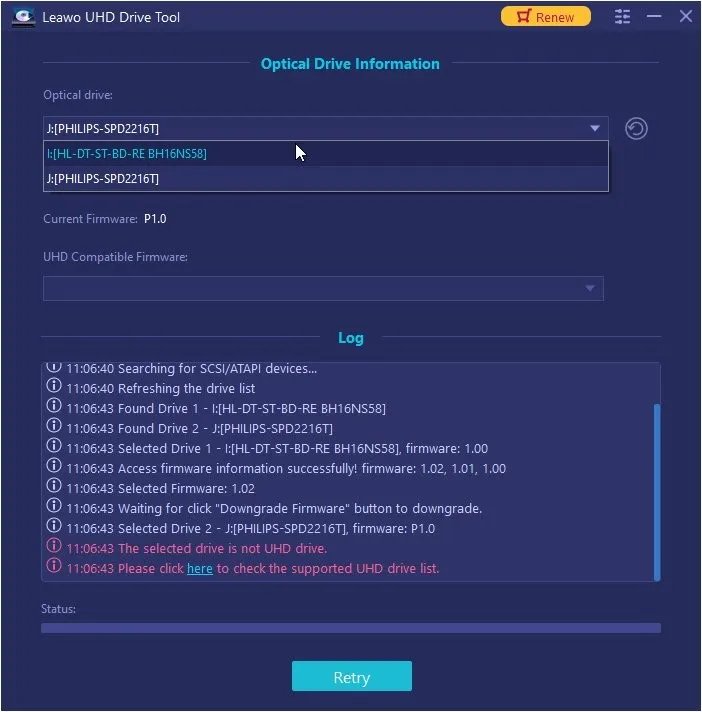
Choosing the drive: an LG BH16NS58 (firmware 1.00) and a Philips drive in the list. The log reports compatible firmware 1.02, 1.01 and 1.00 for the LG and flags the Philips as "not UHD drive" (Windows build).
Features
Tells you straight away whether your drive qualifies
Leawo UHD Drive Tool for Mac scans for connected optical drives and shows each one's interface, current firmware, whether it's UHD compatible ("Friendly" or "Official") and the firmware versions it can switch to. A drive that isn't supported gets a red "The selected drive is not UHD drive" line in the log. That check works in the free trial, so you know before buying.
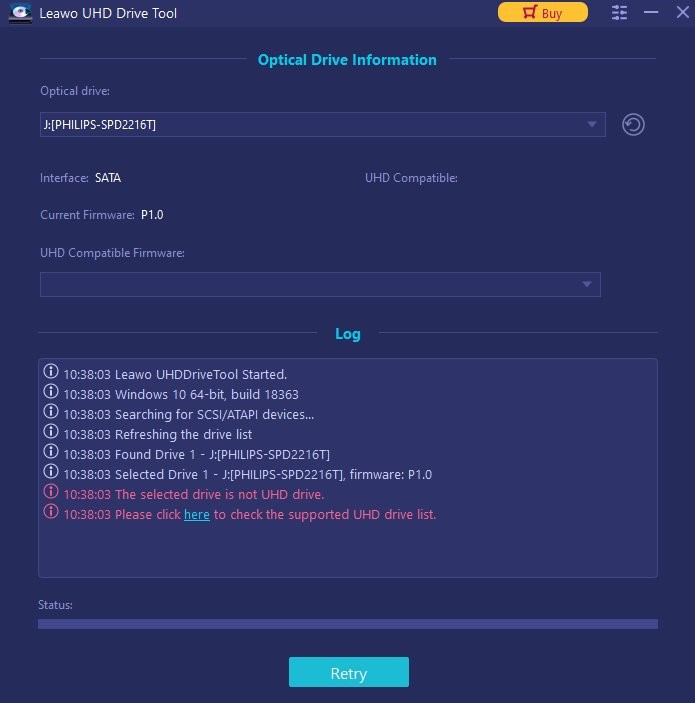
An unsupported drive: a Philips SATA drive (firmware P1.0) gets "The selected drive is not UHD drive" and a link to the supported list, with a Buy button at the top (Windows build, unregistered).
Fetches the right firmware for you
Leawo UHD Drive Tool for Mac downloads the compatible firmware for your exact model, validates it and flashes it, so you don't go hunting through forums for a file that may be for the wrong drive revision. You pick the target version from the UHD Compatible Firmware menu and click Downgrade Firmware.
Covers USB drives and drives in enclosures
Leawo UHD Drive Tool works with internal SATA drives, external drives and USB drives, as long as the model is on Leawo's list. For a Mac that means either a ready-made USB model (LG BP50NB40, BP60NB10, ASUS BW-16D1H-U, Buffalo BRUHD-PU3-BK, Archgon MD-8107S-U3-UHD) or a listed internal drive, such as an LG WH16NS40, in a USB 3 enclosure.
Benefits
- Use the drive you already bought. A listed USB drive that refuses 4K discs becomes usable without buying another.
- No Windows PC needed. Many firmware guides assume Windows. This lets a Mac-only household do the job on the Mac.
- A clear yes or no before paying. The trial's detection step shows whether your drive is supported.
Real-World Uses
- A new USB 4K drive that won't play ball. You bought an LG BP60NB10 for your MacBook and UHD Ripper won't open your discs. Downgrade, reconnect, rip.
- A DIY drive for a Mac mini. Put a listed LG internal drive in a USB 3 enclosure and flash it from the Mac.
- Undoing a firmware update. A drive that used to read 4K discs stopped after an update. Roll it back.
Who It's For, and Who Should Skip It
It's a good fit if you own a listed drive, use a Mac, and plan to rip or back up your own 4K discs with Leawo's UHD tools.
Skip it if:
- Your drive already reads 4K discs in your software. Leawo says there's no need to flash it.
- You're about to buy a drive. Leawo itself says "Friendly drives are highly recommended, especially to those who plan to purchase new drives," and a drive that works as shipped saves you this cost.
- Your drive isn't on the list. The tool won't flash it.
- You only have DVDs and regular Blu-rays. Firmware only matters for 4K UHD discs.
Usage Guide
- Install. Download macuhddrivetool_setup.dmg from Leawo's Mac download page, open it and copy the app to Applications. On an Apple silicon Mac, let macOS install Rosetta if it asks.
- Connect the drive. Plug the USB drive (or enclosure) straight into the Mac, and connect the MacBook to power.
- Select it. Open Leawo UHD Drive Tool and pick the drive from the Optical drive list. Check that it shows as UHD compatible and lists firmware versions.
- Register. Buy a license and activate it from the Register tab; the trial stops here.
- Downgrade. Choose a version in UHD Compatible Firmware, click Downgrade Firmware, read the warning and click Continue. Don't unplug the drive, close the app or let the Mac sleep until it finishes.
- Restart. When it reports success, restart the Mac, reconnect the drive and open your 4K disc in UHD Ripper or UHD Copy.
Where it falls short
- Expensive for a one-off job. $99.95 a year costs more than a year of UHD Ripper or UHD Copy, for a tool most people run once per drive.
- Risk you carry. Leawo's drive page warns that firmware changes can damage a drive or void its warranty, and it doesn't describe a recovery if a flash is interrupted.
- Rosetta only on Apple silicon. There's no native build, and only M1 and M2 are named.
- Nothing Mac-specific in the documentation. Every guide and screenshot shows Windows, and the testimonials on the UHD Drive Tool page are about Leawo's Cinavia removal tool, not this one.
What Users Say
Independent reviews of UHD Drive Tool don't exist that we could find, on Mac or Windows. Leawo's own review page has two short customer reviews, both from 2021, and both describe the setup Mac owners use: a drive connected over USB.
Leawo's review page for UHD Drive Tool (2 reviews, both 5 stars)
Leawo moderates reviews on its site. The two posted so far:
"I tried many free flashing tools to enable my LG WH16NS40 in a Vantec NexStart DX USB 3 external enclosure to play 4K movies. None of them worked. I downloaded the trial version of Leawo UHD Drive Tool. In less than 2 minutes this tool identified the LG drive, the USB connection, the firmware version and indicated it was ready to flash the downgraded firmware. I bought a licence and after activating the software and completing the installation I was able to play a 4K film on my computer." Christ, May 2021
"It's amazing!!! My drive is bp60nb10, windows 10 can't read UHD discs, after flash firmware, it does!" Eric, April 2021
Trustpilot (Leawo as a company: 4.4 TrustScore from 151 reviews for leawo.org, 4.3 from 158 for leawo.com)
No Trustpilot review names UHD Drive Tool. The company's reviews are mostly about its disc software and quick support replies, with the critical ones about refunds and software that didn't work for the buyer.
The pattern
The little feedback there is says it does what it promises on listed drives, USB ones included, and both reviewers were Windows users. Nobody has written about flashing a drive from a Mac, so lean on the trial's detection step and the 14-day guarantee on the lifetime license.
Comparisons
Mac version vs Windows version
Same drive list, same prices, separate licenses. The Mac build is a 90 MB disk image that asks for 512 MB of RAM and 2 GB of disk, and needs Rosetta on Apple silicon. The Windows build lists 2 GB of RAM, 10 GB of disk and a Core 2 Quad, and is the one shown in all of Leawo's guides.
Downgrading vs buying a friendly drive
If you already own a listed drive, the $109.95 lifetime license is the cheaper route. If you don't, a drive that reads 4K discs as shipped avoids both the cost and the flashing risk, which is what Leawo itself recommends.
Editions and Pricing
| License (Mac) |
Price |
Term |
Money-back |
| UHD Drive Tool, 1 year |
$99.95 |
1 Mac, renews automatically |
5 days |
| UHD Drive Tool, lifetime |
$109.95 |
1 Mac, one-time payment |
14 days |
| UHD Ripper + UHD Copy + UHD Drive Tool for Mac |
$154.91 (list $309.85) |
1 Mac, lifetime |
14 days |
The lifetime license costs only $10 more than one year, and you'll rarely need the tool twice, so it's the obvious pick. If you also want to rip or copy 4K discs, the three-tool bundle costs little more than the drive tool alone.
FAQs
Can Leawo UHD Drive Tool for Mac flash a drive connected by USB?
Yes. Leawo UHD Drive Tool supports external and USB drives on its list, and one of Leawo's customer reviews describes flashing an LG WH16NS40 in a USB 3 enclosure. A Mac has no internal drive bay, so USB is the only way on a Mac anyway.
Does Leawo UHD Drive Tool run on an M3 or M4 Mac?
Leawo UHD Drive Tool for Mac lists Intel Macs and Apple M1/M2 with Rosetta required. M3 and M4 aren't named, so run the free trial and confirm it detects your drive before buying.
After the downgrade, can I watch 4K Blu-rays in Apple's apps?
No. macOS has no 4K Blu-ray playback of its own. A downgraded drive lets third-party software read the disc, such as Leawo's free Blu-ray Player, UHD Ripper (to make files the Apple TV app can play) or UHD Copy.
Will a downgraded drive stay that way?
Leawo UHD Drive Tool's change lasts until the firmware is updated again. Leawo notes that listed LG and ASUS drives stop loading 4K discs in its software once their firmware is upgraded to the latest version, so don't install drive firmware updates afterwards.
Can I use my Windows license of UHD Drive Tool on a Mac?
No. Leawo sells UHD Drive Tool for Mac as a separate product at the same prices. If you also have a Windows PC, a drive flashed there works the same when you plug it into the Mac afterwards, since the firmware lives on the drive.
System Requirements
- macOS: 10.10 Yosemite through 15 Sequoia, 26 Tahoe and 27 Golden Gate
- Processor: 1 GHz or faster Intel, or Apple M1/M2 with Rosetta
- Memory: 512 MB RAM (1 GB or more recommended)
- Disk: 2 GB or more free
- Other: an internet connection and a drive from Leawo's supported list
Conclusion
Leawo UHD Drive Tool for Mac is worth the $109.95 lifetime price in one situation: you own a listed USB drive (or a listed drive in an enclosure), it won't read 4K discs, and you want to fix it from a Mac without hunting for firmware files. It turns that job into a few guided clicks.
For anyone else it's an expensive extra. It runs only through Rosetta on Apple silicon, its documentation is all Windows, and if you're shopping for a drive, buying one that already works is cheaper and safer. Run the free trial to confirm detection, then buy the lifetime license rather than the yearly one.
Download Free TrialBuy Now