Leawo YouTube Downloader: The Ultimate Guide to High-Quality Video Archiving and Management
In the rapidly evolving digital landscape, video content has become the primary medium for information, entertainment, and education. From in-depth tutorials and documentary films to viral social media clips and music videos, the sheer volume of visual data available online is staggering. However, the convenience of streaming comes with significant limitations: reliance on stable internet connections, the risk of content removal due to copyright strikes or platform policy changes, and the inability to access media offline during travel or in areas with poor connectivity. This is where Leawo YouTube Downloader emerges as an indispensable tool for modern digital users.
Leawo YouTube Downloader is not merely a simple utility for saving video files; it is a comprehensive multimedia solution designed to bridge the gap between online streaming platforms and local media libraries. By offering robust downloading capabilities, format conversion features, and high-fidelity audio extraction, this software empowers users to take full ownership of their digital media consumption. Whether you are a professional video editor looking for source material, a student archiving educational lectures, or a casual viewer wanting to build a personal collection of favorite moments, Leawo YouTube Downloader provides the reliability, speed, and quality necessary to meet your needs.
This comprehensive guide will delve deep into every aspect of Leawo YouTube Downloader Version 1.0. We will explore its core architecture, detailed feature sets, system requirements, and step-by-step usage instructions. Furthermore, we will analyze how it compares to competitors, address common user questions, and provide expert tips on maximizing its potential. By the end of this article, you will have a thorough understanding of why Leawo YouTube Downloader is considered a top-tier choice for Windows users seeking a premium video downloading experience.
Overview: Redefining Offline Video Access
The concept of "offline viewing" has transformed from a niche requirement to a mainstream necessity. While many streaming services offer limited offline modes within their proprietary apps, these options are often restrictive. They may require constant re-verification, limit the number of downloadable titles, or encrypt files in a way that prevents them from being played on other devices. Leawo YouTube Downloader solves these problems by allowing users to download content directly to their hard drives in standard, universally compatible formats.
At its core, Leawo YouTube Downloader is engineered to interact seamlessly with some of the world’s most popular video-sharing platforms. It bypasses the complexities of browser-based downloads, which are often slow, prone to interruption, and limited in quality options. Instead, it utilizes advanced multi-threading technology to establish direct connections to media servers, ensuring that downloads are not only faster but also more stable. This stability is crucial when dealing with large files, such as 4K movies or lengthy conference recordings, where a single dropped packet could corrupt an entire file in lesser applications.
The software’s interface is designed with user experience in mind. Recognizing that its user base ranges from tech-savvy professionals to casual users with minimal technical knowledge, Leawo has created an intuitive layout that minimizes the learning curve. Key functions are prominently displayed, and the workflow—from pasting a URL to saving the final file—is streamlined to require as few clicks as possible. This focus on usability does not come at the expense of power; beneath the clean surface lies a sophisticated engine capable of handling batch downloads, playlist processing, and complex format conversions.
Moreover, Leawo YouTube Downloader addresses the growing concern of digital preservation. In an era where content can disappear overnight due to server migrations, account bans, or licensing disputes, having a local copy of important videos is a form of digital insurance. For educators, this means preserving valuable lecture series. For researchers, it means securing primary source material. For fans, it means keeping access to rare performances or deleted scenes. Leawo YouTube Downloader transforms ephemeral streaming content into permanent digital assets.
Key Value Propositions
- Universal Compatibility: Supports a wide array of video hosting sites, ensuring you are not locked into a single platform.
- High-Resolution Support: Capable of downloading videos in up to 4K resolution, preserving the visual fidelity intended by the creators.
- Audio Extraction: Offers dedicated tools for converting video content into high-quality audio formats like MP3, ideal for music lovers and podcast listeners.
- Batch Processing: Saves time by allowing multiple videos or entire playlists to be downloaded simultaneously.
- Secure and Safe: Built with security protocols to ensure that the downloading process does not expose your system to malware or unwanted adware.
Detailed Feature Analysis
To truly appreciate the capabilities of Leawo YouTube Downloader, it is essential to look beyond the marketing headlines and examine the technical features that drive its performance. Each feature has been developed to address specific pain points experienced by users of free or inferior downloading tools.
1. Multi-Platform Support and Versatility
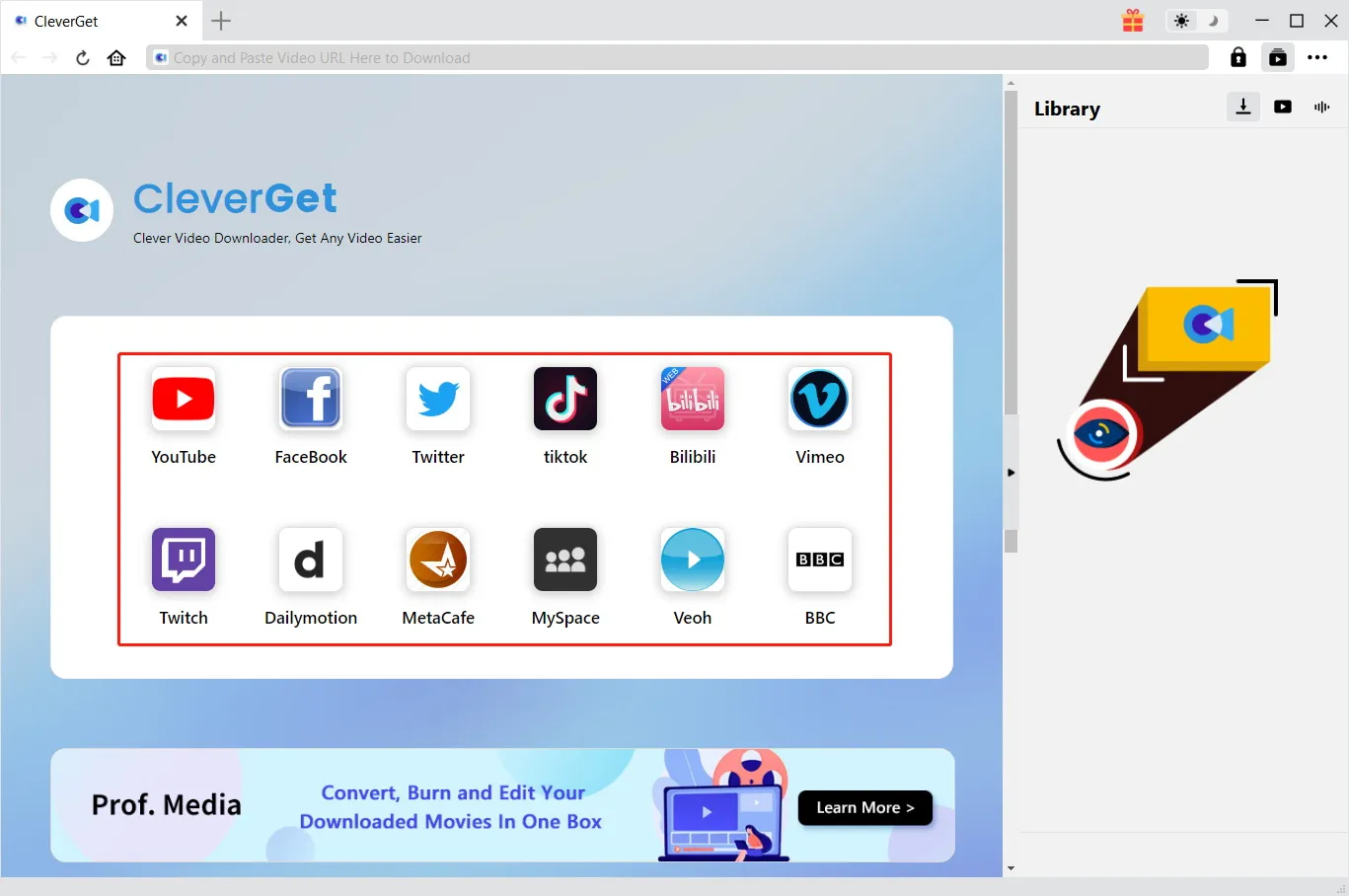
While the name suggests a focus on YouTube, Leawo YouTube Downloader is actually a multi-platform powerhouse. It supports thousands of video-sharing websites, including but not limited to Facebook, Vimeo, Dailymotion, Instagram, and Twitter. This versatility is achieved through a constantly updated database of site parsers that allow the software to recognize and extract media streams from various sources. For users who consume content across different social media ecosystems, this means having a single tool that works everywhere, rather than juggling multiple specialized downloaders for each platform.
The software’s ability to handle different types of content is equally impressive. It can download standard videos, live streams (once they have ended and are archived), 360-degree videos, and even subtitled content. For international users, the ability to download videos with embedded subtitles is a significant advantage, allowing for better comprehension and accessibility without relying on external subtitle files.
2. High-Definition and 4K Download Capabilities
One of the most critical aspects of video downloading is quality preservation. Many free tools compress videos during the download process or limit users to 720p or 480p resolutions. Leawo YouTube Downloader rejects this compromise. It supports downloads in Full HD (1080p), 2K, and even 4K Ultra HD. This is particularly important for users with high-resolution monitors or those who plan to edit the downloaded footage. By preserving the original bitrate and resolution, the software ensures that the local copy is visually indistinguishable from the streamed version.
The software intelligently detects the available resolutions for any given video and presents them to the user. This allows for informed decision-making: if storage space is a concern, a user might choose 1080p, but if archival quality is the priority, 4K is just a click away. Additionally, the software handles High Efficiency Video Coding (HEVC/H.265) streams, which are becoming increasingly common for 4K content due to their superior compression efficiency.
3. Advanced Audio Extraction and Conversion
For many users, the visual component of a video is secondary to the audio. Music enthusiasts, podcast listeners, and language learners often prefer to consume content in audio-only format to save bandwidth and storage space. Leawo YouTube Downloader includes a powerful audio extraction engine that can convert video files into popular audio formats such as MP3, M4A, WAV, and AAC.
Unlike simple container stripping, this feature allows for quality selection. Users can choose the bitrate of the output audio, ranging from standard 128kbps for casual listening to 320kbps for audiophile-grade quality. The conversion process is fast and retains metadata where available, ensuring that track titles and artist names are preserved. This feature effectively turns the software into a dedicated music downloader, eliminating the need for separate audio conversion tools.
4. Batch Downloading and Playlist Management
Efficiency is key when dealing with large volumes of content. Manually downloading videos one by one is tedious and time-consuming. Leawo YouTube Downloader addresses this with robust batch processing capabilities. Users can paste the URL of an entire playlist, and the software will automatically parse the list, identifying all individual videos within it. It then queues them up for sequential or simultaneous download.
This feature is invaluable for educators downloading course modules, fans archiving a complete series of vlogs, or researchers collecting data sets. The software manages the queue intelligently, pausing and resuming downloads as needed to maintain system performance. It also provides progress indicators for each file in the batch, so users always know how much time remains until the entire collection is secured.
5. Intelligent Format Conversion
Downloading is only half the battle; playback compatibility is the other. Different devices support different video containers and codecs. A video downloaded in MKV format might play perfectly on a PC but fail on a smart TV or mobile device. Leawo YouTube Downloader includes built-in conversion tools that allow users to select their desired output format before the download even begins. Supported formats include MP4, AVI, WMV, MOV, and FLV.
This pre-download conversion saves the extra step of running a separate converter after the file is saved. It ensures that the file is ready to use immediately upon completion. For users who are unsure which format to choose, the software offers recommended settings based on the target device, simplifying the decision process.
6. User-Friendly Interface and Workflow
Powerful software often suffers from complex interfaces, but Leawo YouTube Downloader strikes a balance between functionality and simplicity. The main window is divided into logical sections: the URL input area, the format selection panel, and the download manager. New users can start downloading within seconds by simply pasting a link and clicking "Download." Advanced users can access deeper settings for customizing output directories, naming conventions, and network throttling.
The download manager provides real-time feedback, showing download speeds, estimated time remaining, and file sizes. It also allows for the management of active tasks, enabling users to pause, resume, or cancel downloads as needed. This level of control is essential for managing bandwidth usage, especially on connections with data caps.
Pro Tip: Optimizing Download Speeds
To achieve the fastest possible download speeds with Leawo YouTube Downloader, ensure that no other bandwidth-intensive applications (such as cloud backups or large file transfers) are running in the background. Additionally, check your router settings to ensure that Quality of Service (QoS) is not throttling your PC’s connection. The software itself uses multi-threading to maximize throughput, but a clear network path is essential for peak performance.
Comprehensive Benefits for Different User Groups
Leawo YouTube Downloader is not a one-size-fits-all solution; rather, it offers distinct benefits tailored to various user profiles. Understanding how different groups can leverage this tool highlights its versatility and value.
For Content Creators and Video Editors
Video editors often need reference materials, stock footage, or inspiration from existing content. While strict copyright laws must always be respected, fair use provisions allow for the use of short clips for commentary, criticism, or education. Leawo YouTube Downloader allows creators to quickly secure high-quality source files for analysis. The ability to download in 4K ensures that even when cropped or zoomed in during editing, the footage remains sharp. Furthermore, the audio extraction feature is useful for isolating soundtracks or dialogue for study purposes.
For Educators and Students
In the academic world, video lectures and educational tutorials are invaluable resources. However, relying on streaming platforms for classroom instruction is risky due to potential internet outages or server downtime. By downloading lectures beforehand, educators can ensure that their lessons proceed smoothly regardless of connectivity issues. Students can also benefit by downloading complex tutorials to watch repeatedly, pause, and annotate without worrying about buffering. The batch download feature is particularly useful for downloading entire course playlists from educational channels.
For Travelers and Commuters
For those who spend significant time on planes, trains, or in areas with limited internet access, offline entertainment is a lifeline. Leawo YouTube Downloader allows travelers to curate a personal library of movies, documentaries, and shows before they leave home. This eliminates the need for expensive in-flight Wi-Fi or the frustration of spotty mobile data. By converting videos to smaller, mobile-friendly formats like MP4, users can maximize the storage capacity of their tablets and smartphones.
For Archivists and Digital Historians
The internet is ephemeral. Videos are deleted, accounts are banned, and platforms shut down. Digital archivists play a crucial role in preserving cultural and historical content. Leawo YouTube Downloader provides the tools necessary to create high-fidelity local copies of important digital artifacts. The ability to preserve subtitles and metadata ensures that the context of the content is not lost. For historians and researchers, this tool is essential for building reliable databases of primary source material.
For Music Enthusiasts
While streaming services dominate the music industry, many users prefer owning their music libraries. Leawo YouTube Downloader’s audio extraction feature allows users to build extensive MP3 collections from live performances, rare remixes, and independent artist uploads that may not be available on major streaming platforms. The high-bitrate options ensure that the audio quality meets the standards of discerning listeners.
Step-by-Step Usage Guide
Getting started with Leawo YouTube Downloader is straightforward. This guide will walk you through the process from installation to your first successful download, ensuring you make the most of the software’s capabilities.
Step 1: Installation and Setup
Begin by acquiring the software. Click on the "Download Free Trial Now!" button at the top of this page. Once the installer file is downloaded, run it and follow the on-screen prompts to install Leawo YouTube Downloader on your Windows system. The installation process is quick and typically completes within a few minutes. Upon launching the application for the first time, you may be prompted to configure basic preferences, such as the default download folder. It is recommended to choose a location with ample free disk space, especially if you plan to download high-resolution videos.
Step 2: Copying the Video URL
Navigate to your preferred web browser and visit the video hosting site containing the content you wish to download. Locate the specific video, playlist, or channel. Copy the URL from the address bar. Ensure that you copy the complete link, including any parameters that identify the specific video ID. For playlists, make sure you are on the main playlist page to enable batch downloading.
Step 3: Pasting and Analyzing
Open Leawo YouTube Downloader. You will see a prominent input field labeled "Paste URL here." Paste the copied link into this field. The software will automatically analyze the link. This process usually takes only a few seconds. During this phase, the software identifies the source platform, checks the availability of the video, and retrieves metadata such as the title, duration, and thumbnail.
Step 4: Selecting Format and Quality
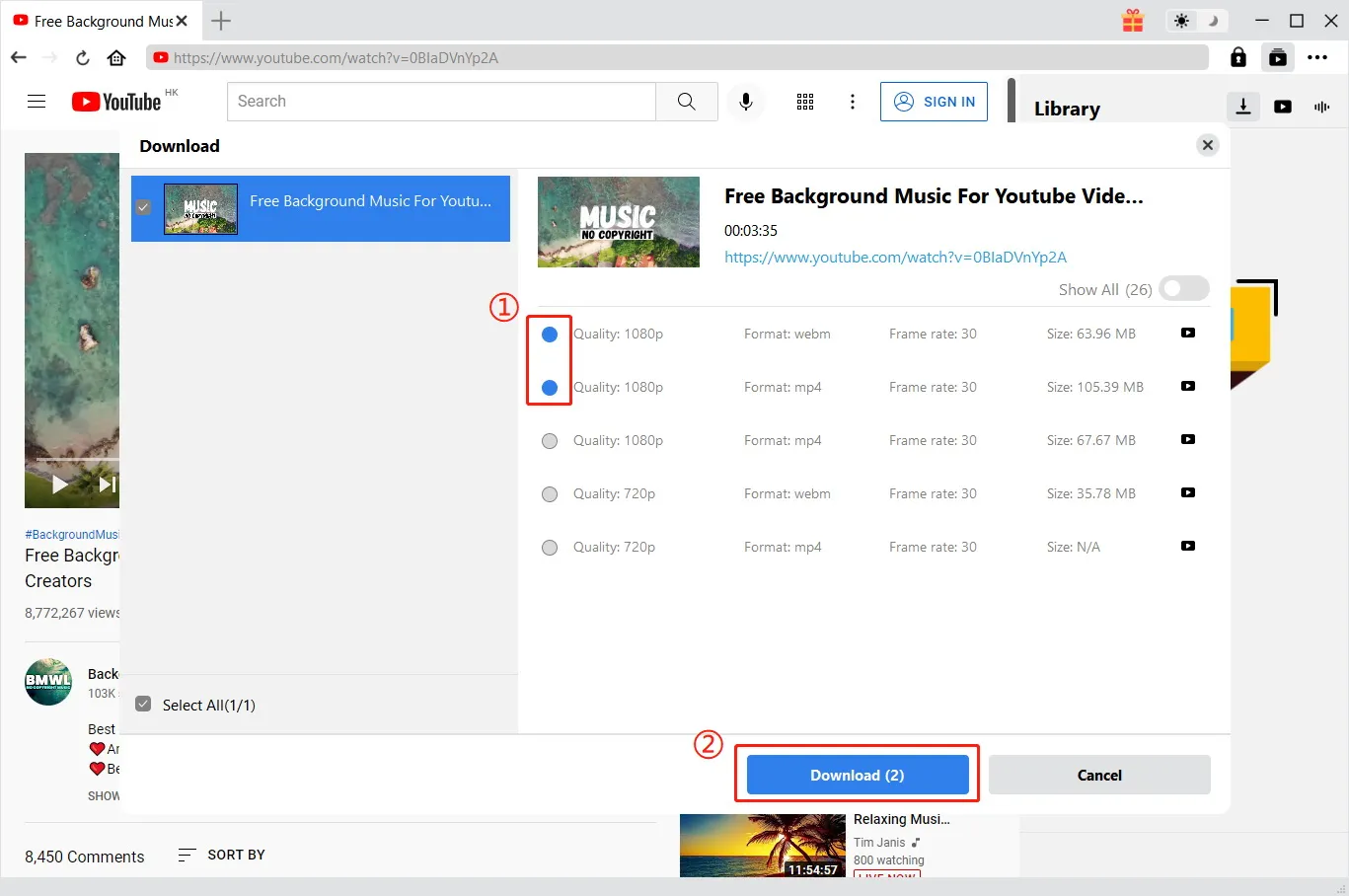
Once the analysis is complete, a dialog box or panel will appear displaying the available download options. Here, you can choose the output format (e.g., MP4, AVI, MP3). If you selected a video format, you will also see a list of available resolutions (e.g., 360p, 720p, 1080p, 4K). Select the quality that best suits your needs. For general viewing, 1080p is often the sweet spot between quality and file size. For archival purposes, choose the highest available resolution. If you only want the audio, select MP3 and choose your desired bitrate.
Step 5: Initiating the Download
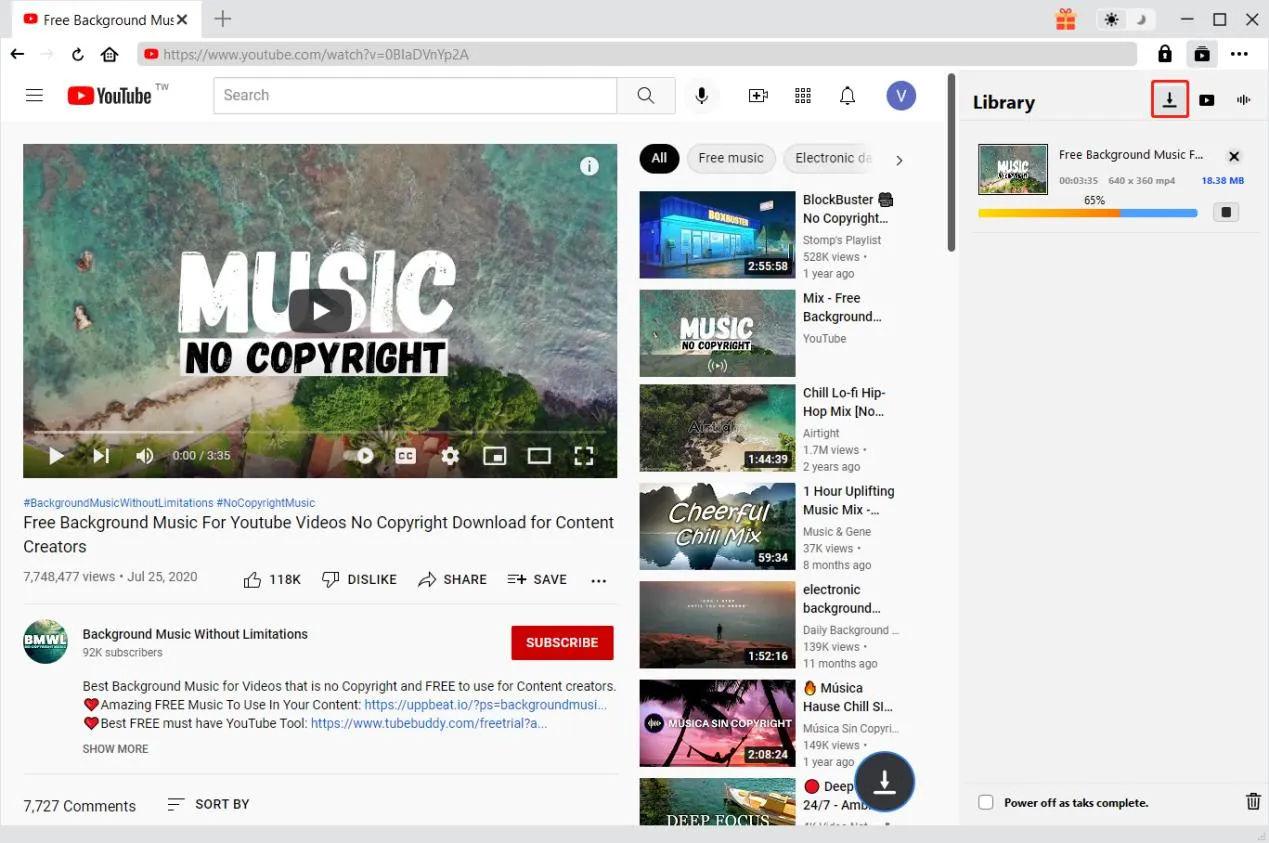
After configuring your preferences, click the "Download" button. The software will add the task to the download queue. You can monitor the progress in the main interface, which displays a progress bar, download speed, and estimated time remaining. If you are downloading a playlist, you will see multiple items in the queue. You can prioritize specific files by moving them up in the list or pause non-urgent downloads to conserve bandwidth.
Step 6: Accessing Your Files
Once the download is complete, a notification will appear. You can access your files by clicking the "Open Folder" icon next to the completed task in the download manager. The files will be named according to the video title by default, making them easy to identify. You can now play them using any media player, transfer them to other devices, or import them into editing software.
Troubleshooting Common Issues
Slow Downloads: Check your internet connection and ensure no other devices are consuming heavy bandwidth. Try pausing and resuming the download.
Failed Downloads: Ensure the video is still available on the source website. Some videos may be region-locked or private. Verify that your firewall or antivirus is not blocking the software.
Audio/Video Sync Issues: This is rare but can occur with certain codecs. Try downloading in a different format (e.g., switch from MKV to MP4) to resolve compatibility issues with your media player.
System Requirements and Technical Specifications
To ensure optimal performance of Leawo YouTube Downloader, your computer should meet the following minimum system requirements. While the software is optimized for efficiency, meeting or exceeding these specifications will guarantee smooth operation, especially when handling 4K downloads or batch processing.
- Operating System: Windows (Compatible with Windows 10, Windows 8, Windows 7, and later versions). The software is specifically designed for the Windows environment, leveraging its native APIs for efficient file handling and network management.
- Processor: 1 GHz or faster processor. A multi-core processor is recommended for faster conversion and decoding tasks.
- Memory (RAM): 4 GB RAM. This ensures that the software can manage multiple threads and buffer data efficiently without slowing down your system.
- Hard Disk Space: 500 MB free disk space for installation. However, you will need significant additional space for storing downloaded videos. It is recommended to have at least several gigabytes of free space on the drive where you intend to save your media library.
- Internet Connection: A stable broadband internet connection is required for downloading content. Higher speeds will result in faster download times, particularly for high-resolution files.
- Graphics: Standard graphics card capable of displaying the user interface. Hardware acceleration is not strictly required for downloading but may enhance preview capabilities if available.
It is important to note that while the software itself is lightweight, the size of the files you download will depend on the resolution and length of the videos. A single hour-long 4K video can occupy several gigabytes of space. Therefore, planning your storage strategy is an essential part of using Leawo YouTube Downloader effectively.
Comparative Analysis: Leawo vs. Competitors
The market for video downloaders is crowded, with numerous free and paid options available. How does Leawo YouTube Downloader stack up against the competition? Let’s compare it with typical alternatives to highlight its advantages.
Leawo YouTube Downloader vs. Free Online Converters
Free Online Converters: These web-based tools are convenient for occasional use but suffer from significant drawbacks. They are often laden with intrusive ads, pop-ups, and potential malware risks. File size limits are common, and download speeds are throttled. Privacy is a major concern, as you must upload or process data through third-party servers.
Leawo YouTube Downloader: As a desktop application, Leawo offers a secure, ad-free environment. There are no file size limits, and speeds are determined solely by your internet connection. Privacy is enhanced because the processing happens locally on your machine. The reliability and consistency of Leawo far exceed the hit-or-miss nature of online converters.
Leawo YouTube Downloader vs. Browser Extensions
Browser Extensions: Many users turn to browser add-ons for downloading. While integrated into the browsing experience, these extensions are often unstable. They frequently break when the host website updates its code. They also lack advanced features like batch downloading, format conversion, and audio extraction. Security risks are also higher, as malicious extensions can track browsing history.
Leawo YouTube Downloader: Leawo operates independently of the browser, making it more robust against website changes. Its dedicated engine is regularly updated to maintain compatibility. The feature set is far more comprehensive, offering professional-grade tools that extensions simply cannot match due to browser sandboxing limitations.
Leawo YouTube Downloader vs. Other Premium Software
Other Premium Tools: Competitors like 4K Video Downloader or YTD Video Downloader offer similar functionalities. However, Leawo distinguishes itself through its superior user interface and broader format support. Leawo’s integration of audio extraction and conversion tools into a single seamless workflow reduces the need for additional software. Additionally, Leawo’s customer support and regular update cycle ensure that users receive timely assistance and compatibility fixes.
User Testimonials and Reviews
Don't just take our word for it. Here is what actual users have to say about their experience with Leawo YouTube Downloader. These reviews highlight the real-world benefits and reliability of the software.
"A Lifesaver for My Research"
"I am a PhD student focusing on media studies, and I need to archive hundreds of video essays and documentaries for analysis. Leawo YouTube Downloader has been a lifesaver. The batch download feature saves me hours of work, and the ability to download in 1080p ensures that I can analyze visual details clearly. Highly recommended for academics."
- Sarah J., Researcher
"Simple and Effective"
"I tried several free downloaders before, but they were either too slow or filled with viruses. Leawo is clean, fast, and incredibly easy to use. I just paste the link, choose MP4, and it’s done. The audio extraction feature is also great for saving my favorite songs from live concerts."
- Mark T., Music Enthusiast
"Perfect for Travel"
"I travel frequently for work and often find myself on long flights with no entertainment. I use Leawo to download movies and series before I leave. The 4K download quality is amazing, and the files play perfectly on my tablet. It’s worth every penny for the peace of mind it brings."
- Emily R., Business Consultant
"Great Customer Support"
"I had a small issue with downloading a specific playlist format. I contacted support, and they responded within hours with a solution. It’s rare to find such attentive service these days. The software itself is robust, but knowing that help is available makes it even better."
- David L., IT Professional
"Best Audio Extractor"
"I primarily use this for extracting audio from yoga and meditation videos. The MP3 conversion is high quality, and I love that I can choose the bitrate. It’s much better than using online converters that compress the audio badly. Leawo keeps the sound crisp and clear."
- Linda K., Yoga Instructor
"Reliable and Fast"
"I’ve been using Leawo for over a year now. It consistently updates to keep up with changes on video sites. I haven’t had a failed download in months. The speed is impressive, especially compared to other tools I’ve used. It’s a staple in my software toolkit."
- James B., Video Editor
"User-Friendly Interface"
"I’m not very tech-savvy, but I found Leawo very easy to navigate. The buttons are clear, and the process is straightforward. I was able to download my first video within minutes of installing it. Great product for beginners."
- Patricia M., Retired Teacher
"Excellent for Archiving"
"As a digital librarian, I need tools that preserve metadata and quality. Leawo does both. It respects the original file structure and allows for high-fidelity downloads. It’s an essential tool for our digital preservation project."
- Robert H., Librarian
"Worth the Investment"
"I hesitated to pay for a downloader when free ones exist, but after dealing with broken links and malware scares, I switched to Leawo. The stability and safety alone are worth the price. Plus, the time I save with batch downloading is invaluable."
- Michael S., Student
"Versatile Tool"
"I use it for everything from downloading tutorial videos for my coding classes to saving music videos. The format conversion options are extensive, and I never have to worry about compatibility. It’s a versatile tool that handles all my media needs."
- Jessica W., Developer
Frequently Asked Questions (FAQs)
To further assist you in making an informed decision, we have compiled a list of the most frequently asked questions about Leawo YouTube Downloader.
Is Leawo YouTube Downloader legal to use?
The legality of downloading videos depends on your jurisdiction and the specific content being downloaded. Generally, downloading content for personal, offline use is considered fair use in many countries, provided you do not distribute or sell the copyrighted material. However, it is important to respect the terms of service of the video hosting platforms and copyright laws. Leawo YouTube Downloader is a tool, and users are responsible for ensuring their usage complies with applicable laws.
Can I download videos from protected or private channels?
No, Leawo YouTube Downloader cannot bypass authentication or privacy settings. It can only download videos that are publicly accessible. If a video requires a login or is set to private, the software will not be able to access it. This is a security feature to protect user privacy and adhere to platform policies.
Does the software support macOS or Linux?
Currently, Leawo YouTube Downloader is designed specifically for Windows operating systems. Users on macOS or Linux may need to use alternative solutions or run Windows via virtualization software to use this specific version. However, Leawo offers other products that may be compatible with different systems, so it is worth checking their official website for updates.
What happens if my internet connection drops during a download?
Leawo YouTube Downloader supports resume functionality. If your internet connection is interrupted, the download will pause. Once the connection is restored, you can resume the download from where it left off, rather than starting from the beginning. This saves time and bandwidth, especially for large files.
Can I edit the videos after downloading?
Yes, the downloaded files are standard video files (e.g., MP4, AVI) that can be imported into any video editing software. Since Leawo preserves the original quality, you can edit, cut, or merge the videos without significant loss of fidelity. This makes it an excellent source for content creation projects.
Is there a limit to the number of videos I can download?
There is no limit to the number of videos you can download with the licensed version of Leawo YouTube Downloader. You can download as many videos as your storage space and internet connection allow. The trial version may have certain limitations, so upgrading to the full version is recommended for heavy users.
How often is the software updated?
Leawo regularly updates its software to ensure compatibility with changes in video hosting platforms and to introduce new features. Updates are typically released whenever major changes occur on supported sites to minimize downtime for users. You can check for updates within the application or on the official website.
Can I download subtitles along with the video?
Yes, Leawo YouTube Downloader supports the downloading of subtitles. If subtitles are available for the video, you can choose to embed them in the video file or save them as a separate file. This is particularly useful for foreign language content or for accessibility purposes.
Conclusion: Secure Your Digital Media Library Today
In a world where digital content is increasingly transient, Leawo YouTube Downloader offers a sense of permanence and control. It empowers users to curate their own media libraries, free from the constraints of streaming algorithms, internet connectivity, and platform volatility. With its robust feature set, high-quality output, and user-friendly design, it stands out as a premier choice for Windows users.
Whether you are looking to preserve educational resources, enjoy entertainment offline, or gather materials for creative projects, Leawo YouTube Downloader provides the tools you need to succeed. Its ability to handle high-resolution video, extract high-quality audio, and process batches efficiently makes it a versatile addition to any software suite.
Don’t let your favorite content slip away. Take control of your digital experience with Leawo YouTube Downloader. Experience the freedom of offline access, the clarity of 4K resolution, and the convenience of a single, powerful tool for all your downloading needs.
Ready to transform how you interact with online video? Click the button below to get started with Leawo YouTube Downloader today.
Invest in a tool that respects your time, your storage, and your viewing preferences. With Leawo YouTube Downloader, the internet’s vast video library becomes yours to keep.
Additional Technical Insights and Best Practices
To further enhance your experience with Leawo YouTube Downloader, consider these additional technical insights and best practices that go beyond the basic usage guide.
Understanding Codecs and Containers
When downloading videos, it is helpful to understand the difference between codecs and containers. A container (like MP4 or MKV) is the file format that holds the video and audio streams. A codec (like H.264 or HEVC) is the method used to compress and decompress the data. Leawo YouTube Downloader allows you to choose containers, but the codec is often determined by the source video. For maximum compatibility, MP4 with H.264 is the safest choice. For higher efficiency and smaller file sizes at 4K resolution, HEVC is superior, but ensure your playback device supports it.
Managing Storage Efficiently
High-quality video files can consume storage rapidly. To manage this, consider organizing your downloads into folders by category (e.g., Music, Education, Entertainment). Regularly audit your library to delete files you no longer need. Leawo YouTube Downloader allows you to customize the output directory for each download, making organization easier. Additionally, consider using external hard drives for archival storage of rarely accessed but valuable content.
Network Security and Privacy
While Leawo YouTube Downloader is secure, it is always good practice to maintain a secure network environment. Use a firewall to monitor outgoing connections, and keep your operating system updated. Avoid downloading content from suspicious or untrusted sources, as the video file itself could potentially be malformed or malicious, although this is rare with reputable platforms. Always scan downloaded files with antivirus software if you have any doubts.
Leveraging Metadata for Organization
Leawo YouTube Downloader preserves metadata such as title, artist, and album art for audio files. For video files, it retains the title and description. This metadata can be leveraged by media server software like Plex or Kodi to create rich, organized libraries with automatic categorization and artwork. Ensuring that your downloads are properly named and tagged enhances the overall viewing experience when using these media center applications.
Final Thoughts on Digital Ownership
The shift towards streaming has conditioned users to accept a rental model for media, where access is temporary and conditional. Leawo YouTube Downloader challenges this paradigm by restoring the concept of digital ownership. By downloading content, you assert your right to access it on your terms, at your convenience, and on your devices. This is not just about convenience; it is about autonomy in the digital age.
As internet regulations tighten and content libraries shrink due to licensing disputes, having a local backup of cherished content becomes increasingly prudent. Leawo YouTube Downloader is more than a utility; it is a tool for digital independence. It empowers you to build a personal archive that reflects your interests, needs, and values, unaffected by the whims of corporate platforms.
We encourage you to explore the full potential of Leawo YouTube Downloader. Experiment with different formats, try batch downloading your favorite playlists, and discover the joy of having your media library at your fingertips, anytime, anywhere. With its proven track record, continuous updates, and dedicated support, Leawo YouTube Downloader is poised to remain a leader in the video downloading space for years to come.