MacX DVD Ripper Pro for Windows: Rip and Back Up DVDs on a PC for a One-Time $59.95
MacX DVD Ripper Pro for Windows is Digiarty's Windows DVD ripper: it turns DVD discs, ISO images and DVD folders into MP4, AVI, WMV or MOV files, or copies them 1:1 to an ISO image or a single MPEG2 file. A lifetime license for one PC costs $59.95 at checkout, and it suits anyone with a shelf of DVDs who wants them on a laptop, phone, TV or USB drive.
Despite the "MacX" in the name, this is a Windows program, sold by Digiarty's MacXDVD brand next to its Mac ripper. You load a disc, pick a profile such as "iPhone" or "MP4", choose a folder and press RUN. Digiarty says a two-hour movie takes about five minutes with GPU acceleration on.
Quick facts
- Developer: Digiarty Software, Inc. (MacXDVD brand), in business since 2006
- Version: 8.11.3, released November 13, 2025
- Platform: Windows 11, 10, 8.1, 8 and 7. The Mac product is a separate program
- Input: DVD discs (including CSS-protected and region-coded discs), ISO images and DVD folders
- Output: MP4, AVI, WMV, MOV, MPEG, MTS, M2TS, TS, 370+ device profiles, MP3/AAC/AC3 audio, ISO image, DVD folder and MPEG2 backups
- Acceleration: Intel Quick Sync Video and NVIDIA CUDA
- Price: $59.95 lifetime for one PC, $49.95 for a 1-year license on 3 PCs, $107.95 for a lifetime Family License
- Trial: rips only the first five minutes of a DVD, and Trim is locked
- Guarantee: 30 days, for software that fails and support can't fix
- What we checked: the installer we downloaded from macxdvd.com is 31.4 MB and reports file version 8.11.3, and the order page showed $59.95 for the lifetime license with no renewal, $49.95 for the 1-year license and $107.95 for the Family License on November 25, 2026. We didn't rip a disc with it, so speed and disc support are Digiarty's claims, not our results.
Before you buy
Check the law where you live. MacX DVD Ripper Pro for Windows removes DVD copy protection, and the order page says DVD rippers are for personal use only. Getting around copy protection isn't legal everywhere, even for discs you own, and that includes the United States.
The refund depends on a fault. Digiarty refunds within 30 days only when the program doesn't work and support can't fix it in reasonable time. "I changed my mind" and "I don't want it" are refused. Run the five-minute trial on your most difficult disc before you pay.
One license, one PC. The lifetime license activates on one computer. If you need it on several family PCs, the 1-year or Family License is the better fit.
Download Free TrialBuy Lifetime LicenseBuy 1-Year LicenseBuy Family License
Overview
The main window lists every title on the disc with its length, aspect ratio, audio track and subtitle setting. The longest title is ticked for you, a preview plays on the right, and the hardware encoder, quality and CPU options sit under the preview above a large RUN button. It's a plain, older-looking interface, but everything you need for a normal rip is on one screen.
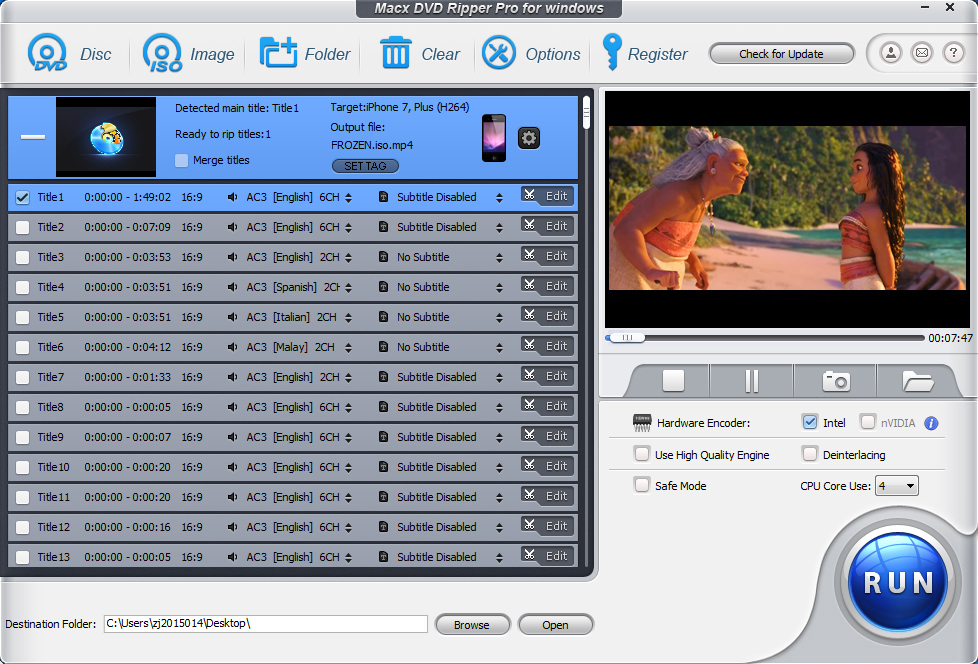
The main window: the detected main title ticked in the title list, an iPhone profile chosen, the Intel hardware encoder on, and the RUN button.
Features
MacX DVD Ripper Pro for Windows converts DVDs to everyday formats
MacX DVD Ripper Pro for Windows rips to MP4, AVI, WMV, MOV, MPEG and transport-stream formats, and has more than 370 ready-made profiles for iPhone, iPad, Apple TV, Android phones and tablets, Xbox, PlayStation and Surface. Pick a device and it chooses the codec, resolution and bit rate for you. It can also pull the soundtrack out as MP3, AAC or AC3, or save a frame as a PNG image.
MacX DVD Ripper Pro for Windows reads protected and awkward discs
MacX DVD Ripper Pro for Windows handles CSS encryption, region codes 1 to 6, Sony ARccOS, RCE and UOPs, according to Digiarty. It's built for the discs that trip up simpler rippers: new studio releases with 99 decoy titles, TV series discs, workout DVDs and scratched or damaged discs. A title check picks the real main movie, and a Safe Mode slows the rip down for difficult discs.
MacX DVD Ripper Pro for Windows backs up a disc without re-encoding
MacX DVD Ripper Pro for Windows copies a DVD to an ISO image or a DVD folder, or copies the main title or the full title to a single MPEG2 file. The MPEG2 copy keeps the original video and the 5.1-channel Dolby AC3 or DTS audio, and Digiarty puts a typical main-title copy at about 3 GB. It's the option to choose if you want a backup that looks exactly like the disc, and you can convert it to a smaller format later.
MacX DVD Ripper Pro for Windows lets you set every encoding parameter
MacX DVD Ripper Pro for Windows opens a settings window for each profile, where you can change the video codec, frame rate, resolution, aspect ratio and bit rate, and the audio codec, channels, sample rate and bit rate. "Apply to All" uses the same settings for every title in the queue.
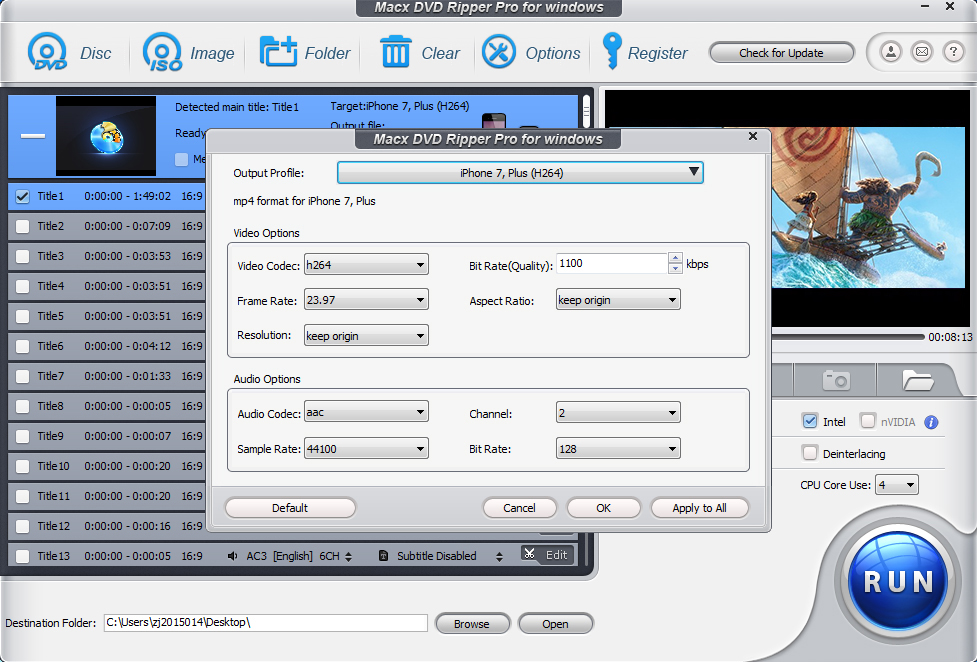
The output settings window for an iPhone H.264 profile, with video codec, frame rate, resolution, bit rate and audio options.
MacX DVD Ripper Pro for Windows trims, crops, merges and adds subtitles
MacX DVD Ripper Pro for Windows has a small editor with General, Subtitle, Crop & Expand and Trim tabs. You can cut a clip out of a scene, crop away black letterbox bars, merge several titles into one file, choose an internal subtitle track (forced subtitles included) or add an external .srt file, and raise the audio volume. It's enough for tidying a rip, not for editing a film.
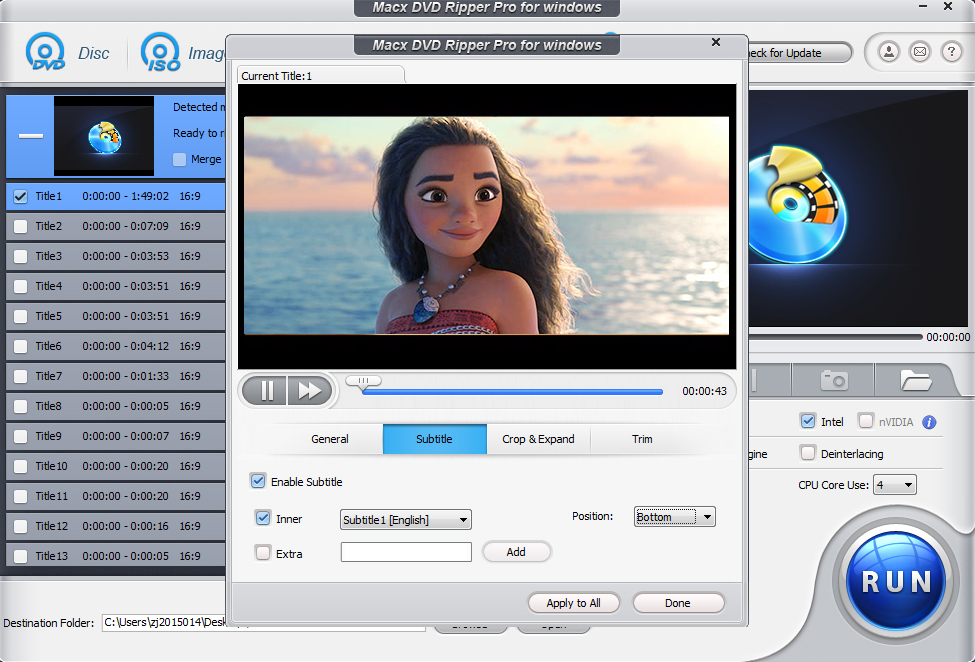
The Subtitle tab: an inner subtitle track picked, an "Extra" box for adding an external subtitle file, and the position setting.
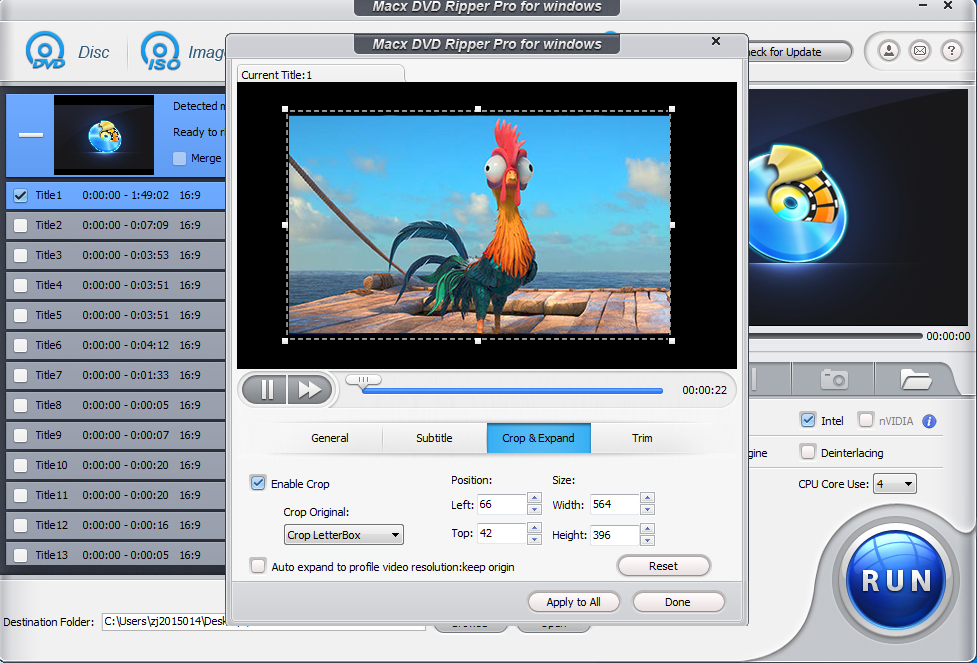
The Crop & Expand tab, with "Crop LetterBox" selected and the crop box drawn on the preview.
MacX DVD Ripper Pro for Windows uses the GPU to rip faster
MacX DVD Ripper Pro for Windows can hand encoding to Intel Quick Sync Video or an NVIDIA graphics card, and also uses multiple CPU cores and hyper-threading. Digiarty claims 300 to 400 frames per second and about five minutes for a two-hour DVD. For the best picture there's a "High Quality Engine" option and a deinterlacing filter for interlaced TV discs. Both make a rip slower.
Benefits
- Your discs outlive your DVD drive. Once a movie is an MP4 on a drive, it plays on a laptop with no disc slot, a phone on a flight, or a smart TV over USB.
- Scratched discs get a second chance. A rip made while the disc still plays protects it from the next scratch.
- Pay once. The lifetime license includes future updates with no yearly fee, which matters for a tool you may use in bursts years apart.
- No guessing about settings. Device profiles make a correct file for an iPhone or Android phone without you knowing what H.264 or a bit rate is.
Real-World Uses
- Clearing out a movie shelf: rip a few hundred family DVDs to MP4 on an external drive for a Plex or Jellyfin library, then box the discs.
- Kids' movies for the car: rip the favorite discs straight to an iPad profile so a scratched disc stops ending a road trip.
- Exact backups of rare discs: make an ISO image of an out-of-print DVD so you can burn or mount a perfect copy later.
- Workout and TV series discs: merge an exercise DVD's short chapters into one file, or rip each episode of a series as its own file.
- Old home-video DVDs: convert camcorder DVDs to MP4 with deinterlacing on, crop the black bars, and share them with relatives.
Who It's For, and Who Should Skip It
It's for Windows users with a collection of commercial DVDs who want a simple, fast ripper that copes with protected discs, and who'd rather pay once than subscribe.
Skip it if you only rip your own unprotected home-made discs (a free tool such as HandBrake does that well), if you need Blu-ray (this program only reads DVDs), or if you're on a Mac (Digiarty sells MacX DVD Ripper Pro for macOS separately). If you want to burn a copy back to a blank DVD, look for a DVD copy program instead: this one makes files and ISO images, not discs.
Usage Guide
- Install and launch. Run the installer from Digiarty's site, start MacX DVD Ripper Pro for Windows, and enter your license code if you bought one (the top bar has a Register button).
- Load the source. Click Disc for a DVD in the drive, Image for an ISO file, or Folder for a VIDEO_TS folder. The program scans the disc and ticks the main title.
- Choose the output. In the Output Profile window pick a format or device, for example MP4 Video, or DVD Backup and then Full Title Copy for a lossless MPEG2 copy. Click OK.
- Adjust if needed. Use Edit next to a title to trim, crop or add subtitles, and tick Merge titles to join several titles into one file.
- Set speed and quality. Tick the Intel or NVIDIA hardware encoder, and choose High Quality Engine, Deinterlacing or Safe Mode for difficult material.
- Pick a folder and run. Click Browse to set the destination folder, then RUN. You can watch the progress and cancel at any time.
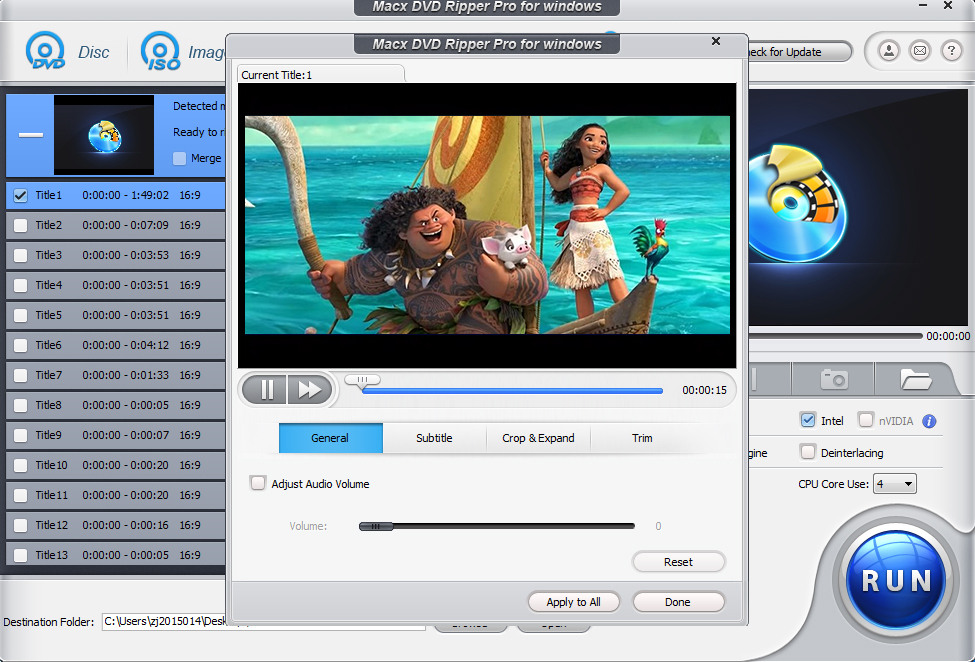
The editing window opened from a title's Edit button, on the General tab with the audio volume setting.
Where it falls short
- No disc-to-disc copy. MacX DVD Ripper Pro for Windows outputs files, ISO images and DVD folders. You need separate burning software to make a physical copy, and one customer quoted on Digiarty's own page asked for exactly that feature.
- DVD only. There's no Blu-ray support.
- It updates more slowly than its sibling. Digiarty's own WinX DVD Ripper Platinum for Windows reached version 8.22.4 in May 2026, while this program's latest version is 8.11.3 from November 2025.
- A dated interface. The window design goes back several Windows versions. It works, but it looks old next to newer rippers.
- Speed claims are the vendor's. The five-minute rip assumes a supported Intel or NVIDIA GPU. On older PCs without one, expect much longer.
What Users Say
Few independent reviews look at the Windows edition by itself, so most feedback is about Digiarty's MacXDVD products as a whole. Here's what's out there.
Trustpilot (macxdvd.com): 4.7 out of 5 from 245 reviews
Most reviews praise support and speed. Guilherme Degani (5 stars) wrote: "It's worth every penny! Great features, fast encode engine, user friendly interface!" Simon Nathan (5 stars) summed up his support case: "Had a problem. Wrote it up. Got help. Problem fixed." Gareth Smith (5 stars), about MacX DVD Ripper Pro, said "they honoured my purchase from all those years ago, service like that is not found much anymore."
Not everyone is happy. Jason Conners (1 star) wrote "what a horrible piece of software" and said "it constantly crashes, or just locks up and sits there", adding that his crash reports got no reply. Trustpilot also notes that Digiarty hasn't replied to negative reviews.
Customers quoted on Digiarty's product page
One user wrote: "I do like to feature of copy DVD, it make sense when I backup my DVD collections to my USB. To my surprise, the output video looks the same as the original one, yet the conversion only took me eight minutes. But it would be more great if it could add the ability of copying DVD to DVD." Another liked that it "can also rip straight to iPhone, iPod, Apple TV, iPad and PSP-friendly formats", which other programs needed extra software for. These are picked by the vendor, so read them as such.
The pattern: buyers like the speed, the ease of use and the support team, which answers within a business day. The complaints are about crashes on some systems and about features it doesn't have, such as burning to a new disc. That's a good reason to run the trial on your own PC and discs first.
Comparisons
MacX DVD Ripper Pro for Windows vs WinX DVD Ripper Platinum
Both are Digiarty DVD rippers for Windows with the same kind of window, the same copy-protection handling and GPU acceleration, and both sell for $59.95 for a lifetime license. WinX DVD Ripper Platinum is the line Digiarty updates more often (version 8.22.4 in May 2026). If you're choosing fresh, Platinum is the safer pick. MacX DVD Ripper Pro for Windows makes sense if you want its 1-year license for 3 PCs or its Family License.
MacX DVD Ripper Pro for Windows vs HandBrake
HandBrake is free and open source and makes excellent MP4 and MKV files, but it doesn't remove DVD copy protection on its own and has no ISO or 1:1 backup mode. For home-made discs, HandBrake is enough. For commercial discs, and for exact backups, MacX DVD Ripper Pro for Windows does the job in one program.
MacX DVD Ripper Pro for Windows vs MacX DVD Ripper Pro (Mac)
They share a name and a feature set, but they're separate programs with separate licenses. A Windows license doesn't activate the Mac version, so buy the edition for the computer you'll rip on.
Editions and Pricing
All three licenses give you the same full program. Each button orders that license.
| License | Price at checkout | Term | Computers | Buy |
|---|
| Lifetime License | $59.95 | Lifetime, free updates | 1 PC | Buy Lifetime |
| 1-Year License | $49.95 | 1 year, renews yearly until you cancel | 3 PCs | Buy 1-Year |
| Family License | $107.95 | Lifetime | Family use (seat count not shown at checkout) | Buy Family |
Schools, government bodies and nonprofits buying five or more licenses can ask Digiarty for volume pricing, and the vendor offers up to 50% off for approved non-profit organizations.
FAQs
Is MacX DVD Ripper Pro for Windows a Mac program?
No. MacX DVD Ripper Pro for Windows is a native Windows program for Windows 11, 10, 8 and 7. "MacX" is the name of Digiarty's MacXDVD brand, which also sells a separate Mac version.
Does the lifetime license include future versions?
Yes. Digiarty says the MacX DVD Ripper Pro for Windows lifetime license never expires, has no yearly fee, and includes all future updates and version upgrades.
Can I move my license to a new computer?
Yes. In MacX DVD Ripper Pro for Windows, remove the license code with the button at the top right of the window, uninstall the program from the old PC, then install it on the new one and register again. If the old PC died, Digiarty's support can release the license for you.
What happens when the 1-year license ends?
The MacX DVD Ripper Pro for Windows 1-year license renews automatically each year, and Digiarty emails you seven days before the charge. You can cancel at any time, and the program works without limits while the subscription is active.
Does the trial add a watermark?
The MacX DVD Ripper Pro for Windows trial's limit is length, not a watermark: it rips only the first five minutes of any DVD, and the Trim tool is locked until you register.
Can MacX DVD Ripper Pro for Windows rip Blu-ray discs?
No. MacX DVD Ripper Pro for Windows reads DVD discs, DVD ISO images and DVD folders only.
How long does it take to get the license code?
The MacX DVD Ripper Pro for Windows license code arrives by email from the payment processor, usually within minutes. Check your spam folder, and contact Digiarty if nothing arrives within 30 minutes.
System Requirements
- Windows 11, 10, 8.1, 8 or 7
- A DVD drive (internal or USB) for discs. ISO images and DVD folders need no drive
- Optional: an Intel CPU with Quick Sync Video or an NVIDIA graphics card for hardware-accelerated ripping
- Disk space for the output: about 3 GB for a lossless MPEG2 copy of a movie, much less for MP4
- Installer size: 31.4 MB
- Languages: English, German, French, Spanish, Japanese and Traditional Chinese
Conclusion
MacX DVD Ripper Pro for Windows is worth $59.95 if you have a pile of commercial DVDs and want them as files you can play anywhere, without a subscription. The one reason to buy it is that it handles protected and awkward discs and makes exact backups in the same simple window. The main reason to hesitate is that Digiarty's own WinX DVD Ripper Platinum costs the same and gets updated more often. Pick this one if its 1-year 3-PC or Family License suits your household, and test the trial on your toughest disc first, because refunds only cover faults.
Download Free TrialBuy Lifetime LicenseBuy 1-Year LicenseBuy Family License