MacX DVD Video Converter Pro Pack: a DVD Ripper and Video Converter for Older Intel Macs
MacX DVD Video Converter Pro Pack is a Digiarty Software bundle for the Mac that puts a DVD ripper and a video converter behind one launcher, so you can turn DVDs and video files into MP4, MOV or device-ready copies. It costs $50.95 at checkout for a one-time Personal License covering up to three Macs. The catch comes first: the latest version, 6.3.4 from December 1, 2021, supports Mac OS X 10.5 up to macOS Catalina (10.15) and no later macOS.
That makes the pack a fit for one kind of reader: someone with an Intel Mac still on Catalina or earlier, a shelf of DVDs, and a folder of MKV, AVCHD and AVI files that won't play on an iPhone. If your Mac runs Big Sur or anything newer, read the "Before you buy" note before you spend anything.
Quick facts
- Version: 6.3.4, released December 1, 2021
- Developer: Digiarty Software, Inc. (MacXDVD)
- What's inside: a DVD ripper and a video converter with a YouTube downloader, screen recorder and slideshow maker
- Runs on: Mac OS X 10.5 Leopard to macOS 10.15 Catalina. The app is an Intel build
- Price: $50.95 one-time for the Personal License (up to 3 Macs), with free upgrades. Digiarty's own store also lists a 1-Mac Single License at $45.95 (list price $109.90)
- Free trial: every function, but each conversion stops after 5 minutes of video
- Refunds: 30 days, for problems support can't fix (not for a change of mind)
- Windows version: sold separately
- What we checked: the installer on the vendor's server (macx-dvd-video-converter-pro-pack.dmg, 91.2 MB) and a checkout price of $50.95 for the Personal License, a lifetime license with no renewal, on November 4, 2026. We didn't run the app on a Mac, so the speed figures below are Digiarty's, not our measurements
Before you buy: check your macOS version
Open the Apple menu, choose About This Mac, and look at the macOS name. If it says Catalina, Mojave, High Sierra or older, the pack is supported on your machine. If it says Big Sur, Monterey, Ventura, Sonoma, Sequoia or Tahoe, it isn't: the pack hasn't had an update since December 2021, and its supported list ends at Catalina.
Apple Silicon Macs (M1 and later) are the second warning. The pack is an Intel-only app, so on an M-series Mac it can only run through Apple's Rosetta 2 translation layer, and Apple plans to drop Rosetta in a future macOS. Digiarty still sells its current apps, MacX DVD Ripper Pro and Macxvideo AI, separately, and those are the ones to look at on a newer Mac.
Run the free trial on your own discs before paying. Digiarty's 30-day refund covers bugs its support team can't fix, not "it wasn't what I expected".
Download Free Trial Buy Now
Overview
The pack opens on a small launcher window with two big buttons: DVD Ripper and Video Converter. Each one opens a full program. The ripper is Digiarty's MacX DVD Ripper Pro and the converter is MacX Video Converter Pro (the product page now calls the second one by its newer name, Macxvideo AI). You buy one license and get both.

The pack's launcher (unregistered copy), with one button for the DVD ripper and one for the video converter, plus About, Check New Version and Register.
Both programs share the same layout: a list of titles or files on the left, a preview player on the right, a hardware encoder checkbox, and a big blue RUN button. If you've used one, you can use the other.
Features
Rip homemade and copy-protected DVDs to MP4, MOV and device formats
The DVD ripper in MacX DVD Video Converter Pro Pack reads a disc, a VIDEO_TS folder or an ISO image and converts it to MP4, MOV, MKV, AVI, FLV, MP3 and presets for iPhone, iPad, Apple TV, Android phones, PlayStation and Xbox. It handles CSS encryption, region codes 1-6, Sony ARccOS and Disney's DVD protection, and its title check picks the real main movie on discs with 99 decoy titles. It's meant for discs you own, for personal backup.

The DVD ripper with a disc loaded: it reports "Main title detected: 31", lists every title with its length, audio track and subtitle setting, and targets an iPhone 7 preset.
Back up a DVD 1:1 as MPEG-2 or ISO
The pack's ripper can also skip re-encoding and copy a disc to your hard drive as a single MPEG-2 file with the original audio and video, as an ISO image with the menus and subtitles, or as MKV. That's the option to pick if you want an archive copy of a scratched or aging disc rather than a phone-sized file. It plays back in VLC or QuickTime.
Convert 4K, HD and camcorder video between formats
The video converter in MacX DVD Video Converter Pro Pack takes AVCHD (MTS/M2TS), MKV, HEVC (H.265), AV1, MOD/TOD from JVC camcorders, WMV, AVI, FLV, WebM and MXF, and writes MP4, MOV, MKV, AVI, WMV and device presets. It also exports audio only (MP3, AAC, FLAC, ALAC, WAV and iPhone ringtones) and can make a VOB file from a video, ready for a separate DVD burning app.

The video converter (titled MacX Video Converter Pro) with four MP4 files queued for an iPhone 7 preset, the Intel and Nvidia hardware encoder boxes, and a Merge switch.
Download online video, record the screen, make slideshows
MacX DVD Video Converter Pro Pack's converter has a URL button that downloads from YouTube, Facebook, Vimeo, Dailymotion and, by Digiarty's count, over 300 sites. You paste a link, press Analyze, and pick a resolution and codec from the list. A Recorder button captures the Mac's screen, and a Photo button turns JPG, PNG or BMP pictures into a slideshow video.
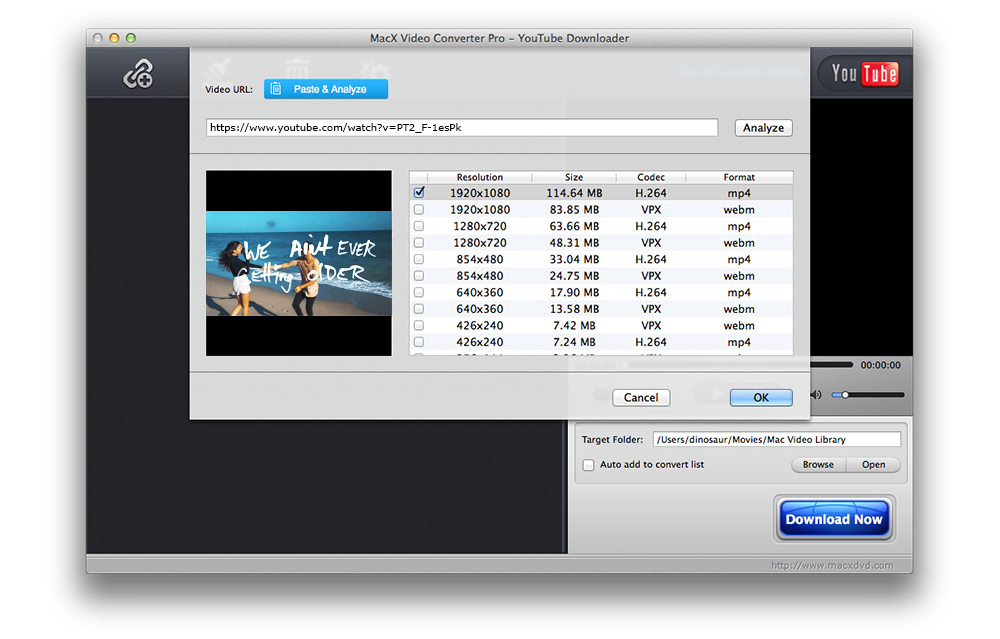
The YouTube downloader after analyzing a link: each resolution from 1920x1080 down to 426x240 is offered as H.264 MP4 or VPX WebM, with the file size.
Trim, crop, merge and add subtitles before converting
Both programs in MacX DVD Video Converter Pro Pack have an edit panel with General, Subtitle, Trim and Crop & Expand tabs. You can cut a clip by start and end time, crop black borders, join several titles into one file, pick a built-in subtitle track or load an external .srt file, and add a watermark. Advanced users can set the codec, bitrate, frame rate, resolution, aspect ratio and audio sample rate by hand.

The ripper's edit panel on the Subtitle tab: subtitles enabled from the disc's English track, an option for an external .srt file, and a before/after preview.
Hardware acceleration and batch conversion
MacX DVD Video Converter Pro Pack can hand encoding to Intel Quick Sync Video or an Nvidia NVENC graphics chip, uses multiple CPU cores with hyper-threading, and converts a queue of files in one batch. Digiarty claims up to 5x the speed of other tools. "Force A/V Sync" fixes drifting audio, a "High Quality Engine" box and a deinterlacing option trade speed for picture quality, and "Safe Mode" is there for discs that make a normal rip fail.
Benefits
- One purchase covers two jobs. Discs and files usually need two different apps. Here one license does both, and the two programs work the same way.
- Your DVD collection outlives the discs. A 1:1 ISO or MPEG-2 backup keeps the menus and full quality, so a scratched disc isn't the end of the film.
- Files play where you watch. Device presets remove the guesswork about which codec and resolution an iPad or Android tablet accepts.
- Three Macs on one license. The Personal License sold at checkout covers up to three Macs in a household for $5 more than the 1-Mac license.
Real-World Uses
- Family videos burned to DVD years ago: rip them to MP4 so they can be edited in iMovie or shared, and keep an ISO of each disc as the archive.
- A kids' DVD shelf for a road trip: convert the films to an iPad preset in a batch, so nothing has to be played from a disc in the car.
- Camcorder footage that won't open: turn AVCHD .MTS files or JVC .MOD clips into MP4 or MOV that QuickTime and iMovie accept.
- A lecture or tutorial for offline viewing: download it at 720p or 1080p before a flight, or record a webinar that has no download button.
Who It's For, and Who Should Skip It
It's for owners of Intel Macs that stay on Catalina or earlier, often an older iMac or MacBook Pro kept as the family media machine, who want DVD ripping and general video conversion from one license. On those machines it's a supported, inexpensive way to do both.
Skip it if your Mac runs Big Sur or later, or has an Apple M-series chip. The pack isn't supported there and hasn't been updated since 2021. Look at Digiarty's current standalone MacX DVD Ripper Pro or Macxvideo AI instead, or at any converter that lists your macOS version. Skip it too if you only rip a few unprotected discs a year: the free HandBrake does basic DVD-to-MP4 conversion. And skip it if you need Blu-ray discs: the pack rips DVDs only, though it converts Blu-ray video files (.m2ts) you already have.
Usage Guide
- Install: download the free trial (a 91 MB .dmg), open it, and drag the app into Applications. On an Apple Silicon Mac, macOS will offer to install Rosetta 2 the first time you launch it.
- Launch and choose a tool: click DVD Ripper for discs or Video Converter for files and downloads.
- Load the source: in the ripper, click Disc, Folder or Image (ISO). In the converter, click Video, Photo, URL or Recorder.
- Pick an output: choose a format or a device preset. The ripper ticks the main title for you, but check its length against the film's running time.
- Edit if needed: click Edit on a title to trim, crop, add subtitles or a watermark.
- Set speed options: tick the hardware encoder box if your Mac has a supported Intel or Nvidia chip, and set the CPU cores to use.
- Choose a destination folder and press RUN. Use Register on the launcher to enter the license code Digiarty emails after purchase.
Where it falls short
- No updates since December 2021. "Free lifetime upgrades" only matter while the product is developed, and the pack's version 6.3.4 has stood still for almost five years. Digiarty's newer tools, such as Macxvideo AI, are sold as separate products.
- The device list is dated. The newest presets on the product page stop around the iPhone 11 and 13, Galaxy S8 and Surface Pro 3. A generic MP4 H.264 preset still plays on newer phones.
- Some rips come out short or fail. Buyers of the DVD ripper report rips that missed part of a video, and the "Safe Mode" option exists for discs that crash a normal rip. Check the length of the first file before ripping a whole box set.
- No Blu-ray disc ripping and no DVD burning. The pack makes a VOB file but needs a separate app to burn it.
- Online downloads depend on the sites. A downloader that hasn't been updated since 2021 is likely to fail on sites that changed how they serve video, so don't buy the pack mainly for downloading.
What Users Say
There's little independent writing about the pack itself. Most press coverage is deal posts and sponsored articles (a 9to5Mac post from November 2018 opens with "Thanks to our sponsor Digiarty Software"), and their speed claims come from Digiarty. The real user feedback below is about the two programs inside the pack, mostly the DVD ripper.
Verified buyers of MacX DVD Ripper Pro (StackCommerce deal stores)
The MacX DVD Ripper Pro lifetime deal on StackCommerce stores (such as Pocketnow Deals and the Entrepreneur Store) shows an average of 4.5 out of 5 from 8 verified-buyer reviews. Excerpts:
- "Works great! Does exactly what I need it to." (Ian Else, March 21, 2021)
- "I used MacX DVD ripper to get these into Quicktime format so I could edit them" (Robert Mule, March 6, 2021, who digitized about 60 family VHS tapes that had been transferred to DVD)
- "Not as quick as some others, but had less issues too!" (Christian Meyer, April 8, 2021, who found it read some DVDs other tools couldn't)
- "Exactly the same thing except it seems to be more stable" (Stephanie Foldy, September 22, 2023, comparing it with the Windows WinX DVD Ripper she used before)
- "in some cases it did not capture the entire length of the video I was ripping." (Richard Doitteau, March 4, 2021, who otherwise found it easy to use)
- "I love this but I don't love the fact that it said lifetime and now I had to pay for an upgrade" (Andrew Hinderlie, May 2, 2026, about having to buy a new product for the AI features)
Indezine on MacX Video Converter Pro
Geetesh Bajaj reviewed the converter half of the pack on Indezine in December 2015. He wrote that "MacX Video Converter Pro is helpful because it seems much easier to use", and noted that "It also supports Intel QSV hardware acceleration technology that significantly accelerates video conversion speed."
Compatibility reports
Rosetta Check, a community site that tracks which Mac apps run natively on Apple Silicon, lists MacX DVD Video Converter Pro Pack v6.3.4 as "Intel Only", with older 6.3.0 and 6.3.2 builds also seen on users' Macs. It warns that "this Intel-only build will stop launching altogether" once Apple removes Rosetta.
The pattern: people who use the ripper on family DVDs and home videos are happy with the results and the ease of use. The complaints are about the occasional rip that stops short, speed that's fine rather than fast, and "lifetime" licenses that don't include Digiarty's newer products. For the pack, the bigger concern is age: it's an Intel app last updated in 2021.
Comparisons
The pack vs. buying MacX DVD Ripper Pro alone
Digiarty's store lists MacX DVD Ripper Pro from $39.95 on its own. The pack adds the full video converter, downloader and screen recorder for about $6 to $11 more. If you have only DVDs to rip, the single ripper is enough. If you also convert camcorder or downloaded files, the pack is the better value, but only on a Mac it supports, since the standalone ripper is the one still being updated.
The pack vs. HandBrake
HandBrake is free, open-source and current on Apple Silicon, and it converts unprotected DVDs and most video files to MP4 or MKV. It doesn't remove DVD copy protection by itself, and it has no downloader or screen recorder. The pack is easier for a beginner and handles protected discs, while HandBrake wins on a modern Mac.
Editions and Pricing
| License |
Price |
Term |
Macs |
Notes |
| Personal License (our Buy Now button) |
$50.95 at checkout (list $149.95) |
One-time, free upgrades |
Up to 3 |
Best value for a household |
| Single License |
$45.95 on Digiarty's store (list $109.90) |
One-time, free upgrades |
1 |
Same software |
| MacX Family Video Pack |
$59.95 on Digiarty's store (list $169.95) |
One-time, free upgrades |
Not stated |
MacX DVD Ripper Pro, Macxvideo AI and MacX MediaTrans |
Prices are Digiarty's "holiday offer" prices as shown on November 4, 2026. The license code arrives by email within minutes of payment.
FAQs
Does MacX DVD Video Converter Pro Pack work on macOS Big Sur, Sonoma or Sequoia?
No. MacX DVD Video Converter Pro Pack supports Mac OS X 10.5 through macOS Catalina (10.15). Its last version, 6.3.4, came out in December 2021, and Digiarty doesn't list any later macOS for it. Try the free trial on your own Mac before buying if you're on anything newer.
Does MacX DVD Video Converter Pro Pack run on an M1, M2 or M3 Mac?
MacX DVD Video Converter Pro Pack is an Intel app, so an Apple Silicon Mac can only run it through Rosetta 2, and Apple Silicon Macs ship with Big Sur or later, which is past the supported range. On those Macs, Digiarty's current standalone apps are the safer choice.
What does the free trial of MacX DVD Video Converter Pro Pack limit?
The MacX DVD Video Converter Pro Pack trial has every function, but each rip or conversion stops after 5 minutes of video. That's enough to check that a protected disc is read correctly and that the output plays on your device.
Is the license a subscription?
No. The MacX DVD Video Converter Pro Pack Personal License is a one-time payment of $50.95 with no renewal, and it includes free upgrades of the pack. Upgrades don't extend to Digiarty's separately sold products such as Macxvideo AI.
Can I get a refund if it doesn't work on my Mac?
Digiarty offers refunds within 30 days when a product can't work normally because of an error or bug that support can't fix in a reasonable time. Requests without a reason, or for features the software doesn't have, are turned down, so contact support first and test with the trial.
Can MacX DVD Video Converter Pro Pack rip Blu-ray discs?
No. MacX DVD Video Converter Pro Pack rips DVDs only. Its video converter does accept Blu-ray video files (.m2ts) that are already on your drive.
Is there a Windows version?
Yes. Digiarty sells a Windows edition of the pack separately, and its WinX DVD Ripper is the Windows counterpart of the ripper. A Mac license doesn't activate the Windows edition.
System Requirements
- OS: Mac OS X 10.5 Leopard, Snow Leopard, Lion, Mountain Lion, Mavericks, Yosemite, El Capitan, macOS Sierra, High Sierra, Mojave or Catalina
- Processor: Intel Mac (Apple Silicon only through Rosetta 2, outside the supported macOS range)
- Hardware acceleration: Intel Quick Sync Video or Nvidia NVENC, optional
- Drive: an internal or external DVD drive for disc ripping
- Download size: 91.2 MB installer
Conclusion
On the right Mac, MacX DVD Video Converter Pro Pack is a good deal: $50.95 once buys a DVD ripper that handles protected discs and a full video converter, for up to three Macs. If you have an Intel Mac on Catalina or earlier and a pile of DVDs and camcorder files, it does the job with less fiddling than free tools.
The one reason not to buy it is age. The pack stops at macOS Catalina, it's Intel-only, and it hasn't been updated since December 2021. If your Mac is newer than that, don't buy the pack: look at a tool that supports your macOS. Either way, run the 5-minute trial on your own discs first.
Download Free Trial Buy Now