Coolmuster PDF Creator Pro: Make PDFs from Seven Kinds of File
Coolmuster PDF Creator Pro is a $29.95-a-year Windows program that makes PDFs in batches from Word, image, text, ePub, MOBI, CHM and HTML files.
Your source files don't come in one format. There's a DOCX here, a folder of scans there and an old CHM help file you'd like to keep. This tool takes all of those and writes PDFs, with one set of page options.
Quick facts
- Version: 2.7.3 for Windows (February 2, 2026)
- Developer: Coolmuster
- Platforms: Windows 11, 10, 8, 7 (Mac is a separate product, version 2.2.21 from September 2020)
- Input: DOCX, TXT, JPG, JPEG, PNG, TIF, BMP, MOBI, PRC, ePub, CHM, HTML
- Output: PDF
- Trial: free download. A 2023 buyer on Coolmuster's site reported a limit of 3 items
- Price: $29.95 for one PC for one year at checkout, renewing automatically unless you cancel
- Refund: 30 days on one-year and lifetime licenses, 7 days on monthly ones
- What we checked: the trial installer from coolmuster.com (22.61 MB, server date February 2, 2026) and the $29.95 price on the order page on November 10, 2026. We read Coolmuster's specifications and user guide, but we didn't install the program or run it on our own files.
Before you buy
Pick one conversion type per run. You choose Word to PDF, Image to PDF and so on before adding files, and only files of that type belong in the list. On the order page this appears as "Coolmuster PDF Creator", and it's the same product. The name says Pro, but it's a converter: it doesn't edit PDFs, and DOCX is the only Word format listed.
Download Free TrialBuy Now
Overview
PDF Creator Pro is the reverse of a PDF converter. It builds PDFs from other documents rather than turning PDFs into something else. A drop-down at the top right selects the source type, and the options under it set the page size, margins and output folder.
When you convert images you also get a Merge into one file checkbox, which is how you turn a folder of pictures into a single PDF.
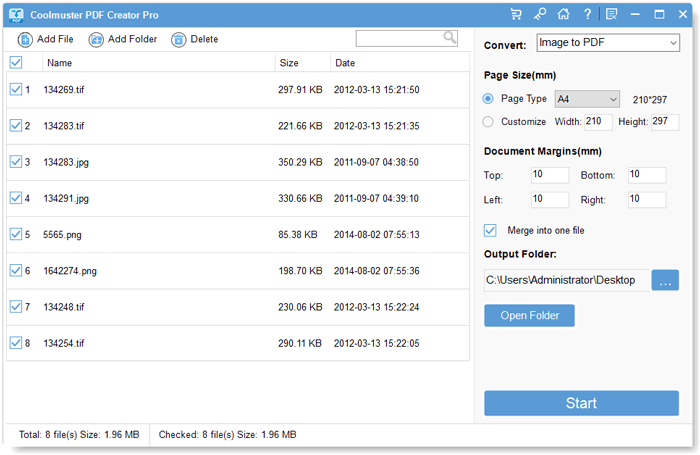
Image to PDF selected with eight images listed and Merge into one file ticked.
Features
Seven source types
Coolmuster PDF Creator Pro creates PDFs from Word (.docx), text, images, MOBI, ePub, CHM and HTML files, chosen from one drop-down.
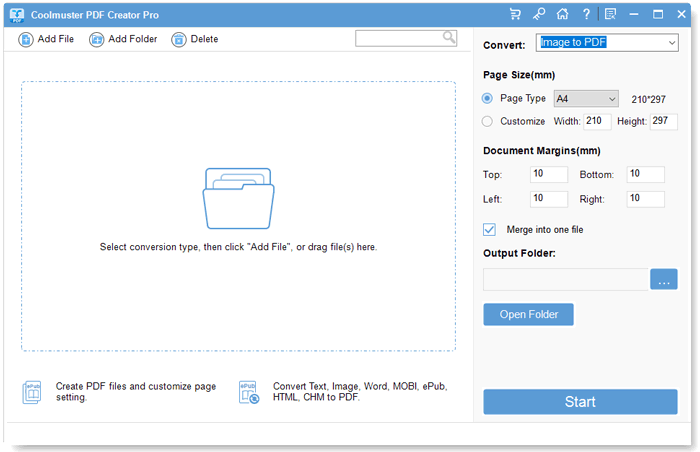
The start window, where you pick a conversion type before adding files.
Batch conversion and merging
PDF Creator Pro converts every selected file in one run, and in Image to PDF mode it can merge all selected images into a single PDF.
Page size and margins
PDF Creator Pro offers a page type such as A4 or a custom width and height, with four margin values in millimetres applied to the output.
Three ways to add files
PDF Creator Pro accepts files from the Add File button, the Add Folder button or drag and drop, and lists name, size and date for each.
Benefits
- Several source formats are handled by one tool with one set of controls.
- Old e-books and help files become PDFs you can read anywhere.
- Merging images into one PDF makes multi-page documents from scans.
Real-World Uses
- Combining photographed receipts into one PDF for an expense claim.
- Converting a CHM help file into a PDF you can keep with a project.
- Making a PDF copy of a MOBI or ePub book you own for printing.
- Batch-converting DOCX letters with the same page margins.
Who It's For, and Who Should Skip It
It's for people who collect documents in mixed formats and want PDFs out of all of them.
Skip it if Word is your only source, since Word to PDF Converter costs $15.95 and Microsoft Word exports PDF itself. Skip it if you only need images merged, where JPG to PDF Converter is the cheaper choice at $15.95. It isn't a PDF editor, so advanced users may find it basic.
Usage Guide
- Install PDF Creator Pro from the Download Free Trial button and launch it.
- Pick the source type from the drop-down, such as Word to PDF or Image to PDF.
- Click Add File or Add Folder, or drag in files of that type.
- Tick the files you want, then set the page size, margins and output folder.
- For images, tick Merge into one file if you want a single PDF, then click Start.
Where It Falls Short
- Only one source type per run.
- It creates PDFs and doesn't edit them.
- Softpedia's editor found it may be too basic for advanced users.
- A buyer on the vendor's site reported the trial handled only 3 items.
What Users Say
Coolmuster's site shows customer reviews, but it also runs a "Win Free Coolmuster License Code" offer for writing one, and many entries are short and unspecific. Treat them as a sign of what buyers care about, not as independent testing.
Reviews on Coolmuster's own site
- PDF files creation becomes easy. "I saw this Coolmuster PDF Creator Pro on a software download website. I tried it cause it had a trial version, although it only supports 3 items." Jacob Dave, June 19, 2023
- Make my own PDF easily. "While it may not have all the advanced features of some premium PDF software, its affordability and ease of use make it a worthwhile choice for most users." Shinwano, September 21, 2023
- Amazing Product "I had never thought I could create my own PDF books without Adobe Acrobat." Leo Chan, June 7, 2013
- Easy to Use for Creating PDFs "The output quality is excellent, and I appreciate the variety of formats supported." Sarah Johnson, December 31, 2024
- I love it "Now, I can convert all files I want into a single PDF document, so that I can quickly find the info I want in the daily life." Hheart, June 6, 2013
Independent coverage
Softpedia's editor review calls PDF Creator Pro a simple tool capable of various PDF conversion tasks that may seem overly simple to advanced users.
Buyers value the format range and the price. Independent coverage agrees it does the job and adds that it's basic, and the 3-item trial report is worth keeping in mind when you test it.
Comparisons
PDF Creator Pro vs Word to PDF Converter
PDF Creator Pro takes seven source types for $29.95 a year. Word to PDF Converter takes DOCX alone for $15.95.
PDF Creator Pro vs JPG to PDF Converter
PDF Creator Pro includes image conversion along with six other source types. JPG to PDF Converter handles only images and costs $15.95 a year.
Editions and Pricing
| Seats | 1 month | 1 year | Lifetime |
|---|
| 1 PC | $19.95 | $29.95 | Not on the order page |
| 5 PCs (business) | $29.95 | $39.95 | $49.95 |
| 10 PCs (business) | $39.95 | $49.95 | $59.95 |
Prices are for the Windows version and exclude VAT. Monthly and yearly licenses renew automatically until you cancel, and the yearly plan includes free upgrades for that year.
FAQs
Is Coolmuster PDF Creator Pro the same as Coolmuster PDF Creator?
Yes. Coolmuster's site calls it PDF Creator Pro, and its purchase page links to the checkout item labeled Coolmuster PDF Creator.
Can PDF Creator Pro merge several images into one PDF?
Yes. PDF Creator Pro has a Merge into one file option in Image to PDF mode that combines all selected images into a single document.
Does the one-year PDF Creator Pro license renew automatically?
Yes. The one-year PDF Creator Pro license at $29.95 renews automatically after 12 months, and Coolmuster's order page says you get a notification email before the renewal date and can cancel at any time. It includes free upgrades during that year.
What is the refund period for PDF Creator Pro?
PDF Creator Pro has a 30-day money-back guarantee on one-year and lifetime licenses and 7 days on monthly licenses. Orders can't be canceled once payment has gone through, because the license is issued right away, and a refund goes through support@coolmuster.com with your order ID or receipt.
Does Coolmuster PDF Creator Pro convert .doc files?
Coolmuster lists Microsoft Word .docx as the input for PDF Creator Pro. Resave older .doc files as DOCX in Word first.
Is PDF Creator Pro available for Mac?
Yes, as a separate product with its own license, last listed at version 2.2.21 from September 2020.
System Requirements
- Windows 11, 10, 8 or 7
- 1 GHz processor or faster (32 or 64 bit)
- 256 MB RAM, 1 GB recommended
- 200 MB of free disk space
Conclusion
Coolmuster PDF Creator Pro is worth $29.95 if you regularly make PDFs from mixed sources, especially e-book and CHM files that Word can't export. It's straightforward and reasonably priced.
The one reason to buy it is the breadth of source formats in one tool. The main reason not to is that for Word or images alone you can pay half as much or use free options.
Download Free TrialBuy Now