Coolmuster PDF Image Extractor: Get the Pictures Out of a PDF
Coolmuster PDF Image Extractor is a $15.95-a-year Windows program that pulls embedded pictures out of PDFs and saves them as JPEG files, for one document or a whole batch.
A catalog, a report or a slide deck arrives as a PDF, and you want its photos. Screenshots lose quality and take forever. Extracting gets the pictures themselves.
Quick facts
- Version: 2.3.3 for Windows (February 2, 2026)
- Developer: Coolmuster
- Platforms: Windows 11, 10, 8, 7 (Mac is a separate product, version 2.1.5 from January 2019)
- Input: PDF
- Output: JPG or JPEG
- Trial: free download, limits not published
- Price: $15.95 for one PC for one year at checkout, renewing automatically unless you cancel
- Refund: 30 days on one-year and lifetime licenses, 7 days on monthly ones
- What we checked: the trial installer from coolmuster.com (18.16 MB, server date February 2, 2026) and the $15.95 price on the order page on November 10, 2026. We read Coolmuster's specifications and user guide, but we didn't install the program or run it on our own files.
Before you buy
This saves pictures, it doesn't turn pages into images. If you want every page of a PDF as a picture, including its text, you need PDF to JPG Converter instead. Output is JPG or JPEG only, so there's no PNG option, and images you extract remain subject to whatever copyright covers them.
Download Free TrialBuy Now
Overview
PDF Image Extractor takes a PDF or a batch of them and writes the embedded pictures to a folder. You can limit it to selected pages, and a preview on the right lets you see which pages hold the pictures you want.
The program exports JPEG by default and doesn't offer other output settings, so there's very little to configure. You can stop and restart an extraction at any point.

One PDF selected with a range of pages 10 to 12 entered, and the preview showing page 10 of 54.
Features
Extracts embedded images from whole PDFs
Coolmuster PDF Image Extractor pulls the pictures out of every page of a PDF in one step and saves them as JPEG images in your output folder.
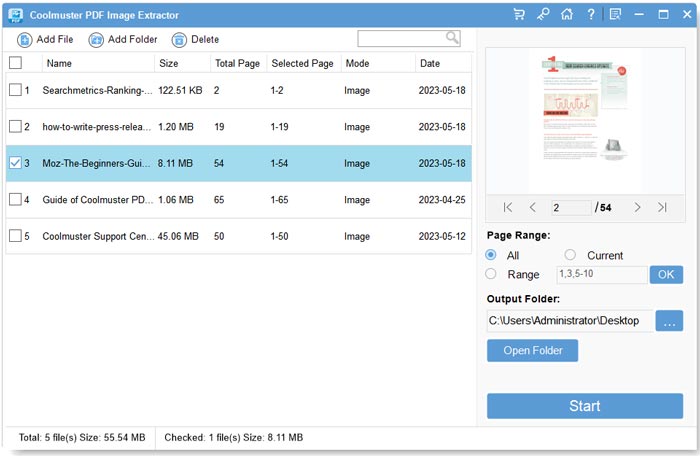
Five PDFs in the file list, with page totals and the preview pane on the right.
Batch extraction across files
PDF Image Extractor processes every PDF you've added in one run, so a folder of documents doesn't have to be handled file by file.
Page ranges and preview
PDF Image Extractor can work on All pages, the Current page or a Range such as 1,3,5-10. Double-click a file to preview it and find the right page numbers.
Standalone program
PDF Image Extractor doesn't need Adobe Acrobat Reader or any other third-party tool installed.
Benefits
- You get the original embedded pictures rather than lower-quality screenshots.
- Page ranges keep your folder free of logos and decorations from pages you didn't need.
- It runs locally, with no upload of your documents.
Real-World Uses
- Reusing your own product photos from a PDF catalog in a new brochure.
- Collecting charts and pictures from your reports for a slide deck.
- Saving the pictures from a batch of scanned-in newsletters you own.
- Retrieving photos from a PDF when the original files are gone.
Who It's For, and Who Should Skip It
It's for designers, marketers and office workers who need the pictures from PDFs on a regular basis.
Skip it if you want PNG or need scaling or format settings, since it has neither. If you need whole pages as images, use a PDF-to-image converter instead. One customer also notes it could handle larger files more efficiently.
Usage Guide
- Install PDF Image Extractor from the Download Free Trial button and launch it.
- Click Add File or Add Folder, or drag PDFs into the window.
- Double-click a file to preview it and set All, Current or Range for its pages.
- Choose an output folder with the browse button.
- Click Start and collect the JPEG files from the folder.
Where It Falls Short
- JPG and JPEG are the only outputs.
- No image settings such as scaling, a point Softpedia's editor also makes.
- The Mac edition's last listed update is from January 2019.
- One 2016 buyer of the Mac edition reported an immediate crash on OS X 10.11.
What Users Say
Coolmuster's site shows customer reviews, but it also runs a "Win Free Coolmuster License Code" offer for writing one, and many entries are short and unspecific. Treat them as a sign of what buyers care about, not as independent testing.
Reviews on Coolmuster's own site
- Great for Extracting Images! "It extracts images from PDFs quickly and maintains their quality. However, I wish it could handle larger files more efficiently." John Smith, December 30, 2024
- Effective PDF Image Extraction Tool "However, if you require more extensive PDF editing features, you may need to explore other software options." Sirisan, October 16, 2023
- fascinating "The most fascinating features of this app is that it can batch extract images from large numbers of PDFs without losing the original resolution." Shailesh, February 17, 2014
- Perfect for Image Extraction "I used Coolmuster PDF Image Extractor to get images from my PDF files, and it worked flawlessly!" Hunter, January 17, 2025
- does not work for me "Coud not even test it : the application is crashing immediately. (OS X 10.11.4)" Fabrice, April 20, 2016
Independent coverage
Softpedia's review found batch processing and page-range selection useful and said image quality is preserved, while noting the absence of extra image settings such as scaling.
Buyers like how quickly it pulls out pictures and that quality holds up. The complaints are about big files and, on the Mac edition, one crash report from 2016.
Comparisons
PDF Image Extractor vs PDF to JPG Converter
PDF Image Extractor saves the pictures embedded in a PDF. Coolmuster PDF to JPG Converter turns whole pages into image files in JPG, PNG, TIF, BMP or GIF. They cost the same $15.95, so pick by what you want out of the file.
PDF Image Extractor vs free PDF readers
Most PDF readers let you copy or save one picture at a time, which works for a single image. PDF Image Extractor pays off once you need all the pictures from a long document or from many files.
Editions and Pricing
| Seats | 1 month | 1 year | Lifetime |
|---|
| 1 PC | $9.95 | $15.95 | Not on the order page |
| 5 PCs (business) | $19.95 | $25.95 | $35.95 |
| 10 PCs (business) | $29.95 | $35.95 | $45.95 |
Prices are for the Windows version and exclude VAT. Monthly and yearly licenses renew automatically until you cancel, and the yearly plan includes free upgrades for that year.
FAQs
Can Coolmuster PDF Image Extractor save images as PNG?
No. Coolmuster lists JPG and JPEG as the only output formats for PDF Image Extractor.
Does PDF Image Extractor change the image quality?
Coolmuster says PDF Image Extractor keeps high output quality, and Softpedia's review agreed that quality is preserved. Because the output is JPEG, a picture stored in the PDF in another format is saved as a JPEG.
Does the one-year PDF Image Extractor license renew automatically?
Yes. The one-year PDF Image Extractor license at $15.95 renews automatically after 12 months, and Coolmuster's order page says you get a notification email before the renewal date and can cancel at any time. It includes free upgrades during that year.
What is the refund period for PDF Image Extractor?
PDF Image Extractor has a 30-day money-back guarantee on one-year and lifetime licenses and 7 days on monthly licenses. Orders can't be canceled once payment has gone through, because the license is issued right away, and a refund goes through support@coolmuster.com with your order ID or receipt.
Is there a Mac version of PDF Image Extractor?
Yes, as a separate product with its own license, listed at version 2.1.5 from January 2019.
Does PDF Image Extractor need Adobe software?
No. PDF Image Extractor is a standalone utility and doesn't need Adobe Acrobat Reader or any other third-party tool.
System Requirements
- Windows 11, 10, 8 or 7
- 1 GHz processor or faster (32 or 64 bit)
- 256 MB RAM, 1 GB recommended
- 200 MB of free disk space
Conclusion
Coolmuster PDF Image Extractor is worth $15.95 if you need pictures out of PDFs regularly and JPEG output suits you. It's plain and it stays out of your way.
The one reason to buy it is pulling pictures from many pages or files in one run. The main reason not to is the lack of format and image settings, which free readers match for the odd single picture.
Download Free TrialBuy Now