MacX MediaTrans: an iPhone Manager for Mac That Copies Only the Files You Pick
MacX MediaTrans is a Mac app from Digiarty Software that moves photos, music, videos, e-books, ringtones and voice memos between an iPhone, iPad or iPod and your Mac over a USB cable, without a Finder or iTunes sync. The lifetime license for one Mac costs $39.95 at checkout, and a free trial lets you test it first with a capped number of transfers.
Apple's own tool on a Mac is Finder sync, and sync is all or nothing: the phone ends up matching the Mac's library, so songs or videos that came from somewhere else can disappear. MediaTrans works the other way round. You open a category, tick the files, and press Export to copy them to the Mac or Add and then Sync to put them on the phone. Nothing else on the device changes.
Quick facts
- Version: 8.7, released September 29, 2026, with iOS 27 support
- Developer: Digiarty Software, Inc. (MacXDVD), in business since 2006
- Runs on: macOS 26 Tahoe and earlier, on Intel and Apple Silicon Macs
- Devices: iPhone, iPad and iPod touch on iOS 7 or later, over a USB or USB-C cable
- Price: $39.95 for a lifetime license on one Mac, with free upgrades. A yearly plan for three Macs is $29.95 a year
- Free trial: every tool works, but the number of items you can transfer is capped
- Refunds: 30 days, for faults support can't fix (not for a change of mind)
- Windows version: sold separately as WinX MediaTrans
- What we checked: the installer on the vendor's server (macx-mediatrans.dmg, 63.5 MB, dated September 29, 2026) and a checkout price of $39.95 for the lifetime license, with no renewal, on November 4, 2026. We didn't run the app on a Mac, so the trial cap and the transfer speeds below are Digiarty's figures, not our measurements
Before you buy
Pick the license by how many Macs you have. The lifetime license covers one Mac and never expires. The yearly plan covers three Macs but renews automatically every year until you cancel it. If you only ever plug your phone into one MacBook, the lifetime license costs less after the second year.
Test the trial with the files you care about first. Digiarty's refund promise covers bugs its support team can't solve, not "it wasn't what I expected", so the trial is your real safety net.
Download Free TrialBuy Now
Overview
Connect the phone and MacX MediaTrans opens on a home screen that shows the device name, its free space and its iOS version, with seven tiles below: Photo Transfer, Music Manager, Video, Data Security, Book, Voice & Ringtone and Flash Drive. Every manager behind those tiles uses the same layout, so once you've used one, you know them all: categories on the left, thumbnails or a track list in the middle, and Export, Add, Delete and Refresh along the top.
Changes queue up first. The bottom bar counts what you've added and deleted, and nothing touches the phone until you click the big Sync button. Exports skip that step and go straight to a folder on your Mac, which you choose in Settings along with a few switches: replace or keep duplicate files, convert incompatible videos to MP4 (H.264) with hardware acceleration, convert music to MP3 or AAC, and save HEIC photos as JPG.

The home screen with an iPhone 13 on iOS 16.4 connected (34.5 GB free of 128 GB): Photo Transfer, Music Manager, Video, Data Security, Book, Voice & Ringtone and Flash Drive.
Features
Bulk photo export that frees space on the phone
MacX MediaTrans copies photos and Live Photos from the iPhone's Camera Roll to your Mac in batches, and can save iPhone HEIC pictures as JPG on the way so they open anywhere. Digiarty puts the speed at 100 4K photos in about 8 seconds. The feature Mac owners tend to want most is the other half: MediaTrans can delete the exported pictures from the Camera Roll in one go, so you're not tapping through thousands of thumbnails on the phone afterwards. Exports can be saved as JPG, PNG, BMP or HEIC.
Two-way music transfer without wiping the library
MacX MediaTrans adds songs from your Mac to the iPhone without erasing the tracks already there, and exports songs from an iPhone or old iPod back to the Mac. You can create, rename and delete playlists, fix artist, album and genre tags in batches, and have unsupported audio converted to MP3 or AAC as it's copied.

Music Manager: the iPhone's songs with artist, album and length, playlists on the left, and the Add/Delete counters waiting for Sync.
Videos converted and rotated on the way to the iPhone
MacX MediaTrans plays the format-fixer when you add a video the iPhone can't play, such as MKV, AVI, MTS or some HEVC files. It converts the file to an iPhone-friendly MP4 during the transfer, turns sideways clips the right way up, and can shrink large files by up to about half. In the other direction, it exports home videos, screen recordings and 4K clips from the phone to the Mac, which is often the fastest way to win back gigabytes of storage.
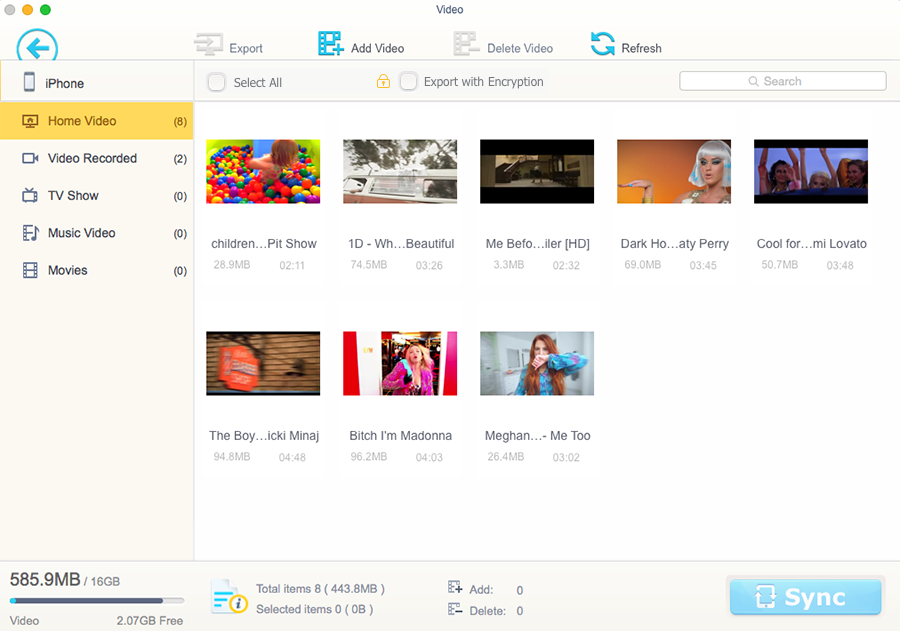
The Video manager, sorted into Home Video, Video Recorded, TV Show, Music Video and Movies, with an "Export with Encryption" option at the top.
Password encryption for private photos and videos
MacX MediaTrans can encrypt photos and videos with a password, either while exporting them from the iPhone or for files already on your Mac (Digiarty names AES and RSA). The Data Security screen has an Encryption tab and a Decryption tab. Keep the password safe: the app warns that an encrypted file can't be opened again without it.

Data Security: one 43.9 MB MP4 queued for encryption, with the warning that a lost password means the file can't be decrypted.
E-books, ringtones, voice memos and podcasts
MacX MediaTrans copies EPUB books, PDFs and audiobooks to the iPhone or iPad and backs your book library up to the Mac, with an option to turn EPUB into PDF, HTML or TXT. The Voice & Ringtone manager exports voice memos, podcasts and iTunes U items, and turns a song into an iPhone ringtone without iTunes.

Book Manager: eight books on the iPhone, split into Books (EPUB), PDFs and Audiobooks.

Voice & Ringtone Manager: five 40-second ringtones, with Voice Memos, iTunes U and Podcasts in the sidebar.
Use the iPhone as a USB flash drive
MacX MediaTrans's Flash Drive mode stores any file from your Mac on the iPhone, such as a DMG installer, a Word file or a folder of PDFs, so you can carry it to another Mac. You can create folders, rename and delete files there. The catch: those files live in a private area that you can't open on the iPhone itself, only through MediaTrans on a Mac.
Benefits
- You stay in control of the phone. Selective transfer means no surprise deletions from a sync that decides the Mac's library is the truth.
- Your photos don't depend on iCloud. With a full phone and a 5 GB free iCloud plan, a cable and a bulk export is the cheapest way out.
- Format problems disappear. A movie downloaded as MKV, a HEIC picture a relative can't open on Windows: MediaTrans converts both as part of the copy.
- One purchase, no subscription. The lifetime license includes future updates, which matters for a tool that has to keep up with every new iOS release.
Real-World Uses
- "iPhone Storage Full" before a trip. Export last year's 4K videos and a few thousand photos to the Mac, then delete them from the Camera Roll in one pass.
- Moving an old iPod's music. Pull the songs off an iPod classic or an old iPhone that holds tracks you no longer have anywhere else, and add them to a new phone without disturbing its library.
- A movie night on the iPad. Drop a few MKV films onto the iPad; MediaTrans converts them during the copy so they play in Apple's TV app.
- Taking a big file to another office. Put a presentation or a DMG on the iPhone in Flash Drive mode instead of hunting for a USB stick.
- A custom ringtone. Turn a song into a ringtone on the Mac and send it to the phone in one step.
Who It's For, and Who Should Skip It
It's for Mac owners who want to manage what's on their iPhone or iPad file by file: people who hit the storage limit often, who keep music outside Apple Music, or who share photos and videos with Windows and Android users and need JPG and MP4 instead of HEIC and HEVC.
Skip it if you use a Windows PC (you'd need WinX MediaTrans, a separate product and license), if you're happy with iCloud Photos and Apple Music doing everything in the background, or if what you really need is a full device backup with messages, contacts and app data. MediaTrans is a media and file manager, and its feature list doesn't include messages, contacts or WhatsApp chats; Finder's free backup or a dedicated backup tool fits that job.
Usage Guide
- Install. Download the DMG, open it and drag MacX MediaTrans into Applications.
- Stop automatic syncing. Digiarty's guide asks you to turn off automatic syncing in iTunes (on current macOS, in Finder's device settings) so Apple's sync doesn't change the phone while MediaTrans works.
- Connect and trust. Plug the iPhone in with its cable, unlock it and tap Trust if asked. The home screen then shows the model, iOS version and free space.
- Set your folders. In Settings, pick where exports go and turn on HEIC-to-JPG and automatic video conversion if you want them.
- Export. Open Photo Transfer, Video or Music Manager, tick the items (or Select All) and click Export.
- Add. Click Add, choose files on the Mac, check the counters at the bottom, then click Sync.
- Register. Enter the license code from the order email to remove the trial's transfer cap.
Where it falls short
- The trial cap isn't spelled out. Digiarty only says the trial limits how much you can sync, so you'll find the number when you hit it.
- The lifetime license is for one Mac. A household with two or three Macs has to choose between several lifetime licenses and the renewing three-Mac plan.
- Flash Drive files are invisible on the phone. They're only reachable through MediaTrans on a Mac, so it's a carrier, not a way to open documents on the iPhone.
- Parts of the documentation are dated. The user guide still talks about iTunes preferences and iPhone X-era models, so expect to translate a few steps to current macOS.
- No messages, contacts or app data. It's built around media and files, not full-device backup and restore.
What Users Say
Independent, hands-on reviews of MacX MediaTrans are thinner than its long history suggests. Much of the coverage on Apple news sites is sponsored posts and license giveaways, and neither Product Hunt nor AlternativeTo shows any user reviews for it. Here's what independent reviewers wrote.
Techlomedia (Deepanker Verma, April 2019)
Verma tested the app as an iTunes replacement and liked the selective, two-way transfers:
"What I personally like is the two-way file sync and better data transfer speed."
"The software comes with an easy to understand layout and performs well."
His one caveat was the Flash Drive mode: "However, you need the MacX MediaTrans for both read and write." The review lists no other downsides, and the site discloses that it can earn money from links in its posts.
FileHippo (editor's review, September 2026)
FileHippo's editors call it user-friendly: "With a user-friendly interface, it simplifies the process of transferring various file types." The write-up is entirely positive and gives no rating, and its text still mentions version 5.2 while the listing shows 8.6, so treat it as a light overview rather than a test.
The pattern is consistent: reviewers praise the clean layout, the speed and the fact that transfers go both ways without a sync. What nobody has published is a long-term, critical test on recent macOS and iOS versions, which is another reason to run the trial on your own phone. The review texts above came to us through a page summarizer, not a direct copy.
Comparisons
MacX MediaTrans vs Finder sync (free, built into macOS)
Finder backs up the whole iPhone and syncs music, movies, books and photos from the Mac, all for free. But it syncs whole libraries one way, it can't pull arbitrary songs or videos off the phone, and it doesn't convert MKV or HEIC. MacX MediaTrans is the better tool when you want to move individual files in either direction; Finder is the better tool for a full encrypted backup of everything on the phone.
MacX MediaTrans vs WinX MediaTrans
WinX MediaTrans is Digiarty's Windows twin with the same tool set. The two are separate purchases, and a MacX license doesn't activate the Windows version. Buy the one that matches the computer you plug your phone into.
Editions and Pricing
| License |
Price (USD) |
Term |
Macs |
Updates |
| Lifetime License |
$39.95 once |
Never expires |
1 |
Free for life |
| Premium (yearly plan) |
$29.95 a year |
Renews yearly until cancelled |
3 |
While subscribed |
| 3-in-1 Bundle (with MacX DVD Ripper Pro and Macxvideo AI) |
$79.95 once |
Never expires |
1 |
Free for life |
The Buy Now buttons on this page open the lifetime license. Digiarty's own store often shows a holiday coupon that takes the first year of the yearly plan down to $19.95, and offers volume licenses from five units for schools, companies and nonprofits.
FAQs
Does MacX MediaTrans work on Apple Silicon Macs?
Yes. MacX MediaTrans 8.7 ships as a Universal app, so it runs natively on M-series Macs as well as on Intel Macs, and Digiarty's guide lists macOS 26 Tahoe as supported.
Does MacX MediaTrans need iTunes or the Apple Music app?
No. MacX MediaTrans talks to the iPhone directly over the cable. You only need to keep Apple's automatic sync switched off so the two tools don't fight over the device.
Does MacX MediaTrans need a cable?
MacX MediaTrans works over a USB or USB-C cable, and every step in Digiarty's guide starts with plugging the device in, so plan on a cable rather than wireless transfers.
Does the MacX MediaTrans lifetime license really never expire?
Yes. Digiarty's purchase FAQ says the MacX MediaTrans lifetime license doesn't expire, carries no yearly fee and includes all future updates and version upgrades. Only the yearly plan renews.
Can I cancel the MacX MediaTrans yearly plan?
Yes. You can stop the MacX MediaTrans subscription at any time, and Digiarty emails a reminder seven days before each renewal charge.
Can I get a refund for MacX MediaTrans?
Only for faults. Digiarty refunds within 30 days when the product doesn't work because of an error or bug that its support team can't fix in reasonable time. Contact support first; it promises a reply within one business day.
Are "free MacX MediaTrans license codes" online safe to use?
No. Digiarty says the codes posted on serial-key sites are invalid for current versions, and cracked copies come from the same kind of sites that bundle malware. Legitimate free licenses only come from Digiarty's own time-limited giveaways, which cover the version of the day without future updates.
System Requirements
- macOS 26 Tahoe or earlier, on an Intel or Apple Silicon Mac
- iPhone, iPad or iPod touch on iOS 7 or later, including iOS 27
- A USB or USB-C cable for the device
- About 64 MB for the installer, plus free disk space for whatever you export
Conclusion
MacX MediaTrans is worth $39.95 if you're a Mac owner who wants to pick exactly which photos, songs and videos move on or off an iPhone, and who'd rather pay once than rent a tool. The one reason to buy it is selective, two-way transfer with format conversion built in, which Finder simply doesn't do. The main reason to hesitate is the refund policy: it covers bugs, not second thoughts, and independent long-term reviews are scarce. So use the trial on your own phone and your own files first; if it handles them, the lifetime license is a fair price for the hours it saves.
Download Free TrialBuy Now