Kernel for Word Repair: Bring Back Corrupt DOC and DOCX Files
Kernel for Word Repair is a $49 Windows tool from KernelApps that repairs corrupt Word documents, one or many at a time, and saves new copies to a folder you choose. It's for anyone whose document won't open and whose Open and Repair option has come up empty.
Word files break during incomplete saves, cloud sync conflicts and pulled USB drives. The trial runs a real repair and puts a watermark on the result, so you can read what came back before paying.
Quick facts
- Version: 24.0, released October 2024
- Developer: KernelApps Pvt. Ltd. (Kernel Data Recovery)
- Platform: Windows 11, 10, 8.1, 8, 7 and older, Windows Server 2019 and older
- Works with: DOC, DOCX, DOCM, DOT, DOTM and DOTX files
- Price: $49 for the Home License on the order page
- Trial: repairs files but adds a watermark
- Guarantee: 30 days money back
What we checked: installer file version 24.0 (4.6 MB, digitally signed by KernelApps Private Limited), and the order page, which showed $49 for the Home License, on November 9, 2026. We didn't repair a damaged document ourselves, so results here are the vendor's and its users' claims.
Download Free TrialBuy Now
Overview
Kernel for Word Repair is about as simple as this kind of program gets. Add your files, click Repair File(s), pick a destination, and open the results from the links it shows. There are no modes to choose from, and the left of the window spells out the two steps.
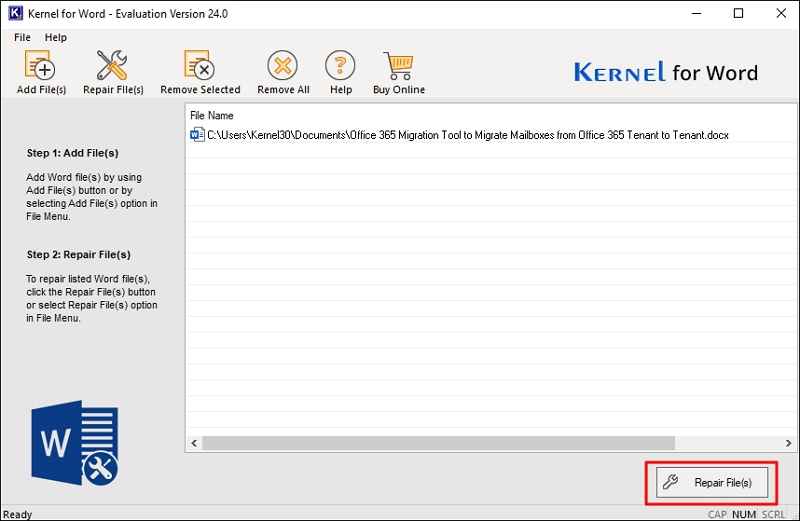
A document in the queue, ready for Repair File(s).
One practical detail: the program writes real Word files only when Microsoft Office is installed on the same PC. Without it, the repaired text comes out as a .txt file.
Features
Batch repair across formats
Kernel for Word Repair takes any number of documents in one run, and you can mix .doc, .docx, .docm, .dot, .dotm and .dotx files in the same list.
Recovers text and structure
Kernel for Word Repair aims to restore text, fonts, tables, images, hyperlinks, bookmarks, headers, footers and document properties. Text is the most dependable part of that list: one independent reviewer found an earlier version recovered text well but not images.
No file size limit
Kernel for Word Repair sets no size limit on documents in the full version, so long reports with embedded objects are accepted.
Quick access to the output
Kernel for Word Repair saves new copies in a folder you pick, can create that folder for you, and shows a link to each repaired file when it's done.
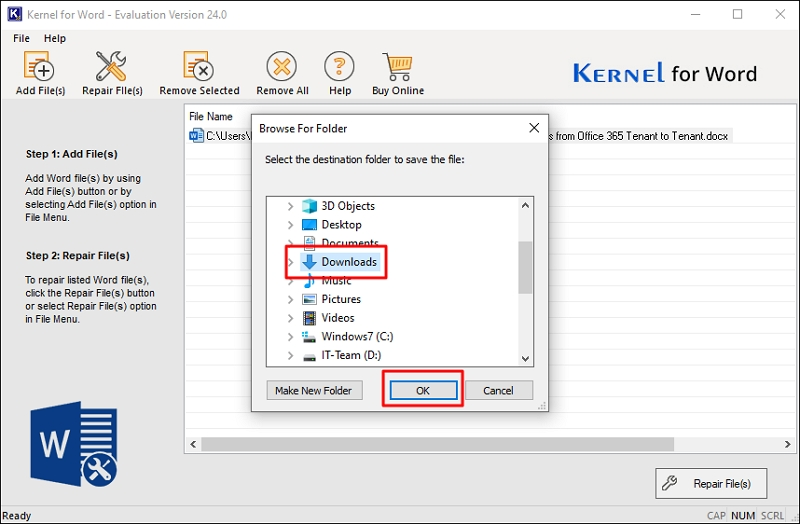
Choosing where the repaired copies go.
Benefits
- Nothing to learn. Two steps, and they're written on the screen.
- Your data stays on your PC. It's a desktop program, so unlike online repair sites, nothing is uploaded.
- The trial output is readable. A watermark doesn't stop you checking whether your text survived.
Real-World Uses
- A thesis or contract that fails with "The file is corrupted and cannot be opened".
- A document damaged by a sync conflict on OneDrive or Google Drive.
- A folder of files copied from a dying drive.
- A macro-enabled template that stopped loading after an add-in crash.
Who It's For, and Who Should Skip It
Buy it if Word's Open and Repair has failed and the watermarked trial output shows your text intact. Skip it if your document is mostly images or complex layout and the trial loses them, or if an earlier version exists in OneDrive's version history. Businesses need Corporate or Technician, since Home is for personal use. There's no Mac version.
Usage Guide
- Copy the damaged document somewhere safe.
- Download and install the demo, then launch Kernel for Word.
- Click Add File(s) and pick one or more documents.
- Click Repair File(s) and choose a destination folder.
- Open the output from the link and read through it.
- If it's good, buy a license and repair again for a clean copy.
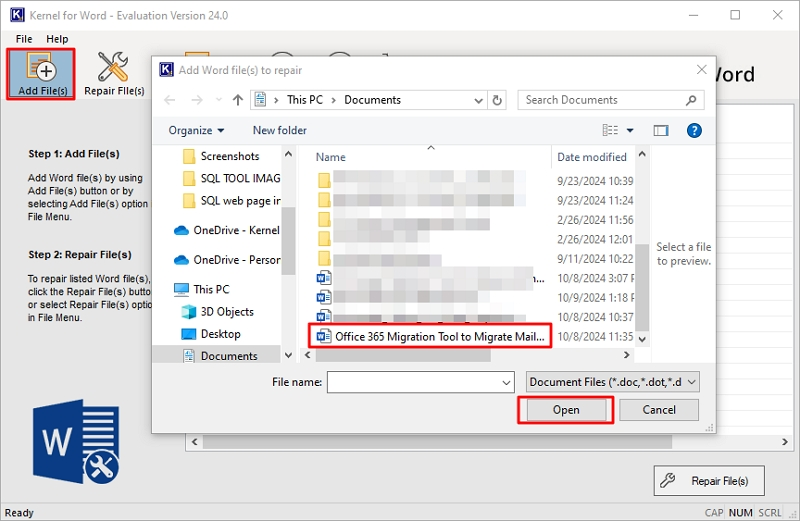
Adding a document through the Add File(s) button.
Before you buy
- Install Office on the PC you'll repair from. Otherwise the output is plain text.
- Check images and tables in the trial output. That's where repairs are likeliest to fall short.
- Don't open the file during a repair. KernelApps says the document has to stay closed while it works.
Where it falls short
- Graphics may not survive. Windows Report's test of version 11.01.01 found text recovered well, but images and graphics didn't come back. That was an older version, so check yours in the trial.
- The look is dated. The same review compared the interface to Windows XP-era software.
- The specifications lag. KernelApps lists Word up to 2021, though an FAQ says Word 2026.
What Users Say
This is the one Kernel Office repair tool with a real outside review, and it's a mixed one.
Windows Report (Teodor Nechita, version 11.01.01)
"Kernel for Word was good at finding and repairing Word files to some extent, although there are some limitations to this program's functionalities."
"For example, while it can recover text pretty well, it doesn't seem to manage to recover the other graphical elements, such as images that were in the Word document, or even the graphics."
"All in all, Kernel for Word is good at recovering all Word file formats, although considering it to be among the best would be a long shot."
The review also found the demo preview-only. KernelApps now describes the trial as saving with a watermark.
On the vendor's page
KernelApps shows 4.9 out of 5 from 496 reviews collected on its own site, with 94% rated Excellent.
"While editing a word document, suddenly, the word application stopped working. I tried to open it again but received an error message. So, I decided to use a professional word repair software and found the Kernel Word Repair one is best in fixing this error. It quickly repaired my Word document within a few clicks." - Michael
Kernel Data Recovery on Trustpilot
Kernel Data Recovery's Trustpilot page shows 4.9 out of 5 from 166 reviews, read through a page summarizer. Those reviews rate the company rather than this product, and about 2% of them are one-star. None of the reviews we could read mention the Word tool.
The pattern: people credit it with getting text back quickly, and the independent reviewer agrees on text but not on graphics.
Comparisons
Kernel for Word Repair vs Word's Open and Repair
Open and Repair is free, so use it first. It's limited to one file at a time and either works or doesn't. Kernel for Word Repair adds batches and a second opinion on files Word has given up on.
Kernel for Word Repair vs online repair sites
Web services need no install, but your document leaves your PC. Kernel for Word Repair works locally, which matters for contracts and anything confidential.
Editions and Pricing
| License | Price | For |
|---|
| Home (this listing) | $49 on the order page | Personal use |
| Corporate | $149 | Multiple machines at one location |
| Technician | $249 | Multiple machines at multiple locations |
FAQs
Do I need Microsoft Office to use Kernel for Word Repair?
No, but you'll want it. Kernel for Word Repair runs without Office, and in that case saves the repaired content as a .txt file. To get .doc or .docx output, Office has to be installed.
Can Kernel for Word Repair fix macro-enabled documents?
Yes. Kernel for Word Repair accepts .docm files and .dotm templates.
Is my document uploaded anywhere by Kernel for Word Repair?
No. Kernel for Word Repair is a desktop program, and KernelApps says all processing is local.
Does the Kernel for Word Repair trial remove the watermark after purchase?
The watermark is a limit of the trial. Once you've activated a license, repair the file again to get a clean copy.
Can I use the Home License of Kernel for Word Repair at work?
No. KernelApps limits the Home License to personal use, and a company needs Corporate or Technician.
Will Kernel for Word Repair help when Word says the document name or path isn't valid?
KernelApps lists that message among the errors Kernel for Word Repair addresses, along with "Unexpected end of file" and invalid XML schema errors.
System Requirements
- Windows 11, 10, 8.1, 8, 7, Vista, XP and older, Windows Server 2019 and older
- Intel Pentium compatible processor (x86 or x64) or equivalent
- 2 GB RAM minimum and 2 GB of disk space
- Microsoft Office on the same PC for .doc and .docx output
Conclusion
Kernel for Word Repair is worth $49 for a text-heavy document that Word can't open. The reason to buy is the simple batch repair, done locally, with a trial that shows you the real output. The reason not to is a document that depends on images, which the one independent review saw go missing. Read the watermarked result before you pay.
Download Free TrialBuy Now