Short answer
Short answer: first try Word's own fixes, which are free: Open and Repair, an earlier version from OneDrive or AutoRecover, Insert > Text from File into a new document, and the Recover Text from Any File converter. If Word still can't open the file, run the free trial of a repair tool on a copy: Stellar Repair for Word ($39 a year) previews the repaired document with its layout, Kernel for Word Repair ($49) saves a watermarked copy you can read, DataNumen Word Repair ($89.95, one-time) writes a full repaired file with demo text mixed in, and SysInfo DOCX Repair ($49) previews .docx files only.
Pay only if the trial shows your text. If it isn't there in the trial, no licence will bring it back.
At a glance: four Word repair tools
| Stellar Repair for Word | Kernel for Word Repair | DataNumen Word Repair | SysInfo DOCX Repair |
|---|
| Price | $39, 1-year licence that renews | $49 Home (personal use) | $89.95 one-time | $49 one-time, 1 year of updates |
| .doc (Word 97-2003) | ✓ | ✓ | ✓ | ✗ |
| .docx | ✓ | ✓ | ✓ | ✓ |
| .docm / .dotx / .dotm templates | ✗ not listed | ✓ | ✗ not listed | ✗ |
| What the free trial gives you | Preview in 3 modes; some words shown as "<demo>" | Real repaired file with a watermark | Real repaired file with demo text inserted | Preview of text and images |
| Batch repair | ✓ | ✓ | ✓ | ✓ |
| Saves as | DOC or DOCX | DOC/DOCX (needs Office installed, else .txt) | Always .doc | .docx |
| Needs Word installed | No (Word must be closed) | For .doc/.docx output | Yes | To open the result |
| Windows | 11, 10, 8.1, 8 (64-bit) | 11 to XP, Server 2019 and older | 32- and 64-bit Windows | 11 to 7, Server 2008/2012 |
| Mac version | ✗ | ✗ | ✗ | ✗ |
What we checked
- We followed Microsoft's own troubleshooting article for damaged Word documents and put its methods in the order most likely to work.
- We compared the four Word repair tools on this site on file formats, what their free trials actually output, licence terms and requirements, from each vendor's product pages, manuals and installers.
- We gathered independent reviews and customer ratings for each tool.
- What we checked: the prices on each order page ($39 for Stellar Repair for Word, $49 for Kernel for Word Repair Home, $89.95 for DataNumen Word Repair and $49 for SysInfo DOCX Repair, in USD) on November 28, 2026.
We compared features, prices and trials from the vendors' documentation, and didn't run all four tools on the same damaged file; results on your document depend on how badly it is damaged.
Step 0: work on a copy, and check it really is the file
Copy the damaged document to another folder before you try anything. Every method below, and every repair tool, should run on the copy, so a failed attempt can't make things worse. Microsoft's troubleshooting article also suggests a quick check: open a few other Word documents. If they misbehave too, the problem is Word, Office or Windows, not the file, and repairing the document won't help.
Typical signs that the file itself is damaged, from the same article: Word keeps renumbering pages or redoing page breaks, the layout and formatting are wrong, the screen fills with unreadable characters, or Word stops responding when you open it. Common error messages include "Word found unreadable content" and "The file cannot be opened because there are problems with the contents".
The free ways first: Word's own repair methods
1. Open and Repair
Word has a built-in repair that fixes light damage. In Word, choose File, Open, select the file, click the arrow next to the Open button and choose Open and Repair. It either works or it doesn't, with no preview, but it costs nothing and takes seconds.
2. Look for an earlier version
If the document lives in OneDrive or SharePoint, its version history may hold a copy from before the damage. If Word crashed while you worked, check File, Open, Recent, then Recover Unsaved Documents, and look for AutoRecover (.asd) files in your AppData folders. An older good copy beats any repair.
3. Open it in Draft view without updating links
Microsoft's first method: in Word, on the View tab choose Draft; then in File, Options, Advanced, tick Use draft font in Draft and Outline views and Show picture placeholders, clear Update automatic links at open, close Word and open the document again. This skips the parts of a file that most often trip Word up.
4. Insert the document into a new one
Create a blank document, then on the Insert tab choose Object, Text from File and pick the damaged document. Word pulls in what it can read; you may have to reapply some formatting to the last section.
5. Recover Text from Any File
In File, Open, set the file type box to Recover Text from Any File (*.*) and open the document. Microsoft warns that formatting, graphics, fields and drawing objects are lost, though field text, headers, footers, footnotes and endnotes come back as plain text. You also have to delete the binary junk at the start and end before saving.
When the free ways aren't enough
Method 5 is the last free step, and it throws away tables, pictures and formatting. That's the point where a repair tool earns its price: all four below try to rebuild the layout, tables and images, not just the words, and all four let you test the result for free first.
If the file was deleted rather than damaged, none of these will help: check the Recycle Bin, OneDrive's recycle bin or a backup, then use data recovery software, and repair the recovered file only if it won't open.
Price of each Word repair tool
Price for one licence (USD)
Stellar Repair for Word (1 year)$39.00
Kernel for Word Repair (Home)$49.00
SysInfo DOCX Repair$49.00
DataNumen Word Repair (one-time)$89.95
Order page prices on November 28, 2026. Stellar's licence renews yearly unless you turn renewal off; the others are one-time payments.
Stellar Repair for Word: the best preview before you pay
- Price: $39 for a 1-year licence on one PC (renews automatically); Stellar Toolkit for File Repair (Word, Excel, PowerPoint, PDF) is $69 a year
- Version: 6.0.0.2, Windows 11, 10, 8.1 and 8 (64-bit)
- Best for: a damaged report or thesis where you want to see the layout before paying
Stellar Repair for Word repairs .doc and .docx files from Word 2000 to Microsoft 365, one or a batch, and can search a drive for Word files if you've lost track of where one was saved. Its strength is the preview: each repaired document is shown as a Full Document (with layout, tables and images), as Filtered Text or as Raw Text for badly damaged files, and you save in whichever mode recovered the most. It recovers fonts, hyperlinks, headers and footers, bookmarks, comments, tables, equations and page colours.
Where it falls short: the licence is a yearly subscription for what is usually a one-time emergency, so turn renewal off after buying if you don't expect more damaged files. The free version's Filtered Text preview replaces some words with "<demo>" placeholders, so you see the text is there but can't read every word. Word must be closed while it runs.

Full Document preview of a repaired file in Stellar Repair for Word: the document opens in an embedded Word view with its table, logo and header intact.
What we like
- Cheapest of the four at $39
- Three preview modes, including the full layout
- Searches a drive for Word files
- Stellar scores 4.8 out of 5 from about 5,600 Trustpilot reviews (all products)
Watch out for
- Yearly subscription; remember to switch off renewal
- Free preview hides some words
- Few recent independent tests of this version
- Windows 8 or later, 64-bit only
"Thanks for developing a great program. Recovered over 124 pages of a Word document."
BrreadPit, AlternativeTo, November 2014
"Within one minute in the chat I was contacted by Swatantra."
Frank Moerdijk, Trustpilot (Stellar, all products), August 2026
Download Stellar Repair for WordBuy Stellar Repair for Word
Kernel for Word Repair: simplest, and a trial file you can read
- Price: $49 Home (personal use); Corporate $149, Technician $249
- Version: 24.0, Windows 11 back to XP and Windows Server 2019 and older
- Best for: text-heavy documents, templates and macro-enabled files
Kernel for Word Repair is about as simple as this kind of program gets: add files, click Repair File(s), pick a destination folder and open the results from the links it shows. It takes the widest range of Word formats here (.doc, .docx, .docm, .dot, .dotm and .dotx) in one batch, and processes everything locally. The trial runs a real repair and puts a watermark on the result, so you can read what came back before paying.
Where it falls short: it writes real Word files only when Microsoft Office is installed on the same PC; without it the repaired text comes out as a .txt file. Windows Report's test of an older version found text recovered well but images and graphics didn't come back, so check pictures in the trial output. The Home licence is for personal use only.
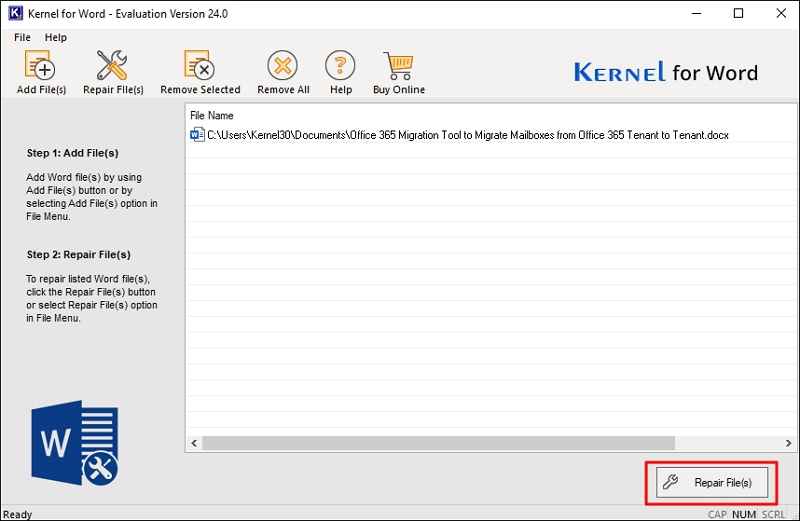
Kernel for Word Repair with a document in the queue, ready for Repair File(s).
What we like
- Two steps, written on the screen
- Widest format support, including templates and .docm
- Trial saves a readable (watermarked) file
- Runs on old Windows versions and Windows Server
Watch out for
- Needs Office installed for .doc/.docx output
- An independent test saw images lost (older version)
- Home licence is personal use only
- Dated interface
"Kernel for Word was good at finding and repairing Word files to some extent, although there are some limitations to this program's functionalities."
Windows Report, Teodor Nechita, version 11.01.01
"It quickly repaired my Word document within a few clicks."
Michael, review on KernelApps' site (4.9 out of 5 from 496 reviews there)
Download Kernel for Word RepairBuy Kernel for Word Repair
DataNumen Word Repair: one-time price, full repaired file in the demo
- Price: $89.95 one-time for one user; lower per-licence prices from 2 licences ($69.95)
- Version: 5.0, 32- and 64-bit Windows, with Word installed
- Best for: badly damaged documents, Word crash leftovers (.tmp files) and pictures you need back
DataNumen Word Repair rebuilds text, images, fonts, layout, tables, bulleted and numbered lists, hyperlinks and bookmarks from DOC and DOCX files made in Word 6.0 through Microsoft 365, including Word for Mac files (the program itself runs on Windows). Two features stand out: it can rebuild a document from the temporary files Word leaves behind after a crash, and it can save every picture as a separate file when the images matter more than the layout. The demo runs the full repair and writes an output file with demo text inserted, which is a fair way to judge the formatting.
Where it falls short: it needs Word installed and always saves as .doc, even from a .docx (open it and Save As .docx). Free upgrades last one month; after that new versions need the support plan. Refunds within 30 days need a detailed reason. It's the most expensive here, and the one independent review we found is from 2016.
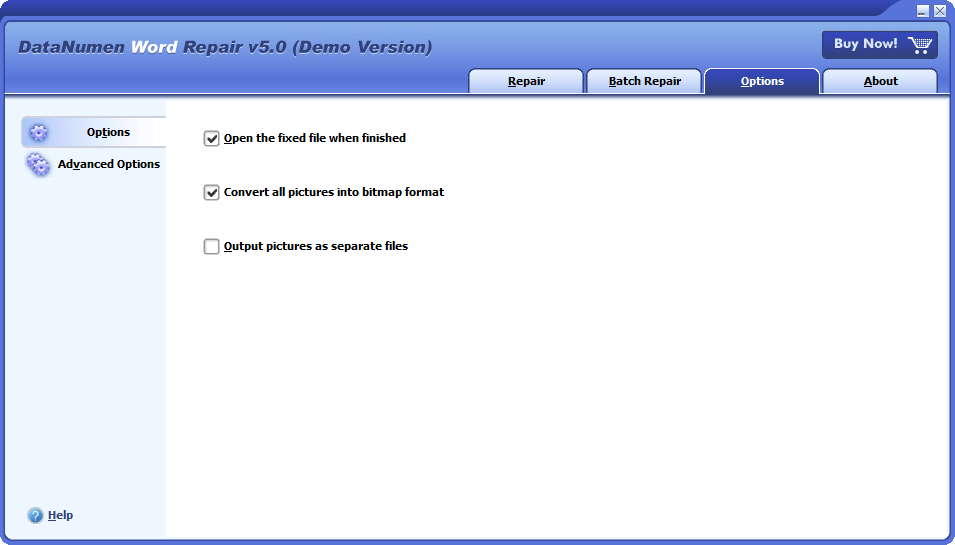
The Options tab in DataNumen Word Repair 5.0: open the fixed file when finished, convert all pictures into bitmap format, and output pictures as separate files.
What we like
- One-time price, no subscription
- Rebuilds from Word's .tmp files after a crash
- Can export every picture separately
- Demo writes a real repaired file
Watch out for
- Most expensive at $89.95
- Output is always .doc
- Requires Word on the same PC
- Free upgrades for one month only
"DataNumen Word Repair is easy to use, worked perfectly with our test document, and displays whatever it recovers in full (no missing text, no "first x lines only")."
Downloadcrew, version 2.5.1.0, February 2016
"I had a thumb drive that had a lot of documents on it that became corrupt. Datanumen Word Repair was able to recover over 95% of them when many other applications I tried to use failed."
Paul B, Washington State, testimonial on DataNumen's page, December 2024
Download DataNumen Word RepairBuy DataNumen Word Repair
SysInfo DOCX Repair: cheap and simple, for .docx only
- Price: $49 one-time Single User licence with 1 year of updates (the order page names it "Sysinfo Office Recovery")
- Version: 2.0, Windows 11 to 7 and Windows Server 2008/2012
- Best for: a modern .docx file, especially one full of pictures
SysInfo DOCX Repair is a step-by-step wizard: pick one file or several, choose Standard mode for light damage or Advanced mode for severe corruption, check the preview of the recovered text with the document's pictures beside it, and save a new .docx. A Save recovered images option writes the pictures to a separate folder. The free download gives you that preview, so you can judge your own file before paying.
Where it falls short: it handles .docx only, not the older .doc format. SysInfoTools' refund policy excludes discounted purchases, activated products and partial recoveries, so treat the 30-day guarantee as narrow and rely on the preview. The vendor also trades free licence keys for published reviews, which makes its review scores lean positive.
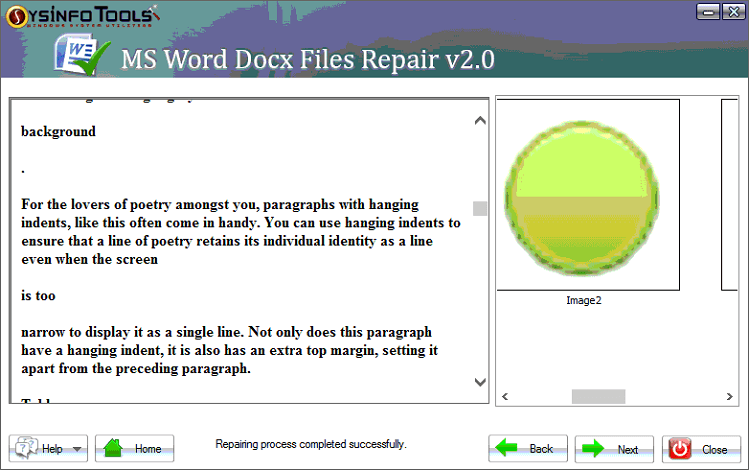
SysInfo DOCX Repair after "Repairing process completed successfully": recovered paragraphs on the left, the document's images on the right.
What we like
- $49 one-time
- Standard and Advanced modes in one licence
- Preview shows text and images side by side
- Saves pictures to a separate folder
Watch out for
- .docx only
- Narrow refund policy
- Reviews traded for free licences
- Dated interface
"This is the best tool to repair corrupt DOCX files in a quick time."
Todd Kelly, testimonial on SysInfoTools' page
"Their Demo product worked, but the Full version would not authenticate, even after 4 hours of on-line chat."
jon sadler, Trustpilot (SysInfoTools, about its OpenOffice tool)
Download SysInfo DOCX RepairBuy SysInfo DOCX Repair
How to repair a Word document with a repair tool, step by step
The steps are the same whichever of the four tools you choose:
- Close Word (Stellar and Kernel both say the document must not be open during a repair).
- Install the free trial and point it at the copy of your damaged file.
- Run the repair. In SysInfo DOCX Repair start with Standard mode; in Stellar Repair for Word compare the three preview modes.
- Check the trial result for what matters: the text, then tables and pictures.
- If your content is there, buy the licence, activate it and run the repair again for a clean copy (Kernel and DataNumen need a second run to remove the watermark or demo text).
- Open the repaired file in Word, Save As .docx, and read it through before deleting the damaged original.
Which Word repair tool should you choose?
| Your situation | Pick | Why |
|---|
| One damaged report, want to see the layout first | Stellar Repair for Word | Cheapest, and the Full Document preview shows tables and images |
| Templates (.dotx, .dotm) or macro-enabled (.docm) files | Kernel for Word Repair | The only one of the four that lists these formats |
| Word crashed and the saved file is useless | DataNumen Word Repair | Rebuilds documents from Word's .tmp files |
| You mainly need the pictures back | DataNumen Word Repair or SysInfo DOCX Repair | Both can save pictures as separate files |
| You never want a subscription | DataNumen, Kernel or SysInfo | One-time payments |
| A company PC | Kernel Corporate or DataNumen | Kernel's Home licence is personal use only; DataNumen sells volume licences |
| An old .doc file | Not SysInfo DOCX Repair | It repairs .docx only |
Who should skip each tool
- Skip Stellar Repair for Word if you hate subscriptions and won't remember to turn renewal off, or if you're on 32-bit Windows.
- Skip Kernel for Word Repair if the document is mostly images and the trial loses them, or if Office isn't installed on the PC you'll use.
- Skip DataNumen Word Repair if you don't have Word on a Windows PC, or the $89.95 price is out of proportion to the document.
- Skip SysInfo DOCX Repair for .doc files, and if you might want a refund after activating.
What commonly goes wrong
- Repairing the only copy. Always work on a copy; a crash mid-repair on the original can leave you with nothing.
- Paying before checking the trial. Every tool here shows its result free. If your text isn't in the trial output, the paid version won't find it either.
- Confusing damaged with deleted. Repair tools fix files you still have. A deleted document needs data recovery first.
- Expecting miracles on overwritten files. If the damaged part of the file held the text itself, no tool can rebuild it; badly damaged files may come back as raw text only.
- Forgetting the output format. DataNumen saves .doc and Kernel saves .txt without Office; open the result and Save As .docx.
- Missing an easier fix. OneDrive version history or an AutoRecover file is often a cleaner copy than any repair.
FAQs
How do I fix "Word found unreadable content"?
Start with Word's Open and Repair (File, Open, the arrow next to Open, Open and Repair). If it fails, try Insert, Object, Text from File into a new document. If Word still can't read it, run the free trial of a repair tool such as Stellar Repair for Word on a copy of the file and buy only if the preview shows your text.
Can a corrupted Word document be repaired for free?
Often, yes. Word's Open and Repair, an earlier OneDrive version, AutoRecover files, Insert Text from File and the Recover Text from Any File converter are all free. Recover Text from Any File loses formatting and pictures, which is where paid tools such as Stellar Repair for Word or DataNumen Word Repair help.
Which is the best Word repair software?
Stellar Repair for Word is the best value for most people at $39, with a Full Document preview before you pay. DataNumen Word Repair ($89.95, one-time) is the strongest choice for crash leftovers and pictures, and Kernel for Word Repair ($49) covers templates and macro-enabled files.
Is Stellar Repair for Word free?
Stellar Repair for Word is free to download, scan and preview. Saving the repaired document needs the $39 licence, which renews yearly unless you turn renewal off.
Can I repair a Word document on a Mac?
None of the four tools here has a Mac version. Stellar Repair for Word and DataNumen Word Repair repair files created in Word for Mac, so copy the file to a Windows PC, repair it there and copy the result back.
Can repair software recover a deleted Word document?
No. Stellar Repair for Word, Kernel for Word Repair, DataNumen Word Repair and SysInfo DOCX Repair repair files you still have. For a deleted document, check the Recycle Bin, OneDrive's recycle bin or a backup, then use data recovery software.
Why does the repaired file have a watermark or demo text?
That is the trial limit. Kernel for Word Repair adds a watermark and DataNumen Word Repair inserts demo text; after buying a licence, run the repair again to get a clean copy.
Does Word repair software change my original file?
No. All four tools write the repaired document as a new file and leave the damaged original alone. Keep the original until you've checked the repaired copy.
For other damaged Office files, see How to Repair a Corrupt Access Database (Free Way First) and How to Repair a Corrupt Outlook PST File (Free Way First), or browse word processing software.