Short answer: close Outlook, copy the damaged PST somewhere safe, and run Microsoft's free Inbox Repair Tool (SCANPST.EXE), which comes with classic Outlook. Run it more than once if it keeps finding errors. If Outlook still can't open the file, scan it with a paid repair tool's free trial before you pay: Kernel for Outlook PST Repair ($49) is the cheapest, and its trial actually saves the first 25 items in each folder; Stellar Repair for Outlook Professional ($79 for a 1-year license) has the clearest preview and the most outside reviews; and DataNumen Outlook Repair ($199.95, one-time) is the one for badly damaged, password-protected or many files at once.
At a glance
|
Inbox Repair Tool (SCANPST) |
Stellar Repair for Outlook Professional |
Kernel for Outlook PST Repair |
DataNumen Outlook Repair |
| Price at checkout |
Free with classic Outlook |
$79 per year, renews |
$49 Home User License |
$199.95 one-time |
| Free trial |
Not needed |
Scans and previews everything, saves nothing |
Saves the first 25 items per folder |
Full repair, message bodies replaced by demo text |
| Preview before saving |
✗ |
✓ Outlook-style view |
✓ with column filters |
✗ open the fixed PST in Outlook |
| Original file |
Repaired in place (makes a .bak copy) |
Saves a new PST |
Read-only, saves a new PST |
Writes a new _fixed.pst |
| Deleted items |
✗ |
✓ shown in red |
✓ shown in red |
✓ |
| Batch of many PSTs |
✗ |
✗ |
✓ add several files |
✓ Batch Repair tab |
| Windows |
Wherever classic Outlook runs |
11, 10, 8.1, 8, 64-bit only, 8 GB RAM |
11, 10, 8.1, older and Server 2003-2022 |
95 to 11, Server 2003-2019, 32- and 64-bit |
| Best for |
Minor errors, always the first try |
One damaged mailbox, easiest to check |
Lowest price, older PCs |
Heavy damage, lost passwords, technicians |
How we picked and what we checked
- We started from Microsoft's own instructions for the Inbox Repair Tool: where SCANPST.EXE lives, what it does to your file, and what it can't recover.
- We compared the three paid PST repair tools on our site that are current and sold today, on price at checkout, license term, trial limits, Windows support and what each does with deleted and password-protected items.
- We opened each checkout and read the price, checked that each trial installer downloads from the vendor, and looked at each vendor's own screenshots of the program.
- We read the vendors' refund and license terms and the reviews on their sites, Trustpilot, Softpedia, G2 and independent tech sites.
What we checked: on November 26, 2026, the order page showed $79.00 for Stellar Repair for Outlook Professional (1 year), $149.00 for the Technician edition (1 year), $49.00 for the Kernel for Outlook PST Repair Home User License and $199.95 for DataNumen Outlook Repair. The trial installers answered from the vendors' servers that day: Stellar version 14.0.0.1 (28.5 MB), Kernel 26.0 (42.6 MB) and DataNumen 10.2 (23.3 MB). We didn't repair a damaged PST with any of them, so recovery results here are the vendors' and their users' accounts, not our test.
Step 1: try the free Inbox Repair Tool (SCANPST.EXE)
The Inbox Repair Tool is Microsoft's own PST checker, and it's already on your PC if you use classic Outlook. It scans an Outlook data file for structural errors and fixes the ones it can. Microsoft recommends it when Outlook says it can't open your data file or the set of folders, or when you suspect the file is damaged. It costs nothing, so always run it before buying anything.
Where to find SCANPST.EXE
- Outlook 2016, 2019, 2021 and Microsoft 365 (64-bit Office): C:\Program Files\Microsoft Office\root\Office16
- The same versions as 32-bit Office: C:\Program Files (x86)\Microsoft Office\root\Office16 (the path Microsoft's help page gives)
- Outlook 2013: usually an Office15 folder under Program Files (x86)\Microsoft Office
- Not sure? Type SCANPST.EXE into the Windows search box, or search the Program Files folders for it.
- The new Outlook for Windows and Store installs of Office don't include SCANPST. Classic Outlook does.
How to run it
- Close Outlook completely, and copy the PST file to another folder or drive first. To find the file, open Outlook and go to File > Account Settings > Account Settings > Data Files.
- Open SCANPST.EXE from the folder above, choose Browse and select the PST.
- Choose Start. If it reports errors, leave "Make backup of scanned file before repairing" ticked and choose Repair.
- Run it again until it reports no errors. Microsoft says you may need to run it several times.
- Start Outlook. Look for a Recovered Personal Folders or Lost and Found folder: that's where items go that couldn't be put back in their original folders. Drag them into a new Outlook data file.
- Missing something? SCANPST leaves a .bak copy of the original next to it. Copy it, rename the copy to end in .bak.pst, and import it in Outlook to pull out items the repair dropped.
When SCANPST isn't enough
- It shows you nothing. There's no preview, so you only find out what survived when Outlook opens the file.
- It doesn't bring back deleted mail. Microsoft says items that were permanently deleted or corrupted beyond repair may not be recovered.
- It works on the file itself. The backup is your safety net, which is why a separate copy made before you start matters.
- It can stop with an error on badly damaged files, or say the file isn't an Outlook data file at all. That's the point where a dedicated repair tool earns its price.
- It isn't for OST files. For an Exchange or Microsoft 365 account, Microsoft's fix is to delete the .ost and let Outlook download it again. If the server copy is gone, see How to Convert an OST File to PST.
Step 2: scan with a paid tool's trial before you buy
All three paid tools below work on a copy of your PST and write the repaired mail to a new file, so a failed attempt costs time, not mail. All three have a free trial that shows what they can recover from your file. That trial result is worth more than any review or rating, including ours, so run it first and pay only if your mail shows up.
Price for one PC (USD, at checkout)
Kernel for Outlook PST Repair (Home User)$49.00
Stellar Repair for Outlook Professional (1 year)$79.00
Stellar Repair for Outlook Technician (1 year)$149.00
DataNumen Outlook Repair (one-time)$199.95
Checkout prices checked on November 26, 2026. The Stellar licenses renew yearly unless you turn renewal off.
Stellar Repair for Outlook Professional
Stellar Repair for Outlook Professional is the easiest of the three to judge before you pay. Price: $79 for a 1-year license on one computer, renewing yearly. Runs on: 64-bit Windows 11, 10, 8.1 and 8, with Outlook 2024 back to older versions and Microsoft 365. Version: 14.0.0.1. Best for: one damaged mailbox on a reasonably modern PC, when you want to see every recovered email before buying.
Stellar Repair for Outlook rebuilds the damaged PST in a window that looks like Outlook itself: folders on the left, the message list in the middle, a reading pane on the right. Deleted messages that it rescued show in red, so you can tell at a glance what came back. It has no PST size limit, handles encrypted and password-protected files, and saves the result as a new PST or as EML, MSG, RTF, HTML or PDF files, with filters by date and address. A big file can be scanned once, saved as a scan file and finished later.

Stellar Repair for Outlook 14, from Stellar's user manual: the repaired mailbox (1,582 mail items) with Inbox, Deleted Items and Recoverable Items in the folder tree, deleted messages in red at the bottom of the list, and a meeting shown in the preview pane.
The Technician edition (Stellar Repair for Outlook Technician, $149 for 1 year) adds exporting the repaired PST straight to Microsoft 365 or a live Exchange server, plus splitting and compacting huge PSTs. Buy it instead of Professional if the repair is part of a move to Microsoft 365, or if the file has grown too large for Outlook to handle comfortably.
What we like
- The free scan previews every recoverable item, deleted ones included
- No file size limit, and encrypted PSTs are handled
- Saves to PST, EML, MSG, RTF, HTML or PDF
- Save Scan and Load Scan for very large files
- The most reviewed of the three outside its own website
Watch out for
- The trial saves nothing at all
- A yearly license that renews, for what's usually a one-off job
- 64-bit Windows only, 8 GB RAM minimum (16 GB recommended)
- Saving a repaired PST needs Outlook installed on the same PC
- Microsoft 365 export and PST split are Technician-only
What users say about Stellar Repair for Outlook
John Hurst, quoted by Stellar: "SCANPST corrected some but not all errors in the main Outlook file. I had purchased a license of Stellar Phoenix Outlook PST Repair. Repaired the main file, and then my email file was working again." (Stellar Phoenix Outlook PST Repair is the program's former name.)
Christian at TechDirectArchive, in a hands-on review, credited its "comprehensive recovery capabilities. Thereby, making it ideal for recovering critical or heavily damaged Outlook files," and flagged that the "demo version previews recoverable items but doesn't allow saving" and that saving needs "MS Outlook installed".
Stellar as a company scored 4.8 out of 5 from 5,586 Trustpilot reviews when we read the page in October 2026. That covers all its products, not this one alone.
Download Stellar Repair for Outlook TrialBuy Stellar Repair for Outlook ProfessionalBuy Stellar Repair for Outlook Technician
Kernel for Outlook PST Repair
Kernel for Outlook PST Repair is the budget pick with the most useful trial. Price: $49 for the Home User License at checkout, with no renewal term shown on the order page. Runs on: Windows 11, 10, 8.1 and older, and Windows Server 2003 to 2022, with PST files from Outlook 97 to 2024 and Microsoft 365. Version: 26.0. Best for: a home user on a budget, an older or low-memory PC, or a small mailbox the trial can almost save on its own.
Kernel for Outlook PST Repair opens the damaged file in read-only mode, so the original is never touched, then shows the recovered mailbox in its folder tree with a filter box above every column. Deleted items appear in red, and when you save you can choose all mail with deleted items, all mail without them, or deleted items only. It has no size limit, reads Unicode and ANSI PSTs, takes several files at once and can split the output into smaller PSTs from 1 GB. Besides a new PST, it saves to MBOX, MSG, EML, PDF and other formats, and Kernel lists direct export to Office 365, Exchange and mail accounts such as Gmail.
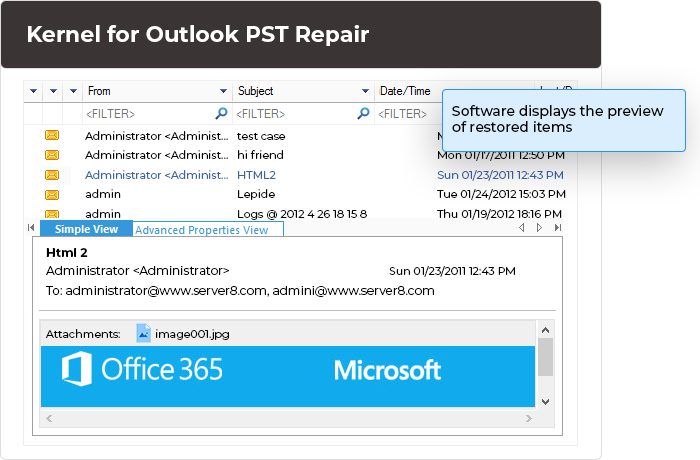
Kernel for Outlook PST Repair, from Kernel's own guide: the preview of restored messages, with filter boxes above the From, Subject and Date/Time columns and an email with an image attachment open below. The blue note is the vendor's.
The trial is the real advantage: it saves the first 25 items from every folder, so you get some of your mail back for free and can check the quality of the repair on real messages. The Home license is for individual use. Businesses need the Corporate license and IT consultants the Technician license, which Kernel sells on its own store at higher prices.
What we like
- The lowest price here, $49
- The trial saves 25 items per folder, not just a preview
- Read-only: the original PST is left as it was
- Light requirements, 500 MB RAM, 32- or 64-bit Windows
- Many save targets, including Office 365 and Gmail
Watch out for
- Home license is for personal use only
- Repairs password-protected PSTs but won't reveal the password
- Kernel's own store shows different prices and license names from the order page
- Few independent reviews, and they're older
- Refunds within 30 days only under the policy's conditions
What users say about Kernel for Outlook PST Repair
Paddy Murphy, on Kernel's page: "I used it to get back deleted emails and attachments from PST files, and it worked really well. The support was great too. I am totally happy with how Kernel for Outlook PST Repair performed. Thanks!"
Softpedia's editor rates it 4.0 out of 5 and calls it "a good choice for both power and novice users that want to recover information from corrupt or damaged PST files." Softpedia's users are cooler, at 3.1 out of 5 from 19 votes.
Kernel's own page shows 4.9 out of 5 from hundreds of reviews collected on its site, and G2 shows 4.3 from just 2 reviews. The gap between those numbers is why the trial result should decide.
Download Kernel for Outlook PST Repair TrialBuy Kernel for Outlook PST Repair
DataNumen Outlook Repair
DataNumen Outlook Repair is the heavy-duty option. Price: $199.95 for one user, a one-time payment at checkout, with lower per-license prices for 2 or more. Runs on: Windows 95 to 11 and Windows Server 2003 to 2019, in 32- and 64-bit builds, with PST and OST files from Outlook 97 to Microsoft 365. Version: 10.2. Best for: a file SCANPST won't even recognize, a PST whose password is lost, or a technician with a folder of damaged mailboxes.
DataNumen Outlook Repair, sold for years as Advanced Outlook Repair, runs a 12-stage scan and writes a new file named after the original with _fixed added, putting items back in their folders and anything homeless into Recovered_Group folders. It targets the errors that stop SCANPST ("The file is not a personal folders file", the tool hanging), recovers deleted items, opens PSTs that hit the old 2 GB limit of the ANSI format, and recovers password-protected PSTs even when the password is lost. A Batch Repair tab runs a whole list of files in one pass, and it can also search disk images and backup files for Outlook data.
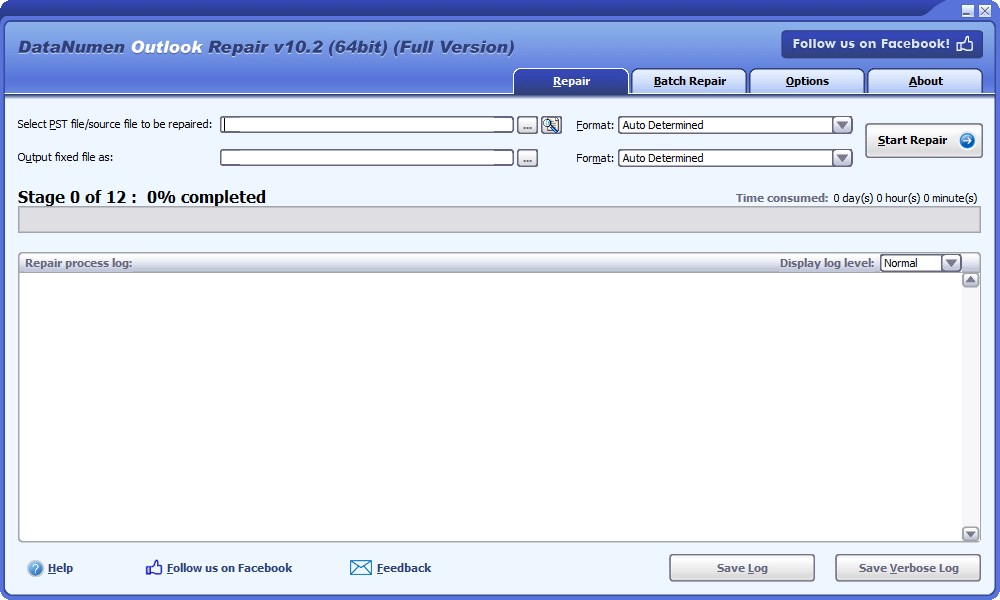
DataNumen Outlook Repair 10.2 (64-bit): the Repair tab with the source PST and output file boxes, both formats on Auto Determined, the Start Repair button and an empty repair log, next to the Batch Repair and Options tabs.
The demo runs the same repair engine and produces a fixed PST, but the message bodies are replaced with demo text. You can see which folders and messages come back, then buy and run the repair again for the real content. DataNumen estimates 2 to 3 hours for a 20 GB PST, and a run can't be paused. Upgrades and support are included for one month after purchase.
What we like
- Recovers password-protected PSTs when the password is lost
- Batch repair of many files, plus OST files
- Runs on very old Windows and 32-bit PCs, 64 MB RAM minimum
- One-time price, no renewal
- Customers report it fixing files SCANPST couldn't read at all
Watch out for
- The most expensive here, at $199.95
- No built-in preview: you check the result in Outlook
- Long runs can only be stopped, not paused
- Plain, dated interface
- Refunds need a detailed reason and may require the corrupt file
What users say about DataNumen Outlook Repair
Cavan McDonald, United Kingdom, on DataNumen's site: "Sheer magic - fixed a file the scanpst.exe could not even recognise as an Outlook Mailbox."
Ahmed Qadeer, Naperville, Illinois: "My Outlook data file appears to be mostly fixed. I needed to inspect and delete a ton of entries but, I think, I recovered most of my data. I will never know what I have lost permanently!"
Roberto, a computer forensics professional in Chile, wrote in March 2024 that big jobs "can require from one to three days non stop" on a fast machine and that the software "does not use all machine cores". DataNumen's page shows 4.90 out of 5 from 1,632 votes, its own numbers; independent reviews are scarce.
Download DataNumen Outlook Repair DemoBuy DataNumen Outlook Repair
Which should you choose?
Start with SCANPST every time. If it fails, the right paid tool depends on your file and your PC, and the trial settles the rest.
| Your situation |
Pick |
Why |
| Outlook warns about errors but still opens | Inbox Repair Tool | Minor damage is what it's made for, and it's free |
| One mailbox won't open after SCANPST, modern 64-bit PC | Stellar Repair for Outlook Professional | Full preview of every item before paying; turn off renewal afterwards |
| Tight budget, small mailbox, or an older PC | Kernel for Outlook PST Repair | $49, light requirements, and the trial saves 25 items per folder |
| Repairing on the way to Microsoft 365 | Stellar Repair for Outlook Technician | Exports the repaired PST straight to Microsoft 365 or Exchange |
| SCANPST says it isn't an Outlook data file, or the password is lost | DataNumen Outlook Repair | Built for the worst cases, recovers protected PSTs |
| A folder full of damaged PSTs | DataNumen Outlook Repair | Batch Repair runs them in one pass, one-time price |
Who should skip each: skip Stellar Professional on 32-bit Windows or a PC with less than 8 GB of RAM, and if you hate subscriptions and forget to cancel them. Skip Kernel if you're fixing files for a business or for clients, since the $49 license is for home use. Skip DataNumen for a lightly damaged file: at four times Kernel's price, it only makes sense when the cheaper trials don't bring your mail back. And skip all three if your account is Microsoft 365 or Exchange with only an OST file, because the server still has your mail.
What commonly goes wrong
- Repairing the only copy. Copy the PST before any tool touches it. SCANPST changes the file itself, and every vendor's support starts by asking for the original.
- Leaving Outlook open. Outlook, and sync tools that keep it running in the background, lock the file. DataNumen asks you to close every Office app.
- Running SCANPST once. Microsoft says it may need several runs. Keep going until it reports no errors.
- Missing the Lost and Found folder. After a repair, items often sit in Recovered Personal Folders or Recovered_Group folders, not where you left them. Check there before deciding mail is gone.
- Expecting every email back. No tool recovers data that's been overwritten. Happy DataNumen and Kernel customers still write "most" and "almost all".
- Repairing an OST. An OST is a cache of a server mailbox. Rebuilding it from the server is free and complete. Only an orphaned OST needs converting.
- Not enough disk space. Every paid tool writes a whole new PST, so the target drive needs at least as much free space as the original file.
FAQs
Where is SCANPST.EXE in Windows 11?
SCANPST.EXE is in C:\Program Files\Microsoft Office\root\Office16 for 64-bit Microsoft 365, Outlook 2021, 2019 and 2016, or in the same path under Program Files (x86) for 32-bit Office. If it isn't there, search the Program Files folders for it. The new Outlook app doesn't include it.
Is SCANPST safe to run on my PST?
SCANPST is safe when you work on a copy. It repairs the file in place and keeps a .bak backup of the original next to it, but a separate copy made before you start is the only thing that protects you if a repair goes wrong.
Can I recover permanently deleted Outlook emails from a PST?
Stellar Repair for Outlook, Kernel for Outlook PST Repair and DataNumen Outlook Repair can all recover deleted items, as long as their data still exists inside the PST. SCANPST can't. Stellar and Kernel show recovered deleted mail in red so you can pick it out.
Which PST repair tool has the best free trial?
Kernel for Outlook PST Repair has the most generous trial, because it actually saves the first 25 items in each folder. Stellar's trial previews everything but saves nothing, and DataNumen's demo repairs the file but replaces message bodies with demo text.
Do I need Outlook installed to repair a PST?
Stellar Repair for Outlook needs Outlook on the same PC to save a repaired PST, though it can save EML, MSG or PDF files without it. Kernel for Outlook PST Repair and DataNumen Outlook Repair write PST files directly. You'll want Outlook anyway to open the result.
Can I repair a password-protected PST if I forgot the password?
DataNumen Outlook Repair recovers password-protected PST files even when the password is lost. Kernel for Outlook PST Repair and Stellar Repair for Outlook repair protected files, but Kernel says it doesn't recover or remove the password.
Is Stellar Repair for Outlook a subscription?
Yes. Stellar Repair for Outlook Professional is $79 and Technician $149 for a 1-year license that renews automatically. If you only need one repair, turn off renewal in your order account once your mail is safe. Kernel's Home license and DataNumen's license are one-off payments.
Can these tools repair Outlook for Mac files?
No. All three run only on Windows and repair Windows PST files. Outlook for Mac stores mail in OLM files, which none of them repair. A PST copied from another PC can be repaired on any Windows computer.
How long does a PST repair take?
DataNumen estimates 2 to 3 hours for a 20 GB PST with DataNumen Outlook Repair, and much longer for heavily damaged files. Stellar Repair for Outlook lets you save a scan and finish later, which helps with very large files.
Conclusion
Repair a corrupt PST in this order: copy the file, run Microsoft's free Inbox Repair Tool until it reports no errors, and check the Lost and Found folder. If Outlook still won't open the file, run the free trials before you pay. For most people with one damaged mailbox, Stellar Repair for Outlook Professional is the pick: its preview shows every email it can save, deleted ones included, so you know what $79 buys. Choose Kernel for Outlook PST Repair at $49 if budget or an older PC matters, and DataNumen Outlook Repair when the file is too far gone for the others or the password is lost.
Download Stellar Repair for Outlook TrialBuy Stellar Repair for Outlook Professional