Kernel for Outlook PST Repair: Fix a Corrupt PST and Get Your Email Back for $49
Kernel for Outlook PST Repair is a $49 Windows tool from KernelApps that rebuilds corrupt or inaccessible Outlook PST files and recovers deleted emails, contacts and calendars into a new file. It's for anyone Outlook has locked out of a mailbox, and for those whose PST won't open after a crash, a full disk or an oversized file.
The best part is that you can see what's recoverable before paying. The trial shows your whole mailbox and saves the first 25 items from each folder, so you know whether the money is worth spending.
Quick facts
- Version: 26.0, released December 2025
- Developer: KernelApps Pvt. Ltd. (Kernel Data Recovery)
- Platform: Windows 11, 10, 8.1 and older, plus Windows Server 2003 to 2022
- Works with: PST files from Outlook 97 through 2024 and Office 365 Outlook
- Price: $49 for the Home User License on the order page
- Trial: saves the first 25 items per folder
- Guarantee: 30 days, under conditions in the refund policy
What we checked: installer file version 26.0 (41 MB, digitally signed by KernelApps Private Limited), and the order page, which showed $49 for the Home User License with no renewal term, on November 5, 2026. We didn't repair a damaged PST, so recovery results here are the vendor's and its users' claims.
Download Free TrialBuy Now
Overview
A PST file holds your Outlook mail, contacts and calendar on your own disk. When it's damaged, Outlook may refuse to open or crash on startup, and you could lose years of messages. Microsoft's free Inbox Repair Tool is the first thing to try, but it can fail on heavy damage.
Kernel for Outlook PST Repair works in read-only mode, so your original PST stays untouched. You choose a file, it scans deeply, then it shows the recovered mailbox in its original folder tree. You preview the items and save to a new PST or another destination. Deleted items show up in red, so you can pick those out.
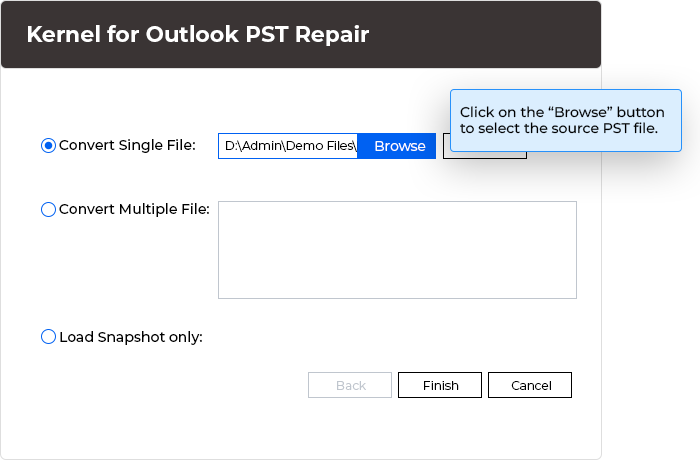
Choosing a PST file. You can load one file, several, or a saved snapshot. The blue note is the vendor's.
Features
Repairs large, damaged and password-protected PSTs
Kernel for Outlook PST Repair handles corrupt and inaccessible PST files with no file size limit, including Unicode and ANSI files and those with a password. Several files can be added at once. It doesn't recover or remove a PST password, though: KernelApps offers a separate free password tool for that.
Finds permanently deleted items
Kernel for Outlook PST Repair can bring back emails and attachments you've permanently deleted, as long as they still exist in the file. They appear in red in the results. When saving, you choose all emails with deleted items, all without, or deleted items only.
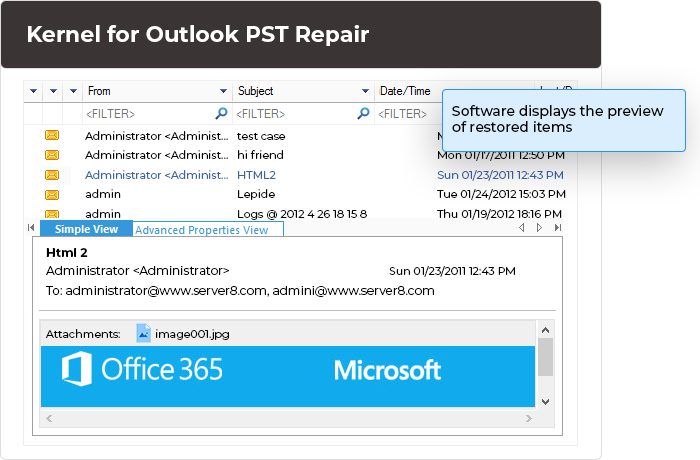
The preview of recovered mail, with filter boxes over each column and an attachment in the message pane.
Filters and search to save only what you need
Kernel for Outlook PST Repair filters by From, To, Subject, Folder Name, Item Type and date range, and its Find feature searches for specific messages. That's handy when you need just one client's emails out of a 40 GB mailbox.
Many ways to save
Kernel for Outlook PST Repair saves to a new PST, or to DBX, MBOX, MSG, EML, TXT, RTF, HTML, MHTML, PDF and other formats. It can also send data straight to Office 365, Exchange, GroupWise and IBM Domino, or to Gmail, Yahoo, AOL, iCloud and company IMAP accounts.
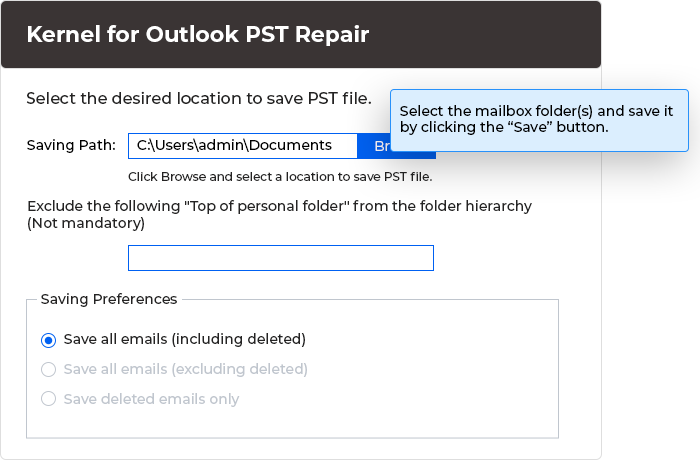
Saving a new PST, with the option to include or exclude deleted emails.
Split oversized files and see mail reports
Kernel for Outlook PST Repair can split the output into smaller PSTs, starting from 1 GB, which keeps Outlook responsive. It also produces reports on your mailbox, covering item types, mail flow by date or sender, and interaction between users.
Benefits
- Know before you pay. The trial shows what can be recovered, which beats buying on a promise.
- Low risk to the original. Read-only mode means a failed attempt leaves your file as it was.
- A way out of Outlook. A repaired mailbox can go straight to Microsoft 365 or Gmail, so a crash can double as a migration.
Real-World Uses
- After a power cut: Outlook won't open and reports a problem with the data file.
- Old archives: pull mail out of a backup PST from a former PC or a former employee.
- Oversized PST: rescue and split a file that's grown too big to work with.
- A deleted folder: find emails emptied from Deleted Items by mistake.
- Moving on from Outlook: send a repaired mailbox to Office 365 or Gmail.
Who It's For, and Who Should Skip It
Buy it if Microsoft's free tool has failed and the trial shows your mail. For a home user with one damaged mailbox, $49 is little compared with years of email.
Skip it if your mail is on Microsoft 365 or Exchange online, because the server already has it and rebuilding the profile is the fix. Try the free Inbox Repair Tool first in any case. An IT consultant or a business should look at the Corporate or Technician license, since the Home license is for individual use. There's no Mac version.
Usage Guide
- Make a copy of the damaged PST and close Outlook.
- Download and install the free demo, then launch it.
- Click Browse, choose the PST file and click Next.
- Wait for the scan, then preview the folders and check that your mail is there.
- Select all folders or just the ones you need, and click Save.
- Apply any filters, pick the output type and destination, and let it finish.
- If the demo looks good, buy a license to save everything. The activation key arrives by email.
Before you buy
- Always try the demo first. KernelApps says the demo and full version work the same, and its refund policy strongly recommends it.
- Check what the Home license gives you. The vendor's comparison lists 1 year of validity and updates and 2 PCs, while the order page showed no renewal. Ask sales if you need that confirmed in writing.
- Read the refund conditions. The 30-day guarantee depends on the policy's guidelines, such as the full version giving different results from the demo.
Where it falls short
- No tool recovers everything. Some users report that heavily damaged files couldn't be fully recovered, and data that's been overwritten is gone. The vendor's own wording is "up to 100%".
- Large files take time. Deep scans of big PSTs can be slow.
- Password recovery isn't included. It repairs password-protected files, but doesn't reveal the password.
- Vendor pricing can confuse. The product page and buy page show different prices and license names from the order page.
- Review numbers are soft. Most of the glowing ratings are on the vendor's own site. See below.
What Users Say
There's a big gap between Kernel's own numbers and independent scores, and few independent reviews are recent. Softpedia and G2 block direct reading, so we took those figures from search summaries.
On the vendor's page
Kernel's page shows 4.9 out of 5 from 895 reviews at the top and 785 reviews lower down. These are collected on its own site, so read them as marketing.
"I used it to get back deleted emails and attachments from PST files, and it worked really well. The support was great too. I am totally happy with how Kernel for Outlook PST Repair performed. Thanks!" - Paddy Murphy
"My IT Team was facing complications in accessing the PST files data of our former employees because of the induced corruption in them." After trying it: "we successfully retrieved data from all the corrupted PST files." - Justin Vendette, MVP
Softpedia and G2
Softpedia's editor rates it 4.0 out of 5 and calls it "a good choice for both power and novice users that want to recover information from corrupt or damaged PST files." Softpedia's users are cooler, at 3.1 out of 5 from 19 votes. That lower number is worth noting next to the 4.9 above. G2 shows 4.3 out of 5, from just 2 reviews.
Kernel Data Recovery on Trustpilot
The company's Trustpilot page shows 4.9 out of 5 from 166 reviews, read through a page summarizer. None we saw were about PST repair directly, but several cover sister tools and support:
"The Kernel team was extremely helpful in resolving an issue I had with OST to PST conversion." - Drew J, March 3, 2026
"Kernel OST to PST converter was easy to use and converted my all old OST files into PST format." - Kanika Sharma, August 24, 2026
Older coverage
Neeraj Bisht's 2016 Techulator article calls it a "trustworthy product" and lists no drawbacks, though it reads more as an overview than a test.
The pattern: buyers praise recovery of deleted mail, simple steps and helpful support. We found no detailed independent test, and heavy corruption remains the case where any tool may fall short. That's why the demo matters more than any rating here.
Comparisons
Kernel for Outlook PST Repair vs Microsoft's Inbox Repair Tool
The Inbox Repair Tool (ScanPST) ships with Outlook and costs nothing, so start there. It repairs the file in place and shows you little along the way. Kernel for Outlook PST Repair adds a deep scan, a preview, recovery of deleted items, and many save options. Reach for it when ScanPST fails or when you need to see what you're getting back.
Home vs Corporate vs Technician
The Home license is for individual use. Corporate covers one organization and Technician covers consultants who work for several. If you repair files for customers, you need Technician, whatever the size of the job.
Editions and Pricing
| License | Order page | Vendor site | For | Installs |
|---|
| Home User (this listing) | $49 | $69 | Individual use | 2 PCs |
| Corporate | $169 | $199 | One organization | 250 PCs |
| Technician | Not checked | $399 | Service providers | Unlimited |
Vendor site figures are the discounted prices shown on its buy page. Its comparison table also lists Technician at $299, so confirm that price before ordering. A larger Outlook suite with PST Split, Duplicates Remover and PST Compress starts at $165 for home users.
FAQs
Does Kernel for Outlook PST Repair change my original PST file?
No. Kernel for Outlook PST Repair works in read-only mode, leaves the original file as it is, and writes the repaired data to a new PST.
What versions of Outlook does Kernel for Outlook PST Repair support?
Kernel for Outlook PST Repair supports Office 365 Outlook and Outlook 2024, 2021, 2019, 2016, 2013, 2010, 2007, 2003, 2002, 2000, 98 and 97. Version 26.0 added Outlook 2024 support.
Can Kernel for Outlook PST Repair remove a PST password?
No. Kernel for Outlook PST Repair can repair a password-protected PST, but it doesn't recover or remove the password. KernelApps offers a free password recovery tool for that.
How fast do I get Kernel for Outlook PST Repair after paying?
KernelApps says the download link and activation key arrive by automated email within 30 minutes of the order confirmation.
Is there a size limit in Kernel for Outlook PST Repair?
No. Kernel for Outlook PST Repair has no PST size limit in the full version, and it can split the output into smaller files starting from 1 GB.
What if the full version of Kernel for Outlook PST Repair recovers less than the demo showed?
Contact KernelApps support. Under its refund policy, the team first analyzes the problem and may ask for your file. If the issue remains unfixed, you can ask for a refund within 30 days of purchase.
Can I lose the Kernel for Outlook PST Repair download after buying?
If you lose your copy, Kernel's support team will help once you email your name and order confirmation number.
System Requirements
- Windows 11, 10, 8.1 and older, Windows 365, or Windows Server 2003 to 2022
- Intel Pentium compatible processor (x86 or x64) or equivalent
- 500 MB RAM minimum
- 1 GB of disk space, plus room for the recovered mail
Conclusion
Kernel for Outlook PST Repair is worth $49 if the free Inbox Repair Tool fails and the demo shows your mail. The reason to buy is that you can preview your actual recovered mailbox first, and the original file stays safe. The main reason not to is simple: the free Microsoft tool may do the job, and independent evidence that this one succeeds on badly damaged files is thin. Run the demo, and let what you see decide.
Download Free TrialBuy Now