Stellar Repair for Word: Fix Corrupt DOC and DOCX Files That Word Refuses to Open
Stellar Repair for Word is a Windows tool from Stellar that repairs corrupt or unreadable Microsoft Word documents (.doc and .docx) and saves a working copy with the text, formatting, tables and images. It costs $39 for a 1-year license (renews automatically), and the free download scans and previews your file so you can see what it will recover before you pay.
It's for the moment Word says "Word found unreadable content" or "Word was unable to read this document" about a report, thesis or contract you can't easily rewrite, and Word's own Open and Repair hasn't helped.
Quick facts
- Price: $39 for a 1-year license on one PC, renewing yearly; Stellar Toolkit for File Repair (Word, Excel, PowerPoint and PDF) is $69 a year
- Developer: Stellar Information Technology (Stellar Data Recovery), India and the USA, in business for about 30 years
- Version: 6.0.0.2 (December 2024)
- Runs on: Windows 11, 10, 8.1 and 8 (64-bit)
- Repairs: .doc and .docx from Word 2000 to Word 2021 and Microsoft 365
- Recovers: text, fonts, hyperlinks, headers and footers, bookmarks, comments, tables, equations, symbols and page colors
- Free version: scans and previews the repaired document; saving needs a license
- What we checked: the trial installer from the download link (StellarRepairForWord.exe, "Stellar Repair for Word", file version 6.0.0.2, 7.7 MB, validly signed by Stellar Information Technology Private Limited) and the price on the order page ($39, a 1-year subscription that renews automatically) on November 27, 2026. We didn't repair a damaged document ourselves.
Before you buy
- Try Word's own fix first. In Word, File, Open, select the file, click the arrow next to Open and choose Open and Repair. It's free and sometimes enough.
- Run the free scan. The preview shows what Stellar can recover from your file. If the text isn't there in the preview, buying won't change that.
- It's a subscription. The $39 license renews yearly at checkout unless you turn renewal off; for a one-off rescue, switch it off after buying.
- Close Word while it runs. Stellar says Word must not be open during a repair.
Download Free TrialBuy Now
Overview
A Word file can break in many ways: a crash during saving, a USB stick pulled out too soon, a bad sector, an email attachment cut short. Word then refuses to open it, opens it full of garbage characters, or keeps repaginating. Stellar Repair for Word reads the damaged file directly, rebuilds what it can, and shows you the result in three views before you save a clean copy in a folder you choose.
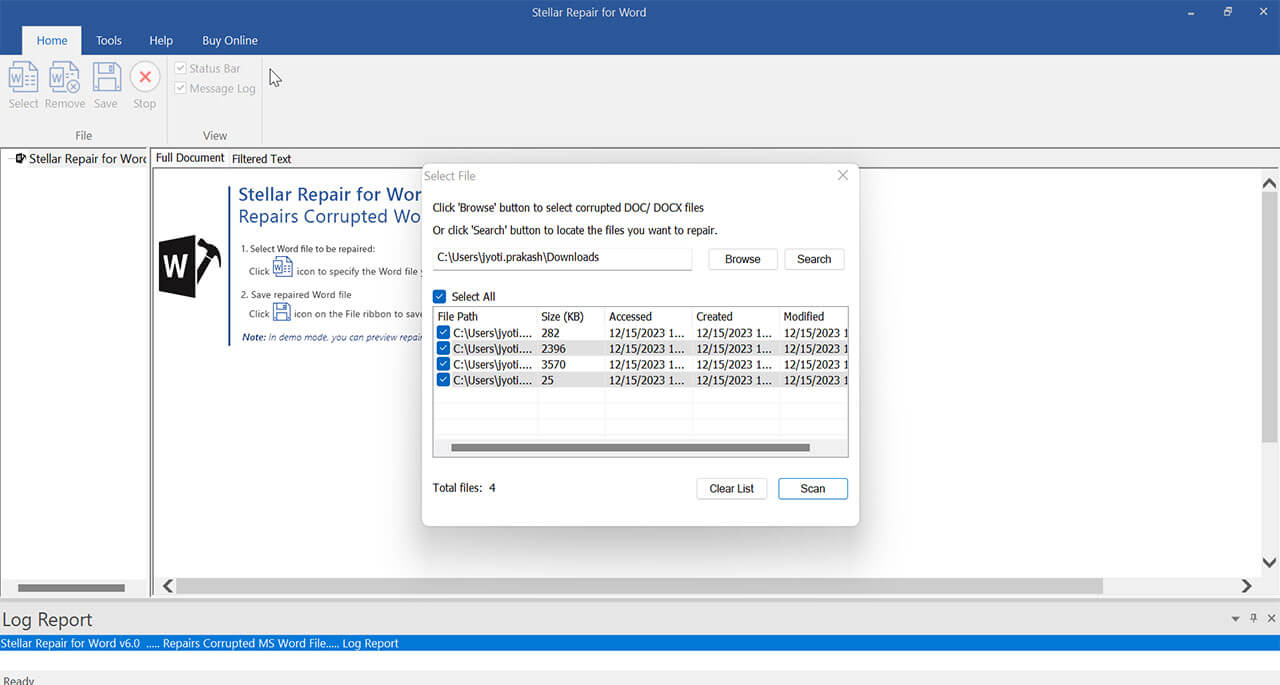
The Select File dialog: Browse or Search for DOC and DOCX files, with four documents ticked for a batch repair.
Features
Repairs DOC and DOCX, several at once
Stellar Repair for Word handles both the old .doc format and modern .docx files, and can repair a whole batch in one run, which helps when a failing drive has damaged a folder of documents rather than one file.
Finds files you can't locate
Stellar Repair for Word can search a drive (and its subfolders) for .doc and .docx files, so you can repair a document even if you've lost track of where it was saved.
Three preview modes
Stellar Repair for Word shows each repaired document as a Full Document (with layout, tables and images), as Filtered Text (text only, cleaned up) or as Raw Text (everything readable it found, for badly damaged files). You can save in the mode that recovered the most.

Full Document preview of a repaired file: the document opens in an embedded Word view with its table, logo and header intact.

Filtered Text preview in the free version: some words are replaced with "<demo>" placeholders until the software is activated.
Keeps formatting and objects
Stellar Repair for Word recovers fonts, hyperlinks, headers and footers, bookmarks, comments, tables, equations, symbols and page and text colors, not just plain text, so a repaired report usually looks like the original.
A log of every repair
Stellar Repair for Word keeps a log of each run (file name, start and end time and the result), which you can save for your records.
Benefits
- Hours of work saved when the alternative is retyping a long document.
- You know before you pay. The free preview shows what's recoverable.
- Simple enough for anyone: select, repair, preview, save.
- Handles batches after a drive or sync failure damages many files.
Real-World Uses
- A thesis that won't open the night before a deadline, after a crash during save.
- Documents from a failing USB stick that open with garbled text.
- A contract received by email that Word says is corrupt.
- A folder of DOC files recovered by data recovery software that won't open cleanly.
Who It's For, and Who Should Skip It
Good fit: Windows users with one or more damaged Word files they can't recreate, after Word's Open and Repair has failed.
Skip it if: the document is simply deleted or lost rather than damaged (you need data recovery software first); an older version exists in OneDrive or SharePoint version history, or in Word's AutoRecover files; or you also need to fix Excel, PowerPoint or PDF files, where Stellar Toolkit for File Repair at $69 covers all four. There's no Mac version.
Usage Guide
- Close Microsoft Word, then install and launch Stellar Repair for Word.
- Click Select and use Browse to add the damaged file(s), or Search to find Word files on a drive.
- Tick the files and click Scan (or Repair).
- Click each file in the left pane and check the preview in Full Document, Filtered Text or Raw Text.
- Activate the license, then click Save and choose the preview type and a folder.
- Open the saved copy in Word and check it before deleting the damaged original.
Where it falls short
- The free version holds back text. Filtered previews replace some words with "<demo>", so you see that the text is there but can't read every word until you buy.
- Subscription pricing for what is usually a one-time emergency; remember to turn off renewal.
- Severely overwritten files may only come back as raw text, without formatting.
- Few recent independent tests. Most published tests are of its predecessor, Stellar Phoenix Word Repair.
What Users Say
Independent coverage
Independent reviews of the current version are scarce. A 2016 BetaNews roundup of tools for corrupted Word documents rated the repair performance of the predecessor, Stellar Phoenix Word Repair, as excellent and noted it recovered fragments other tools couldn't, while suggesting the price suited home users best. On AlternativeTo, two users praised it:
"Happy to say that I had successfully repaired and recovered my Word document!!! ... I had spend $39 to buy this software and can say that this was one the best investment." (Colpert_83, February 2015)
"Thanks for developing a great program. Recovered over 124 pages of a Word document." (BrreadPit, November 2014)
On Trustpilot (Stellar, all products)
Stellar scores 4.8 out of 5 on Trustpilot from about 5,600 reviews: 89% five stars and 4% one star. The reviews are about Stellar's whole range, mostly its data recovery software, and most praise named support agents:
"Within one minute in the chat I was contacted by Swatantra." (Frank Moerdijk, August 2026)
"Akshay Sahu was excellent at providing information and alternatives to the online repair tool" (Diego De La Vega, November 2026)
The one-star reviews are blunt: "Do not purchase. Software is terrible and customer service worse." (Nick, November 2026). Most of the negative ones are about photo and phone recovery that didn't bring files back, not about the file repair tools.
The pattern: when the content is still in the file, Stellar's Word repair has a long record of getting it back, and Stellar's live chat support gets consistent praise. The complaints about Stellar mostly come from data recovery jobs that failed. With Word repair, the free preview removes most of the risk: if your text shows up there, the paid version will save it.
Comparisons
Stellar Repair for Word vs Word's Open and Repair
Word's built-in Open and Repair is free and fixes minor damage, but it either works or it doesn't, with no preview and no raw-text fallback. Stellar reads the file independently, shows three previews and can pull text from files Word won't touch.
Stellar Repair for Word vs Stellar Toolkit for File Repair
The Toolkit ($69 a year) adds Excel, PowerPoint and PDF repair to the same Word engine. Buy the single tool for a Word emergency; buy the Toolkit if you look after other people's files.
Editions and Pricing
| Edition | Price | Term | PCs | Buy |
|---|
| Stellar Repair for Word | $39 | 1 year, renews automatically | 1 | Buy Now |
Price from the order page on November 27, 2026. Stellar's own store shows it as a discount from $49.
FAQs
Is Stellar Repair for Word free?
Stellar Repair for Word is free to download, scan and preview. Saving the repaired document needs the $39 license.
Can Stellar Repair for Word fix "Word found unreadable content"?
Yes, that is the kind of damage Stellar Repair for Word is built for; Stellar says even the "Word was unable to read this document" error usually means minor corruption it can repair.
Does Stellar Repair for Word recover deleted Word files?
No. Stellar Repair for Word repairs files you still have. To get back a deleted document, use data recovery software first, then repair the recovered file if needed.
Will it change my original file?
No. Stellar Repair for Word saves the repaired document as a new file; keep the original until you've checked the copy.
Does it work with Word for Mac files?
Stellar Repair for Word runs only on Windows, but it repairs .doc and .docx files whichever computer created them.
What happens when the year ends?
The license renews automatically at the subscription price unless you turn renewal off. Stellar sells it only as a 1-year subscription, so keep renewal on only if you expect more damaged files.
System Requirements
- Windows 11, 10, 8.1 or 8
- Intel-compatible 64-bit processor
- 4 GB RAM minimum (8 GB recommended)
- 250 MB disk space for installation
- Word documents from Word 2000 to Word 2021 and Microsoft 365
Conclusion
Stellar Repair for Word is worth $39 when a Word document you can't recreate won't open and Word's own repair has failed: the free scan shows exactly what it can recover, and it keeps formatting, tables and images where the file allows. The main reason to hesitate is the pricing model: a yearly subscription for what's usually a one-time emergency, so turn off renewal if you don't need it again. If you also handle Excel, PowerPoint or PDF files, the $69 Toolkit is the better value.
Download Free TrialBuy Now