SysInfo DOCX Repair: Get the Text and Images Back from a Word File That Won't Open
SysInfo DOCX Repair is a $49 Windows tool that repairs damaged Microsoft Word .docx documents and saves what it recovers (text, tables, formatting and images) to a new .docx, leaving the broken original alone. It's for anyone facing "Word found unreadable content" or "the file cannot be opened" on a document they can't recreate.
It usually happens at the worst time: Word crashed while saving, a USB stick was pulled too early, or a download stopped halfway, and now the report or thesis chapter won't open. A .docx is really a ZIP archive of XML parts, so a damaged file often still holds most of its content. This tool digs it out.
Quick facts
- Version: 2.0 ("MS Word Docx Files Repair v2.0", installer dated August 22, 2024)
- Developer: SysInfoTools Software (India)
- Platform: Windows 11, 10, 8.1, 8 and 7, plus Windows Server 2008 and 2012
- Files: Word .docx (Open XML, Word 2007 and later); one file or a batch
- Price: $49 for a Single User licence with 1 year of updates, one-time payment. The order page names the product "Sysinfo Office Recovery".
- Free download: scans damaged files and previews the recovered text and images; an activation key turns on the full version
- Free licence offer: the vendor sends a free activation key to users who post a review of the tool on a review site and email it a screenshot (details below)
- What we checked: the installer (2.83 MB, file version 2.0.0.0) downloaded from the vendor and the $49.00 price and product name on the order page on November 26, 2026. We didn't repair a damaged document ourselves.
Before you buy
- Try Word's own repair first. Word has a free Open and Repair command (File, Open, then the arrow next to the Open button). It fixes light damage, and if it works you don't need any tool.
- Run the free download on your file. If SysInfo DOCX Repair's preview shows your text and pictures, the full version will save them. If the preview is empty, a licence won't change that.
- The free licence route. SysInfoTools says this tool is now free for life to anyone who posts their honest experience on UpdateStar, Software Informer, ITQlick, Trustpilot or another supported review site and emails a screenshot of the review. The key arrives after the vendor checks the review, and its terms apply. The $49 licence is the no-strings option, with the key emailed within about 15 to 20 minutes.
- Treat the 30-day guarantee as narrow. SysInfoTools' refund policy excludes software bought at a discounted price (the $49 is shown as a sale price against $79), refuses refunds for products that have been activated, and doesn't refund recovery software that recovers part of the data. The free preview is your real test.
- Look for the right name at checkout. The order page lists "Sysinfo Office Recovery" at $49. That's the product the vendor's own DOCX buy page sells.
Download Free DemoBuy Now ($49)
Overview
SysInfo DOCX Repair is a step-by-step wizard. You choose a file (or a set of files), pick a recovery mode, wait for the scan, look at what came back, and choose where to save the repaired copy. The original document is never overwritten: the output is a new .docx in the folder you pick, which you then open in Word.
It does one job. It doesn't repair the older .doc format, Excel or PowerPoint files, and it doesn't recover deleted files from a disk. If Word can't open a .docx you still have, this is the tool; if the file itself is gone, you need file recovery software instead.
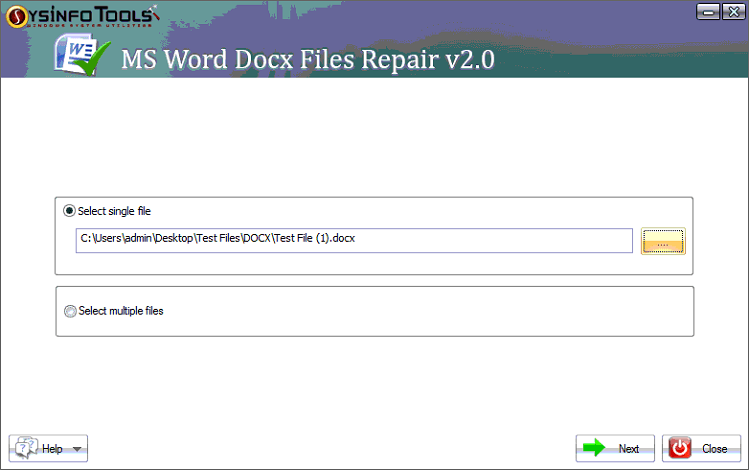
The first step of MS Word Docx Files Repair v2.0: select a single .docx or switch to multiple files.
Features
Two recovery modes
SysInfo DOCX Repair offers Standard mode for minor damage and Advanced mode for severe corruption, or for when Standard mode doesn't get the document back. Start with Standard; if the preview looks incomplete, go back and run Advanced on the same file.
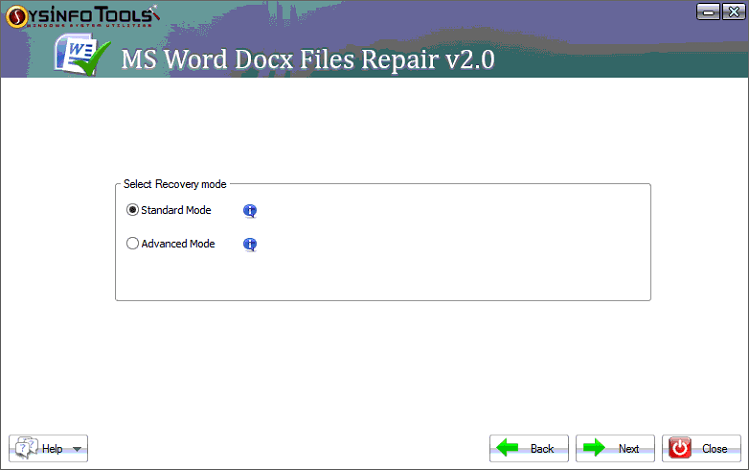
Choosing between Standard Mode and Advanced Mode.
Preview before you save
SysInfo DOCX Repair shows the recovered document in a text pane with the recovered pictures in a strip beside it, so you can judge the result before saving anything. This preview is what the free download gives you, which makes it a fair test of whether your particular file can be saved.
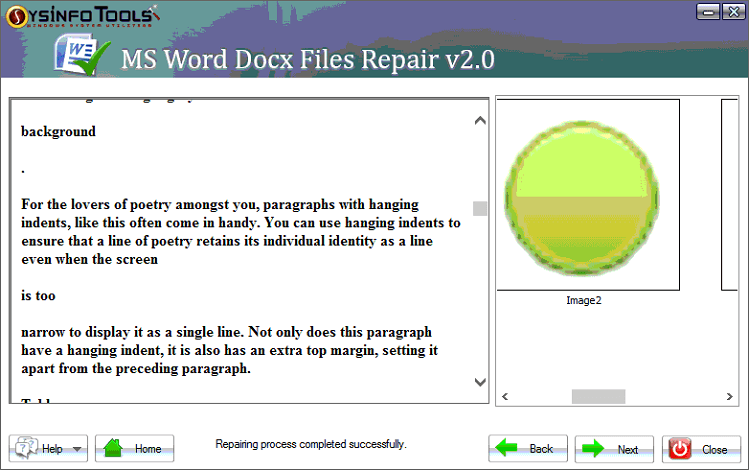
After "Repairing process completed successfully": recovered paragraphs on the left, the document's images on the right.
Text, tables, formatting and images
SysInfo DOCX Repair aims to bring back the text, tables, charts, images, fonts and formatting, Unicode characters, formulas, headers and footers, hyperlinks and notes of the document. A Save recovered images option also writes the document's pictures to a separate folder, handy when the photos or diagrams matter more than the layout.
Batch repair
SysInfo DOCX Repair can process several damaged .docx files in one run, handy after a failed USB drive or a sync error leaves a whole folder of documents unreadable. There's no file size limit on the licensed version.
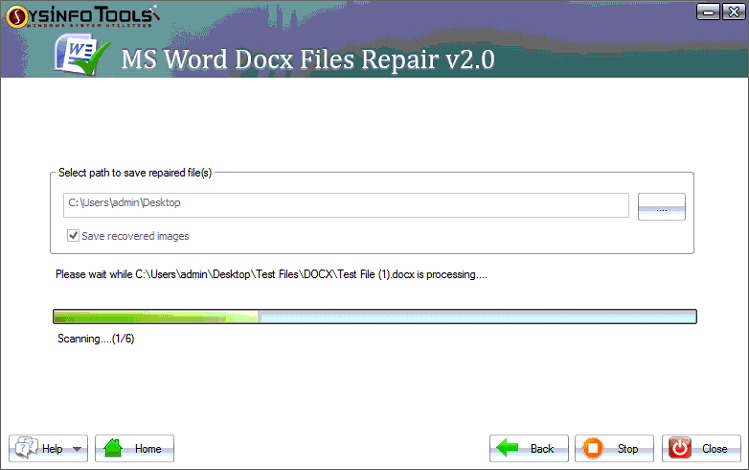
Saving: choose the output folder, tick Save recovered images, and watch the progress bar.
Benefits
- Hours of retyping saved. Even a partial recovery of a long report beats rebuilding it from memory.
- No risk to the original. Because the tool writes a new file, you can try both modes, or another tool afterwards, on the same damaged document.
- You see the result first. The preview tells you what you'll get before you spend anything.
- Simple enough for anyone. A wizard with Next and Back buttons, nothing to configure.
Real-World Uses
- Word crashed mid-save. The thesis chapter now shows "Word found unreadable content", and Open and Repair gives up.
- A bad USB stick. Several documents copied off a failing drive won't open; batch mode processes them together.
- An e-mail attachment that arrived broken. A contract or form that was truncated in transit, when the sender can't resend it.
- Getting the pictures out. A document full of photos or diagrams is damaged, and you mainly need the images back.
Who It's For, and Who Should Skip It
It's for Windows users with one or a few damaged .docx files that Word's own repair can't open, and who want a cheap, simple tool rather than a recovery service.
Skip it if your file is an old .doc (Word 97-2003), which SysInfoTools covers with a separate Word Doc repair tool; if you work on a Mac, since there's no Mac version; or if the document was deleted rather than damaged, which calls for file recovery software. Also skip it if Word's free Open and Repair already worked.
Usage Guide
- Download and install the tool, then launch it.
- Choose Select single file or Select multiple files, browse to the damaged .docx and click Next.
- Pick Standard Mode (try this first) or Advanced Mode and click Next.
- Wait for the scan, then check the preview of the text and images.
- Choose the destination folder, tick Save recovered images if you want the pictures separately, and click Save.
- Open the new .docx in Word and check it. If parts are missing, run the same file again in Advanced mode.
Where it falls short
- No miracle for wiped content. If the damaged part of the file held the text itself (not just its structure), no repair tool can bring that text back; expect gaps and lost layout on badly damaged files.
- Dated interface. The v2.0 window looks like Windows 7-era software, and the installer dates from 2024.
- Inconsistent product page. The vendor's specification box says version 1.0 and lists Outlook and Exchange versions that belong to other products; the program itself is 2.0.
- Reviews tied to free licences. The vendor trades free keys for published reviews, so its review scores lean positive. Trustpilot reviewers have complained about exactly this (quoted below).
- Word needed to open the result. The vendor says you need Microsoft Office installed to work with the repaired files.
What Users Say
There are no independent reviews of this particular tool on the big review sites, and SysInfoTools' G2 profile has no ratings. What exists is feedback about the company overall, plus testimonials on the vendor's page.
Trustpilot (sysinfotools.com): 4.6 out of 5 from 305 reviews
About 83% of the reviews are five stars and 8% are one star. Most praise the 24/7 chat support. Positive examples about other SysInfo repair tools:
- "I downloaded the SysInfo Archive Recovery Software Tool to try to recover a large corrupted zip file (well over 3GB)." (Louis Teixeira, who reports it worked)
- "I installed "SysinfoTools Software" and was able to restore my inbox 100%, thank you very much. I'm happy." (Beni)
- "The 24/7 helpdesk helped me solve all my issues. Very importan to have access to help anytime!" (Johny McTar)
The one-star reviews are mostly about refunds, activation and results:
- "Their Demo product worked, but the Full version would not authenticate, even after 4 hours of on-line chat." (jon sadler, "OpenOffice recovery tool would not work, but NO REFUND")
- "Refused a refund 4 hours after purchasing the software despite proof it would not work." (Darren Casey)
- "Absolutely awful! Paid for software which crashes. Support is useless. Avoid if you can" (Si, "Awful product and support")
- "I´d really like to test the software. But it didn't even show the list of recoverable files in the trial version." (Max, four stars)
And two about the review-for-licence deal:
- "trying the free zip repair tool and have to write a review in order to get a free licence." (GBT)
- "Ran into an issue and support helped me out at first. Offered me their admin version in return for writing a good review" (Jim Brown)
On the vendor's product page
SysInfoTools shows an average of 4.9 from 1,859 ratings on its own page, and two testimonials:
- "This is the best tool to repair corrupt DOCX files in a quick time. I received a satisfactory response from this product as well as from the support team. Thank you SysInfoTool." (Todd Kelly)
- "After receiving an error while opening my Word 2010 file I thought it was a temporary one, but it was more than that. Thanks to the DOCX Recovery tool, I got rid of this fault and my files are now error-free!." (Maria Watson)
The pattern: people like the support and say the tools usually do the job; the complaints are about refunds being refused, activation problems and trials that show less than hoped. With this tool, the free preview settles the main question before you pay.
Comparisons
SysInfo DOCX Repair vs Word's Open and Repair
Word's built-in Open and Repair is free and handles small structural errors, but it either opens the file or fails with a message. SysInfo DOCX Repair goes further on badly damaged files, shows you what it found, can save the images separately, and processes several files at once. Try Word first; pay only if Word gives up and the SysInfo preview shows your content.
Standard vs Advanced mode
Both modes are in the same program and licence. Standard is the quick pass for files with minor damage; Advanced digs deeper for severe corruption. There's no edition to choose between.
Editions and Pricing
| Licence |
Price |
Term |
Includes |
| Single User (order page: "Sysinfo Office Recovery") | $49 (list $79) | One-time payment, 1 year of updates | Both recovery modes, batch repair, preview, image export, no file size limit, 24/7 support |
| Free key for a review | $0 | Lifetime, after the vendor approves your posted review | The licensed version, subject to the vendor's terms |
There's only one paid licence for this tool, and the Buy button orders it. The vendor recommends its business licences for organizations on its other tools; for DOCX Repair, ask its sales chat if you need it on several company PCs.
Buy Now ($49)
FAQs
Can SysInfo DOCX Repair fix old .doc files?
SysInfo DOCX Repair is built for the .docx format that Word has used since Word 2007, and every feature the vendor lists is about .docx. For the older .doc format, SysInfoTools sells a dedicated Word Doc repair tool, which is the safer choice.
Does SysInfo DOCX Repair change my original document?
No. SysInfo DOCX Repair reads the damaged file and writes a new .docx to the folder you choose, so the original stays as it was, ready for another attempt.
Why does the order page say "Sysinfo Office Recovery"?
That's the name of the product SysInfoTools sells DOCX Repair under at checkout; the vendor's own DOCX buy page links to the same $49 item. Your activation key arrives by email after payment.
Do I need Microsoft Word installed?
The vendor says you need Microsoft Office on the PC to work with the recovered files, since the output is a normal .docx you open in Word.
Does SysInfo DOCX Repair work on a Mac?
No. SysInfo DOCX Repair is Windows only. On a Mac, copy the file to a Windows PC or use a Mac-native tool.
Does the licence expire after a year?
No. The SysInfo DOCX Repair licence keeps working; the one year refers to free updates.
Does activation need the internet?
Yes. SysInfoTools' purchase FAQ says activating the full version needs an internet connection. Keep the order email with your key in case you reinstall Windows.
System Requirements
- Windows 11, 10, 8.1, 8 or 7; Windows Server 2008 or 2012 (32 or 64-bit)
- About 3 MB for the installer
- Microsoft Word to open the repaired documents
- An internet connection to activate the full version
Conclusion
SysInfo DOCX Repair is worth $49 when Word's free Open and Repair has failed on a .docx you can't afford to lose, and the free preview shows your text and pictures. That preview is the one real reason to choose it: you know what you'll get before you pay. The main reason not to is the vendor's refund policy, which leaves little room once you've activated, so don't buy on hope. Old .doc files and Mac users need something else.
Download Free DemoBuy Now ($49)