MacX DVD Video Converter Pro Pack for Windows: A DVD Ripper and Video Converter in One License
MacX DVD Video Converter Pro Pack for Windows bundles two Digiarty programs, MacX DVD Ripper Pro and MacX HD Video Converter Pro, under one lifetime license for $45.95 on the order page (list price $109.90). It is for Windows users who want to turn a DVD collection into MP4 or phone-ready files and also convert camcorder, MKV and downloaded videos.
Shelves of DVDs and a laptop with no disc drive is a familiar mismatch. One program rips the discs; the other deals with everything that is already a file: AVCHD clips from an old camcorder, MKV downloads, videos that need to shrink for a phone.
Quick facts
- Version: DVD Ripper Pro 8.11.3 (November 13, 2025) and HD Video Converter Pro 5.18.3 (June 20, 2025)
- Developer: Digiarty Software (MacXDVD)
- Platform: Windows 11, 10, 8, 7, Vista and XP, 32 and 64 bit
- Price: $45.95 with code MPACKF, applied automatically on the order page (list price $109.90), lifetime license with free updates
- Trial: free; converts only the first 5 minutes of each video
- Languages: English, German, French, Spanish, Japanese, Chinese (Traditional)
- What we checked: the pack download (83 MB zip) and both programs' current installers, with their file versions read on our PC, and the $45.95 price on the order page, all on November 25, 2026. We didn't rip a disc or time a conversion
Before you buy
Two things matter more than the feature list. First, Digiarty says MacX HD Video Converter Pro for Windows gets no further updates and points users to its newer Winxvideo AI; the DVD Ripper Pro half is still maintained. Second, the pack's own download is a zip of September 2019 builds (DVD Ripper Pro 8.9.3 and HD Video Converter Pro 5.15.4); the current builds, 8.11.3 and 5.18.3, are on each program's own page on macxdvd.com.
Ripping copy-protected DVDs is legal for personal backups in some countries and not in others, so check the rules where you live.
Download Free TrialBuy Now
Overview
The pack is two separate programs that install side by side, each with its own window and registration. MacX DVD Ripper Pro for Windows reads a DVD, lets you pick the main title, audio track and subtitles, and converts it to a video file or a device preset. MacX HD Video Converter Pro for Windows works on files: it converts between HD and SD formats, downloads online videos, burns video to DVD and extracts audio.
Both use presets for Apple, Android, Microsoft and Sony devices, so you don't have to know bitrates to get a file that plays. If you do care, resolution, frame rate, codec and bitrate are all adjustable, and the converter uses NVIDIA CUDA and multi-core CPUs to speed things up.
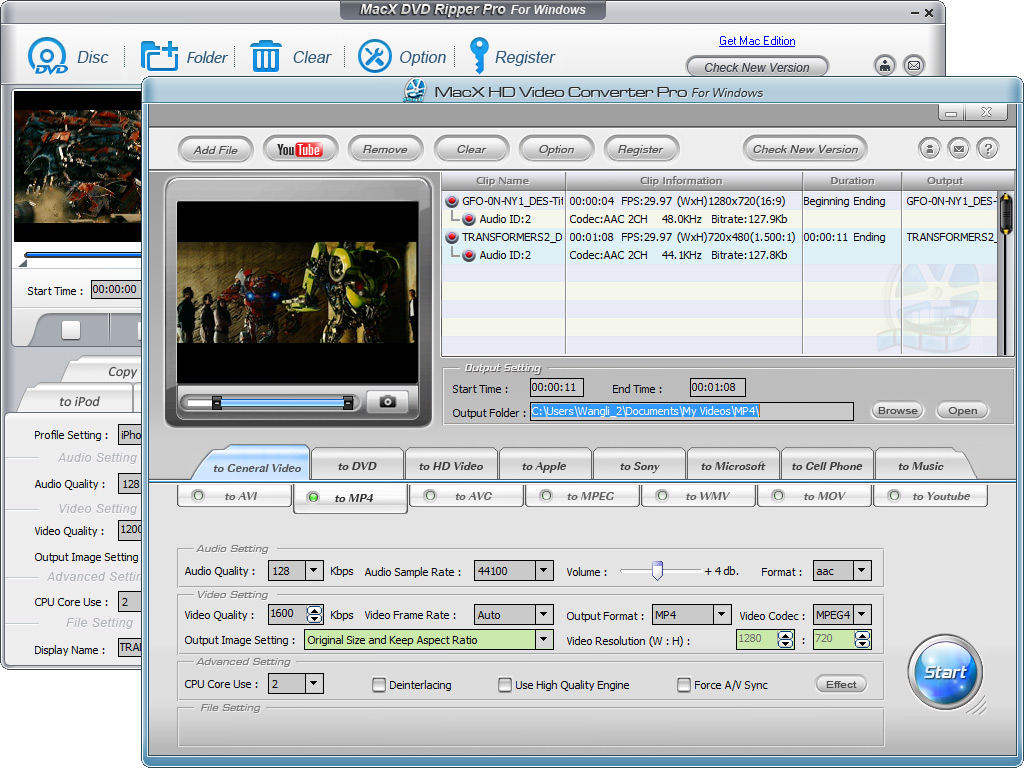
MacX HD Video Converter Pro (front) with two clips queued, MP4 chosen under "to General Video" and the audio and video settings open, in front of the MacX DVD Ripper Pro window (vendor screenshot).
Features
Rip DVDs to MP4, AVI, WMV, MOV and more
MacX DVD Ripper Pro for Windows converts homemade and commercial DVDs to MP4, AVI, WMV, MOV, FLV, MPEG and MP3, or straight to presets for iPhone, iPad, Apple TV, Android phones, PSP and Xbox. Digiarty says it handles CSS, region codes, Sony ARccOS and Disney's X-project protection.
Copy a DVD to USB or hard drive
MacX DVD Ripper Pro for Windows can copy a DVD into one MPEG-2 file with the original video and 5.1 AC3/DTS audio, a quick way to keep a disc on a drive without re-encoding.
Convert HD and camcorder video
MacX HD Video Converter Pro for Windows converts MKV, M2TS, AVCHD, MOD, TOD, MP4, AVI, WMV, MOV, FLV and more, including Blu-ray video files and HDTV recordings, to formats for players, phones and the web.
Download online videos
MacX HD Video Converter Pro for Windows has a built-in downloader for YouTube and other video sites, and can convert the download to MP4, H.264 or AVI in the same step.
Burn video to DVD
MacX HD Video Converter Pro for Windows can turn video files into a DVD folder or VOB files for burning, the reverse of the ripper.
Trim, crop, merge and snapshot
Both programs in MacX DVD Video Converter Pro Pack can trim a clip, crop black bars, merge titles into one file, extract the soundtrack as MP3 and save a frame as JPG or BMP.
Benefits
- One purchase covers both discs and files, instead of two separate tools.
- Device presets take the guesswork out of formats for phones, tablets and TVs.
- A lifetime license: no yearly renewal for either program.
- At $45.95 with the code it costs less than many single-purpose rippers.
Real-World Uses
- Moving a family DVD collection onto a NAS or USB drive as MP4 files before the discs scratch.
- Converting AVCHD clips from an old Sony or Panasonic camcorder into MP4 that phones and editors open.
- Putting films on an iPad for a flight, using the iPad preset.
- Burning a set of home videos to a DVD for relatives who still use a DVD player.
Who It's For, and Who Should Skip It
It suits Windows users with a DVD drive and a backlog of discs who also want a general-purpose video converter, and who like a one-time price.
Skip it if you need Blu-ray disc ripping (it converts Blu-ray video files, not protected Blu-ray discs), AI upscaling, or long-term updates for the converter half: Digiarty's own newer tools cover that. Skip it on a Mac, where Digiarty sells separate Mac versions. And if you only rip a few unprotected discs, free tools such as HandBrake may be enough.
Usage Guide
- Download the pack (a zip) from the button on this page, unzip it, and run both installers.
- To rip a disc, open MacX DVD Ripper Pro, click Disc, pick the drive, and let it select the main title.
- Choose an output profile (for example MP4 or an iPhone preset), set the output folder, and start the conversion.
- To convert files, open MacX HD Video Converter Pro, click Add File (or the YouTube button to download), choose a target under the format tabs, and click Start.
- After buying, enter the license code from the order e-mail in each program's Register dialog to remove the 5-minute limit. Use Check New Version or the programs' own pages to get the newest builds.
Where it falls short
- MacX HD Video Converter Pro for Windows is end-of-life: Digiarty says it will not be updated again, so new formats and site changes for the downloader won't be fixed.
- The interfaces look like they date from the Windows 7 era, with small text and many tabs.
- The 5-minute trial shows quality but not whether a whole disc rips cleanly.
- Online video downloaders break when sites change, and without updates this one will break for good.
- A user on Digiarty's own page wished it could copy a DVD to another DVD; it can't, only to a file.
What Users Say
Independent review
Milena Dimitrova reviewed MacX HD Video Converter Pro for Windows (version 5.9.4) for Sensors Tech Forum, a page last updated in January 2023. She found that "The program has a user-friendly interface and a list with complete instructions in the Help section" and that "The program does its job and meanwhile, it keeps the audio and video quality." Her one criticism was about the slideshow tool: "Note that you can only import folders, not single photos."
Independent reviews of the Windows editions are scarce and old. Most coverage of MacX DVD Ripper Pro is of the Mac version, and several "reviews" online come from companies selling competing rippers, which we leave out.
Testimonials on Digiarty's pages
"This application is very simple to use. It just took me a cup of coffee to make backup of all the DVDs and video collections. With customized parameter settings, I could specify according to my portable devices." (Steve, on the pack page)
"Works great as it state. It supports ripping the new copy protected DVD movies that can't be handled by similar tools." (Paul, on the pack page)
"I bought your software and was impressed by the speed. The conversion ran very fast using 4 cores, even with deinterlacing." (unnamed customer, HD Video Converter Pro page)
A customer quoted on the DVD Ripper Pro page liked the DVD-to-USB copy and said the output "looks the same as the original one, yet the conversion only took me eight minutes", while adding: "it would be more great if it could add the ability of copying DVD to DVD."
The pattern: buyers praise speed, simple presets and protected-disc support; the complaints are about missing extras (DVD-to-DVD copy, single-photo import) and, today, the converter's lack of updates. Treat vendor-page testimonials as the vendor's pick.
Comparisons
vs HandBrake (free)
HandBrake is free, open source and actively developed, but it doesn't remove DVD copy protection on its own and has no downloader or DVD burning. The MacX pack is easier for beginners and handles protected discs, at the cost of a license and an aging converter.
vs Digiarty's newer tools
Digiarty now pushes Winxvideo AI for video conversion, with AI upscaling and GPU acceleration, and keeps DVD Ripper Pro updated. If you want a converter that will keep getting updates, the newer tool is the safer pick; the pack is the cheaper way to get a maintained DVD ripper plus a converter that still works today.
Editions and Pricing
| Edition | Price | License | Includes | Buy |
|---|
| DVD Video Converter Pro Pack for Windows | $45.95 with code MPACKF (list $109.90) | Lifetime, free updates | DVD Ripper Pro + HD Video Converter Pro | Buy |
Price from the order page on November 25, 2026, in US dollars; the code is applied automatically by the Buy button. Digiarty also sells each program on its own and has separate Mac versions. The license code arrives by e-mail right after payment, and e-mail support is free for life.
FAQs
Does MacX DVD Video Converter Pro Pack for Windows run on Windows 11?
Yes. Digiarty lists Windows 11 for both MacX DVD Ripper Pro for Windows and MacX HD Video Converter Pro for Windows, as well as Windows 10, 8, 7, Vista and XP.
Is MacX HD Video Converter Pro for Windows still updated?
No. Digiarty states that MacX HD Video Converter Pro for Windows will no longer receive updates; version 5.18.3 from June 2025 is the last. MacX DVD Ripper Pro for Windows is still updated (8.11.3, November 2025).
Is the MacX DVD Video Converter Pro Pack license a subscription?
No. It is a one-time payment for a lifetime license with free updates to the latest version of each program.
What does the trial of MacX DVD Video Converter Pro Pack limit?
The trial converts only the first 5 minutes of each video. The full version removes that limit.
Can MacX DVD Video Converter Pro Pack rip Blu-ray discs?
No. It converts Blu-ray video files (M2TS) that are already on your drive, but it does not rip Blu-ray discs.
Is there a Mac version of MacX DVD Video Converter Pro Pack?
Digiarty sells a separate Mac pack. This listing is the Windows pack.
Do I need a DVD drive?
For ripping discs, yes, a DVD drive (internal or USB) is needed. The video converter works without one.
System Requirements
- Windows 11, 10, 8/8.1, 7, Vista or XP (32 or 64 bit)
- A DVD drive for ripping discs
- About 85 MB for the download; more space for the ripped video files
- NVIDIA graphics card optional, for CUDA acceleration in the converter
Conclusion
At $45.95 with the code, MacX DVD Video Converter Pro Pack for Windows is a fair price for a DVD ripper that is still maintained, with a working video converter and downloader thrown in. Buy it if your main job is moving DVDs to files on Windows.
The reason to hesitate is the converter half: Digiarty has stopped updating it, so it will only get older. If ongoing video conversion matters more to you than DVDs, pick a tool that is still developed. Try the 5-minute trial on one of your own discs first.
Download Free TrialBuy Now