Kernel for OST to PST: Get Mail Out of an Orphaned OST File for $49
Kernel for OST to PST is a $49 Windows tool from KernelApps that converts offline, orphaned or corrupt Outlook OST files into a PST you can open anywhere. It's for anyone holding an OST file whose Outlook profile, mailbox or Exchange account is gone.
That last case is the one Outlook can't help with. An OST is tied to the profile and account that created it, so a file left behind by a former employee or a rebuilt PC simply won't open. The trial shows you the whole mailbox first and saves 25 items from each folder, so you can see what's inside before spending anything.
Quick facts
- Version: 26.0, released December 2025
- Developer: KernelApps Pvt. Ltd. (Kernel Data Recovery)
- Platform: Windows 11, 10, 8.1 and older, Windows 365, Windows Server 2022, 2019 and older
- Works with: Office 365 Outlook and Outlook 2024, 2021, 2019, 2016 and previous versions, Exchange Server 2019, 2016, 2013 and earlier
- Price: $49 for the Personal License on the order page
- Trial: saves the first 25 items per folder
- Guarantee: 30 days money back, per the vendor's buy page
What we checked: installer file version 26.0 (39.7 MB, digitally signed by KernelApps Private Limited), and the order page, which showed $49 for the Personal License with a lifetime term and no renewal, on November 9, 2026. We didn't convert a damaged OST ourselves, so results here are the vendor's and its users' claims.
Download Free TrialBuy Now
Overview
Outlook keeps an offline copy of a server mailbox in an OST file. While the account exists, you never think about it. Once the account is deleted, the profile is lost or the file is damaged, that OST holds mail you can't reach. Outlook's own Import and Export wizard only works on the live profile, so it's no help at that point.
Kernel for OST to PST reads the file directly. You point it at one or more OST files, it scans them, and it lists the mailbox in its original folder tree with a message preview. Deleted items appear in red. You then tick the folders you want and choose where they go. The same product is sold on the vendor's site as Kernel OST Recovery, and both pages lead to one buy page.
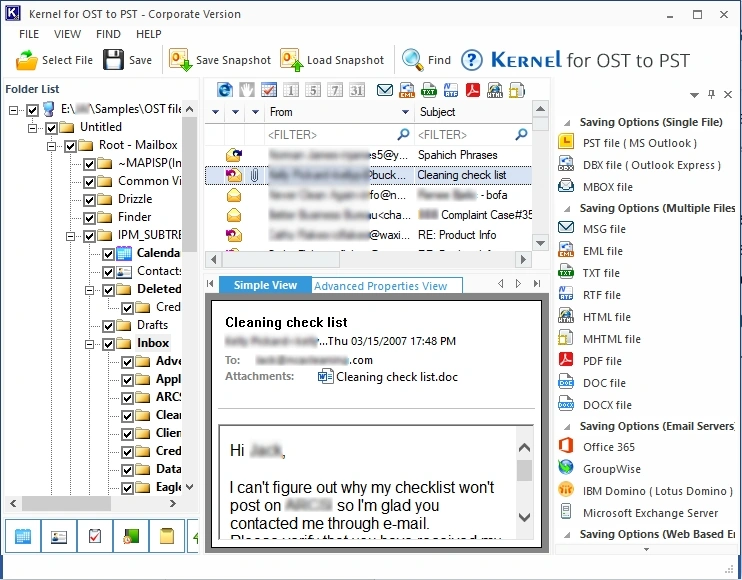
The main window: the OST's folders on the left, a message preview in the middle and the saving options on the right. This one is the Corporate edition's title bar.
Features
Converts orphaned and inaccessible OST files
Kernel for OST to PST opens OST files without the Outlook profile that made them, including files from a deleted Exchange or Office 365 account. Several can be added at once, and the Search option finds OST files on a drive if you don't know where they are. The full version has no OST size or item limit.
Repairs damage and finds deleted items
Kernel for OST to PST rebuilds corrupt OST files into a new PST and brings back deleted mail that's still in the file, with those messages marked in red. When saving, you pick all mail including deleted items, all mail without them, or deleted items only.
Saves to many formats and servers
Kernel for OST to PST writes to PST, DBX or MBOX, and saves individual messages as MSG, EML, TXT, RTF, HTML, MHTML, PDF, DOC or DOCX. It can also send the data straight to Office 365, Exchange, GroupWise, IBM Domino, Gmail, Yahoo, iCloud or AOL, as the panel on the right of the screenshot shows.
Filters, Find and split output
Kernel for OST to PST filters by date range, item type, folder name, From, To and Subject, so you can pull out one person's mail from one quarter. A Find tool locates specific messages, and a large result can be split into smaller PSTs of 1 GB, 2 GB and up.
Snapshots and mailbox reports
Kernel for OST to PST can save a snapshot of a scan and load it later, so a long job needn't start over. It also draws a report on the mailbox, covering item types, mail flow by date or sender, and interaction between users.
Benefits
- You can check before paying. The trial's preview shows the actual mailbox, not a sample.
- The account doesn't have to exist. That's the whole point when someone has left the company.
- A conversion can double as a move. Sending the mail directly to Office 365 or Gmail skips a separate import step.
Real-World Uses
- A departed employee: the account was deleted and all that's left is an OST on an old laptop.
- A rebuilt PC: a new Outlook profile doesn't recognize the OST from before.
- A corrupt file: Outlook throws sync errors and the OST won't load.
- Before a migration: archive a mailbox to PST ahead of decommissioning an Exchange server.
- A size problem: pull mail out of an oversized OST and split it into smaller PSTs.
Who It's For, and Who Should Skip It
Buy it if you have an OST file you can't open any other way and the trial shows your mail. For one orphaned mailbox, $49 is modest next to the cost of rewriting what was in it.
Skip it if the account still works. An OST is only a copy, so when the mailbox is alive on the server, delete the OST and let Outlook download it again, or export through Outlook for free. IT firms that handle customers' files should look at the Technician license, since the Personal license is for individual use. There's no Mac version.
Usage Guide
- Copy the OST somewhere safe and close Outlook.
- Download and install the free demo, then launch it.
- Choose single or multiple OST files and add them, or use Search to find them.
- Wait for the scan, then preview the folders and look for items in red.
- Tick the folders you want and click Save.
- Choose PST or another destination, apply any filters, set a location and click Finish.
- If the demo looks right, buy a license and activate it from the program.
Before you buy
- Run the demo on your real file. It costs nothing and answers the only question that matters.
- Check the Personal license terms. KernelApps' license table lists 1 year of validity and updates and 3 PCs, while the order page showed a lifetime term with no renewal. Corporate and Technician are listed as lifetime.
- Keep the original OST. Work on a copy so you have something to go back to.
Where it falls short
- Independent evidence is thin. Nearly all the high ratings sit on the vendor's own site, and no detailed outside test of this product turned up.
- The product naming is confusing. The same tool appears as Kernel for OST to PST, Kernel OST to PST Converter and Kernel OST Recovery.
- Prices vary by page. The Personal license is listed at $79 with a discount to $49, so the number you see depends on the promotion running.
- Overwritten data is gone. Deleted mail comes back only if it's still in the file.
What Users Say
Kernel's own numbers are very high, and independent reviews of this specific product are scarce. Read the vendor's figures as marketing, and let the trial decide.
On the vendor's page
KernelApps shows 4.9 out of 5 from 852 reviews, collected on its own site.
"A key employee of ours left, and their Exchange account was deactivated with critical project data in the orphaned OST file. All standard recovery methods failed. This OST to PST converter was an absolute lifesaver." - Carl Mathew, CEO
"Recently, we shifted from classic Outlook to New Outlook and wanted all the data in it. This OST to PST converter tool is a lifesaver for our organization." - Paul Jameson, Product Manager
"I am impressed with the Kernel OST to PST Converter tool. It effortlessly converted my files in PST format by keeping everything in place." - Tom Conroy, CIO
Kernel Data Recovery on Trustpilot
The company's Trustpilot page shows 4.9 out of 5 from 166 reviews, read through a page summarizer. The reviews we could read were all five stars, and they cover the company rather than this one product. Two mention OST to PST work:
"The Kernel team was extremely helpful in resolving an issue I had with OST to PST conversion." - Drew J, March 3, 2026
"I needed to convert my old OST file to PST after I could no longer access the original Outlook profile." - Kanika Sharma, August 24, 2026
Other sites
Gartner's page for the product shows 4.0, from a single review posted in August 2025, seen through a search summary. Other software directories list it with no ratings yet, so there's little independent score to weigh.
The pattern: buyers praise the rescue of orphaned files and the support team. There's no independent test to back the 4.9, so the trial's preview is your best evidence.
Comparisons
Kernel for OST to PST vs Outlook's Import and Export wizard
Outlook's wizard exports mail to PST for free, so use it whenever the profile still works. It needs that live profile, though. Kernel for OST to PST reads the file on its own, which is why it's worth paying for only when the account or profile is gone or the file is damaged.
Personal vs Corporate vs Technician
Personal is for individual use. Corporate covers business use within one organization, and Technician is for consultants and service companies working across several organizations. If you recover mailboxes for customers, you need Technician.
Editions and Pricing
| License | Price | Validity and updates | Installs | For |
|---|
| Personal (this listing) | $49 on the order page | 1 year in the vendor's table | 3 PCs | Individual use |
| Corporate | $199 | Lifetime | 250 PCs | One organization |
| Technician | $399 on the vendor's buy page | Lifetime | Unlimited | Consultants and service providers |
FAQs
Can Kernel for OST to PST open an OST from a deleted account?
Yes. Kernel for OST to PST reads orphaned OST files without the original profile or Exchange account, which is the main reason to buy it.
Does Kernel for OST to PST convert encrypted OST files?
Yes. KernelApps lists encrypted OST conversion among the features of Kernel for OST to PST.
Is there a size limit in Kernel for OST to PST?
No. Kernel for OST to PST has no OST size limit in the full version. The trial's limit is 25 saved items per folder, not a file size.
Will the converted PST work in New Outlook?
A PST from Kernel for OST to PST is a standard Outlook data file. One reviewer on the vendor's page used it while moving from classic Outlook to New Outlook. Run the trial and check the result on your own setup.
Is Kernel for OST to PST the same as Kernel OST Recovery?
They share one buy page, one trial installer and the same version number, 26.0. KernelApps markets the product under both names.
Does Kernel for OST to PST need other software?
KernelApps' FAQ says Kernel for OST to PST needs no additional applications to be installed.
System Requirements
- Windows 365, 11, 10, 8.1 and older, Windows Server 2022, 2019 and older
- Intel Pentium compatible processor (x86 or x64) or equivalent
- 128 MB RAM minimum and 50 MB of disk space, plus room for the converted mail
Conclusion
Kernel for OST to PST is worth $49 if you're stuck with an OST that Outlook can't open and the trial shows your mail. The reason to buy is simple: it reaches mail no free Microsoft tool can reach once the profile is gone. The reason not to is just as simple: if the account still works, you don't need it at all. Independent reviews are thin, so run the demo and judge by what it finds.
Download Free TrialBuy Now