Leawo DVD Copy: 1:1 DVD Backups, DVD-9 to DVD-5 and ISO on Windows
Leawo DVD Copy is a Windows DVD copier that makes 1:1 copies of DVD-9 and DVD-5 movies, or squeezes a dual-layer DVD-9 onto a single-layer DVD-5, and saves the result to a blank disc, a DVD folder or an ISO image. It costs $29.95 for one year or $39.95 for a lifetime license on one PC. If you own Blu-rays too, Leawo Blu-ray Copy ($44.95 a year, $99.95 lifetime) includes DVD Copy plus three Blu-ray modules.
Quick facts
- Version: 13.0.1.6, a module of Leawo Prof. Media 13, released October 10, 2026
- Developer: Leawo Software Co., Ltd.
- Runs on: Windows 11, 10, 8.1, 8 and 7. Leawo DVD Copy for Mac is a separate product.
- Copies from: a DVD disc, a DVD folder or an ISO image
- Copies to: a blank DVD, a DVD folder or an ISO file
- Disc types: DVD-9 and DVD-5, 1:1 or DVD-9 compressed to DVD-5, NTSC or PAL
- Price: $29.95 for one year or $39.95 lifetime, one PC, on the order page
- Also included in: Leawo Blu-ray Copy, $44.95 for one year or $99.95 lifetime, which covers four modules: Blu-ray Copy, DVD Copy, Blu-ray Recorder Copy and Blu-ray to DVD Converter
- Free trial: copies only the first 5 minutes of a disc
- Money-back period listed: 5 days (1-year licenses), 14 days (lifetime)
- Installer: 199.5 MB (the whole Prof. Media 13 suite)
What we checked: the Windows installer linked from Leawo's DVD Copy download page (ltmcp_setup.exe, 209,171,392 bytes, file version 13.0.1.6, product name "Leawo Prof. Media", signed by ShenZhen Moyea Software Co., Ltd.), and the order pages for both products: Leawo Blu-ray Copy at $44.95 for one year with lifetime $55.00 more ($99.95), and Leawo DVD Copy at $29.95 for one year with lifetime $10.00 more ($39.95), before sales tax, all on October 30, 2026. We didn't copy a DVD with it ourselves.
Before you buy
- Own Blu-rays too? Consider Blu-ray Copy instead. Leawo's registration guide says: "You get the DVD Copy module for free if you purchase the Blu-ray Copy module." For $15 more a year, Blu-ray Copy adds Blu-ray copying, Blu-ray recorder disc copying and Blu-ray to DVD conversion. Buy one or the other, not both.
- You download the whole Prof. Media 13 suite. DVD Copy is the Copy tab. The Convert, Burn, Download and Cinavia tabs belong to other Leawo products with their own licenses, and stay locked.
- Refunds are narrow. Leawo refunds real faults its support can't fix, not a change of mind, so the 5-minute trial is your real test. Run it on the exact discs you care about.
- Personal backups only. Leawo's fair-use terms limit it to discs you've lawfully obtained and rule out rental discs and redistribution. Whether breaking CSS protection is legal depends on your country.
Download Free TrialBuy Now
Overview
Leawo DVD Copy has been around since the early 2010s as a stand-alone program. Today it lives inside Leawo Prof. Media 13, Leawo's one-window suite of disc tools, as one of the modules on the Home screen. Once a license that covers it is activated, the DVD Copy tile shows as Registered, and DVD copying happens on the Copy tab.
The job it does is narrow and old-fashioned in a good way: it keeps a DVD as a DVD. Menus, chapters and the original audio tracks stay in a disc structure you can burn again or play from an ISO, instead of being re-encoded into an MP4.
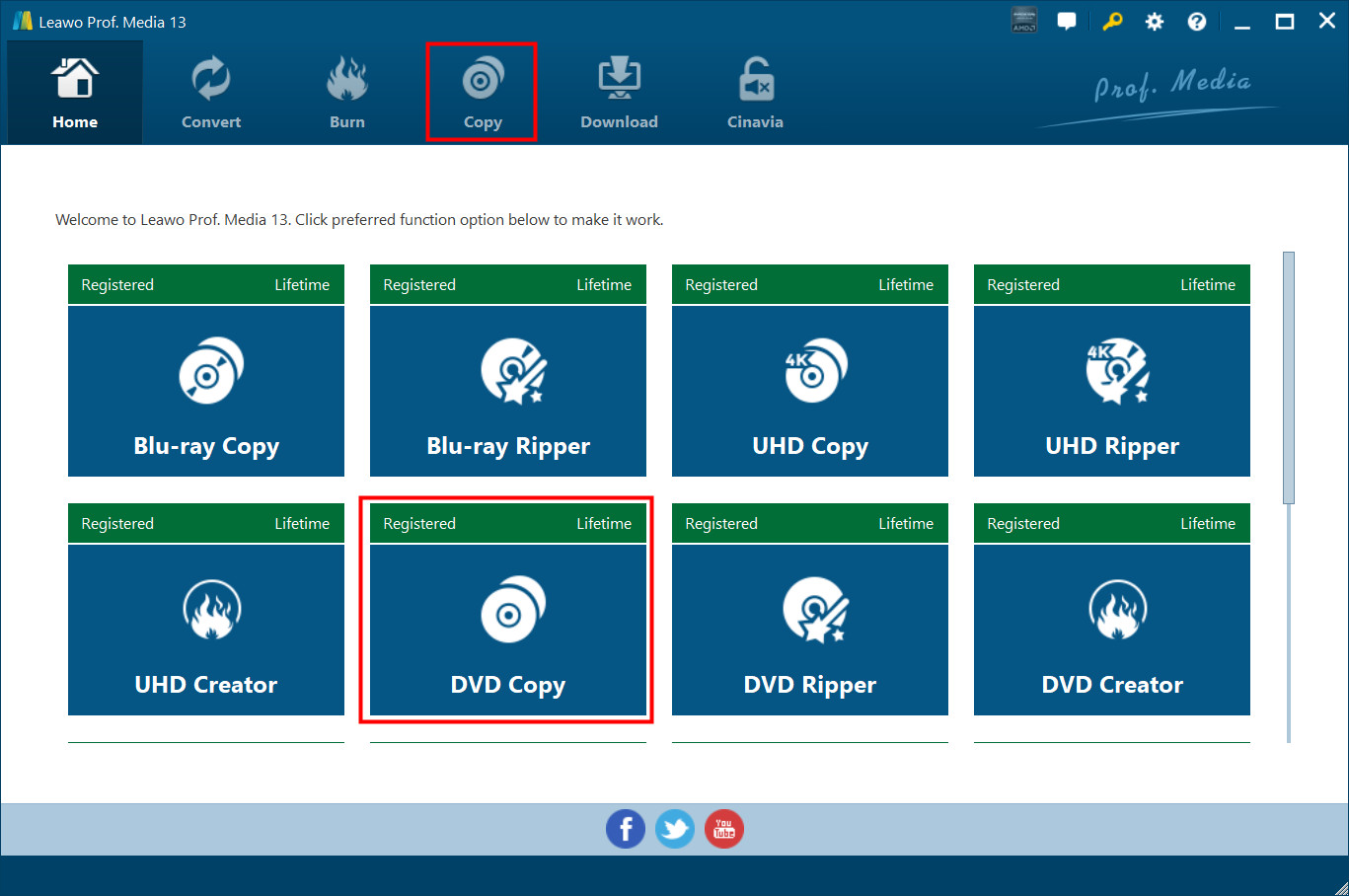
The Prof. Media 13 Home screen with the DVD Copy tile (Registered, Lifetime) next to Blu-ray Copy, UHD Copy, DVD Ripper and the other modules. DVD Copy opens on the Copy tab. Vendor screenshot.
Features
1:1 copies of DVD-9 and DVD-5 discs
Leawo DVD Copy makes a 1:1 copy of a DVD-9 to a DVD-9 or a DVD-5 to a DVD-5, so the copy keeps the original's full picture quality, menus and chapters. With one drive, it reads the movie first, then asks you to swap in a blank or rewritable disc to burn it.
DVD-9 to DVD-5 compression
Leawo DVD Copy can shrink a dual-layer DVD-9 onto a cheaper single-layer DVD-5 (4.7 GB) instead of copying it 1:1. A size bar along the bottom of the window shows how much of the target disc your selection fills, so you can drop extras or audio tracks until it fits. Compression costs some quality, which is why Main Movie, which leaves the bonus material behind, often looks better on a DVD-5 than Full Movie.
Full Movie, Main Movie and Custom Mode
Leawo DVD Copy has three ways to decide what goes into the copy. Full Movie copies the whole disc. Main Movie copies only the film. Custom Mode lets you tick the titles you want. Below the title list, you choose which subtitle and audio tracks to keep, and a built-in player previews the disc.
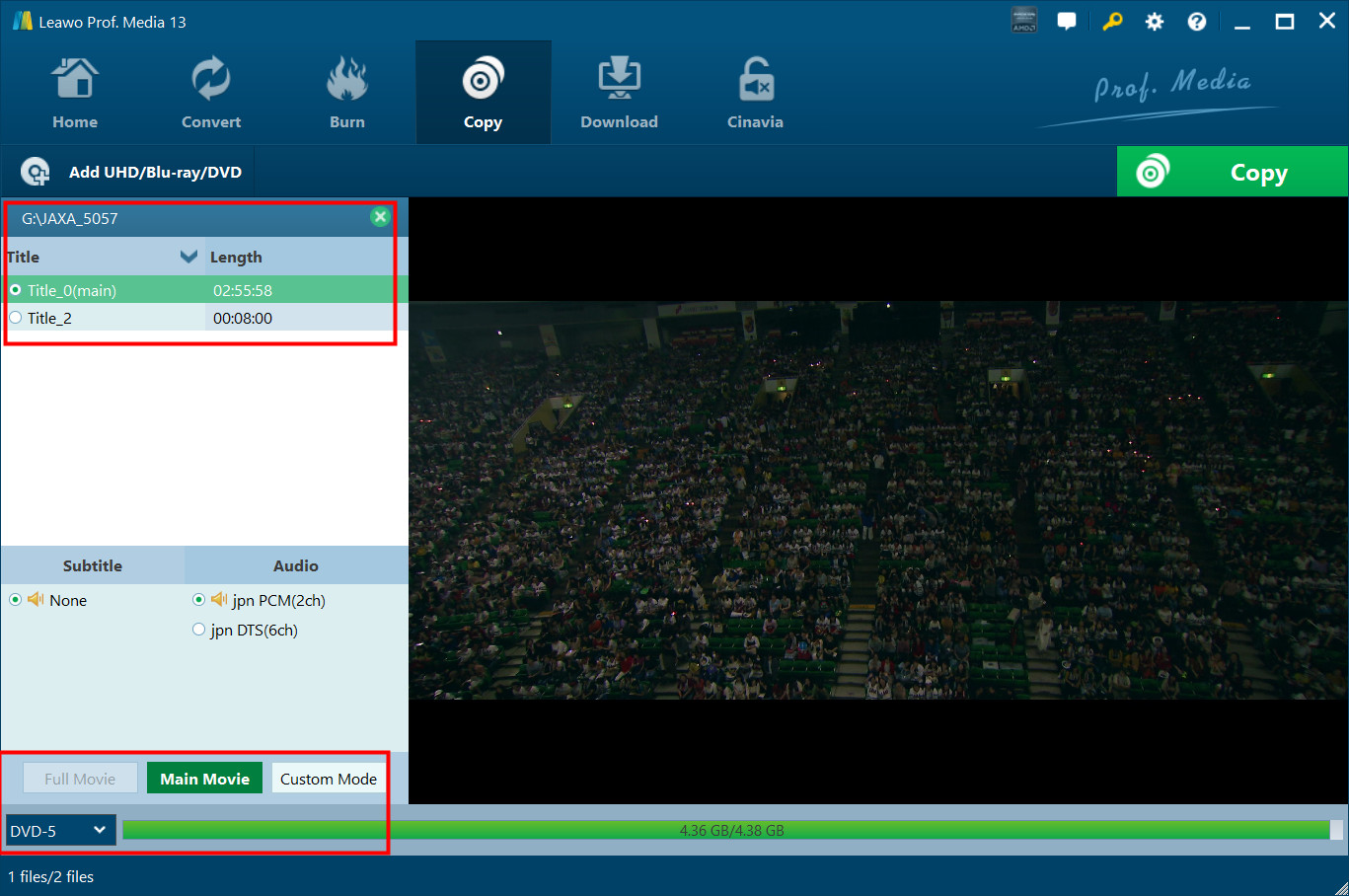
The Copy tab with a disc loaded: two titles (main title 2:55:58), subtitle and audio choices, Main Movie selected, and the target set to DVD-5 with the size bar at 4.36 GB of 4.38 GB. The same Copy tab serves Blu-ray Copy. Vendor screenshot.
CSS and region code removal, NTSC and PAL
Leawo DVD Copy removes CSS protection and region codes during the copy, according to Leawo, so a disc bought in another region can be copied and played on your own player. It also converts between the NTSC and PAL video standards: set the Default Video Mode under the gear icon's Copy & Burn tab before you start.
Disc, folder or ISO output, and ISO burning
Leawo DVD Copy writes one copy to up to three places in a single job: a DVD folder, an ISO file and a blank disc in your burner. It shows the hard disk space the job needs next to the free space, and lets you set the disc label. Going the other way, it burns an ISO image you already have onto a blank DVD.
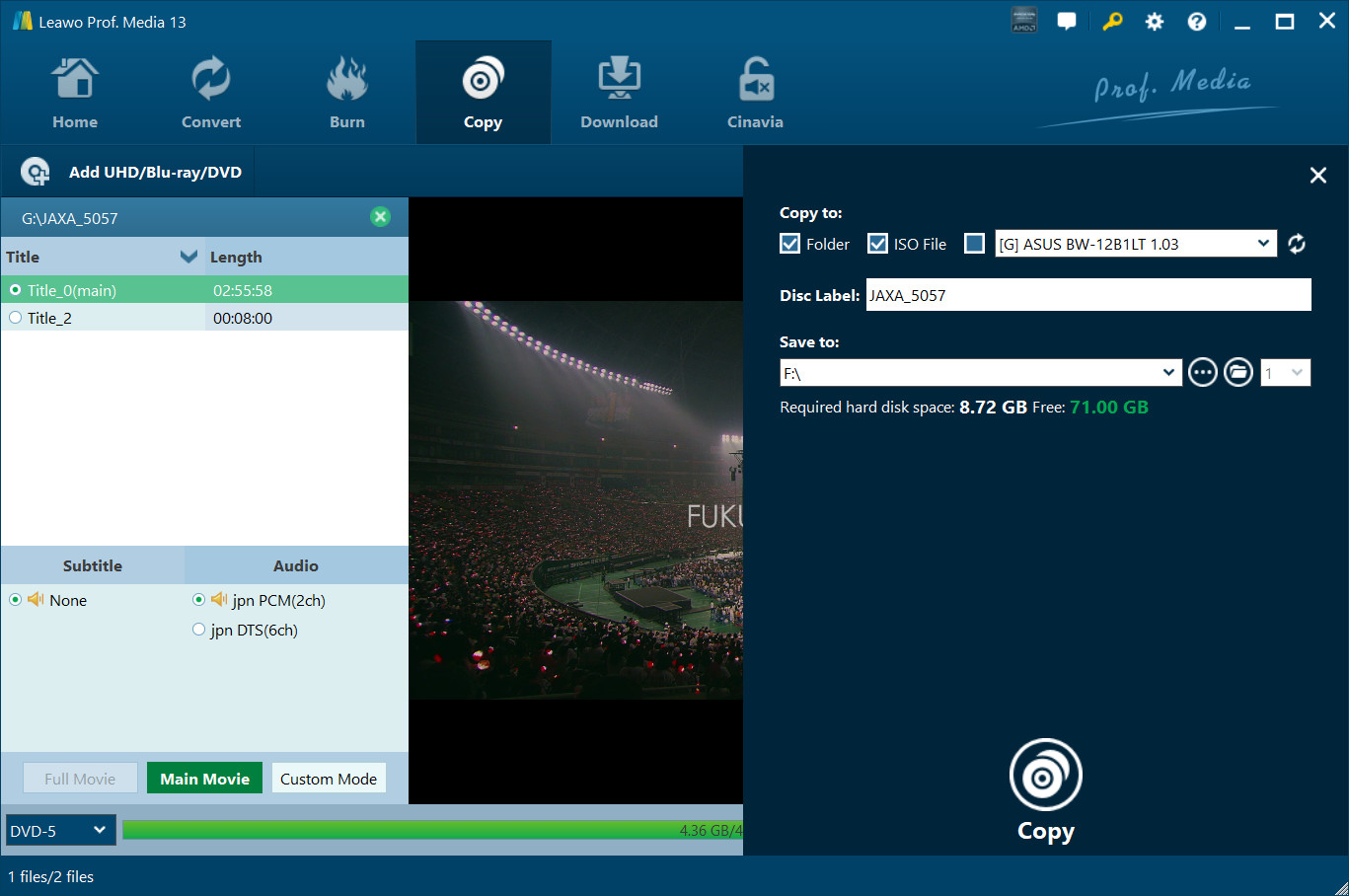
The output sidebar: Folder and ISO File ticked, an ASUS burner available as the third target, the disc label, the save location, and "Required hard disk space: 8.72 GB, Free: 71.00 GB". Vendor screenshot.
Benefits
The main benefit is keeping the disc experience. A ripper turns your movie into a file for a phone or a media server; Leawo DVD Copy gives you back a DVD that behaves like the one you bought, with its menus, chapters and language choices, playable in any DVD player. The second benefit is very little to learn: pick a mode, pick DVD-9 or DVD-5, tick where it should go, and click Copy.
Real-World Uses
- Kids' DVDs in the car: burn a Main Movie copy for the back seat, and keep the original at home where small fingers can't scratch it.
- A shelf of DVD-9s, a spindle of DVD-5s: compress each dual-layer movie onto a cheaper single-layer blank.
- An ISO archive: save each disc as an ISO on a NAS or an external drive while the discs still read cleanly, and burn a fresh copy whenever one dies.
- Imported discs: copy a PAL disc to NTSC, or a disc from another region, so it plays on your own DVD player.
Who It's For, and Who Should Skip It
It's for Windows users with a DVD collection who want spare discs or ISO images that keep menus and extras, without tuning encoder settings. If you also own Blu-rays, Leawo Blu-ray Copy is the better buy, since its license copies both.
Skip it if you want your movies as MP4 or MKV files for a phone, tablet or Plex: that's a DVD ripper's job, and Leawo sells DVD Ripper separately. Mac users need Leawo DVD Copy for Mac instead. And if you want a light, single-purpose program, a 200 MB suite with locked tabs for other products may annoy you.
Usage Guide
- Install and launch. Run the Prof. Media 13 installer from the Download Free Trial button and open the program. Once you've bought a license, click the Register button at the top right and enter your registration code in the Activation Center.
- Open the Copy tab and add the source. Click Add UHD/Blu-ray/DVD and choose Add from CD-ROM, Add from folder or Add iso file, or drag the folder or ISO into the window.
- Set the disc type. Choose DVD-9 or DVD-5 in the drop-down at the bottom left and watch the size bar.
- Choose a mode and tracks. Click Full Movie, Main Movie or Custom Mode, then pick the subtitle and audio tracks to keep.
- Set the output. Click the green Copy button at the top right. Tick your burner to copy to a blank disc, or Folder or ISO File to save to your hard drive, and set the label and save location.
- Copy. Click Copy at the bottom of the sidebar. With only one drive, eject the original when asked and insert a blank or rewritable DVD.
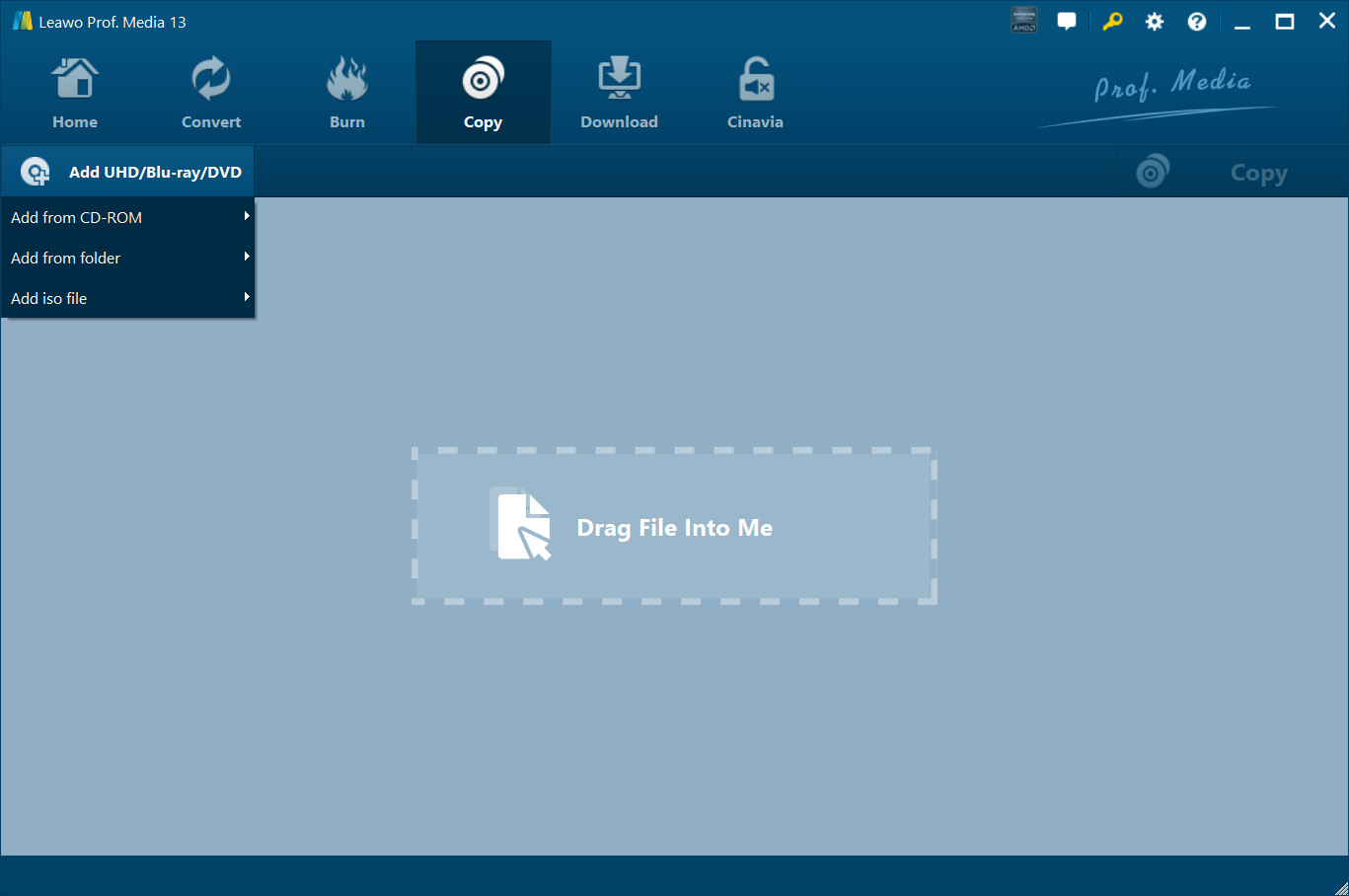
Step 2: the Add UHD/Blu-ray/DVD menu (Add from CD-ROM, Add from folder, Add iso file) above the "Drag File Into Me" box. With only a DVD Copy license, the program imports DVDs only. Vendor screenshot.
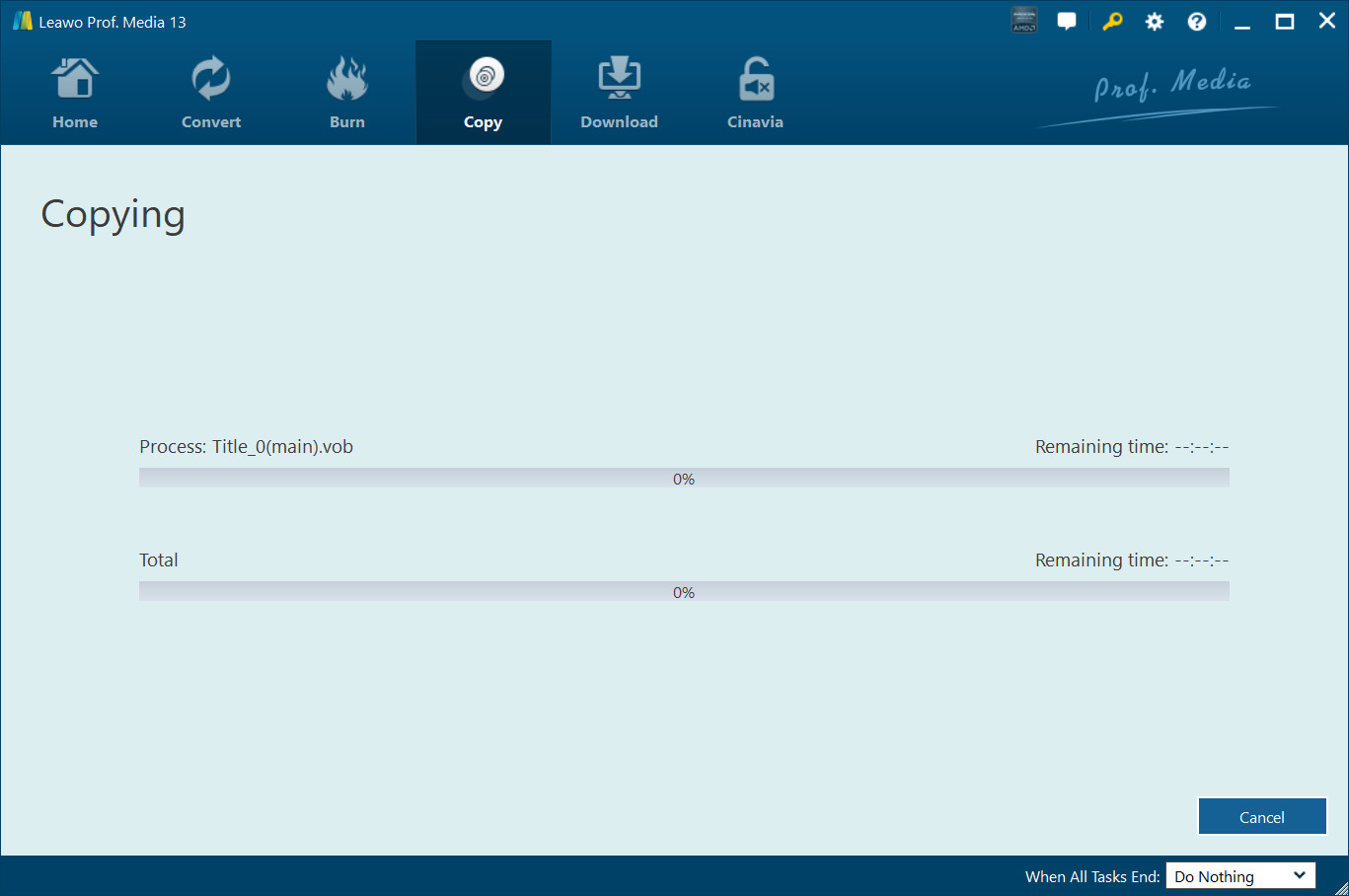
Step 6: the Copying screen, with progress and remaining time for the current file (Title_0(main).vob) and for the whole job, and a "When All Tasks End" option at the bottom. Vendor screenshot.
Tips
- Weigh lifetime against one year. Lifetime costs only $10 more than one year ($39.95 vs $29.95), so it pays off if you'll still be copying DVDs next year.
- Leave room on the drive. Leawo asks for 5 GB or more free for a DVD job, and saving both a folder and an ISO doubles that.
Where it falls short
- Speed. The most common complaint in Leawo's own reviews is time: one reviewer measured "about 45 min" for a DVD-9 to DVD-5 job, and others found it slower than DVD Cloner or DVD Shrink. Leawo's product page claims 50x faster copying with Intel Quick Sync, so treat that as a best case.
- Not every disc copies. Several buyers report that "some of my dvds cannot be backed up" or that it "works with most of my DVDs". Leawo names CSS and region codes as what it removes.
- Little independent testing. Almost all the reviews are on Leawo's own site, and most date from 2013.
What Users Say
There's no recent independent lab test of Leawo DVD Copy. What's left are two sources: buyers' reviews on Leawo's own DVD Copy review page, which Leawo verifies before they appear, and Trustpilot reviews of Leawo as a company. Read both with that in mind.
Buyers on Leawo's review page (4.8 out of 5 from 82 ratings)
Leawo's DVD Copy review page averages 4.8 from 82 ratings: 71 five-star, 6 four-star, 5 three-star and no one- or two-star ratings. Most of them were posted in March 2013, and several of those reviewers say they got the program free through a giveaway. The newest is from April 2021.
Dan Peay (5 stars, March 2013): "I purchased a current Dreamworks DVD to play in my SUV. Because it is subject to kids fingers and dirt, I wanted to copy it. Leawo DVD Copy allowed me to select only the main movie and it asked if I wanted to copy to a standard 4.7 GB DVD. I confirmed that and the software informed me that it would copy at 87% compression. No one can tell the difference in the quality."
Heather A. (5 stars, March 2013): "I really like that you can make a copy of JUST the movie if you want to. It makes taking our kids movies with us in the car stress free!"
JM (5 stars, March 2013): "The user interface is almost self-explanatory with no complicated settings to figure. Even someone with little computer experience could use this program."
Jim Bennett (5 stars, June 2018): "Preserves the quality of the original DVD and is very user friendly. Once it starts needs no further attention"
Porterj (5 stars, September 2020): "I have been looking for sometime for simple to use software to copy a DVD. This programme does everything I need"
David Curran (5 stars, April 2021): "So easy to use and you can buy only what you need."
The complaints on the same page
ghlnkson (3 stars, March 2013): "Takes too long to process a movie. Took about 45 min to process a dvd9 to dvd5."
colin maclaurin (3 stars, March 2013): "Disappointing - Slower than alternatives . DVD Cloner 9 still the best - simple and fast."
Steven (5 stars, March 2013), despite the rating: "I wasn't impressed witht e straight copy from the original to a blank dvd. It looks at the original as being approx 14gb." He added: "For some reason it won't shrink it down to fit. DVD Shrink works better". Leawo replied that it would pass the request to its R&D team.
John Sanders (3 stars, March 2013): "The program does the job admirably in regard to the actual copying and the final output quality, good solid copier program, but.. There is a marked lack of indicators as to the program's progress".
Justus (4 stars, March 2013): "When I copied ordinary DVD's it was as fast as the other DVD copy program I have ." But: "However when I copied a write protected DVD it took very long."
geoff smith (5 stars, March 2013): "it is a good product but I noticed some of my dvds cannot be backed up on my hdd"
Leawo as a company (Trustpilot)
Leawo has a TrustScore of 4.3 from 158 reviews on Trustpilot, with 63% five-star and 25% one-star ratings. Most of those reviews cover Leawo's products in general, and few name DVD Copy.
Guido (5 stars, September 2026) bought DVD Copy and DVD Ripper from the Prof. Media 13 suite for Windows and said "they worked flawlessly both in copying 1:1 physical media", adding that support "promptly helped me sorting out issues with license activation".
Peter Madden (2 stars, November 2025) left only a title: "Will not copy TV mini series ." The one-star reviews from late 2025 and early 2026 don't name DVD Copy.
The recurring themes: people like how simple it is, Main Movie for car and kids' copies, and copies that look like the original. The complaints are about speed, the odd disc it won't copy, and, in older versions, the lack of progress feedback. The picture is a long record of short, positive reviews, most from a 2013 giveaway, and very little independent testing since.
Comparisons
DVD Copy alone vs the Blu-ray Copy license
The two licenses open the same DVD Copy module, so your DVD copies come out the same. The Blu-ray Copy license costs $15 more a year ($44.95 vs $29.95) or $60 more for lifetime ($99.95 vs $39.95), and adds Blu-ray copying (BD50 and BD25, 3D included), Blu-ray recorder disc copying and Blu-ray to DVD conversion.
Leawo DVD Copy vs Leawo DVD Ripper
Leawo DVD Copy keeps the movie as a DVD disc, folder or ISO with menus. Leawo DVD Ripper converts it to video files for phones, tablets and media servers. Leawo's Prof. Media DVD Pack + CleverGet Video Downloader bundle, sold on its own store, combines DVD Ripper, DVD Copy, DVD Creator, Video Converter and CleverGet Video Downloader for life at $99.94.
Editions and Pricing
| License |
Price |
Term |
Money-back period listed |
Where to buy, what you get |
| Leawo DVD Copy, 1 Year |
$29.95 |
One year, one PC |
5 days |
This page's Buy Now button. DVD Copy only |
| Leawo DVD Copy, Lifetime |
$39.95 |
One-time payment, one PC |
14 days |
The lifetime option on the same order page. DVD Copy only |
| Leawo Blu-ray Copy, 1 Year |
$44.95 |
One year, one PC (renewal $26.97) |
5 days |
Leawo Blu-ray Copy's order page. DVD Copy plus three Blu-ray modules |
| Leawo Blu-ray Copy, Lifetime |
$99.95 |
One-time payment, one PC |
14 days |
The lifetime option on Blu-ray Copy's order page. Same four modules |
All four include unlimited free upgrades while the license is valid, and sales tax may be added at checkout depending on where you live.
FAQs
Does the Leawo Blu-ray Copy license really include DVD Copy?
Yes. Leawo's pricing tables list Leawo Blu-ray Copy as "All Features of 4 Modules": Blu-ray Copy, DVD Copy, Blu-ray Recorder Copy and Blu-ray to DVD Converter. Leawo DVD Copy's registration guide adds that you get the DVD Copy module free with the Blu-ray Copy module, and one registration code activates them in Prof. Media 13.
Can Leawo DVD Copy copy a DVD with only one drive?
Leawo DVD Copy can copy disc to disc with a single DVD drive. Tick the drive under "Copy to", and once the program has read the movie it asks you to eject the original and insert a blank or rewritable DVD to finish the burn.
Does Leawo DVD Copy convert DVDs to MP4?
No. Leawo DVD Copy only outputs DVD discs, DVD folders and ISO images. To get MP4 or MKV files, you need a ripper such as Leawo DVD Ripper, which is a separate license.
Does the Leawo DVD Copy 1-year license renew automatically?
Leawo's 1-year licenses renew only if you choose it on the order page. On October 30, 2026, the automatic renewal box was unticked by default for both Blu-ray Copy and DVD Copy. Leawo's own pricing table describes the 1-year plans as auto-renewing with cancellation at any time, and the lifetime licenses are single payments.
Can I get a refund on Leawo DVD Copy if it won't copy my disc?
Leawo DVD Copy refunds are possible within 14 days for a reproducible bug Leawo's support can't fix, a hardware incompatibility or a duplicate order, and you're expected to send support the details first. Buying the wrong product, or a request that only says you no longer need the program, is refused, and purchases over a month old aren't refunded.
Can I use one Leawo DVD Copy license on two computers?
No. Every Leawo DVD Copy and Blu-ray Copy license, yearly or lifetime, covers one PC. Moving to a new computer is possible, and Trustpilot reviewers describe support helping them activate on a new PC.
Does Leawo DVD Copy still run on Windows 7?
Yes. Leawo lists Windows 7, 8, 8.1, 10 and 11 for the current Prof. Media 13 version of Leawo DVD Copy. Older systems such as Windows XP and Vista are no longer listed.
System Requirements
- Operating system: Windows 11, 10, 8.1, 8 or 7
- Processor: 1 GHz Intel or AMD CPU
- Memory: 512 MB RAM (1 GB or more recommended)
- Free disk space: 5 GB or more for a DVD job
- Graphics: NVIDIA GeForce GTX 260 or better
- Other: a recordable DVD drive to burn discs, and an Internet connection
Conclusion
Leawo DVD Copy is a sound buy for Windows users who want DVD backups that stay DVDs, with menus, chapters and the original audio, and who'd rather click Main Movie and DVD-5 than learn a pile of settings. The one reason to choose it is that simplicity. The main reason to hesitate is speed: expect a DVD-9 to DVD-5 job to take the better part of an hour, by its own users' accounts.
Which license to get depends on your shelf. The Buy Now button below sells Leawo DVD Copy at $29.95 a year ($39.95 lifetime), the better deal if you only copy DVDs. If you own Blu-rays too, Leawo Blu-ray Copy ($44.95 a year, $99.95 lifetime) includes DVD Copy. Either way, run the free 5-minute trial on your hardest disc first.
Download Free TrialBuy Now