Leawo Blu-ray Copy: Back Up Blu-ray and DVD Movies to Disc, Folder or ISO
Leawo Blu-ray Copy is a Windows disc copier that costs $44.95 for a year or $99.95 for a lifetime license and backs up Blu-ray and DVD movies, either as an exact 1:1 copy or compressed to fit a smaller disc, onto a blank disc, a folder or an ISO image on your hard drive. It's for people with a shelf of discs they own who want a spare copy before a scratch, a toddler or a dying player ruins the original.
The picture to keep in mind: you put a BD50 movie in the drive, pick "Main Movie" so the trailers and menus stay behind, keep the English audio track and subtitles, and save the result as an ISO on a NAS or burn it to a cheaper BD25. The original goes back in its case and stays there.
Quick facts
- Version: 13.0.1.6 (part of Leawo Prof. Media 13), released October 10, 2026
- Developer: Leawo Software Co., Ltd.
- Runs on: Windows 11, 10, 8.1, 8 and 7. Leawo Blu-ray Copy for Mac is a separate purchase.
- Copies from: Blu-ray and DVD discs, disc folders and ISO images
- Copies to: a blank Blu-ray or DVD, a folder, or an ISO file
- Disc sizes: BD50, BD25, DVD-9 and DVD-5, 1:1 or compressed to a smaller size
- Included modules: Blu-ray Copy, DVD Copy, Blu-ray Recorder Copy and Blu-ray to DVD Converter
- Price: $44.95 for one PC for one year, or $99.95 for lifetime use on one PC
- Free trial: copies only the first 5 minutes of a disc
- Money-back period listed: 5 days (1-year license), 14 days (lifetime)
- Installer: 199.5 MB
What we checked: the Windows installer from Leawo's download server (ltmcp_setup.exe, 209,171,392 bytes, file version 13.0.1.6, product name "Leawo Prof. Media", digitally signed by ShenZhen Moyea Software Co., Ltd.) and the order page ($44.95 for the 1-year license, the lifetime option adding $55.00 for $99.95, automatic renewal unticked by default, renewal quoted at $26.97), both on October 29, 2026. We didn't copy a disc with it ourselves.
Before you buy
- The download is the whole Leawo Prof. Media 13 suite. The program window says "Leawo Prof. Media 13", and your Blu-ray Copy license activates the Copy tab. The other tabs (Convert, Burn, Download, Cinavia) are other Leawo products with their own licenses.
- Refunds are narrow. Leawo refunds only real faults it can't fix, not a change of mind (details in the FAQs). The 5-minute trial is your real test, so run it on the exact discs you care about.
- Cinavia isn't removed. A copy of a Cinavia-protected Blu-ray can still be muted on a Cinavia-compliant player. Leawo sells Blu-ray Cinavia Removal separately for that.
- Personal use only. Leawo's own fair-use terms limit it to discs you've lawfully obtained, and rule out rental discs and redistribution. Copying laws differ by country.
Download Free TrialBuy Now
Overview
Leawo Blu-ray Copy lives on the Copy tab of Leawo Prof. Media 13, which bundles Leawo's disc tools in one window. The tab shows the disc's titles on the left with their lengths, the subtitle and audio tracks below them, a preview player on the right, and a size bar along the bottom that shows whether your selection fits the target disc.
That size bar is the heart of the program: BD50 gives a full 1:1 copy, while BD25, DVD-9 or DVD-5 makes Blu-ray Copy compress the movie to fit.
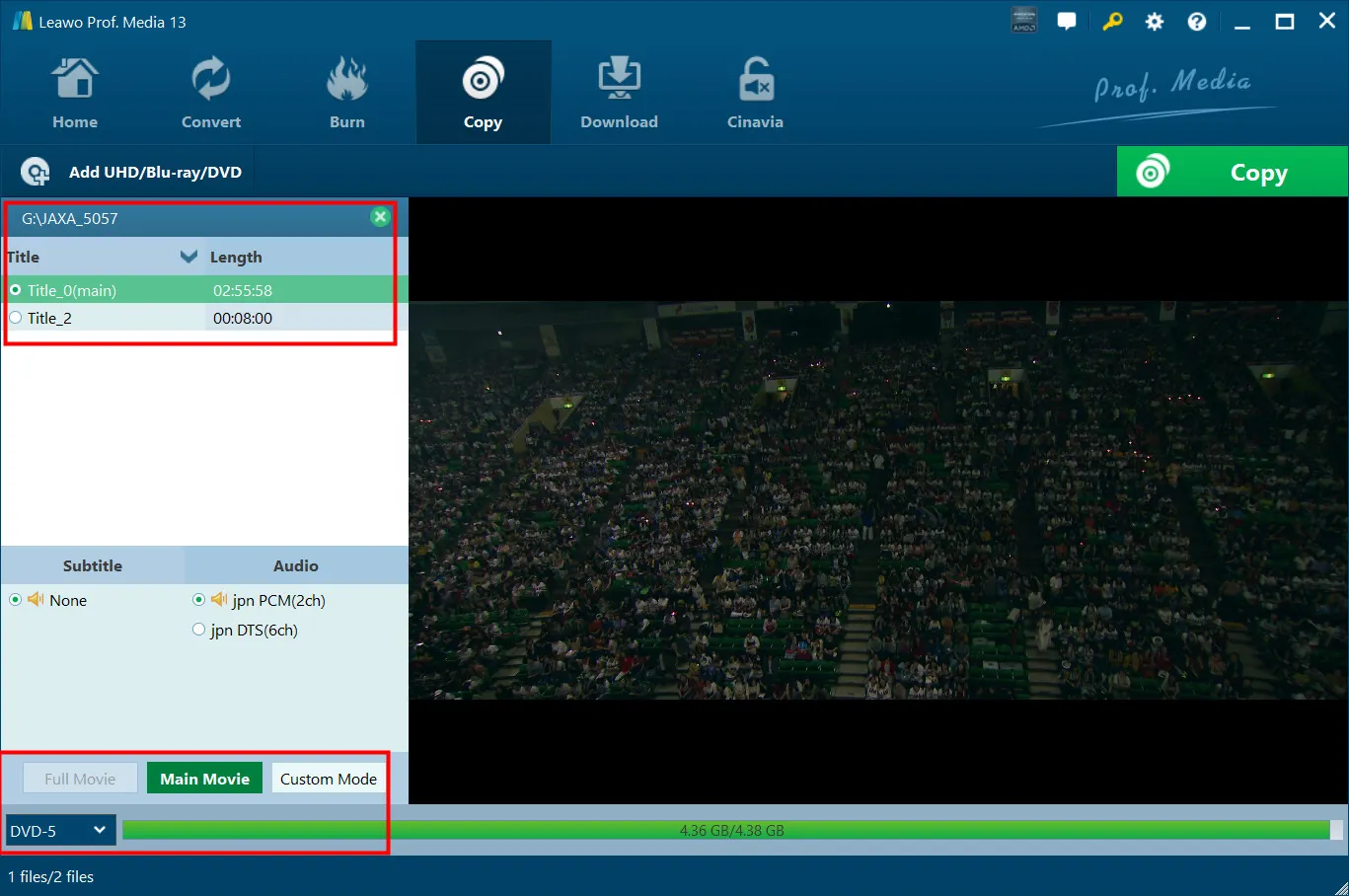
The Copy tab with a disc loaded: the title list (main title 2:55:58), subtitle and audio choices (Japanese PCM 2ch or DTS 6ch), the Full Movie, Main Movie and Custom Mode buttons, and the size bar set to DVD-5 (4.36 GB of 4.38 GB). The title bar reads "Leawo Prof. Media 13". Vendor screenshot.
Features
1:1 copies of Blu-ray and DVD discs, 3D included
Leawo Blu-ray Copy makes a full 1:1 copy of BD50, BD25, DVD-9 and DVD-5 discs, keeping chapters, titles, subtitles and audio channels as they are on the original. It also copies 3D Blu-rays, and in 1:1 disc-to-disc mode the 3D effect is kept. Leawo says it copies discs "released in any area, by any movie studio", and the settings let you choose the disc region code.
Compression to a smaller disc: BD50 to BD25, Blu-ray to DVD
Leawo Blu-ray Copy can shrink a movie to fit a smaller disc instead of copying it 1:1. Its user guide lists compression between Blu-ray and DVD disc sizes, so a dual-layer Blu-ray can go onto a single-layer BD25 or even a DVD. The size bar shows the result before you start. Compression costs some picture quality, and only the 1:1 mode keeps 3D.
Three copy modes: Full Movie, Main Movie and Custom
Leawo Blu-ray Copy lets you decide how much of the disc to keep. Full Movie copies everything, menus and extras included. Main Movie copies just the film, which saves the most space. Custom Mode copies only the titles you tick. Full Movie and Main Movie both keep the source's chapters.
Pick your subtitles and audio tracks
Leawo Blu-ray Copy lets you keep only the subtitle and audio tracks you want, so a disc with eight dubbed languages becomes a copy with just your own. A built-in player previews titles before you copy.
Output to disc, folder or ISO, and ISO burning
Leawo Blu-ray Copy can write one copy to several places at once: a folder, an ISO image and a blank disc in a connected burner, each a checkbox in the Copy sidebar. It shows the hard disk space the job needs next to what's free. Burning an existing ISO image to a blank Blu-ray or DVD is built in, and with two drives you can copy disc to disc directly.
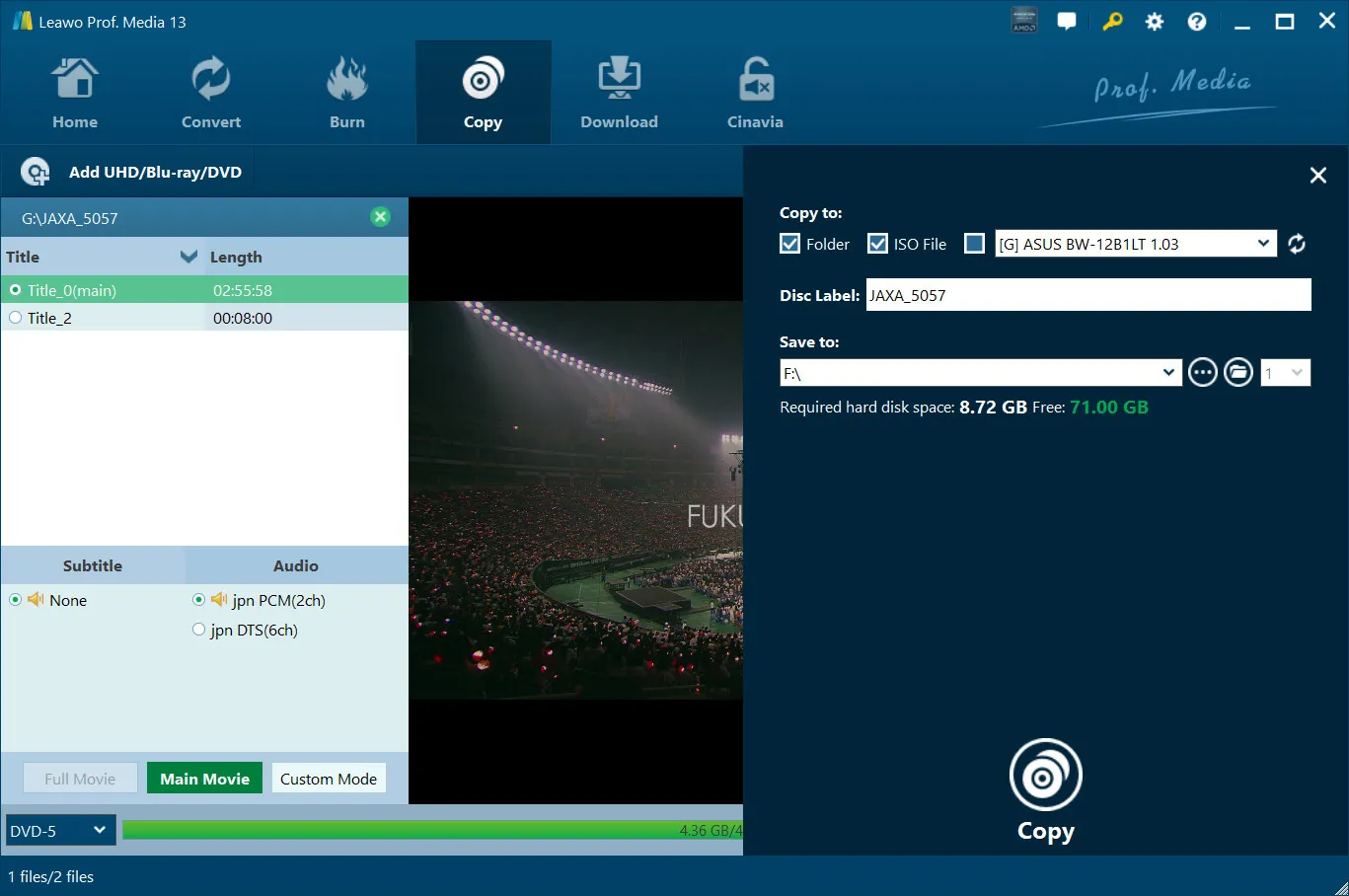
The Copy sidebar: Folder and ISO File ticked, an ASUS BW-12B1LT burner available as a third target, the disc label, the save location, and "Required hard disk space: 8.72 GB, Free: 71.00 GB". Vendor screenshot.
Four copy modules in one license
A Leawo Blu-ray Copy license covers four modules: Blu-ray Copy, DVD Copy, Blu-ray to DVD Converter and Blu-ray Recorder Copy. The last one handles BDAV discs, the kind recorded on Panasonic, Sony, Samsung, LG or Sharp Blu-ray recorders. Leawo also claims up to 50x faster copying with NVIDIA CUDA, Intel Quick Sync and AMD APP graphics acceleration.
Real-World Uses
- Kids' movies: burn a BD25 copy of each Blu-ray the children watch, and keep the originals on a high shelf.
- A NAS movie library: save each disc as an ISO and play it through a media player or Blu-ray software on the TV.
- Rare and out-of-print DVDs: make a 1:1 copy while the disc still reads cleanly.
- Old player, new discs: convert a Blu-ray to a DVD-9 or DVD-5 for a DVD-only player in a car or holiday home.
Who It's For, and Who Should Skip It
It's for Windows users who own Blu-rays and DVDs and want them copied as discs or disc images, with menus, chapters and the original audio intact, without learning a pile of settings. It suits people who'd rather click Full Movie or Main Movie than tune encoders.
Skip it if you want the movies as MP4 or MKV files for a phone, tablet or Plex. That's a ripper's job, and Leawo sells Blu-ray Ripper separately. Skip it too if your discs are 4K Ultra HD Blu-rays (Leawo's UHD Copy is a different product), if they carry Cinavia and you play copies on a Cinavia-compliant player, or if you're on a Mac, where you'd need Leawo Blu-ray Copy for Mac.
Usage Guide
- Install and launch. Run the Prof. Media 13 installer from the Download Free Trial button, open the program and click the Copy tab. Once you've bought a license, register the program with your license code.
- Add the source. Click Add UHD/Blu-ray/DVD and choose Add from CD-ROM, Add from folder or Add iso file, or drag the folder or ISO into the window.
- Choose the mode and tracks. Click Full Movie, Main Movie or Custom Mode, tick the titles you want in Custom Mode, then pick the subtitle and audio tracks.
- Pick the target size. Set the drop-down at the bottom left to BD50, BD25, DVD-9 or DVD-5 and check the size bar.
- Set the output. Click the green Copy button, tick Folder, ISO File and/or your burner, set the disc label and save location, and check the required disk space.
- Copy. Click the Copy button at the bottom of the sidebar. The progress screen shows the current file and the total, and a "When All Tasks End" setting chooses what the PC does when the job is done.
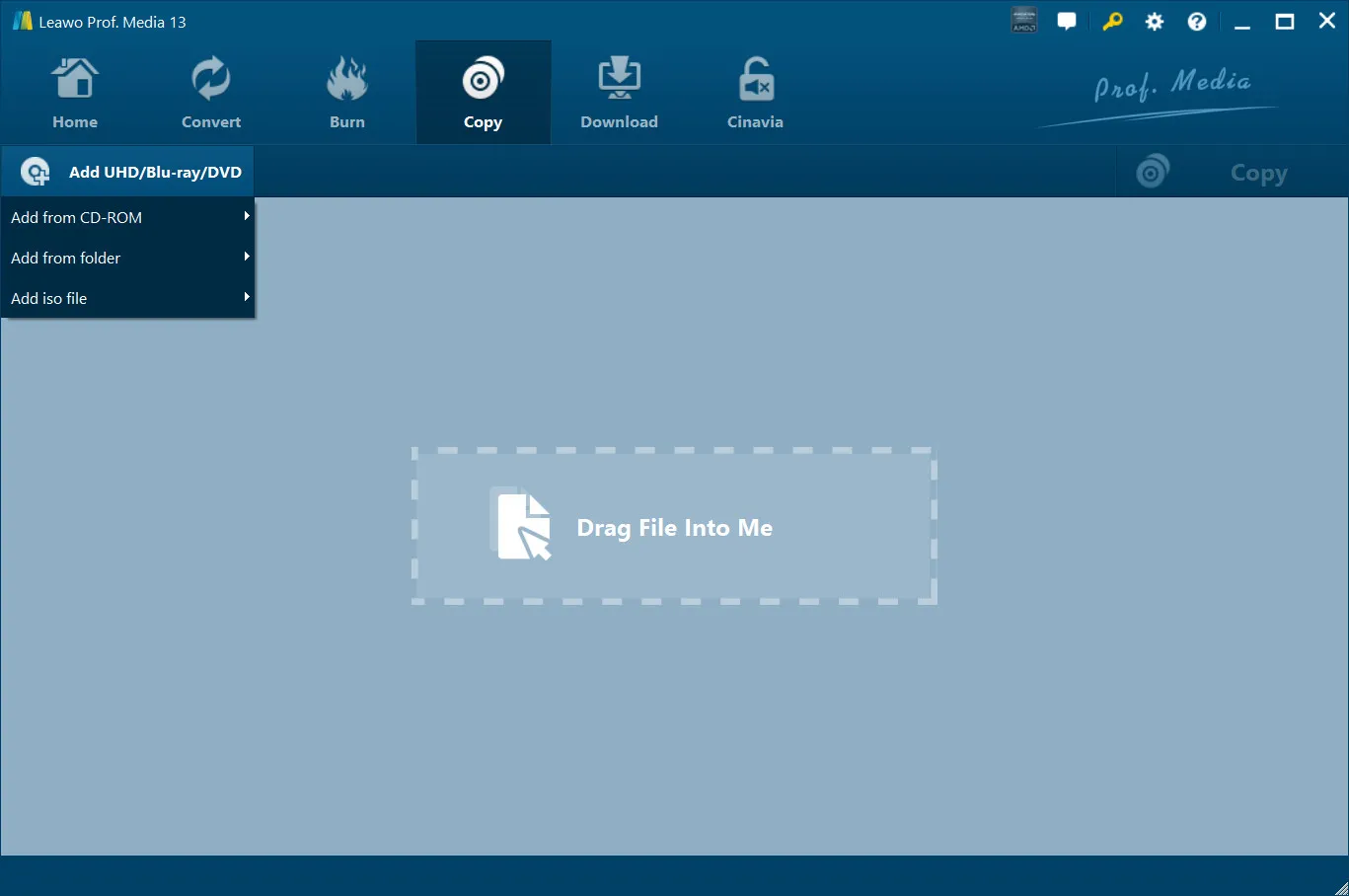
Step 2: the Add UHD/Blu-ray/DVD menu (Add from CD-ROM, Add from folder, Add iso file) above the "Drag File Into Me" box. Vendor screenshot.
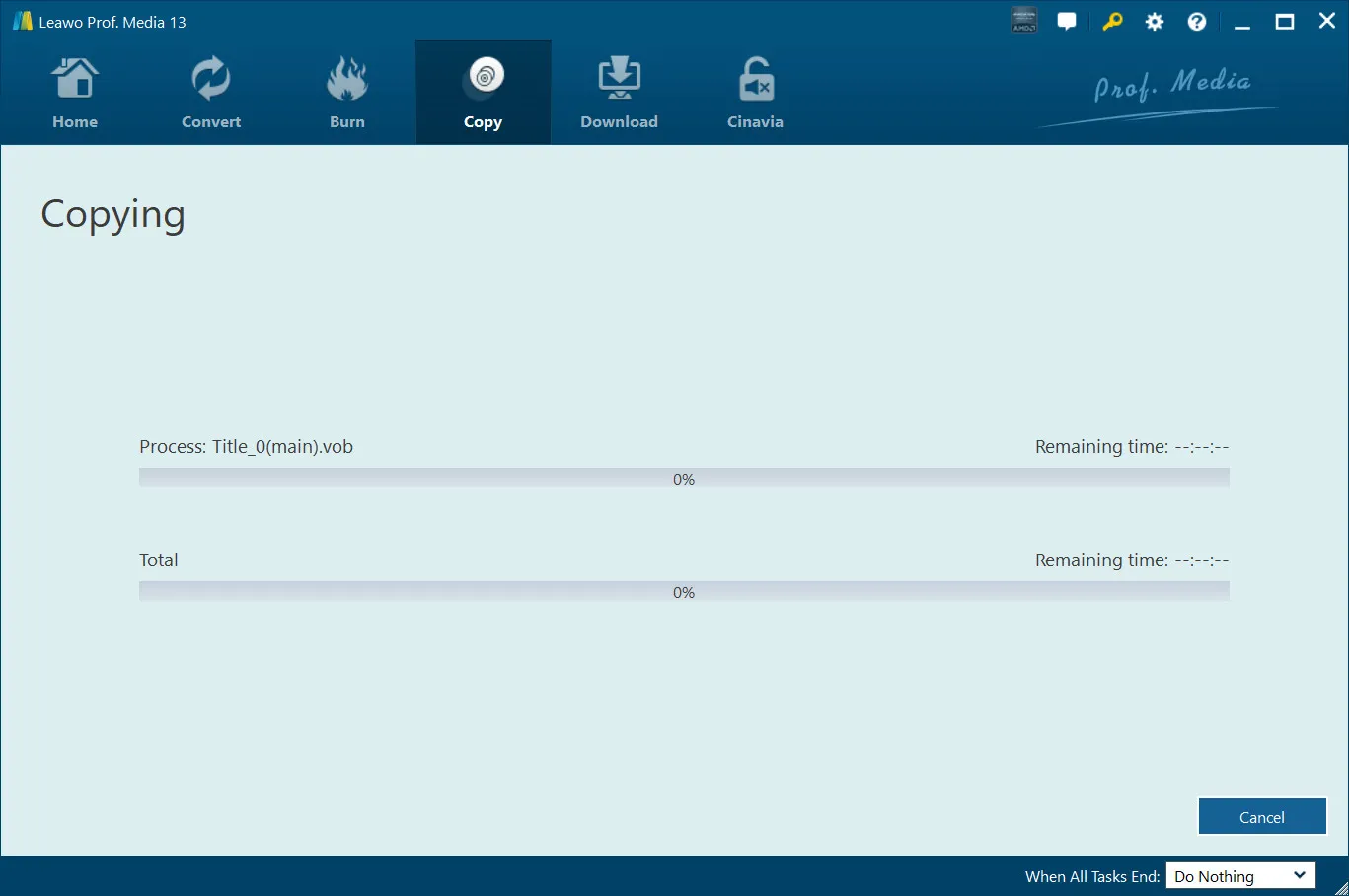
Step 6: the Copying screen, with progress for the current file (Title_0(main).vob) and for the whole job, and the "When All Tasks End" option. Vendor screenshot.
Tips
- Check the space first. Leawo asks for 25 GB or more free for a Blu-ray job and 5 GB for a DVD. Copying to both a folder and an ISO doubles that.
- Do the math on the license. At the $26.97 renewal price quoted on the order page, the 1-year license costs $71.92 over two years and $98.89 over three, so the $99.95 lifetime license only pays off from the fourth year.
Where it falls short
- Some discs won't copy. Even happy users report the odd failure: "99% of the time", or "2 blu ray disk so far it would not copy". New discs with fresh protection are the usual cause, so a license is a bet on Leawo keeping up.
- It can be slow. Several buyers call it slow, especially at high quality on Blu-ray, despite the 50x speed claim.
- A suite, not a small tool. You install a 200 MB suite with four other product tabs you didn't pay for, and some buyers dislike the newer interface.
- License activation is a common support topic. Several Trustpilot reviewers needed help activating the program on a new PC, though they say support sorted it out quickly.
What Users Say
Independent hands-on reviews of Leawo Blu-ray Copy are scarce, and the few magazine reviews we found were sponsored by Leawo, so they're left out here. What remains is two sources: buyers' reviews on Leawo's own review page, which are moderated before they appear, and Trustpilot reviews of Leawo as a company.
Buyers on Leawo's review page (4.9 out of 5 from 74 ratings)
Leawo's review page for Blu-ray Copy shows an average of 4.9 from 74 ratings: 69 five-star, 4 four-star, 1 three-star and no one- or two-star ratings. Most reviews are short and several years old, from versions long before Prof. Media 13, so read them as a long track record rather than a test of the current build.
David (5 stars, November 2023): "Works good. Bought a dvd online, with the wrong region code. Allowed me to fix the problem with minimal issues.[Read: make a copy without the region code restriction..] Would recommend."
Alan T (5 stars, May 2018): "It is very seldom that I give any product a five star review, but in the case of Leawo Blu-ray copy, I am very happy to do so. Ease of use, consistency of copied media and ongoing development and improvements, make this a must have for anyone archiving a movie collection."
Fred W (5 stars, March 2018): "The program has worked perfectly every time from my DVD drive to my hard drive. If I select high resolution on the copy, Blu-ray discs take a long time but the quality is terrific when I play the movie back from the hard drive."
Michael (5 stars, March 2018): "This software has copied DVDs 99% of the time. The few it wouldn't copy seemed to play poorly from the original disc. It's easy to use and the price is reasonable."
Dallas W Frint (5 stars, April 2016): "Coping 3D disks is just as easy as a regular Blu-ray disk. Just check the full move option and check the BD50 option." The same reviewer added: "Once they get the Cinavia problem figured out it will even be better."
Paul (5 stars, January 2015): "BluRayCopy is much much faster and a lot easier to navigate than other interfaces I've tried." He wasn't sold on the redesign, though: "Don't much care for their new "drag files into me" box, liked their original format so much more."
The complaints on the same page
Bob (4 stars, February 2013): "Have found 2 blu ray disk so far it would not copy." Leawo's support team replied asking for the disc names "So we can do something."
Carl S. Honaker (5 stars, January 2013): "Slow and unable to go chapter to chapter, nor can you start where U left off when watching a movie as U have to go to the beginning again. Also no menu when copying movie to a 25G as no stores I know of sell the 50G Disc."
Priece Rich (5 stars, January 2013): "It has worked well on all of my efforts to archive my movies to the .iso format. A bit slow, but acceptable."
Leawo as a company (Trustpilot)
Leawo has a TrustScore of 4.3 from 158 reviews on Trustpilot, with 63% five-star and 25% one-star ratings, a split that says buyers either have no problems or real ones. Most reviews are about Leawo's disc tools in general, and few name Blu-ray Copy.
Guido (5 stars, September 2026), who bought DVD Copy and DVD Ripper from the Prof. Media 13 suite for Windows, said "they worked flawlessly both in copying 1:1 physical media" and that support "promptly helped me sorting out issues with license activation".
Robert (5 stars, August 2025): "I have used Leawo Prof. Media 13 for many years ripping DVDs and Blue-ray disks; it has worked flawlessly."
Peter Madden (2 stars, November 2025) left only a title: "Will not copy TV mini series ." Leawo replied offering a remote session to diagnose it.
The recurring themes: buyers like how easy it is (load, pick a mode, copy), the 1:1 quality, 3D support and the support team's quick replies. The complaints are about speed, the occasional disc it can't copy, Cinavia, and license activation on a new PC. The honest picture is a long record of mostly short, positive reviews on Leawo's own site and very little independent testing.
Comparisons
Leawo Blu-ray Copy vs Leawo Blu-ray Ripper
Leawo Blu-ray Copy keeps the disc as a disc: a 1:1 or compressed Blu-ray or DVD, folder or ISO, with menus and chapters. Leawo Blu-ray Ripper turns the movie into video files for phones, tablets and media servers. If you want both, Leawo's own store sells a lifetime bundle of the two for $119.94.
Leawo Blu-ray Copy vs Blu-ray Cinavia Removal
Leawo Blu-ray Cinavia Removal also makes 1:1 Blu-ray copies, but its job is to strip the Cinavia audio watermark so a copy isn't muted on Cinavia-compliant players. Blu-ray Copy doesn't do that, so buy Cinavia Removal instead if your discs carry Cinavia.
Windows vs Mac edition
Leawo Blu-ray Copy for Mac runs on macOS 10.13 High Sierra through macOS 27, on Intel or Apple M1/M2 Macs. It's a separate product with its own license, so a Windows license doesn't cover a Mac.
Editions and Pricing
| License |
Price |
Term |
Money-back period listed |
What you get |
| 1 Year |
$44.95 |
One year, one PC (renewal quoted at $26.97) |
5 days |
All four copy modules, unlimited free upgrades |
| Lifetime |
$99.95 |
One-time payment, one PC |
14 days |
All four copy modules, unlimited free upgrades |
| Blu-ray Ripper + Blu-ray Copy (Lifetime) |
$119.94 (list $199.90) |
One-time payment, one PC |
14 days |
Seven modules: the four copy modules plus Blu-ray, DVD and Blu-ray Recorder Ripper |
The Buy Now buttons on this page open the 1-year license at $44.95, and the order page lets you switch it to lifetime for $55.00 more. The bundle is sold on Leawo's own store.
FAQs
Can Leawo Blu-ray Copy copy 4K Ultra HD Blu-rays?
Leawo Blu-ray Copy is built for standard Blu-ray and DVD discs, and 4K Ultra HD copying is a separate Leawo product, UHD Copy. The "Add UHD/Blu-ray/DVD" button you'll see belongs to the shared Prof. Media window, not to the Blu-ray Copy license.
Do I need a Blu-ray burner to use Leawo Blu-ray Copy?
Leawo Blu-ray Copy needs a burner only to write discs, though Leawo's requirements list a recordable Blu-ray drive. Copying to a folder or ISO works from any drive that reads the disc, and an ISO or folder you already have needs no drive at all.
Does the Leawo Blu-ray Copy license renew automatically?
Leawo Blu-ray Copy's 1-year license renews only if you choose it. On the order page on October 29, 2026, the automatic renewal box was unticked by default and the renewal was quoted at $26.97 a year. Leawo's own pricing table describes the 1-year plan as auto-renewing with cancellation at any time. The $99.95 lifetime license is a single payment.
Can I get a refund on Leawo Blu-ray Copy if it doesn't copy my disc?
Leawo Blu-ray Copy refunds are possible within 14 days for a reproducible bug Leawo's support can't fix, hardware incompatibility or a duplicate order, and you're expected to work with support first by sending the details. Buying the wrong product, or a request that only says you don't need the program any more, is refused, and purchases over a month old aren't refunded.
Can I use one Leawo Blu-ray Copy license on two computers?
No. Each Leawo Blu-ray Copy license, 1-year or lifetime, covers one PC. Moving to a new computer is possible, and Trustpilot reviewers describe support helping them reactivate on a new PC.
Is copying my own Blu-rays with Leawo Blu-ray Copy legal?
Leawo Blu-ray Copy is sold for personal backups of discs you've lawfully obtained, and Leawo's fair-use notice rules out piracy, commercial redistribution and copying rental discs. Whether breaking a disc's copy protection is allowed depends on your country's law, so check it before you start.
System Requirements
- Operating system: Windows 11, 10, 8.1, 8 or 7
- Processor: 1 GHz Intel or AMD CPU
- Memory: 512 MB RAM (1 GB or more recommended)
- Free disk space: 5 GB or more for DVD, 25 GB or more for Blu-ray
- Graphics: NVIDIA GeForce GTX 260 or better
- Other: a recordable Blu-ray drive and an Internet connection
Conclusion
Leawo Blu-ray Copy is worth buying if you own a Blu-ray and DVD collection on Windows and want spare copies that behave like the originals, as discs or ISOs with menus, chapters and 3D intact. The one reason to buy it is how little you have to think: pick Full Movie or Main Movie, pick a disc size, and it does the rest, with DVD and recorder-disc copying included in the same license.
The main reason not to is what it leaves out. It doesn't remove Cinavia, it doesn't do 4K UHD, it's slow on high-quality Blu-ray jobs by its own users' accounts, and Leawo won't refund a change of mind. Run the 5-minute trial on your hardest disc first. If it copies cleanly, the $44.95 year is enough for a one-off backup project, and the $99.95 lifetime license only makes sense if you'll still be copying discs in four years.
Download Free TrialBuy Now