Leawo PowerPoint to DVD Pro: Burn Presentations to a Playable DVD or Blu-ray, From a Program That Stopped Changing in 2016
Leawo PowerPoint to DVD Pro is a Windows program that turns PowerPoint presentations into DVDs and Blu-ray discs that play on a TV's disc player, with menus, background music and a logo, and also converts them to video files. It costs $79.95 a year or $119.95 lifetime. It's for anyone who still has to hand over a presentation on a disc: a memorial slideshow, a school assembly, a trade-show loop. But the installer Leawo offers today was signed in February 2016, and its supported list stops at PowerPoint 2019, so treat it as an unmaintained product.
Quick facts
- Version: 4.7.0.0, the only build Leawo offers
- Developer: Leawo Software (installer signed by Shenzhen Moyea Software)
- Runs on: Windows 7, 8, 8.1, 10 and 11; no Mac version
- Needs: Microsoft PowerPoint 2000 to 2019, or PowerPoint Viewer 2007/2010, installed
- Opens: PPT, PPTX, PPTM, PPS, PPSX, POT, POTX, POTM
- Makes: DVD and Blu-ray discs, folders or ISO files, plus video and audio files (MP4, AVI, WMV, MKV, FLV, MOV and more)
- Batch: up to 12 presentations per job
- Trial: everything it makes carries a watermark
- Money-back guarantee: 5 days (yearly) or 14 days (lifetime), for technical problems Leawo can't fix
What we checked: the installer from Leawo's download page (leawo_ppt2dvd_setup.exe, file version 4.7.0.0, 31,197,472 bytes; its digital signature is time-stamped February 23, 2016, though the server dates the file July 6, 2020) and the order page, which charged $79.95 for 1 year and $119.95 lifetime on November 1, 2026. We didn't burn a disc or test it with a current PowerPoint.
Before you buy
- It looks abandoned. Version 4.7.0.0 was signed in early 2016 and hasn't been replaced. Leawo's user guide still shows Windows 7-era screenshots, its device list ends with the iPhone 5s and Nexus 5, and its upload targets include Metacafe, Veoh and Break.com.
- Current PowerPoint isn't on the list. Leawo names PowerPoint 2000 through 2019 and PowerPoint Viewer 2007/2010. PowerPoint 2021, 2024 and Microsoft 365 aren't mentioned, so whether it works with them is untested by Leawo as far as its pages show.
- PowerPoint already makes videos. Microsoft's own File > Export > Create a Video saves MP4 or WMV up to 4K (3840 x 2160) with narration, timings, animations and transitions. You only need this program for a disc that plays in a DVD or Blu-ray player.
- The price is high for what's left. $79.95 a year for a program that isn't being updated; if you need it at all, the trial will tell you within an hour whether it works with your PowerPoint.
Download Free TrialBuy Now
Overview
Leawo PowerPoint to DVD Pro works through six tabs along the top: Import, Options, Menu, Music, Logo and Burn. You load presentations on the left, preview them on the right, choose a disc or video output, design a menu, and start. Behind the scenes it opens each presentation in your installed PowerPoint and plays it, capturing video and audio as the slides run, then encodes and authors the disc.
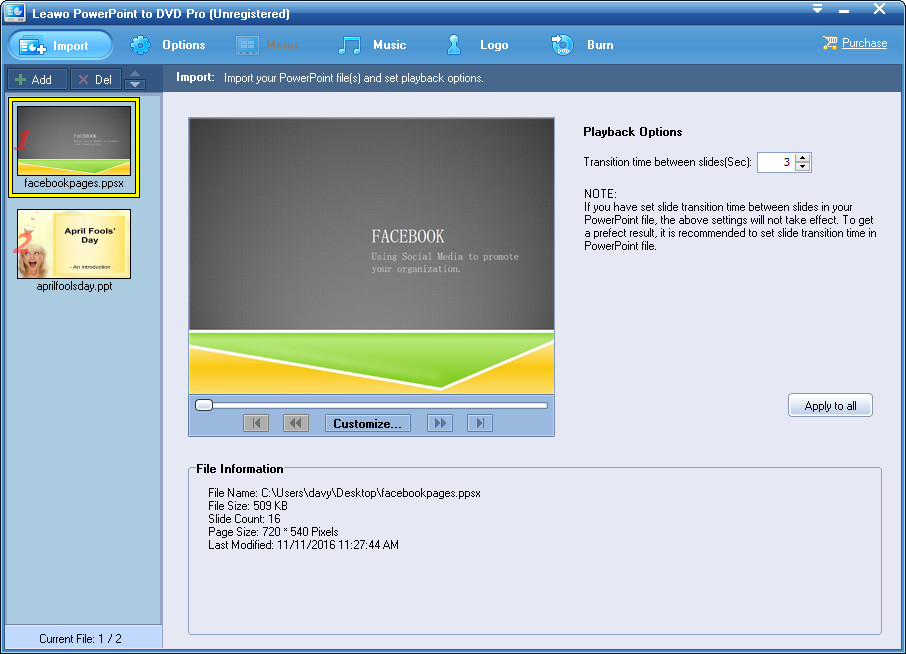
The Import tab of the unregistered program: two presentations (a PPSX and a PPT) on the left, a slide preview with a Customize button, a 3-second "Transition time between slides" setting and the file's details (16 slides, 720 x 540 pixels).
Features
DVD and Blu-ray discs that play on a TV
Leawo PowerPoint to DVD Pro authors a standard DVD (NTSC or PAL, 4:3 or 16:9) or a Blu-ray disc, and burns it, saves a disc folder, or writes an ISO image. Animations, transitions, embedded sounds, narration and video clips play as they do in your slideshow, according to Leawo. One catch from its own guide: a Blu-ray made this way doesn't allow manual interruption during playback.
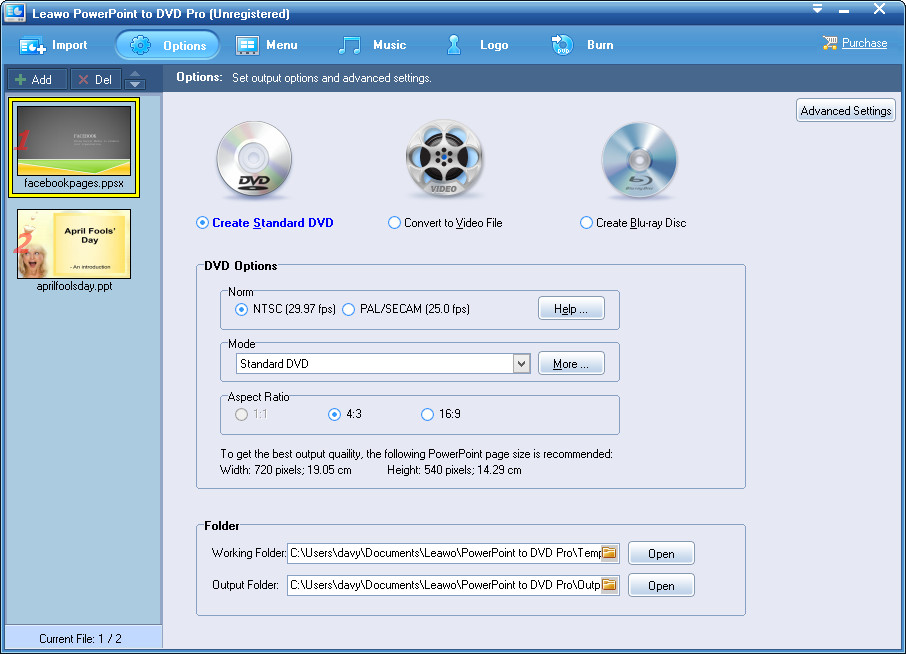
The Options tab: Create Standard DVD selected (next to Convert to Video File and Create Blu-ray Disc), NTSC, Standard DVD mode, 4:3, and a note recommending a 720 x 540 PowerPoint page size.
Disc menus and chapters
Leawo PowerPoint to DVD Pro adds a menu with a thumbnail for each presentation and a "Loop all presentations" button, from templates in themes such as Business, Education and Holiday, or your own design in the DVD Menu Creator. A remote-control simulator lets you test it before burning. Chapters can be set one per slide or one per animation, so a viewer can skip ahead with the remote.
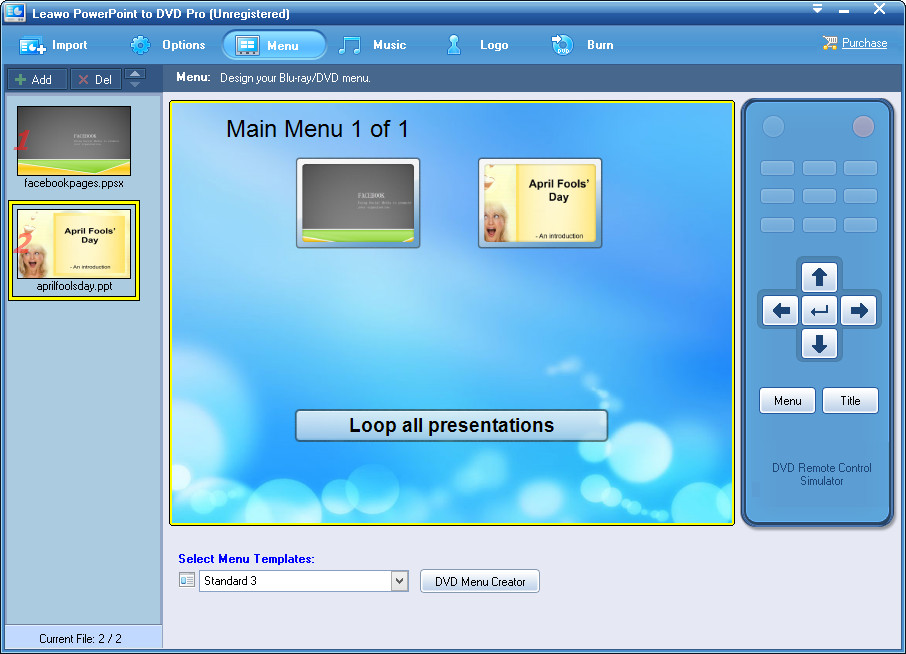
The Menu tab: "Main Menu 1 of 1" with two presentation thumbnails and a "Loop all presentations" button, the Standard 3 template, a DVD Menu Creator button and the DVD Remote Control Simulator.
Background music, narration and a logo
Leawo PowerPoint to DVD Pro adds a song across chosen slides or the whole show, records narration, and stamps your logo image on the output. You can also rename slides and give each one a custom thumbnail for the chapter menu.
Video files too
Leawo PowerPoint to DVD Pro's Convert to Video File option saves MP4, AVI, WMV, MKV, FLV, MOV and other formats, plus presets for phones, tablets and consoles, with codec, bit rate, frame rate and size settings. This is the part PowerPoint now does on its own.
Real-World Uses
- A memorial or anniversary slideshow on a DVD for relatives with a living-room player and no computer.
- A looping display at a booth or reception desk from a Blu-ray player.
- Classroom or church presentations on disc for a room where the TV and DVD player are the only equipment.
Who It's For, and Who Should Skip It
Good fit: someone with PowerPoint 2019 or older on Windows who needs a menu-driven DVD or Blu-ray, and can test it with the trial first.
Skip it if:
- You only need a video file. PowerPoint's own Create a Video export is free and goes up to 4K.
- You use PowerPoint 2021, 2024 or Microsoft 365 and can't confirm with the trial that it works.
- You're on a Mac. There's no Mac version.
- You'd rather not pay yearly for software that isn't updated. Export the MP4 from PowerPoint and burn it with a current DVD authoring program instead.
Usage Guide
- Install and register: install the program, enter your code in the registration window that opens at launch (or Help > Register).
- Import: click Import or Add and load up to 12 presentations; set the seconds between slides if your file has no timings of its own.
- Choose output: on Options pick Create Standard DVD, Convert to Video File or Create Blu-ray Disc, then the TV standard, aspect ratio and folders.
- Dress it up: pick a menu template, add music and a logo.
- Burn: click Burn, then Start, and leave the PC alone while each presentation plays through and is captured.
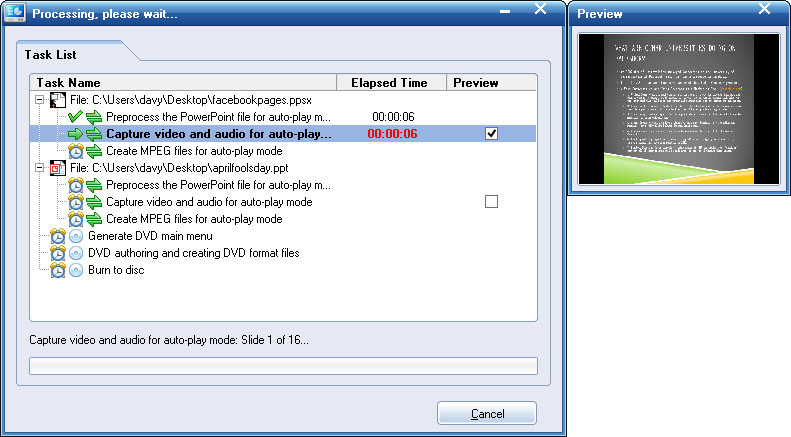
The "Processing, please wait..." task list: for each file, preprocess, "Capture video and audio for auto-play mode" (running, slide 1 of 16) and create MPEG files, then generate the DVD menu, author the DVD and burn, with a live preview window.
Where it falls short
- It records in real time. The progress window shows it capturing video and audio while each presentation plays, so expect a 20-minute show to take at least 20 minutes before encoding and burning even start.
- It depends on PowerPoint behaving. On Giveaway of the Day (July 2015, version 4.6.4), Karl reported "During creation a BlueRay disk file, my Microsoft Powerpoint program crashed", Gary got "ERROR: [EOleException] Not implemented." on every file, and Michelle said "it had glitches with PowerPoint 2013" while "Using the built-in tool from Power Point, though, I had no trouble."
- Built for 4:3 standard definition. The DVD options recommend a 720 x 540 page size, which doesn't match today's 16:9 slides; 16:9 is offered, but the guide's advice shows its age.
- The trial watermarks everything, so you can test compatibility but not produce a usable disc.
What Users Say
Leawo's review page
Leawo's moderated review page showed a 4.7 average from 7 reviews on November 1, 2026, the latest from 2021 (a one-word "OK"). The most useful are older. Tiffany (June 2014): "I've been creating powerpoints for many occasions and always run into the same situation of not being able to save on dvd for playback. The great part is that it's very easy to use." Ms. Brown (January 2015): "just bought ppt to dvd-r no prior experience. Needed memorial dvd-r in less than an hour 15 minutes Done!"
karl (4 stars, August 2012) gave the one criticism: "Easy to use, support Blu-ray Disc output, customize DVD menu and fast speed. But the interface looks too dark". Leawo replied it would "try to optimize the interface in the future versions."
Giveaway of the Day comments (July 2015)
Reactions were split when version 4.6.4 was given away. Juan Peris: "The process of installation and activation on my Windows 8.1 is flawless" and "I satisfy with the output video quality". Against that, the crash and error reports quoted above from Karl, Gary and Michelle, all involving PowerPoint itself. The page drew 145 ratings.
Trustpilot (Leawo as a company)
Leawo's Trustpilot page showed 4.4 out of 5 from 151 reviews on November 1, 2026, mostly about its Blu-ray and DVD tools and support; none we saw mention PowerPoint to DVD Pro.
The pattern: people who needed a disc fast were happy; failures come from PowerPoint automation, and almost every review is ten years old.
Comparisons
PowerPoint to DVD Pro vs PowerPoint to Video Pro
Leawo PowerPoint to Video Pro ($44.95 a year on Leawo's page) only makes video files; PowerPoint to DVD Pro adds DVD and Blu-ray authoring, menus and burning for $35 more a year. Both come from the same era and need the same PowerPoint versions. If you don't need a disc, neither beats PowerPoint's free export.
Editions and Pricing
| License | Price | Term | Guarantee |
|---|
| 1 Year | $79.95 | Renews yearly, 1 PC | 5 days |
| Lifetime | $119.95 | One-time payment, 1 PC | 14 days |
Leawo lists "Unlimited Free Upgrades" with both, though no upgrade has shipped since the 2016 build.
FAQs
Does Leawo PowerPoint to DVD Pro work with Microsoft 365?
Leawo doesn't say. Leawo PowerPoint to DVD Pro lists PowerPoint 2000 through 2019 only, so install the trial and convert one of your own presentations before buying.
Do I need PowerPoint installed to use Leawo PowerPoint to DVD Pro?
Yes. Leawo PowerPoint to DVD Pro plays your presentation through PowerPoint (or the old PowerPoint Viewer 2007/2010) to capture it, so one of them must be installed.
Can't PowerPoint burn a DVD by itself?
Not one with menus that plays in a DVD player. PowerPoint exports MP4 or WMV video and can copy a presentation to a disc as files; a menu-driven DVD-Video or Blu-ray disc, which Leawo PowerPoint to DVD Pro makes, needs disc authoring software.
What does the Leawo PowerPoint to DVD Pro trial do?
The English trial of Leawo PowerPoint to DVD Pro has every feature, but videos and discs it makes carry a watermark until you register.
Is there a Mac version of Leawo PowerPoint to DVD Pro?
No. Leawo PowerPoint to DVD Pro is Windows-only, and Leawo's site has no Mac download for it.
Will narration and embedded video survive the conversion?
Leawo says Leawo PowerPoint to DVD Pro keeps animations, transitions, background music, voice narration and movie clips, and synchronizes audio and video, because it captures the slideshow as it plays.
System Requirements
- Windows: 7, 8, 8.1, 10 or 11
- PowerPoint: 2000, 2002, 2003, 2007, 2010, 2013, 2016 or 2019, or PowerPoint Viewer 2007/2010
- Processor: 1 GHz Intel or AMD or faster
- Memory: 256 MB RAM or more
- Disk: 2 GB free
- Other: DirectX 8.1 or later, a sound card, and a DVD or Blu-ray burner for discs
Conclusion
Leawo PowerPoint to DVD Pro still does one thing PowerPoint can't: a menu-driven DVD or Blu-ray from a slideshow. For anyone else it isn't worth $79.95 a year. The program hasn't changed since its 2016 build, it doesn't list any PowerPoint newer than 2019, and PowerPoint itself now exports 4K video for free.
If you truly need a disc, run the trial on your own presentation and PowerPoint version first. If it works, buy the yearly plan rather than lifetime, since no updates are coming, and cancel the renewal once your discs are done.
Download Free TrialBuy Now