Leawo Video Converter for Mac: Batch-Convert MKV, AVI, MTS and More to Files Your Mac Will Play
Leawo Video Converter for Mac converts video and audio between more than 180 formats on macOS, with a basic editor, external subtitles, 2D-to-3D and a photo slideshow maker built in. One Mac costs $29.95 a year or $39.95 for a lifetime license, it supports macOS 10.13 High Sierra through macOS 27, and there are separate downloads for Intel and Apple-chip Macs.
QuickTime Player opens MOV and MP4 and not much else. If you have AVI and WMV files from an old PC, MKV films with three audio tracks, or MTS clips from a camcorder, this is the kind of tool that turns them all into something QuickTime, iMovie and your iPhone accept, a whole folder at a time.
Quick facts
- Program: Video Converter is a module of Leawo Prof. Media for Mac. The Intel installer contains version 13.0.8; the Apple-chip installer is a separate, newer download (July 7, 2026).
- Developer: Leawo Software Co., Ltd.
- macOS: 10.13 High Sierra up to macOS 27, on Intel or Apple silicon
- Input: MP4, MOV, MKV, AVI, MTS, FLV, MOD and other video, plus MP3, AAC, FLAC, AC3, OGG, AU and other audio
- Output: Common Video (MP4, H.265 MP4, MKV, H.265 MKV, MOV), HD and 4K MP4/MKV, audio (MP3, AAC, WAV, FLAC and more) and device presets
- Price: $29.95 per year (auto-renews) or $39.95 once, per Mac
- Trial: converts the first five minutes of each file
- Refunds: within 5 days (yearly) or 14 days (lifetime), only for problems Leawo confirms and can't fix
- What we checked: the Mac download page for Video Converter, which serves the same two Prof. Media disk images as Leawo's other Mac disc tools (Intel ltmcu_setup.dmg, 252,961,353 bytes, whose package reads version 13.0.8 and about 580 MB installed, and ltmcu_setup_arm64.dmg, 331,793,186 bytes), Leawo's Mac user guide, and the order page for "Leawo Video Converter for Mac", which showed $29.95 for a year and $39.95 for lifetime on November 1, 2026. We didn't convert files with it ourselves.
Before you buy
- You may not need it. For a single MOV or MP4, macOS can already re-encode: right-click the file in Finder and choose Encode Selected Video Files. Leawo earns its price on formats macOS won't open (MKV, AVI, WMV, FLV, MTS) and on batches.
- It doesn't rip discs. The Add UHD/Blu-ray/DVD button appears in the window, but reading discs needs Leawo's separate ripper modules.
- Buy "for Mac". Windows and Mac are separate products, and Leawo won't refund a purchase of the wrong one.
- Lifetime beats yearly. $10 more than one year, with no renewal and a longer refund window.
Download Free TrialBuy Now
Overview
After installing, you'll find Leawo Prof. Media in Applications rather than an app named Video Converter. It opens to a grid of module tiles. Click the Video Converter tile or the Convert tab and you're in a single-window converter: a file list in the middle, the output profile at the top, and a big green Convert button on the right. Mac conventions apply: settings live under the Leawo Prof. Media menu > Preference, and registration under the Help menu.

The Prof. Media home screen on macOS (version 12 in Leawo's Mac guide), with the Video Converter tile outlined in red next to Blu-ray Cinavia, Blu-ray Creator, DVD Ripper, DVD Copy and DVD Creator.
Features
Open the formats macOS can't
Leawo Video Converter for Mac accepts single files or whole folders of video and audio, including formats with no native macOS support such as MKV, AVI, WMV, FLV, MTS and MOD, and audio such as OGG and AU. Everything in the list goes out in one run to the profile you choose, so a folder of mixed holiday clips becomes a folder of matching MP4s.
One profile for every file, or settings per file
Leawo Video Converter for Mac shows the current output (MP4 Video by default) in a drop-down above the list. Change opens the profile library with Favorite, Custom, Format and Devices tabs; Edit opens codec, quality, size, bit rate, frame rate, aspect ratio and audio settings; and Apply to All copies the choice to every file. Settings you like can be saved as a Custom profile.
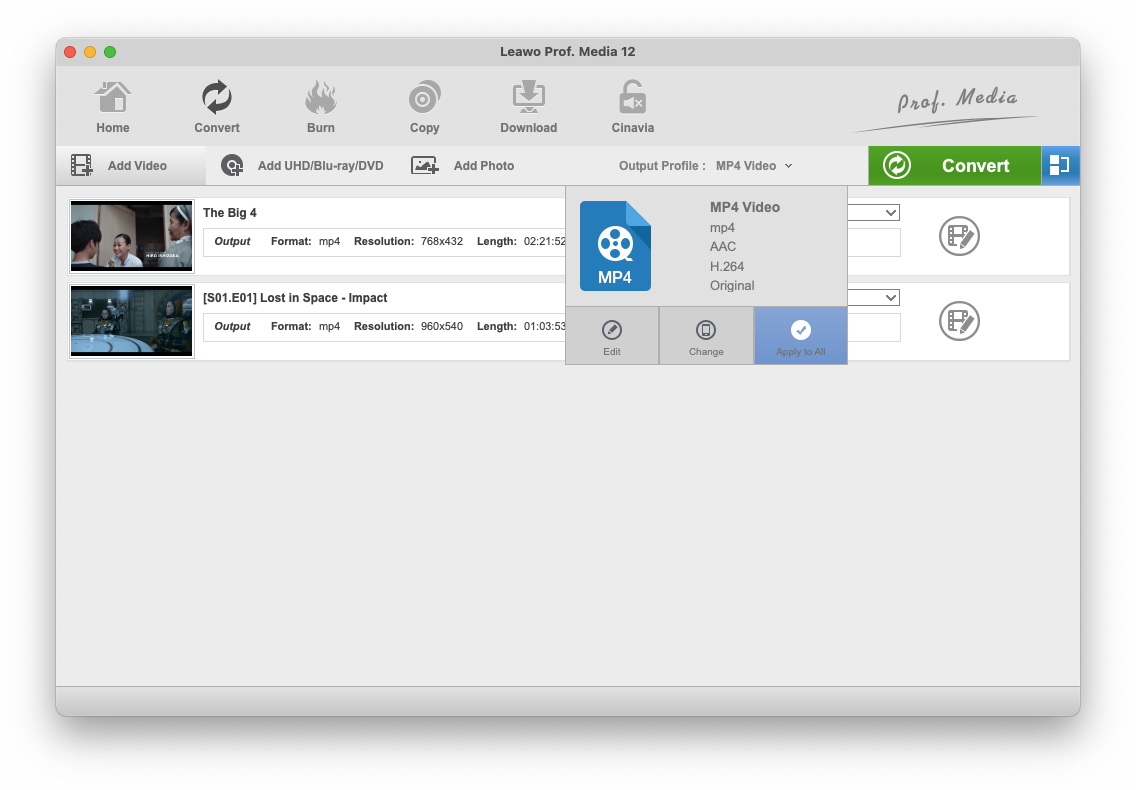
Two files loaded on a Mac, with the Output Profile menu open on MP4 Video (H.264, AAC, original size) and its Edit, Change and Apply to All buttons.
An editor for quick fixes
Leawo Video Converter for Mac opens an editor from the pencil icon on each file, with a before-and-after preview. Its tabs cover Video & Audio (speed up to 4x, noise removal, volume, flips and 90-degree turns), Trim (including a split marker to cut a section out of the middle), Watermark, Crop with Letter, Pan, Full, 16:9, 4:3 and custom zoom, Effect (brightness, contrast, saturation) and 3D. A merge button joins the loaded files into one.

The Mac editor's Crop tab: a 960x540 source on the left, the output on the right, Left/Top/Size fields and the Letter, Pan, Custom, Full, 16:9 and 4:3 zoom buttons.
Subtitles and language tracks
Leawo Video Converter for Mac adds an SRT, ASS or SSA subtitle file to a video and lets you choose which audio track goes into the output. That matters for MKV downloads that carry several languages, where an iPad or Apple TV may otherwise pick the wrong one. Preferences set the folder it searches for subtitle files and their text encoding.
Slideshows from a photo folder
Leawo Video Converter for Mac's Add Photo button turns photos or a folder of them into a video. You set photo and transition durations, reorder or drop pictures, and add a music track, then export the result in any output format. It's a handy way to put a holiday's iPhone photos on the TV without opening iMovie.
Long batches that finish on their own
Leawo Video Converter for Mac shows a progress bar and remaining time for every file, with a pause button on each. A "When All Tasks End" menu at the bottom of the window can shut the Mac down or open the output folder when the queue is done, so you can start a big batch at night.
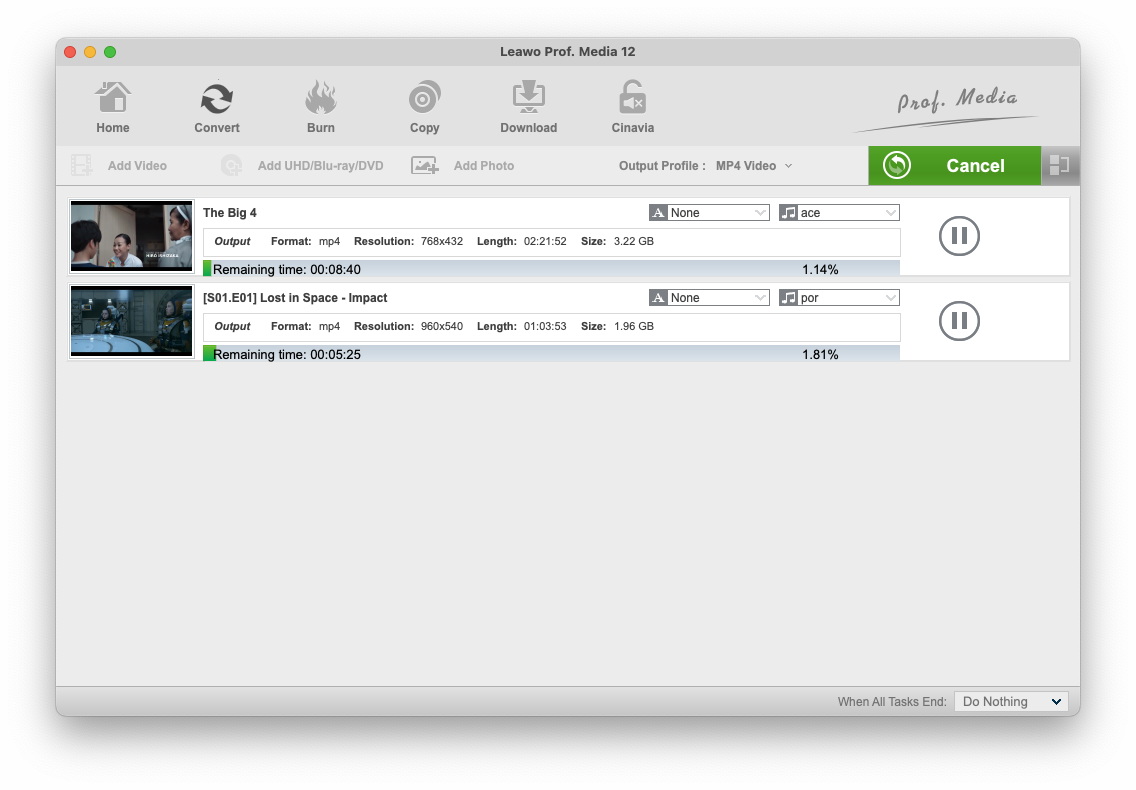
Two videos converting on a Mac, each with its subtitle and audio menus, remaining time and a pause button, and the "When All Tasks End: Do Nothing" setting at the bottom right.
Benefits
- Your old PC files come back to life. AVI, WMV and FLV files from years of Windows use play again in QuickTime and Photos.
- iMovie stops refusing files. Converting to MOV or H.264 MP4 first avoids iMovie's unsupported-format errors.
- Space back on the SSD. H.265 output makes large camcorder files smaller on a Mac whose storage can't be upgraded.
Real-World Uses
- Camcorder archive: drop a folder of MTS clips in, pick H.265 MP4, and let it run overnight with "When All Tasks End" set to shut down.
- Language lessons on an iPad: convert an MKV film with its Spanish track and an SRT subtitle file.
- Podcast or lecture audio: pull the sound out of a recorded talk into MP3 or AAC for the Music app.
- Family slideshow: load a folder of photos, add a song, and export an MP4 for the living-room TV.
Who It's For, and Who Should Skip It
A good fit for Mac users who regularly meet files macOS won't play and want presets, batches and small edits in one inexpensive window, without learning codec settings.
Skip it if:
- You only convert MOV and MP4 now and then. Finder's Encode Selected Video Files or QuickTime Player's Export covers that for free.
- You're comfortable with settings. HandBrake is free on the Mac and converts most formats well, though without Leawo's editor and slideshow tools.
- Your files are on discs. Leawo Video Converter Ultimate for Mac or the DVD/Blu-ray rippers include disc ripping.
- You want real editing. No timeline, titles or transitions here; iMovie (free) or Final Cut Pro fit better.
Usage Guide
- Install and open. Choose "Mac with Apple Chip" or "Mac with Intel Chip" on the download page, run the installer from the DMG, and open Leawo Prof. Media from Applications. Click the Video Converter tile.
- Add files. Click Add Video for files or folders, or drag them into the window.
- Pick the output. Click the MP4 Video drop-down, then Change to choose a format or device, or Edit to set codec and quality. Click Apply to All for the whole list.
- Edit (optional). Click the pencil icon on a file to trim, crop, watermark, adjust or add 3D. The merge button joins all files.
- Convert. Click the green Convert button, choose a folder under "Save to", and click Convert at the bottom of the sidebar.
- Register. Open Help > Activate, paste the code from your order e-mail and click the arrow to remove the five-minute limit.
Where it falls short
- A small tool in a big package. Leawo's Mac requirements ask for 60 MB of disk space, but the installer we checked unpacks about 580 MB, because it installs the whole Prof. Media suite.
- Dated device list. Leawo's Apple presets end at the iPhone XR. Use the generic MP4 or H.265 profiles for newer iPhones and iPads.
- Speed claims are PC claims. The "50X faster" figure is pinned to NVIDIA, AMD and Intel GPU acceleration. On a Mac the equivalent is Apple's VideoToolbox hardware encoding and decoding, and Leawo's Mac screenshots note that hardware decoding isn't supported on Apple silicon. There's no CPU-core setting like the Windows build has.
- Old Mac screenshots. Leawo's Mac guide shows Prof. Media 12. Version 13 keeps the layout, but expect small differences.
- Installation trouble on some Macs. One Trustpilot reviewer couldn't install Leawo's software and didn't get a refund. Try the trial first.
What Users Say
Written reviews of the Mac converter are few, so below is what we could verify: Leawo's own Mac review page, which Leawo moderates, and Mac owners on Trustpilot. We skipped the many "reviews" published by competing converter makers.
Leawo's review page for Video Converter for Mac (4.9 out of 5, 8 reviews)
"Definitely the gold standard software for video conversion on a Mac,simply astounding. Thank you" Frank Twomey, 5 stars, April 2021
"Decent price and it does what it says it does. I have tried a few others. This one works the best. There may be better ones out there but I have not found any." Ryan, 4 stars, November 2020
"Lossless video conversion, an oasis in the apple video-desert" Christian Claus, 5 stars, October 2014
"I hate looking for software for hours that will convert video on a Mac. This just does it." Robert, 5 stars, October 2012
"This is just what I need to get my movies backed up. Easy to use." Griffin, 5 stars, June 2013
Trustpilot: Mac owners (leawo.org 4.4 from 151 reviews, leawo.com 4.3 from 158)
Trustpilot covers Leawo as a company. These reviews mention the Mac:
Jason T, 5 stars, August 2015, "Great program (Video Converter) & great service", wrote that he had used the Mac Video Converter for years and "received great service when I needed help moving my registration to a new system."
Pere Guiu, 4 stars, December 2014, had trouble with Video Converter on Mac OS until support stepped in: "Once I contacted with Leawo-support I received fantastic assistance on a very personal level!"
Dee, 4 stars, December 2014: "It works seamlessly, converting DVDs into other formats that I can use in iMovie."
Alain CLAUDIN, 5 stars, December 2014, said Leawo's software stopped working after the Mac OS X Yosemite upgrade: "The solution arrived 8 hours after my request mail solution to support Leawo."
Ad Libitum Audiovisuals, 1 star, May 2022: "I CAN NOT INSTALL their software in my Mac and the company refuse to give me a refund."
The recurring themes
Mac users value that it "just works" on formats macOS ignores and that output looks like the source. The praise for support is consistent, often after a macOS upgrade broke something. The weak points are age and volume: most reviews are years old, there are only eight on Leawo's Mac page, and the one serious complaint is an install that failed without a refund.
Comparisons
Mac vs Windows edition
The Mac and Windows editions share the converter, editor, subtitle and slideshow features and the $29.95 / $39.95 prices, but they're separate licenses. The Windows build is newer (13.0.1.6, October 2026, against the Mac's 13.0.8 Intel build from June 2026), names NVIDIA, AMD and Intel GPU acceleration and has a CPU-core setting. The Mac build has a native Apple-chip download.
Video Converter vs Video Converter Ultimate for Mac
Video Converter handles files only. Video Converter Ultimate for Mac adds DVD and Blu-ray ripping and burning, which only matters if you still have discs.
Video Converter vs HandBrake
HandBrake is free, open source and very capable, but its presets and terminology assume you know what you want. Leawo adds device profiles, a visual editor, external subtitle files, a slideshow maker and 3D, at a price.
Editions and Pricing
| Mac option |
Price |
What's included |
Refund window |
| Video Converter for Mac, 1 year |
$29.95, renews yearly |
Video Converter |
5 days |
| Video Converter for Mac, lifetime |
$39.95 once |
Video Converter |
14 days |
| DVD Media Bundle for Mac, lifetime |
$99.94 once |
5 modules: Video Converter, DVD Ripper, DVD Copy, DVD Creator, CleverGet Video Downloader |
14 days |
| BD Media Bundle for Mac, lifetime |
$169.94 once |
11 modules, adding the Blu-ray rippers, copiers and creators |
14 days |
Bundle prices are what the order page charged after the discount codes Leawo's product page applies ($199.88 and $289.90 before discount). Every option covers one Mac with free upgrades.
FAQs
Does Leawo Video Converter for Mac run on Apple silicon?
Leawo Video Converter for Mac has its own Apple-chip download alongside the Intel one, and Leawo's requirements list Apple M1/M2 chips. The Intel package is built for x86_64 only, so M-series owners should take the Apple-chip build.
Can Leawo Video Converter for Mac convert MKV to MP4 without losing the subtitles?
Leawo Video Converter for Mac keeps one audio track of your choice and can add an external SRT, ASS or SSA subtitle file. If you need several selectable subtitle tracks in the output, a ripper's multi-track MKV output or a remuxing tool is the better route.
How long does the Leawo Video Converter for Mac trial last?
Leawo's Mac guide describes the trial of Video Converter for Mac as a one-month evaluation that converts only the first five minutes of each file, without free support. Registration removes the limit.
Can I move Leawo Video Converter to a new Mac?
Leawo Video Converter for Mac licenses one Mac. Trustpilot reviewers describe Leawo's support moving their registration when they changed computers, so ask support when you replace your Mac.
Will one license cover my Windows PC too?
No. Leawo Video Converter for Mac and the Windows edition are sold separately, so each computer type needs its own license.
Does Leawo Video Converter for Mac work after a macOS upgrade?
Leawo Video Converter for Mac lists every macOS from 10.13 High Sierra to 27. Past Trustpilot reviews describe macOS upgrades (Yosemite, El Capitan) breaking Leawo apps until support sent a fix, so check for an update in the Help menu after upgrading.
System Requirements
- macOS: 10.13 High Sierra, 10.14 Mojave, 10.15 Catalina, 11 Big Sur, 12 Monterey, 13 Ventura, 14 Sonoma, 15 Sequoia, 26 Tahoe, 27
- Processor: 1 GHz Intel or Apple M1/M2 or later
- Memory: 512 MB RAM
- Disk: about 580 MB for the installed suite (Leawo lists 60 MB)
- Display: 800x600, 16-bit graphics or better
Conclusion
Leawo Video Converter for Mac is a fair buy at $39.95 lifetime if non-Apple video formats keep landing on your Mac. It batch-converts them to MP4, MOV or H.265, adds subtitles, trims and crops, and runs natively on Apple silicon, all from one simple window.
The reason to buy: a folder of MKV, AVI and MTS files becomes iMovie- and iPhone-ready in one pass, with no settings homework. The reason to pass: free options (Finder's encoder, QuickTime, HandBrake) already cover simple jobs, and the Mac build trails Windows in updates. Run the trial on your awkward files before paying.
Download Free TrialBuy Now