Leawo PowerPoint to Video Pro: Batch-Convert Presentations to MP4, AVI or WMV, but Check PowerPoint's Own Export First
Leawo PowerPoint to Video Pro is a Windows converter that turns PowerPoint files into video (MP4, AVI, WMV, MKV, MOV, FLV and more) with animations, transitions, sound and narration kept, plus your logo and background music. It costs $44.95 a year or $69.95 lifetime. It made sense when PowerPoint couldn't export good video; today PowerPoint does that itself, and Leawo's current build, version 2.8.0.0, was signed in May 2016 and lists nothing newer than PowerPoint 2019. Read it as an old tool kept on sale, not an active product.
Quick facts
- Version: 2.8.0.0
- Developer: Leawo Software (installer signed by Shenzhen Moyea Software)
- Runs on: Windows 7, 8, 8.1, 10 and 11; no Mac version
- Needs: PowerPoint 2000 to 2019, or PowerPoint Viewer 2007/2010
- Opens: PPT, PPTX, PPTM, PPS, PPSX, POT, POTX, POTM
- Video out: MP4, AVI, RMVB, FLV, TS, VOB, MPG, WMV, ASF, MKV, WebM, 3GP and HD MP4/MOV/WMV presets, plus audio-only MP3, AAC, WAV, FLAC and others
- Batch: no limit on the number of files per job
- Trial: full features, but videos carry a watermark
- Money-back guarantee: 5 days (yearly) or 14 days (lifetime), for technical problems Leawo can't fix
What we checked: the installer from Leawo's download page (leawo_ppt2video_setup.exe, file version 2.8.0.0, 24,868,056 bytes; its digital signature is time-stamped May 24, 2016, while the server dates the file July 6, 2020) and the order page, which charged $44.95 for 1 year and $69.95 lifetime on November 1, 2026. We didn't convert a presentation with it.
Before you buy
- Try File > Export > Create a Video in PowerPoint first. Microsoft's instructions for PowerPoint 2016, 2019, 2021, 2024 and Microsoft 365 export MP4 or WMV at up to 4K (3840 x 2160) with recorded narration, timings, animations and transitions, at no extra cost.
- The program hasn't moved since 2016. Version 2.8.0.0 is the only build on offer, the interface is Windows 7-era, and its device presets stop at phones like the iPhone 5s and Nexus 5.
- No PowerPoint 2021, 2024 or Microsoft 365 on the list. Leawo names PowerPoint 2000 to 2019 only; test your own version with the trial.
- The guarantee covers faults, not disappointment. Leawo refunds within 5 or 14 days only for technical problems its support can't fix.
Download Free TrialBuy Now
Overview
Leawo PowerPoint to Video Pro is a single dark window with a four-step "Getting Started" panel: Add, Customize, pick a profile, Start. A slide player on the right previews the loaded presentation, and the bottom bar holds the output profile, video and audio quality and the output folder. When you start, it opens each file in your installed PowerPoint, captures video and audio while the slides play, then encodes the result.

The main window: the four Getting Started steps, Add, Customize and Purchase buttons, a preview player, and the XviD Movie (*.avi) profile with medium video and audio quality.
Features
Many formats and device presets
Leawo PowerPoint to Video Pro's Profile menu groups output by Common Video, Common Audio, HD Video and devices (iPod, iPhone, iPad, Apple TV, PSP, PS3, Wii and DS, tablets, Windows Phone and Android). A Settings button opens the codec, bit rate, frame rate, size and aspect ratio, and you can save your own profile. This range, from WebM to MKV to old phone presets, is what PowerPoint's own MP4/WMV export doesn't offer.
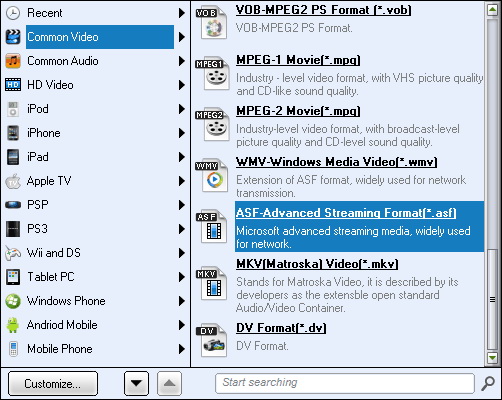
The profile menu on Common Video: VOB, MPEG-1, MPEG-2, WMV, ASF (highlighted), MKV and DV, with device groups down the left and a search box.
Logo, margins and background music
Leawo PowerPoint to Video Pro's Customize dialog sets the default seconds per slide for files without timings, adds background music, can drop the presentation's own audio, and stamps a logo with adjustable transparency. A Video Layout tab adds a margin around the slides filled with a color gradient or picture.
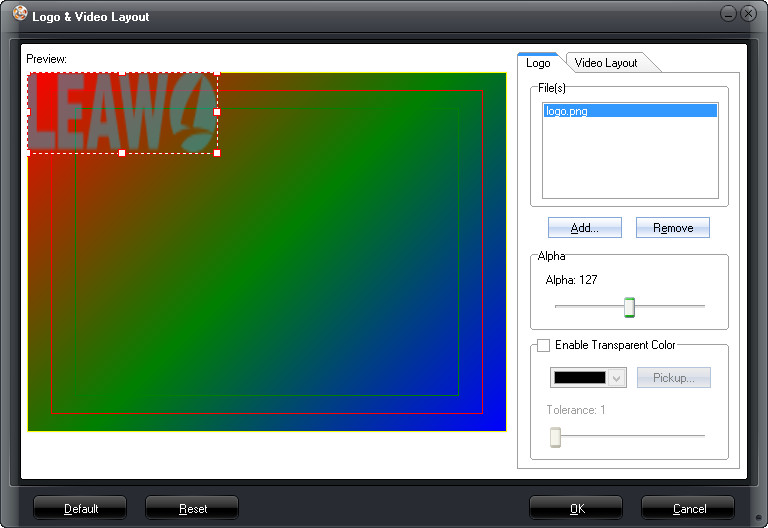
The Logo & Video Layout dialog: a logo.png file at Alpha 127, a transparent-color option, and a preview with the logo in the top-left corner over a colored background.
Unlimited batch with a live preview
Leawo PowerPoint to Video Pro takes as many presentations as you load and processes them in order, showing each step (preprocess, capture video and audio, generate a temporary file, create the output) with elapsed time and an optional live preview.
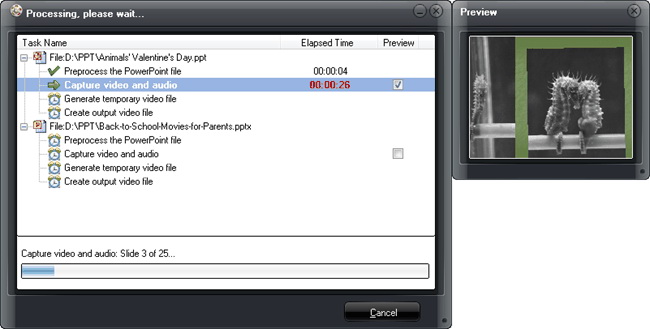
"Processing, please wait...": the first presentation at "Capture video and audio" (slide 3 of 25, 26 seconds in), the second queued, and a Preview window beside it.
Who It's For, and Who Should Skip It
Good fit: someone on PowerPoint 2019 or older who needs a format PowerPoint doesn't export (AVI, MKV, WebM, FLV) or wants to convert a folder of presentations in one unattended batch with a logo on each.
Skip it if:
- MP4 is what you need. PowerPoint's own Create a Video export is free and goes to 4K.
- You're on Microsoft 365 or PowerPoint 2021/2024 and the trial doesn't work cleanly with it.
- You need a disc for a DVD player. That's Leawo PowerPoint to DVD Pro, a separate program.
- You use a Mac. It's Windows-only.
Usage Guide
- Install and register: paste your code into the Registration Code window shown at launch (or Menu > Help > Registration).
- Add: click Add and load your presentations; reorder them with Move Up and Move Down.
- Customize: set the seconds per slide, music, logo and layout; settings in your PowerPoint file's own timings take priority.
- Profile: choose the format or device from the Profile box and adjust Settings if needed.
- Start: set the output folder and click Start, then leave the PC while each presentation plays and is captured.
Where it falls short
- Quality a notch below the original. Ran Ginosar (Leawo's review page, September 2021) wrote that HD MPEG-4 output "is a notch lower quality than when I play the PPSX file" and the audio "is noticeably lower quality".
- Capture runs at playback speed. Its own progress window shows it recording each slideshow as it plays, so long presentations take a long time.
- Your PowerPoint file's timings override its settings. Leawo's own note says the seconds-per-slide setting won't apply if the presentation already has transition timings.
- The trial watermark means you can test compatibility but not produce a clean video.
What Users Say
Leawo's moderated review page held 38 reviews with a 4.9 average on November 1, 2026, many of them in other languages, and several from June 2020 thank Leawo for a free copy. Here are the English ones that say something specific.
What people liked
Suzanne Medders (September 2013) "tested at least ten different PowerPoint to video converters" and listed her reasons, including "HD 1920 x 1080 resolution option", "Does NOT include the shadow PPT "controls" in the lower left corner of the video (as some do)" and "Includes all PowerPoint animations in the video".
KH (May 2016): "all animations and audio transferred over perfectly to MP4. Price a bit high, but worth it after hours of trying to find software to convert my 75-slide show".
Chryss Stathopoulos (January 2019): "the timing of my presentation just kept getting messed up in the conversion. Five minutes after purchasing Leawo, I had my video in the bag."
John (June 2020): "in my test it did an excellent job of converting a PowerPoint presentation of 73 slides to MP4."
Reservations
Ran Ginosar (September 2021) gave 5 stars but wished for "a somewhat better video quality" and "better audio quality", calling it "a good substitute to the defunct "save as video" menu item in Powerpoint". (PowerPoint's video export still exists, under File > Export.)
Jack Moran (4 stars, December 2013) praised that it "handles the entire set of PowerPoint features and outputs, including embedded audio, transitions" but wished it "offered more options for borders". Leawo's product page also quotes a CNET editor and a customer, Mike Vidal, who called it "an easy way to convert powerpoints to video without having to screen record a presentation".
Trustpilot (Leawo as a company)
Leawo's Trustpilot page showed 4.4 out of 5 from 151 reviews on November 1, 2026, about Leawo's products and support in general; none we saw mention this converter.
The pattern: buyers praise how faithfully it keeps animations and audio, the very thing older PowerPoint versions did badly; the few complaints are about output quality. Almost all of it predates PowerPoint's current export.
Comparisons
Leawo PowerPoint to Video Pro vs PowerPoint's Create a Video
PowerPoint's built-in export is free, supports the current Microsoft 365 app, and goes up to 4K, but saves only MP4 or WMV, one presentation at a time, with no logo. Leawo PowerPoint to Video Pro adds dozens of formats and device presets, unattended batches and a logo or margin, but needs PowerPoint 2019 or older and hasn't been updated since 2016.
Leawo PowerPoint to Video Pro vs PowerPoint to DVD Pro
Leawo PowerPoint to DVD Pro ($79.95 a year) does everything here plus DVD and Blu-ray authoring with menus. If you'll never burn a disc, PowerPoint to Video Pro is the cheaper of the two.
Editions and Pricing
| License | Price | Term | Guarantee |
|---|
| 1 Year | $44.95 | Renews yearly, 1 PC | 5 days |
| Lifetime | $69.95 | One-time payment, 1 PC | 14 days |
FAQs
Can't PowerPoint convert a presentation to video by itself?
Yes, it can. PowerPoint's File > Export > Create a Video saves MP4 or WMV up to 4K. Leawo PowerPoint to Video Pro is only worth it for other formats, big batches, or a logo on every video.
Does Leawo PowerPoint to Video Pro work with Microsoft 365?
Leawo doesn't list it. Leawo PowerPoint to Video Pro names PowerPoint 2000 through 2019, so convert one of your own files with the trial before paying.
What resolution can Leawo PowerPoint to Video Pro export?
Leawo PowerPoint to Video Pro has HD presets, and buyers report 1920 x 1080 output. Leawo doesn't list a 4K option.
Does Leawo PowerPoint to Video Pro need PowerPoint installed?
Yes. Leawo PowerPoint to Video Pro plays each file through PowerPoint (or PowerPoint Viewer 2007/2010) to capture it.
What's the watermark in the Leawo PowerPoint to Video Pro trial?
The free trial of Leawo PowerPoint to Video Pro keeps a watermark on every output video; registering removes it.
Is there a Mac version of Leawo PowerPoint to Video Pro?
No. Leawo PowerPoint to Video Pro runs only on Windows, and Leawo has no Mac download for it.
System Requirements
- Windows: 7, 8, 8.1, 10 or 11
- PowerPoint: 2000, 2002, 2003, 2007, 2010, 2013, 2016 or 2019, or PowerPoint Viewer 2007/2010
- Processor: 1 GHz Intel or AMD
- Memory: 512 MB RAM (1 GB or more recommended)
- Disk: 2 GB free
- Other: internet connection, DirectX 8.1 or later, a sound card
Conclusion
For most people Leawo PowerPoint to Video Pro isn't worth buying any more: PowerPoint's own export makes MP4 video up to 4K for free, and this program hasn't been updated since 2016. Its one remaining case is a user on PowerPoint 2019 or older who needs AVI, MKV or WebM output, or a logo stamped on a large batch of presentations.
If that's you, test the trial with your own files first, and choose the yearly plan and cancel the renewal rather than the lifetime license, since no updates are coming.
Download Free TrialBuy Now