Vovsoft Health Break Reminder: A Timer That Tells You When to Step Away from the PC
Health Break Reminder is a $19 Windows program from Vovsoft that counts your working time and pops up a break alert after the interval you set, such as every 20 minutes or every hour. It notices when you've already stepped away, through keyboard, mouse, joystick and gamepad activity, and resets the timer by itself. The $19 is a one-time lifetime license, and there's a free trial.
It's for anyone whose eyes, back or wrists pay for long stretches at the keyboard, and who needs something more insistent than good intentions.
Quick facts
- Version: 2.7, released November 6, 2026
- Developer: Vovsoft
- Platform: Windows 11, 10, 8/8.1, 7 and Vista, 32-bit and 64-bit. No Mac or phone version
- Timer: work time and idle time in minutes, with a countdown window and a tray icon that shows progress as a chart
- Alert: your own alert text and sound, LED-style colors and a transparency slider
- Runs: offline, as a standalone tray program, not a browser extension
- Editions: installer (4.16 MB) and portable (3.17 MB), one license for both
- Price: $19, one-time payment, lifetime license with free updates
- Trial: free to try, for personal, non-commercial use
- What we checked: installer file version 2.7.0.0 (4,365,672 bytes) with a valid code signature, downloaded from the vendor on November 11, 2026, and $19.00 on the order page with no auto-renewal on November 11, 2026. We didn't run it through a working day
Download Free TrialBuy Now
Overview
A small window, labeled Next Rest, counts down your work time in big digital numbers. When it reaches zero, a Break Time alert appears. Click Dismiss to keep working a little longer, and the window shrinks to a small, semi-transparent reminder so you don't forget. After your break, click Start Working and the countdown starts again.
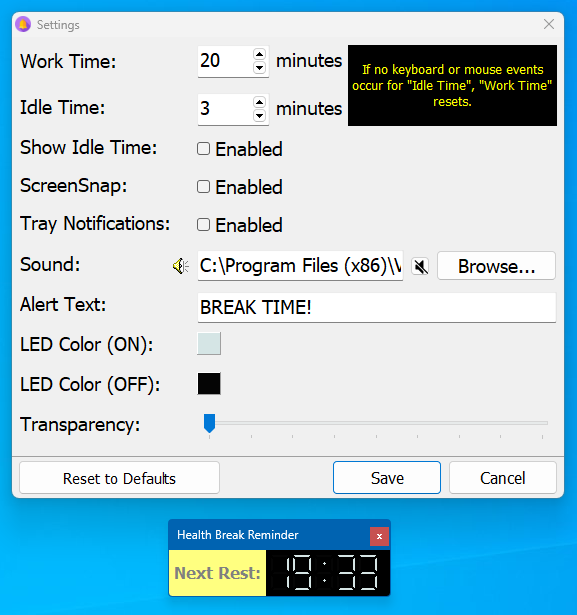
Settings with a 20-minute work time and 3-minute idle time, a custom alert text and sound, and the Next Rest countdown window below.
Features
Idle detection that resets the clock
Health Break Reminder watches for keyboard, mouse, joystick and gamepad input. If nothing happens for the idle time you set, such as 3 minutes, it assumes you've taken a break and restarts the work timer, so coming back from lunch doesn't trigger an instant alert.
An alert you can make your own
Health Break Reminder lets you change the alert text (one user changed it to "stand up"), pick a sound file or mute it, set the colors of the countdown digits and make the window more or less transparent.
Out of the way in the tray
Health Break Reminder sits in the system tray, where its icon shows how much of the work period has passed. Right-click the window or the tray icon to pause it, reset the work time, keep it on top or test the alert.
Benefits
The point is a habit you won't keep by yourself. Vovsoft suggests at least 5 minutes away from the screen each hour and the 20-20-20 rule for your eyes: every 20 minutes, look at something about 20 feet away for about 20 seconds. A 20-minute work time with Health Break Reminder turns that rule into an alert you can't miss.
Real-World Uses
- A programmer sets a 20-minute work time to follow the 20-20-20 rule for eye strain.
- Someone with wrist pain uses hourly breaks to stretch and rest their hands.
- A remote worker sets the alert text to "stand up" as a cue to get away from the desk.
- A gamer gets a reminder after long sessions, since gamepad activity counts as work time.
Who It's For, and Who Should Skip It
It suits Windows users who spend hours at the computer and want a simple, offline break timer that resets itself when they walk away.
Skip it if you want a strict enforcer that locks the screen during breaks, or a Pomodoro app with task lists and statistics: Health Break Reminder doesn't block work and keeps no activity summary, both open requests. Free break timers and the stretch reminders on smartwatches also cover the basics.
Usage Guide
- Download the installer or the portable edition and start Health Break Reminder.
- Open Settings (right-click the window or the tray icon) and set Work Time and Idle Time.
- Change the alert text, sound, colors and transparency if you like, then click Save.
- Work as normal. When the break alert appears, take your break, or click Dismiss to finish what you're doing.
- Click Start Working when you're back.
Before you buy
Watching a long video counts as idle time, since only keyboard, mouse and game controller input are detected, so the timer can reset during a film. One license covers one person on any number of their own computers. Vovsoft's general policy is no refunds once the key is delivered, since a free trial comes first (accidental orders are generally refunded, at its discretion, and PayPro Global has the final say on its orders).
Where it falls short
- It doesn't block the screen during a break. You can keep working.
- No countdown for the break itself, so you time your own rest. A break-length countdown is an open request.
- No statistics, no hotkey to pause, and breaks can't be shorter than a minute.
- Some users find the full alert intrusive and have asked for a tray-notification-only option.
What Users Say
On Vovsoft's site
Health Break Reminder's page shows 4.8 out of 5 from 5 ratings, with these comments.
"Time goes so fast that it takes an app to remind me to take a break. I can't always stop when an hour is up, but I try to find a stopping point as soon as possible after the alert. Breaks keep me from getting too cramped in one position and maintain good circulation. I set the 'work time' and the 'idle time' for 60 minutes each." Jack Sweeney
"I like it! It is very helpful to take care of my health!!!" Anonymous User
"I don't often try out new software, but I really liked this one." Anonymous User
Vovsoft as a company has a TrustScore of about 4.6 out of 5 from 411 reviews on Trustpilot, read through a summarizer. A handful of ratings is all this program has, so judge it by the free trial.
Comparisons
Health Break Reminder vs a Pomodoro timer
Pomodoro apps run fixed 25-minute sprints and short breaks, often with task tracking. Health Break Reminder is simpler: one work interval, an alert, and automatic resets when you're away.
Health Break Reminder vs smartwatch stand reminders
A watch nudges you to move once an hour, whether or not you were at the computer. Health Break Reminder only counts time you're actually using the PC.
Editions and Pricing
| Edition | Price | License | What you get |
|---|
| Trial | Free | Personal, non-commercial use | The full program |
| Licensed | $19 one-time | Lifetime | Commercial use, lifetime free updates |
The installer and portable editions use the same key, sent by email right after payment. Vovsoft's $99 Universal License covers all of its desktop programs.
FAQs
How does Health Break Reminder know I've taken a break?
Health Break Reminder watches keyboard, mouse, joystick and gamepad input. If there's none for the Idle Time you set, it assumes you took a break and restarts the work timer.
Can Health Break Reminder remind me every 20 minutes for the 20-20-20 rule?
Yes. Set Health Break Reminder's Work Time to 20 minutes, and look about 20 feet away for about 20 seconds when the alert appears.
Does Health Break Reminder lock my computer during breaks?
No. Health Break Reminder shows an alert but doesn't stop you working. You can dismiss it and carry on.
Does Health Break Reminder work with two monitors?
Yes. Vovsoft improved its multi-monitor support in version 2.3.
Is the Health Break Reminder license a subscription?
No. The $19 license is a one-time payment that never expires and includes future updates.
System Requirements
- Windows 11, 10, 8/8.1, 7 or Vista, 32-bit or 64-bit
- About 5 MB of disk space
Conclusion
Health Break Reminder is worth $19 if you know you sit too long and want a reliable, offline nudge that adapts when you walk away on your own. The reason to buy it is the idle detection, which keeps the alerts sensible. The reason not to: it won't force a break or track your habits, and simple free timers cover the basics if that's all you need.
Download Free TrialBuy Now