Vovsoft Window Resizer: Set Any Window to an Exact Size and Position
Window Resizer is a $19 Windows utility from Vovsoft that sets any program's window to an exact width, height and position, can force windows that refuse to resize, locks them in place, and saves whole window layouts to restore later. It runs on 64-bit Windows only. The $19 is a one-time lifetime license, and there's a free trial.
Windows lets you drag a window's edges but never type in a size. Web designers, people who make tutorials and anyone with a carefully arranged multi-monitor desk will see the point at once.
Quick facts
- Version: 5.0, released September 17, 2026
- Developer: Vovsoft
- Platform: Windows 11, 10, 8/8.1, 7 and Vista, 64-bit only. No Mac version
- Works on: any program's main window, child windows and hidden windows, across multiple monitors
- Layouts: save and load window positions in memory, as a CSV file or as named Workspaces, with hotkeys and command-line loading
- Editions: installer (3.83 MB) and portable (2.73 MB), one license for both
- Price: $19, one-time payment, lifetime license with free updates
- Trial: free to try, for personal, non-commercial use, with a nag screen
- What we checked: installer file version 5.0.0.0 (4,017,208 bytes) with a valid code signature, downloaded from the vendor on November 11, 2026, and $19.00 on the order page with no auto-renewal on November 11, 2026. We didn't test forced resizing on a fixed-size app
Download Free TrialBuy Now
Overview
Window Resizer lists every open window with its title, program file, and current left, top, width and height. Select one, type the numbers in the boxes at the bottom and press Apply. The arrow on the Apply button adds Lock Dimensions and Lock Dimensions and Positions, which put the window back whenever something moves it.
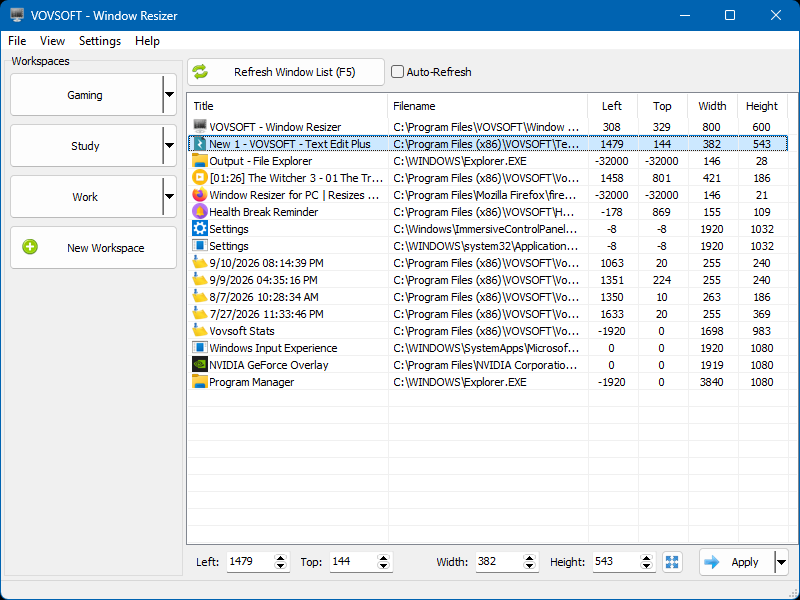
Version 5.0: open windows with their position and size, the Left, Top, Width and Height boxes with Apply, and the new Workspaces panel (Gaming, Study, Work) on the left.
Features
Exact sizes, even for stubborn windows
Window Resizer takes the window frame into account, so the numbers you type are the size you get. Resize Forcibly (Bypass Limitations) resizes apps that use fixed dimensions or limit resizing, asking them politely first and forcing it if they refuse.
Lock a window's size and place
Window Resizer's Lock Dimensions and Lock Dimensions and Positions options restore your chosen size and position whenever an app changes it. Leave Window Resizer running in the tray to keep the lock working.
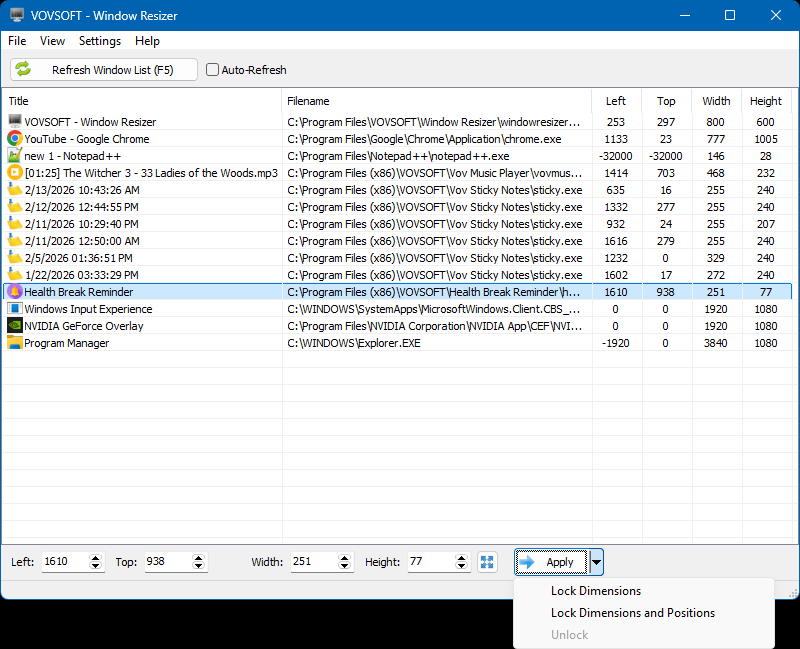
The Apply button's menu: Lock Dimensions, Lock Dimensions and Positions, and Unlock.
Saved layouts and Workspaces
Window Resizer saves every window's position and size to memory or to a CSV file and restores them later, by menu, by drag and drop, by hotkey or from the command line (windowresizer.exe layout.csv /close). Version 5.0 added Workspaces, named groups such as Gaming, Study and Work. With Run Missing Application on, it starts programs that aren't open before placing them, and it can load at Windows startup.
Extras in the right-click menu
Window Resizer also centers a window, dims the background around it, changes its title, checks whether it's frozen, ends its task, and saves a screenshot of just its client area without the title bar and borders.
Real-World Uses
- A web designer sets a browser window to 1366x768 or 390 pixels wide to preview a site at those sizes.
- A technical writer resizes the same app to 1280x800 before every screenshot so the manual looks consistent.
- A trader with three monitors restores the same arrangement of charts and platforms each morning with one hotkey.
- A gamer keeps a chat window locked at one size and place over a second screen.
Who It's For, and Who Should Skip It
It suits designers, documentation writers, streamers and multi-monitor users who want exact, repeatable window sizes and layouts on 64-bit Windows.
Skip it if you only need windows snapped into halves or grids: Windows' own Snap layouts and Microsoft's free PowerToys FancyZones do that. It won't run on 32-bit Windows, and the interface is English-only with no dark mode yet.
Usage Guide
- Download the installer or the portable edition and start Window Resizer.
- Press Refresh Window List (F5) and select the window you want.
- Type Left, Top, Width and Height, then press Apply. Use the arrow on Apply to lock it.
- Turn on Resize Forcibly in Settings for apps that won't resize.
- Save the layout with File > Save to File or as a Workspace, and restore it later by menu, hotkey or command line.
Before you buy
Check it runs on your PC first: it needs 64-bit Windows. Some windows, like large plugin pop-ups, may not show in the list, as one user notes below. One license covers one person on any number of their own computers. Vovsoft's general policy is no refunds once the key is delivered, since a free trial comes first (accidental orders are generally refunded, at its discretion, and PayPro Global has the final say on its orders).
Where it falls short
- 64-bit Windows only.
- No dark mode, no named custom resolution presets and no way to pass parameters when it opens an app. All are open requests.
- Locks only hold while Window Resizer keeps running.
- Not every window appears in the list, such as some apps' large pop-up windows.
What Users Say
On Vovsoft's site
Window Resizer's page shows 4.7 out of 5 from 6 ratings. Comments on Vovsoft's testimonials page include:
"There are many great apps for Macs that help you size windows precisely to a specific width & height (e.g., Moom or Keyboard Maestro). Windows lacks such tools (which seems ridiculous to me). I finally found one that works: Vovsoft's Window Resizer." Scott Granneman
"Very simple to use and works great! First, just make whatever window the size you want, then select it in your app list, then Apply. Done." Ken Lapointe
"Does what it says. Easy to use. Be aware that there are some windows that may not show up in the Resizer. I have a music production app that creates large popup windows that do not show in the resizer. The main app window shows up fine." Dann
"Very cool just what I need to produce considering I don't own another PC monitor this works well and I can save the size settings" Rob
Vovsoft as a company has a TrustScore of about 4.6 out of 5 from 411 reviews on Trustpilot, read through a summarizer. Users like how simple it is. The one caveat that comes up is windows missing from the list.
Comparisons
Window Resizer vs PowerToys FancyZones
FancyZones is free and snaps windows into zones you draw. Window Resizer sets exact pixel sizes and positions, forces stubborn windows, locks them and restores saved layouts by hotkey or command line.
Window Resizer vs browser resize extensions
Browser extensions resize only the browser. Window Resizer resizes Word, Excel, any other program and every browser the same way.
Editions and Pricing
| Edition | Price | License | What you get |
|---|
| Trial | Free | Personal, non-commercial use | The full program, with a nag screen |
| Licensed | $19 one-time | Lifetime | Commercial use, no nag screen or ads, lifetime free updates |
The installer and portable editions use the same key, sent by email right after payment. Vovsoft's $99 Universal License covers all of its desktop programs.
FAQs
Can Window Resizer resize a window that doesn't allow resizing?
Usually, yes. Window Resizer's Resize Forcibly (Bypass Limitations) setting changes the size at the system level for apps with fixed or limited sizes.
Does Window Resizer work with multiple monitors?
Yes. Window Resizer places and sizes windows on any monitor and restores multi-monitor layouts.
Can Window Resizer restore my window layout when Windows starts?
Yes. Window Resizer can load at startup and apply a saved layout, and it can launch missing programs first.
Does Window Resizer run on 32-bit Windows?
No. Window Resizer needs 64-bit Windows 11, 10, 8/8.1, 7 or Vista.
Can Window Resizer take a screenshot without the title bar?
Yes. Right-click a window in the list and choose Save Screenshot (Client Area Only).
Is the Window Resizer license a subscription?
No. The $19 license is a one-time payment that never expires and includes future updates.
System Requirements
- Windows 11, 10, 8/8.1, 7 or Vista, 64-bit
- About 4 MB of disk space
Conclusion
Window Resizer is worth $19 if you need exact window sizes or the same multi-monitor layout every day. The reason to buy it is precise, repeatable sizing with forced resizing, locks and saved Workspaces that Windows doesn't offer. The reason not to: casual users who only snap windows side by side get that free from Windows and PowerToys.
Download Free TrialBuy Now