Vovsoft AI Requester: A Desktop Chat Window for Your Own OpenAI Key or a Local Model
AI Requester is a $19 Windows program from Vovsoft that talks to the OpenAI API, OpenAI-compatible servers and local models such as Ollama or LM Studio, so you can chat, ask about images, generate pictures and transcribe audio from one small desktop window. The $19 is a one-time lifetime license, but online OpenAI models need your own API key, and OpenAI bills that key per use.
It suits someone who already pays for API access, or runs a model on their own PC, and wants a plain desktop client instead of a browser tab or a monthly chat subscription.
Quick facts
- Version: 5.4, released September 29, 2026
- Developer: Vovsoft (Fatih Ramazan Çıkan)
- Platform: Windows 11, 10, 8/8.1 and 7, 32-bit and 64-bit. No Mac or Linux version
- Connects to: OpenAI, OpenAI-compatible endpoints (
/v1/chat/completions, /v1/responses) and Anthropic-compatible /v1/messages endpoints, plus local servers such as Ollama and LM Studio - What you need: an OpenAI API key for online OpenAI models. Local models need no key but must be installed separately
- Editions: installer (3.72 MB) and portable (2.52 MB), one license for both
- Price: $19, one-time payment, lifetime license with free updates. API usage is billed separately by the API provider
- Trial: free to try, for personal, non-commercial use, with a nag screen
- What we checked: installer file version 5.4.0.0 (3,904,376 bytes) with a valid code signature from Fatih Ramazan Çıkan, downloaded from the vendor on November 11, 2026, and $19.00 on the order page with no auto-renewal on November 11, 2026. We didn't connect it to an API key or a local model
Download Free TrialBuy Now
Overview
AI Requester has three pages down the left side: Chat, Image and Audio. You type a prompt, press Send, and the answer appears below with the prompt, completion and total token counts in the status bar, so you can see what each request costs you. A Conversation Log tab keeps the session.
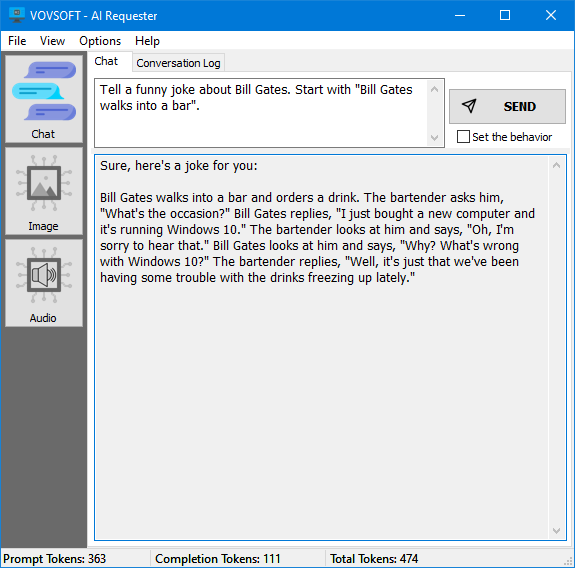
The Chat page: prompt at the top, the reply below, and prompt, completion and total tokens along the bottom.
Since version 5.0 the API settings live in a models.json file, so you can keep several accounts and endpoints side by side and edit them by hand. Version 5.4 added a text length display, Unsloth in the default endpoints, and a flashing window when a reply arrives while the program is in the background.
Features
Chat with OpenAI or a local model
AI Requester sends your prompt to the model you pick and lets you change the temperature (randomness) and the token limit. Besides OpenAI's GPT models, it works with DeepSeek, Qwen, Gemma, LLaMA and Mistral through an OpenAI-compatible server, online or on your own PC with no internet connection. You can load a prompt from a file, save the result, and save a Markdown answer as an HTML page.
Questions about images
AI Requester's vision feature lets a model read a PNG file or an image URL and answer questions about it. It also works with local vision models such as Google Gemma.
Image generation and editing
AI Requester's Image page has three tabs: Create Image from a text prompt, Create Image Variation from a picture you load, and Edit Image, which extends or changes a PNG with a transparency channel according to your prompt. Sizes run from 256x256 up to 3840x2160.
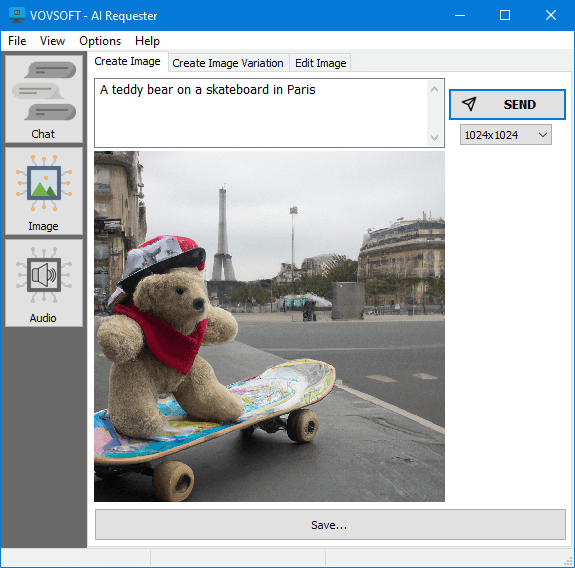
Create Image: a text prompt, a size picker (1024x1024 here) and the generated picture with a Save button.
Speech to text and text to speech
AI Requester transcribes WAV, MP3, MP4, MPEG, MPGA, M4A and WebM files with automatic language detection, and turns typed text into an MP3 file with AI voices.
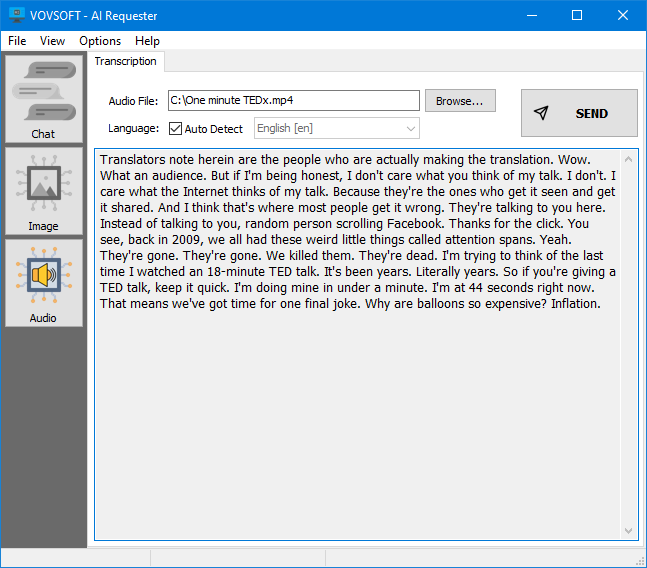
The Audio page's Transcription tab, with an MP4 file loaded and Auto Detect on for the language.
Benefits
The main draw is paying for what you use. With an API key you pay OpenAI per request rather than a monthly chat plan, which is cheaper for light use and lets you try new models as soon as they reach the API. The token counter shows where the money goes. The key is stored on your PC and sent only to the API you configure. And when you'd rather not send anything out, the same window works with a model running locally.
Real-World Uses
- A freelancer who already has an OpenAI API account drafts emails and summaries without a ChatGPT Plus subscription.
- Someone running Ollama on a gaming PC gets a proper desktop window for a local LLaMA or Gemma model, with no data leaving the machine.
- A blogger generates a header image, then edits a transparent PNG to extend the background.
- A student transcribes a recorded lecture saved as M4A and pastes the text into notes.
Who It's For, and Who Should Skip It
AI Requester suits Windows users who are comfortable creating an API key, or already run a local model server, and want a lightweight, standalone client for it.
Skip it if you just want to chat with an assistant and don't want to manage keys and usage bills: the free tiers or apps from the AI companies themselves are simpler. Mac users need a different client. And if you need to chat with your own documents, uploading PDFs is still an open feature request.
Usage Guide
- Download the installer or the portable edition and start AI Requester.
- For online OpenAI models, create an API key in your OpenAI account and enter it in the program's settings. For a local model, install Ollama or LM Studio first and point AI Requester at its endpoint.
- Pick a model, then type a prompt on the Chat page and press Send.
- Adjust the temperature and token limit if the answers are too random or too short.
- Use the Image and Audio pages for pictures, transcription and speech, and save results with the Save button or the File menu.
Before you buy
The $19 buys the program, not AI usage: OpenAI charges your API key separately for every request. Try the free version with your key or local model first, since Vovsoft's general policy is no refunds once a key is delivered (an order placed by accident is generally refunded, at its discretion, and PayPro Global has the final say on orders placed through it). One license covers one person on any number of their own computers, or one shared workstation.
Where it falls short
- It's a bring-your-own-key tool. There's no built-in account or free AI credit.
- Users have asked for pasting an image straight into Vision, showing API costs in dollars, a prompt manager, command-line use, and PDF upload with questions about the document. None of these is in the program yet.
- An open feature request asks that the window not freeze while it waits for a reply, so slow requests can make it unresponsive.
- Its rating on the vendor's site is middling for Vovsoft, at 3.8 out of 5.
What Users Say
Ratings
AI Requester's page on Vovsoft's site shows 3.8 out of 5 from 23 ratings, lower than most of the company's programs, with no written comments attached. Vovsoft as a company has a TrustScore of about 4.6 out of 5 from 411 reviews on Trustpilot (read through a summarizer), where reviewers mostly praise quick fixes and lifetime pricing across its many tools.
"Vovsoft products really are the BEST. They are intuitive, reliable and competitively priced, with great customer service." Peter Middleton, quoted on the AI Requester page
We found no independent hands-on review of the current version, so the free trial tells you more than the star rating.
Comparisons
AI Requester vs a ChatGPT subscription
A ChatGPT plan is a monthly fee with an app, memory and file handling built in. AI Requester is a one-time $19 window onto the raw API, billed per token, with no memory beyond the Conversation Log. Light or occasional users usually spend less with the API, heavy daily users may not.
AI Requester vs Vovsoft AI Automator
Vovsoft's AI Automator runs saved prompts on a schedule. AI Requester is for interactive chat, images and audio. Both use the same kind of API setup, and both come under Vovsoft's $99 Universal License.
Editions and Pricing
| Edition | Price | License | What you get |
|---|
| Trial | Free | Personal, non-commercial use | All pages, with a nag screen |
| Licensed | $19 one-time | Lifetime | Commercial use, no nag screen or ads, lifetime free updates |
The installer and portable editions use the same key, which arrives by email right after payment. Vovsoft also sells a $99 Universal License that activates every one of its desktop programs.
FAQs
Do I need a ChatGPT Plus subscription to use AI Requester?
No. AI Requester uses the OpenAI API, which is billed separately from ChatGPT plans. You need an API key from your OpenAI account, and OpenAI charges it for each request.
Can AI Requester work without an internet connection?
Yes, with a local model. AI Requester connects to OpenAI-compatible servers such as Ollama and LM Studio running on your own PC, which need no API key. You install the model server yourself.
Can AI Requester connect to Claude or other non-OpenAI services?
AI Requester supports Anthropic-compatible /v1/messages endpoints as well as OpenAI-compatible ones, and Vovsoft has added DeepSeek and Perplexity support. Each service needs its own key from that provider.
Where does AI Requester store my API key?
AI Requester keeps the key on your device and sends it only to the API server you set up.
Does AI Requester run on a Mac?
No. AI Requester is a Windows program for Windows 7 through 11. A Mac would need a Windows virtual machine.
Is the AI Requester license a subscription?
No. The $19 license is a one-time payment that never expires and includes future updates. Only the API usage costs money over time.
Can I use the free version of AI Requester at work?
No. The free version is for personal, non-commercial use. Commercial use needs the license.
System Requirements
- Windows 11, 10, 8/8.1 or 7, 32-bit or 64-bit
- About 4 MB of disk space (3.72 MB installer, 2.52 MB portable)
- An internet connection and an OpenAI API key for online models, or a separately installed local model server
Conclusion
AI Requester is worth $19 if you already have an API key or a local model and want a simple, fast desktop window for chat, images and transcription without a monthly plan. The reason to buy it is the low one-time price for a client that keeps adding new models. The reason not to: you manage and pay for the API yourself, and someone who just wants to chat will find a ready-made assistant app easier.
Download Free TrialBuy Now